
Install
Inside DeepSeek Harness, with dsh-market
dsh plugin --profile web add dshmarket
Or from the command line
dsh plugin --profile web add dsh-markdown-xyy
Installing runs third-party code with your own permissions — it can read your files, use your credentials and reach the network. Review the source first, and pin a commit (github:owner/repo#sha) when you can.
README
Theme the Markdown in your DeepSeek Harness conversations — 4 built-in themes (light/dark), user-defined themes, and a version ledger for the plugin itself.
A Cordis plugin for DeepSeek Harness. It reskins the Markdown rendering in conversations with pure CSS — headings, code blocks, tables, quotes, links, highlights — without touching the product's baseline theme. Every theme ships a light and a dark variant that follow the system appearance.
Versions & compatibility
| This project | Aligned DeepSeek Harness version |
|---|---|
| v2.1.1 | 0.1.7-rc.2 |
The table above is refreshed after each DSH re-verification. The baseline declaration lives in
dshCompatibilityinpackage.json; item 11 ofnode scripts/check-release.jschecks this table against that declaration and cross-checks the declared baseline against both the local DSH runtime contract and the four built-in theme stylesheets — the 14 L0 token names, thesettings.section/tool.view.cordisslots, and thebody[data-ds-dark-theme]dark marker. A contract drift introduced by a DSH upgrade fails the gate.
📖 Why this project exists
The reason is simple: the native conversation styling is not built for reading long walls of text.
When a lot of conversation text piles up, everything looks "flat" — headings, quotes, key points and code all lean on default typography, and the faster you scan, the easier it is to miss what matters. Since I deal with large amounts of conversation text every day, coloring the key information and layering the hierarchy became essential: being able to spot the essentials at a glance makes even the longest conversations readable.
That is exactly what this project does: a "reading-assist" theme for Markdown in conversations — emphasized highlights, clear typography, light/dark variants, and never touching the product's default theme.
This project was built end-to-end with AI: core development by my partner deepseek-v4-flash, with the four themes' palettes refined with help from my international friend Gemini.
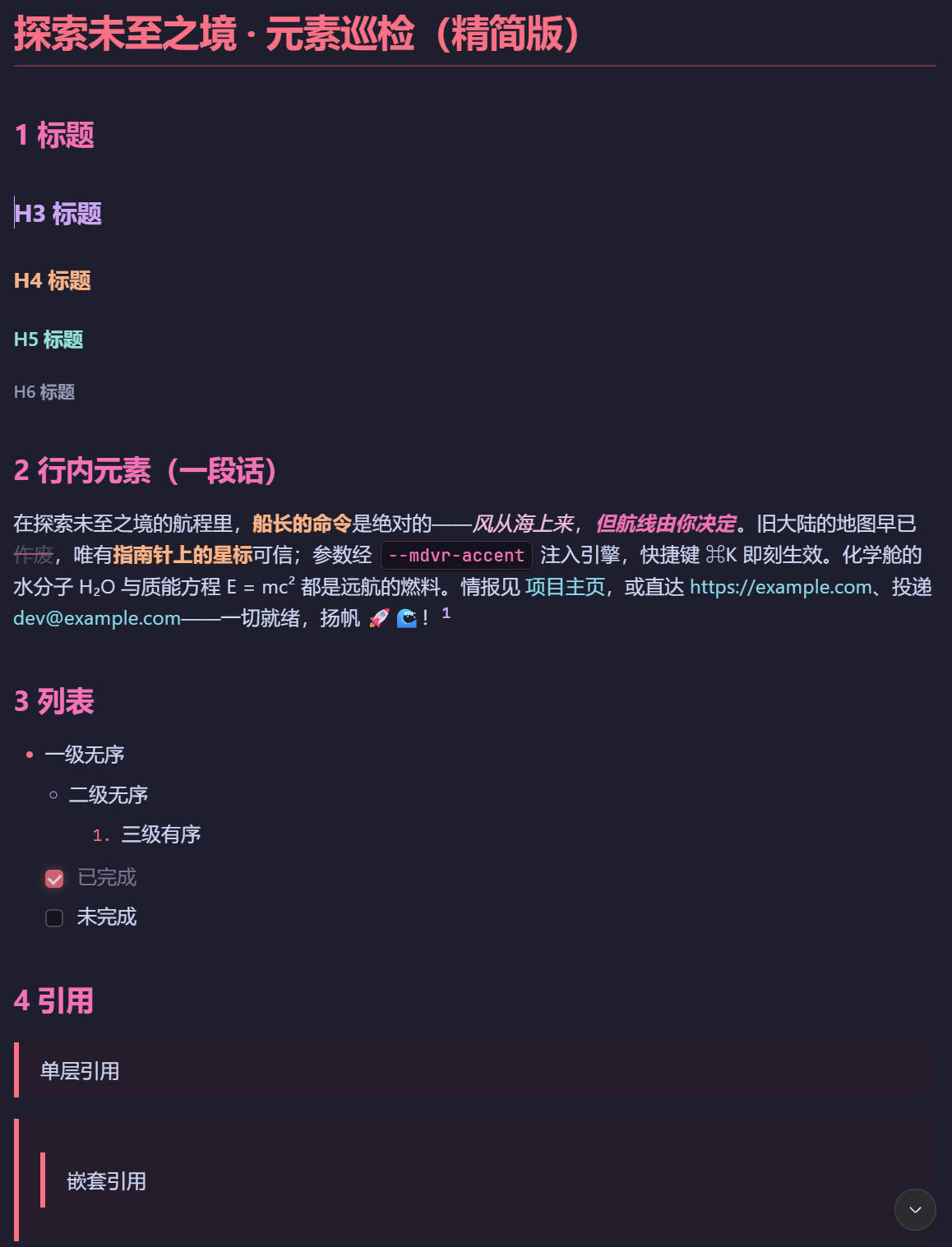
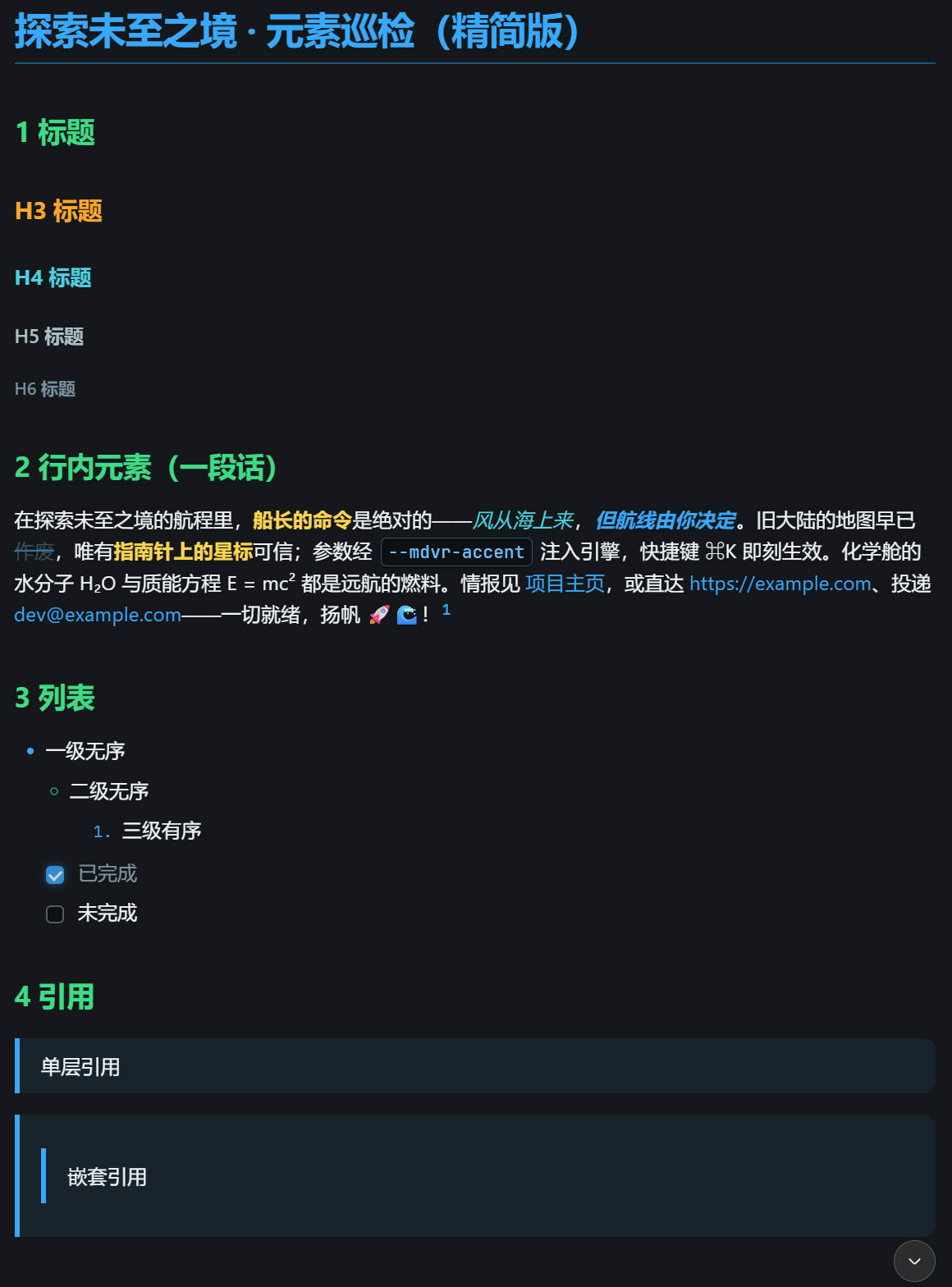
Theme previews
Strawberry Mocha strawberry-mocha |
Cyber Titanium cyber-titanium |
|---|---|
 |
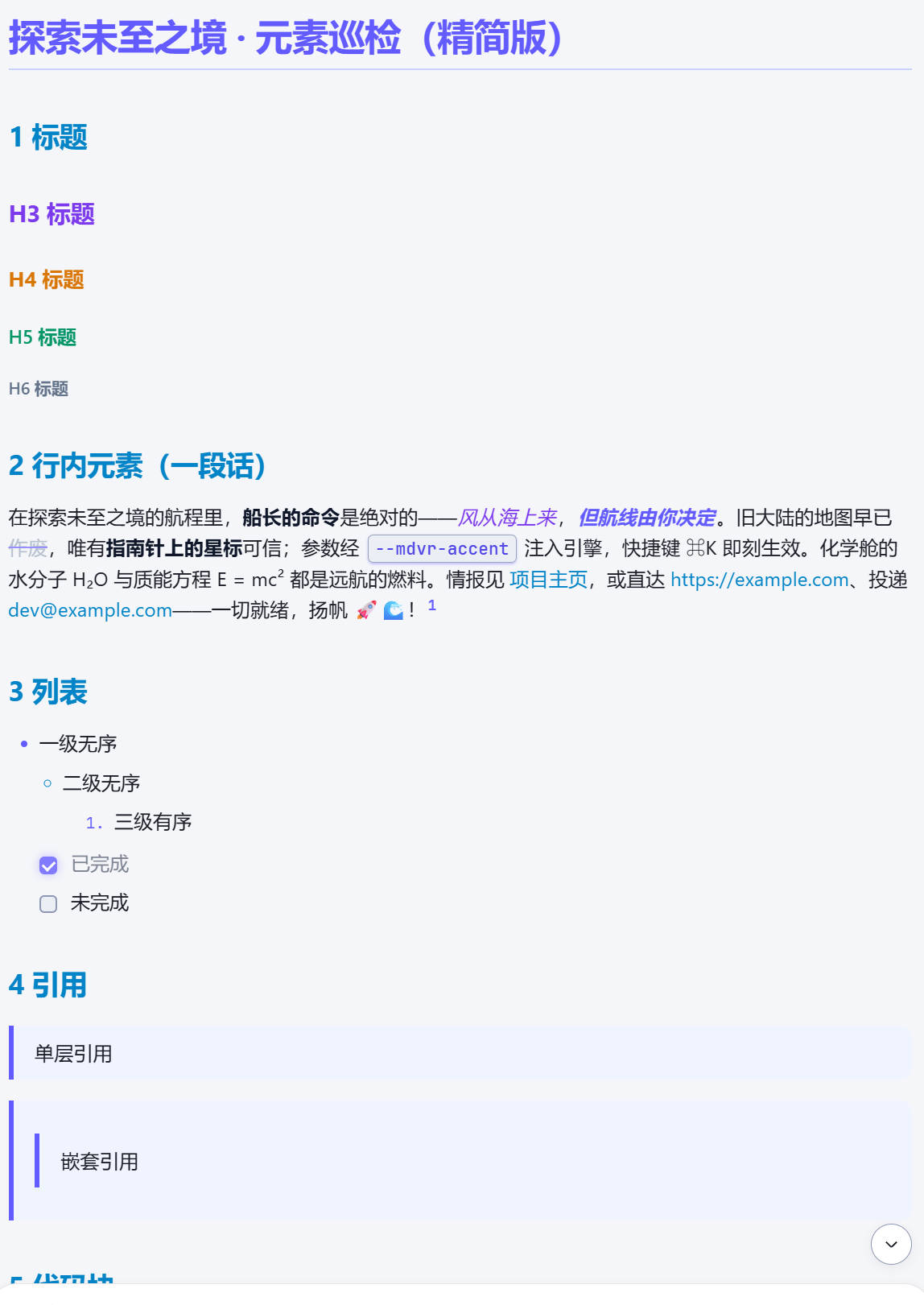 |
| Velvet strawberry × Catppuccin Mocha nights, the reference implementation | Space Black × anodized titanium purple × electric cyan × cool silver |
High-Vis Clarity high-vis-clarity |
Pine Smoke Ink pine-smoke-ink |
|---|---|
 |
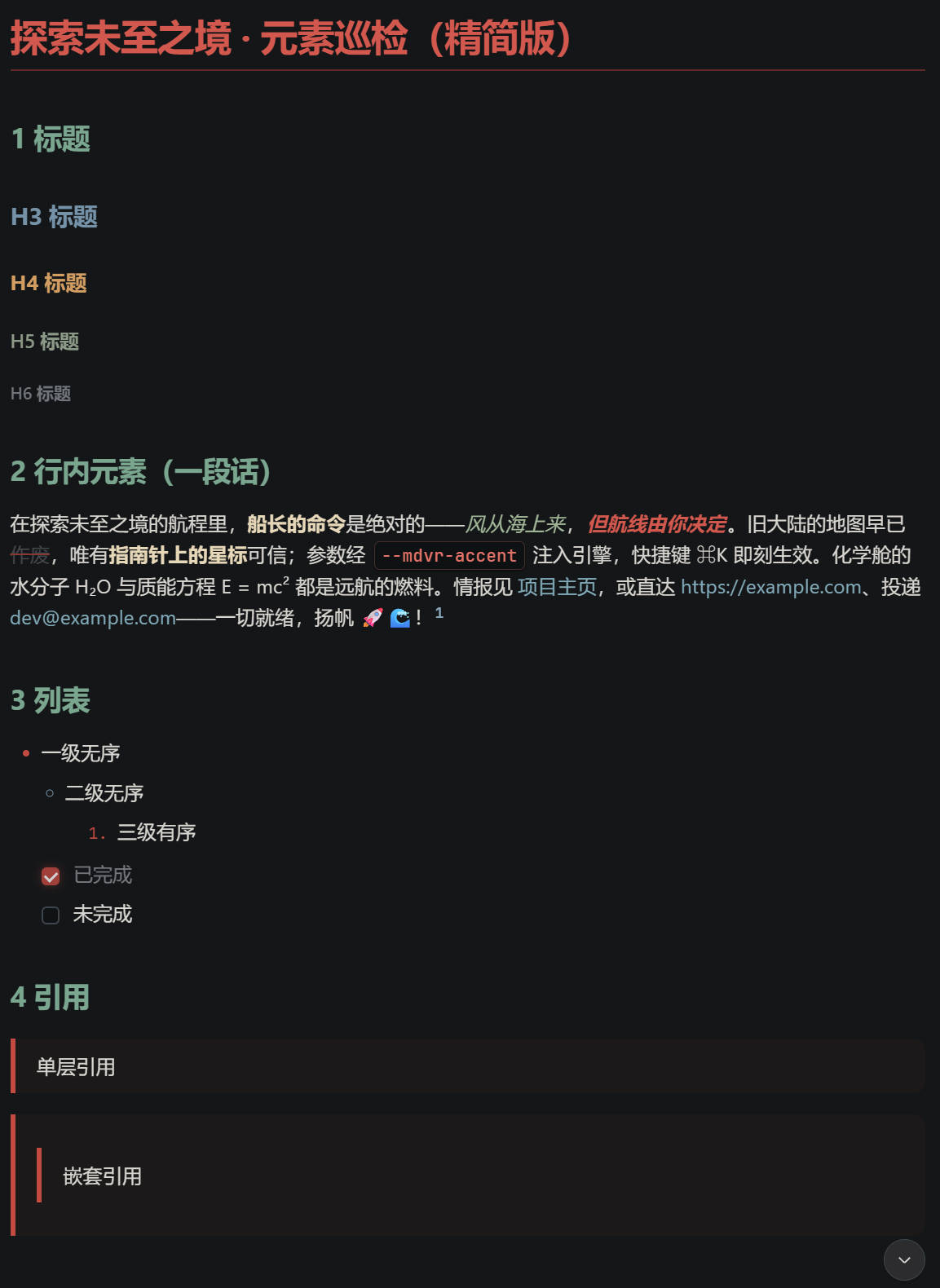 |
| High-contrast cool white × pure sky blue × golden accents, built for low-gamut displays | Ink-stick incense × cinnabar × misty indigo × rice-paper cool white |
Previews live in screenshots/; overwrite the same filenames to swap images.
Features
- ✔️ 4 built-in themes, each with light / dark variants; ☀️ / 🌙 / 🖥️ appearance modes follow the system
- ✔️ Persistent theme choice: your selected theme is remembered (localStorage) and restored after refresh, a fresh page, or a restart — and synced across open tabs in real time
- ✔️ Drop-in user themes: put a CSS file into
~/.dsh/web-themes-xyy/and it becomes a theme — no packaging, no plugin upgrades - ✔️ Live theme editor: create / edit user themes in Settings with syntax highlighting, one-click formatting, and double-side CSS validation
- ✔️ Element-level progressive styling:
:where()zero-specificity overrides only touch bare Markdown elements; explicit product styles always win - ✔️ Immutable version ledger: every iteration is one immutable Package; current version and full history are shown in the run card, rollback anytime
- ✔️ One-command permanent install: from the npm registry (
dsh plugin add dsh-markdown-xyy), GitHub as fallback, survives restarts
Quick start
Prerequisite: a running DeepSeek Harness (dsh web). No runtime dependencies, no npm install needed.
Permanent install (recommended, survives restarts)
Install directly from the npm registry (published: dsh-markdown-xyy):
dsh plugin --profile web add dsh-markdown-xyy
Or follow the latest GitHub main (handy while a mirror hasn't synced the new npm package yet):
dsh plugin --profile web add github:mengnanxyyyy/dsh-markdown-xyy
Then open Settings → Theme Settings: switch between "System native" and the 4 built-in themes, or create / edit user themes.
🎨 Custom themes (copy-paste with AI, re-skin in 3 minutes)
A theme is essentially a CSS file: editing it re-skins the UI — no code changes, no plugin upgrade, and it takes effect on refresh after save / drop-in.
Way 1 — let AI do it (fastest, recommended)
- Open Settings → Theme Settings → New user theme, pick a base theme closest to your taste (default: Strawberry Mocha; the dropdown also offers Titanium / High-Vis Clarity / Pine Smoke Ink).
- Copy the whole CSS from the editor and paste it into any AI (DeepSeek / ChatGPT / Claude).
- Tell it what you want, e.g.:
You are a CSS theme expert. This is the complete CSS of a DSH conversation Markdown theme —
keep the file structure intact:
[paste the whole editor CSS here]
Restyle it as "cyberpunk": ① change --mdvr-accent and the --dsw-alias-* tokens to neon
purple + electric cyan ② make the background deep black ③ add a neon outline to code blocks.
Keep the three-section structure (body / body[data-ds-dark-theme] / :where()) and every
variable name: change values only, never the variable list. Output the complete CSS so I
can paste it straight back into the editor and save.
- Paste the AI's full CSS back into the editor → Save → the new theme appears in the list immediately (the plugin validates CSS syntax before saving and rejects broken output with a reason).
Way 2 — hand-write / drop a file
- A theme is a three-section CSS: ① light
body {…}② darkbody[data-ds-dark-theme] {…}③ element overrides:where(). See the reference implementationplugin/assets/themes/strawberry-mocha.css(fully commented). - Drop-in: save it as
~/.dsh/web-themes-xyy/<your-name>.css, then click "Refresh user themes" in Settings. - 90% of a re-skin is a handful of key variables (full contract in docs/variables.md):
--dsw-alias-bg-base/--dsw-alias-bg-layer-1… background & surface layers--dsw-alias-brand-primarybrand / accent color--mdvr-accenttheme accent,--mdvr-link-*links,--mdvr-code-*code,--hl-*syntax highlighting
Full spec: docs/themes.md | Variable contract: docs/variables.md
Project layout
dsh-markdown-xyy/
├── README.md / README.en.md     # Chinese / English README
├── AGENTS.md                    # project conventions for agent contributors
├── LICENSE                      # MIT
├── package.json                 # installed-package manifest (main=lib/index.mjs, exports ./client)
├── cordis.patch.yml             # dsh bundle plugin row (mounted via dsh plugin add)
├── screenshots/                 # theme preview images (README gallery)
├── docs/                        # architecture / themes / variables / capabilities / development
├── manifest/
│   └── versions.json            # persisted version ledger
├── lib/
│   └── index.mjs                # installed Host half (generated)
├── client/
│   └── client.js                # installed Client half (__ModuleLoader__, generated)
├── plugin/
│   ├── host.js                  # Host half source mirror (ledger + theme-asset RPC)
│   ├── client.js                # dynamic-mode Client half artifact (do not hand-edit)
│   ├── src/client.core.js       # Client half source (single editable source)
│   └── assets/                  # panel.css / themes/ (4 built-in themes)
└── scripts/
    ├── build-client.js          # dynamic-mode artifact build
    ├── build-installed.js       # installed-mode halves build
    ├── check-release.js         # release gate
    └── minify.js                # safe minification for define transport
Docs
| Doc | What it covers |
|---|---|
| docs/architecture.md | Architecture: halves, version model, theme pipeline, dual channels |
| docs/themes.md | Theme system: capability boundary, file format, user themes |
| docs/variables.md | Variable contract: L0 tokens / L1 colors / L2 constants / L3 knobs |
| docs/capabilities.md | Capability list and roadmap |
| docs/development.md | Development & release flow (one iteration = one Package) |
Development
The iteration loop bump MANIFEST → build → define → run → verify → tag is documented in docs/development.md. Before releasing, run the release gate:
node scripts/check-release.js
License
MIT © 2026 dsh-markdown-xyy contributors
Comments
Comments live in GitHub Discussions. Sign in with GitHub to post or react.