
Install
Inside DeepSeek Harness, with dsh-market
dsh plugin --profile web add dshmarket
Or from the command line
dsh plugin --profile web add dsh-onebot-qq
Installing runs third-party code with your own permissions — it can read your files, use your credentials and reach the network. Review the source first, and pin a commit (github:owner/repo#sha) when you can.
README
English | 中文
A QQ channel for DeepSeek Harness. 给 DeepSeek Harness 加上 QQ 通道。
This plugin turns dsh into a QQ bot (OneBot 11 protocol, compatible with NapCat / Lagrange / LLOneBot / go-cqhttp). Like dsh-vision, it ships as an external plugin: zero Python, pure TypeScript, a native Cordis plugin mounted into the dsh host process, with no core code changes.
User(QQ) ←→ NapCat ←→ dsh-onebot plugin ←→ dsh Agent (one per chat)
                        ├─ Reverse WS server / forward WS client (auto-reconnect)
                        ├─ Inbound: CQ parsing, image download, speech-to-text (STT), reply/forward expansion
                        └─ Outbound: single/t2i-card send, Markdown stripping, [[qq_forward]], image/voice/video/file tools
Architecture
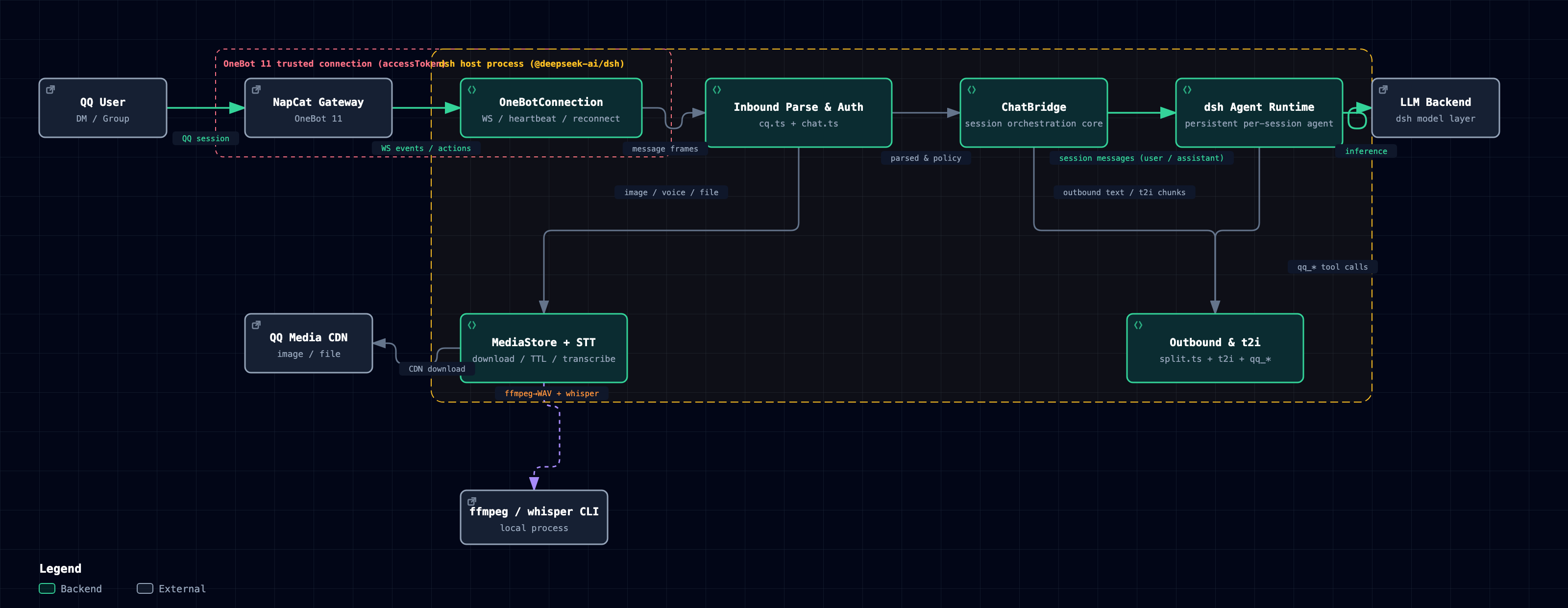
Interactive version (dark/light theme toggle + guided views): docs/dsh-onebot-architecture.html; vector version: docs/dsh-onebot-architecture-en.svg.

Features
| Category | Capability |
|---|---|
| Connection | Reverse WS (NapCat ws-reverse dials in, default port 8643) or forward WS (plugin dials out, default ws://127.0.0.1:3001); auto-reconnect with backoff (2s → 60s) |
| Inbound | Private/group chats; segment-array-first parsing (CQ string fallback), CQ unescaping, @/reply trigger detection (fail-closed; replies count only when replying to the bot itself); images resolved from 4 sources (url/base64/file/hash) with auto-shrink (long edge ≤ inboundImageMaxPx, GIFs untouched); files received via dual channel (CDN direct link get_private_file_url + get_file base64/url fallback); face id→emoji/card/poke segment types; quoted messages auto-fetched via get_msg; merged forwards auto-expanded via get_forward_msg |
| Voice | ffmpeg to 16 kHz WAV + whisper transcription (openai-whisper / whisper.cpp / custom command); non-blocking: the voice message enters the turn as a [语音] placeholder right away, and the transcript follows as a (语音转写:…) supplement when done (default timeout 60s); failure keeps the [语音] placeholder |
| Text image | t2i card renderer (@napi-rs/canvas): headings/bold/italic/strikethrough/quotes/lists/code blocks/tables/inline code pills/color emoji/CJK punctuation rules; same numbers as the Hermes original (800px/26px/rules/right edge 790) |
| Outbound | Body length ≤ textImageThreshold (default 150) is sent as one message; over the threshold renders a t2i text-image card (AstrBot style: headings/quotes/lists/tables/code blocks/color emoji; render failure, a PNG over outboundImageMaxBytes, or <=0 (card path disabled) falls back to a single plain-text message); Markdown stripped to plain QQ text; [[qq_forward]] merged-forward cards (group/private); live interim messages (interimMessages: each interim text is sent immediately; each is auto-recalled alone after interimRecallMs (default 90s); at turn end the whole turn's interims render into one t2i summary card, the still-on-screen originals are recalled, then the final reply is sent — no turn-end merged forwarding, avoiding unrecallable >2min originals and duplicate cards on long turns; interimRecall: false degrades to send-only: no summary card, no recall); host plan-book/question-card auto-relay (when the model calls exit_plan_mode / ask_user_question, the full plan text / question options are sent to QQ), typing indicator (set_input_status, private chats only) |
| Commands | Slash commands (admin only): /new fresh session (context cleared, old session kept on disk), /stop stop the current generation, /model view/switch the current session's model (--default changes the deployment default; the bare form renders a two-level numbered list — reply with a number to pick a provider, then a number to pick the model), /workspace view/switch workspace (bare form renders a numbered list; reply with a number to switch), /preset view/switch agent presets (session rebuilt, recorded in the new session's header; bare form numbered), /status session panorama: chat/session/preset/model/cwd/outbound mode/agent status, /retry rerun the last user message (retry after a failed turn; refused while a generation is in progress), /id chat/session/cwd only (for troubleshooting), /ver plugin version + git commit, /ocr OCR the latest inbound image of this session (NapCat ocr_image), /mode switch this session's outbound mode (per-chat override, persisted across restarts), /plan host plan mode (/plan off exits directly with no Web approval card; /plan <text> enters and processes the text), /permission switch the host permission preset (w = workspace-writable + approvals, f = full access + no approvals; full preset names passed through, unknown names error with the available list; bare form renders the menu), /goal record/update the session goal (auto-attached as a reminder each turn, persisted across restarts), /help help; unknown slash commands are intercepted by default with close-match suggestions (unknownCommand: passthrough restores the fall-through to the model) |
| Tools | qq_send_image (≤9 images, path or URL), qq_send_voice, qq_send_video, qq_send_file, qq_send_forward, qq_napcat_api (14 allowlisted actions), qq_group_history (guarded file editing code_safe_edit/code_safe_rollback/code_list_backups moved to the standalone plugin dsh-safe-edit — see Safe editing below) |
| Permissions | Admin allowlist (ONEBOT_ALLOWED_USERS), dm/group policies (open/allowlist/disabled), group @-mention gating, restricted users soft limit ([受限用户:仅问答]), outbound sensitive-content auditing |
| Sessions | One persistent Agent per QQ chat (stable derived session id), auto-resumed after restart; mounted into presets/workspaces via agentPreset/workspacePath; mapping flushed to disk at the end of every turn |
| Ops | Hot reload: config overrides and insert additions/removals in the profile-level patch take effect hot — the plugin fiber restarts in place within seconds (the host process is not restarted; cost: one second-level QQ bridge reconnect, in-flight turns interrupted); touch / no-content-change triggers nothing; changes to the bundle's built-in patch, repo templates, deployment-copy patch files, or the root cordis.yml do not hot-reload; temp media TTL cleanup |
| Prompt | Injects QQ platform notes automatically (plain-text output, [图片]/[语音] placeholders for incoming images/voice, tool & command guidance, host interaction cards banned); injected into each QQ chat agent's own scope, invisible to Web sessions |
Compatibility
| Item | Requirement |
|---|---|
| dsh | ≥ 0.1.5-rc.1 (engines.dsh; all @deepseek-ai/* peer deps ≥0.1.5-rc.1, JsonValue provided by dsh-util-values) |
| Node.js | ≥ 22 |
| OneBot 11 impl | NapCat / Lagrange / LLOneBot / go-cqhttp (reverse or forward WebSocket) |
| Optional deps | Voice transcription needs ffmpeg + whisper CLI; t2i text images need Noto CJK fonts on Linux |
Last verified: 2026-09-12 (M4 interaction & persistence: unknown-command interception / serial selection / workspace persistence — 306/306 vitest green, build clean; M0 security semantics unchanged: reverse mode refuses an empty accessToken and defaults to 127.0.0.1, see the BREAKING note under the config table).
Installation
Prerequisites: dsh (≥0.1.5-rc.1) on PATH; NapCat or another OneBot 11 implementation running.
npm install (published channel — pick this OR the source install below; do not mix)
dsh plugin --profile web add dsh-onebot-qq
(or install from the Plugins page in the web UI.) Then:
Write two lines into
pnpm-workspace.yamlin the profile directory<DSH_HOME>/profiles/web/(pnpm 12 no longer reads a project-level.npmrc, seedocs/npm-e2e-report.mdD1):autoInstallPeers: false hoist: false— this stops pnpm from pulling stale standalone
@deepseek-ai/*copies from the registry. npm/pnpm version difference: this is required for pnpm 12 users only (pnpm 12 no longer reads.npmrc); npm users are unaffected — npm's default peer auto-install pulls registry versions that now satisfy the peer range (docs/npm-e2e-report.md§1 #2). Runtime peer unification is done by the host's resolver layer: any@deepseek-ai/*import declared in the package's peerDependencies is intercepted by the host and redirected to the same instance in the host install tree — no npm overrides needed.Merge the two
insertlines from the bundledcordis.patch.ymltemplate into the profile-level<DSH_HOME>/profiles/web/cordis.patch.yml: main entryname: 'dsh-onebot-qq', host-plane linename: 'dsh-onebot-qq/settings-remote'; config overrides must sit on the top-level line with the same id (see the template header for details).Never hand-write any
@deepseek-ai/*dependency into the profile's package.json — a hand-written copy overrides the host install tree as the interception target, causing a version-skewed dual-package.If the compatibility gate rejects the install (dsh version outside the peer range), use the official escape hatch
dsh plugin allow-version ... --accept-riskto opt in explicitly.
Option 2: install from source (git clone)
git clone <repo> ~/dsh-plugins/dsh-onebot
cd ~/dsh-plugins/dsh-onebot
npm install --include=dev
./scripts/build.sh          # link host @deepseek-ai packages + tsc src/ → lib/
A deployment copy must carry the full node_modules link set (produced by
scripts/link-host.sh):filespackages onlylib/, but the runtime peer deps@deepseek-ai/*are symlinked to the host install — copyinglib/alone fails to mount (the plugin entry fails loudly with an explicit "peer dependency resolution failed" error). When the host has nodshon PATH (e.g. the fnOS app form), use the escape hatch:DSH_ROOT=<host node_modules path> ./scripts/build.sh.
Building against an fnOS app-form host: the dsh installed from the fnOS App Center has no dsh CLI on PATH,
so build.sh's auto-discovery (PATH binary → npx store) fails with an explicit cannot locate the dsh install.
Point DSH_ROOT at the host node_modules root explicitly (it must contain @deepseek-ai/; a wrong path errors
out instead of silently falling back):
DSH_ROOT=<fnOS app data dir>/node_modules ./scripts/build.sh
After building, place the deployment copy (lib/ + the full node_modules link set) at the target location and
mount it; a runtime copy missing the link set fails to mount the same way (see above).
Mount it in ~/.dsh/config.yaml (create it if missing):
- insert:
    - id: dsh-onebot
      name: '$HOME/dsh-plugins/dsh-onebot/lib/index.js'
      config:
        mode: reverse        # reverse = NapCat dials in; forward = plugin dials out
        port: 8643
        # accessToken: 'token-matching-NapCat'  # required: reverse mode refuses to start with an empty token (M0 hardening)
        # botQQ: ''          # leave empty to learn automatically from meta events
        adminUsers: ['<your-QQ-number>']   # required: at least one admin, otherwise private chats & slash commands are unavailable
⚠️ You must configure at least one admin on first setup (
adminUsersor theONEBOT_ALLOWED_USERSenv var):dmPolicy: open(default) only allows admins to DM, and slash commands are admin-only too; with no admin, nobody can talk to the bot. For development you can temporarily setallowAllUsers: true(orONEBOT_ALLOW_ALL_USERS=true) to allow everyone.
Restart dsh (dsh web or however you start it); the log line [dsh-onebot] mounted means it loaded.
NapCat side (required, pick one of two modes):
- reverse mode (NapCat dials into dsh, recommended): in NapCat's network settings add a WebSocket client,
set "report URL" to dsh's WS address
ws://<dsh-host-ip>:<port>/ws(e.g.ws://192.168.1.100:8643/ws), and set "token" to the same value as the plugin'saccessToken; when dsh and NapCat are on different machines127.0.0.1won't work. - forward mode (dsh dials out to NapCat): enable the WebSocket server in NapCat's network settings
(listens on
0.0.0.0:3001by default), set the plugin'surltows://<napcat-host-ip>:3001(ws://127.0.0.1:3001works on the same machine), tokens must match on both sides.
Tokens must match on both sides; for the message report format, choose "array" (the plugin parses segment
arrays first; CQ strings are only a fallback). After configuring, restart dsh. [dsh-onebot] mounted in the log
plus a successful NapCat connection means you're ready.
Deployment requirements: NapCat must be on a LAN reachable from dsh (same subnet / routable).
The WS connection, image downloads and file resolution all depend on this network path; when NapCat and dsh are
not on the same machine, enable the "file-to-URL" switch on the NapCat side so get_file returns a downloadable
http(s) url (otherwise it returns a container-local path the plugin cannot access).
Configuration
The full schema lives in the Config of src/index.ts (schemastery-validated, every key has a
default). Common options:
| Key | Default | Description |
|---|---|---|
mode |
reverse |
reverse/forward |
host / port |
127.0.0.1 / 8643 |
reverse listen address; for cross-machine deployment (NapCat dialing in from another machine), explicitly set this to 0.0.0.0 |
url |
ws://127.0.0.1:3001 |
forward target |
reconnectMaxAttempts |
100 |
reconnect give-up limit: auto-reconnect stops after this many consecutive failures (the log includes the limit and recovery guidance); 0 = unlimited retries (backoff capped at 60s) |
accessToken |
empty | OneBot token; required in reverse mode — the plugin refuses to start when left empty (fail-closed); may stay empty in forward mode |
botQQ |
empty | bot QQ (empty = auto-learned) |
ignoreSelf |
true |
Ignore messages sent by the bot itself (prevents self-loops) |
requireMention |
true |
groups only respond when @-mentioned or replying to the bot's own messages (replies to other members don't trigger; when the replied-to message can't be determined, it falls back to counting as mentioned, fail-open) |
rateLimitPerMinute |
30 |
per-chat cap on ordinary messages per minute (60s sliding window): over-limit messages are skipped with a rate-limit notice (at most one per window); commands are exempt; 0 disables |
unknownCommand |
intercept |
unknown slash-command handling: intercept (default) consumes the message and suggests close matches (prefix matches first, edit-distance ≤2 fallback only for inputs of length ≥4, at most 3 candidates; with no match it points to /help or re-sending without the leading /); passthrough restores the old fall-through to the model. Text not starting with a /word token (e.g. a path like /tmp/x) is unaffected |
dmPolicy |
open |
DM policy: open(admins only)/allowlist/disabled |
groupPolicy |
open |
group policy: open(everyone)/allowlist/disabled |
restrictedMemberPrefix |
true |
Prefix non-admin group messages with [受限用户:仅问答] (soft restriction) |
adminUsers |
[] |
admin QQ numbers; or the ONEBOT_ALLOWED_USERS env var. At least one is required, otherwise DMs (dmPolicy=open) and slash commands are unavailable to everyone |
allowFrom / groupAllowFrom |
[] |
allowlisted users/groups |
interimMessages |
true |
send interim text between tool calls immediately; false sends only the final reply |
interimRecall |
true |
interim recall + turn-end summary card switch; false = send-only (degraded: no summary card, no recall) |
sendErrorNotice |
true |
Send a ⚠️ error notice to the user when a turn fails |
sensitivePatterns |
[] |
Outbound sensitive-content audit regexes (built-in rm -rf/shutdown/db-wipe/secret patterns; leave empty to use the built-in defaults) |
sttEnabled |
true |
voice transcription (needs ffmpeg + whisper CLI) |
sttEngine |
auto |
STT engine: auto (auto-detects whisper-cli/whisper/mlx_whisper)/openai/whisper-cpp/custom |
sttModel |
small |
whisper model |
sttCommand |
empty | Program name/path for the custom engine |
sttArgs |
[] |
Argument templates for the custom engine; {file} and {out} are substituted |
sttTimeoutMs |
60000 |
voice transcription timeout in ms (60s default since v0.4.0, previously 300s): on timeout the [语音] placeholder is kept; <=0 falls back to the built-in 60s |
textImageThreshold |
150 |
t2i card threshold: body length ≤ this is sent as one message; > this renders a text-image card. Render failure, a PNG over outboundImageMaxBytes, or <=0 (card path disabled) falls back to a single plain-text message |
cardFooter |
dsh |
card footer brand ("Powered by ") |
fontFiles / fontFamilies |
[] |
t2i font file/family overrides (Linux deployments: install Noto CJK, see below) |
mediaDir |
<dsh-home>/media/onebot |
inbound media / mapping file directory |
tempTtlHours |
6 |
Retention for inbound temporary media files (hours), auto-cleaned on expiry |
inboundImageMaxPx |
2048 |
inbound image long-edge limit (px): larger images are proportionally shrunk before reaching the vision model (transparent PNGs preserved, GIFs untouched); <=0 disables (old name imageMaxSize deprecated, still honored this release) |
outboundImageMaxBytes |
8388608 |
outbound image size cap (bytes): an oversized t2i summary card falls back to plain text (old name maxImageBytes deprecated, still honored this release) |
maxVoiceBytes |
15728640 |
Outbound voice size cap (bytes) |
maxFileBytes |
20971520 |
Outbound video/file size cap (bytes) |
inboundFileMaxBytes |
20971520 |
inbound QQ file size cap (bytes): oversized file segments are rejected with a notice (old name maxInboundFileBytes deprecated, still honored this release) |
allowPrivateHosts |
false |
allow downloads from private/loopback addresses (skips only the private-network check; the protocol allowlist and size limits still apply); enable only in trusted setups such as a local reverse proxy |
agentPreset |
empty | agent preset for sessions (empty = default) |
workspacePath |
empty | workspace for sessions (empty = host process cwd; when unconfigured the plugin warns once at startup recommending an explicit value — the host exposes no programmable default-workspace query). The per-chat /workspace override is persisted to the mapping file and survives restarts |
chatIdleEvictDays |
7 |
idle-session eviction (days): when a chat has had no activity for longer than this, its in-memory agent is cleaned up before the next inbound message is processed (the session is flushed to disk first and the mapping is kept, so a later message from the same chat resumes the original session); 0 = disabled |
⚠️ BREAKING (M0 security hardening): in reverse mode an empty
accessTokenrefuses to start (fail-closed); thehostdefault changed from0.0.0.0to127.0.0.1(loopback only) — cross-machine deployments must explicitly configurehost: 0.0.0.0.
Env vars: ONEBOT_ALLOWED_USERS (comma-separated admins), ONEBOT_ALLOW_ALL_USERS=true (development).
Settings page
The dsh Web GUI settings page exposes this plugin's configuration visually (a host-plane Remote
onebotSettings that writes the config override of the dsh-onebot entry in the profile-level
cordis.patch.yml — the same persistence layer as a hand-edited patch and the host's native settings page).
Three groups, 19 keys
| Group | Keys |
|---|---|
| connection | mode, host, port, url, accessToken, botQQ |
| permissions | requireMention, adminUsers, dmPolicy, groupPolicy, allowAllUsers, allowFrom, groupAllowFrom |
| behavior | interimMessages, interimRecall, interimRecallMs, sendErrorNotice, unknownCommand, rateLimitPerMinute |
accessToken is a password-style input in the settings page; snapshots redact it on return (no plaintext echo);
the write side still lands in the patch file as plaintext.
Priority vs. patch config
schema defaults ← bundle/base patch (inherited layer) ← profile override line (what the settings page writes);
within the same layer, later patch entries win. Settings-page keys and a hand-edited patch are the same line in
the same layer — there are no two competing priorities. Keys outside the 19 (media/STT/performance/
agentPreset and other low-frequency keys) get no UI; hand-edit the patch in the same config line.
How changes take effect
Every save (settings page or a hand edit of the same override line) = the plugin fiber restarts in place within seconds; the host process and Web GUI are not restarted. Cost: one second-level QQ bridge reconnect, in-flight turns interrupted, rate-limit windows and interim-message buffers cleared (session mappings/history are unaffected). A save identical to the current override line is a no-op and triggers no restart; if a write makes the plugin fail to activate, the patch file rolls back automatically and the old config keeps running.
Session workspace selection
Each QQ session picks its working directory at creation time, in this order (written into the session meta and frozen for the session's lifetime):
- The chat's
/workspaceoverride (per-chat, survives/newresets) - The configured
workspacePath - The host process cwd (
process.cwd())
/workspace <dir> switches directories (realpath + directory check): it records the override and retires the
current agent, so the next message rebuilds the session under the new directory. The old session stays on disk.
The bare /workspace form renders a numbered list (the current directory is marked); reply with
/workspace <number> to switch without retyping the path; /workspace list lists all workspace records.
The per-chat /workspace override is persisted to the mapping file (chat-sessions.json, additive format that
stays compatible with older files): it survives restarts and failed session resumes, and a /new keeps it too —
as long as the chat uses a non-default directory, /workspace and new sessions keep using it after a restart.
Sessions attach to GUI workspaces as follows: a new workspace is auto-created only when the session cwd equals
the configured workspacePath (or the host cwd when unset); legacy sessions carrying a foreign cwd are attached
only when a workspace already owns that path, never auto-created.
Slash commands quick reference (admin only)
| Command | Purpose |
|---|---|
/new |
Start a fresh session (context cleared, old session kept on disk) |
/stop |
Stop the current generation |
/model [--default] <provider> <model> |
View/switch the current session's model; --default changes the deployment default. The bare form renders a two-level numbered list: reply with a number to pick a provider, then a number to pick the model |
/workspace [path|number|list] |
View/switch workspace; bare form renders a numbered list (current dir marked), reply /workspace <number> to switch; /workspace list lists all records |
/preset [id|number] |
View/switch presets (bare form numbered, reply with a number to pick); switching rebuilds the session and records the preset in the new session's header |
/session [number] |
List the switchable historical sessions of this chat (bare form numbered; each entry has a content preview, created and retired timestamps, truncated id; unreadable entries show "(content unreadable)" without affecting the rest). Reply with a number to switch back: the current session retires into the list, the target session is restored with its history (including per-chat settings); you can switch back and forth. The list persists across restarts (switchable-sessions.json, max 20 per chat) |
/status |
Session panorama: chat/session/preset/model/cwd/outbound mode/agent/switchable count |
/retry |
Rerun the last user message (retry after a failed turn) |
/id |
chat/session/cwd only (for troubleshooting) |
/ver |
Plugin version + git commit |
/ocr |
OCR the latest inbound image of this session (NapCat ocr_image) |
/mode [interim|instant] |
Switch this session's outbound mode (per-chat override, persisted across restarts) |
/plan [off|text] |
Host plan mode (/plan enters; /plan off exits directly with no Web approval card; /plan <text> enters and processes the text) |
/permission [w|f|preset|number] |
Switch the host permission preset (sandbox mode + approval policy, applies immediately): w/ws/write→workspace-write (workspace-writable + approvals required), f/full/danger→danger-full-access (full read/write, no approvals); full preset names are passed through as-is (unknown names make the host error and list the available ones); bare form renders a Chinese permission menu; numeric indexes resolve against the host's available list in order (not snapshotted) |
/goal [goal|clear] |
Record/update this session's goal (auto-attached as a reminder each turn, persisted across restarts) |
/help |
Grouped command card (▍sessions/output/queries/actions/other), each entry with usage; error hints always include usage or the next step |
/preset switching is an in-process per-chat override (survives /new): the next message rebuilds the session
with the new preset written into the header, and a restart-resume restores it from the record. The per-chat state
of /mode and /goal is persisted into the mapping file (since v0.4.0, across restarts), as is the /workspace
override; /plan remains an in-process override that falls back to the default on restart.
The /session switchable list persists per chat in the media directory's switchable-sessions.json (same
read/write discipline as retired-sessions.json: missing file = fresh, corrupted file kept in memory, atomic
writes; max 20 per chat, deduped, newest first). Each entry renders a content preview (the first real user input
of that session's event log: kind 'user' or QQ messages authored by this plugin first, falling back to any
user/message; all text blocks joined, the QQ inbound <user_message> wrapper and trusted prefixes outside the
join boundary ([受限用户:仅问答] / [HH:MM nickname(QQ)] — incomplete wrappers or empty bodies fall back
verbatim) stripped, folded to newlines and truncated to ≤40 code points, never splitting an emoji; with no user
input found it shows "(no conversation content)"), the created time (the session header's createdAt, omitted if
unavailable), the retired time, and a truncated id (first 8 + … + last 8 chars, keeping both ends recognizable).
Previews come from a cold read of the first 24 events via sessionPersistence's read handle (no write ownership,
closed right after reading); a missing/corrupted/unreadable log only degrades that entry to "(content unreadable)",
the rest and the switch-back feature are unaffected. After a successful switch the target session is un-retired;
restart-resume and post-eviction reactivation find it through the normal path. If resuming the target fails, its
id is hard-retired immediately and removed from the list, and the chat falls back to creating a new session on
the next message — it never gets stuck. Sessions retired due to corruption (collision/resume failure) never
enter the list and can never be switched back to.
Serial-number replies resolve against a snapshot of the list the command just printed and stay valid for
5 minutes (an expired snapshot asks you to list again); a purely numeric argument is read as an index only while
such a list is live, otherwise the original parameter semantics apply. Exception: /permission numeric indexes
are not snapshotted — they resolve live against the host's available list each time, with out-of-range or
unparseable values falling back to the usage hint. Unknown slash commands are intercepted by default with
close-match suggestions; unknownCommand: passthrough passes them to the model instead.
Safe editing (code_safe_edit)
Guarded host-file editing is provided by the standalone plugin dsh-safe-edit (~/dsh-plugins/dsh-safe-edit/,
split out of this plugin on 2026-08-18, registered globally across all channels). Three tools; the approach
draws on irmia_devkit_open's safe_edit (AGPL-3.0, an
independent clean TypeScript implementation). Tools and boundaries: see the dsh-safe-edit repo/docs:
code_safe_edit: read → path allowlist → auto backup → match (exact → strip line-number prefix → whitespace-aligned / Aider-style) → replace → syntax check (node --checkfor js/cjs/mjs) → auto-rollback on failurecode_safe_rollback/code_list_backups- Boundaries follow the session sandbox policy:
danger-full-accessunrestricted,workspace-writelimited to the session workspace,read-onlydenied; with no policy service it falls back tosafeEditRoot(default/Users/mario/workspace) - The model may prefer this tool (the
code-safe-editskill guides all channels; the QQ platform notes guide built-in read/edit conventions without binding to a specific tool name)
dm / group access policies (pick on first setup)
Private (dmPolicy) and group (groupPolicy) chats each have three options:
| Option | dmPolicy (private) | groupPolicy (group) |
|---|---|---|
open |
Admins only can DM (adminUsers/ONEBOT_ALLOWED_USERS; with allowAllUsers: true everyone can) |
All groups can chat (messages gated by requireMention: @ or reply-to-bot required; group members get the [受限用户:仅问答] soft limit) |
allowlist |
Only the allowFrom QQ numbers can DM (admin not required) |
Only the groupAllowFrom groups can chat |
disabled |
All DMs rejected | All group chats rejected |
Recommended setups:
- Just for yourself →
dmPolicy: open+ configureadminUsers(only you can DM); - A few friends →
dmPolicy: allowlist+allowFrom: ['QQ1','QQ2']; - Group-only bot →
groupPolicy: open(with the defaultrequireMention: true, members must @ the bot); - Only specific groups →
groupPolicy: allowlist+groupAllowFrom.
t2i font dependencies
Text-image cards need three font families (CJK / monospace / color emoji). The plugin registers them automatically from the system and fixed paths at startup; missing glyphs render as tofu blocks.
macOS: zero install. Uses system Hiragino Sans GB / Songti SC, Menlo and Apple Color Emoji automatically.
Linux (Debian/Ubuntu, one command):
sudo apt install fonts-noto-cjk fonts-dejavu-core fonts-noto-color-emojiPackage Provides (auto-registered path) Used for fonts-noto-cjk/usr/share/fonts/opentype/noto/NotoSansCJK-Regular.ttcCJK body/headings (SC face auto-extracted from the ttc, JP/Mono fallback) fonts-dejavu-core/usr/share/fonts/truetype/dejavu/DejaVuSansMono.ttfcode blocks / inline code monospace fonts-noto-color-emoji/usr/share/fonts/truetype/noto/NotoColorEmoji.ttfcolor emoji optional fonts-wqy-zenhei/fonts-wqy-microhei/usr/share/fonts/truetype/wqy/*.ttcCJK fallback (when Noto is missing) optional fonts-unifont/usr/share/fonts/opentype/unifont/*.otflast-resort fallback Custom:
fontFilesadds extra font files (restart to apply);fontFamiliesprioritizes family names. The renderer does an ink self-check: families missing glyphs are dropped and fall back automatically, so you never get a silent tofu card.
Permissions & data
- Network: opens a WebSocket to the OneBot 11 gateway (reverse listen or forward dial-out); inbound images/files are downloaded from the QQ CDN.
- Files: inbound media and chat mappings are written to
<dsh-home>/media/onebot/(mediaDir, expired files cleaned after 6 hours); session data is persisted by the dsh host. - System calls: voice transcription invokes local ffmpeg and whisper CLI (disable with
sttEnabled: false). - Sensitive info:
accessTokenand the admin allowlist live in the dsh config, never in logs; outbound content passes a sensitive-information audit. - No telemetry: nothing is collected; no third-party services are called besides your configured OneBot gateway and the image CDN.
Platform notes injected into the model
- QQ does not render Markdown → output plain text (numbered/dashed lists, inline backticks).
- Send images/files/voice/video with the
qq_send_*tools; merged forwards withqq_send_forward. - Incoming images/voice/video are annotated in the text as
[图片]/[语音]/[视频]placeholders (paths never enter the text); when no vision tool is available, say so honestly. - Group messages carry a
[HH:MM nickname(QQ)]prefix; restricted-user messages carry a[受限用户:仅问答]prefix (answer only, no file/terminal/config operations). - This channel is QQ and the host has no Web interaction cards: do not call
ask_user_question/exit_plan_mode(confirmation cards are Web-only and would stall the conversation); ask and confirm in plain text; in host plan mode, output the plan as plain text and point to/plan offto exit. - Slash commands are intercepted by the plugin (16 of them, admin only, see
/help); unknown slash commands are intercepted by default with close-match suggestions, andunknownCommand: passthroughpasses them to the model; text that does not start with a/wordtoken (e.g. a path) still goes to the model normally. - Edit host files with the built-in read/edit (line-level hash anchors, dsh-better-edit auto-undo); never overwrite whole files with write (it clears the undo history).
Uninstall
- Remove the dsh-onebot insert entry from
~/.dsh/profiles/<profile>/cordis.patch.yml; - Restart dsh;
[dsh-onebot] mountedgone from the log means it's unloaded; - Optional: delete the plugin directory and leftover media under
<dsh-home>/media/onebot/.
Development
./scripts/build.sh                 # compile src/ → lib/
./node_modules/.bin/vitest run     # 306 tests: unit + real WS peer + full pipeline
Lessons ported from the source DEVLOG:
- CQ unescaping: NapCat escapes
&in URLs to&; unescape before downloading (the root cause of CDN 403s). - Fail-closed @ detection: when the bot's QQ is unknown, group messages are treated as un-mentioned and never auto-replied.
- Fail pending actions on disconnect: reject all in-flight actions immediately on WS close to avoid 10-30 s stalls and leaks.
- Dedupe reconnects: only one reconnect task per concurrent disconnect, preventing dual WS connections.
- int(target) fallback: chat_id parsing runs inside try/catch so a bad target can't crash the host.
- Temp media 6h cleanup: write-only-without-delete would pile up forever.
- t2i iterates by code point: JS string indexing splits emoji surrogate pairs (the high surrogate gets
classified as CJK → rendered as a black glyph); drawing/measuring must use
Array.from/for...of. - t2i measure = draw: line breaks/column widths all go through
segWidth(pill/bold/italic extra width), with pixel-level right-edge verification ≤790 (non-white testnot(r>245&&g>245&&b>245)).
Troubleshooting
| Symptom | Cause & fix |
|---|---|
| Group chat not responding | With requireMention: true, @ or reply-to-the-bot is required; @ detection is fail-closed; make sure botQQ was learned from meta events or configured explicitly |
| Image download 403 | NapCat escapes & in URLs to & (parsing unescapes automatically); if it still fails, check the media download line in the log |
| File receive fails | NapCat on a different machine needs the "file-to-URL" switch on, otherwise get_file returns an unreachable container path; confirm dsh ↔ NapCat network connectivity |
| Tofu CJK in text images | Linux without CJK fonts: apt install fonts-noto-cjk, and point fontFiles at an SC font file |
| Crash loop / tool registration conflict | The same plugin file inserted twice (double instance); check the patch has no duplicate entries |
Voice never gets a transcript (stays [语音]) |
ffmpeg or whisper unavailable, or transcription timed out: install and restart, raise sttTimeoutMs, or set sttEnabled: false |
| Plugin fails to mount / peer dependency resolution failed | The deployment copy lacks the full node_modules link set: copying lib/ alone is not enough — the runtime peer deps @deepseek-ai/* must be linked to the host install via scripts/link-host.sh; the plugin entry fails loudly with an explicit error, fix the link set per the message and restart |
build.sh reports cannot locate the dsh install |
The host has no dsh on PATH (e.g. the fnOS app form) and no npx store was found: set DSH_ROOT=<host node_modules path> and re-run ./scripts/build.sh (the directory must contain @deepseek-ai/; a wrong path errors out instead of silently falling back) |
| Settings-page / patch change doesn't take effect | Troubleshoot in order: ① make sure you edited a watched file — the profile-level <DSH_HOME>/profiles/web/cordis.patch.yml or the home-level <DSH_HOME>/cordis.patch.yml (repo patch templates, deployment copies, and the bundle's built-in patch are not watched; sync your change into one of the above); ② the content must actually change (touching a file with identical content is a no-op); ③ check the host log for activation failures — an insert-added entry that fails to activate (e.g. a missing peer) errors out explicitly and stays inactive until a restart retries it; ④ the settings page's persistence layer is the profile-level dsh-onebot override line — editing anywhere else (e.g. settings.yaml, which the host has deprecated and renames away) has no effect |
| Where are the logs | dsh host logs; historical root causes & fixes in DEVLOG.md |
Development record
Full timeline / root causes / fixes: DEVLOG.md (ported from the Hermes onebot plugin's DEVLOG convention).
License
BSD-3-Clause
Comments
Comments live in GitHub Discussions. Sign in with GitHub to post or react.