
Install
Inside DeepSeek Harness, with dsh-market
dsh plugin --profile web add dshmarket
Or from the command line
dsh plugin --profile web add github:loyalchiiina/dsh-skill-browser
Installing runs third-party code with your own permissions — it can read your files, use your credentials and reach the network. Review the source first, and pin a commit (github:owner/repo#sha) when you can.
README
This plugin publishes its README in Chinese only.
把技能库变成看得见、搜得到、管得住的资产。
Turn your skill library into something you can see, search, and govern.
在 DeepSeek Harness(DSH)桌面端 / 网页端里直接浏览本机技能库,并自动登记技能失效台账。一个悬浮球入口,点开即见:技能目录、两级分类浏览、实时搜索、SKILL.md 全文查看;内置「失效台账」页,自动记录每次技能调用的结果。
Browse your local DSH skill library straight from the GUI, with an automatic skill-failure ledger. One floating-ball entry point opens a wall of skill cards — categories, live search, full SKILL.md viewer — plus a ledger page that logs the outcome of every skill tool call.
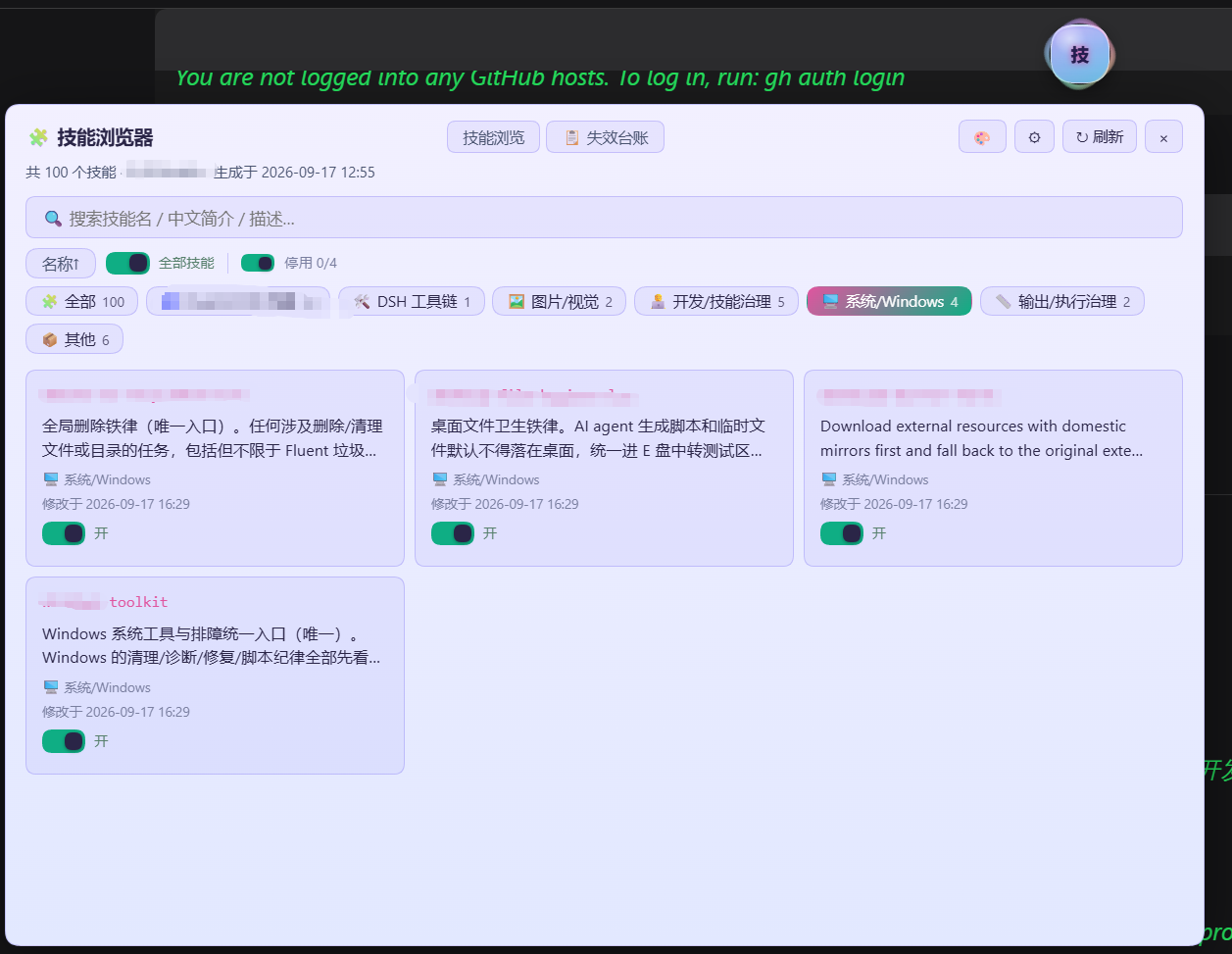
技能浏览页:顶部技能总数与生成时间,搜索框 + 「全部技能 / 停用」开关,分类标签一行排开,主体是技能卡片墙(技能名 / 中文简介 / 分类 / 修改时间 / 开关)。 Browse view: skill count, search box, category chips, and a wall of skill cards.
独门功能:技能失效台账 · Signature feature: the failure ledger
技能调用了,可到底生效没有?插件监听 DSH 官方 tools/result 事件,自动登记每一次 skill 工具调用结果——成功记「生效 ✅」,加载失败记「未生效 ❌」并带上错误信息。人工台账与自动登记分开显示,人工维护区插件永不改动。
Did that skill actually work? The plugin listens to DSH's native tools/result event and automatically logs every skill tool call — successes "effective ✅", load failures "ineffective ❌" with the error. The manual ledger and the automatic log display separately, and the plugin never touches your manually maintained section.
功能
- 悬浮球 🧩:固定在屏幕角落,点击开关面板;可拖拽换位置(位置记忆),Alt+点击收起成小圆点
- 技能库位置自己定:首次使用在面板 ⚙ 设置里选择技能库文件夹(弹系统目录选择框),或手动粘贴路径;未配置时自动探测官方默认根
~/.dsh/skills。插件不含任何预设路径 - 一级/二级分类:按技能目录名模式自动归类(Fluent/CFD 仿真、DSH 工具链、多端协同、Excel/表格、文档处理、图片/视觉、语音/媒体、数据/可视化、开发/技能治理等 16 个一级分类与 Fluent/DSH 域二级分类)
- 中文简介:技能简介直接取自各技能 SKILL.md frontmatter 的 description(v1.5.0 起插件不内置任何技能名清单/字典,避免泄漏技能库构成,也保证所有人看到的是自己技能库的准确描述)
- 搜索:按技能名 / 中文简介 / 原始描述实时过滤
- 详情:点击卡片查看 SKILL.md 全文,可一键复制
- 失效台账(人工 / 自动分开显示):
- 👤 人工台账:解析台账 md 的统计表与失败明细(人工维护区,插件永不改动)
- 🤖 自动登记:插件监听 DSH 官方
tools/result事件,自动记录每次skill工具调用结果——成功记「生效✅」、加载失败记「未生效❌」(含错误信息) - 登记口令:技能触发失败时,在对话里对 AI 说「触发失败,登记」或「登记失败:技能名 原因」,AI 调用上报接口写入台账
- 台账智能发现:初始化时全库搜索台账文件(文件名含「失效台账 / 失败台账 / 生效-失效」等关键词,约定路径
skill-master/references/优先);搜到就复用,没搜到才创建默认台账 +skill-master技能骨架(幂等,已有人工内容绝不覆盖) - 推荐插件:仅面板 ⚙ 设置展开区(技能库位置下方)保留推荐位(照片显示器 dsh-chat-image-lightbox、字体插件 dsh-font-enhancer);v1.5.3 起技能列表每页末尾与 DSH 设置页不再显示推荐(用户反馈心烦)
- DSH 设置页分区「悬浮球导航」:在 DSH 设置中即可控制 🧩 技能球 / 🔤 字体球(若安装了字体插件)的显示与隐藏;v1.5.3 新增「🎯 一键恢复悬浮球默认位置(右下角)」按钮——悬浮球被拖出屏幕外卡住时点一下立即复位(清位置记忆/收起状态,无需重启)
🎨 三球共享 128 皮肤
与 dsh-todo-float-ball / dsh-font-enhancer 共享同一套 128 款皮肤目录(window.__DSH_BALL_SKINS,localStorage key dsh-ball-skin)。任一处切换,三个悬浮球与其展开面板实时同步;「原版(仅本球)」可让技能球单独回到原始星云紫。v1.8.x:全部面板控件(含技能详情正文、tab、开关、批量菜单)跟随皮肤,浅色主题文字对比度 WCAG 达标。
Highlights (English)
- 🧩 Floating-ball entry — pinned to a screen corner, click to toggle the panel; draggable with position memory, Alt+click to collapse to a dot.
- 📂 Configurable skill root — pick the folder via the native directory chooser in ⚙ settings, or paste a path; auto-detects the official
~/.dsh/skillsroot when unset. No hard-coded paths shipped. - 📚 Two-level categories — auto-classified from skill directory names (16 top-level categories: Fluent/CFD simulation, DSH toolchain, multi-client collaboration, Excel/spreadsheets, document processing, image/vision, voice/media, data/visualisation, dev/skill governance…).
- 🇨🇳 Chinese summaries — taken straight from each skill's
SKILL.mdfrontmatterdescription. Since v1.5.0 the plugin ships no built-in skill dictionary, so you always see an accurate description of your own library. - 🔍 Live search — filter by skill name, Chinese summary, or raw description.
- 📄 Full-text viewer — click a card for the complete
SKILL.md, with one-click copy. - 🤖 Automatic failure ledger — driven by the native
tools/resultevent; manual and automatic records shown separately, manual content never modified. - 📋 Ledger auto-discovery — scans the whole library for an existing ledger (filename keywords, with
skill-master/references/preferred) and reuses it; creates a default one only if absent. Idempotent, never overwrites manual content. - ⚙️ Settings integration — toggle the skill 🧩 / font 🔤 balls from DSH settings, plus a 🎯 reset-to-default-position button that un-sticks a ball dragged off-screen (no restart needed).
- 🎨 128 shared ball skins — synced live with
dsh-todo-float-ballanddsh-font-enhancer; all panel controls are themed with WCAG-compliant contrast in light themes.
安装(desktop profile)
- 把本目录完整复制到
~/.dsh/profiles/desktop/node_modules/dsh-skill-browser(真实目录,不要 junction/link) - 在
~/.dsh/profiles/desktop/package.json的dsh.profile.bundles数组加"dsh-skill-browser"(不要加进dependencies——本插件零 npm 依赖,加进去反而可能在其他插件安装/更新时造成解析问题) - 重启 DSH,右下角出现 🧩 悬浮球;打开 ⚙ 设置选择你的技能库文件夹即可
⚠️ 安装须知 Install Notice
发布 24 小时内安装报错? 这不是插件问题。
DSH 桌面端内置供应链安全策略(minimumReleaseAge):刚发布不到 24 小时的 npm 包会被 pnpm 拒绝安装,防止刚发布的投毒包。报错通常含 ERR_PNPM_MINIMUM_RELEASE_AGE_VIOLATION 字样。
- ✅ 解决:等一天再装,市场安装自然通过
- ✅ 插件本体没有任何问题,也无需任何配置
- ✅ 此策略对所有 DSH 插件一视同仁,是全局安全机制
推荐清单说明:两个插件的设置页「悬浮球导航」分区会列出推荐插件(字体插件 / 技能浏览器 / 照片显示器),并实时探测显示「已安装 / 未安装」徽标;未安装的插件可点击 Star 前往仓库安装。
台账自动登记原理
- 数据源 1(自动,确定性):
ctx.on('tools/result', (exec, result) => ...),过滤exec.name === 'skill';result.isError为真记失败,同时记录exec.arguments.name(技能名)与错误文本 - 数据源 2(手动,语义层):
POST /ledger/report { skill, note, kind },对话 AI 发现用户纠错/技能未达预期时调用 - 台账文件:初始化时搜索技能库(文件名含「失效台账 / 失败台账 / 生效-失效」等,约定路径优先);搜到则复用并在插件标记区块内增量写入(人工内容永不改动,首次接管自动备份);没搜到则在
skill-master/references/技能生效-失效台账.md创建默认台账 - 全量机器可读流水:
<技能库>/skill-master/references/技能失效-自动登记.jsonl - 写盘节流:队列满 5 条或 60 秒批量落盘,绝不阻塞工具调用
API(宿主端,仅回环可访问)
| 路由 | 说明 |
|---|---|
GET /dsh-skill-browser/health |
健康检查(含 root 与识别来源) |
GET/POST /dsh-skill-browser/config |
读取/保存运行时配置(skillsDir、ledgerEnabled) |
GET /dsh-skill-browser/skills[?refresh=1] |
全量技能清单 + 分类元数据 + 总数 |
GET /dsh-skill-browser/skill?dir=<name> |
读取某技能 SKILL.md 全文 |
GET /dsh-skill-browser/ledger[?refresh=1] |
人工台账表 + 自动登记统计与流水 |
POST /dsh-skill-browser/ledger/report |
手动上报失败 { skill, note, kind } |
POST /dsh-skill-browser/ledger/flush |
立即落盘队列中的登记 |
GET /dsh-skill-browser/ledger-detail?skill=<name> |
该技能的人工明细 + 全部自动记录 |
POST /dsh-skill-browser/pick-dir |
弹系统目录选择框(Windows) |
技能根目录解析顺序:设置页覆盖(~/.dsh/data/dsh-skill-browser/config.json)→ 环境变量 DSH_SKILLS_DIR → 插件 config skillsDir → ~/.dsh/skills(官方默认根)。全部未命中时面板提示选择目录。
测试
node test/run.js <你的技能库路径>      # 扫描/分类/frontmatter 解析
node test/ledger-test.mjs             # 台账引擎(38 项断言)
License
MIT
Comments
Comments live in GitHub Discussions. Sign in with GitHub to post or react.