
Install
Inside DeepSeek Harness, with dsh-market
dsh plugin --profile web add dshmarket
Or from the command line
dsh plugin --profile web add github:loulangogogo/dsh-plugins-loulan#path:/packages/mcp
Installing runs third-party code with your own permissions — it can read your files, use your credentials and reach the network. Review the source first, and pin a commit (github:owner/repo#sha) when you can.
README
English | 中文
Turn a project's
.mcp.jsoninto out-of-the-box MCP capabilities inside a DSH session — plus one page where you can actually see the list.
dsh-loulan-mcp is the MCP mounting plugin for DeepSeek Harness (DSH):
- When DSH starts: it automatically mounts
~/.dsh/.mcp.json, shared globally and available to every agent; - When an agent is created/resumed: it automatically mounts the
.mcp.jsonof that session's workspace — private to that session, unmounted when the agent is destroyed; - In the session view area: it adds an "MCP" tab alongside "Chat" and "Trace", where you can see what the current session has loaded and refresh, add, or unload mountings.
The whole pipeline writes no session events and never enters the model context — the model only knows the tools are available, not that the plugin exists.
30-second overview
| Zero config | Just drop .mcp.json into the workspace root: no plugin config, no approval, no restart |
| No clashes | Concurrent sessions in the same workspace mount independently, each with its own unique suffix (e.g. postgres_9f2c1a7b3d5e), so same-named servers never conflict |
| Visible | The "MCP" tab lists server names, transports, and tool names in three groups: "This workspace / Manually added / Global shared" |
| Disk is the source of truth | On refresh (or when the tab is reopened) it reconciles against .mcp.json: changed content is re-mounted incrementally, a missing file is unloaded, unchanged content is left untouched |
| Silent | Mounting and unloading produce no session events, consume no model context, and never interrupt the conversation |
Compatibility: the tab and the HTTP endpoints only take effect in profiles that provide a webServer (such as Web); other profiles still mount normally, just without a UI. It depends on @deepseek-ai/dsh-mcp-client, and that version must match your DSH runtime (see FAQ).
Table of contents
- 1. What problem it solves
- 2. Core capabilities
- 3. Installation
- 4. Usage
- 5. Configuration
- 6. How it works
- 7. Constraints and known limitations
- 8. FAQ
- 9. Development and release
1. What problem it solves
.mcp.json is the de facto convention in the MCP ecosystem (used by Claude Code, Cursor, and others), and its greatest value is that it travels with the project: commit it to the repo, share it with the team, clone it on another machine and it is just there. But it also brings three practical problems:
| Problem | What this plugin does |
|---|---|
| Every project requires copying its servers by hand into one global config, and a missed entry means "the tool mysteriously isn't available" | It reads the workspace-root .mcp.json directly — if the file is there, it gets mounted, with no switch to flip |
| Opening two sessions on the same project makes same-named servers fight over or overwrite each other | Workspace mountings get a unique agent-derived suffix, so every session gets its own copy, unmounted automatically when the agent is destroyed |
| Once mounted, it is a black box: you cannot tell what was loaded or what the tool names are | The "MCP" tab lists the server names, transports, and full tool names of all three sources, and lets you refresh/add/unload |
At the same time it deliberately makes one "counter-intuitive but important" choice: no display information ever enters the model context. The mounting list travels only through the plugin's in-memory registry and HTTP endpoints — the model cannot see it and it never appears in session logs, so it neither pollutes the conversation nor spends extra tokens on a mere list.
2. Core capabilities
| Capability | Description |
|---|---|
| Two sources, different strategies | The .dsh root (global shared, mounted at startup) and the workspace (session-private, mounted when the agent is created) |
| Two transports | stdio (local child process) and streamable-http (remote server) |
| Session-level isolation | Workspace/manual mountings carry a unique suffix: <base>_<agentToken>, <base>_<agentToken>u |
| Automatic mounting, no approval | A workspace that hits .mcp.json is mounted immediately; unloading follows the agent's destruction |
| "MCP" tab | Three groups + server name + transport pill + tool names (expandable) |
| Refresh | Incremental re-mount of globals + re-mount of this session, where unchanged parts are not re-mounted (no child-process restarts) |
| Add | Upload a .mcp.json straight from the tab and mount it to the current session |
| Unload | Group-level unloading (global shared deliberately has no entry point, and the server rejects it too) |
| Idle guard | While a session is running, write operations return 409 so the conversation is never interrupted |
| Zero log pollution | Appends no session events, enters no model context, and never wakes the model |
3. Installation
3.1 Install from a profile (once the package is published)
dsh plugin --profile web add dsh-loulan-mcp
This installs the package into the profile directory; restart DSH for it to take effect.
3.2 Wire it up locally from source (the current development workflow)
Prerequisites: a runnable DSH checkout (default ~/.dsh/deepseek-harness) and Node ≥ 23.6.
pnpm install

# Symlink the @deepseek-ai/* packages from the harness so the source can import them
# just like an in-monorepo plugin
pnpm link:dsh                                   # reads DSH_HARNESS, defaults to ~/.dsh/deepseek-harness
pnpm link:dsh -- /path/to/deepseek-harness      # or point at the harness path explicitly

# Start the Web UI with this repo's cordis.yml as a patch overlay (fixed port 13080)
pnpm dev
pnpm installrebuildsnode_modulesand wipes the manual symlinks, so you need to re-runpnpm link:dshafterwards.
The repo-root cordis.yml already wires packages/hello (the example plugin), packages/mcp (this plugin), and packages/rules into the overlay, and pnpm dev picks it up automatically.
3.3 Confirm it took effect
curl -s http://127.0.0.1:13080/dsh-loulan-mcp/mounts
Returning JSON (the three lists) means the Host side is ready. Open any session and the view area should show three tabs: "Chat / Trace / MCP". If you cannot see them, see FAQ.
4. Usage
4.1 Write .mcp.json
Put it in the workspace root (or under ~/.dsh/ as a global shared file):
{
  "mcpServers": {
    "memory": {
      "command": "npx",
      "args": ["-y", "@modelcontextprotocol/server-memory"]
    },
    "postgres": {
      "command": "uvx",
      "args": ["--with", "mcp<2", "postgres-mcp", "--access-mode=restricted"],
      "env": { "DATABASE_URI": "postgresql://localhost/mydb" }
    },
    "remote-api": {
      "type": "streamable-http",
      "url": "https://example.com/mcp",
      "headers": { "Authorization": "Bearer <token>" }
    }
  }
}
Lookup rule: .mcp.json is looked up only in the starting directory itself (~/.dsh or the session workspace), and it never recurses into parent directories.
4.2 How entries are mapped
| Entry content | Result |
|---|---|
Contains a string command |
stdio: this process spawns a child process; args / env / cwd are optional |
Contains a string url |
streamable-http: connects to a remote server; headers is optional |
| Both are present | Treated as command (stdio wins) |
| Neither is present | The entry is skipped and a warning is printed |
The type field |
Currently not involved in the decision (writing it changes nothing) |
Non-string args / env / headers values |
Silently dropped |
serverName not matching [A-Za-z0-9_-]{1,32} |
The entry is skipped and a warning is printed |
Default working directory for stdio: global/workspace entries use the directory containing .mcp.json; manually added entries use the session workspace directory.
4.3 Mounting timing
| Source | Timing | Scope | Unloading |
|---|---|---|---|
~/.dsh/.mcp.json |
When DSH starts | Global, shared by all agents | Unloaded on refresh after the file disappears |
Workspace .mcp.json (session.header.cwd) |
When the agent is created/resumed | This session only | Unloaded automatically when the agent is destroyed; can be temporarily disabled within the session |
| File uploaded via the tab's "Add" | Manually triggered | This session only | Can be unloaded (the uploaded content is discarded with it); disappears when the process restarts |
If the workspace
.mcp.jsonand the global root hit the same file, the workspace mounting is skipped and the list appears only in the "Global shared" group (to avoid mounting twice).
4.4 The "MCP" tab
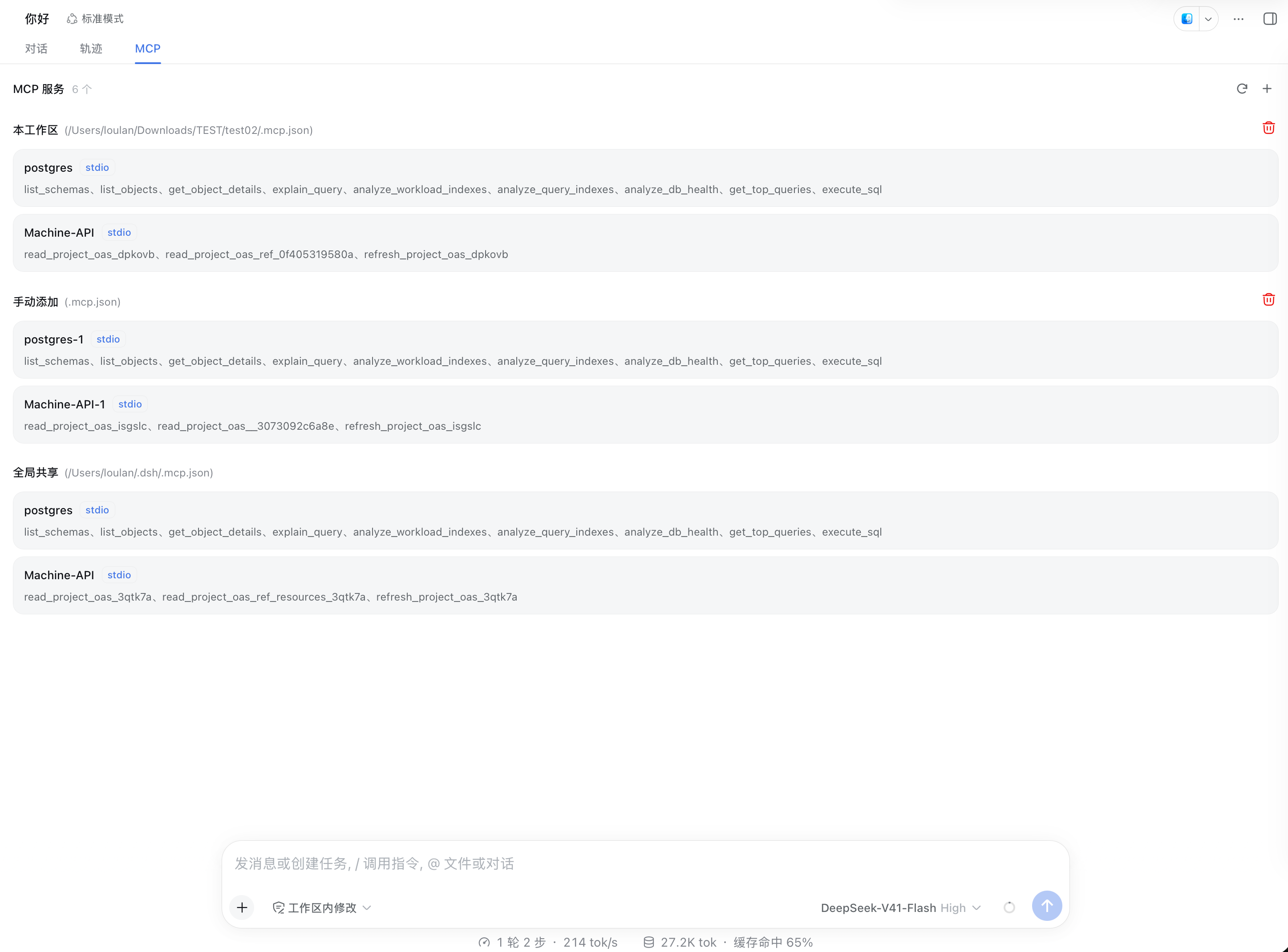
- Three groups in fixed order: This workspace → Manually added → Global shared; empty groups are not shown.
⟳Refresh: first syncs the global config against the current disk state, then re-mounts this session; unchanged servers are left alone. It returns409while a session is running (the UI shows the reason).+Add: pick a.mcp.json, upload it, and mount it to the current session.🗑Unload: only the first two groups have an entry point, with different semantics (see the table below), behind a confirmation dialog.- Tool names: collapsed to 2 lines by default, with "Expand / Collapse" offered only when they genuinely overflow; shows "Tool list temporarily unavailable" when the server is not ready or exposes no tools.
| Unload target | Semantics |
|---|---|
| This workspace | Temporarily disable: releases the mounting but keeps the source, so a refresh re-reads .mcp.json and mounts it back |
| Manually added | Permanently remove: the retained uploaded content is discarded too, so a refresh will not bring it back |
| Global shared | No entry point, and the server returns 400; it can only be changed by editing the file + refreshing (or restarting) |
4.5 What refresh actually does
A refresh (and every list fetch when the tab opens) first brings the global config in line with disk:
Current state of the global .mcp.json |
Behavior |
|---|---|
| Content changed | Incremental re-mount: new entries are mounted, changed ones are unloaded then mounted, deleted ones are unloaded |
| Content unchanged | Only the fingerprint is compared — nothing is unloaded or re-mounted (no child-process restart) |
| File does not exist | All global servers are unloaded and the "Global shared" group disappears with them |
| Exists but fails to parse | Existing mountings are kept and a warning is printed (so a half-written file during editing cannot wipe out the servers) |
The current session's workspace and manual entries are re-mounted at the same time (re-reading the file / re-mounting the retained uploaded content).
5. Configuration
| Field | Description | Default |
|---|---|---|
cwd |
The .dsh root directory (the starting point for reading the global .mcp.json at startup) |
$DSH_HOME or ~/.dsh |
The workspace part needs no configuration at all: it is discovered and mounted automatically from the agent's session.header.cwd, and there is no switch either.
To override the default, configure it in the profile's cordis.patch.yml:
- id: dsh-loulan-mcp
  name: dsh-loulan-mcp
  config:
    cwd: /path/to/.dsh
6. How it works
      ~/.dsh/.mcp.json                        <workspace>/.mcp.json
             │                                        │
  DSH startup┘                  agent create / resume┘
             │                                        │
             └───────────────────┬────────────────────┘
                                 ▼
              mount (through dsh-mcp-client)
              stdio child process / streamable-http connection
              serverName: postgres   ·   postgres_9f2c1a7b3d5e
                                 │
                                 ▼
              in-process registry (mount handles recorded per sessionId)
                                 │
      GET /dsh-loulan-mcp/mounts  (syncs global file state before reading)
                                 ▼
              "MCP" tab: This workspace / Manually added / Global shared
Tool names and isolation: mcp-client registers tools as mcp__<serverName>__<toolName>. Workspace mountings splice the agent token into serverName (agentToken = the first 12 hex digits of sha1(agentId), e.g. postgres_9f2c1a7b3d5e), so the same postgres becomes mcp__postgres_9f2c…__execute_sql and mcp__postgres_4a71…__execute_sql in different sessions without overwriting each other; manually added entries get one more u suffix to avoid clashing with same-named workspace servers. When serverName is too long, the original name is truncated while the suffix is preserved, to respect the 32-character limit.
HTTP endpoints (registered by the Host side under the /dsh-loulan-mcp prefix):
| Endpoint | Purpose |
|---|---|
GET /mounts?sessionId=… |
Reads the three lists; syncs the global .mcp.json before reading; skips the sync while a session is running |
POST /refresh |
Incremental re-mount of globals + re-mount of this session (sessionId may go in the body or the query string) |
POST /add |
Uploads .mcp.json content and mounts it to the current session (256 KiB limit) |
POST /unload |
Unloads one source group of this session (workspace / manual; global always returns 400) |
Idle guard: the three write endpoints return 409 whenever any agent is running; GET merely skips the sync silently and returns the in-memory snapshot as usual.
Startup failure: a single server failing to map or start does not affect other servers in the same group; failed entries do not appear in the list but are recorded, so later refreshes do not try to mount a same-named server again.
7. Constraints and known limitations
| Limitation | Description |
|---|---|
| localhost only | The endpoints have no authentication and only reject cross-site browser requests via sec-fetch-site; this suits localhost-bound deployments only — do not expose DSH to the public internet |
| Data lives only for "the current run" | The registry is in memory; after a process restart, reopen the session or refresh to rebuild it |
| New workspace files are not discovered | workspaceFile is determined when the agent is created; dropping in a .mcp.json after the session is created requires a new session (deleting it, however, takes effect on refresh) |
| A manually added source has only a file name | For security the browser does not expose the real path of the selected file, so the group title can only show the uploaded file name |
| 256 KiB upload limit | Exceeding it returns 400; manually added content is kept in memory only and disappears when the process restarts |
| Tool call timeout is fixed at 60 seconds | Hard-coded in the current implementation; it cannot be overridden through .mcp.json |
serverName limit of 32 characters |
Workspace/manual mountings truncate the original name to fit the unique suffix |
| Global shared cannot be unloaded | The server hard-rejects it (400) to avoid collateral damage to other sessions |
| Conservative parse-failure handling | A global file that fails to parse keeps the existing mountings; only a missing file unloads them |
| Silent throughout | No session logs, no notifications, and the model is never told "what was just mounted" |
8. FAQ
MCP server fails to start with ModuleNotFoundError: No module named 'mcp.server.fastmcp'
This comes from the breaking redesign in mcp 2.x: some Python MCP servers (such as postgres-mcp) still use the v1 FastMCP API, but uvx resolved mcp 2.x. The fix is to pin v1 by adding --with "mcp<2" before uvx:
{
  "command": "uvx",
  "args": ["--with", "mcp<2", "postgres-mcp", "--access-mode=restricted"]
}
A server is missing from the tab / the tool list is empty
- A server is missing: most likely it failed to start (mapping failed or the child process handshake failed). Look for warnings starting with
[dsh-loulan-mcp]in the DSH logs; failed entries are deliberately excluded from the list. - Tool list temporarily unavailable: the server is mounted but its tools have not been enumerated yet (
toolsis empty); refresh a little later. It is also possible that the server genuinely exposes no tools. - The whole "Global shared" group disappeared: the global
.mcp.jsonno longer exists (expected behavior); when parsing fails, the old mountings are kept instead.
Can't see the "MCP" tab
- Are you on the Web profile? The endpoints and the tab come from the optional
webServer; other profiles only mount, with no UI. - Does
lib/client.jsexist? If the package declaresdsh.client, the build artifact must exist, otherwise the Web startup reports an aggregation error. Runpnpm --filter dsh-loulan-mcp buildfirst. - Refresh the page: the client is loaded as a module, so after changing client code you must rebuild and refresh the page.
- Probe the endpoint directly:
curl -s http://127.0.0.1:13080/dsh-loulan-mcp/mounts; a 404 means the plugin is not mounted. - When the session has not been registered yet,
GET /mountsreturns only the global group (which is normal).
It says "a session is running, please refresh/add/unload later"
The idle guard: whenever any agent is running, all three write endpoints return 409. Wait for the current turn to finish before operating.
There are two copies of mcp-client / tool registration conflicts
The @deepseek-ai/dsh-mcp-client version this plugin depends on must match the DSH runtime. A version mismatch can produce two copies of mcp-client, causing tool registration conflicts.
9. Development and release
Directory structure
packages/mcp/
├── src/
│   ├── index.ts          # Plugin entry: global mounting + endpoint registration + lifecycle listeners
│   ├── config.ts         # Plugin config: the .dsh root (start point for the global .mcp.json)
│   ├── approval.ts       # Discovers and mounts the workspace .mcp.json on agent/created
│   ├── mounts.ts         # In-process runtime: session records + refresh/add/unload + global sync
│   ├── mount.ts          # Maps and mounts mcpServers, assembles the display groups
│   ├── server-name.ts    # serverName naming, unique suffix, entry → mcp-client config
│   ├── discover.ts       # .mcp.json and .dsh root discovery
│   ├── parse.ts          # Parsing and defensive type validation
│   ├── contract.ts       # Data contract and route constants (shared by Host / browser)
│   ├── http.ts           # HTTP endpoints
│   └── client/           # Browser side: tab, data source, styles, dictionary
├── test/                 # node:test + tsx
└── scripts/              # Client bundling and test scripts
Common commands
pnpm --filter dsh-loulan-mcp test     # Unit tests (node:test + tsx)
pnpm --filter dsh-loulan-mcp build    # Host tsc + client type check + esbuild client bundle
Artifacts and release conventions
lib/is not committed; it is generated by the build.package.json'sfilesincludes the wholelib/pluscordis.patch.yml.- The
dsh.clientdeclaration andlib/client.jsmust both exist: declaring without building makes Web startup report an error.prepackalready triggersbuildautomatically. - Release:
pnpm release(pnpm login+build+publish). - ⚠️ After deleting a
src/module, cleanlib/first:tscdoes not remove stale artifacts from the output directory, and leftover modules get published along with everything else.rm -rf libbefore building is the most reliable habit.
Styles
- Styles are inlined as template strings in
src/client/styles.ts, injected once byensureMcpStyles()as<style data-plugin="dsh-loulan-mcp">(equivalent to the harness's style-injection mechanism, just without pulling in the CSS Modules pipeline). - Class names all carry the
dsh-mcp-prefix; colors always go through semantic tokens (--dsw-alias-*,--dsw-specific-tip), so they follow light/dark themes automatically.
Comments
Comments live in GitHub Discussions. Sign in with GitHub to post or react.