
Install
Inside DeepSeek Harness, with dsh-market
dsh plugin --profile web add dshmarket
Or from the command line
dsh plugin --profile web add dsh-paoding
Installing runs third-party code with your own permissions — it can read your files, use your credentials and reach the network. Review the source first, and pin a commit (github:owner/repo#sha) when you can.
README
English · 中文
Pao Ding carves the ox, blade gliding through — turn DSH into a small, well-organized team of agents.
dsh-paoding (Chinese brand 「庖丁」/ Pao Ding, from the Zhuangzi parable of the butcher whose blade never dulls because he cuts along the ox's natural seams) is a preset generator for DSH (DeepSeek Harness, an agent runtime). Out of the box, DSH runs one monolithic agent that loads all ~60 tools on every request; with dsh-paoding it becomes one lead plus four specialists — the main agent keeps a lean orchestration-and-search toolkit, and everything else is delegated to sub-agents that carry only the tools of their trade. Pure configuration, zero DSH source changes.
Highlights
- A small team with clear roles: the main agent acts as the lead — it breaks work down, delegates, and reviews results. Four specialist helpers (web research, UI/design, coding, whole-repo search) each carry only their own tools, show up when called, and leave when done.
- Everyday tasks never leave the desk: finding code, checking references, reading files — the main agent handles those itself, no delegation round-trips.
- Recruit your own specialists: the four built-ins are just the start. Give a new role its tools and skills (say, an
html-ppt-equipped slide maker), and "turn this outline into a PPT" is someone else's job from then on. Create roles in the config file or the 庖丁配置 panel. - A dedicated model per helper: pin the coder to a stronger model and the researcher to a lighter, faster one; unset, they follow the main agent's current session model.
- Helpers that inherit the conversation: flip a role's start mode to fork and the helper starts from the main agent's already-completed turns — no restating the context inside every delegation prompt. Every role defaults to a fresh start, so nothing changes until you flip it.
- Helpers that finish the job in place: flip a role's session mode to continuable and, when a run fails or disappoints, the main agent resumes the same child conversation with
send_messageinstead of re-delegating from scratch. Every role defaults to one-shot — run and discard — so nothing changes until you flip it. - Cheaper requests, cleaner context: a helper's tools load only when it is called — pay per use. The main agent's per-request tool overhead drops by roughly two-thirds, and it keeps only summaries instead of accumulating search dumps and diffs.
- Roles bend to your setup: delete built-in roles you don't need, give roles display names, set a display name for the main agent — all one line of config; hit Save & Apply in the panel once and the preset regenerates on the spot, taking effect after a DSH restart or a new session.
- Whatever you've installed, it's recognized: MCP servers, local plugins, installed skills — detected throughout install and configuration; the default install carries only DSH base tools, and detected host tools are opted into per tool in Paoding Config; disable one, re-apply, and its tools drop out on their own.
- A different lineup per workspace: each project can carry its own main/sub-agent setup — pick the workspace in 庖丁配置, configure it separately, and it gets its own preset (
orchestrator-<basename>); choose that preset when starting a session. The global default stays untouched. - A visual configurator: prefer clicking to editing YAML? the 庖丁配置 (Paoding Config) entry in the sidebar bottom action bar (above the Settings row) covers everything; Save & Apply regenerates the preset on the spot — the same generation pipeline as first-install automation.
- Notified of new releases, one-click upgrade in the panel: the panel compares your local version against the latest npm registry publish (npmmirror and GitHub release as successive fallbacks) and points to the release page when a newer one is out. The Upgrade button swaps in the new version in place (profile auto-detected): regular profiles go through
dsh plugin update dsh-paoding, while the Electron-owned desktop profile — which the dsh CLI guards against — gets a directpnpm add dsh-paoding@<version>run in the profile directory; a DSH restart applies it, and the orchestrator preset regenerates itself against the new version on startup. A dev checkout in link: form cannot be upgraded in place — the panel tells you how to switch back to the registry version. If the check fails (offline, rate-limited), a subdued "version check failed · retry" row stays in the header (full causes and proxy hints in its tooltip) without popping anything up. - Installs and uninstalls cleanly: no DSH source changes; active in a new session right after install, gone when you delete one directory.
- Works on both host generations: DSH 0.1.5 through 0.2.0-rc.2 are all supported (0.1.5 / 0.1.6 / 0.1.7-rc.1 / 0.1.7-rc.2 / 0.2.0-rc.1 / 0.2.0-rc.2) — the two generations discover presets differently (directory scan vs patch declaration rows), and the installer picks the right landing automatically; from 0.2.0 the workflow worker row in the orchestration composition also adapts to the host version at generation time (0.1.5 uses workflow-worker-thread, 0.1.6+ swaps to workflow-ptc). Migration happens on the first save/self-heal after a host upgrade or downgrade, all without user action.
Screenshots
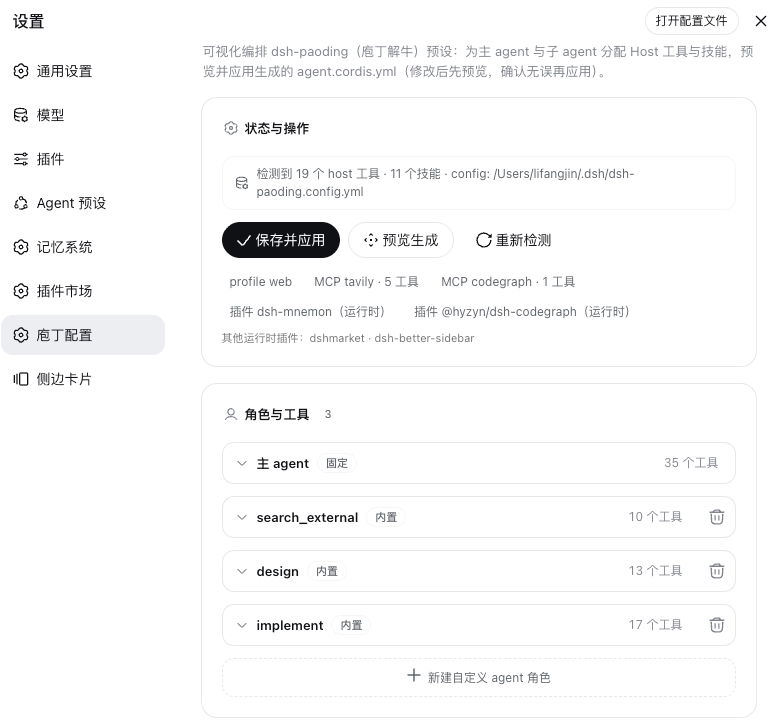
Quick Start
Prerequisites: Node.js ≥ 18, pnpm, and a working DSH host (@deepseek-ai/dsh 0.1.5 – 0.2.0-rc.2, all supported — the preset landing adapts to the host generation automatically).
The official plugin channel (the only install route) — no clone needed; one command, then a restart:
dsh plugin --profile web add dsh-paoding
Equivalent shortcut: npx dsh-paoding@latest (delegates to the command above; default profile web; requires dsh on PATH). Whichever version npx pulls is what gets installed: the actual install is dsh-paoding@<the version npx resolved>.
dsh plugin is a transparent pass-through to pnpm: the package is installed into the profile by pnpm, and the bundle patch declared inside it mounts the 庖丁配置 (Paoding Config) page into the DSH Web left sidebar. Restart DSH (dsh web) and the install is complete — on startup the plugin checks itself, and if the orchestrator preset is missing or carries an outdated version marker it regenerates it once (applying ~/.dsh/dsh-paoding.config.yml when present, writing the base template otherwise). Nothing else to click. From DSH 0.1.7 the host discovers presets through patch declaration rows instead, and the plugin switches the registration over by itself — the install steps stay the same. Pick "编排模式 (Orchestrator)" in the new-session preset selector; to make it the default, choose it in Settings → Agent Presets.
Out of the box only DSH's built-in base tools are enabled — detected MCP/host tools are not written in automatically. Open 庖丁配置 (Paoding Config) in the sidebar, opt into the tools and roles you need, and hit Save & Apply. When you no longer want it, three commands uninstall it for good — the per-workspace presets created by workspace-specific configs are removed too:
dsh plugin --profile web remove dsh-paoding
rm -rf "${DSH_HOME:-$HOME/.dsh}/.agent-presets/orchestrator"
rm -rf "${DSH_HOME:-$HOME/.dsh}/.agent-presets"/orchestrator-*
On a DSH 0.1.7+ host there is one extra step: delete the dsh-paoding managed block from ~/.dsh/cordis.patch.yml (the auto-generated marker comments), so no declaration rows are left pointing at the removed directories (see §7 of the installation guide).
Dev checkout install — to hack on the plugin or the preset sources, link the repository directly (changes go live via HMR or a restart):
git clone https://github.com/lifangjin/dsh-paoding.git
dsh plugin --profile web add link:"$PWD/dsh-paoding"
Upgrades go through the panel's Upgrade button (regular profiles: equivalent to dsh plugin update dsh-paoding; the desktop profile: a direct pnpm add of the exact version in the profile directory). Full steps, upgrading, and troubleshooting are in the installation guide.
How It Works in Practice
Just hand work to the main agent; it routes by division of labor:
- Finding code / checking references / reading files → the main agent does it itself, no delegation;
- Web research → the research helper (
search_external: web tools only, never modifies files); - UI designs and specs → the design helper (
design: may load design skills, produces specs rather than final code); - Writing / editing code → the implementation helper (
implement: verifies its changes before reporting); - Whole-repo exploration or full-file reads in a huge repository → the deep-search helper (
search_internal_deep: read-only, no network, returns only a condensed summary); - Specialized work (e.g. making PPTs) → create a custom role once, then call it anytime.
While a helper runs, the main agent can send follow-ups, check progress, or stop it; when done, it integrates only the summary, never the helper's full transcript. Failure recovery and multi-turn iteration are covered in the orchestration guide.
Configuration
All preferences live in ~/.dsh/dsh-paoding.config.yml: role add/remove/tweak, skill assignment, per-role models, per-role session modes (one-shot / continuable), per-role start modes (fresh / fork), the main agent's tools and skills… Edit it, open the 庖丁配置 (Paoding Config) entry at the bottom of the sidebar, and hit Save & Apply — the preset syncs. It is regenerated from "static source + config" every time, so no manual patches pile up. The full key reference is in the configuration guide; the rationale and the cost ledger are in the architecture guide.
Documentation
| Document | Contents |
|---|---|
| Architecture | Why it is designed this way — overview, the cost ledger, roles and tools, mapping to DSH's native mechanisms, token governance, known limits. |
| Installation | The single official channel (dsh plugin add), version support and the dual preset landing (DSH 0.1.5 – 0.2.0-rc.2), first-install automation and the version marker, upgrading, dev-checkout install, host patch detection, the Paoding Config panel, uninstalling, troubleshooting. |
| Orchestration | Orchestration overview, how failures surface and the three recovery layers, one-shot vs continuable, context isolation. |
| Configuration | The full key reference, tuning built-in roles, main-agent tools and skills, custom roles, per-role models, per-role session modes. |
Contributing
Issues and PRs are welcome: report problems, request new roles, or point out where the docs and the implementation disagree. Before contributing, read the architecture and configuration guides; when a document and the code conflict, the source of truth is presets/orchestrator/ and tools/.
License
Released under the MIT License; see the LICENSE file at the repository root for the full terms.
Comments
Comments live in GitHub Discussions. Sign in with GitHub to post or react.