
Install
Inside DeepSeek Harness, with dsh-market
dsh plugin --profile web add dshmarket
Or from the command line
dsh plugin --profile web add dsh-longtext-input
Installing runs third-party code with your own permissions — it can read your files, use your credentials and reach the network. Review the source first, and pin a commit (github:owner/repo#sha) when you can.
Screenshots

README
A DeepSeek Harness plugin that moves long text out of the chat and into a workspace file, leaving a single
@reference in the composer.
简体中文 | English
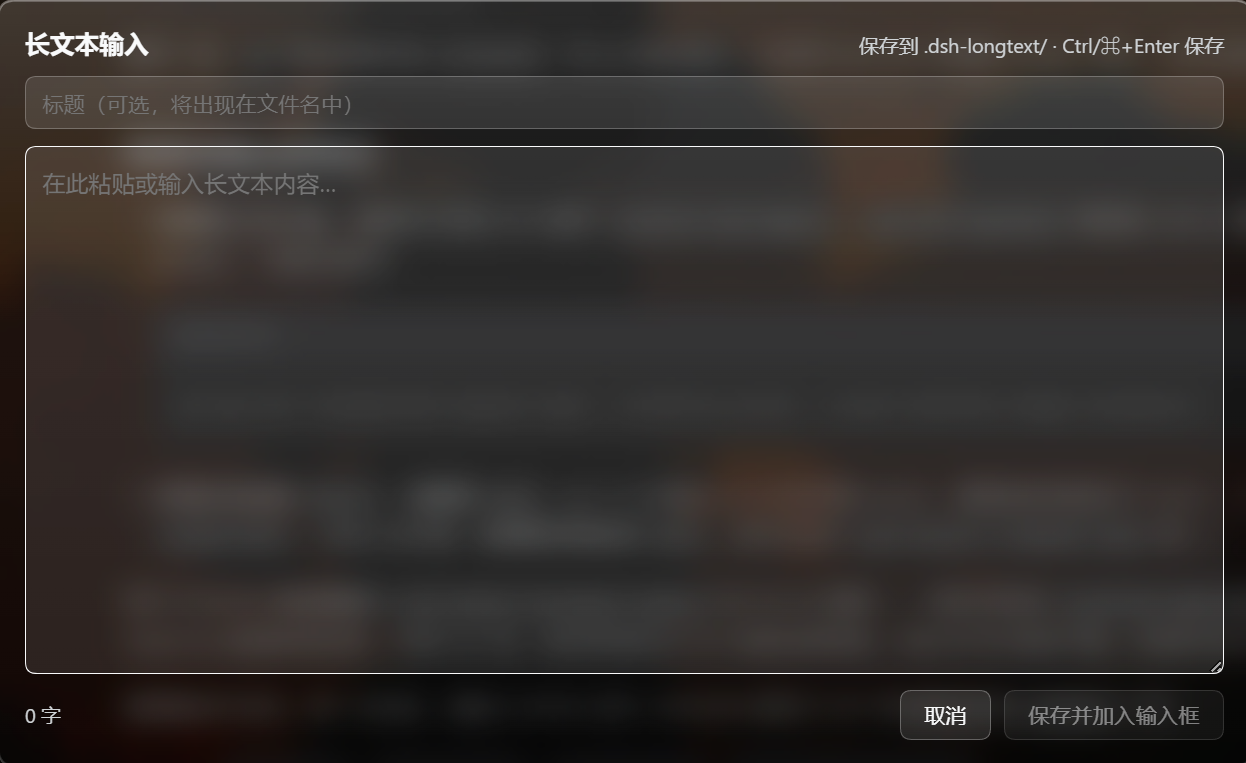
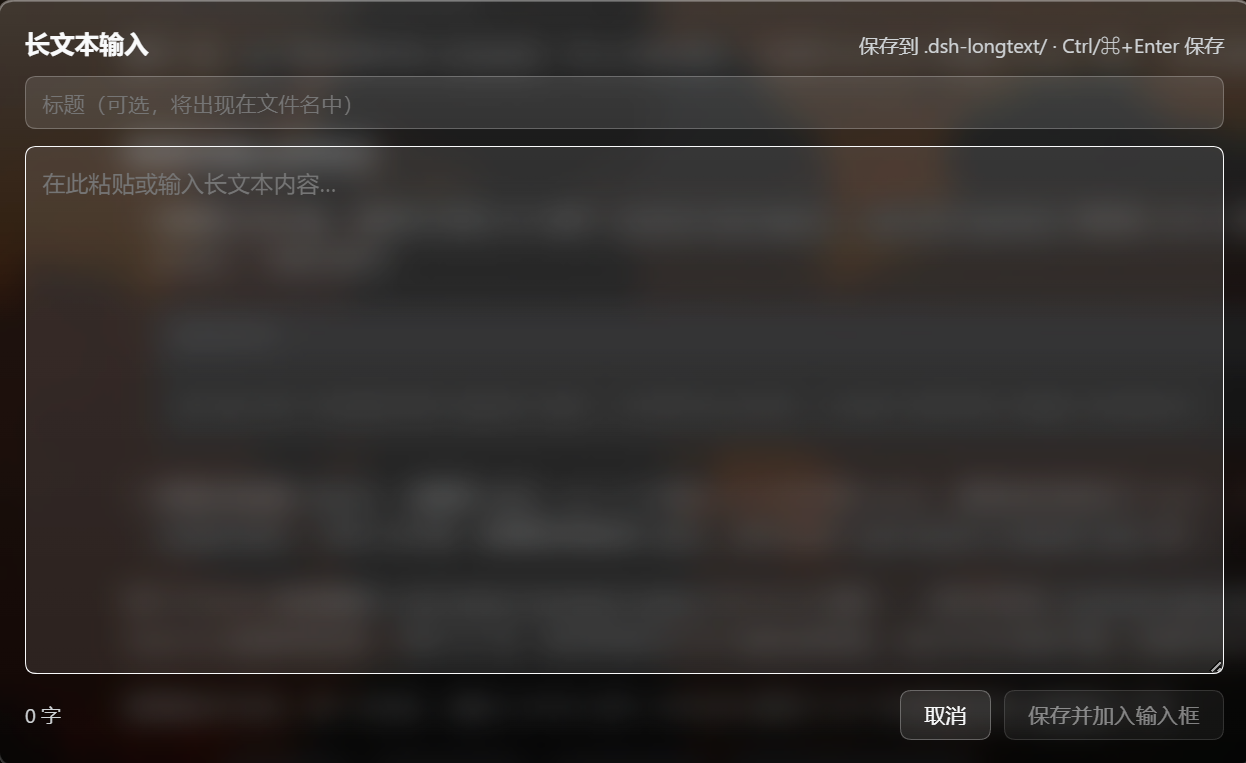
It adds a Long text button to the composer toolbar. Click it, write or paste into the editor, and on save:
writes <workspace>/.dsh-longtext/<YYYYMMDDHHmmss>_<title>.md
appends @.dsh-longtext/<filename>.md to the composer
The point is keeping the chat readable. When you need to hand over a stack trace, meeting notes, or a long draft, the body stays in a file and the conversation is not buried under a wall of text.
DSH's composer has no length limit, so this is not about working around one — it is about getting long prose out of the conversation flow.
Screenshots
The wallpaper and frosted-glass effect in these shots come from other plugins and are unrelated to this one.

Behavior
| Item | Rule |
|---|---|
| File name | 14-digit local time_title.md, e.g. 20260712153045_meeting-notes.md |
| Empty title | 20260712153045.md (the _title part is dropped) |
| Title sanitizing | Strips / \ < > : " | ? * and control characters, collapses whitespace to _, trims leading/trailing _ and ., caps at 60 characters |
| Save location | .dsh-longtext/ under the session's working directory; created on first use |
| Existing composer draft | Preserved. The reference is appended on its own new line; it is only placed directly when the composer is empty |
| Reference shape | @ + workspace-relative path + one space. Plain text, not a reference chip |
| Saved body | Lives only in the file; the editor keeps no copy |
| Success notice | None. The @ reference appearing in the composer is the confirmation |
| Shortcuts | Ctrl/⌘ + Enter to save, Esc to cancel |
It never pre-fills, clears, or overwrites the draft you are writing.
Why the @ reference is plain text
DSH's setDraft() rebuilds the editor as plain-text paragraphs; it does not create reference chips. This plugin does not fake a chip — doing so would require a source registered in the input trigger registry, which is product-internal. The reference is therefore injected as literal text, @.dsh-longtext/xxx.md: the model can resolve that path, and you can delete it at any time.
Install
Requires DSH ≥ 0.1.5-rc.1 (web profile).
From npm (recommended)
dsh plugin --profile web add dsh-longtext-input
This installs a prebuilt artifact: no build step, no runtime dependencies, and it honours the npm registry or mirror you have configured.
From the GitHub source
dsh plugin --profile web add github:levodoubt/dsh-longtext-input
From a local checkout (development only)
dsh plugin --profile web add <path-to-your-checkout>
This installs a link dependency, so edits under lib/ take effect without reinstalling — at the cost of binding your profile to that directory: moving or deleting it makes DSH fail to start. Use one of the two options above for normal use.
Common notes
dsh plugin add automatically appends any dependency declaring dsh.bundle.patch to dsh.profile.bundles, so no config editing is needed. DSH must be restarted afterwards — the Host half only loads on a fresh process.
Version compatibility
This plugin declares the host versions it supports through dsh.compatibility.dsh (>=0.1.5-rc.1), the field the plugin storefront reads to display compatibility.
It deliberately declares no peerDependencies on @deepseek-ai/*: it imports none of those packages and relies only on DSH's own bundle, client-module and slot machinery. DSH validates every @deepseek-ai/dsh* peer range and, on a mismatch, warns that the plugin "may cause crashes or data loss" and requires a per-version exemption. Declaring peers for packages a plugin does not actually depend on would only cost users that warning and that manual step.
Uninstall
The first option is normally enough.
1. Normal removal
dsh plugin --profile web remove dsh-longtext-input
Removes both the profile dependency and the bundle layer. Takes effect on the next DSH restart.
2. Manual fallback (if the above fails, or DSH will not start)
Edit $DSH_HOME/profiles/web/package.json:
- delete the
"dsh-longtext-input"line fromdependencies - delete
"dsh-longtext-input"fromdsh.profile.bundles
Then:
cd "$env:USERPROFILE\.dsh\profiles\web"
pnpm install
3. Disable without removing
In $DSH_HOME/profiles/web/package.json, replace "dsh-longtext-input" in dsh.profile.bundles with an object:
{ "id": "longtext-input", "name": "dsh-longtext-input", "disabled": true }
The dependency stays installed but is not mounted. Useful for "get DSH booting first, investigate after".
Diagnosing a startup problem
This plugin sits off the Host's critical boot path — it registers one HTTP route and two UI slots, and every external lookup is guarded — so it should not be able to block startup. If you suspect it anyway:
dsh --profile web --dump-config
That command composes the config tree and exits without starting any service; the # == dsh-longtext-input block in its output is this plugin's row.
Files already written to .dsh-longtext/ are never cleaned up automatically — delete that directory yourself.
Architecture
| Half | File | Responsibility |
|---|---|---|
| Host | lib/index.js |
Registers POST /longtext-input/save: validates the session and body, writes the file, returns the workspace-relative path |
| Client | lib/client.js |
Registers the toolbar button in conversation.input.left and the editor overlay in shell.overlay |
Both slots register under their own ids — purely additive, replacing nothing shipped.
Zero build, zero runtime dependencies — both halves are hand-written plain JavaScript. lib/client.js is a pre-built client bundle in window.__ModuleLoader__.load({id, factory}) form. Its id must be the package name, dsh-longtext-input: the boot graph keys every client row by package name, and using the cordis row id instead makes the whole plugin tree fail to load in the browser.
Why the write happens on the Host half
The browser half is sandboxed inside the page and has no filesystem access. The working directory comes from the Session header's cwd — not a path guessed by the client — so switching workspaces cannot write into the wrong tree. The file name is generated entirely on the Host side; the client supplies only a title, and that title is sanitized. Client input is never concatenated as a path segment.
Writes use node:fs/promises deliberately: fs.writeText refuses to create a missing parent directory, and .dsh-longtext/ does not exist on first use.
Wallpaper Engine frosted-glass adaptation
With dsh-plugin-wallpaper-engine installed and a wallpaper active, the editor overlay automatically takes on the same liquid-glass look as the composer, and follows that plugin's glass / glass-opacity / glass-color sliders live.
The implementation is pure CSS with no code coupling:
- Every selector is scoped to
body[data-we-wallpaper], the stable attribute that plugin puts on<body>while a wallpaper is active. With the plugin absent or the wallpaper off, not one of these rules matches and the overlay looks exactly as it does without the plugin. - It reuses that plugin's own custom properties (
--we-blur,--we-saturate,--we-glass-alpha,--we-glass-color, …). They are declared on<body>, so they inherit into the overlay (which is portalled underdocument.body) — the sliders drive both surfaces with no coordination between the plugins. - Every
var()carries a fallback.
Why an element selector is unavoidable: backdrop-filter cannot be expressed as a design token, and DSH ships no glass token. The wallpaper plugin hits the same wall — it targets the composer through [data-composer-card] and its better-sidebar adaptation through [data-dsh-better-sidebar]; this plugin targets its overlay through .dsh-longtext-panel. All three are the same technique.
Development
node scripts/check.mjs
27 offline checks covering: both halves' export shape, the module-loader registration contract (including registration-id-versus-package-name agreement), slot registration, route behavior (including a real write to a temp directory), file-name rules, draft-preservation semantics, button contrast, and the Wallpaper Engine variable contract and rule isolation.
The Wallpaper Engine checks read the installed plugin's source to cross-validate; they skip automatically when it is not installed.
After editing lib/:
- Client half: bundle changes are detected and hot-loaded — a hard browser refresh is enough, no DSH restart.
- Host half: needs a DSH restart.
Known limitations
- The model does not read the body automatically. In DSH an
@pathis a path reference for the model, not inlined content. The model has to open the file itself; if it does not, just tell it "read .dsh-longtext/xxx.md". - The
@reference is text, not a chip (see above). - Injection uses the draft as of the save.
setDraftis a whole-draft replacement, so the current draft is read and written back in full.- The draft comes from a continuous mirror the composer entry keeps of
useInput(synced during render, re-read at save time), never a snapshot taken when the editor opened — the latter once wiped a user's text when it read back empty. - If you insert a reference chip into the composer while the editor is open, that chip degrades to its text projection on write-back. The window is very short.
- The draft comes from a continuous mirror the composer entry keeps of
- The draft is not pre-filled. Per design, opening the editor does not carry over what is already in the composer.
- The frosted glass is an optional enhancement. It applies only while the wallpaper plugin has a wallpaper active.
Relationship to the QwenPaw version
This is a rewrite of qwenpaw-longtext-input for DeepSeek Harness, not a port. The original is a QwenPaw frontend plugin that injects a button into the DOM and forges an <input type="file"> via DataTransfer to push the body into the attachment stream. DSH has a real slot system, and this plugin deliberately takes the "write to disk + @ reference" route instead, reusing none of the original's code. Only the behavior spec is inherited (button placement, title-to-filename mapping, discard confirmation on cancel).
License
Comments
Comments live in GitHub Discussions. Sign in with GitHub to post or react.