
Install
Inside DeepSeek Harness, with dsh-market
dsh plugin --profile web add dshmarket
Or from the command line
dsh plugin --profile web add @lcthe/dsh-timeline-rail
Installing runs third-party code with your own permissions — it can read your files, use your credentials and reach the network. Review the source first, and pin a commit (github:owner/repo#sha) when you can.
README
⚠️ Deprecated — DeepSeek Harness now ships this feature
This package is no longer maintained. The web client of DeepSeek Harness now includes its own turn navigation rail —
TurnNavigator, shipped in@deepseek-ai/dsh-client-ui-chatsince 2026-08-25 and part of the0.2.0line. It covers the same ground as this plugin (a jump-and-preview rail beside the transcript, on the right edge, one mark per turn) and goes further: it is driven by the session's full turn outline, so it can navigate to turns that have not been paged into the browser yet, and it is virtualized for long sessions.Nothing needs to be installed to get it — just run DeepSeek Harness
0.2.0or later.This package is also not compatible with DSH
0.2.0and later. It is built on@deepseek-ai/dsh-client-runtime, a package that was removed in0.2.0; DSH's plugin compatibility gate therefore skips it on those versions. The last release that works is0.2.12, against the0.0.1-rc.x/0.1.xline.The source stays here for reference under the MIT license. No further releases or fixes are planned.
A message timeline rail for the DeepSeek Harness web chat.
Along the left edge of the conversation, above the composer, it draws a low-contrast, evenly spaced column of thin tick marks — one tick per durable user message, styled after a meeting-notes / editor timeline. Hover a tick to preview that message; click it to jump the conversation straight to it.
Desktop & Web both supported. The DeepSeek Harness desktop app is an Electron shell that embeds the same browser client served over a localhost web server, so a "web" plugin renders identically on both. This package targets the browser-side conversation slot and works wherever that client runs — Desktop and Web. Only headless / TUI profiles have no composer slot and render nothing.
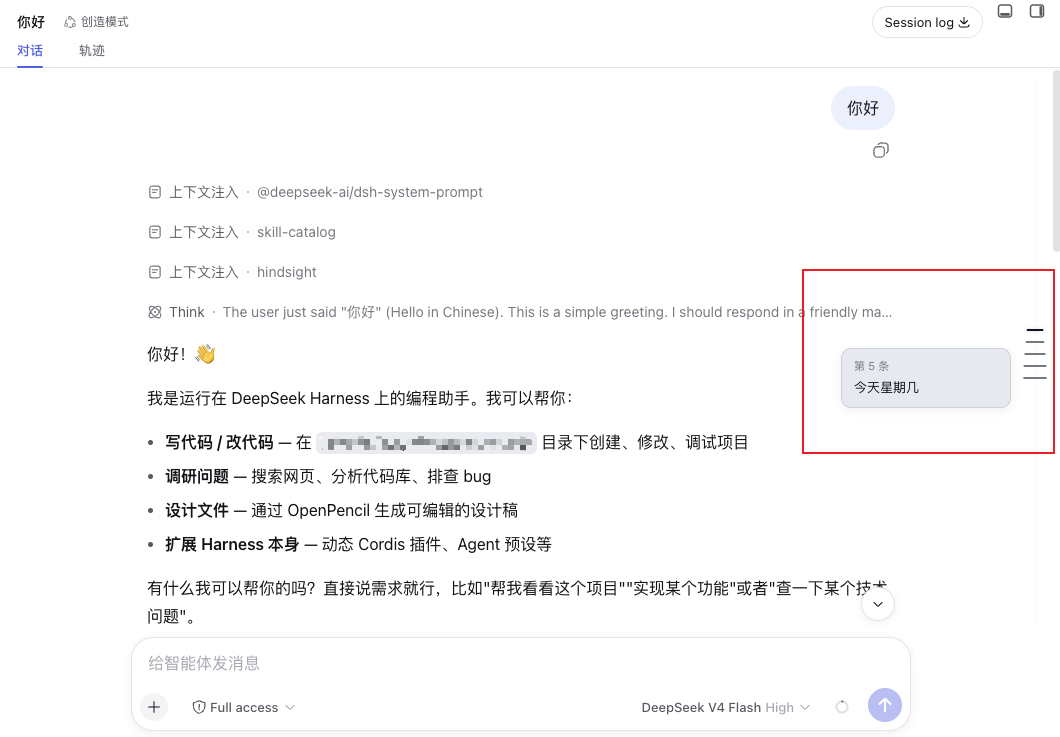
Features
- Evenly spaced ticks — one short horizontal line per user message along a 1px track, with a fixed 12px gap; long histories scroll inside the rail instead of compressing the marks.
- Centered marks — each horizontal tick is centered on the vertical rail, keeping the timeline axis visually balanced.
- Complete-history loading — after the session opens, the rail automatically loads earlier history pages in series until no pages remain, and adds ticks as each page arrives.
- Click to jump — aligns the selected user message to the top of the visible message area.
- Hover to preview — a compact wide card shows the user message (
#N) in bold, clamped to 2 lines, followed by the assistant reply clamped to 3 lines; image/attachment-only messages get a labelled placeholder. - Theme aware — colors come from
--dsw-*tokens, so it follows the light/dark theme with no extra config. - Slim and out of the way — pointer-events are none except on the ticks themselves; the rail never blocks clicks on the messages.
How it works
DSH's web GUI is a Cordis composition. This package is a client plugin that registers a single entry into the conversation.input.dock slot (the additive band above the composer card). It reads the live ConversationSnapshot through the slot's useSession hook, maps each durable kind: 'user' node to a tick, and measures the scrollport ([data-conversation-scroll], [data-composer-seat]) to lay the rail out on the left edge. On mount it uses the scoped conversation service's loadOlder() action to fetch earlier pages automatically until the session history is complete; each returned page adds ticks immediately. It defines no new service.
Positioning is computed against the same stable data attributes the product itself uses ([data-conversation-scroll], [data-chat-flow], [data-chat-anchor-key], [data-composer-seat]). The rail is constrained to the visible conversation area, and its empty gutter is pointer-transparent so it does not block conversation or Session Log scrolling. Long histories use an independent rail scrollport; scrolling the rail does not scroll the conversation.
Install
Requires a DeepSeek Harness deployment with the browser client — that is the desktop app (Web UI embedded) or the web version alike. The rail is pure presentation; it renders only where the conversation composer exists.
pnpm add @lcthe/dsh-timeline-rail
Then add the plugin row to your cordis.yml at the same include level as the bundle rows:
- insert:
    - id: dsh-timeline-rail
      name: '@lcthe/dsh-timeline-rail'
Full wiring details live in INSTALL.cordis.yml.md.
Alternative: load in-session as a dynamic plugin
DSH web also ships a first-class dynamic-Cordis tool. If you are in a session and just want to try it, ask the agent to load the plugin (it can cordis_define + cordis_run this package). This is the recommendable route for quick evaluation; the npm package is the stable, shareable form.
Peer dependencies
| package | range |
|---|---|
@deepseek-ai/cordis |
>=4.0.1-rc.1 |
@deepseek-ai/dsh-client-locale |
^0.0.1-rc.1 |
@deepseek-ai/dsh-client-runtime |
^0.0.1-rc.1 |
@deepseek-ai/dsh-client-ui-conversation |
^0.0.1-rc.1 |
@deepseek-ai/dsh-client-ui-slots |
^0.0.1-rc.1 |
react / react-dom |
^18.2.0 |
Development
pnpm install
pnpm run build     # typecheck (tsc) + bundle (tsdown) -> lib/
lib/index.js,lib/invariant.js— node-half ESM for the Host Loader.lib/client.js— the browser bundle in DSH's__ModuleLoader__.load({ id, factory })closure format, with CSS modules inlined and auto-injecting a<style data-plugin>.lib/types/**— emitted TypeScript declarations.
Known limitations and deferred work
- The rail renders only in the web client; headless/TUI profiles have no composer slot, so nothing shows there.
- Ticks are evenly spaced (one per user message) at a fixed 12px gap. Long histories make the rail content independently scrollable rather than compressing the gap; the ticks still do not represent each message's true scroll position. A real-position "minimap" mode is a natural follow-up.
- Message previews clamp the user message to 2 lines and the assistant reply to 3 lines; longer text is truncated without an affordance to expand in the rail itself (clicking the tick already jumps you to the full message).
- The plugin targets the slot contract as of the
0.0.1-rc.1release line of the Harness client packages. If theconversation.input.dockcontract changes in a later RC, this package may need a bump.
License
Comments
Comments live in GitHub Discussions. Sign in with GitHub to post or react.