
Install
Inside DeepSeek Harness, with dsh-market
dsh plugin --profile web add dshmarket
Or from the command line
dsh plugin --profile web add github:jaikensai888/dsh-drawio
Installing runs third-party code with your own permissions — it can read your files, use your credentials and reach the network. Review the source first, and pin a commit (github:owner/repo#sha) when you can.
README
This plugin publishes its README in Chinese only.
在 DSH Web GUI 的侧边栏里直接画 draw.io 图。

说明
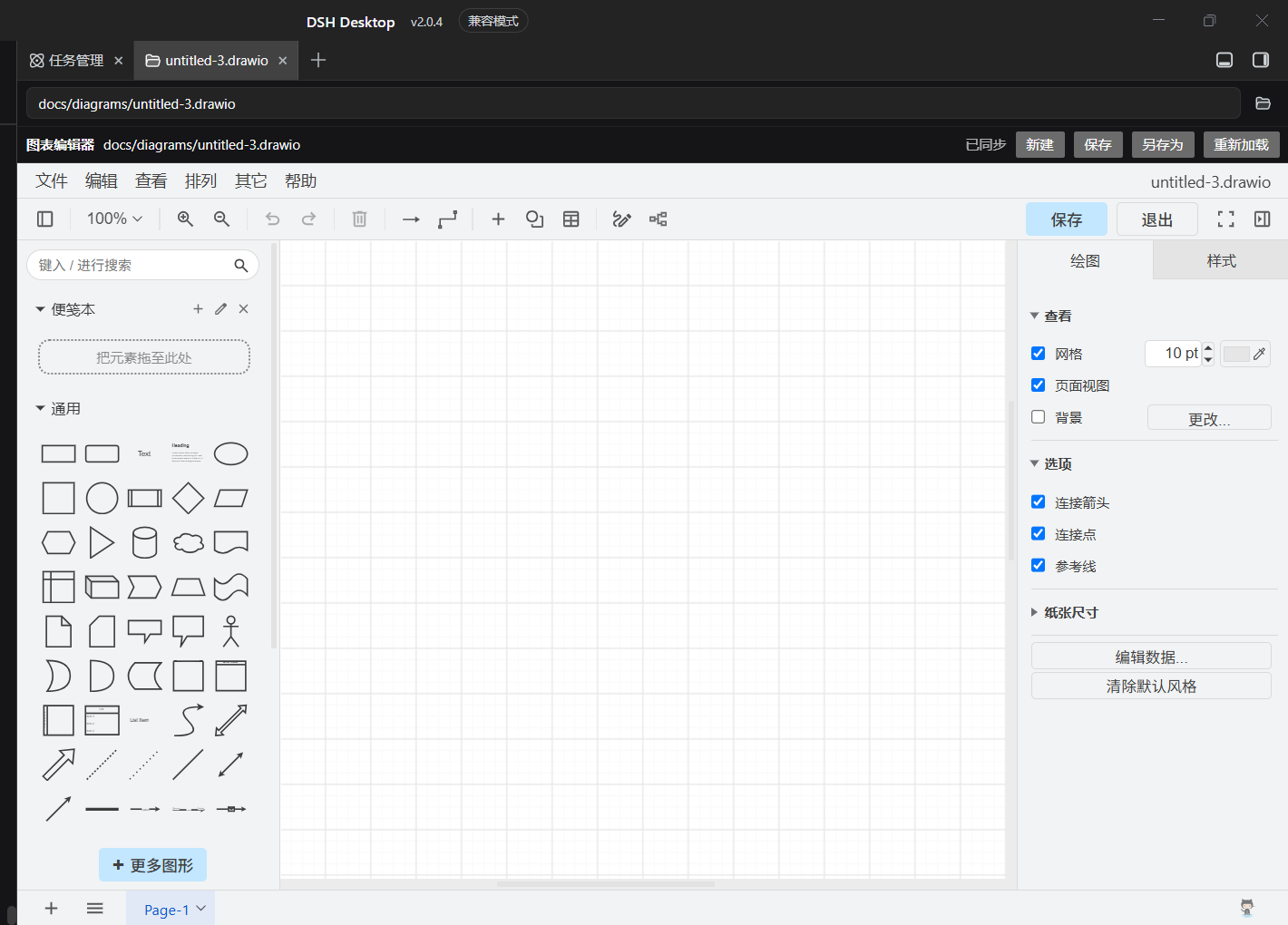
- 侧边栏点开工作区里的
.drawio文件,就是一个真正的 draw.io 画布(形状面板、格式面板、连线都在)。 - 图纸就是工作区里的普通文件,能进 git、能被别的工具读写;新建默认落在
<工作区>/docs/diagrams/。 - 编辑器自托管:首次使用时下载并校验官方资源包到
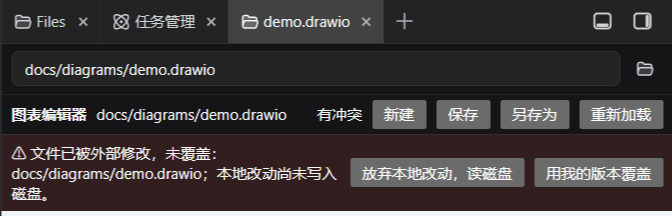
~/.dsh(约 51 MB),之后完全离线。 - 改动自动保存;文件在编辑器之外被改过时会拒绝覆盖并让你选,不会静默吞掉别人的改动。
- 明暗跟随 DSH:设置里选浅色/深色/跟随系统,画布立刻跟着变,不重载编辑器(见下方「深色模式」)。
- 不给模型任何工具,这是给人用的编辑器。
安装
cd $env:USERPROFILE\.dsh
dsh plugin --profile desktop add "github:jaikensai888/dsh-drawio#v0.1.4"
然后完全退出并重启 DSH Desktop(关窗口不算),再在浏览器里 Ctrl+Shift+R。
卸载:
cd $env:USERPROFILE\.dsh
dsh plugin --profile desktop remove dsh-drawio
要求:DSH Desktop 2.0.4+、dsh-better-sidebar 0.17.1+;首次使用需要联网,之后离线可用。
想调图纸目录、编辑器地址等参数,写在 profile 的 cordis.patch.yml 里(键与默认值见 src/config.ts)。
升级 DSH Desktop 之后「画布」不见了?
升级 App 会换掉它内部的 @deepseek-ai/dsh-client-modules,而那个服务是用
require.resolve('<包名>/package.json') 去定位每个插件的客户端清单的。所以只要
package.json 的 exports 没有导出 "./package.json",客户端那一行会被静默丢弃:
host 半照常在跑、/drawio/ping 也回 200,但左栏没有「画布」,.drawio 还会掉回代码预览器。
v0.1.4 已修掉这个坑(exports 补了 "./package.json",并加了回归测试)。一条命令就能分辨现状
(端口就是 GUI 的端口,不需要凭据):
curl.exe -s http://127.0.0.1:<GUI 端口>/drawio/ping
| 返回 | 含义 | 怎么办 |
|---|---|---|
| 连不上 / 404 | host 半没挂上,插件已不在 profile 里 | 按上面「安装」重装一次 |
"clientHalf":{"row":false,"bundle":null} |
客户端清单没被找到(就是这个坑) | 升级到 v0.1.4+:先 remove 再 add |
"clientHalf":{"row":true,...} |
客户端半在页面里 | 刷新页面(Ctrl+Shift+R) |
clientHalf 是 v0.1.4 起 /drawio/ping 的一部分:以后任何一次升级只要「画布消失了」,
先看这一个字段就知道是 host 行没了、清单没被认出来,还是只是页面没刷新。
使用
打开图纸 —— 在侧边栏文件树里点任意 .drawio,它就在编辑器标签页里打开:
新建图纸 —— 三个入口任选:
- 左栏底部、设置上方的「画布」按钮(侧栏收起时和设置一样只剩图标; 一张图纸都没有的新工作区里,这是唯一入口);
- 编辑器工具栏的「新建」;
- 在编辑器里打开一个不存在的路径时,面板会问你要不要在该路径创建。
保存 —— 自动的。工具栏右侧显示 已同步 / 未保存 / 保存中… / 已保存 / 有冲突。
出现冲突条,说明文件被编辑器以外的东西改过;面板提供「放弃本地改动,读磁盘」和「用我的版本覆盖」,
由你决定,插件不会替你选:
面板太窄 —— draw.io 会自己收起形状/格式面板。把编辑器标签页拖到主会话区域, 它会变成可移动、可缩放的悬浮窗口;拖回侧边栏即停靠。
深色模式 —— 默认跟着 DSH 走:设置 →「通用」里选 浅色 / 深色 / 跟随系统,
编辑器打开时用当前那一种;之后在设置里一改,画布立即切换,不会重载 iframe,
画布上还没保存的东西不会丢。
想固定一种,写在 profile 的 cordis.patch.yml 里:
- id: drawio
  config:
    darkMode: dark      # follow(默认) | light | dark
darkMode: dark/light→ 钉死这一种,不再跟随 DSH。uiTheme: dark→ drawio 自带的深色外壳主题;它本身就等于深色,所以会把darkMode一并钉成dark,避免出现深色外壳 + 浅色画布这种半深色状态。- 两者都改不动
editorUrl指向的外部编辑器:那是别人家的页面,插件不下发任何参数。
许可 MIT。drawio 编辑器资源来自 jgraph/drawio(Apache-2.0),
由本插件在运行时下载到本机,不在本仓库分发。
实现细节与踩坑记录见 docs/PLAN.md 和 docs/GROUND-TRUTH.md。
Comments
Comments live in GitHub Discussions. Sign in with GitHub to post or react.