
Install
Inside DeepSeek Harness, with dsh-market
dsh plugin --profile web add dshmarket
Or from the command line
dsh plugin --profile web add "https://github.com/itchenshi/dsh-keys-setting/releases/download/v0.2.0/dsh-keys-setting-0.2.0.tgz"
Installing runs third-party code with your own permissions — it can read your files, use your credentials and reach the network. Review the source first, and pin a commit (github:owner/repo#sha) when you can.
Screenshots
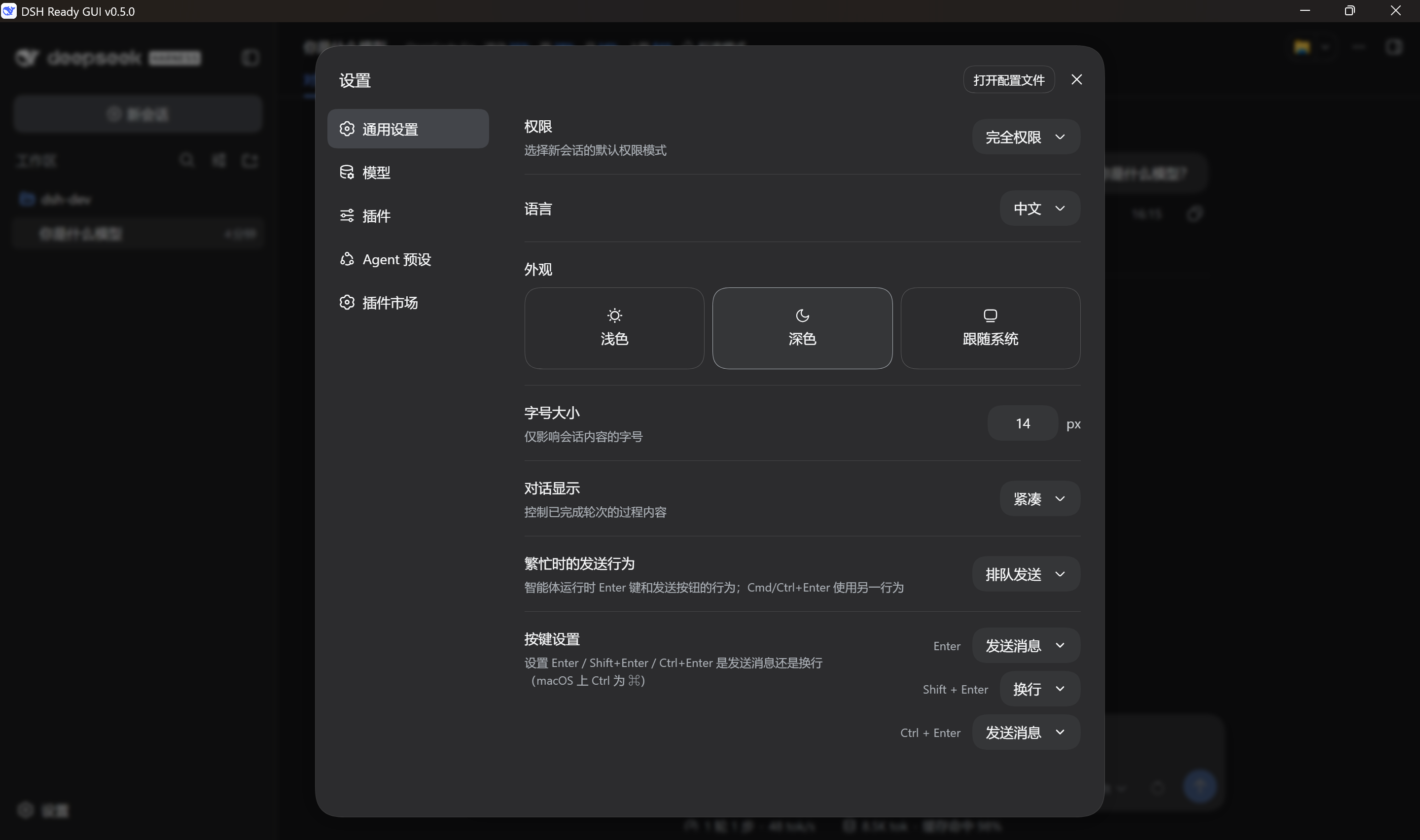
README
One of the plugins bundled with DSH Ready GUI — the GUI ships all four, ready to tick. Each one also installs standalone into any DSH host (see "Install and go" below). GUI: https://github.com/itchenshi/dsh-ready-gui
Configure the composer's shortcut keys in DSH Settings → General: Enter / Shift+Enter / Ctrl+Enter (⌘ on macOS) each set to "send message" or "newline".
Settings → General
  ┌────────────────────────────────────────────────────────────┐
  │ Key bindings                                               │
  │ Set what Enter / Shift+Enter / Ctrl+Enter do               │
  │                                  Enter        [Send    ▾]  │
  │                                  Shift+Enter  [Newline ▾]  │
  │                                  Ctrl+Enter   [Send    ▾]  │
  └────────────────────────────────────────────────────────────┘
Install and go
Using DSH Ready GUI (recommended): the plugin ships inside the GUI. Open the GUI → Settings → Third-party plugins → tick Key bindings, then restart the engine and refresh the page as prompted (it has a page half). The row then appears at the bottom of Settings → General.
Any other DSH host (
dsh web, the CLI) — either route works:# Recommended: install straight from GitHub (recorded in your profile, updatable) dsh plugin --profile web add github:itchenshi/dsh-keys-setting # Fallback: install the release tarball (use this if github.com is unreachable for you) dsh plugin --profile web add https://github.com/itchenshi/dsh-keys-setting/releases/download/v0.2.0/dsh-keys-setting-0.2.0.tgzBoth land the full repository contents (including
cordis.patch.yml); no extra configuration is needed afterwards.
Not on npm yet: sign-up is unreachable (
www.npmjs.comanswers with a Cloudflare challenge), so nothing can be published. Use one of the two routes above; publishing resumes once sign-up works.
Doing nothing keeps the engine's native behaviour, so installing it changes no habit:
| Gesture | Engine native | Plugin default |
|---|---|---|
Enter |
send | send |
Shift+Enter |
newline | newline |
Ctrl/Cmd+Enter |
send | send |
It only intercepts when your choice differs from the engine's native behaviour, so with untouched
defaults the plugin intervenes exactly zero times.
(Ctrl+Shift+Enter folds into the Shift gesture — the engine's key map matches the Shift rule first.)
How it works (the essentials)
- Remaps only, never touches content: it listens for
keydownon the composer in the capture phase and, on a match, callspreventDefaultand re-dispatches the engine's other gesture (a syntheticShift+EnterorEnter). Whether that means newline or send stays the engine's decision. - Composer detection uses the engine's semantic attribute
data-composer-input="true"(not hashed class names, and not "any contenteditable"), so it cannot hit an editor owned by a sidebar plugin. - Never interferes with IMEs: events with
isComposingorkeyCode === 229pass straight through. Alt+Enteralways passes through (that is the engine's own accelerator).
Synthetic (
isTrusted: false) keyboard events really do drive the engine's composer — verified against a live page over CDP: a trusted Shift+Enter and a synthetic one produced identical DOM changes (inserting<br data-lexical-managed-linebreak="true">), and a synthetic Enter actually submitted the message.
Configuration
The preference lives in the composer-keys section of $DSH_HOME/settings.yaml and can be edited by
hand:
composer-keys:
  enter: newline       # Enter inserts a newline
  shiftEnter: newline  # Shift+Enter inserts a newline (default)
  ctrlEnter: send      # Ctrl+Enter sends (default)
After a hand edit, refocus the Harness window and it applies (the plugin re-reads on window focus) — no page refresh needed. Changes made in the settings window apply immediately.
The plugin row's switch (in the cordis.patch.yml row config):
- insert:
    - id: composer-keys        # the row id is decoupled from the package name, on purpose
      name: dsh-keys-setting
      config:
        enabled: true          # false: nothing loads (no route, no settings row)
The package name changed (
dsh-composer-keys→dsh-keys-setting, because the old name is taken on npm), but the row id and settings namespace staycomposer-keyson purpose: the patch layer's disabled row, the market'sstate.jsonswitch and your saved key bindings insettings.yamlare all recorded under that name, and a rename should not invalidate them.
Permissions and boundaries (for marketplaces that scan statically)
- Runtime dependency:
schemastery(a pure-JS schema library — no native artifacts, no install scripts). The host half uses it to register this plugin's namespace schema with the engine's settings service. It is the only entry underdependencies. - Files: the plugin reads and writes none directly. The preference reaches
$DSH_HOME/settings.yamlthrough the engine's own settings service; there is nonode:fsin the source. A reported "files signal" comes from that indirect write (and from the comments mentioningsettings.yaml), not from direct disk I/O. - Local routes: one. The host registers
GET/POST /composer-keysfor the page half to read and write the preference — the page cannot reach a plugin-private settings namespace (the settings RPC domain serves fixed namespaces only), so this is the only channel. It goes through the engine's trust fence (Host allow-list + browser session cookie) and fails closed; a barecurlgets401. - Outbound network: none. The page half's
fetchonly calls that same-origin route. - Credentials / commands / native artifacts / lifecycle scripts: none.
- Failure boundary: if the route or the settings service is unavailable the keyboard engine still
works (only persistence or the settings entry is lost) — a degradation, not a crash. Uninstalling
leaves the
composer-keyssection insettings.yaml, and reinstalling restores the old values.
Two halves
| Half | File | Runs in | Responsibility |
|---|---|---|---|
| Host | lib/index.js |
Node | Registers the composer-keys namespace through the engine's settings service (values land in settings.yaml and follow the data directory) and exposes GET/POST /composer-keys |
| Page | client/client.js |
Browser | Registers the Settings → General row and performs the capture-phase key remap |
Why the host half is needed: the page is served from a random port that changes on every launch (the
shell uses dsh web --port 0), so browser storage is a different origin each time and cannot persist
anything — while the engine's settings document is exactly where persistence belongs, and it travels
with the data directory. The page half cannot reach a plugin-owned settings namespace, so the host route
relays it, the same way third-party sidebar plugins store their own preferences.
The settings row follows the General page's other rows declaration by declaration: typography, colours,
spacing, and the selector (also a <button> pill + arrow SVG + popover rather than a native
<select>). Every colour comes from engine theme variables, so light and dark follow automatically.
Measured inside the real settings dialog, the pill's height / radius / background / padding / font size /
line height / gap / colour are all 8 equal to the "conversation display" control's.
Development
node --check lib/index.js
node --check client/client.js
npm test        # local behaviour tests (no network, no engine, no DOM)
tests/test.mjs covers gesture recognition (including Ctrl+Shift folding and Alt pass-through), the
intervention decision for three gestures × two actions, IME pass-through, malformed preference values
never intervening, and the key property that defaults never intervene.
License
MIT
Comments
Comments live in GitHub Discussions. Sign in with GitHub to post or react.