
Install
Inside DeepSeek Harness, with dsh-market
dsh plugin --profile web add dshmarket
Or from the command line
dsh plugin --profile web add dsh-remote-dsh
Installing runs third-party code with your own permissions — it can read your files, use your credentials and reach the network. Review the source first, and pin a commit (github:owner/repo#sha) when you can.
Screenshots
README
English | 中文
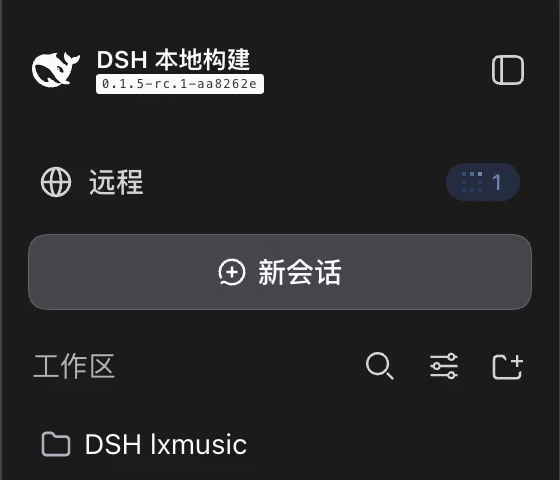
A DeepSeek Harness (DSH) plugin. It adds a 「Remote」 row at the top of the sidebar; clicking it turns the whole page into another host's DSH Web GUI. The row also carries a session-state dot for that remote — blue while it is running something, green when activity arrived since you last looked.
┌────────────┬──────────────────────────────────┐
│ DSH        │                                  │
│ 🌐 Remote ●1│                                  │
│ + New chat │      another host's DSH          │
│ sessions…  │      (the whole page is it)      │
└────────────┴──────────────────────────────────┘
Here is what it actually looks like. The top row of the sidebar — the blue pill is the remote's state dot (here the remote is running something, and the number is its session count):

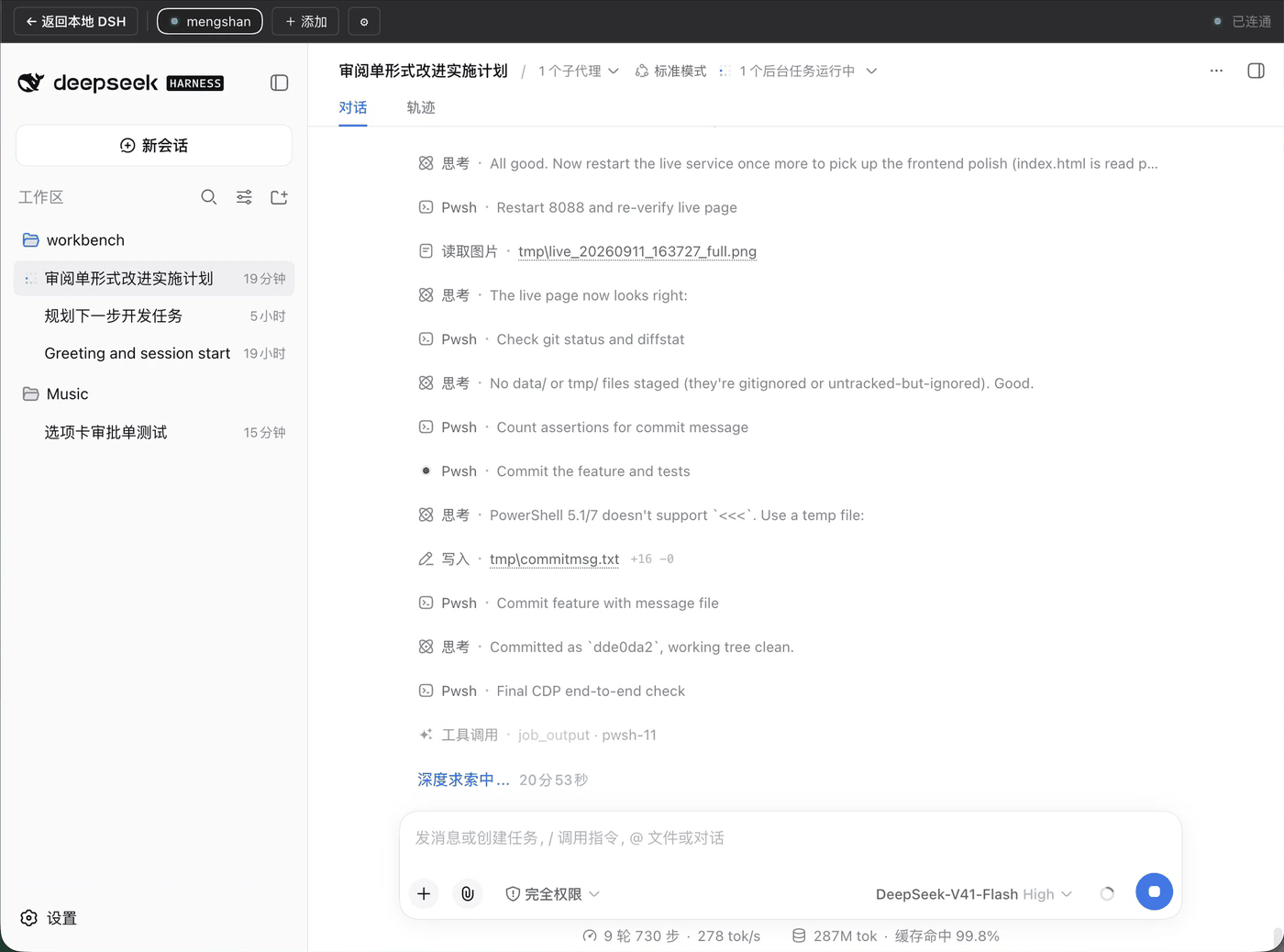
After you open it, the whole page is the remote machine's DSH: the top bar belongs to the plugin (back / hosts / add / settings / connection state), and everything under it is its GUI — including its sidebar:

Install
dsh plugin --profile web add dsh-remote-dsh
Then restart DSH once. To track main instead, use github:hutao562/dsh-remote-dsh — same thing.
Use
- Install DSH on the other host and run
dsh webthere (it prints a URL carrying?token=). - Map it to a loopback port on this machine:
ssh -L 3081:127.0.0.1:3080 you@remote-host - In the sidebar click 「Remote」 → 「+ Add」 → address
http://127.0.0.1:3081. - Click 「⚙」 to expand the settings row, paste the token the remote
dsh webprinted → 「Pair」.
After that you go straight in as long as the cookie has not expired (30 days by default). The cookie survives a remote restart; the token is generated per process, so re-pairing needs the current one.
One hard rule: it must be a loopback port
The remote DSH's session cookie is HttpOnly; SameSite=Strict, so a cross-site iframe cannot even fetch its index.html — straight to 401:
| Remote address in the browser | Result |
|---|---|
http://127.0.0.1:<port> (ssh -L, or frpc stcp / xtcp + visitor) |
✅ works |
https://remote.example.com (frps http/tcp public domain) |
❌ 401 |
http://100.x.y.z:3080 (Tailscale IP, direct) |
❌ 403 + 401 |
Even with FRP, use stcp/xtcp + frpc visitor mode to map it to a local loopback port. That way the controlled host needs no configuration change at all.
The reasons, the consequences, and what to do if you genuinely need a public domain → docs/why-loopback.md
The status dot on the rail
| Colour | Meaning | When it clears |
|---|---|---|
| Amber | The remote has a session blocked waiting on you (approval / question / plan review) | When you answer it over there |
| Blue | The remote is running something (including subagents) | When it finishes |
| Green | Since you last opened the remote view, a session finished a turn | Opening the remote clears it |
| Red | Unreachable (that remote has no peer installed) | When it recovers |
Colours and shapes are taken from the remote sidebar's own state dots — blue is that 8-cell chasing animation from the session list, not a new circle drawn from scratch.
When the row is expanded, the state is a count pill (a dot plus a number) at the far right of the row, on the same vertical line as the timestamps of the session rows. When the sidebar is collapsed to a rail there is no room for text, so the dot hangs off the top-right of the icon and the count lives in the tooltip.
The word 「Remote」 is rendered by the shell; the plugin only sets three things through :has() — UI font family, 14px, weight 500 — so it speaks in the same voice as 「New chat」 (14/500) instead of looking like a paragraph of body text. order: 1 puts the pill after the text, so the text returns to the text column and the pill lands at the end of the row.
Amber is the only state that "does not go away when you look at it" — it is a block, not a notification. Click into the remote view and you will see the approval box or question they are waiting on; answering it puts it out.
The green dot counts by session: a session that was both prompted and just finished still counts as one.
For the status dot to work, the controlled host must also install this plugin and run it in the peer role. It publishes anonymous counts only (no session ids, titles, or content), and it needs no credentials at all — that is its key advantage over "save the token locally".
Role configuration, why it does not compare clocks, and the one place the fence is relaxed → docs/peer-status-badge.md
What the controlled host still has to configure
A machine that is accessed remotely is easily judged by DSH to be a "local workstation", at which point several features aimed at its own desktop turn on: folder dialogs pop up on its screen, Open In launches programs over there, a browser pops up on its desktop on every start… Turn these off on the controlled host, or you will just be staring at a white screen and a 401 guessing.
A ready-to-copy checklist (five groups of settings, with the reason and a way to verify each) → docs/remote-host-setup.md
Files
lib/index.js |
Node half: host registry, the /api/remote-dsh routes, the loopback fence, liveness probing |
lib/client.js |
Browser half: a hand-written __ModuleLoader__ bundle registering three official slots |
cordis.patch.yml |
The bundle layer's insert row (applied by dsh plugin add) |
docs/ |
The deeper write-ups linked above |
.verify/host-pending.mjs |
Node-half self-check: pending bookkeeping and attribution |
.verify/client-smoke.mjs |
Browser-half smoke test |
There is no build step — lib/ is the source, and edits take effect as-is.
Development
npm install
npm test          # 112 assertions
npm run test:host   # Node half only: waterfall bookkeeping, resolve / reject / synchronous throw, subagent attribution
npm run test:client # Browser half only: module-loader contract + real React rendering + real jsdom clicks
To edit in a source checkout and have the local DSH pick it up immediately (the first insert hot-loads, no restart needed) → docs/implementation.md
Known limitations
- Amber only appears when the controlled host runs peer v4 or later. Older peers do not report
pending; they do not turn red because of it, but they will not produce amber either. - Taking over covers the local sidebar; you go back with the top-bar button, and Esc stops working once focus is inside the iframe.
- Editing
lib/index.jsrequires restarting DSH; a change tolib/client.jsonly needs a page refresh. - It is built "to be used", not for agent integration — the remote host is not exposed as a model tool.
The remaining trade-offs and implementation details → docs/implementation.md
Comments
Comments live in GitHub Discussions. Sign in with GitHub to post or react.