
Install
Inside DeepSeek Harness, with dsh-market
dsh plugin --profile web add dshmarket
Or from the command line
dsh plugin --profile web add @hr98w/dsh-memory
Installing runs third-party code with your own permissions — it can read your files, use your credentials and reach the network. Review the source first, and pin a commit (github:owner/repo#sha) when you can.
README
Design inspiration · Capabilities · Installation · Getting started · Evaluation · Data and privacy · Documentation
Memory that carries forward
Once a Session ends, an Agent can easily lose user preferences, project constraints, and lessons that were already verified. dsh-memory keeps this long-term information in readable Markdown files on the user's machine. Later requests receive only Global memory and the current Workspace index.
It does not require an external memory database or dedicated memory service, nor does it put every historical conversation back into context. The Agent sees a small index first and uses DSH's existing file tools to open only the relevant detailed memories.
Evaluation
The repository includes a LoCoMo-10 benchmark isolated from the published plugin code. It compares plain DSH, online memory only, and online memory plus Session consolidation. The benchmark guide provides copyable commands, environment variables, Judge, and Score steps for conv-26 or all 10 samples, together with a self-contained interactive results report.
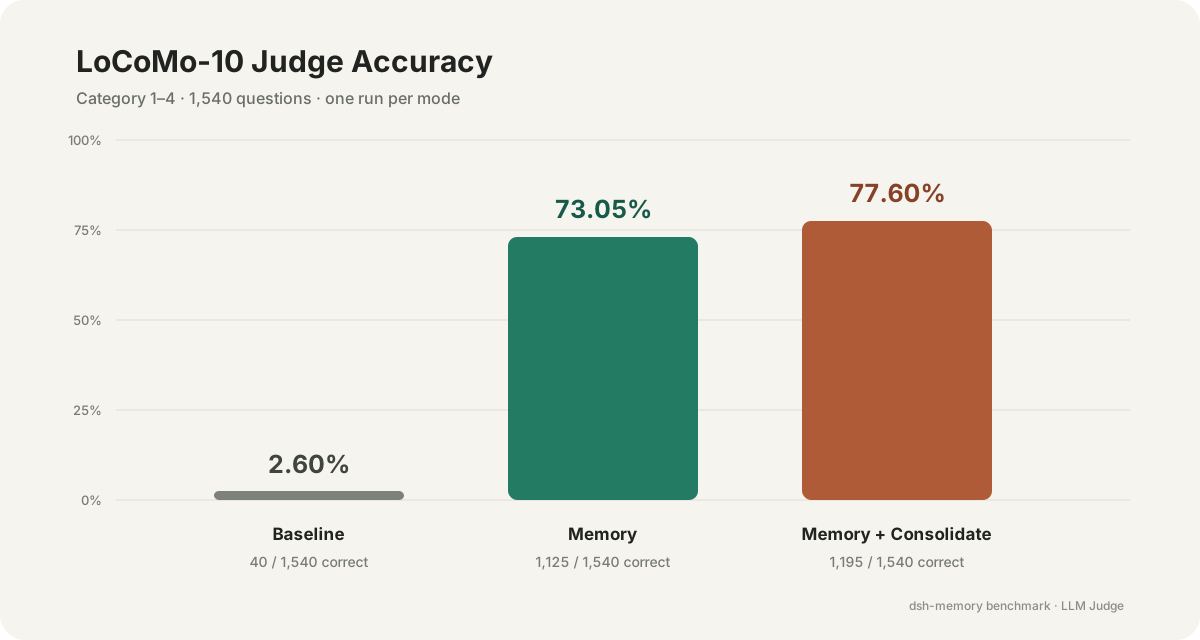
In the retained results, Baseline scored 2.60%, Memory scored 73.05%, and Memory + Consolidate scored 77.60%. See the interactive report for complete results, experiment limitations, and per-question answers.
Baseline receives no conversation history; both memory modes read history to form memories first. Each mode has one complete result set, not an average of repeated independent experiments. This is not a comparison against full-context answering or other memory systems. The experiment retrospective covers the setup, observations, and limitations (in Chinese).
Design inspiration: Claude Code × Codex
Instead of introducing a vector database or a separate memory service, dsh-memory combines two simple mechanisms already used by coding agents:
| Inspiration | Borrowed idea | dsh-memory implementation |
|---|---|---|
| Claude Code | Use a concise MEMORY.md as an index and let the Agent read detailed Markdown on demand |
Automatically provide Global memory and the current Workspace index, then progressively disclose details through DSH file tools |
| Codex | Extract and consolidate reusable memory from eligible historical Sessions | Select finished, stable DSH Sessions and let a dedicated, constrained consolidation Agent propose memory changes |
dsh-memory brings these ideas together: memories are layered in Markdown and disclosed on demand, while reusable information is continually distilled from historical Sessions.
Core capabilities
| Capability | Description |
|---|---|
| Local Markdown | Authoritative memory lives under $DSH_HOME/memory and can be read or backed up directly |
| Global / Workspace isolation | Global stores cross-project preferences; project facts stay in the current Workspace |
| Claude Code-style progressive disclosure | Global memory and the current Workspace index are provided first; detailed Markdown is opened only when relevant |
| Safe writes | The Agent and Web UI use the same write path and refuse to overwrite concurrent changes |
| Codex-style Session consolidation | Evidence is selected from finished, stable historical Sessions before a dedicated consolidation Agent updates Global and source-Workspace memory |
| Observability | Every review keeps a result record; optional Debug logs capture stages and error chains without copying conversation bodies or credentials |
| Bilingual UI | The Memory pages follow the Chinese or English locale selected by DSH Web |
How it works
Agent request
  └─ Global memory + current Workspace MEMORY.md
       └─ Agent searches detailed Markdown on demand

Finished DSH Session
  └─ User starts consolidation
       └─ Dedicated consolidation Agent can iteratively review and propose Global / source-Workspace changes
            └─ Host validates evidence, memory scope, and data versions
                 └─ MemoryStore writes atomically and records the result
The model only proposes memory changes. Deterministic Host code owns memory scope resolution, content validation, version checks, and the final write.
Interface
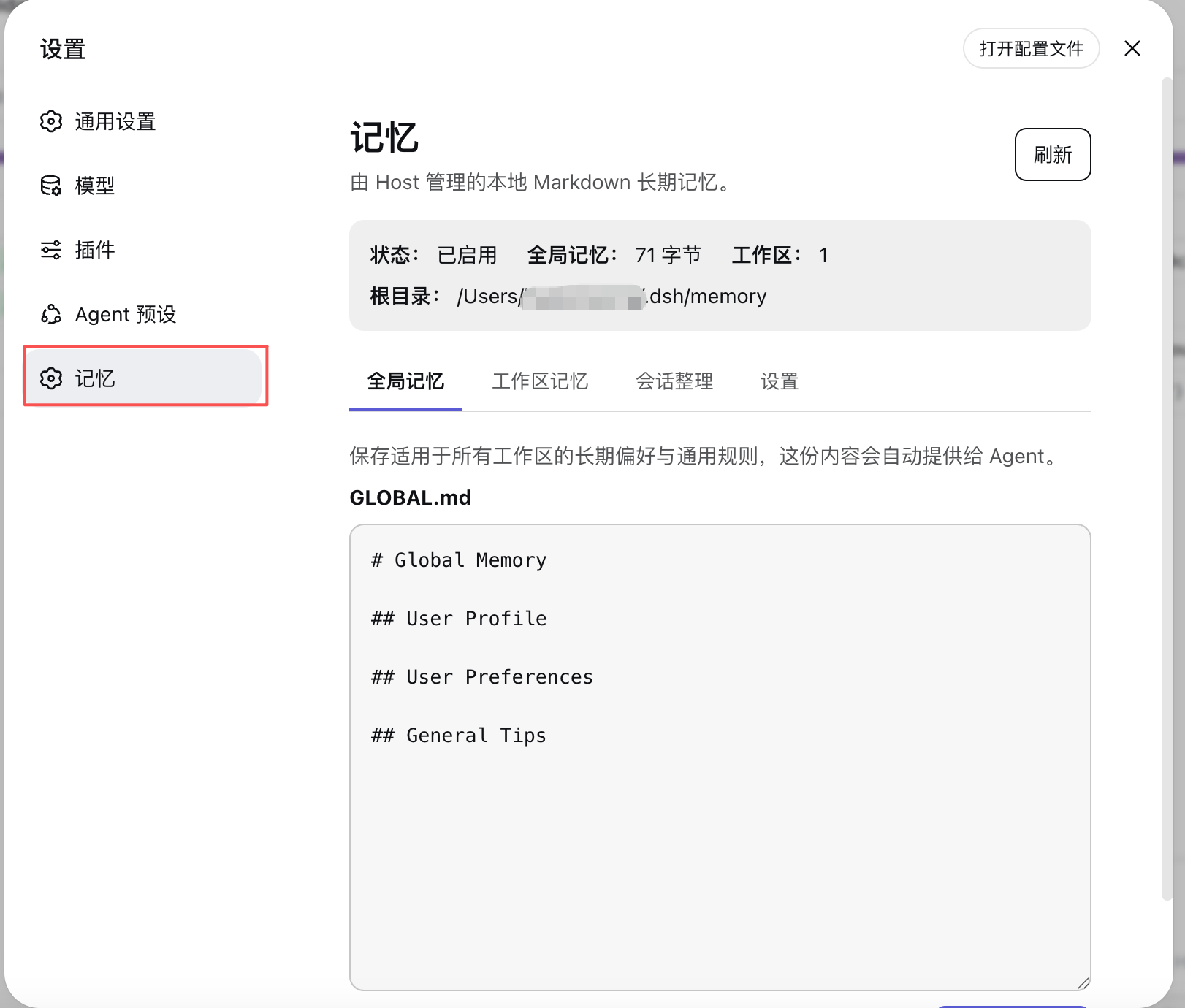
Memory appears as a dedicated section in DSH Settings:
| Page | Purpose |
|---|---|
| Global Memory | Read and edit GLOBAL.md, which is available across Workspaces |
| Workspace Memory | Browse, create, update, and delete project-specific memories |
| Session Consolidation | Browse stable Sessions by Workspace, run a review, and inspect the latest result |
| Settings | Select an active DSH text model for consolidation and optionally enable Debug logs |
Installation
Requirements
- DeepSeek Harness installed and a working
dsh webcommand. - Building from source also requires Node.js
^22.19.0 || >=24.0.0and pnpm.
Install from npm
Install from npm:
dsh plugin --profile web add @hr98w/dsh-memory
Restart dsh web completely after installation.
The plugin adapts to the newer DSH Web RPC and Session persistence APIs. Restart Web after updating the plugin; refreshing the page alone is not enough.
Install from source
After cloning the repository, run these commands from its root:
pnpm install
pnpm run build
dsh plugin --profile web add .
Then restart dsh web completely. Bundle composition and the Host ESM entry are loaded at process startup; refreshing the Browser does not apply Host code changes.
Getting started
Try cross-session memory in a test Workspace: tell the Agent, “Remember: this project's release checklist is called Pinecone. Before each release, remind me to check the rollback plan.” After memory_update succeeds, start a new Session in the same Workspace and ask, “What are this project's release conventions?” Check the answer and the Markdown record under Workspace Memory. Keep this project-specific convention out of Global.
Online memory uses the current Agent's model; the separate model setting below is only for manual Session consolidation.
- Configure and activate at least one text model in DSH Models. API keys remain under DSH ownership.
- Open Settings → Memory → Settings and select the provider/model used for Session consolidation.
- Use Global Memory for cross-project preferences and Workspace Memory for project facts and constraints.
- Select a finished, stable Session under Session Consolidation and start a review.
- Inspect the result. If troubleshooting is necessary, enable Debug in Settings before running another attempt.
Data and privacy
Default layout:
$DSH_HOME/memory/
├── GLOBAL.md
├── settings.yml
├── consolidator-workspace/             # dedicated cwd for internal review Sessions
├── debug/<review-id>/attempt-<n>.jsonl # written only when Debug is enabled
├── reviews/<review-id>.md
└── workspaces/<workspace-key>/
    ├── MEMORY.md                        # generated index
    └── <memory-name>.md                 # authoritative detailed memory
- Web management APIs are available only to the local machine;
- Web memory-write requests never submit a memory root, absolute path, cwd, or internal Workspace key; the header shows the Host-reported local memory root for diagnostics only;
- Debug is off by default and does not record conversation evidence, memory/model proposal bodies, or API keys;
MEMORY.mdis a rebuildable index; detailed Markdown files are authoritative Workspace data.
Concurrency protection currently applies within one MemoryStore instance. Use one DSH writer process per $DSH_HOME; independent processes writing concurrently to the same directory can still overwrite each other's changes.
“Local-first” means that authoritative memory is stored locally; it does not mean that every model operation runs offline. Normal Agent requests send the visible memory context to that Agent's model. Manual Session consolidation sends filtered conversation content, Global memory, and current Workspace memories to the model provider selected in Settings. Enable these features only when the provider's privacy policy is appropriate for your data.
See SECURITY.md for vulnerability reporting.
Development and verification
pnpm run typecheck
pnpm run test
pnpm run build
pnpm run check
Run pnpm run check before submitting code. See docs/development.md for the verification matrix and manual checks, and CONTRIBUTING.md for the contribution workflow.
Documentation
- Architecture: implemented components and Host/Browser request flows;
- Design: stable product rules and v0.1 boundaries;
- Session consolidation: full flow, state machine, and data contracts;
- Roadmap: completed milestones and future directions;
- Development: commands, verification matrix, and release procedure;
- LoCoMo-10 benchmark: isolated runs, Judge, Score, and cost reporting;
- Decision records: non-trivial architecture, behavior, and protocol decisions.
The detailed engineering documents are currently maintained in Chinese. Contributions improving their English accessibility are welcome.
License
MIT © 2026 hr98w
Comments
Comments live in GitHub Discussions. Sign in with GitHub to post or react.