
Install
Inside DeepSeek Harness, with dsh-market
dsh plugin --profile web add dshmarket
Or from the command line
dsh plugin --profile web add "https://github.com/hoyyang/dsh-plan-board/releases/download/v0.2.1/dsh-external-dsh-plan-board-0.2.1.tgz"
Installing runs third-party code with your own permissions — it can read your files, use your credentials and reach the network. Review the source first, and pin a commit (github:owner/repo#sha) when you can.
Screenshots


README

Turns your project into a living task mind-map — and makes the agent actually follow it, blocking drift on the spot.
Plan → module → task tree, cross-branch dependency arrows, live topological order badges, an agent GPS station marker, a human-approval gate for plan edits, an evidence gate for "done", and hard tool-scope enforcement inside a DeepSeek Harness session.
中文 · Releases · Changelog · Design doc
Install
dsh plugin --profile web add github:hoyyang/dsh-plan-board
# build output is committed — no local build needed
Restart dsh web. A PlanBoard pill appears in the session header (left of the "⋯" menu). Open it and enter your project's absolute path.
dsh plugin --profile web remove @dsh-external/dsh-plan-board # uninstall
Requires dsh >= 0.1.5-rc.1. Zero configuration — no API key; all plan data lives inside your own project directory.
What it looks like
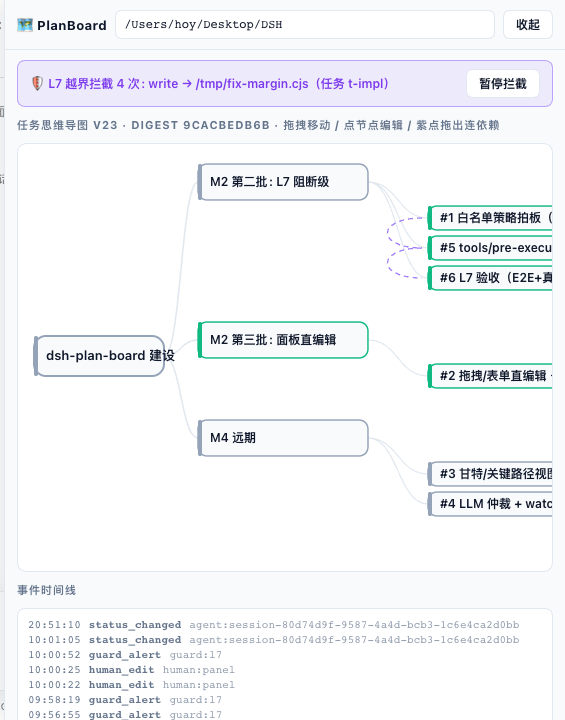
- Panel (561×720): plan → module → task tree; dashed violet lines are dependencies; the
#Nbadge is the topological execution order; green means done. The top banner is an L7 scope denial, the bottom is the live event timeline (status_changed/human_edit/guard_alert— everything leaves a trace). - Header button: rests as a 31×31 circle (left) and expands leftwards into a full pill on hover (right) — both states share the same 15.5px corner radius (= half the height), so the curvature never changes; the right edge stays pinned and the neighbouring "⋯" menu never moves.
The problem
Agents do not drift out of disobedience; they drift because there is no executable source of truth for the plan. The plan lives in the conversation and dies at the first context compaction; nobody knows which task is in flight; "done" comes with no evidence; plan edits leave no trace. dsh-plan-board materialises the plan as a file the agent must obey — <project>/.plan-board/plan.board.json.
Agent tools (5)
| Tool | What it does |
|---|---|
plan_map |
Read the board: module/task tree, deps, topological order, station, drift block, pending approvals |
plan_edit |
Change the board: structural edits go to a pending queue until a human approves them (L2) |
plan_next |
Issue the single next ready task (deps satisfied + priority), marking it doing (L1 single-issue lock) |
task_update |
Transitions planned/ready → doing → done/blocked; done requires evidence (L3); also closes modules |
plan_link |
Reconcile with ~/.ai project memory through ai-memory (push/pull) |
Seven anti-drift layers
| Layer | Mechanism | Default |
|---|---|---|
| L1 | Single-issue lock — only one doing task; plan_next refuses otherwise |
on |
| L2 | Human approval gate — plan_edit structural changes wait for a human click |
on |
| L3 | Evidence gate — done without evidence → EVIDENCE_REQUIRED |
on |
| L4 | Git cross-check — commits during a doing task that fall outside its scope raise drift |
on |
| L5 | Drift blocking — an unhandled drift alert blocks issuing until cleared | on |
| L6 | LLM arbitration + watchdog | M4, not scheduled |
| L7 | Tool observation + scope enforcement — write/edit outside the current task scope is denied on the spot; reads pass; bash/run_code are recorded only |
on (enforceScope: false downgrades) |
Features
- Mind-map panel — React + hand-rolled SVG horizontal tree, auto-grouped by module; wheel zoom (native non-passive listener, panel itself does not scroll), background panning, free node placement (
posis view state only, never linted). - Direct editing — click a node for an edit card (title / priority / note / acceptance / scope / deps), drag nodes, drag from the violet handle to rewire dependencies, add subtasks, delete nodes.
- Save gating — every panel change is a draft (banner shows "N unsaved changes"); only "Save" batch-posts
/editand records ahuman_editevent; "Discard" rolls everything back. Cycles are rejected client-side first and server-side by lint. Status is never edited in the panel. - Module dependencies really count (v0.2.0) — a dependency declared on a module bubbles down to its subtasks, so "big task 3 depends on big task 2" genuinely blocks task 3-1. A module completes when it is explicitly
doneor all of its tasks are done/canceled; empty modules never auto-complete; deadlocks that only appear after bubbling are rejected by lint. - Live updates —
/streamNDJSON push plus a 4s polling fallback for pending diffs, drift/deny banners and the event timeline. - Header button — rests as a 31×31 circle showing only the galaxy icon, and expands leftwards into a full pill on hover, keyboard focus or while the panel is open (same 15.5px radius in both states) (right edge pinned, neighbours glide out of the way). A status dot polls
GET /stateevery 15s (cyan = idle, amber = N in progress, red = drift/blocked, grey = unset); in the collapsed state the icon's halo colour carries that signal. Both themes,aria-pressed,focus-visible,prefers-reduced-motion. - Storage —
<project>/.plan-board/:plan.board.json(machine authority, optimisticversion+ SHA-256 digest),events.jsonl(append-only audit),ROADMAP.md(human-readable mirror), plusmemory.link.jsonfor the~/.aipointer. All committed to git.
Authority
.plan-board/plan.board.json is the single authority for plan and task state; ~/.ai is the authority for narrative memory. plan_link reconciles them; the plugin never writes canonical memory files directly.
Usage
- Agent side —
plan_mapfirst (after every new session or compaction),plan_nextto take exactly one task,task_updatewith evidence when done,plan_editfor plan changes,plan_link pushat milestones. - Human side — open the panel from the header button, enter the project root, then approve/reject pending edits, clear drift blocks, or pause L7 enforcement.
Boundaries (what it does not do)
- No Kanban view — the mind map is the primary form (by decision).
- Not an issue tracker: one board per project, no multi-user/permissions/notifications.
- Status is not editable in the panel — it must go through
task_update's evidence gate. - L7 v1 limits:
run_codedoing raw fs work, and shell redirections, bypass tool-level checks by design (recorded only). - Gantt/critical-path and LLM arbitration (M4) are not scheduled.
Development
npm install                      # local devDependencies (tsdown, …)
bash scripts/build.sh            # host: tsc → lib/
npm run build:client             # client: tsdown bundle of the panel
Commit lib/ together with source changes — GitHub installs rely on it.
Uninstall
dsh plugin --profile web remove @dsh-external/dsh-plan-board
Uninstalling never deletes your .plan-board/ data.
License
BSD-3-Clause
Comments
Comments live in GitHub Discussions. Sign in with GitHub to post or react.