
Install
Inside DeepSeek Harness, with dsh-market
dsh plugin --profile web add dshmarket
Or from the command line
dsh plugin --profile web add dsh-improve-prompt
Installing runs third-party code with your own permissions — it can read your files, use your credentials and reach the network. Review the source first, and pin a commit (github:owner/repo#sha) when you can.
README

The ✦ button in your composer rewrites the draft into a prompt an agent can actually act on — replaced in place, undoable, and guaranteed to lose nothing.
Install
dsh plugin --profile web add dsh-improve-prompt
# or straight from GitHub (prebuilt lib/ is committed — no local build needed)
dsh plugin --profile web add github:hoyyang/dsh-improve-prompt
Restart dsh web; a ✦ appears in the composer tool row, left of the submit action. Zero configuration — no API key; it uses the harness's own model service and credential store. Requires dsh >= 0.1.1-rc.2 (verified on 0.1.5-rc.1).
dsh plugin --profile web remove dsh-improve-prompt # uninstall
Core features
- One-click replace — click ✦ and 1–3 seconds later the draft is replaced with a sharper, agent-ready prompt. No preview dialog, no interruption.
- One-click undo — restore the original within 8 seconds; the moment you edit by hand the undo bar disappears, so your new input is never overwritten.
- Fidelity gate (the real difference) — it mechanically extracts the draft's hard facts (file paths, file names, identifiers, numbers and versions, URLs,
backtickedcode, @references) and verifies each one literally survived the rewrite. A missing fact triggers one repair call naming those exact strings; if the model still drops it, a deterministic re-append adds a "Preserved original details" block — zero loss. Every other enhancer in the ecosystem just asks the model to "preserve the original details"; none of them checks. - Length gate — a rewrite over budget (2.5x in Standard, never below a 200-character absolute floor) gets one convergence call carrying an explicit character budget; if it is still over, nothing is written back and the reason is shown.
- Quality certificate — the status bar shows
Improved · fidelity 5/5 · 1.0x · 2.2s: trust at a glance. - Two modes — Light (≤1.2x, de-filler and disambiguate) / Standard (≤2.5x, restructure); the mode is remembered locally, and the ⇄ zone on the chip switches instantly.
- Slash commands supported — with
/bugfix <body>the command prefix is kept verbatim and only the body is rewritten; the button is disabled only when a command has no body yet. - Cancellable — click ✦ again while it runs to genuinely abort the upstream request (
AbortSignal); the draft stays untouched. - Failure keeps your draft — no model, timeout, empty output, network error: your input is never touched, you just get one readable message.
- Smart session context — history is attached only when the draft cannot stand alone (anaphora like it / this, or a ≤12-character draft): your own words plus the tail of the assistant's prose. The decision is a local regex, zero extra calls; tool results, injected context, images and source code never travel.
- Zero-config out of the box — no API key required; every optional setting has a default (see Advanced usage).
- Prompt templates are overridable — all behaviour lives in
prompts/*.md; drop same-named files into$DSH_HOME/dsh-improve-prompt/prompts/to replace the discipline layer and mode templates without touching code. - Local HTTP surface —
POST /dsh-improve-prompt/api/improveexposes the same pipeline to your scripts and tools (loopback only). - Short-draft protection — the budget is
max(200, length × ratio), so a three-line draft is never killed by the ratio (a real flaw found in live testing, locked down by four tests).
How it differs from the five existing enhancers
No preview-and-compare panel, no voice input, no self-updater, no multi-stage LLM pipeline, no model chain or watchdog, no memory chain, no project-source scanning, no clarifying-question loop. It does one thing: press once, get a better prompt, and know it did not break your meaning.
At most two model calls per click (one generation + one repair). Never a pipeline.
Quick start
- Type a colloquial draft — one line, typos and all:
就是那个 帮我把 src/host/config.ts 里的 maxRatioFor 改成 2.5 呗,用
pnpm build验证一下 - Click the ✦ star circle in the composer toolbar — hovering expands the chip into 「✦ 标准 │ ⇄」 (collapsed by default, breathing while a draft waits)
- Wait 1–3 seconds; the draft becomes:
把
src/host/config.ts里的maxRatioFor改成2.5;用pnpm build验证一下。 - Read the certificate on the status bar above the composer:
已增强 · 保真 5/5 · 1.0x · 2.2s - Press「撤回」(Undo) to restore the original — valid for 8 seconds; edit by hand and the bar disappears
- Click the ⇄ zone to switch Light / Standard instantly (remembered locally)
- Click ✦ again to cancel a run in progress — the draft stays untouched
Usage examples
Real input → output pairs (rows 1–4 were produced by a real model on this machine, see Real measured examples; the last two are documented behaviours):
| Input | Output |
|---|---|
就是那个 帮我把 src/host/config.ts 里的 maxRatioFor 改成 2.5 呗,顺便看看 https://example.com/a?b=1 那个文档,用 pnpm build 验证一下 |
把 src/host/config.ts 里的 maxRatioFor 改成 2.5,同时看一下 https://example.com/a?b=1 这个文档,然后用 pnpm build 验证一下。(fidelity 5/5 · 1.0x) |
| I was kind of wondering if you could maybe take a look at the login flow and see if there is any way we could possibly make it a bit faster | Take a look at the login flow and see if there's any way we can make it faster — it feels slow to me. (0.6x, Light) |
| 加个功能 | 加个功能 (nothing invented when the draft carries no information — unchanged is the correct outcome) |
| 把那个接口加上限流 | 给那个接口加上限流 + structured follow-ups: (TBD: which endpoint / threshold window / overflow behaviour) — zero facts invented |
| /bugfix ISS-202607-00090605A 用户反馈填充后密码框被清空,帮忙查一下 | /bugfix ISS-202607-00090605A prefix kept verbatim + only the body rewritten |
| Click ✦ again while a run is in progress | The upstream request is genuinely aborted; the draft stays as-is |
| Press「撤回」(Undo) within 8 seconds | The original is restored verbatim; the rewrite is discarded |
| Click ✦ with no model configured | A clear error: "未找到可用模型:请先在设置里选默认模型" — the draft is untouched |
Script and tool integration:
# wire the enhancer into your own scripts via the local HTTP surface (loopback only)
curl -X POST http://127.0.0.1:3080/dsh-improve-prompt/api/improve \
  -H 'content-type: application/json' \
  -d '{"text":"把那个接口加上限流","sessionId":"sess-1","mode":"standard"}'
# slash command: prefix kept verbatim, only the body rewritten
/bugfix ISS-202607-00090605A 用户反馈填充后密码框被清空,帮忙查一下根因
Override the prompt templates without touching code:
# drop same-named files into this directory to take effect
cp my-discipline.md $DSH_HOME/dsh-improve-prompt/prompts/discipline.md
cp my-standard.md $DSH_HOME/dsh-improve-prompt/prompts/standard.md
Change the default mode and ceilings (keys explained under Advanced usage):
# a snippet of the profile's cordis.patch.yml
- insert:
    - id: dsh-improve-prompt
      config:
        defaultMode: light
        standardMaxRatio: 2.5
Button design and interaction
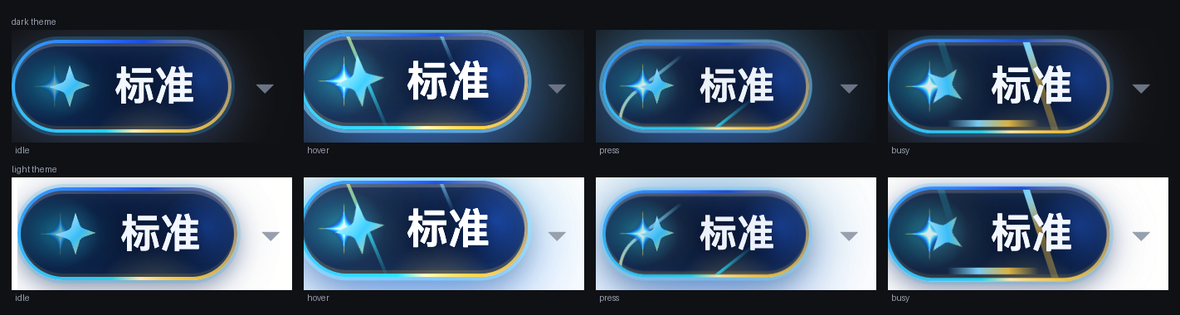
Crisp geometry first, light second, and every light source contained inside the chip (which clips with overflow:hidden). The plate is dark navy glass in both themes and never inverts; the rim is a width-independent conic-gradient; the palette is this plugin's own cyan -> electric blue -> gold (the banner family). The main button and the ⇄ mode switch fuse into one split glass chip: one plate, two zones, an electric-blue pool behind the switch zone, and a 1px hairline divider that separates hit areas without ever crossing a glyph.
| State | Treatment |
|---|---|
| Collapsed (default) | 28px star circle, breathing while a draft waits (dark star when the draft is empty) |
| Hover expand | Right edge pinned, expands leftward into the full split chip (the left neighbor reflows automatically, gaps constant) |
| Expanded | Dark glass chip — cyan pool over the main zone, electric-blue pool over the switch zone — full gradient rim, hairline divider; the rim brightens and laps slowly (3.4s) |
| Press | A shockwave ring expands from the star + one fast rim lap + an aurora pulse (zero geometry change) |
| Busy | Deliberately unlike hover: a 2px long-tailed comet rim, a sweeping energy bar on the bottom edge, the whole chip charging, the icon spinning |
| Disabled / focus | Desaturated and dimmed, rim extinguished; focus-visible keeps a ring |
| Reduced motion | Animations stop; busy falls back to a static full-width bar |
Label legibility: a hard requirement, measured in pixels
No light source ever sits under the glyphs: the spark owns the icon slot (9px clearance), the rim is masked to the 1px border band, the energy bar occupies only the bottom 2px (y25..27 against glyph boxes at y8..20), and the divider keeps 7px off both edges. The plate is never translucent, so the ratio holds in both themes and every state — for the label AND the caret, measured separately from the pixels of 3x screenshots, because the plate is a gradient and computed colours cannot answer for it:
| State | Label dark/light | Caret dark/light |
|---|---|---|
| Idle | 8.45 / 8.45 | 9.97 / 9.97 |
| Hover (main) | 8.78 / 8.77 | 10.57 / 10.49 |
| Hover (switch) | 9.09 / 9.09 | 9.36 / 9.36 |
| Press | 8.35 / 8.35 | 9.56 / 9.56 |
| Busy | 8.47 / 8.47 | 10.21 / 10.21 |
| Disabled | 5.43 / 5.43 | 11.56 / 11.56 |
Worst case 5.43:1 (disabled label; WCAG AA wants >= 4.5:1) — the caret is brightest exactly when the main action is disabled, because switching modes stays usable. npm run harness:button builds a comparison page with the real dsh-plan-board button beside this one, so every claim here is reproducible.
Typical scenarios
- A colloquial request, said clearly once — "帮我看看能不能把那个登录接口改得快一点,就是感觉有点慢" loses the verbal filler but keeps your own judgement ("feels slow") and does not pick an optimisation technique for you.
- A request carrying paths and identifiers — where the fidelity gate earns its keep: file paths, function names, version numbers, URLs and backticked code survive the rewrite verbatim instead of being paraphrased away.
- A wordy English sentence — Light mode compresses "I was kind of wondering if you could maybe…" into one executable English request.
- A continuation draft — you discussed an endpoint last turn and now type only "把那个接口加上限流". Smart context carries the recent turns, so the rewrite connects to the plan you already agreed on.
- A mis-click or a result you dislike — press Undo within 8 seconds. The moment you edit by hand the bar disappears, so your new input is never overwritten.
- A vague draft is never padded — something like "加个功能" is never invented into a fabricated spec: the discipline layer tells the model to leave it alone, so you get it back unchanged or with explicit (TBD) follow-ups.
- A slash command with a long body —
/bugfix <a rambling account>: the prefix survives verbatim and only the body becomes a clearly structured investigation request; command parsing is unaffected. - Script and tool integration —
POST /dsh-improve-prompt/api/improvewires the same pipeline into your own scripts, CI or editor tooling, loopback only. - Mixed Chinese-English drafts — English paths, function names and versions inside Chinese prose: the fidelity gate treats them as hard facts and keeps them verbatim; no translation pass eats your identifiers.
- Long drafts afraid of bloat — a colloquial wall of text in Standard mode: restructuring is capped at 2.5x, over-budget results get one convergence call, and anything still over is refused instead of silently becoming a thirty-line spec.
- Paste the error verbatim — drop a whole stack trace or validation log into the draft: class names, paths and versions are kept as hard facts while your ask is rewritten into one executable investigation request.
What you will see
- Quality certificate — the status bar:
已增强 · 保真 5/5 · 1.0x · 2.2s - Undo affordance — the 撤回 button on the same bar, gone after 8 seconds (failure copy stays 12)
- Re-append notice — only when the deterministic fallback fired:
已增强 · 保真 5/5 · 1.4x · 3.1s · 已回灌 src/a.ts - Preserved-details block — appended to the rewrite on re-append:
保留原始细节 / Preserved original details:followed by the exact strings - Failure copy (draft untouched) — "增强超时(180000ms),原文未改动" / "未找到可用模型:请先在设置里选默认模型" / "增强结果超出长度上限(…),已保留原文"
- Mode label — the button shows the active mode (轻 / 标准); the ⇄ zone on the same glass chip switches it
- Chip two states — a 28px star circle at rest, expanding into the 「✦ 标准 │ ⇄」 split glass chip on hover (the left neighbor reflows automatically)
- API response —
POST /api/improvereturns the rewritten body plus certificate fields (fidelity count / length ratio / contextUsed / elapsed), ready for scripts to consume - Cancellation feedback — after an abort the status bar disappears immediately and the draft is preserved; no dangling timers, no half-written text
Real measured examples
All four were produced on a real model on this machine — none of them is a constructed demo.
① Chinese + hard facts (Standard)
输入:就是那个 帮我把 src/host/config.ts 里的 maxRatioFor 改成 2.5 呗,顺便看看 https://example.com/a?b=1 那个文档,用 `pnpm build` 验证一下
输出:把 `src/host/config.ts` 里的 `maxRatioFor` 改成 `2.5`,同时看一下 https://example.com/a?b=1 这个文档,然后用 `pnpm build` 验证一下。
凭证:保真 5/5 · 1.0x · 2.2s
The path, the identifier, the version, the URL and the backticked command all survive verbatim; only the noise ("就是那个", "呗") is gone.
② Wordy English (Light)
输入:I was kind of wondering if you could maybe take a look at the login flow and see if there is any way we could possibly make it a bit faster, it feels slow to me
输出:Take a look at the login flow and see if there's any way we can make it faster — it feels slow to me.
凭证:0.6x
③ Vague input (Standard) — it refuses to invent
输入:加个功能
输出:加个功能
凭证:1.0x
The model is told not to invent requirements when the draft carries none; returning it unchanged is the correct outcome.
④ Explicit uncertainty (Standard)
输入:把那个接口加上限流
输出:给那个接口加上限流。

- 目标接口:(TBD: 具体是哪个接口/路由)
- 限流规则(阈值与时间窗口):(TBD: 例如每秒/每分钟允许多少次)
- 超限后的行为:(TBD: 例如返回 429 还是拒绝/排队)
- 除新增限流外,原有逻辑保持不变。
Structure added, zero facts invented. Gaps are marked (TBD: …) for you to fill, instead of guessed at.
Advanced usage
Everything is optional and everything has a default; three paths to adjust behavior:
- Retune settings —
cordis.patch.ymlchanges the default mode, length ceilings, timeout and context depth (table below). - Retune the prompts — override the
prompts/*.mdtemplates; the discipline layer and mode copy are yours to edit, no code touched. - Wire up scripts —
POST /dsh-improve-prompt/api/improveplugs the pipeline into your own tooling.
Configuration
Set it in the profile's cordis.patch.yml:
- insert:
    - id: dsh-improve-prompt
      name: 'dsh-improve-prompt'
      config:
        defaultMode: standard      # light | standard
        lightMaxRatio: 1.2
        standardMaxRatio: 2.5
        acceptanceCriteria: false  # append a verifiable acceptance clause in Standard
        temperature: 0.3
        maxTokens: 8192
        timeoutMs: 180000
        maxInputChars: 20000
        contextTurns: 3            # 0 disables history
        contextChars: 6000
        smartContext: true
        fidelityGate: true
        lengthGate: true
        provider: ''               # set together with model to override the session model
        model: ''
        reasoningEffort: low        # default low: rewrites are shallow tasks; off/high/max also accepted
        logFailures: true
Model routing: explicit provider + model → agentDefaultModel's current selection → the last route seen on the live waterfall. If none resolves, it fails loudly and the draft is untouched.
Retune the prompts without touching code
All behaviour lives in prompts/*.md: discipline.md (the global discipline layer) plus light.md / standard.md. Override by dropping same-named files into $DSH_HOME/dsh-improve-prompt/prompts/.
Local HTTP surface
GET /dsh-improve-prompt/api/config reports the active mode and ceilings; POST /dsh-improve-prompt/api/improve (body {text, sessionId?, mode?}) performs one enhancement. Loopback only.
How it works
composer draft
   │
   ├─ local guards (empty / command-without-body / too long) ──► refuse, zero model traffic
   ├─ slash-command split (/bugfix body → prefix kept verbatim, only the body rewritten)
   │
   ├─ smart-context decision (local regex) ──hit──► read the last N turns (human + assistant prose only)
   │
   ├─ fidelity gate: extract hard facts (local, zero calls)
   │
   ├─ model call 1 (system = prompts/discipline.md + prompts/<mode>.md)
   │
   ├─ both gates judged together
   │     ├─ missing facts or over budget ──► call 2 (both complaints at once)
   │     └─ both clean ──────────────────► done
   │
   ├─ still missing a fact ──► deterministic re-append (guarantees zero loss)
   │
   └─ final length judgement (a re-appended fact outranks the ceiling) ──► write back or refuse
The host half is one loopback route plus the orchestrator; the browser half registers exactly two entries — a button on conversation.input.right and a status bar on conversation.input.dock. Zero runtime dependencies (@deepseek-ai/dsh-llm is a type-only import, erased at build).
Reliability and verification
Everything below was actually run before publishing:
- 88 tests, all green — pure functions (hard-fact extraction / fidelity checking / length judgement / context trigger / output normalization / session history / slash-command splitting) plus full orchestration against a stub model (repair pass, re-append, refusal, timeout, cancellation, upstream failure, injection defence) plus the built client bundle (registration contract, disabled states, click-to-write-back, failure leaving the draft untouched, undo, mode memory, localization and fallback).
- Strict TypeScript checks pass for both halves (
npm run typecheckandtypecheck:client). - Cold-start three-failure static check green: link-dependency junction, bundle manifest, disabled-state contradiction — plus a clean
dsh --dump-configcomposition check. - Uninstall verified clean: route unregistered, junction removed, zero profile-manifest residue, loader entry and client module table cleared.
- Reinstall is idempotent: a second inject reports "already active, skipping" and creates no duplicate entry.
- Reverse-install acceptance: installed from both
dsh plugin add dsh-improve-prompt(npm) anddsh plugin add github:hoyyang/dsh-improve-promptinside an isolated staging home; artifacts complete, config composition correct. - Live end-to-end against a real model: a draft carrying a path, an identifier, a version, a URL and backticked code came back at fidelity
5/5,1.0x(example ① above). - Light mode measured: a wordy English sentence came back at
0.6x(example ②); a vague draft came back unchanged (example ③). - Smart context measured: the same draft reports
contextUsed: anaphorawith a session id and genuinely references the conversation; without one it reportsnoneand falls back to TBD markers. - A real design flaw was found and fixed during live testing: a nine-character draft would have been allowed only 22 characters under a bare 2.5x ratio — refusing exactly the rewrite it needs most. Now
max(200, length × ratio), locked down by four tests.
FAQ
Nothing changed after enhancing? When the draft is already precise, the discipline layer requires light cleanup only — an unchanged result is a correct outcome.
The status bar says "re-appended …"? The model dropped a hard fact twice, so the plugin put it back deterministically at the end. Nothing was lost; the cost is a small extra block.
Why can a short draft grow several times over? For short drafts the length gate uses a 200-character absolute budget instead of a ratio — otherwise it would refuse the three-line structure they need most.
Was session context used? The status bar shows context used when it was. By default it is attached only for anaphoric or very short drafts; contextTurns: 0 disables it entirely.
Which model does it use? Your current session's default. To pin a cheaper one, set provider + model.
Local build
pnpm install
npm run build          # host: tsc → lib/
npm run build:client   # client: tsdown → lib/client.js (window.__ModuleLoader__ format)
npm test               # 88 tests
npm run typecheck && npm run typecheck:client
License
Comments
Comments live in GitHub Discussions. Sign in with GitHub to post or react.