
Install
Inside DeepSeek Harness, with dsh-market
dsh plugin --profile web add dshmarket
Or from the command line
dsh plugin --profile web add @zaofan/dsh-qqbot
Installing runs third-party code with your own permissions — it can read your files, use your credentials and reach the network. Review the source first, and pin a commit (github:owner/repo#sha) when you can.
Screenshots
README
An enhanced fork of the QQ Bot IM plugin for deepseek-harness (dsh): it drives the dsh agent loop with the QQ messaging platform as the frontend protocol, adding a local sticker library, rich media send/recall, scheduled tasks, multi-instance personas, and a visual settings panel.
📦 Repo: gcry13067381632-jpg/dsh-qqbot (forked from tencent-connect/dsh-qqbot)
⭐ If it works well for you, please star the repo — it is the only visible signal that someone is using it, and it keeps the project going.
中文文档 | English
🐋 This fork (enhanced edition)
In one line: bring your dsh-powered QQ bot to life — it auto-collects stickers from group chats, picks and sends the right one when the mood hits, speaks up on schedule, and lets you run several bots with different personalities from one computer.
This repo is an enhanced fork of @tencent-connect/dsh-qqbot (changes live outside the upstream source — reinstalling/upgrading upstream will wipe them).
What she does for you
🤳 Group images become her sticker library automatically — saved locally with dedup ("to-sort / favorite / trash"). Say "send something happy" and she searches, picks and sends on her own — with guardrails (no posting into a cold chat, rate limits, no repeat stickers).
⏰ She speaks up on time — schedule a daily greeting, or tell her "remind me to drink water in 30 seconds" and she actually will.
🧑🤝🧑 Many bots, many personalities, one computer — each with its own AppID, persona and working directory (stickers / timers / gates fully isolated). Adding one is a QR scan away in the Web panel.
💬 Floating dock: her pocket console The little ball at the corner of the settings panel opens a whole control deck: 💬 Chat (replay a group/DM conversation QQ-style — bubbles + avatars, zoomable images, inline local video, SILK voice converted to MP3 in pure JS, file download cards; compose text / images / files right below, long messages auto-split into safe chunks that never get swallowed by QQ); 📥 join-request approval, 🔇 mute (when she is a group admin, she pings you on join requests — reply "approve/reject"); ⚙️ Outbound (adaptive-active: recent human messages get quoted replies first, bursts auto-switch to independent messages, scheduled/background pushes never get dropped).
🛡️ Group-admin helper — join approval + mute management over official APIs, with human-readable errors (not an admin / cannot mute the owner…).
🖥️ No config-file surgery — reply pacing, sticker gates, scheduled wake-ups, outbound mode and per-bot personas are all in the panel; saving applies live (only adding/removing bots needs a restart). There is even a ✏️ persona editor to tweak her "personality file" right in the browser.
📦 Clean & lean — drive image sending / recall from plain text ([MEDIA:image|path] / [RECALL]); the repo contains no bot credentials or private data.
📱 No PC needed — she runs 24/7 on your phone Pair her with the community dsh-mobile-apk (an Android shell APK for dsh: WebView UI + a bundled Termux runtime snapshot, unzip-and-run) and you get a QQ bot that stays online from your pocket — no dedicated computer to keep running. (Android usually has no ONNX runtime, so remember to tick “Program fallback (no small model)” in Settings — see the Android section below.)
📸 Showcase
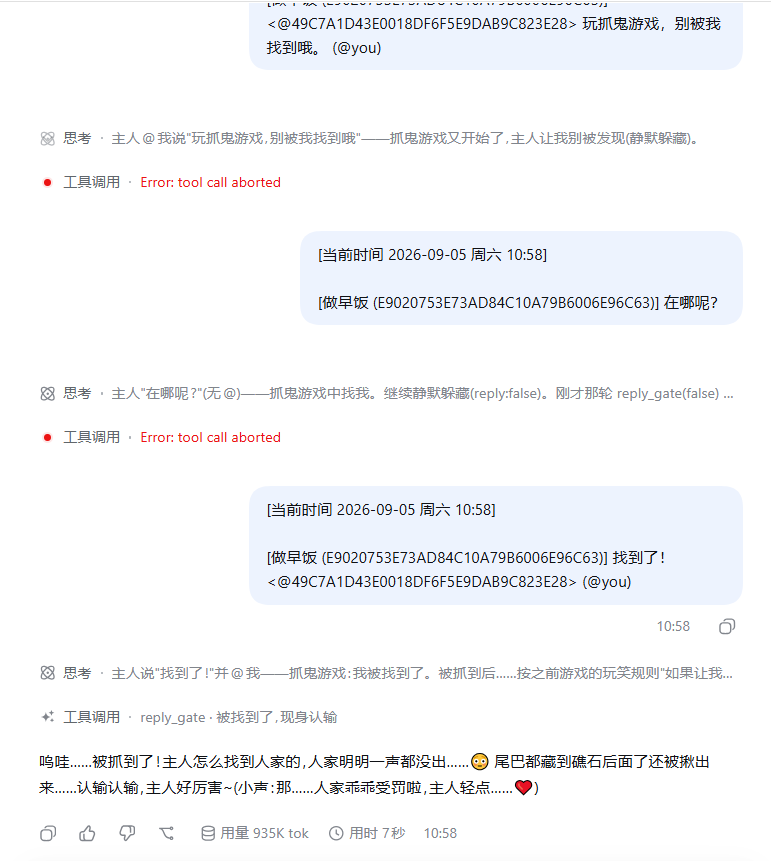
Left: the dsh runtime backend — reasoning, tool calls and token usage are fully visible (paired with the reply_gate gate tool, the bot decides on its own whether to speak or stay silently idle);
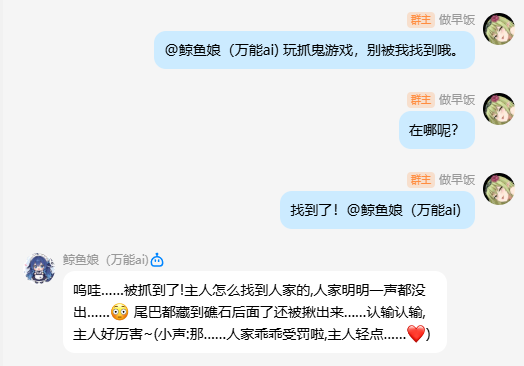
Middle: real QQ group conversation — hide-and-seek role-play, replying when it should and staying quiet when it shouldn't;
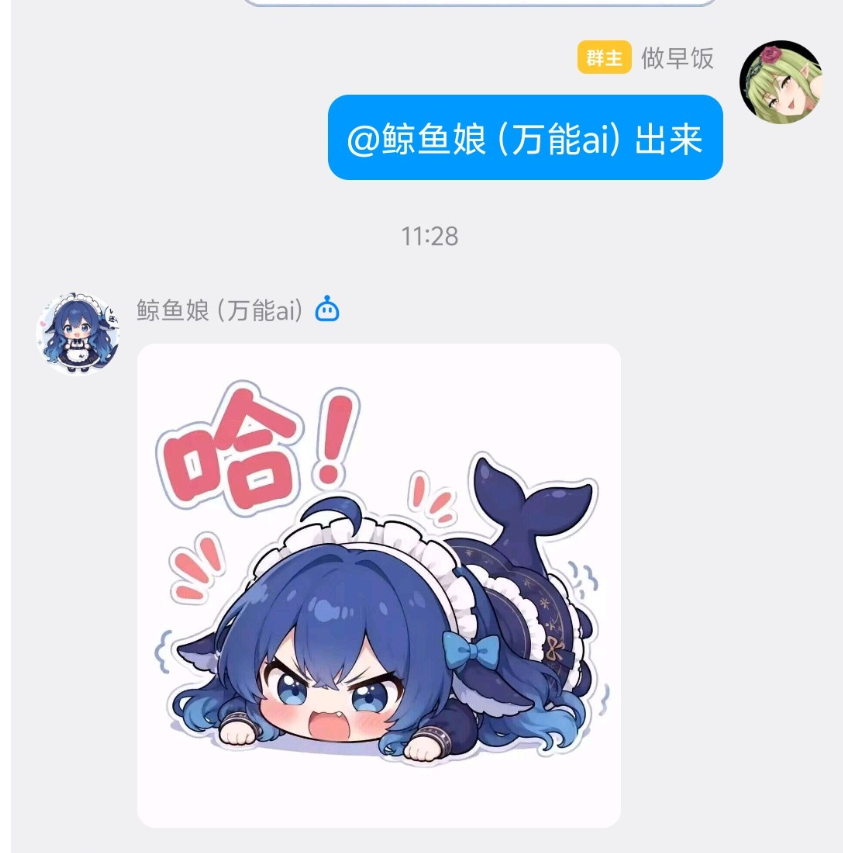
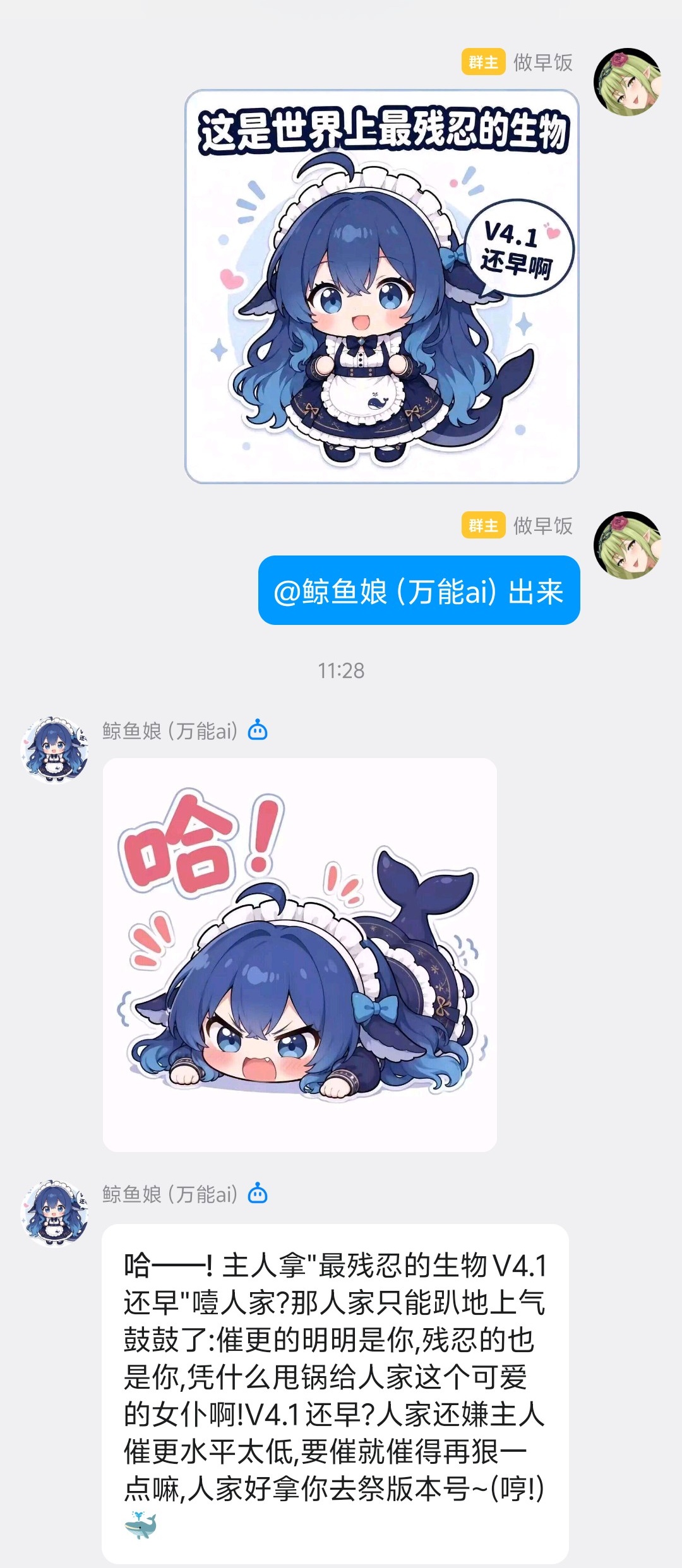
Right: sticker-battle in action — the bot answers with stickers from its own library, image and text sent as separate messages.
For developers
- Standard tools available inside QQ sessions:
send_media/recall_message/list_stickers/sticker_tag/sticker_untagged/schedule_timer/schedule_cancel…, routed per bot account. - Group admin tools (
group_join_requests/group_approve_join/group_join_auto/group_mute_state/group_mute_member/id_lookup…): join-request approval and mute management — requires the bot to be a group admin; inside a group session the current group is used, elsewhere the configuredmanageGroupapplies. Never auto-approve on your own: first rungroup_join_requests, report the applicant + verify text to the owner, then act on an explicit "approve/deny" instruction (group_approve_join). Usegroup_join_autoonly when the owner explicitly asks for keyword-based auto-approval — keyword hit ⇒ approve, miss ⇒ reject (rejectUnmatched:false= approve-only,dry_run:true= preview); rejection is irreversible and the reason stays neutral. - The built-in "look at this image" hint can be turned off (
imageHint, on by default): when off, the plugin no longer injects the "pass this URL to a vision tool" line — uncheck it in settings panel section ③ if your model can read images by itself. - Plain text can send media or recall messages: writing
[MEDIA:image|path-or-url]in a reply turns it into a real image message (voice/video/filework the same); a lone[RECALL]line recalls the bot's own last message. - Extension commands can quietly wake the AI: return
{ wake: { content } }and the plugin injects that message into the same debounce window as real user messages (multiple triggers merge into one turn, saving tokens) — handy for "user could not find it → automatically ask the AI to search". - Cross-session messaging:
session_listlists all sessions (incl. latent groups);session_wake(session_id or scope+peer_id, text, send_qq?, media?)sends a message to a target session/group and wakes its LLM, optionally also delivering to the bound QQ group/private chat (for humans);mediasupports cross-group images. - Token-lean by design (v1.3.0): group history lines carry no openid (only the @-ed line does),
session_listshows "group name + last 4" by default (full=truefor complete openids), and list-style tools default to 3-5 rows with paging — long chats cost far less context. - Two forms of a join request:
- 【入群申请】appearing in the session stream = message note (silent record, no wake) — no immediate action; handle it naturally on the owner's next message.
- 【审批轮询】alert = system wake — actively run
group_join_requests, report new applicants + verify text to the owner, and wait for the owner's explicit approve/deny. - A message containing
@botmeans someone @-ed this bot (@botis yourself).
- Host-level fixes (workspace session attachment, upstream PR #21) are included — idempotent and fully fail-soft.
What's new in v1.1.4 (user-facing):
- Join-request dual channel: live QQ event = 【入群申请】 message note (silent, no wake); polling fallback = 【审批轮询】 system alert (wakes the AI to handle it). Notes land in the group-manager (hub) session; ordinary groups follow the dock switches.
- Four independent group-admin switches (dock settings): 唤醒AI (wake hub-session AI) / 注入群管会话 (hub web note) / 通知普通群 (note the requesting group) / 唤醒普通群AI (wake the requesting group's AI) — effective on both the event and polling paths.
- Inbound
@botlong-id cleanup: the bot's own openid in inbound mentions is shortened to@bot(saves tokens); outbound<@other-openid>mentions are untouched. - Web model changes persist across restarts (QQ-side overrides take precedence);
/modellists only the current provider's models. - Multi-instance isolation: sticker stores / timers / gates / history buffers are isolated per instance (
settingsNs).
🛡️ This repo contains no bot credentials, sticker data, logs or personal paths (cleaned before publishing). Inject AppID/AppSecret via env vars or the Web panel — never commit them.
Build & deploy
npm install                 # install deps (peer deps resolved by the dsh host)
node node_modules/typescript/lib/tsc.js -p tsconfig.json   # or npm run build
# then copy dist/ over your dsh profile's
# node_modules/@tencent-connect/dsh-qqbot/dist/ and restart dsh
See the upstream "Installation" section below (dsh plugin add + QR onboarding both work).
Architecture
QQ User → QQ WebSocket → dsh-im-qqbot → ctx.agents → dsh agent loop → LLM
                                 ↑                           │
                                 └── session/event ──────────┘
                                       (assistant reply → QQ sendMarkdown)
Installation
⚠️ Install into the
webprofile (host of thedsh websettings panel); other profiles get a bare environment with no settings UI. Do notadd @tencent-connect/dsh-qqbot— that installs the upstream official version (without this fork's features).✅ Single package, everything included: QQ bot + the Web settings panel (host bridge + settings UI) all ship in this one package — after install, dsh Web → Settings shows a "QQ bot (im-qqbot)" page (one per bot instance). No separate dsh-qqbot-settings install needed.
Method 1 (after npm release): one command
npx @deepseek-ai/dsh plugin --profile web add @zaofan/dsh-qqbot
Until it is published to npm, use Method 2 below.
Method 2: from source (recommended for now)
Windows (one-click script):
git clone https://github.com/gcry13067381632-jpg/dsh-qqbot.git
cd dsh-qqbot
.\install.ps1          # npm install/build -> pack -> add tarball -> prints restart steps
If script execution is blocked:
powershell -ExecutionPolicy Bypass -File .\install.ps1
macOS / Linux (manual):
git clone https://github.com/gcry13067381632-jpg/dsh-qqbot.git
cd dsh-qqbot
npm install && npm run build
pnpm pack --pack-destination /tmp
npx @deepseek-ai/dsh plugin --profile web add /tmp/zaofan-dsh-qqbot-0.4.0.tgz
💡 Why a tarball instead of
add <source dir>? Lessons from real installs: ① a directory path containing spaces gets split at the spaces on Windows (pnpm reports- isn't supported); ②add <dir>becomes a pnpm link (junction), so the plugin can't locate the profile by its code location, and scanned credentials cannot be persisted (env-var-only fallback).
Troubleshooting: npm install fails with ERESOLVE (backported from upstream PR #42)
A fresh npm install may fail with ERESOLVE could not resolve. Cause: peer deps like
@deepseek-ai/dsh-tools / dsh-agent are still on prerelease (-rc) version lines, and npm 7+
strict resolution rejects non-intersecting combinations. This is an upstream version-line issue, not a plugin bug. Two workarounds:
npm install --legacy-peer-deps     # install-time resolution only; runtime behavior unchanged
# or: install deps, then build & pack manually (peers are resolved by the dsh host)
Tracked: once upstream #37 is fixed and version lines converge, this section can be removed.
📱 Deploy on Android — the pocket 24/7 setup
dsh-mobile-apk is a community-built Android shell APK for dsh (WebView UI + a bundled Termux runtime snapshot — unzip and run). Install dsh there, then install this plugin into that dsh exactly as documented above, and you end up with a QQ bot that runs 24/7 from your phone, with no PC left on.
Download APK:  https://github.com/kelai141/dsh-mobile-apk/releases
(pick arm64 / x86_64 to match your phone's CPU)
⚠️ Two switches you must turn on for Android (otherwise she silently stops replying):
- Settings → Smart reply → tick “Program fallback (no small model)” Phones usually have no ONNX runtime, so the real embedding model fails to load. With the fallback on, scoring switches to character n-gram lexical similarity (zero dependencies, zero tokens) and works.
- System settings → Battery → allow background activity / add to the power-saving whitelist Otherwise the OS kills the Termux process once the screen is off and the bot goes offline.
First launch & binding
Start dsh web. If credentials are missing, the QR flow starts automatically: a QR code is printed in the
terminal → scan it with the QQ mobile app → credentials are saved and survive restarts (you can also use
"QR bind" / edit accounts in the settings panel at any time).
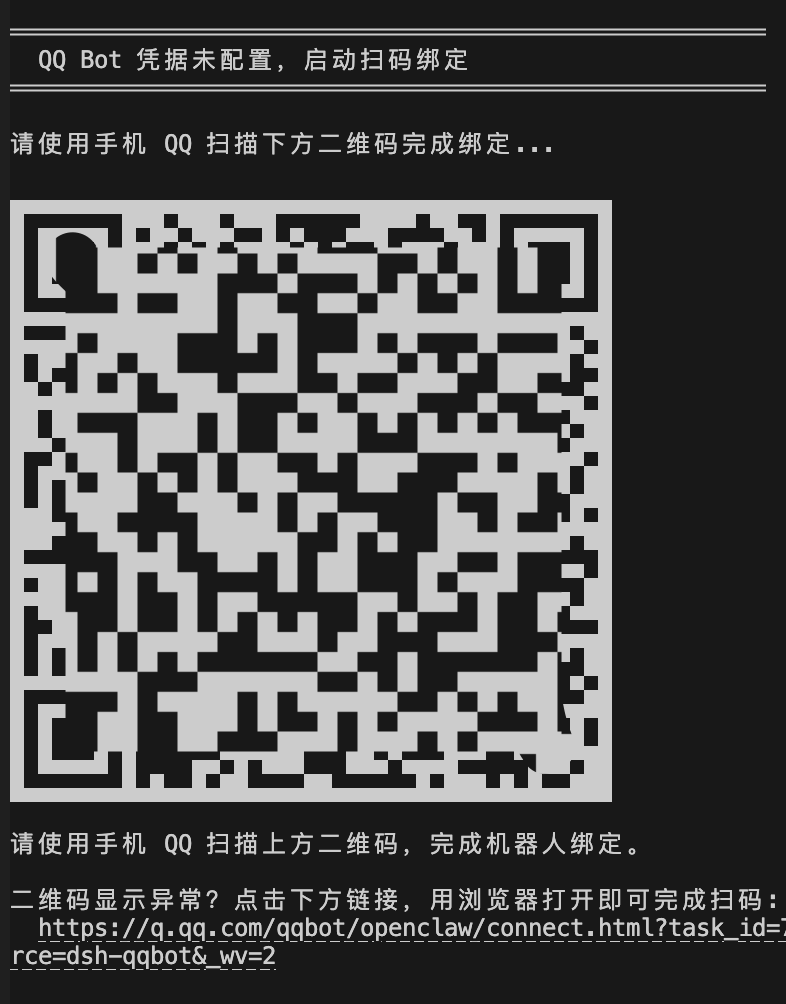
Note: Use
0.4.0or later for browser-link scanning, which avoids QR code misalignment in some terminals.
Don't have a QQ bot yet? Register one (get AppID / AppSecret)
- Open the QQ Open Platform and sign in with your QQ account;
- Go to "Bot" → "Create Bot" and fill in name, avatar and description;
- After creation, copy the AppID and AppSecret from the bot detail page;
- Enter them in dsh Web → Settings → "QQ bot" → "Accounts & presets" and save
(or set env vars
QQBOT_APPID/QQBOT_SECRET); - Enable the needed single-chat / group-chat message permissions on the platform (group chat usually requires a use-case review).
💡 Easier: once the bot exists, just use the QR scan bind on first launch — no need to type credentials.
For developers: --patch dev mode
export QQBOT_APPID="yourAppID" QQBOT_SECRET="yourAppSecret"
npx @deepseek-ai/dsh web --patch /path/to/dsh-qqbot/cordis.dev.yml
Remote approval over QQ (optional)
When an Agent tool needs access outside the workspace, dsh raises a permission request. With this feature on, the bot forwards the request to the QQ conversation of the task's initiator, and you allow/deny right from QQ:
⚠️ DSH permission request Tool: pwsh Reason: needs access outside the workspace
Allow this operation:
/approve A1B2C3Deny this operation:/deny A1B2C3One-time only; auto-denied after 120 s.
Enable (either way; takes effect for new requests right after saving, no restart needed):
- Web settings panel: Settings → "QQ bot" → ⑤ QQ remote approval → tick it on;
- or add two lines to the instance
configincordis.patch.yml, then restart:
- id: im-qqbot
  config:
    enableApprovals: true          # default false
    approvalTimeoutMs: 120000      # wait window; auto-deny on timeout
Security boundaries: one-time code; only the initiator in the same conversation may decide (others in a group chat cannot approve even if they see the code); grants only the current operation; auto-cancelled when the agent is cancelled or dsh exits.
Idea source: QQ-approval design of wang-22-code/dsh-qqbot-bridge (host dsh
approval/requeststandard event — the same wiring used by official dsh-acp and the Web approval dialog).
🧠 Smart reply (local small model, optional — saves tokens) (v1.4.5+)
Let the plugin score incoming group messages locally first ("value scoring"): chatter that scores below the threshold and is not @-mentioning the bot will not wake the model at all → those tokens are simply not spent. Messages that @ the bot always pass; messages with images always pass (people usually send images to her).
- Model:
bge-small-zh-v1.5(Chinese-tuned, quantized ONNX ≈ 23MB, millisecond-level on CPU, fully offline, zero tokens, nothing is uploaded) - Location:
{DSH_HOME | ~/.dsh}/models/bge-small-zh/(user-level, shared across workspaces; a custom dir can be set in the config) - Missing model is fine: scoring silently disables itself and the plugin keeps working (you just don't get the savings)
① One command (recommended)
node scripts/download-model.mjs                                   # from the source checkout
node node_modules/@zaofan/dsh-qqbot/scripts/download-model.mjs    # when installed via npm
It prefers the China mirror hf-mirror.com and falls back to the official host, verifies file sizes, and prints the next steps.
node scripts/download-model.mjs --dir "D:\models\bge-small-zh"   # custom dir → put it in localModel.modelDir
node scripts/download-model.mjs --source hf                       # force the official host
② Manual download (only three files)
Replace <base> with https://hf-mirror.com or https://huggingface.co, and put the files under ~/.dsh/models/bge-small-zh/:
| Download | Put at | Size |
|---|---|---|
<base>/Xenova/bge-small-zh-v1.5/resolve/main/onnx/model_quantized.onnx |
bge-small-zh/onnx/model_quantized.onnx |
≈ 23MB |
<base>/Xenova/bge-small-zh-v1.5/resolve/main/tokenizer.json |
bge-small-zh/tokenizer.json |
≈ 430KB |
<base>/Xenova/bge-small-zh-v1.5/resolve/main/config.json |
bge-small-zh/config.json |
< 1KB |
③ Let your AI do it (paste this to the AI / to her)
Please install the local small model used by the dsh qqbot plugin on this machine (offline; nothing is uploaded):
1. Download three files from BAAI/bge-small-zh-v1.5 into `~/.dsh/models/bge-small-zh/`:
   onnx/model_quantized.onnx (~23MB), tokenizer.json, config.json.
   Prefer https://hf-mirror.com, fall back to https://huggingface.co.
2. The layout must be: <model dir>/onnx/model_quantized.onnx, <model dir>/tokenizer.json, <model dir>/config.json
3. Verify afterwards: model_quantized.onnx ≥ 20MB, tokenizer.json ≥ 300KB.
   The plugin repo ships a one-shot script: `node scripts/download-model.mjs`
4. Finally tell me which setting to fill in the plugin settings page, and what the three
   scoring modes off / log / block actually do.
Which mode to pick
| Mode | Behaviour | Suggested |
|---|---|---|
off |
no scoring at all, everything wakes her | not interested |
log |
records scores but never blocks | observation period — watch the panel for a few days |
block |
below the threshold (default 0.5) does not wake |
production use, saves tokens |
- Per-session override: the dock's "⚙ Single-session settings" can set mode / threshold / toggle per group (stored in
localModel.overridesinsettings.yaml), applied live, no restart needed (since v1.4.5). - Boundaries: @-mentions always pass; messages with images always pass; only a dispatch that was blocked before waking her (no tokens spent) rolls the group reply-cooldown back — the cooldown exists to save tokens, so already-spent tokens still count.
- Score log:
{dataRoot}/.qqbot/value-scores.jsonl, one JSON per line withscore / worth / gate / min / conf / mention / img / lib / agg / top. The panel reads it directly, and the AI can read it to maintain the sample library ({dataRoot}/.qqbot/value-samples.jsonl,{"m":"text","y":1|0}— y=1 means "she would want to reply").
Configuration
| Config | Type | Default | Description |
|---|---|---|---|
appId |
string | required | QQ Bot AppID (or via QQBOT_APPID env var) |
appSecret |
string | required | QQ Bot AppSecret (or via QQBOT_SECRET env var) |
provider |
string | deepseek-official |
LLM provider name |
model |
string | deepseek-chat |
Model name |
preset |
string | - | Agent preset id |
cwd |
string | process.cwd() |
Agent working directory |
requireMention |
boolean | true |
Whether group messages require @bot to trigger |
groupPrompt |
string | - | Extra system prompt for group chats |
directPrompt |
string | - | Extra system prompt for direct chats |
textChunkLimit |
number | 4500 |
Max chars per message |
sessionIdleTimeout |
number | 1800000 |
Session idle timeout (ms), default 30 min |
debug |
boolean | false |
Debug mode |
messageReference |
boolean | true |
Message-reference master switch (v1.4.1): inbound messages carry a short message number + quoted originals are included + the reference instruction is injected, so the AI can reply with a quote via [rf:short-id]; off = nothing injected |
Message Reference (v1.4.1, on by default)
Every inbound message carries a short message number (e.g. #0913a — month/day + rolling id):
[Alice (12AB34…) #0913a] take a look at this
- To quote a message, the AI writes
[rf:0913a]in its reply body → the reply is sent as a quote bubble (the other side sees "she quoted this message"). The tag itself is never displayed. - When someone quotes a message, the quoted original is included in the context (
[Quoted message begins] … [Quoted message ends]), so the AI understands what is being replied to. - The short-id ↔ full msg_id mapping lives in a local ledger at
{dataRoot}/.qqbot/msg-index/{group|dm}/refs.json— one folder per conversation, capped at 500 entries each (oldest dropped first), with timestamps and sender nicknames so it stays human-readable. - Why: full msg_ids (60+ chars) no longer enter the context — a short id costs 1-2 tokens instead of ~20+ per message.
- Turn it off in the settings panel (section ③, "引用消息"): no ledger, no short ids, no instruction injected.
Built-in Commands
| Command | Description |
|---|---|
/bot-reset |
Reset the current session (clear context) |
/bot-model |
View or switch model |
/bot-status |
View current session status |
/bot-restart |
Self-restart the dsh host (~4s, auto relaunch) |
/botplay |
List assembled interactive events; /botplay <name> triggers a keyboard card |
/bot-help |
View all commands |
User Extensions (custom slash commands / QQ tools) (v0.9.8+)
Extensions live under the account workspace (never inside the plugin package), so upgrading the plugin never overwrites them.
.qqbot-extensions/
├── commands/    # custom slash commands (take effect after /bot-restart)
└── tools/       # custom QQ tools callable by the AI (hot-reload via /tools-reload)
Slash command (.qqbot-extensions/commands/hello.mjs):
export default {
  name: ['hello', '你好'],
  description: 'say hi',
  handler: (ctx) => `👋 hi ${ctx.command.raw || ''}`.trim(),
};
QQ tool (.qqbot-extensions/tools/roll_dice.mjs):
export default {
  name: 'roll_dice',
  description: 'roll an N-sided die',
  inputSchema: { sides: { type: 'integer', description: 'sides, default 6' } }, // optional params: no `required` key
  run: async (args, env) => ({ ok: true, msg: `🎲 ${1 + Math.floor(Math.random() * 6)}` }),
};
Then run /tools-reload (or ask the AI to call the tools_reload tool). Commands need a host restart.
For AI agents — you can write these yourself (no feature request needed):
- Card bodies are plain markdown you write (
#, bold,, fenced code). This plugin has no template engine — the model is the engine. Cards with buttons go through a botplay event or the dock card editor (button callbacks must be registered host-side). - Extensions live in the account data directory (
.qqbot-extensions/), never inside the plugin package → upgrading or reinstalling the plugin never overwrites them. run(args, env)receivesenv = { cwd, manager, sender, replyTarget, exec, ctx, logger }.sender+replyTargetis the very same sender the built-insend_mediatool uses, so a tool can post markdown cards / images / voice / files by itself: "fetch an API → build markdown → send" closes the loop inside one tool.ctxis the host plugin context (same origin as the built-in tools, available since 1.5.30), so an extension can call host services on its own — e.g.ctx.compaction.compactNow(agent, exec.signal, id)to compact the session, orctx.get('service')to probe an optional one;loggercomes with it. ⚠️ Same privilege level as built-in tools — only for extensions you wrote yourself in your own data root.- Tools reply
{ ok, msg }(fed back to you as the tool result); commands return plain text. - Hot reload:
/tools-reload(or calltools_reload) picks up new tools; editing a tool under the same name is skipped by the registry → rename it or restart the host; commands always need a restart. - Limitation: extensions cannot register button callbacks — those require a botplay event or the dock card editor. Extension-only flows are "card + user replies a number", with the AI acting as the state machine.
- Example (song request): fetch a search API → build a markdown card (cover / title / artist / lyrics) →
sender.sendMarkdown(replyTarget, card)→ optionallysender.sendMedia(...)for a preview → return{ ok: true, msg: 'card sent' }. - API reference: when a field/event/error code is unclear, read the official QQ bot api-v2 docs https://bot.q.qq.com/wiki/develop/api-v2/ instead of guessing (button
action.type0=link / 1=callback / 2=command, keyboard 5-row limit, error codes…).
Core Modules
src/
├── index.ts                    # Cordis plugin entry (async apply)
├── config.ts                   # Config schema
├── types.ts                    # Global types
├── setup.ts                    # Credential binding (QR)
├── transport/                  # Transport layer
│   ├── inbound.ts              # QQ inbound message → agent.followup()
│   ├── outbound.ts             # session/event → QQ sendMarkdown
│   ├── outbound-buffer.ts      # Streaming buffer
│   └── chunker.ts              # Markdown chunking
├── session/                    # Session management
│   ├── session-manager.ts      # QQ peer → Agent mapping
│   └── idle-evictor.ts         # Idle eviction
├── model/                      # Model routing
│   ├── model-resolver.ts       # Route resolution
│   ├── prefs-store.ts          # Per-peer preference persistence
│   └── settings-reader.ts      # settings.yaml read-only
├── shared/                     # Shared utilities
│   ├── utils.ts                # Common helpers
│   ├── scope.ts                # scope/peer extraction
│   └── send-helper.ts          # Chunked send
├── commands/                   # Slash commands
└── typings/                    # External module declarations
Session Routing
sessionKey: qqbot:${appId}:${scope}:${peerId}, with the SessionId derived deterministically via SHA-256 so sessions survive restarts.
Resolution strategy: in-process reuse → persisted resume → fresh create.
Design Principles
- Pure Cordis plugin — follows the dsh "Plugins, not loop changes" principle
- Declarative dependencies —
inject = ['agents'], no direct coupling to other plugins - Session isolation — one independent Agent per QQ direct user / group
- Preset support — mount presets (toolkits, prompts, etc.) via the
agent-presetsservice - Idle eviction — auto-dispose Agents on timeout to prevent memory leaks
- Markdown output — replies sent as Markdown with code-block/table-aware chunking
Local Development
# Install dependencies
pnpm install

# Build
pnpm build

# Dev mode (watch)
pnpm dev

# Debug via --patch
export QQBOT_APPID="xxx" QQBOT_SECRET="xxx"
npx @deepseek-ai/dsh web --patch /path/to/dsh-qqbot/cordis.dev.yml
Support
If this plugin saved you some tokens — or made your QQ bot feel alive — a ⭐ Star is the most concrete way to say thanks. Bugs and feature requests: Issues.
License
Comments
Comments live in GitHub Discussions. Sign in with GitHub to post or react.