
Install
Inside DeepSeek Harness, with dsh-market
dsh plugin --profile web add dshmarket
Or from the command line
dsh plugin --profile web add dsh-funasr-voice
Installing runs third-party code with your own permissions — it can read your files, use your credentials and reach the network. Review the source first, and pin a commit (github:owner/repo#sha) when you can.
README
中文 | English
A local, offline voice input plugin for the DeepSeek Harness (DSH) Web UI. The browser captures the microphone, the host half lazily launches a local FunASR + SenseVoiceSmall recognizer, and the recognized text is written into the composer in real time. No cloud, no network, no uploads.
⚠️ macOS users: DSH Desktop 2.0.2 has a microphone-permission bug that yields a silent stream and looks like "it records but no text appears" (a silent failure). You must patch DSH Desktop first — see "Known bug & fix" below.
Features
- Click to start, click again to stop — continuous dictation with VAD auto-segmentation; text appears as you speak.
- One-click install — click Install in settings to create a venv, install funasr + torch, and download the SenseVoiceSmall model (~2–3 GB) automatically.
- Recording timer — the elapsed time is shown beside the mic button.
- Fully offline — ASR runs on the local CPU (SenseVoice RTF ~0.07, ~10x real time).
- Auto-fill / auto-send — recognized text goes into the draft; optional auto-send after recognition.
- Leading/trailing SenseVoice event & emotion emojis (👏🎼😊 …) are stripped.
Screenshots
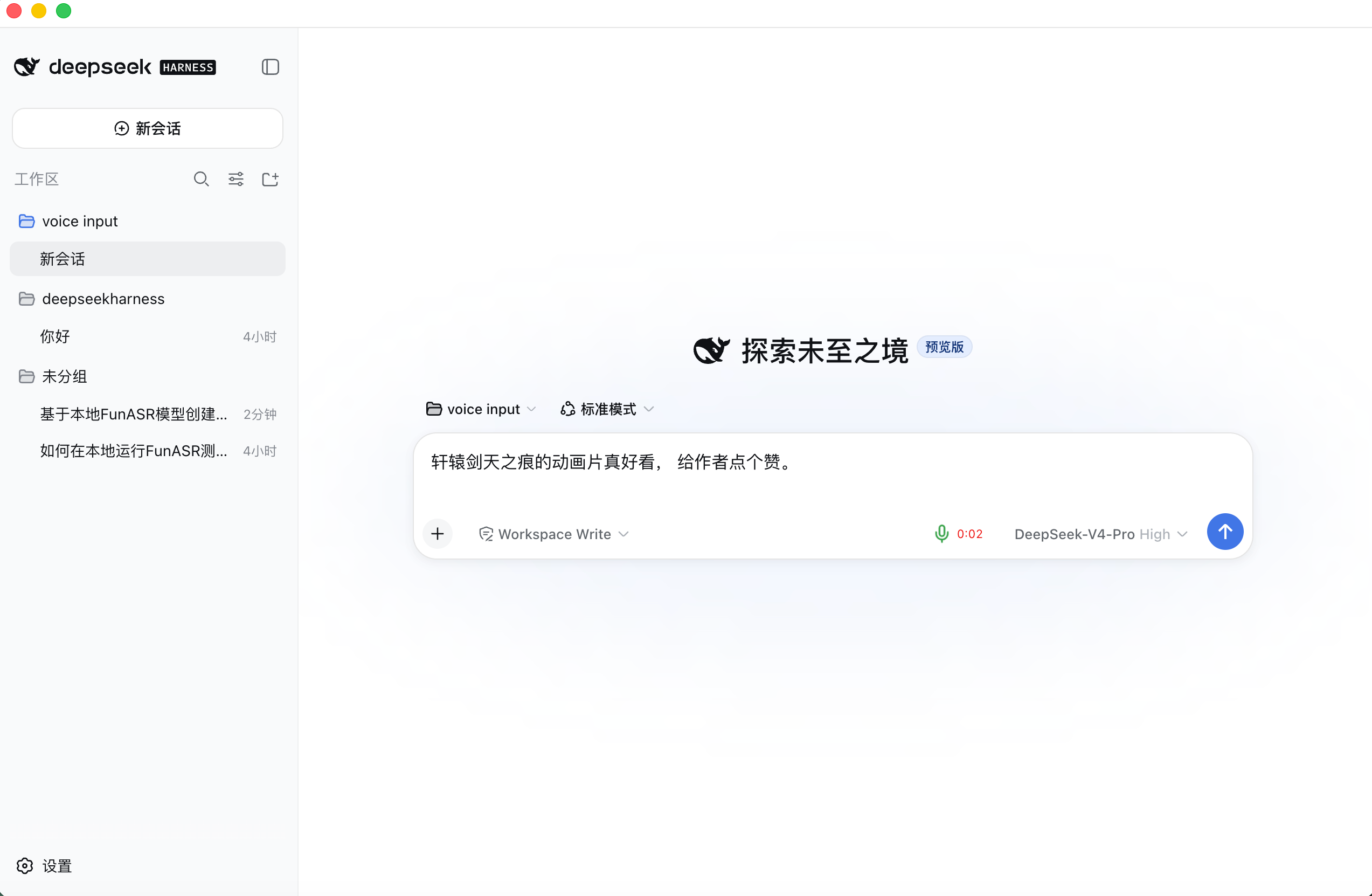
Voice input (click the mic → speak → text fills the composer, with a timer):
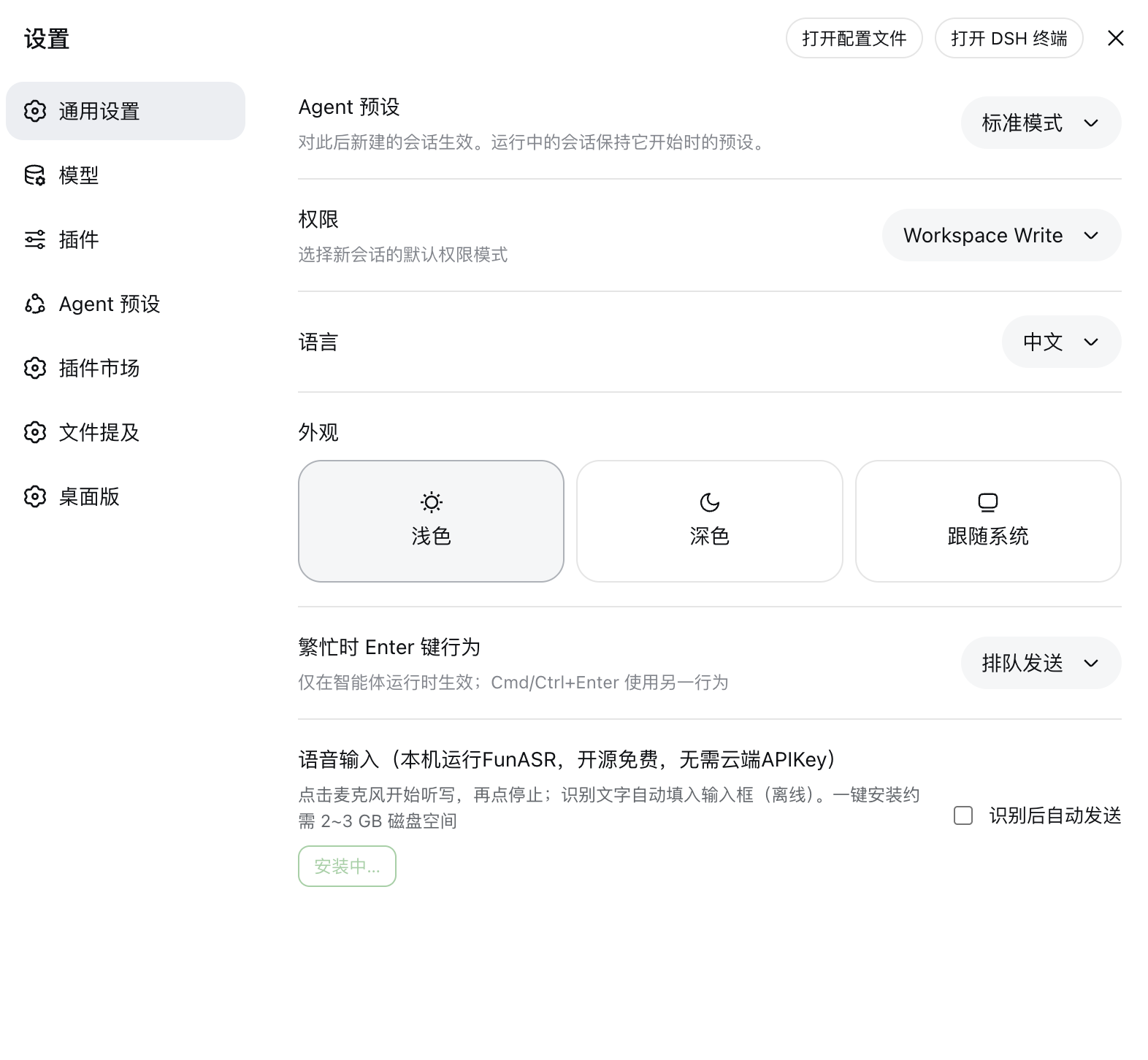
Configuration (Settings → General → Voice input, with auto-detect and manual paths):
How it works
browser mic ──AudioWorklet──▶ VAD segmentation ──POST /funasr-voice/asr (raw f32 PCM @16 kHz)
                                           │ host half proxies
                                           ▼
                            local FunASR Python service (SenseVoiceSmall)
                                           │
             composer ◀── recognized text ─┘
- The browser only records and does endpoint detection; ASR runs entirely in a local Python process on the host.
- The host half lazily launches the FunASR service (first recognition takes ~2–3 s to load the model, then it stays resident).
- Audio capture uses AudioWorklet (not the deprecated ScriptProcessorNode).
Requirements
| Dependency | Notes |
|---|---|
| DeepSeek Harness Desktop | 2.0.2 (the version this plugin was developed against) |
| Python venv + FunASR 1.4.x + torch | the local ASR engine |
| SenseVoiceSmall model | loaded locally, offline |
| Node ≥ 20 | host half |
⚠️ DSH Desktop 2.0.2 has a microphone-permission bug — without a fix the mic yields a silent stream and recognition never works. See "Known bug & fix" below.
One-click install (recommended)
Open DSH Settings → General → Voice input and click Install. The plugin will:
- detect
python/python3and pick a usable one as the venv base; - create a venv under the install directory (default
~/.dsh/funasr-voice) and install torch + funasr; - download the SenseVoiceSmall model to
~/.dsh/funasr-voice/models/SenseVoiceSmall(~1 GB).
Progress and logs are shown live, and the paths are filled in automatically. On Desktop, clicking Install first opens a native directory picker; on Web you type the directory instead.
Alternative: manual install
If you already have a FunASR environment or want to control the location yourself. Example for macOS:
# 1. create a dedicated venv
python3 -m venv ~/Documents/ASR/funasr/.venv
source ~/Documents/ASR/funasr/.venv/bin/activate

# 2. install FunASR (pulls torch, modelscope, etc.; several GB of disk)
pip install --upgrade pip
pip install funasr

# 3. download the SenseVoiceSmall model (~1 GB; pick one)
mkdir -p ~/Documents/ASR/funasr/models
cd ~/Documents/ASR/funasr/models

#    A: ModelScope (faster inside China)
python -c "from modelscope import snapshot_download; snapshot_download('iic/SenseVoiceSmall', local_dir='SenseVoiceSmall')"

#    B: HuggingFace
pip install huggingface_hub
python -c "from huggingface_hub import snapshot_download; snapshot_download('FunAudioLLM/SenseVoiceSmall', local_dir='SenseVoiceSmall')"
Afterwards:
pythonpath:~/Documents/ASR/funasr/.venv/bin/python- model directory:
~/Documents/ASR/funasr/models/SenseVoiceSmall(must containmodel.ptandconfig.yaml)
Fill these into the plugin's python / model config (below), or use the
Auto-detect button in the plugin settings.
Install
Install the plugin:
dsh plugin --profile <your-profile> add <this-repo-or-path>Restart DSH, open Settings → General → Voice input, and click Install to set up FunASR + the model automatically (or use the manual path above).
Click the mic icon on the right side of the composer. Grant microphone permission when asked.
Configuration
Two ways to configure python / model:
① GUI (recommended) — DSH Settings → General → Voice input, click Install to
set up FunASR + the model and fill the paths automatically; the button then shows
"✓ Ready". Persisted to ~/.dsh/dsh-funasr-voice.json, which takes precedence over
YAML config.
② YAML — the plugin source ships no personal paths (python: python3,
model empty by default). Override them in your profile's cordis.patch.yml:
# ~/.dsh/profiles/<your-profile>/cordis.patch.yml
- id: dsh-funasr-voice
  config:
    python: /your/FunASR/.venv/bin/python
    model: /your/SenseVoiceSmall/directory
Configurable fields:
| Field | Default | Notes |
|---|---|---|
enabled |
true |
master switch |
basePath |
/funasr-voice |
HTTP route prefix |
python |
python3 |
FunASR venv python (required) |
model |
(empty) | SenseVoiceSmall directory (required) |
port |
18765 |
local ASR service port |
language |
auto |
auto | zh | en | ja | ko | yue |
useItn |
true |
inverse text normalization |
autoSend |
false |
auto-send after recognition |
Known bug & fix: DSH Desktop 2.0.2 microphone permission
Symptom — DSH Desktop 2.0.2's Electron main process does not handle the
getUserMedia media permission. The browser receives a silent stream and
macOS never shows the "want to access the microphone" prompt — the plugin looks like
"it records but recognizes nothing, no text appears".
Root cause — dsh-plugin-desktop/src/main.ts is missing a
session.setPermissionRequestHandler and never calls
systemPreferences.askForMediaAccess('microphone') to trigger the macOS prompt.
Fix — patch the DSH Desktop source (dsh-plugin-desktop/src/main.ts, after
app.whenReady()):
import { session, systemPreferences } from 'electron'

session.defaultSession.setPermissionRequestHandler((_wc, permission, callback, details) => {
  if (permission !== 'media') {
    callback(true)
    return
  }
  const mediaTypes = 'mediaTypes' in details ? details.mediaTypes : undefined
  const checks: Promise<boolean>[] = []
  if (!mediaTypes || mediaTypes.includes('audio')) checks.push(systemPreferences.askForMediaAccess('microphone'))
  if (!mediaTypes || mediaTypes.includes('video')) checks.push(systemPreferences.askForMediaAccess('camera'))
  void Promise.all(checks).then(results => callback(results.every(Boolean)))
})
Rebuild and relaunch; clicking the mic then shows the system permission dialog. Alternatively, wait for an official DSH Desktop release that fixes this.
Structure
.
├── lib/index.js       # host half: launch/proxy FunASR + HTTP routes
├── lib/client.js      # client half: mic button + VAD + timer + settings
├── asr_server.py      # FunASR (SenseVoice) HTTP service, launched by the host
├── cordis.patch.yml   # bundle patch (configuration)
└── package.json
Troubleshooting
- "server exited during startup" — the
python/modelpaths are wrong; check the DSH log for the captured stderr. - Records but no text, no permission prompt — see "Known bug & fix" above.
- Slow first recognition — model + torch initialization takes ~2–3 s, then stays resident.
License
Comments
Comments live in GitHub Discussions. Sign in with GitHub to post or react.