
Install
Inside DeepSeek Harness, with dsh-market
dsh plugin --profile web add dshmarket
Or from the command line
dsh plugin --profile web add dsh-composer-ux
Installing runs third-party code with your own permissions — it can read your files, use your credentials and reach the network. Review the source first, and pin a commit (github:owner/repo#sha) when you can.
README
English README. The Chinese original is
README.md(far more detailed); a plain-language Chinese quick start isREADME.simple.md.
A DeepSeek Harness Web plugin that upgrades the composer (the chat input) experience. Everything is opt-in through two layers of switches, and nothing here touches your conversations unless you turn it on.
What it adds
- Configurable send / newline keys — presets or press-any-combo recording.
- A native-style right-click menu — 7 items, with three modes (official / browser / custom).
- Quick-command panel — a prompt library with categories, per-item insert mode (off · every send · first send of a session), and a prompt optimizer.
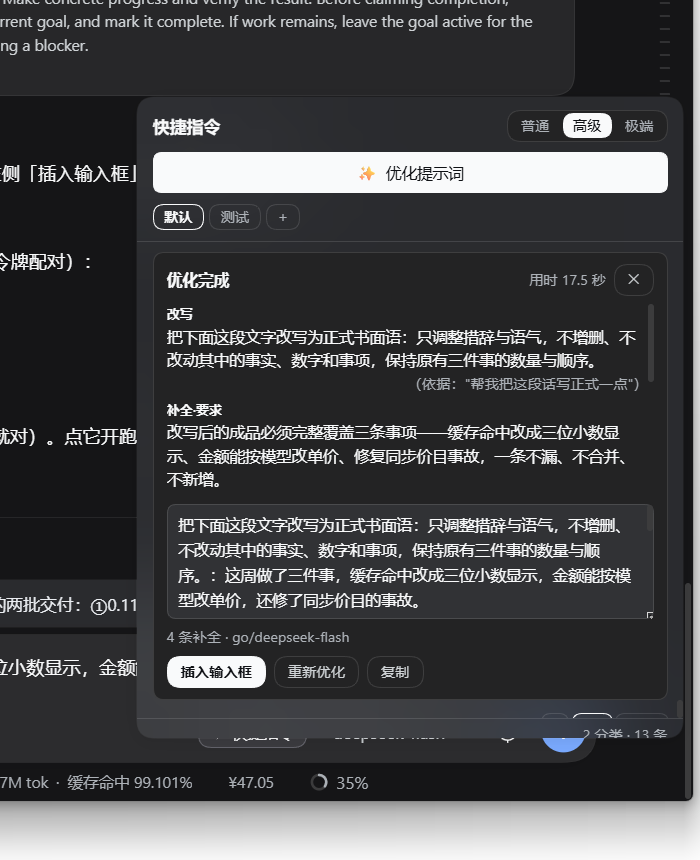
- Prompt optimizer — sends your draft to a separate model call that returns itemized edits, each one backed by a verbatim quote from your own words; the host verifies every quote literally and drops any item it cannot trace. Results land in a result box (0.12.0): items stream in one by one as they pass verification, the finished prompt is editable, and an explicit “Insert into input” button decides when — and whether — it replaces what you typed.
x-opencode-sessionheader injection so OpenCode (Go) routes work inside DSH.- Default terminal switch (Windows) — replaces the model's PowerShell tool with Git Bash.
- Official persistent terminal tools (
terminal_open/read/send/signal/close/list). - Stats line upgrade — renders DSH's built-in cache-hit percentage with three decimals.
- Cost capsule — per-session cost from DeepSeek's list price, with per-model peak/off-peak prices you can override, Chinese public holidays fetched automatically, an account-balance reader, and one-click price sync (official page + models.dev).
- One-click “restart DSH” in the settings-card header.
Install with dsh plugin --profile <name> add dsh-composer-ux, then restart DSH (a page refresh is not
enough for host-side changes). The built lib/ ships in the package and in this repository, so there is
no build step and no build authorization at install time.
Screenshots (0.12.0)
Real screenshots from a live install (dark theme; the published build):
The tool row carries exactly one plugin button — 「⚡ 快捷指令」 (Quick commands); the prompt optimizer is reached from inside that panel. The standalone 「✨ 优化」 button that 0.11.1 briefly added was removed on request.

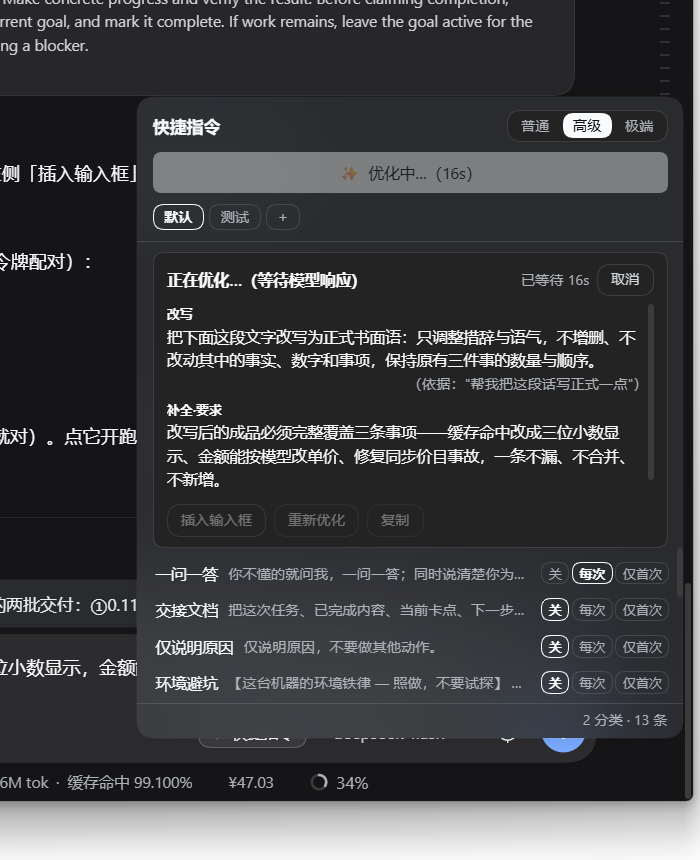
Item-by-item streaming: the result box only ever shows items that have already been closed and passed the verbatim-quote check (unverified content never appears). The header shows the stopwatch and Cancel, and the buttons stay dimmed while it runs.
Done: every item carries the exact phrase from your own words that it was based on; the finished prompt is editable in the box, and 「插入输入框」 (Insert into input) is what writes it back.
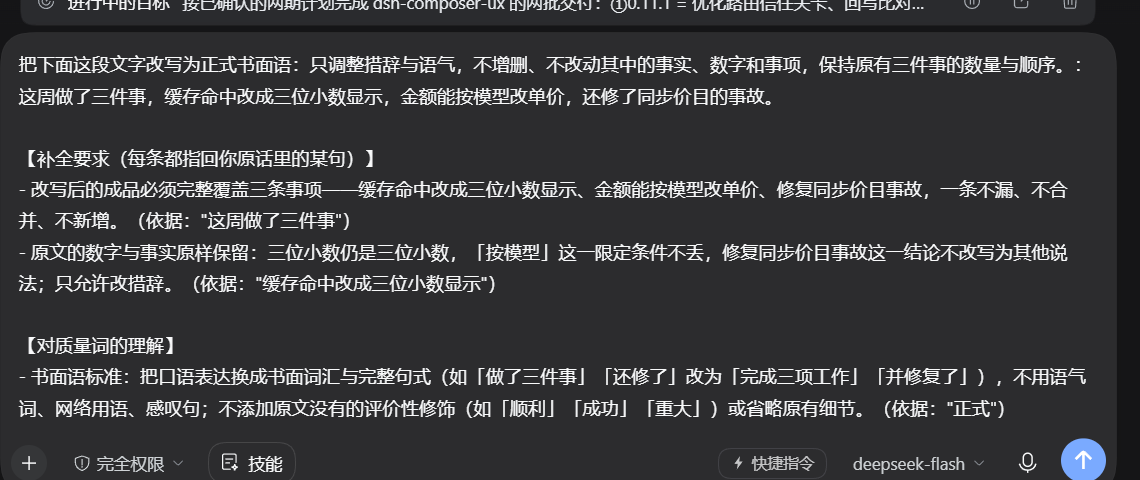
After insert: the composer holds the optimized prompt (Ctrl+Z restores your draft).
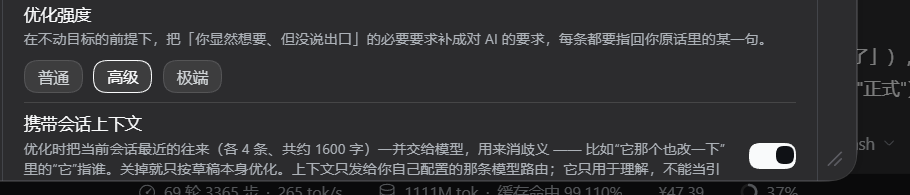
Settings: the new "carry session context" switch (on by default) — it is used for disambiguation only and can never be a source of quotes.
Install
# npm (recommended)
dsh plugin --profile <your-profile> add dsh-composer-ux

# a specific version
dsh plugin --profile <your-profile> add dsh-composer-ux@0.12.0

# from GitHub (identical code; `lib/` is committed, so no prepare script / build approval is needed)
dsh plugin --profile <your-profile> add github:fangwen9527/dsh-composer-ux

# pinned commit (recommended if you want the exact revision you reviewed)
dsh plugin --profile <your-profile> add github:fangwen9527/dsh-composer-ux#<sha>
Then restart dsh web (or use the plugin's own Restart DSH button once it is running).
Features
Two layers of switches
The settings page has a master switch (default: on) plus one switch per card for the first seven cards.
A section is active only when both are on (enabled && sectionSwitch). The first six cards default to
off; the stats line card defaults to on (it is the only exception); the cost card has no card-level
switch because the capsule is always visible.
The same build supports DSH 0.1.6 and 0.1.7 — the settings service changed shape between those releases
(settingsScope.bind → configForms.get, host-side settings.register removed, new event names), so the code
branches on capability detection instead of shipping two builds.
⚠️ Back up
~/.dsh/settings.yamlbefore upgrading DSH to 0.1.7: the official upgrade renames it tosettings.yaml.importedand imports it section by section (one-shot, irreversible).
Section defaults are not hard-coded false: they migrate from "is there a trace in the settings document that
you were using this?" — sections you touched stay on, untouched ones start off, and a brand-new install starts
with all six off.
Prompt optimizer (the interesting part)
The optimizer is a separate model call routed through the host (ctx.llm), so nothing leaves your machine
except what goes to the model route you already configured. Its contract:
- The model may only emit items (
rewrite/requirement/quality/unknown/plan/risk). - Every
rewrite/requirement/qualityitem must carry a quote that exists verbatim in your draft. The host compares character by character (with a whitespace-normalising fallback) and drops only the offending item — never the whole round. - Items that cannot be traced are not silently invented:
unknown/plan/riskmay go without a quote, but they are labelled as model-supplied, and the finished text shows each item's evidence. - If the model ignores the JSON envelope entirely, the raw text is passed through and labelled as unverified; if it looks like an envelope but is truncated, the round fails rather than writing broken JSON into your input box.
Three intensity tiers differ in evidence budget (basic = language-level fixes only; advanced = may add requirements traceable to your words; extreme = adds a staged plan and contingencies). Each tier's prompt can be edited in settings; the JSON output contract is always appended and cannot be overridden.
0.12.0 result box
- Your draft stays in the input box while the optimizer runs — edit it freely.
- Items appear one by one as the host verifies them; the box never shows unverified content.
- The finished prompt is editable; Insert into input replaces the draft (
Ctrl+Zrestores it) and puts a leading slash command (/goal …) back in place. - If you changed the input box while the round was running, the first click only warns; the second click overwrites.
Escwhile running cancels and keeps what was generated; the assembled prompt only exists once the whole output has been assembled, and the box says so instead of pretending.- Re-optimize re-runs the same source (not whatever is in the input box now — by then you may have inserted the result).
- Session context (on by default): the host reads the recent turns of the current session (up to 4 of your messages and 4 replies, ~1600 characters) so that "change that one too" has a referent. The context is used for disambiguation only, is explicitly not a source of quotes, and can be switched off.
- Memory chain: when you edit the previous result and optimize again, the previous version is passed along so the model adjusts rather than rewriting from scratch. Same-draft retries and re-running an unmodified result do not carry it.
Cost capsule and money settings
- Per-session cost from DeepSeek's list price; click the capsule for a breakdown.
- Peak / off-peak prices per model (empty field = official list price; you can add arbitrary model names).
- Peak/off-peak is decided by each usage event's own timestamp, not by when you look at the panel, and the price era is resolved the same way — so historical sessions keep the price they actually ran at.
- Chinese public holidays are fetched automatically (State Council schedule via
holiday-cn, GitHub raw with a jsDelivr mirror, built-in table as offline fallback). Manual dates always win; "not published yet" is reported as such rather than as a failure. Settlement days (调休) are still off-peak — the official wording is "Saturdays and Sundays are off-peak all day". - Third-party (non-DeepSeek) models get their prices from a models.dev snapshot with a one-click sync.
Everything else
- Context menu: three modes — official (do not interfere), browser default, or the plugin's own menu with seven items; clipboard read permission is explained in the card.
- Quick commands: categories, cross-category moves, per-item insert mode, and a JSON file you can back up
or edit by hand (
$DSH_HOME/quick-prompts.json, atomic writes with a lock file; a corrupt file is quarantined rather than silently replaced by an empty list). - OpenCode header: writes
providers.<route>.headersin thellm-pi-aiprofile — the only supported outbound-header entry point in DSH — so it takes effect on the next request without a restart. - Default terminal (Windows): git-anchored discovery, WSL excluded, per-session tool-surface trim, with the official sandbox/approval/timeout semantics preserved.
- Restart DSH: two-step confirmation, detached helper process, waits for the port to be released, hidden console relaunch, same-origin fence.
Privacy and trust
- No API keys are read, stored, or logged by this plugin; model calls go through DSH's own
ctx.llmrouting. - Your draft and (if enabled) the session context are sent only to the model route you configured.
- Every HTTP route the plugin registers goes through DSH's official trust gate
(
connection.requestRejection— Host/Origin fence and browser token) before the request body is read. - Settings are stored in DSH's own settings document; quick prompts live in
$DSH_HOME/quick-prompts.json.
Evidence and what is not verified
Why this section exists: the upstream project WestFox-AwA/dsh-prompt-optimizer publishes a verified / not-verified table and honestly lists effect as not verified (their holdout evaluation finished S1 and found "no measurable difference"; even their headline criterion was later declared non-discriminating). That is more honest than dressing design up as capability, so this table follows one rule: only evidence you can reproduce inside this repository goes in the left table.
Verified (reproducible evidence)
| Capability | Evidence |
|---|---|
| Result-box persistence: atomic write / corrupt quarantine / version envelope / sanitising | node test/optimize-state.mjs (69 checks, incl. a real GET/POST round-trip and "too big ⇒ refuse"); mutations DL/DM/DN/DO/DP/DQ |
| Ledger records metadata only — never your text | node test/optimize-ledger.mjs (50 checks) plus the 5e section of test/quick-commands.mjs: after a real run, a unique word from the draft cannot be found in the on-disk ledger |
| Ledger reason sanitising (a model-supplied quote can no longer reach disk) | same; mutation DH |
| Ledger rotation / per-line tolerance / clearing | node scripts/recap.mjs in a real process: --last / --session / --json / --clear and bad-line counting |
| Read-only tool fence (including symlinks) / every cap / out-of-bounds rejection | node test/optimize-tools.mjs (66 checks against a real temporary directory) |
| Tool-loop message shape / round cap / exceptions must degrade | same file, section 6 (a fake llm.stream drives the whole loop; role:'tool' and toolCallId are asserted) |
| Tool path: off by default, fires only when enabled, prose after lookups falls back, no cwd ⇒ no tool at all | test/quick-commands.mjs 5g (13 checks) |
| Mutation guards really bite, and the named test must be the one going red | npm run test:mutations: 137/137 bite |
0.13.2: ✕ collapses (result kept) + a two-click 丢弃 |
node test/panel-split-render.mjs §6, mutations EE–EI |
| Panel split + pinned result-box buttons (0.13.1) | node test/panel-split-render.mjs (20 checks, real react-dom/server render) |
| Release gates | npm run gates (tag target / packed file list / docs drift) |
| Three-platform CI | GitHub Actions: ubuntu / windows / macos × Node 20 |
0.13.1 split the panel into「优化提示词 / 快捷指令」halves with one toggle between them, and pinned the result
Not verified (design intent, or verified on one machine only)
| Gap | Note |
|---|---|
| Effect (the important one) | We have no controlled evaluation at all — no holdout set, no A/B, no cost baseline. "The model does better after this" has zero evidence in this repository. |
| 0.13.0 on a real machine | Persistence, the ledger and the read-only tools were exercised only by tests and a fake LLM. Real-machine acceptance waits for a restart (the user restarts DSH). |
| Benefit and cost of the read-only tools | No data on how many round trips they save, or how many tokens/seconds they add — exactly why they default to off. |
| Whether a real model respects "tool content is not a quote" | Structurally enforced (quote must be a verbatim substring of your own words); behaviourally untested. |
| Atomicity itself | Not observable in a single-threaded test; only a "no leftover temp file" hygiene assertion exists, with no mutation proof. |
| Fence portability | Verified on Windows locally; other platforms only run the same tests in CI. |
Development
npm ci             # install from the lockfile
npm run typecheck  # tsc --noEmit (type surface for @deepseek-ai/* lives in types/dsh-externals.d.ts)
node build.mjs     # emit lib/index.js + lib/client.js
npm test           # 18 suites
node test/mutation-guards.mjs   # mutation testing (each guard must fail when its rule is removed)
CI runs on ubuntu / windows / macos × node 20: npm ci → typecheck → build → npm test
(the tests exercise the built artifacts, so the build runs first on purpose).
Building the host bundle inlines @deepseek-ai/schemastery and @deepseek-ai/cosmokit: it prefers the copies
vendored in a DSH source checkout (DSH_REPO_PATH) and otherwise falls back to the identical npm packages, so
a clean clone builds without a DSH checkout.
Credits and license
MIT. Prompt-optimizer mechanics were adapted from the community plugins
WestFox-AwA/dsh-prompt-optimizer (BSD-3-Clause,
item/provenance design) and cross-checked against
Y1X1n/dsh-prompt-optimizer (streaming UX); pricing rules and
model aliases were cross-checked against dsh-plugin-usage-meter and dsh-cost-meter; holiday data comes from
NateScarlet/holiday-cn (MIT). See README.md for the full
provenance notes.
Comments
Comments live in GitHub Discussions. Sign in with GitHub to post or react.