
Install
Inside DeepSeek Harness, with dsh-market
dsh plugin --profile web add dshmarket
Or from the command line
dsh plugin --profile web add dsh-data-cleaning-agent
Installing runs third-party code with your own permissions — it can read your files, use your credentials and reach the network. Review the source first, and pin a commit (github:owner/repo#sha) when you can.
Screenshots
README
0.9.2 upgrade: Better Sidebar is an optional workbench dependency. Base tools and conversations remain available without it. The workbench requires
targetedOpenandstateSubscription; no private drawer fallback is created. See the compatibility record.
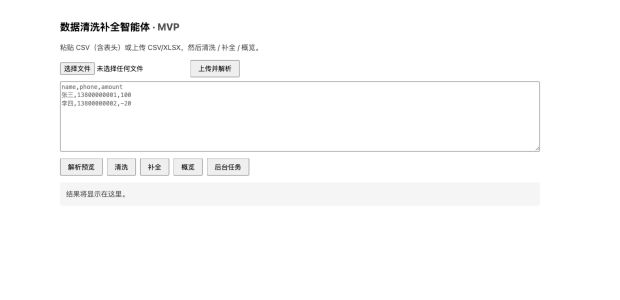
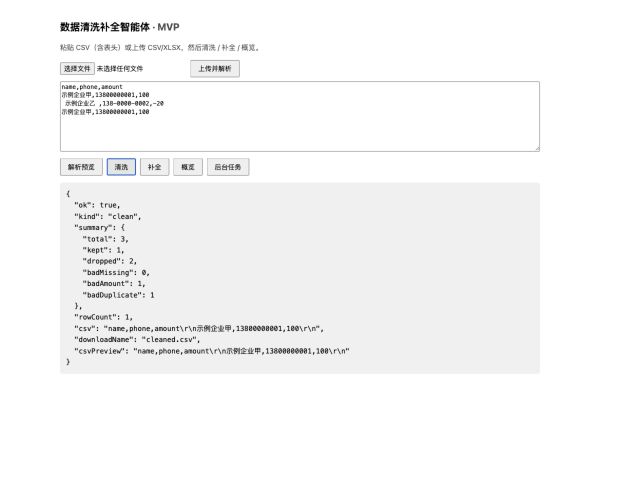
Data cleaning and data enrichment for CSV/XLSX/JSON enterprise lists in DeepSeek Harness, including spreadsheet cleaning, deduplication, profiling, optional Qichacha MCP and exports.
Install a pinned release using the command in the Chinese quick start, review the preview or evidence before confirming, and keep the previous version and task-directory backup for rollback. Qichacha calls use the customer's authorized account.
Related agents: 数据清洗补全 · AI填表 · 访前尽调 · 招投标
A data cleaning & completion agent plugin for DeepSeek Harness: local CSV/XLSX/JSON engine plus optional Qichacha (QCC) MCP enterprise-data enrichment. Initiated and maintained by the Qichacha (QCC) team.
Current source version / 当前源码版本: 0.9.17 (stable release)
0.9.17 adds 14 region, industry-level, product and enterprise-size fields (150 total), supports both legacy industry text and nested responses, and improves field search and column mapping. Defaults remain unchanged; missing levels are never inferred. Products reflect only the upstream first 10 entries. See field expansion and verification boundaries.
0.9.16 implements UX-49: a one-time editable native guide for new cleaning-entry Sessions, with existing text, attachment, IME and asynchronous-race guards. Clearing, refreshing or returning never restores it. Initialization does not send, call tools or open the workbench. Incomplete templates request the missing list and fields first. See the adoption record for isolated DSH evidence and unverified boundaries.
0.9.15 releases the Host-driven forward-only workflow across import, rules, entity matching, enrichment, and download. Future stages provide explicit locked feedback, while completed stages remain viewable without business-state mutations. Imported rows stay visible for full review before the bottom confirmation advances to rules. The compact status area reports stage, source, time, scope, and explicit result counts. The 0.9.13 submission-admission, background-session isolation, and manual-collapse guarantees remain intact. Start a new cleaning Session after upgrading; legacy Session migration is outside this release's acceptance scope.
0.9.10 observes the Host settling-to-hero transition so the database logo and product title appear even after delayed layout. Unknown structures do not trigger global headline rewriting. Rollback version: 0.9.9.
0.9.9 restores the “数据清洗补全智能体” native home title when newer Host builds place the plugin marker and Hero headline in sibling composer branches. The bridge remains reversible and isolated from other business plugins. The 0.9.8 read-only Profile history and origin Workspace/Session guarantees remain unchanged. Rollback: dsh plugin --profile web add dsh-data-cleaning-agent@0.9.8. Live DSH A/B verification remains a post-install user check.
This release refines workbench hierarchy, spacing, and responsive behavior across imported lists, field mapping, quality profiling, and entity matching. File, image, and pasted-data inputs collapse after a successful import and return through the explicit reimport action. Field mapping uses grouped choices, and searching a dimension exposes all fields in that group. Preparing a draft does not query QCC; sending starts execution. Fully restart DSH after upgrading. Existing download artifacts are not rewritten.

Overview
dsh-data-cleaning-agent is a DeepSeek Harness plugin (DSH Bundle plugin) for the common
"customer gave us a messy list of company names / table data" task. Upload CSV / XLSX / JSON,
clean name / phone / amount columns (trim, phone normalization, drop missing-required /
negative-amount / duplicate rows), deterministically complete gaps, profile the batch, and
export clean CSV.
When spreadsheet data is handled in the right-side workbench, the model receives aggregate summaries by default while full rows stay in the same-origin UI. If the user explicitly pastes entities, attaches an image, or sends a spreadsheet entity preview through the prompt builder, that selected content enters model context; the full spreadsheet still remains local to the workbench.
QCC enrichment follows a bring-your-own connection and account (BYO QCC) model. Each customer connects QCC MCP in their own DSH environment and uses quota or billing attached to their own QCC contract. This plugin does not embed, distribute, or share a maintainer key, does not resell QCC data, and does not pay or subsidize customer usage. Maintainer credentials are used only in isolated tests and are never shipped in the package.
Quick start
dsh plugin --profile web add dsh-data-cleaning-agent
Fully restart DeepSeek Harness afterwards (stop and re-run dsh web). Then say
"help me clean this batch of company list data" and the plugin loads its built-in Skill and
drives the clean / complete / profile tools.
After restart, a "Data Cleaning & Completion" entry appears between "New Session" and "Workspaces" near the top of the sidebar. It opens a dedicated native DSH session with a business landing view, product/workflow introduction, and a prompt builder at the upper-left of the composer. The builder accepts pasted entities, locally parsed spreadsheet data, or image attachments and writes an editable task brief back to the native composer. Five workflow actions (upload, profile, match, enrich, history) sit below the composer and open the five-step workbench (upload, rules, match, enrich, download) on demand. Completed tasks expose four durable Host artifacts: result and exception-list CSV/XLSX.
Since 0.8.1, users can paste, drop, or select a PNG/JPEG/WebP image, finish match rules and enrichment
field selection, and write one complete editable task brief to the native composer; the separate OCR-only
turn has been removed. Before send, the client releases the native image attachment so text-only models can
still dispatch the Agent-owned high-level tool. That tool calls the official local qcc-document-mcp
parse_document(file_path) exactly once and polls get_parse_result with the returned task_id only while
processing, then returns company names/credit codes to the workbench for human review.
Local image parsing requires the official qcc-document-mcp stdio server to be configured in the MCP
connector. The remote qcc-document connector accepts public file_url values only and cannot read Host
temporary files. The local server uploads the explicitly submitted file to the QCC document parsing gateway.
Both use the current customer's own QCC account and quota. Without the local connector,
image intake fails closed with actionable guidance; text and spreadsheet paths remain available.
Better Sidebar is optional and is not automatically installed. Native conversations and the clean/complete/profile engine tools work without it; interactive import, mapping confirmation, workbench preview/export and navigation do not. Workbench entry explains the limitation without deleting drafts/tasks or creating a private drawer. For the workbench, use the tested DSH 0.1.2-rc.1 + Sidebar 0.18.1 pair; an exact optional peer is not a general compatibility claim. Existing incompatible sidebar installations still block preflight. Context is optional; an existing 0.36.0 must be upgraded to 0.48.0. Use node lib/install-preflight.js <profile> <dsh-executable> --workbench for workbench checks; base checks permit a missing sidebar. Runtime capabilities are checked separately. No global host upgrades are performed.
Run from a full checkout or unpacked npm package with the actual dsh CLI (streamed shell installation is no longer supported):
node lib/install-preflight.js "$DSH_HOME/profiles/web"
bash install.sh
Or let an agent install it for you:
Install this plugin for me: https://github.com/duhu2000/dsh-data-cleaning-agent
Capability matrix
| Capability | Tool / entry | Notes |
|---|---|---|
| Clean | data_clean_rows |
trim, phone normalization, drop missing-required / negative-amount / duplicate rows |
| Complete | data_complete_rows |
fill empty amount with 0, empty name with placeholder, report incomplete items |
| Profile | data_profile |
column overview and amount distribution |
| Parse | web /data-cleaning/api/mvp/parse |
CSV / XLSX / JSON |
| Async jobs | web /data-cleaning/api/mvp/jobs |
job state machine + persistent storage |
| UI | web /data-cleaning/ |
upload → clean/complete → export |
| Five-step tasks | web /data-cleaning/api/workflow/* |
taskId/revision, rules, match, enrich, recovery, and state audit |
| Durable artifacts | Host workspace .dsh-data-cleaning-artifacts/v1 |
result/exception CSV+XLSX, checksum verification, restart-safe download |
| In-app entry | top "Data Cleaning & Completion" entry + five actions below the composer | dedicated business home in the center; opens the Mockup-aligned workbench on demand |
| Prompt builder | conversation.input.overlay |
text / spreadsheet / image intake, cleaning and enrichment selection, editable native-composer draft |
| Image list intake | data_cleaning_extract_image_companies + web /data-cleaning/api/images/* |
native thumbnail/lightbox, paste/drop, ephemeral Host image, Agent-owned provider recognition, human review; no QCC call during recognition |
| Tool cards | tool.call.toolview (clean/complete/profile/image-list) |
render four tool result cards in-conversation with running/done/failed state |
| Task progress | workbench header jobs pill | polls /data-cleaning/api/mvp/jobs; shows queued / running tasks |
| Skill | data-cleaning |
guides the model through the workflow |
| QCC Skill enrichment | enterprise-enrichment |
0.4.0: company panorama, ownership, governance, and historical registration |
| 0.4.0 preflight | web /data-cleaning/api/phase2/capabilities |
Read-only 16+4 dynamic-tool check; makes no QCC or paid calls |
| QCC Host Bridge | data_cleaning_qcc_run + web /data-cleaning/api/g5/* |
Web stages commands in the Host; an Agent-owned high-level tool uses nested execution for dynamic QCC tools; real OAuth/QCC path, natural-expiry refresh, and fault injection verified |
| Three-domain enrichment | web /data-cleaning/api/phase3/* |
0.5.0: risk 38 + IPR 18 + operation 35, zero-call estimate, user-owned QCC quota confirmation, candidate review, recovery/retry, and two CSV exports (no domain expansion in 0.6.0) |
Qichacha MCP enrichment (status and roadmap)
Besides local deterministic completion, the plugin supports Qichacha MCP enterprise-data enrichment:
- Plan A (model-mediated, first): after the user connects Qichacha with
qcc-dsh-mcp-oauth, the Skill guides the model to callmcp__qcc-company__get_company_by_query/mcp__qcc-company__get_company_registration_infoper company name and feed the fresh registration data back into the completion tool. - Plan B (Agent-owned batch, since 0.4.0): in DSH Code Mode, the workbench stages rows in the
local Host and sends only a typed commandId intent, containing no company list, to the native
conversation. The Agent calls
data_cleaning_qcc_runexactly once; the bridge then dispatches dynamic QCC tools as nested executions using the parent execution token and Session. This path supports batch enrichment, idempotency, candidate-resolution resume, manual retry of retryable failures, and metadata-only auditing. Since 0.8.14, initial draft staging automatically preflights tools and scope without a billing checkbox; only sending the readable draft starts queries. Candidate resolution, retry and legacy direct-execution APIs still requireconfirmPaidCalls:truefor the user's own QCC account quota. Ambiguous candidates are never auto-selected. A loopback-only, fail-closed E2E runner is ready. On 2026-09-01 an isolated rc.2 Host passed real OAuth, restart recovery, and 400 QCC calls across 20 public companies. Natural-expiry token refresh, dynamic-tool recovery, a post-refresh real call, and 401/429/quota fault injection also passed. - 0.5.0 three-domain batch extension (released): a frozen 91-tool contract covers risk (38), intellectual property (18), and operation (35). The workbench supports domain selection, a zero-call upper-bound estimate, separate paid-call confirmation, manual ambiguous-candidate locking, partial-failure retry, 30-minute Host-memory recovery, and result/review CSV exports. rc.2 and alpha.2 passed 24/24 zero-call Host smoke checks; rc.2 passed actual rendering and Chinese company-field mapping. On 2026-09-03, a minimal real Phase-3 E2E using the maintainer's own test account completed one public entity with one risk tool in two actual calls, with no review items or errors. IPR and operation were covered by runtime registration, contract, and zero-call gates only.
The Bridge accepts both the documented mcp__qcc-company__* names and the legacy
mcp__company__* names observed from qcc-dsh-mcp-oauth@0.1.7. A fresh rc.2 profile must also
install the matching @deepseek-ai/dsh-mcp-client explicitly; see the compatibility guide.
See the 0.4.0 release record for scope, validation gates, and rollback steps. See the Phase-3 acceptance record and the 0.5.0 release record for verification, upgrade, and rollback. See the 0.5.1 release record for the README fix and release-text gate. See the 0.5.2 release record for native DSH UI alignment, verification, and rollback. See the 0.5.3 release record for the business landing view and prompt builder. See the 0.7.0 release record for the first 40 and second 58 one-company-one-row fields, deduplicated QCC tool dispatch, and real two-company acceptance. See the 0.8.0 release record for image paste/drop, native previews, Agent-owned OCR, and the human-review handoff. See the 0.8.1 release record for QCC intelligent document parsing and the single editable task brief. See the 0.6.3 release record for multiline entity-list parsing, editable execution summaries, and workbench/composer layout fixes. See the 0.6.2 release record for Chinese export headers, complete field-selection propagation, and profile-field enrichment. See the 0.6.1 release record for the Agent-owned QCC workbench, session isolation, recovered statistics, and real end-to-end validation. See the 0.6.0 release record for the taskId workflow, durable artifacts, restart recovery, and dual-baseline validation.
See docs/PLAN-OSS.md for details.
Local development
Node.js 20 or later. DSH runtime services (ctx.tools / ctx.skills / ctx.jobs /
ctx.storageDomain / webServer / webRuntime) are provided by the Host; locally you only
install xlsx:
npm install --legacy-peer-deps
npm run check
npm run check runs lint, documentation version consistency, pack whitelist verification and
unit tests.
Real G5 validation must be enabled explicitly according to
the E2E runbook; npm run e2e:g5 refuses to run by default.
The Phase-3 runner is also disabled by default: npm run e2e:phase3 only permits a loopback Host,
and real-call mode requires an additional confirmation for use of the maintainer's own test account.
Configuration
The plugin registers itself as a bundle via cordis.patch.yml; dsh plugin add adds the
package to the profile's dsh.profile.bundles automatically.
Documentation
Security & privacy
- Model tools return summaries only; raw detail rows never enter model context.
- Detail data is delivered only via same-origin (
127.0.0.1/localhost) web endpoints; untrusted cross-origin requests are rejected. - Never put tokens, API keys, cookies, OAuth credentials, or real business data in issues, PRs, logs, screenshots, or test fixtures.
License
MIT © 2026 dsh-data-cleaning-agent plugin contributors
Get involved
If the plugin helps you clean company lists faster, consider starring the repository, filing an issue, or contributing a fix.
Comments
Comments live in GitHub Discussions. Sign in with GitHub to post or react.