
Install
Inside DeepSeek Harness, with dsh-market
dsh plugin --profile web add dshmarket
Or from the command line
dsh plugin --profile web add dsh-input-traffic
Installing runs third-party code with your own permissions — it can read your files, use your credentials and reach the network. Review the source first, and pin a commit (github:owner/repo#sha) when you can.
Screenshots
README
dsh-input-traffic
- English README
- 中文 README
- 日本語 README
- 한국어 README
- Installation guide
- 中文安装指南
- 日本語インストールガイド
- 한국어 설치 안내
- Changelog
- 日本語 changelog
- 한국어 changelog
▼ DSH version support
DSH version Queue strip / freeze button Busy-Enter pin Key difference 0.1.1-rc.2 ✅ ✅ conversation.input.rightstill carries theInputZoneowner (the plugin no longer depends on it)0.1.2-rc.1 ✅ ✅ That slot lost its owner ( InputBar.tsx:466passes{}); the freeze button now reads the session standard kituseSession
- One artifact, runtime-adaptive: the same
lib/client.jsworks on both releases. The client bundle onlyrequiresreact/react/jsx-runtime/@deepseek-ai/dsh-client-ui-primitives— all three are in the shared module table of both releases, so thedsh-client-runtime→dsh-client-storerename never reaches it.- Only the two-release intersection is consumed: the queue strip lives in
conversation.input.dock(ownerInputZonein both releases, andinput.draftexists in both); the freeze button lives inconversation.input.right, whose owner was removed in 0.1.2, so the component reads onlyuseSession/sessionId— both present inSessionStandardPropson both releases.- Queue strip position: registered with
order: 1000, so it sorts after every known contributor of theconversation.input.dockband (todo 0 / goal 10 / official queue 20 / dsh-perm-gate notice 30) and sits directly on top of the composer card. DSH has no "last" slot semantics, so this is a convention rather than a structural guarantee — a third-party plugin registering a largerordercould still land below it.
Compatibility note: v0.2.9 ships Japanese (
ja) and Korean (ko) dictionaries, but the current official DSH releases expose onlyzhandenthroughLocaleRuntime. On stock DSH, selectingjaorkofails withlocale "<id>" is not registered. These languages will work after official DSH adds the locale IDs. Advanced users can use a DSH fork that updatesLOCALE_IDS(locale-settings.ts) andLOCALESlabels (client/index.ts), then rebuild. Changing this plugin alone cannot extend DSH's global locale list.
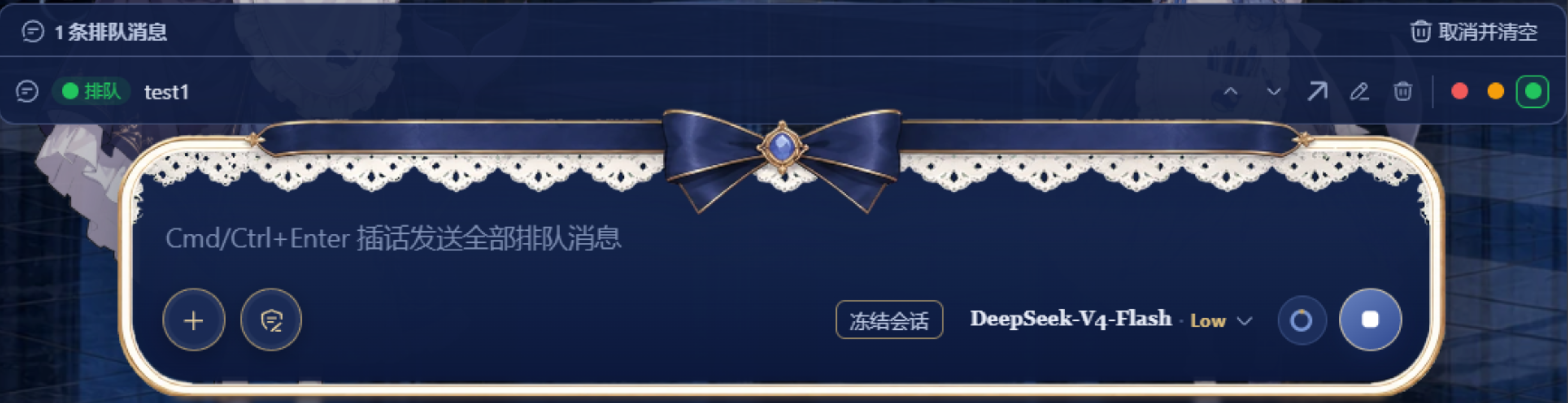
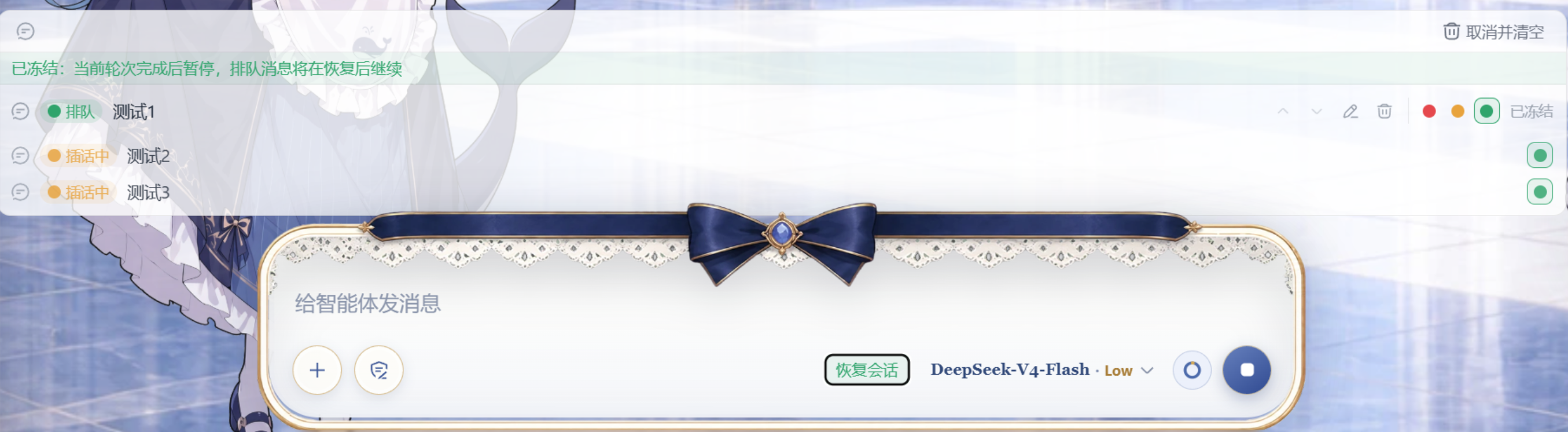
While the agent is busy, "interrupt" and "queue" are no longer mutually exclusive: red interrupts and sends now, yellow inserts at the next turn, green queues until the end — all three coexist. Near DeepSeek peak pricing hours, one click freezes the session; resume later during off-peak pricing.
A cordis client plugin assembled via the dsh plugin command and a bundle patch — no dsh source changes, no PR required.
💡 Why "Freeze session" is recommended: DeepSeek moved to peak/off-peak billing on 2026-08-17 — the peak window (Beijing time 09:00-12:00, 14:00-18:00) costs 2× the off-peak rate (all other hours, including lunch, night, weekends and holidays). If a long-running session spans the expensive window, manually freezing pauses API consumption and resuming off-peak can save up to 50%.
Suggested pairing for now: use it together with a reminder plugin (e.g. dsh-notify, desktop notifications when it is time to freeze/resume) and a billing/usage plugin (e.g. dsh-deepseek-usage, dsh-cost-tracker, dsh-billing-balance, to verify actual spend around a freeze) — a "remind → freeze → resume off-peak → verify" saving loop.
What it does
- Three tiers coexist: while the agent is busy, every input lands in a waiting area first, then you choose when it enters the conversation — no longer a single "interrupt" or a single "queue":
- 🔴 Red (now): interrupt the current turn and send immediately — the running generation stops and the message is processed and answered right away;
- 🟡 Yellow (next): insert at the next natural turn — the current action (tool call / ongoing generation) finishes first, no interruption;
- 🟢 Green (later): queue until the whole logic has finished — processed after all previously queued actions complete (the default).
- Yellow is reversible: pressing green on an already-steered (yellow) message revokes the insertion and pulls it back to the queue.
- Queued content stays editable: messages already in the queue can be edited in place — the multi-line editor auto-grows with the content so long messages stay fully visible (Enter saves / Shift+Enter newline / Esc cancels); they can also be pulled back into the composer for editing (back-filled draft, then resubmitted).
- Queue management: messages in the waiting area can be moved up / down to reorder, removed, or cleared with the queue-level "cancel and clear".
- Edits are never lost: if saving an edit fails (the agent already claimed the message), the edited content automatically moves back to the composer; an occupied draft is never overwritten.
- Peak-hour freeze: a "Freeze session" button on the composer's right — near DeepSeek peak pricing hours (09:00-12:00, 14:00-18:00) it pauses API consumption: the current turn finishes naturally, then the unsent queue is frozen; "Resume session" continues during off-peak hours.
- Official behavior takeover: while the plugin is mounted, the official "busy-Enter behavior" settings row is hidden (Enter stays queue-later).
- Day/night auto-adapt: the dock and the freeze button use dsh's official semantic tokens (
--dsw-alias-*) exclusively, so they follow the system dark mode / dsh dark theme automatically — in dark mode they switch to a dark-gray surface with inverted (white) text, with no configuration (see "Day/night mode").
UI preview
Layout sketch of the waiting area and the freeze button in a session page:
┌─ Composer ───────────────────────────────────── Send ── [❄ Freeze] ─┐
└─────────────────────────────────────────────────────────────────────┘
┌─ Waiting area (three-tier planning dock) ───────────────────────────┐
│ ┌ 2 queued messages                                 🗑 Cancel & clear ┐ │
│ │ 🟢 queued   First message preview…       ↑ ↓ Pull  Edit  Remove   │ │
│ │ 🟢 queued   Second message preview…      ↑ ↓ Pull  Edit  Remove   │ │
│ │   Editing: the multi-line editor auto-grows (up to ~8 rows)       │ │
│ │   Enter saves · Shift+Enter newline · Esc cancels                 │ │
│ └───────────────────────────────────────────────────────────────────┘ │
└───────────────────────────────────────────────────────────────────────┘
The three tiers
| Tier | Color | Semantics | Underlying mechanism (existing dsh RPCs) |
|---|---|---|---|
| later (default) | Green | Queue: processed after all previously queued actions finish; green on an already-steered message revokes the insertion | Enter default queue → agent.followup() (next-turn); revoke = updateQueue(remove) + send(text) |
| next | Yellow | Insert at the next natural turn: after the current action finishes | updateQueue(id, { kind: 'steer' }) → agent.steer() (next-step boundary) |
| now | Red | Interrupt and send: stop the current turn, the message is processed immediately | cancel() → updateQueue(remove) (avoids the inbox duplicate-insertion rejection) → send(text) (re-submit, wakes the driver immediately) |
Why red is cancel + remove + resend: the harness inbox rejects inserting a message that is already pending; steering the original message after an interrupt would be rejected and strand the message (see FAQ).
Session freeze / resume (peak-hour pause) ⭐ Recommended
Cost-saving role: this is the plugin's core recommended feature for DeepSeek's peak/off-peak billing (effective 2026-08-17) — the peak window (09:00-12:00, 14:00-18:00) costs double, off-peak is half price. Freezing pauses non-urgent work until off-peak hours, directly avoiding the expensive window; long-running sessions can save up to half the cost.
Suggested pairing: a reminder plugin (e.g. dsh-notify) notifies you to freeze/resume when entering or leaving the peak window; a billing/usage plugin (e.g. dsh-deepseek-usage, dsh-cost-tracker, dsh-billing-balance) verifies the actual spend around a freeze.
The "Freeze session / Resume session" button on the composer's right (beside the send button) pauses API consumption near DeepSeek peak pricing hours:
- Freeze: the current turn is not interrupted — it finishes naturally, then consumption pauses. The queue is fully decoupled from freezing: freezing only stops the agent from consuming (executing / inserting / appending), while the waiting area stays visible and fully operable — reorder, edit, remove and set the red/yellow/green insertion tier, just like when not frozen;
- Resume: the (possibly edited) queue is re-submitted and each entry executes with its planned tier (red = interrupt and process immediately, yellow = interject, green = queue); the agent continues in FIFO order;
- Session isolation: freeze state and the detached queue are keyed by sessionId (
src/client/freeze-store.ts'sMap<string, FreezeState>) — freezing session A never affects session B's banner/button/queue; editing only re-renders the owning session's consumers; - Engine: freeze = detach every queued row via
updateQueue(remove)(copies with their tiers kept in the plugin store, keyed by session); the driver stops naturally once the current turn ends with no pending work; edits made while frozen (text / order / tier) write back to the store in real time; resume = firstawait sessionGuard.resume(sessionId)(so the interrupted turn's natural next step happens first), then re-submit viasend(text), waking the driver (red-tier entries are preceded bycancel()); - Note: queued messages containing non-text content (images) cannot be re-sent and are released by the freeze (they do not come back).
Session-level locking via dsh-session-guard
The freeze button hands off to a sessionGuard bridge (src/client/session-guard-bridge.ts → POST /session-guard/rpc { action: stopNextTurn|resume, sessionId }) for per-session locking on the server side, while raising a composer block (conversation.blocks.set) so the input box turns inert and Enter can no longer leak into the conversation:
- Component references:
src/client/freeze-button.tsx— freeze/resume control (slotconversation.input.right);src/client/steer-queue-dock.tsx— three-tier planning dock + frozen banner/list (slotconversation.input.dockidqueue);src/client/freeze-store.ts— session-scoped freeze state (Map<sessionId, {frozen, pending}>, shared by button ↔ dock);src/client/session-guard-bridge.ts— session-guard RPC bridge (fail-open, silently skipped when session-guard is absent);src/client/index.ts— slot registration + composer-block injection (conversation.blocks.set).
- Scope comparison: this plugin's freeze button = per-session (locks that one session by id); session-guard's peak auto gate / step gate = global or per-session pause (holds on peak entry, releases off-peak). They complement each other — this plugin owns the queue and freezing, session-guard owns when progress may happen.
Division of labour (important): this plugin only "orders", session-guard only "stops"
| This plugin (input-traffic) | session-guard | |
|---|---|---|
| Job | which queue user input goes to, at what tier, and when it is consumed | when progress may happen (step / turn / request) |
| DSH primitives | the next-step / next-turn pending queues + updateQueue(steer|remove|edit) / send / cancel |
agent/pre-step (step gate), agent.cancel({keepInbox:true}) + goals.pause, agent/request hold |
| Freeze | detach queued + steering rows (tiers preserved) + composer block |
stopNextTurn: release the step gate first, then turn-level pause (otherwise both wait on each other) |
| Resume | re-submit by tier (red cancel+send / yellow steer / green send) | resume: continue from the pause point |
The two queues mean: next-step = "the next step, same level as a tool result, still inside the same turn"; next-turn = "a new turn". That is why the yellow tier inserts into the current turn and the green tier waits for the turn to close.
Queue management
Each waiting-area message (while not frozen) offers:
| Action | Description |
|---|---|
| Move up / down | Reorder the FIFO queue (the whole queue is rebuilt in the new order; disabled while any image message is queued) |
| Drag to reorder | Drag a row onto its target position (native HTML5 DnD, no extra dependency); same server-side rebuild as the arrow buttons |
| Edit in composer | Back-fill the message into the composer draft and remove it from the queue for editing |
| Edit / remove | Edit the queued content in a multi-line editor / cancel the message |
| Red / yellow / green planning | See "The three tiers" |
| Cancel and clear | Two-step confirm, then stop the current run and remove every queued message (first click shows "Confirm clear?") |
Concurrency protection for reordering: if a message was already claimed by the agent during the rebuild (queue-item-not-found), the reorder stops immediately and nothing is re-sent — the changed queue is never scrambled.
The waiting area's collapse state is remembered across sessions.
When editing a queued message (inline):
- Auto-grow: the editor grows with the content in real time; long messages expand fully, up to about 8 rows, then scroll internally;
- Shortcuts:
Entersaves,Shift+Enterinserts a newline,Esccancels (composition input is protected from accidental saves); - Failure fallback: if the save fails because the agent already claimed the message (e.g. "started sending"), the edited content automatically moves back to the composer with a notice — nothing is lost; the back-fill only happens when the composer is empty, so an existing draft is never overwritten.
Day/night mode (automatic dark adaptation)
The dock and the freeze button no longer use hand-drawn colors — they reference dsh's official semantic tokens (--dsw-alias-*: bg-layer-* / border-l* / label-* / interactive-bg-hover / state-success|warn|error-primary) maintained by the dsh theme system:
- Automatic follow: dsh's default theme preference is "system" — when the OS switches to dark mode (or you pick a dark theme in dsh settings),
body[data-ds-dark-theme]takes effect and the tokens switch to the dark palette, so the dock becomes a dark-gray surface with inverted (white) text and the tier colors use the official dark-adapted values (contrast is guaranteed by dsh); - No configuration: the plugin does not watch the system and adds no settings — light/dark is fully delegated to the dsh theme; the day appearance is unchanged;
- Scope: the waiting-area dock (including the frozen banner / frozen list) and the "Freeze session" button on the composer's right.
Installation
# Option 1: install from npm (recommended, stable release)
#   (the profile is a pnpm workspace root, so -w is required)
dsh plugin --profile web add dsh-input-traffic -w

# Option 2: install directly from GitHub (drscrewdriver fork — trial new features first)
#   (lib/ is not committed; after install build in the profile:
#    cd ~/.dsh/profiles/web/node_modules/dsh-input-traffic && npm install --legacy-peer-deps && npm run build)
dsh plugin --profile web add github:drscrewdriver/dsh-input-traffic#main

# Option 3: assemble from a local path
# dsh plugin --profile web add /absolute/path/to/dsh-input-traffic -w

# Confirm the composed tree contains the new row
dsh web --dump-config | grep -B1 -A2 'input-traffic'

# Restart dsh web — required! A running instance does not hot-load the bundle layer
dsh web
⚠️ GitHub reachability: installing via github: requires access to github.com; if your network is restricted, set up a working proxy or mirror first, otherwise add may stall while fetching.
Local build and tests:
npm install --legacy-peer-deps   # the @deepseek-ai client package chain is incomplete on npm; toolchain only
npm run build                    # tsc (lib/types) + tsdown (lib/index.js + lib/client.js)
node examples/verify-assembly.mjs  # 12 assembly assertions
npm test                         # 36 vitest component tests
npm run lint                     # ESLint (src + tests, flat config)
npm run verify                   # one-shot gate: lint + test + build + verify-assembly
Development (TDD + Lint)
This project is maintained with TDD (test-driven development): write the failing test first, then implement to green.
npm run tdd # vitest watch: re-runs on change, red-to-green loop
Workflow:
- Add/update a case in
tests/(red: confirm the new behavior is not implemented yet); npm run tddand watch it fail;- Implement the minimal change in
src/(green); npm run verifyall green before committing (lint + 36 tests + build + 12 assembly assertions).
Lint:
npm run lint       # ESLint flat config (eslint.config.mjs)
npm run lint:fix   # auto-fix what can be fixed
- Scope:
src/andtests/(TypeScript + React); build outputlib/is ignored; - Rules:
@typescript-eslint/recommended+react-hooksbest practices; unused variables are errors (underscore prefix_exempts).
Usage
- While the agent is busy, type and send — the message enters the waiting area (green queue by default);
- Press a planning button on the message:
- 🟡 Yellow = interject — insert after the current action finishes;
- 🔴 Red = interrupt — stop the current action, the message is processed right away;
- 🟢 Green = keep queued (the default); on an already-steered message, green revokes it back to the queue;
- Reorder / re-edit: use move up/down, "Edit in composer", or the multi-line inline editor (Enter saves, Shift+Enter newline);
- Cost-saving key (recommended): near the peak window (09:00-12:00, 14:00-18:00), press "Freeze session" on the composer's right; the session pauses after the current turn, avoiding the expensive window; press "Resume session" off-peak to continue. Pair with reminder / billing plugins (see "Recommended" above).
FAQ
After an interrupt the message gets no reply / the conversation stalls
Fixed (historical issue). Root cause: the harness inbox rejects inserting a message that is already pending — steering the original message right after an interrupt was rejected with "message is already pending", stranding the message and stopping the driver. The current implementation is cancel → remove → resend (the text re-submitted as a fresh message), so the interrupted message is processed and answered immediately. If it still happens, rebuild the plugin and restart dsh web.
Where does the content go after a failed edit save?
It is not lost. When the save fails (the agent already claimed the message), the edited content automatically moves back to the composer with an "Edit failed; the content was moved back to the composer" notice; if the composer already has a draft, nothing is back-filled and only the failure is reported.
The "busy-Enter behavior" settings row is missing
Expected — the plugin hides it and pins Enter to green queue; a stale preference cannot leak behind the hidden row.
Queued messages disappeared after freezing
Expected — the freeze detaches the queue into the plugin store (keyed by session, removed from the waiting area); they return on resume. Refreshing the page loses the frozen queue; avoid refreshing while frozen.
Move up/down is disabled
Reordering is disabled while any queued message contains non-text content (images cannot be re-sent). Same for "Edit in composer".
Interrupt / interject buttons are disabled
Red and yellow are disabled while the agent is idle — an idle agent would process the message immediately anyway, so planning is not needed.
Uninstall
dsh plugin --profile web remove dsh-input-traffic
Restart dsh web afterwards to restore the official queue dock and the "busy-Enter behavior" settings row.
Compatibility and privacy
- Requires DeepSeek Harness with the web profile; verified on Windows/macOS/Linux dsh web.
- A browser-side (client) plugin only — every operation goes through existing dsh RPCs (
session.prompt/session.updateQueue/session.cancel); no official source changes. - The plugin reads no data beyond session state and uploads nothing; the frozen queue lives only in browser memory.
- The contract types are declared locally in
src/types/contracts.d.ts(the npm dsh client chain is incomplete) and mirror the harness sources at build-verification time.
Architecture
src/
├── index.ts                  # node half (loader entry, empty apply)
├── invariant.ts              # takeover invariants
├── types/contracts.d.ts      # local @deepseek-ai/* contract declarations
└── client/
    ├── index.ts              # browser half apply: busyEnter pinned to queue + three slot registrations
    ├── steer-queue-dock.tsx  # three-tier planning dock (shadows conversation.input.dock id queue)
    ├── freeze-button.tsx     # freeze/resume button (conversation.input.right)
    ├── freeze-store.ts       # session-scoped freeze state (Map<sessionId, {frozen, pending}>)
    ├── hide-enter-row.tsx    # settings-row hiding (shadows settings.general.item id composer-enter)
    ├── locales.ts            # steer dictionaries (zh/en)
    └── *.module.css
- Slot shadowing: list slots render the lowest priority per cell — the same id at priority -1 overrides the official entries (QueueDock, EnterBehaviorRow).
- Build chain: tsdown mirrors harness
packages/client/tsdown.client.tssemantics (__ModuleLoader__.loadbanner, lightningcss-inlined CSS Modules, platform externals table, bundle purity gate). - Consumer contract:
conversation.updateQueue / cancel / send / input.for(actx).notify / actions.setDraft(official ui-conversation service, verified against api-proxy.ts). - Auto-growing editor:
resizeEditor(a pure export of steer-queue-dock.tsx) resets the textarea height and grows it byscrollHeight; a CSSmax-heightcaps the growth and the editor scrolls internally.
Real-environment verification (Windows, 2026-08-17)
End-to-end browser verification on a live dsh web, zero application console errors:
| Item | Result |
|---|---|
| Assembly | Composed tree contains the input-traffic row; plugin tab shows mounted/enabled; /plugins/dsh-input-traffic/client.js 200 |
| Settings-row hiding | The "busy-Enter behavior" row is absent (zero DOM matches) |
| Red now | Interrupted message is processed immediately: the agent replies to it explicitly and continues; no stranded intermediate state |
| Yellow next + green revoke | After interjecting, green pulls the message back to the queue |
| Freeze / resume | Current turn finishes naturally without interruption, queue frozen with banner; resume drains everything in FIFO order |
| Queue editing (multi-line / fallback / drag-reorder / confirm) | Covered by component tests (36/36 green); real-environment re-check pending |
References
- dsh-plugin-creation-convention.md (workspace root) — the dsh plugin creation convention this plugin follows
- Semantics reference: dsh-traffic-light (desktop session-status traffic light)
- Harness anchors:
packages/client/AGENTS.md,packages/client/tsdown.client.ts,packages/client/web/src/platform.ts,packages/bundle/web-app/cordis.patch.yml,packages/client/ui-conversation/src/client/queue/QueueDock.tsx,packages/host/apiproxy/src/api-proxy.ts
drscrewdriver DSH Plugin Family
This project is one of the DSH plugins maintained by drscrewdriver. If this one helps you, the others likely will too:
| Plugin | One-liner |
|---|---|
| dsh-input-traffic | Busy-time input queue: three-tier traffic control, drag-to-reorder, session freeze |
| dsh-session-guard | Peak auto session gate: weekend mode + peak auto-pause + session-level lock + backend auto-retry (pairs with this plugin's button) |
| dsh-thinking-levels | Per-round reasoning_effort control: Auto scheduling or manual wire level |
| dsh-seatbelt-sandbox | macOS Seatbelt sandbox adapter: native libsandbox loader replacing deprecated sandbox-exec |
| dsh-switch-search | Session content search sidebar: title/content toggle, type-filter by user/reply/tool |
License
MIT
Comments
Comments live in GitHub Discussions. Sign in with GitHub to post or react.