
Install
Inside DeepSeek Harness, with dsh-market
dsh plugin --profile web add dshmarket
Or from the command line
dsh plugin --profile web add dsh-canvas-tsx-sidebar
Installing runs third-party code with your own permissions — it can read your files, use your credentials and reach the network. Review the source first, and pin a commit (github:owner/repo#sha) when you can.
Screenshots
README
This plugin publishes its README in Chinese only.
简体中文 | Français | Deutsch | Italiano | Русский | Español
DSH(DeepSeek Harness)Web 插件 —— dsh-better-sidebar 消费插件。
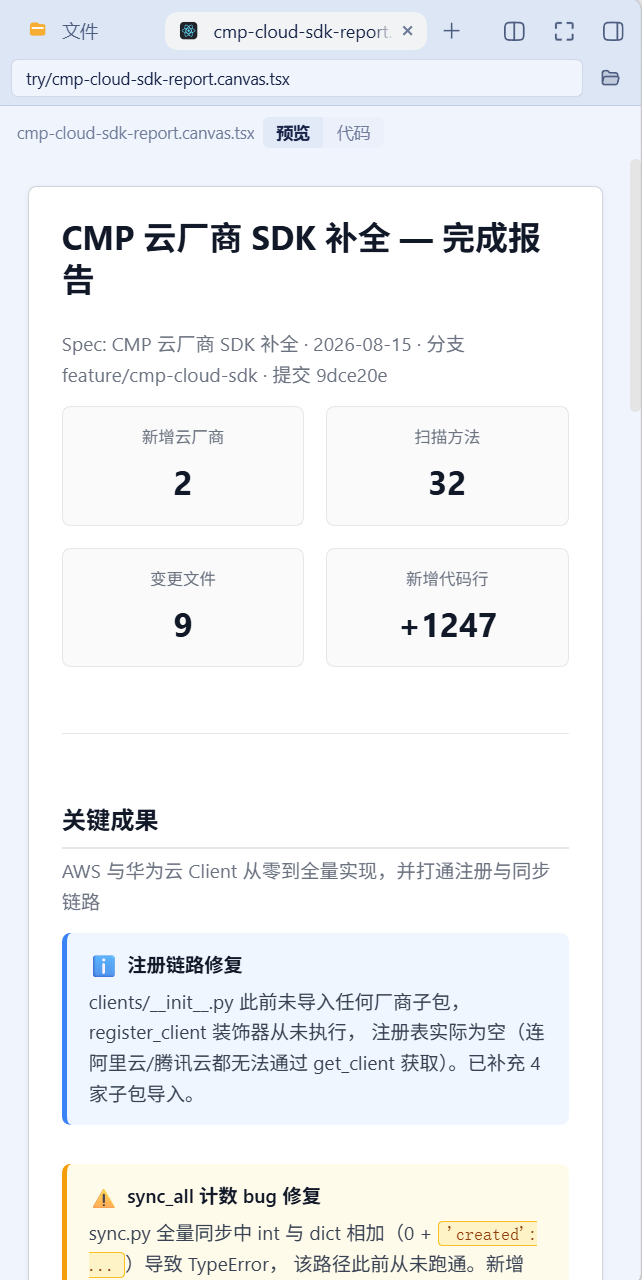
把工作区里的 Qoder Canvas *.canvas.tsx 静态解析为结构化页面,在 DSH 右侧栏渲染。
纯静态管线:不执行 canvas 源码。无
eval、无new Function、无 bundler、无沙箱 iframe。 解析在浏览器侧用自研的轻量递归下降解析器完成(零解析器依赖)。
本仓库还附带一个 Skill:skills/writing-qoder-canvas/,让 LLM 会写这种格式。见 集成 Skill。
兼容性范围:DSH 0.2.0 线(本线)—— engines.dsh 为 >=0.2.0-rc.1 <0.2.1-0,实测基线 dsh-client-locale 0.2.0-rc.1,发布走 npm dist-tag dsh-0.2.0。0.2.0 对本插件所用的全部宿主 API 是纯增量(本插件只消费 dsh-client-locale 的 register(ns, locale, dict) / bind(ns),client 导出面与 0.1.7-rc.2 完全一致),所以支持线整体前移即可,没有运行时兼容分支。按 DSH 版本选插件版本(不要在旧宿主上裸用 latest——不满足旧宿主 engines 会被启动预检静默禁用;caret 范围跨宿主 minor 也不成立):
| DSH 宿主 | 本插件最新版本 | 安装 dist-tag |
|---|---|---|
| 0.2.0 | 0.5.0(latest) | dsh-0.2.0 |
| 0.1.7 | 0.4.0 | dsh-0.1.7 |
| 0.1.5 | 0.3.2 | dsh-0.1.5 |
| 0.1.2 | 0.2.2 | dsh-0.1.2 |
| 0.1.1 及更早 | 不支持(本包最早的 0.1.2 线下限为 0.1.2-rc.1) | — |
(截至 2026-09-30;旧线版本由 compat/0.1.7 / 冻结的 compat/0.1.5、archive/release/0.1.2 分支服务。)
前置
- DSH
dsh web可正常运行 - 已安装 dsh-better-sidebar(
>=0.19.1)
未安装 better-sidebar 时插件完全惰性:两个注册被静默跳过,不影响 DSH 其他功能。
安装
方式 A(推荐,官方 CLI)
# 按 DSH 宿主版本选 dist-tag(推荐,勿用裸 latest)
dsh plugin --profile <profile> add dsh-canvas-tsx-sidebar@dsh-0.2.0   # DSH 0.2.0 线(0.5.0)
dsh plugin --profile <profile> add dsh-canvas-tsx-sidebar@dsh-0.1.7   # DSH 0.1.7 线(0.4.0)
dsh plugin --profile <profile> add dsh-canvas-tsx-sidebar@dsh-0.1.5   # DSH 0.1.5 线(0.3.2)
dsh plugin --profile <profile> add dsh-canvas-tsx-sidebar@dsh-0.1.2   # DSH 0.1.2 线(0.2.2)
# 备选:本地 tarball(本线为 dsh-canvas-tsx-sidebar-0.5.0.tgz)
dsh plugin --profile <profile> add <dsh-canvas-tsx-sidebar-0.5.0.tgz>
dsh 会把本包加入 dsh.profile.bundles,启动时由本包自带的 cordis.patch.yml
插入 loader entry,并按 entry.name 注册下发客户端 bundle。
方式 B(手动,备选)
把包复制到
~/.dsh/profiles/<profile>/node_modules/dsh-canvas-tsx-sidebar(或在 profile 的package.json的dependencies里加"dsh-canvas-tsx-sidebar": "link:<插件路径>");把下面这行追加到
~/.dsh/profiles/<profile>/cordis.patch.yml:- insert: - id: dsh-canvas-tsx-sidebar name: dsh-canvas-tsx-sidebar在 profile 目录执行
pnpm install。
⚠️ 方式 A 与方式 B 二选一,勿重复注册。
生效
- 重启
dsh web—— 新增 bundle 需要宿主侧重载(对已挂载插件的 client 改动才只热加载); - 浏览器硬刷新(Ctrl+Shift+R)。
可用 pwsh -NoProfile -File ./scripts/mount-check.ps1 复查挂载状态。
使用
两个入口:
| 入口 | 触发方式 | 行为 |
|---|---|---|
| 文件查看器(接管) | 在文件树里点开任意 .tsx |
.canvas.tsx → 结构化页面 + 预览/代码 切换;其他 .tsx → 源码视图 |
| 页签 | 右侧栏 + 菜单 → Canvas 报告 |
手动输入路径查看,不必先在编辑器里打开文件 |
文件查看器可在 Side 卡设置里关闭,关闭后该类型回落内置的代码查看器。
打开某一个文件就渲染那一个文件 —— 插件不扫描工作区。
为什么文件查看器必须认领整个 .tsx
exts: ['tsx'] 是唯一可行的认领方式,代价是它也会认领非 canvas 的 .tsx。证据全部来自
better-sidebar 源码与生态实测:
| # | 约束 | 证据 |
|---|---|---|
| L1 | extOf() 只取最后一段扩展名 → extOf('a.canvas.tsx') === 'tsx' |
src/client/paths.ts:80-85 |
| L2 | exts: ['tsx'] 会认领工作区全部 .tsx,且 priority 0 压掉内置 code(-100)的 CodeMirror |
service.ts:847-875 |
| L3 | detect 只在 head 字节可用时调用,而 head 仅来自二进制 fs.read —— 文本 .tsx 永远走不到该分支 |
service.ts:860 |
| L4 | descriptor 认领后 component 必须渲染,无委托/回退 API |
EditorHost.tsx:349,486 |
| L5 | 生态插件 dsh-code-nav 的 LANG_EXT 已含 tsx 并以 priority: 10 认领 |
dsh-code-nav/src/lang-registry.js |
→ .canvas.tsx 的判定只能在自有组件内完成。因此:查看器认领全部 .tsx(canvas 走页面,
其余走源码),页签作为不经过文件认领的第二入口保留。
集成 Skill:让 LLM 会写 .canvas.tsx
skills/writing-qoder-canvas/ 是一个自包含、可整体搬迁的 Skill:
skills/writing-qoder-canvas/
  SKILL.md                      # 触发条件、文件骨架、五条铁律、红旗清单
  references/components.md      # 真正会渲染的 38 个 tag + 每个的 prop(机器校验)
  references/expressions.md     # 静态解析器的封闭规则:什么值能活下来
  references/layout.md          # 为 ~400px 侧栏写作(而不是为 960px 预览)
  examples/status-report.canvas.tsx   # 可渲染的范本,由测试保证零降级
它为什么不会说谎
文档会漂移,所以这里的每条断言都接到源码上(tests/skill.spec.ts):
components.md的支持清单必须逐项等于render.tsx的case标签(38 个,含顺序);- "不支持"清单里的任何名字都不能出现在渲染器里;
examples/status-report.canvas.tsx必须零降级渲染 —— 无unsupported提示、无未知组件虚线框。
文档与实际能力不一致时,pnpm test 会失败。
怎么安装到 DSH
DSH 从固定的一组 root 发现 Skill,且 Skill 必须恰好一层深:<root>/<name>/SKILL.md。
嵌套的 **/SKILL.md 不会被发现(provider 用 chokidar 监听每个 root,depth: 1)。
| rank | 来源 | 路径 |
|---|---|---|
| 100 | project-dsh |
<projectRoot>/.dsh/skills |
| 200 | project-agents |
<projectRoot>/.agents/skills |
| 300 | custom |
DSH 配置 customSkillDirs |
| 400 | user-dsh |
~/.dsh/skills |
| 500 | user-agents |
~/.agents/skills |
| 600 | bundled |
$DSH_BUNDLED_SKILL_DIR |
# 默认:装到 ~/.agents/skills,用 junction(无副本、无漂移)
pwsh -NoProfile -File ./scripts/install-skill.ps1

# 装到别处;-Copy 则做一份可独立搬迁的真实副本(会漂移,改完要重跑)
pwsh -NoProfile -File ./scripts/install-skill.ps1 -Target UserDsh
pwsh -NoProfile -File ./scripts/install-skill.ps1 -Path D:\some\skills -Copy

# 卸载
pwsh -NoProfile -File ./scripts/install-skill.ps1 -Uninstall
provider 会监听 root,无需重启 dsh web:装完即出现在下一次会话的 skill catalog 里。
默认用 junction 而不是复制,因为复制会漂移 —— 这个工作区在 memport 上已经吃过一次
"三份副本互不同步" 的教训。junction 让仓库里的那份始终是唯一权威源。
skills/不在package.json的files[]里,属于仓库资产而非 npm 发布物。
版本约束
在 dsh-better-sidebar@0.19.0 / 0.19.1 上,openTab({ path }) 的 path seed 会被改道到
文件编辑器,组件型页签不会挂载(上游 #632,0.19.2+ 修复)。因此本插件不依赖 path seed,
而是自行经 /sidebar/api(session.cwd → fs.tree → fs.read)解析目标文件——
该实现对 0.19.2+ 同样成立。
皮肤与主题
插件外壳(页签、设置卡、按钮)只消费 DSH 的 --dsw-alias-* 令牌,自动跟随全部皮肤与深浅色。
canvas 文档子树是例外,且是有意的:.canvas.tsx 描述的是一张固定版式的纸,颜色由作者决定,
按皮肤重新着色会改变报告本身的样子。因此 styles.ts 用字面色值,并且每条选择器都限定在
.dsh-canvas-doc 之下,不会泄漏到宿主 UI(tests/render.spec.tsx 守护作用域,
tests/purity.spec.ts 守护注册面)。
已知限制
解析为轻量自研解析器,非编译器级精度。泛型、装饰器、任意调用不做建模,一律降级, 但永不抛错。
值的解析是封闭规则集(详见
skills/writing-qoder-canvas/references/expressions.md)。 支持的:字面量、as const/as T断言、模块级与函数体顶层的字面量const、 对静态数组的ARR.map(x => 字面量)投影、canvasImage('字面量')。 不支持的(不做求值):条件表达式、函数调用、成员链、模板插值、算术、new、await、 嵌套块内的const、跨模块import的数据。- 非字面量子节点 → 渲染为行内降级条,片段原文可见;
- 非字面量属性 → 该属性被丢弃,名字记录在 IR 的
unresolved里,其余属性照常渲染。
小写 tag 一律作为原生 HTML 透传;只有大写且未映射的组件才渲染为带名字的虚线框。
页签渲染为只读。
解析器比编译器更宽容:Qoder SDK 要求作者用 IDE 的 "Canvas TypeScript check" 修掉诊断, 但真实文件未必干净。本插件遇到非法 TSX 不报错、不中断,只降级出问题的那个节点。 可用
node scripts/syntax-oracle.cjs <file.canvas.tsx>查看权威诊断。实测:仓库自带的样本
cmp-cloud-sdk-report.canvas.tsx第 46 行{'created': ...}即为非法 TSX(TypeScript 报 TS1005 + TS1381 —— 裸展开运算符)。 本插件把该处降级为一个行内标记,其余 147 行照常渲染。
JSX 空白语义
文本子节点严格按 React 的 cleanJSXElementLiteralChild 语义折叠:
- 非首行的前导缩进一律剥离;
- 末行的尾随空格保留 —— 这个空格是承重的,它分隔文本与紧随其后的表达式容器
(例:
…相加(0 + {'created': ...})…中的空格,去掉会让两段粘在一起)。
开发
pnpm install
pnpm typecheck     # tsc(含仅客户端的零 Node 依赖校验)
pnpm test          # vitest
pnpm build         # tsc dts + tsdown(宿主半 + 客户端 bundle)
pnpm run audit:bundle   # 审计真实构建产物
开发脚本
| 脚本 | 用途 |
|---|---|
scripts/dump-ir.ts |
导出某文件的 IR 大纲 / JSON / 黄金夹具(--write) |
scripts/syntax-oracle.cjs |
用真实 TypeScript 编译器判定源文件是否合法 TSX(typescript 仅为 devDependency,不进 bundle) |
scripts/audit-bundle.cjs |
审计真实构建产物:内建模块泄漏、重解析器、eval、越界注册 |
scripts/mount-check.ps1 |
检查/修复 profile 挂载(纯 ASCII,兼容 Windows PowerShell 5.1) |
scripts/install-skill.ps1 |
把 skills/writing-qoder-canvas 装到某个 DSH skill root(默认 junction) |
scripts/component-census.cjs |
独立组件普查(不依赖硬编码组件表,跨行感知) |
scripts/corpus-stats.ts / format-economics.ts / audit-corpus.ts / corpus-gaps.ts |
语料统计与格式经济学实测(docs/canvas-format-rules.md 的数字来源) |
Comments
Comments live in GitHub Discussions. Sign in with GitHub to post or react.