
Install
Inside DeepSeek Harness, with dsh-market
dsh plugin --profile web add dshmarket
Or from the command line
dsh plugin --profile web add dsh-bash-terminal-ts
Installing runs third-party code with your own permissions — it can read your files, use your credentials and reach the network. Review the source first, and pin a commit (github:owner/repo#sha) when you can.
Screenshots
README
🌐 简体中文 | English | Français | Deutsch | Italiano | Русский | Español · Community: LINUX DO · GitHub
A DeepSeek Harness (DSH) plugin: one shell tool that runs commands through PowerShell / Git Bash / MSYS2 / WSL on Windows, plus an interactive terminal tool — all following the terminal you choose in the Web UI settings.

TypeScript rewrite of
MAXeaglet/dsh-bash-terminal, with working MSYS2/MINGW64 support. Compatibility lines are cut per DSH host segment; all lines share the package namedsh-bash-terminal-tsand are distinguished by npm dist-tag:
DSH segment Branch Plugin series npm dist-tag >=0.2.0-rc.1 <0.2.1-0compat/0.2.0(this branch)0.7.x dsh-0.2.00.1.7-rc.1 – 0.1.7.x compat/0.1.70.6.x dsh-0.1.70.1.5-alpha.1 – 0.1.5-rc.x ts/0.1.5(historical, frozen)≤ 0.5.2 dsh-0.1.50.1.2-alpha.1 – 0.1.2-rc.x main(historical, frozen)≤ 0.4.2 dsh-0.1.2Pick the line that covers your DSH build; the version series never overlap, so a
^install cannot resolve across lines.
Features
| Backend | Runs | Syntax / paths | Env vars |
|---|---|---|---|
powershell (default) |
pwsh -NoLogo -NoProfile -NonInteractive -Command <cmd> |
PowerShell; C:\\... |
$env:NAME |
gitbash |
Git for Windows bash -lc <cmd> |
POSIX; /d/workspace; PATH includes /usr/bin and /mingw64/bin |
$NAME |
msys2 |
MSYS2 bash -lc <cmd> (C:\msys64\usr\bin\bash.exe) |
POSIX; /c/...; PATH includes /usr/bin and /mingw64/bin (gcc / make) |
$NAME (MSYSTEM=MINGW64 injected) |
wsl |
wsl [-d <distro>] -e bash -lc <cmd> |
Linux; /mnt/d/... |
$NAME (via WSLENV) |
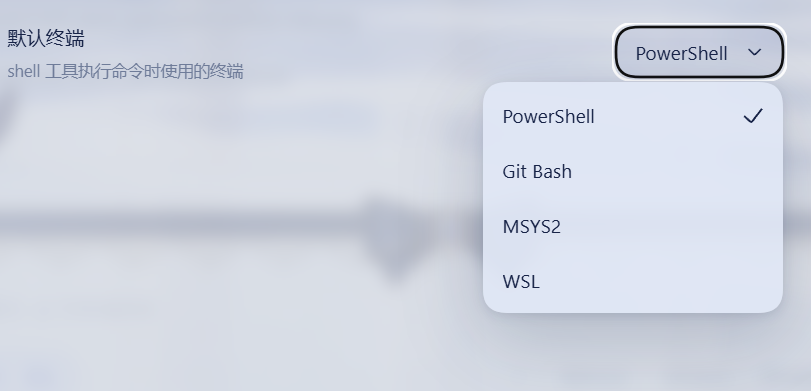
- User decides, the AI cannot override: pick the default terminal in Settings -> General -> Default terminal (PowerShell / Git Bash / MSYS2 / WSL). The setting persists through the DSH settings system; the
shelltool always obeys it. - Official sandbox seam: the
shelltool resolves the DSH sandbox policy per call and confines PowerShell argv throughctx.sandbox— same fail-closedSandboxUnavailableErrorsemantics as the shipped executors. Git Bash, MSYS2 and WSL run unconfined: WSL is its own Linux VM, while Git Bash and MSYS2 cannot run under the DSH Windows ACL restricted-token runner (Cygwin/MSYS2 aborts withCreateFileMappingWin32 error 5). Officialsandbox_permissions/justificationescalation and denial markers included. - Interactive terminal: the
terminaltool opens persistent real-PTY sessions over node-pty — on non-Windows via the officialctx.subprocess.spawnTerminalseam, on Windows directly through node-pty because the upstream seam's process inspector is POSIX-only. Actionsopen/send/read/signal/close; shell state persists across calls; sessions are managed as background jobs and auto-close when idle. - Background execution via the generic jobs registry (
run_in_background/job_output/job_kill).
Screenshots
The Default terminal row in Settings -> General: the user picks PowerShell / Git Bash / MSYS2 / WSL, and the shell tool obeys that choice — the model cannot override it.
Install
The package ships the official dsh.bundle manifest (its own cordis.patch.yml): listing dsh-bash-terminal-ts in a profile's dsh.profile.bundles auto-applies the mount — no manual profile edits.
npm install -g dsh-bash-terminal-ts
dsh plugin --profile web add dsh-bash-terminal-ts        # adds to profile bundles + applies the patch
powershell -ExecutionPolicy Bypass -File install.ps1 install   # patches the DSH settings-UI allowlist (see below)
# restart dsh web
DSH limitation: the Web settings client only exposes a hard-coded allowlist of settings namespaces (
dsh-host-apiproxy); third-party settings writes are refused withsettings-not-exposedotherwise.install.ps1patches the allowlist (with a backup) — re-run it after upgrading DSH;install/uninstallrestores it.
pnpm users: the node-pty build-script notice
This plugin depends on the native PTY library node-pty (Microsoft-maintained, the same library VS Code uses) for the interactive terminal tool. As of 0.7.1 it is pinned to 1.2.0-beta.15 (the same version both DSH host lines use): the tarball ships prebuilt binaries for every platform, so even when pnpm 10+ skips the install script, the runtime loader falls back to prebuilds/<platform>-<arch>/ and runs without compiling. The notice at the end of pnpm add only reports the skipped script; approve once to silence it:
Error: ERR_PNPM_IGNORED_BUILDS
  Ignored build scripts: node-pty@1.2.0-beta.15
pnpm approve-builds      # pick node-pty interactively
# or declare it in the profile's package.json, then rebuild:
#   "pnpm": { "onlyBuiltDependencies": ["node-pty"] }
pnpm rebuild node-pty
This is the only own dsh plugin with a native dependency; the other 0.2.0-line plugins (search-index, session-steward, patch-edit-plus, browser-cdp, date-wrapper) and live-token-stats are pure-JS and install on pnpm without any approval.
For local development (junction install, source changes apply instantly) see the Chinese README's development section.
Sandbox
danger-full-accesssessions run directly (no wrapping).- Confined sessions wrap PowerShell argv through
ctx.sandbox.confine; fail-closed when no backend is available. - Git Bash is never wrapped: the Windows ACL restricted-token runner cannot host Cygwin/MSYS2 (
CreateFileMappingWin32 error 5); results reportenforcement: gitbash-unconfined. - MSYS2 is never wrapped either (same Cygwin/MSYS2 runtime incompatibility); results report
enforcement: msys2-unconfined. - WSL is never wrapped (its VM isolation is the sandbox; results report
enforcement: wsl-isolation). - Denied calls render the official
[sandbox: file access denied under <mode> mode]marker plus a same-turn escalation hint; the model may retry once withsandbox_permissions+justification(user-approved viactx.approval). - Note: when DSH's Windows ACL runner is available, it confines PowerShell; Git Bash and MSYS2 remain unconfined due to the Cygwin/MSYS2 incompatibility.
Interactive terminal
terminal actions: open (start a session on the configured default terminal), send (write input + read new output), read, signal (SIGINT = Ctrl+C etc.), close, list (enumerate live sessions). Reads wait for output to settle (quiet 300ms, cap 5s) so send returns the complete reply; buffer overflow reports a truncated notice. State (cwd / variables / aliases) persists across calls; end input with \\n. Sessions are background jobs (job_kill works) and auto-close after 10 idle minutes (idleMs overrides on open).
Interactive terminal known limits (ConPTY)
- Windows PowerShell 5.1 cannot start in a ConPTY (0x8009001d) — install PowerShell 7 for interactive PowerShell (one-shot commands are unaffected).
- wsl.exe interactive mode may hit a WSL service RPC error under ConPTY (0x8007072c, intermittent) — one-shot
wsl -e bash -lc ...works; for interactive WSL prefer a real terminal (Windows Terminal / WSL app) or retry. - node-pty accepts no named signals on Windows:
signalmapsSIGINTto Ctrl+C (\x03); other signals (SIGTERM/SIGKILL/SIGTSTP/SIGHUP) degrade to terminating the session. - Git Bash interactive sessions work fully.
Config
Web UI: Settings -> General -> Default terminal. Plugin row config overrides: defaultShell, timeoutMs, maxTimeoutMs, pwshPath, gitBashPath, msys2Path, wslPath.
Uninstall
powershell -ExecutionPolicy Bypass -File install.ps1 uninstall
Tests
node test/unit.mjs && node test/apply.mjs && node test/client.mjs && node test/terminal.mjs
Comments
Comments live in GitHub Discussions. Sign in with GitHub to post or react.