
Install
Inside DeepSeek Harness, with dsh-market
dsh plugin --profile web add dshmarket
Or from the command line
dsh plugin --profile web add dsh-tweaks-model-capabilities
Installing runs third-party code with your own permissions — it can read your files, use your credentials and reach the network. Review the source first, and pin a commit (github:owner/repo#sha) when you can.
Screenshots
README
This plugin publishes its README in Chinese only.
在 DSH 的模型编辑界面里,补上官方没有的「思考强度 / 多模态 / 容量」设置。
它能做什么
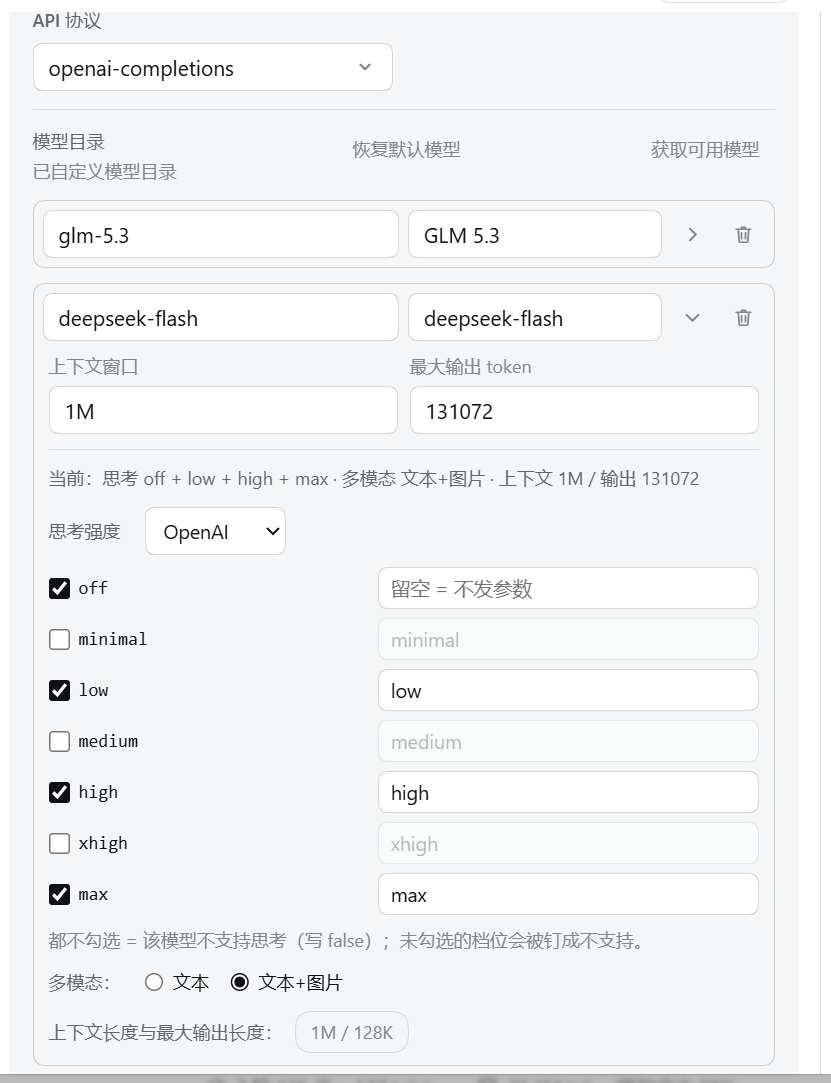
在「设置 → 模型」里编辑模型时,官方界面只能改名字和上下文长度,没法告诉 DSH「这个模型支不支持思考」「支不支持看图」。这个插件把这些开关补进模型行:
- 思考强度 —— 先用「协议预置」选协议,它决定可选档位:
OpenAI= off / minimal / low / medium / high / xhigh / max,Anthropic= off / low / medium / high / xhigh / max(取自 DSH 自带 pi-ai 目录里两家模型的实测映射)。两个预置默认都勾 off / low / high / max;一个都不勾 = 这个模型不支持思考。(只有第三方网关llm-pi-ai有这一项) - 多模态 —— 选「文本」或「文本+图片」。(
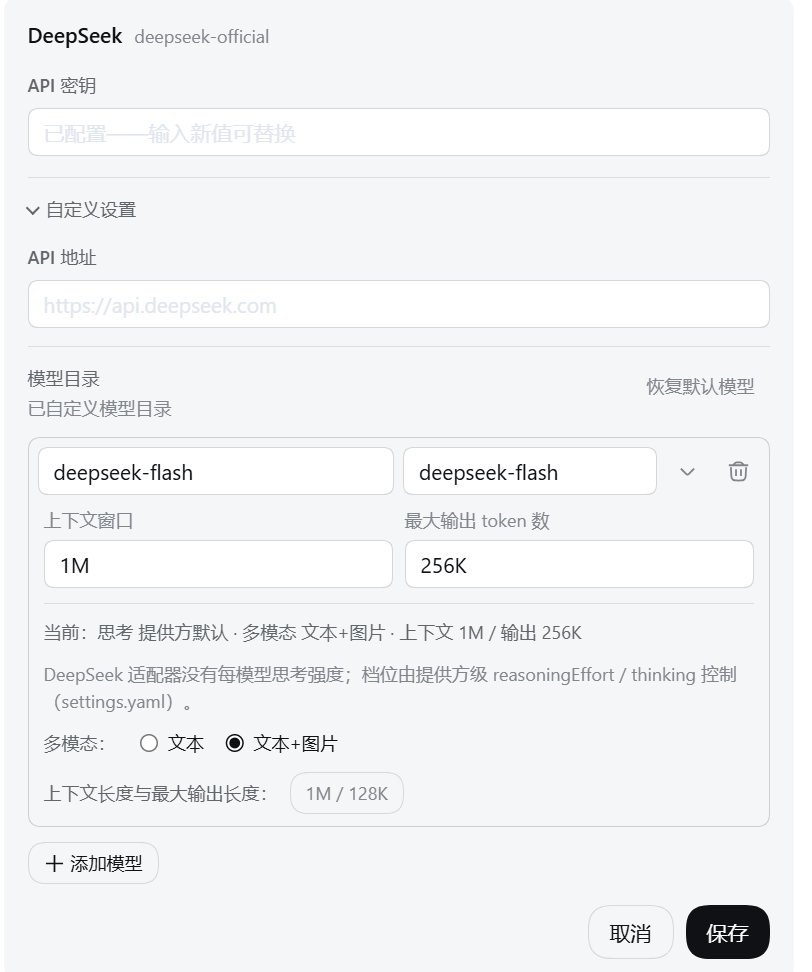
llm-pi-ai和llm-deepseek都有) - 容量快捷填入 —— 「上下文窗口 / 最大输出」各有一个
1M/128K按钮;新建模型行展开容量时自动填好 1000000 / 131072。
怎么用
- 打开 设置 → 模型,选一个提供方 → 编辑 → 自定义设置。
- 找到要改的那个模型,点那一行的 「容量」 展开。
- 展开后顶部会显示这个模型当前的配置摘要,下面是思考强度、多模态和容量按钮:
- 思考强度:先用「协议预置」选协议(
OpenAI/Anthropic),档位行会换成该协议的枚举;勾上这个模型支持的档位,右边输入框是该档的"过线拼写",不同网关叫法不一样(比如max在你那边叫ultra),可以改。 - 切换预置会把档位重新按默认勾成 off / low / high / max;没配置过思考强度的模型展开时默认就是 OpenAI 预置 + off / low / high / max。
- 一个档都不勾 = 这个模型不支持思考。
- 思考强度:先用「协议预置」选协议(
- 改完点官方那个 「保存」 才真正写进去(改过之后行内会提示"已改,点官方『保存』后写入");点官方「取消」则丢弃这次改动。
第三方网关(llm-pi-ai) —— 思考强度 + 多模态 + 容量快捷填入:
官方 DeepSeek(llm-deepseek) —— 只有多模态(DeepSeek 的思考档位是提供方级设置,这里只读显示当前值):
说明
- 上下文窗口、最大输出仍然由官方输入框管,插件只是帮你少敲几个 0。
- 「添加提供方」时的新卡片里不注入控件(还没保存过,这时写入会出问题);保存进编辑页之后就能配置了。
- 预置只决定「有哪些档位可选」和「默认勾什么」,不改变协议本身:模型说 Responses 还是 Messages 由提供方的
compat决定,插件不碰compat。 - 没配置过思考强度的模型,展开时会自动套用 OpenAI 预置并勾上 off / low / high / max,行内随即提示"已改,点官方『保存』后写入";不想写就把档位全部取消勾选。
- 保存失败(比如设置冲突)会原样显示 DSH 报的错,改动会保留,可以再点一次「保存」重试。
DSH 兼容性(本次审计)
- 最低支持 DSH 0.1.7。
- 本次核对覆盖两份完整安装:0.1.7-rc.2 与 0.2.0-rc.2(部署里实际装的是 rc.2,不是 rc.1)。
- 核对方式:对逐文件 sha1 比对,对关键产物做 diff;再用
scripts/selftest.mjs的「官方契约原文」断言把下列片段钉死(片段消失即报红)。 - 结论:本次未发现 0.2.0 真失效,无运行期行为改动,因此版本号不动(仍 0.1.0)。 下列契约「经核对未变,无需改动」。
| 契约 | 官方原文(<部署>/node_modules/@deepseek-ai/) |
结论 |
|---|---|---|
inject 的 4 个服务名 slots / locale / remote / remote.settings |
渲染层 dsh-client-ui-renderer/lib/client.js:1323 super(ctx, "slots");;dsh-client-locale/lib/client.js:1526 ctx.provide("locale", locale);;dsh-api-gateway/lib/client.js:1595 super(ctx, "remote");、:1927 super(ctx, remoteServiceKey(name));、:2040 return `remote.${namespace}`;;dsh-api-remotes/lib/types/client/index.js 挂载 settingsControllerRemote |
未变(两版产物逐字相同) |
remote.settings.describe() / mutate(ns, ops, revision) 入参与返回 |
dsh-api-settings-controller/lib/typert.remote-client.d.ts:17-23:describe: () => Promise<RemoteResult<SettingsDescribeValue>>、mutate: (ns, ops: SettingsPathOpView[], expectedRevision: number | undefined) => Promise<RemoteResult<SettingsNamespaceView>> |
未变(整包只有 package.json 版本号变化;RemoteResult 的成功/失败分支由 dsh-typert-protocol 定义,同样只变版本号) |
settings/document-updated 事件名与实参顺序 |
dsh-api-remotes/lib/types/remote-events.d.ts:85 是转发白名单成员;dsh-settings/lib/types/types.d.ts:73 'settings/document-updated'(ns: SettingsNamespace, revision: number): void;宿主转发 dsh-api-remotes/lib/index.js:115 args: assertJsonArgs(event, args);客户端派发 dsh-api-gateway/lib/client.js:786 parallel(eventKey(frame.event), ...frame.args) |
未变:实参仍是 (ns, revision),插件按 args[0] === ns、args[1] 读 revision 成立 |
keyed slot settings.models.provider-card 的键与 owner props |
dsh-client-ui-settings-models/lib/types/client/slot-contract.d.ts:30-34,56-63(两版 sha256 相同);store.d.ts:15-23 的 settingsNs / settingsPath / declared;渲染点 lib/client.js:2150 renderSlot("settings.models.provider-card", { provider, configured, keyConfigured }, { entryKey: row.entry.settingsNs }) |
未变 |
行内 DOM 判据(_rowCard / _setupCard / _modelEntry / _modelList / _modelAdvanced / _modelRow / _editorActions、input[type="text"]、_editorActions 的按钮顺序) |
dsh-client-ui-settings-models/lib/client.js:7 个局部名两版都是同一哈希前缀 zGbnIq_*;ModelRow / EditorFooter / ModelInputTypes 三个渲染函数两版逐字节相同;展开区顺序仍是 contextWindow → maxTokens → 输入类型 checkbox;动作行仍只有两个按钮(第一个取消、最后一个提交) |
未变(见下方脆弱点标注) |
locale 三参 register(ns, lang, dict) 与 bind(ns) |
dsh-client-locale/lib/types/client/index.d.ts:199(类型化)/ :209(三参非类型化 register(ns: string, locale: string, dict: LocaleDict))/ :226 bind(ns: string);运行时 lib/client.js:1387 与 :1414 两版逐字相同 |
未变 |
| 插件写入的模型字段名 | dsh-llm-pi-ai/lib/types/catalog.d.ts 的 input?: PiAiModality[] 与 reasoningEfforts?: false | PiAiReasoningEfforts;dsh-llm-deepseek/lib/index.js 的 inputModalities;dsh-base/cordis.patch.yml 的 entry id llm-pi-ai / llm-deepseek |
未变 |
0.2.0 的 dsh-client-ui-settings-models/lib/client.js 相对 0.1.7 一共只有 8 个 diff hunk,全部落在首次运行声明文案、WELCOME_NOTICE_VERSION 与新增埋点(onSubmitCredential / productAnalytics),没有一处触碰模型编辑器 DOM、slot 声明或设置 wire。
未受类型保护的脆弱点(重要)
- 行内控件靠 DOM 增补:官方
settings.models.provider-card席位只到「提供方卡片」一级,模型行内部没有 Slot,所以「思考强度 / 多模态 / 容量」控件只能按[class*="_modelEntry"]这类子串匹配注入。官方一旦改 CSS Module 局部名或换组件结构,tsc与 cordis 都不会报错,表现只是静默不注入。自测里的「官方契约原文 / 结构顺序」断言就是为这条设的告警线。 - 硬依赖
inject也是静默的:若官方 remote 装配没有挂上remote.settings(或 slot 未被声明),本条目会永远 pending,界面毫无反应、日志没有异常。 - 本次只做了产物级静态核对 + 纯逻辑自测,没有在运行中的 0.2.0 浏览器里实测点击流程(不重启 3080/3081 的约束)。
复现核对
在插件目录下(无需 DSH 也能跑,只会跳过官方产物那一半):
$env:DSH_CONTRACT_HOMES="D:\env\node-global\dsh-017-rc2;D:\env\node-global\dsh-stable"
node node_modules/typescript/bin/tsc --noEmit
node scripts/selftest.mjs
安装
npx @deepseek-ai/dsh plugin --profile web add "D:\你的目录\dsh-tweaks\plugins\model-capabilities"
重启 DSH,并在浏览器中强制刷新(Ctrl + Shift + R)。
web为 DSH 的 profile 名称,可在C:\Users\你的用户名\.dsh\profiles\下确认。
开发者
本仓库的开发约定、DSH 契约与通用坑见 AGENTS.md。
Comments
Comments live in GitHub Discussions. Sign in with GitHub to post or react.