
Install
Inside DeepSeek Harness, with dsh-market
dsh plugin --profile web add dshmarket
Or from the command line
dsh plugin --profile web add "https://github.com/choco9527/dsh-product-preview/releases/latest/download/dsh-product-preview.tgz"
Installing runs third-party code with your own permissions — it can read your files, use your credentials and reach the network. Review the source first, and pin a commit (github:owner/repo#sha) when you can.
Screenshots
README
The SVGA player is compiled into the browser bundle, with a build check against unresolved package imports. Parsing runs without an external Worker file. Loading and parse failures have separate status messages.
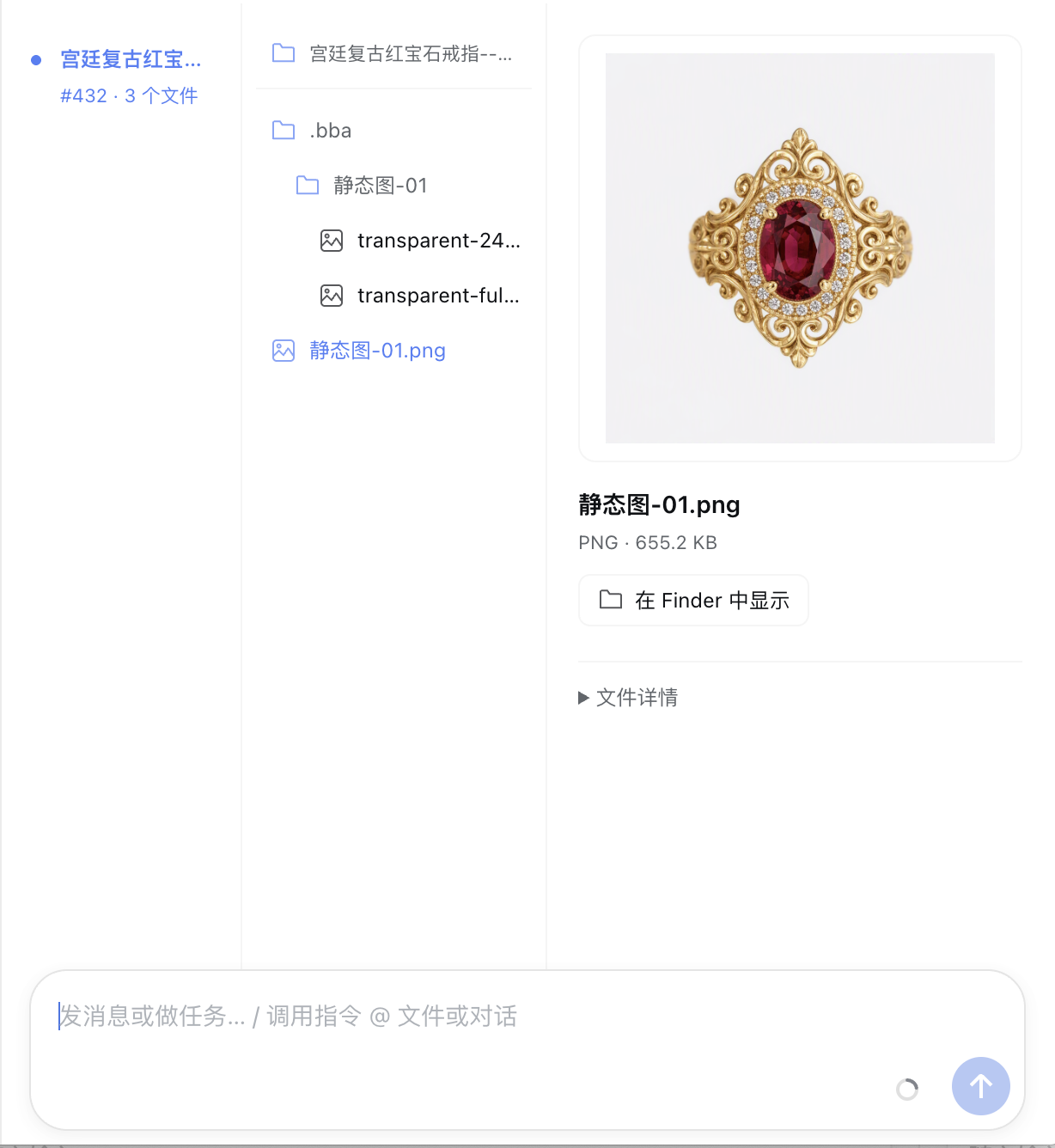
Compact Finder-style columns give media previews more room while preserving original file and directory names. Format and size remain visible; expand file details for the full path and source. Messages accepted from the artifact view return to Chat, including queued messages; failed sends keep the current view. Pending messages come from the host's useInput queue, not the legacy SessionSnapshot.queue field.
The left column uses a read-only React Flow graph. Dashed edges indicate conversation order, not inferred asset dependencies. Selecting a node retains the file column and existing image, video, and SVGA previews. Pan and zoom are available; editing, connecting, and deletion are disabled. Graph gestures do not switch conversation tabs. The graph mounts on demand, with its runtime and CSS embedded in the browser bundle rather than downloaded at runtime.
Each node shows the time of the conversation event that first reported its artifacts in small text, using the local time zone, with the full date on hover. Missing timestamps are omitted. Sequence numbers use subdued text even when selected, distinct from the node title.
dsh-product-preview adds a Finder-style conversation view for local file artifacts. ZIP, JSON, PDF, spreadsheets, and other files without inline renderers retain file details, Open, and Show in folder actions.
Transparent VAP playback uses video-animation-player independently of company component libraries. It accepts MP4 files with embedded vapc metadata and ZIP files containing one MP4 and optional vapc.json, preserving frame rate with muted looping playback. Ordinary MP4 and ZIP files retain their video and file views. ZIP decoding stays in memory: input and selected expanded files are limited to 64 MiB, configuration to 1 MiB, and entry count to 128. Dynamic VAPX resource bindings are unsupported. File switches cancel reads and release the player and Blob URL. Player code ships in the browser bundle and initializes on selection, without downloading scripts at runtime. Failed previews retain access to the original file.
On RC hosts providing documentPreviews, the plugin also registers video, SVGA, and VAP (MP4 / ZIP) in the existing right document Sidebar, sharing the artifact players. Resolution starts only from live file metadata and remains restricted by the media service's allowedRoots; no additional directories are exposed. This preview targets host-local files, not identical path strings from remote execution environments. Ordinary video uses native controls and HTTP Range without autoplay. SVGA and VAP retain animation playback with a 64 MiB input cap. Ordinary ZIP remains a file notice, not a VAP animation. File changes, reloads, and tab closure cancel pending reads and release players. Decoder failures retain the host's original-file actions. Older hosts without this extension keep the artifact view without requiring installation of the new preview module.
On desktop, a two-finger horizontal swipe across the content area switches between Chat, Products, and Trajectory. The edge cue grows with the gesture and stays hidden when no adjacent tab exists.
It reads successful tool results and assistant text, discovers absolute file paths, then assigns each path to the first timeline node that reported it. Extensionless files can be reported as JSON path values, backtick paths, or Markdown links. The UI preserves names and only lists existing regular files under allowedRoots, without scanning directories. Non-media content is served as an attachment. The preview size limit does not exclude files from the list.
The bundle has no product or Bot dependency. A Desktop host may optionally expose native actions such as Open, Reveal in Finder, and the context menu through /api/product-preview/actions.
Path discovery supports absolute POSIX paths, Windows drive paths with either slash style, and UNC shares (\\server\share\image.png), preserving Unicode and spaces. An explicit absolute directory ending in a slash, quoted in backticks or a Markdown link, supplies the base for relative file references in the immediately following Markdown list. The base stays within that list and is never inferred across messages or JSON fields. Unbased relative paths, relative paths containing .., network URLs, and Windows device paths are not local media artifacts. Discovery does not grant access; shared paths must also be under the host's configured allowedRoots.
Installation and compatibility
Artifact-view peers accept DSH Web / Desktop 0.1.2-alpha.3, 0.2.0-rc.1, and 0.2.0-rc.2. Right-sidebar media uses the optional RC document preview API types; preview and native actions still require acceptance on a new host. Requires Node.js ^22.19.0 || >=24.0.0.
Use a prebuilt package from GitHub Releases in the target profile:
dsh plugin --profile web add https://github.com/choco9527/dsh-product-preview/releases/latest/download/dsh-product-preview.tgz
For Desktop, replace web with the actual profile name. The plugin reuses the host's DSH and React dependencies and ships neither Desktop nor a Bot. Configure allowed directories after installation; the empty default does not expose the whole disk.
Configuration
- id: product-preview
  name: dsh-product-preview
  config:
    allowedRoots:
      - /absolute/path/to/your/output-directory
Supported local formats are PNG, JPEG, WebP, GIF, MP4, MOV, WebM, M4V, and SVGA. The bundled svga.lite package lets packed installations preview SVGA files without a network download.
Development
Desktop AI animation reading
The build also emits lib/media-reader.js for Argo's isolated, hidden Electron media reader. It does not mount the preview page, use the user's browser, or start an HTTP/MCP service. It reuses the existing svga.lite, video-animation-player, fflate, and Electron decoders without adding dependencies or FFmpeg. Video frames use native decoding; VAP frames contain composited RGB/alpha; SVGA v2 samples render immutable single-frame sprite selections without relying on hidden-window animation clocks.
The default is three interior samples; callers may request 1–6 frames or explicit timestamps in seconds below the duration. Alpha-preserving PNGs have a maximum 2000px edge. Inputs and expanded SVGA data are limited to 64 MiB; VAP ZIP retains its existing limits. Corrupt files, unsupported codecs, legacy SVGA ZIP, and dynamic VAPX fail explicitly. External SVGA avatar/text replacements are not inferred. Samples are neither continuous playback nor audio transcription, and originals remain unchanged. The host owns timeout, cancellation, sandboxing, local path checks, and durable image attachments for conversation replay.
Use Node.js 22 or newer and pnpm through Corepack:
corepack pnpm install
corepack pnpm run typecheck
corepack pnpm test
corepack pnpm run package
Development dependencies install from the public npm registry without a sibling Desktop checkout. DSH and React are host peer dependencies. SVGA is a development dependency compiled into the browser bundle; installing a prebuilt package requires no build scripts on the user's machine.
Development dependencies supply the host types used by the plugin. skipLibCheck skips validation inside third-party declarations: the DSH alpha declarations reference host-generated RPC types that cannot be fully checked in a standalone plugin. Plugin source remains checked with strict enabled.
Comments
Comments live in GitHub Discussions. Sign in with GitHub to post or react.