
Install
Inside DeepSeek Harness, with dsh-market
dsh plugin --profile web add dshmarket
Or from the command line
dsh plugin --profile web add github:choco9527/dsh-add-to-chat
Installing runs third-party code with your own permissions — it can read your files, use your credentials and reach the network. Review the source first, and pin a commit (github:owner/repo#sha) when you can.
Screenshots
README
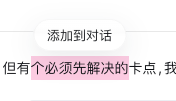
Select text in a DSH assistant reply and choose Add to chat. The plugin keeps the selection as a separate annotation and submits it as plugin-source context only when the user sends their next message.
Demo
- Select text in an assistant reply, then choose the floating Add to chat action.
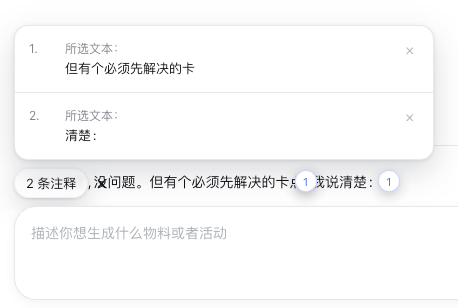
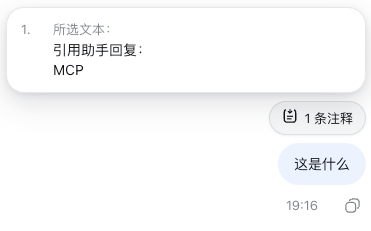
- Add as many annotations as needed. The composer remains plain text; hover the “x annotations” pill to read and remove individual selections.
- Keep writing normally and send. The annotations travel as independent context for that submission, are consumed after a successful send, and return if the submission fails.
Features
- Browser-only DSH client plugin; no Host service or product-specific integration.
- Each selection stays within one assistant reply; multiple annotations can be added in succession.
- Does not send automatically. The user can edit ordinary draft text or send annotations without text.
- The “x annotations” hover card shows the full source text and supports individual or bulk removal.
- Draft annotation previews open above the pill when space permits, fall back below otherwise, and sit above the composer so details and remove buttons remain accessible.
- It never writes Markdown, hidden nodes, or chips into the Lexical editor, so Backspace cannot remove an annotation by accident.
- A numbered marker remains beside the original selection without a text popup. Read the original text in the annotations card above the composer.
- Interface copy follows the active DSH locale, supports Chinese and English, and refreshes immediately after a language switch.
Compatibility
The plugin relies on an assistant body marked with data-dsh-message-role="assistant", the sessions.list catalog, the conversation.draftContexts submission service, and the DSH locale service. It does not depend on page CSS classes, a Host service, or product-specific code.
Active-session lookup supports both the legacy catalog's current field and DSH 0.2.0-rc.1's retainedBy.mainView count. With the newer catalog, only main-view ownership identifies the active session, never catalog order or a background subagent. Switching conversations keeps their pending annotations separate.
Install
dsh plugin --profile web add github:choco9527/dsh-add-to-chat
For DSH Desktop, install into the active Desktop profile. The Electron renderer uses the same DSH Web client module graph.
Development
corepack pnpm install
corepack pnpm run check
dsh plugin --profile web add .
Restart the selected DSH profile after installation. Do not also manually add this plugin id to a profile cordis.patch.yml: the bundle already registers itself.
corepack pnpm test loads the real client plugin and checks adding annotations, session isolation, accepted submission, and failed-submission recovery with both catalog APIs. It does not launch a model or access real conversations.
Browser regression: with Playwright installed, run node --test test/preview.browser.mjs. Set PLAYWRIGHT_MODULE to use an alternate module entry and CHROME_EXECUTABLE to use a specific Chrome executable. The test loads the real plugin into an isolated page and checks composer layers 7/9, upward placement, narrow-window fallback, and removal without accessing real conversations.
License
MIT
Comments
Comments live in GitHub Discussions. Sign in with GitHub to post or react.