
Install
Inside DeepSeek Harness, with dsh-market
dsh plugin --profile web add dshmarket
Or from the command line
dsh plugin --profile web add dsh-quick-open
Installing runs third-party code with your own permissions — it can read your files, use your credentials and reach the network. Review the source first, and pin a commit (github:owner/repo#sha) when you can.
Screenshots
README
Fast file navigation and referencing for DSH: VSCode-style Ctrl+P quick open, plus two missing pieces of the built-in file preview — find-in-file and add-selection-to-conversation.
Median hot query over a 50,000-file workspace: 5 ms (reproduce with
node scripts/bench.mjs).
English | 中文
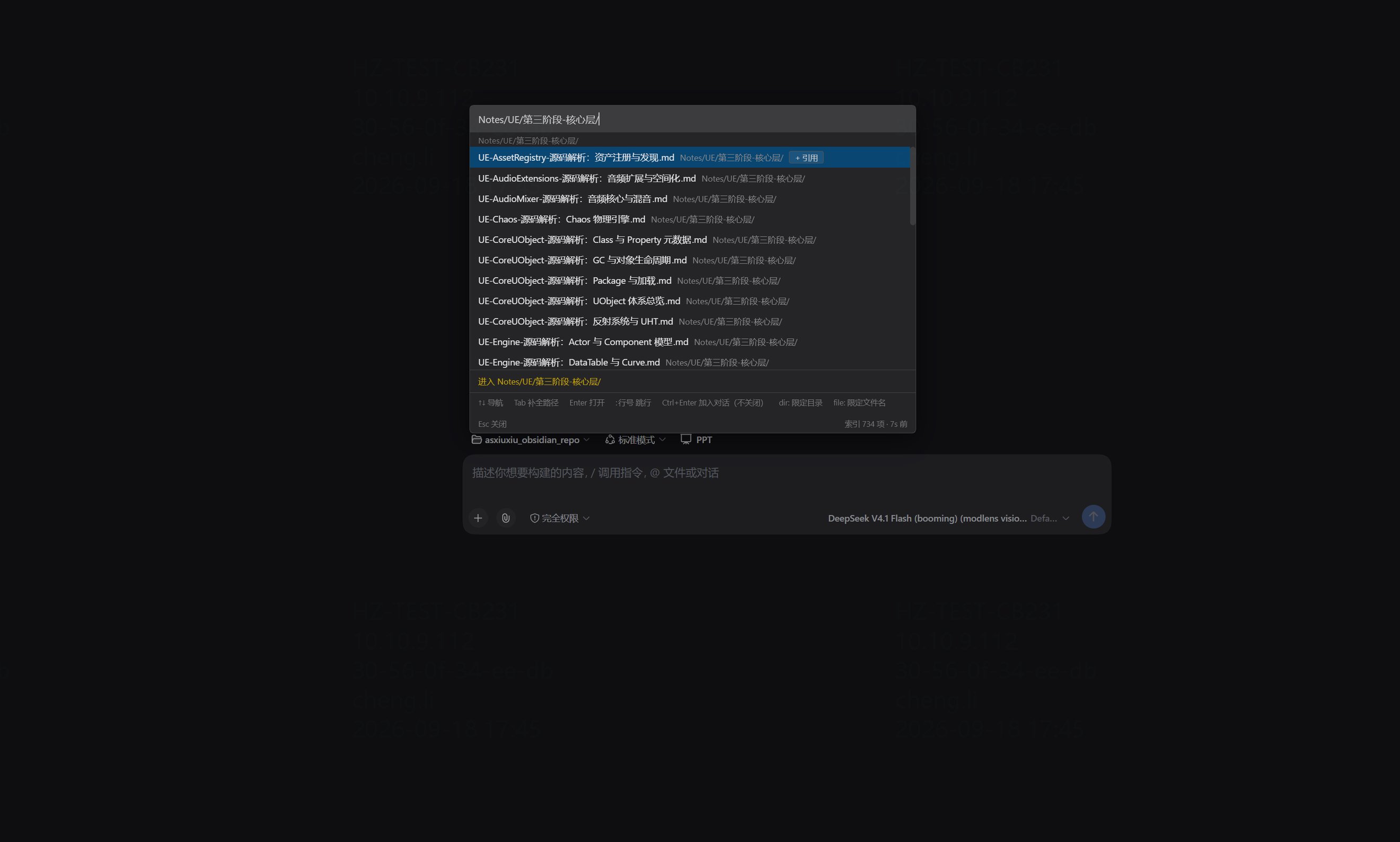
Tab does more than complete a path: landing on a directory swaps the list for that directory's direct children (directories first, then sibling files), so you can drill down one level at a time; keep typing and you are back to fuzzy filtering. Key hints and index transparency (entry count · freshness) stay pinned to the footer.
What it solves
1. Finding a file in a large repository is slow, and the names are unguessable.
Production repositories run to tens of thousands of files, and nobody remembers how to spell client_module.cpp. This plugin ports VSCode's quick-open fuzzy scorer verbatim — clntmod finds client_module.cpp — over a per-workspace in-memory index, so results appear as you type. Path queries containing / are anchored segment by segment (login/index.html will not assemble a false hit by borrowing one letter from each of five unrelated directories), and the dir: / file: prefixes scope a term precisely.
2. Your code does not live in one repository.
Engine, game, and protocol repositories sit side by side, and chasing one issue means hopping between them. Extra index roots (extraRoots) fold any number of directories outside the workspace into the same index — one Ctrl+P searches every repository, result rows carry a source badge (engine/_source, game/_content, …), and references switch to absolute paths automatically. No second window, and no remembering which repository a file belongs to.
3. Feeding code context to an AI conversation takes too many steps.
Find file → open → select → copy → switch back to the composer → paste → fix the path… This plugin compresses that into two gestures: Ctrl+Enter drops the file into the draft as an @ reference (the palette stays open, so you can add several in a row); and selecting code in the file preview and clicking the floating "Add to conversation" inserts a precise @path:start-end reference.
4. The built-in DSH file preview cannot search.
The built-in preview renders everything (code highlighting, Markdown, HTML, PDF, images) except find-in-file. This plugin adds a Ctrl+F floating find bar that highlights matches uniformly across every renderer, with case sensitivity, selection prefill, and a "loaded part only" notice. It takes over nothing and replaces nothing: uninstalling restores the stock preview exactly.
Features
⚡ Quick open (Ctrl+P)
Summoned from any session page, with strict focus discipline (keyboard focus never leaves the search box):
| What you want | How |
|---|---|
| Fuzzy-find a file | Just type, e.g. clntmod matches client_module.cpp |
| Locate by directory | ui/index.html (anchored per segment, so no false hits) |
| Jump to a line | main.cpp:120 (the built-in preview scrolls to and highlights that line) |
| Scope a term precisely | dir:ui index.html (ui must be a directory segment), file:index.html (filename only); shorthand d: / f: — see below |
| Reopen the last file | Ctrl+P → Enter (an empty query shows recently used) |
| Drill into directories | Tab completes; a directory keeps its trailing / and can be pressed repeatedly |
| Reference into the conversation | Ctrl+Enter, or click "+ Reference" at the row's end — the palette stays open, so you can add several |
| Open the file | Enter — goes through DSH's native right Sidebar, the same path a file-tree click takes |
- Matched characters are highlighted per segment; a deep path's directory part is front-elided, so the segment that distinguishes one row from another is never the part that gets clipped
- Index rules are configurable per workspace (settings page): excluded directories, force-included generated directories, extension allowlist, whether directory entries are indexed
- Every shortcut is customizable (settings page): the palette, the in-preview search, and the reference gesture can all be rebound; defaults are
Ctrl+P/Ctrl+F/Ctrl+Enter, orCmdon macOS - The footer permanently shows index transparency (entry count · freshness) and key hints
⌨️ Customizable shortcuts
All three actions can be rebound, with defaults that match each platform's habits:
| Action | Default | Notes |
|---|---|---|
| Open the quick-open palette | Ctrl+P / macOS Cmd+P |
Works on any session page; press again to close |
| Search within the file preview | Ctrl+F / macOS Cmd+F |
Applies while the sidebar preview has focus; opens the floating find bar |
| Add the highlighted file to the conversation | Ctrl+Enter / macOS Cmd+Enter |
Hold the modifier and press Enter inside the palette; the reference lands in the draft and the palette stays open |
Open the settings page, click the record button, and press the new combination once — it takes effect immediately, with no reload.
Two design decisions:
- Each platform interprets the primary modifier its own way. What gets stored is "the primary modifier", not a hardcoded Ctrl or Cmd, so one configuration means Cmd on macOS and Ctrl on Windows — correct on both, with nothing to configure twice.
- A modifier is required (though
Entermay be the main key on its own). Bare-letter bindings are refused, because they would fire while you type; the recorder rejects them outright and explains why.
⚠️ macOS users: earlier versions accepted either
Ctrl+PorCmd+P; the default now recognisesCmd+Ponly. If you are used toCtrl+P, re-record it on the settings page (or just adoptCmd+P, which is the macOS standard).
🎯 dir: and file: — scoping where a term is allowed to match
A query is split on spaces into terms, and each term may carry a prefix restricting which part of the path counts as a match:
| Spelling | Meaning | Example |
|---|---|---|
dir:ui |
Must match a directory segment; the filename does not count | .../ui/coherent/bag/index.html ✓ui_helpers.cpp (ui only in the filename) ✗ |
file:main.cpp |
Must match the filename; directories do not count | .../camera/main.cpp ✓.../main.cpp/helper.txt ✗ |
d: / f: |
The same, abbreviated | d:ui f:index.html |
| no prefix | Filename first, falling back to the whole path for path queries | clntmod, ui/index.html |
Prefixes mix freely, each term governing itself:
dir:camera file:manager      a camera segment in the path, and "manager" in the filename
dir:client cpp               client must be a directory segment; cpp fuzzy-matches the filename as usual
Two properties, confirmed by measurement:
- Match positions are highlighted faithfully.
dir:camerahighlights onlycamera/in the path and not a single letter of the filename;file:camerais the reverse. The highlight tells you which term matched where. dir:requires the directory name to appear contiguously;file:allows abbreviations. This asymmetry is deliberate: directories are targeted by typing their name (dir:camerawill not match.../chaos_client_camera_effect_manager.cpp, whose filename merely contains "camera"), whereas filenames are usually reached by abbreviation (file:clntmodmatchesclient_module.cpp). Sodir:clntmodfinding nothing is expected — no directory segment contains those letters contiguously. Usefile:or no prefix to abbreviate a filename.
With no prefix, dir: / file: change nothing: clntmod, ui/index.html, and main.cpp:120 all behave as before.
📦 Extra index roots (extraRoots)
Fold any directory outside the workspace into the same index, so multi-repository work needs no context switching:
{
  "extraRoots": [
    { "path": "E:\\dev\\engine\\_source",  "label": "engine" },
    { "path": "E:\\dev\\game\\_content",   "label": "game" }
  ]
}
- One
Ctrl+Psearches every root; result rows carry a source badge, so a deep path is still instantly attributable to a repository - Referencing a file from an extra root uses an absolute path (
@E:/dev/engine/...) automatically, and the AI can read it as usual - Every root reuses the same exclude/extension rules, but matched against its own relative paths — a root that happens to sit under a directory named
buildis not caught by the workspace's ownbuildexclude - Symlink traversal is cycle-guarded per root, and an unreadable directory skips only that level rather than stalling the whole index
🔍 File preview enhancements
The built-in preview keeps its renderer switching, paged loading, change notices, line wrapping, and line jumps. This plugin adds exactly two things:
Find in file (Ctrl+F)
- A floating find bar that highlights every match as you type (CSS Custom Highlight API; the preview's DOM is not modified)
- Works across plain text, highlighted code, and rendered Markdown views;
Enter/Shift+Enterstep through matches - Select some text, then press
Ctrl+F, and it is prefilled as the query - An
Aacase-sensitivity toggle that remembers your preference - A large paged file says "loaded part" explicitly, so "no results" is not misread as "not in the file"
Esccloses it from anywhere (no need to click back into the search box first)
Select to reference
- Select any text in the preview → click the floating "Add to conversation" → an
@relative/path:start-endreference is inserted - Works in rendered views such as Markdown too (degrading to a bare
@pathwhen the renderer exposes no line numbers) - Three reference formats (settings page): location only (the default, cheapest in context) / location + read hint / fenced code block (self-contained)
Install
dsh plugin --profile web add dsh-quick-open                   # from npm
dsh plugin --profile web add github:asxiuxiu/dsh-quick-open   # from GitHub
dsh plugin --profile web add link:D:/dev/dsh-quick-open       # local development
Restart DSH after installing (the host half mounts only at boot). It depends on DSH itself and on no third-party sidebar plugin.
Configuration (optional)
It works out of the box: with no config file it uses built-in language-neutral, project-neutral defaults (excluding only the noise directories every ecosystem agrees on, plus source extensions common across languages).
To customize, open Settings → Quick Open index and edit the current workspace's .dsh/quick-open.json:
{
  "version": 1,
  "excludeDirs": ["_install", "build/Engine"],      // bare name at any depth; with a slash, anchored to the root; **/ for any depth
  "includeDirs": ["build/p/include"],               // takes precedence over excludes — rescues a wrongly swept generated tree
  "includeExtensions": [".h", ".cpp", ".py", ".md"],
  "includeFilenames": ["CMakeLists.txt"],
  "includeDirectories": true,
  "extraRoots": [                                    // directories outside the workspace, indexed together
    { "path": "E:\\path\\to\\sibling-repo\\_source", "label": "sibling/_source" }
  ]
}
Saving is atomic, takes effect within 3 seconds, and needs no restart. Why the rules are stored per workspace, the inherent blind spot of an extension allowlist, and why includeDirs can rescue a generated tree — see the architecture section below and docs/.
Technical highlights
- The matcher is a port of VSCode's quick-open scorer (
fuzzyScorer.ts+filters.ts, with constants and score tiers taken from the source). Eight original schemes were tried first, and every one broke on another set of queries; VSCode's1<<16-scale tiering fundamentally guarantees that "matched the filename" always outranks "matched the path" — there are no weights to tune. Experiments and negative results:docs/matching-research.md - Path queries are anchored per segment: unanchored,
login/index.htmlmeasured 27,002 scattered false hits (52.7% of the index), burying the correct answer in 130:1 noise; anchored, it converges from 620 candidates to 7, all correct - Index pipeline: 16-way parallel
readdirbuilds a per-workspace in-memory index, kept fresh by a 30 s TTL with stale-while-revalidate, noticing config changes within 3 seconds, with atomic config writes - The preview enhancement is a DOM-layer decoration: it registers no tab type and patches no DSH package; find highlighting uses the CSS Custom Highlight API and never touches React-managed nodes; selection referencing reads the document selection directly — which is why it works uniformly across every renderer (including the PDF text layer)
- Verification discipline: the built artifacts run through end-to-end stub tests (registration contract, keyboard routing, match counts, reference writes, layering contract), and the load-bearing assertions are each validated by "deliberately break it, it must fail"
Development
npm install
npm run build       # emits lib/index.js (host: the index routes) + lib/client.js (the __ModuleLoader__ envelope, ~80KB)
npm run typecheck
npm run check       # typecheck + build + the client-bundle suite

# Verification scripts
node scripts/verify-i18n.mjs             # key parity, no untranslated/empty values, placeholder survival
node scripts/verify-client-bundle.mjs    # end-to-end stub test of the built artifact (incl. Ctrl+P being claimed)
node scripts/verify-grammar.mjs          # dir:/file: prefix parsing boundaries
node --experimental-strip-types scripts/verify-file-address.mjs   # file addresses / @ references / :line suffix
node --experimental-strip-types scripts/verify-preview.mjs        # preview-augmentation pure logic
node scripts/verify.mjs                  # match-quality regression
node scripts/verify-no-regression.mjs    # per-case comparison of separator-less query behaviour
node --expose-gc scripts/eval-cost.mjs   # index size baseline
node scripts/eval-ambiguity.mjs          # quantifying directory-name ambiguity
Some scripts (
verify.mjs,verify-children.mjs,verify-drill.mjs,verify-no-regression.mjs) read a real workspace at a hardcoded path and exit withENOENTunless that path exists. Point them at your own checkout before running.
Architecture
src/rules.ts             index rules: directory matching (subtree semantics + **/ globs) / file filtering / config parsing
src/match.ts             the VSCode scorer port + dir:/file: scope-prefix parsing
src/index.ts             host half: /quick-open/api/{search,children,probe,config.get,config.set,config.reset}
src/client/index.tsx     client entry: global shortcut listener + preview-augmentation mount + slot registrations
src/client/i18n.ts       every user-visible string, in English and Chinese, with language resolution
src/client/controller.ts the search pipeline (query cache / index route / directory drill), :line parsing, open, reference, recents
src/client/quick-open.tsx the palette component (portal to body, z-index 10000, multi-segment highlighting)
src/client/settings.tsx  settings panel: index rules + reference format + shortcut recording
src/client/shortcut.ts   shortcuts: cross-platform primary-modifier mapping, matching, recording, validation, persistence
src/client/preview/      preview augmentation: find bar (Highlight API) + selection popup + DOM probing (all gracefully degrading)
docs/                    matching research, directory-filter evaluation, sidebar integration research, architecture notes (with measurements and negative results)
Internationalization
The plugin ships English and Chinese. Language follows the DSH shell's own locale preference (<html lang>), is re-read on every lookup so switching needs no reload, and anything that is not zh* resolves to English.
Every user-visible string lives in one table, src/client/i18n.ts. That is enforced rather than merely intended:
- Both tables are typed
Messages, so a key added to English and forgotten in Chinese is a compile error scripts/verify-i18n.mjsasserts key parity, rejects empty values, rejects a Chinese value identical to its English counterpart (a forgotten translation), and requires every{placeholder}to survive translation- The language switch reaches the composer draft text, not just the UI chrome —
verify-i18n.mjscovers that too
Roadmap
- Full-text search mode: a
%queryprefix switching to content search - Pinyin / initial matching: romanized search for Chinese filenames
- Multi-select batch reference:
Ctrl+Spaceto mark several rows and add them in one action - Precise
fs.watchinvalidation: keep the index live with file changes (replacing or supplementing the TTL) - File-tree reveal: "reveal in file tree" for a directory — needs DSH's file tree to expose a locate API first
- Faster
dir:queries: an inverted index over directory segments (+4.3 MB, 19% of the total index), seedocs/dir-filter-evaluation.md
License
MIT
Comments
Comments live in GitHub Discussions. Sign in with GitHub to post or react.