
Install
Inside DeepSeek Harness, with dsh-market
dsh plugin --profile web add dshmarket
Or from the command line
dsh plugin --profile web add dsh-skills-manager-plus
Installing runs third-party code with your own permissions — it can read your files, use your credentials and reach the network. Review the source first, and pin a commit (github:owner/repo#sha) when you can.
Screenshots
README
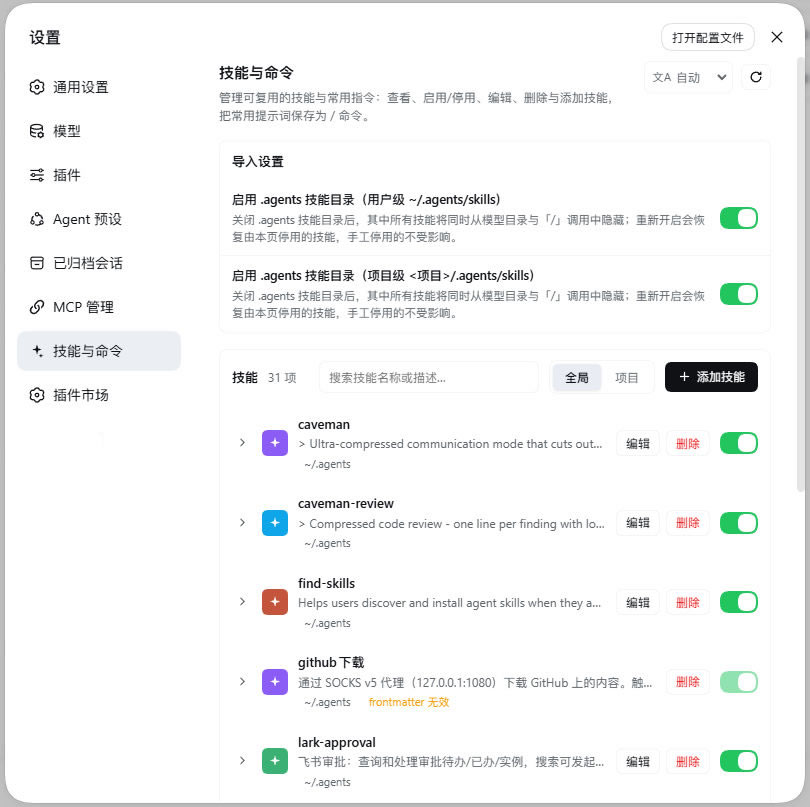
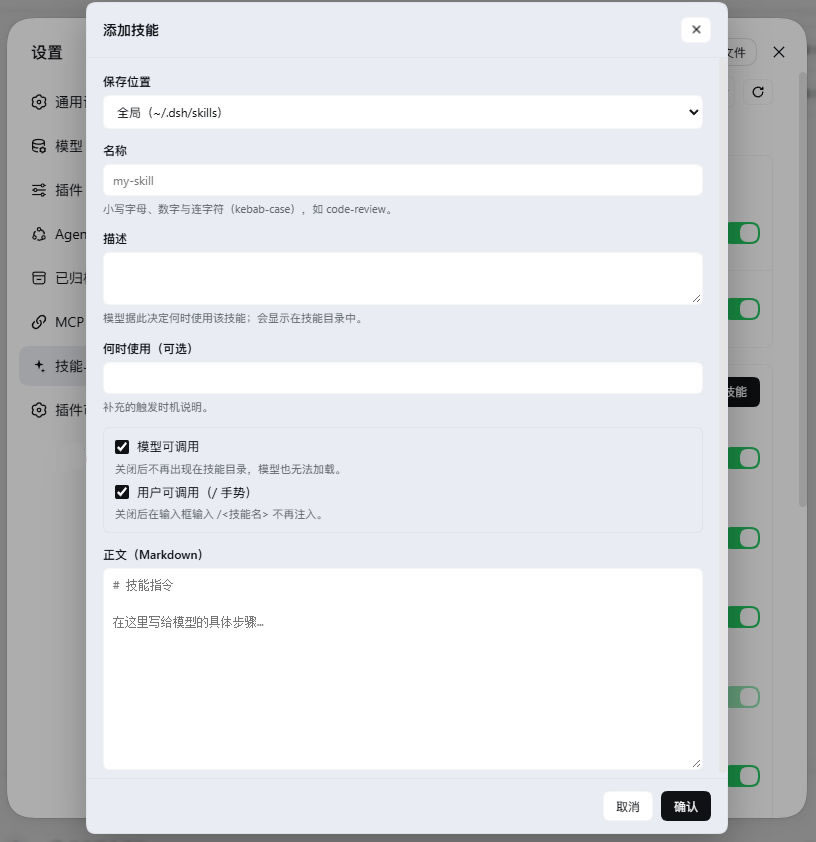
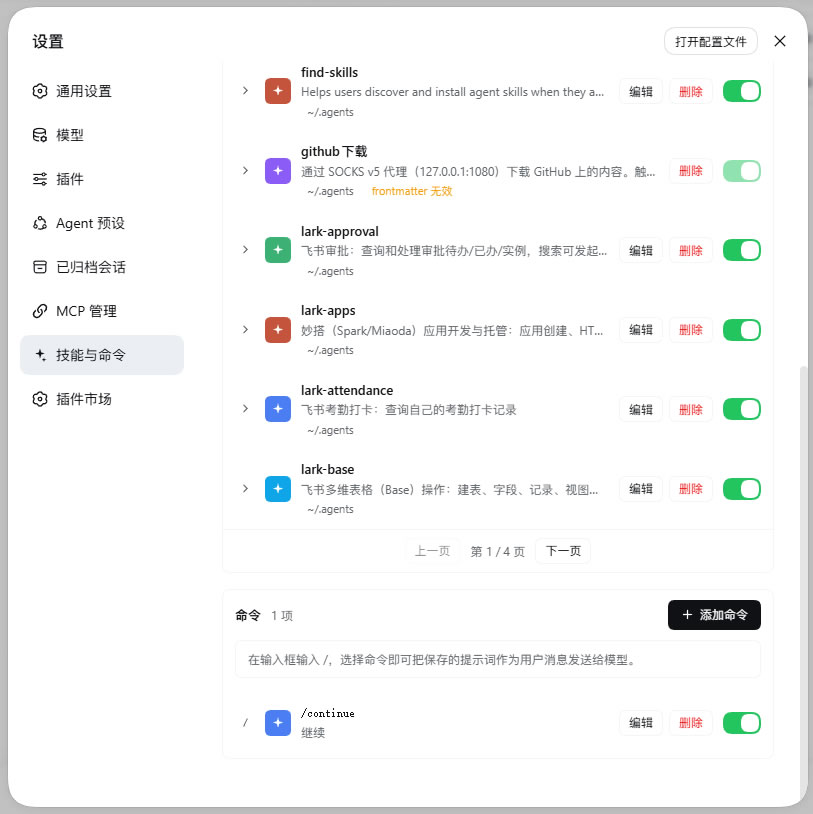
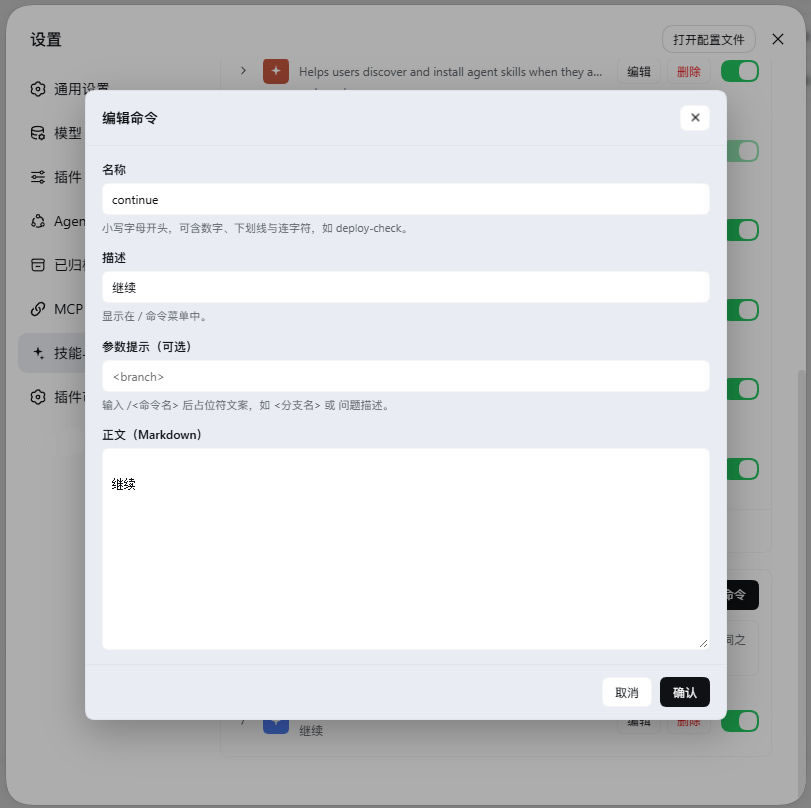
Skills & commands manager plugin for DeepSeek Harness. Adds a "技能与命令" (Skills & Commands) page to the left sidebar of the Settings screen, where you can view, enable/disable, edit, delete and add skills, and save frequent prompts as /commands that you invoke by typing /.
Screenshots
| Skill list | Add skill |
|---|---|
|
|
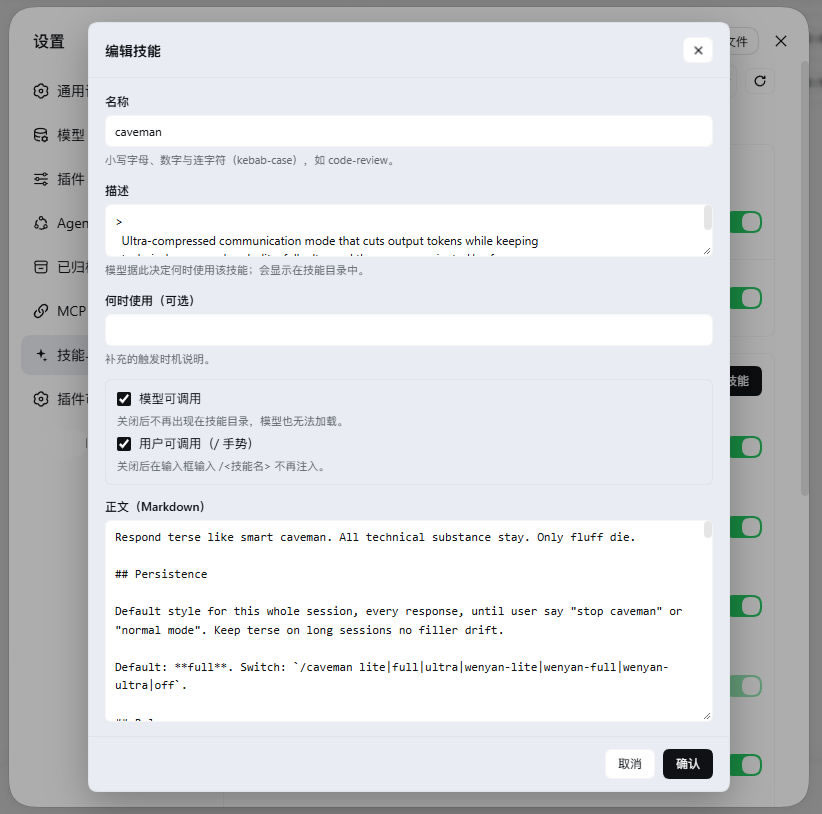
| Edit skill | Commands | Edit command |
|---|---|---|
|
|
|
Features
| Capability | Description |
|---|---|
| List | Shows every skill under the skill roots, switchable between Global / Project scopes |
| Body preview | Expand a row to preview the skill body in Markdown |
| Enable / disable | Rewrites skill frontmatter (model-invocable / user-invocable); the directory watcher picks it up live without a restart |
| Edit | Name, description, when-to-use, the two invocation switches and the body; renaming renames the directory |
| Delete | Removes the skill's SKILL.md (the resource directory too, for directory-form skills); confirms in the plugin's own dialog with the danger action highlighted |
| Add | Creates a new kebab-case skill in the global scope or a chosen project; opening it from the Project tab defaults to the selected project |
| Install from archive | Pick a zip / tar / tar.gz; common skill-bundle layouts are recognized (GitHub "Download ZIP", skillhub root SKILL.md bundles) and deflate compression is decoded; a result popup lists what was installed and skipped |
| Search / pagination | Filter by name or description; 10 rows per page |
| Commands | Save a prompt as /command; picking one sends the prompt to the model as a user message |
| Import settings | One-click enable / disable of the .agents skill directories (user and project), restoring only the skills this page disabled |
| i18n | Chinese / English, follows the UI language, overridable and remembered in the top-right |
Install
Requires: DeepSeek Harness (DSH) ≥ 0.1.5-rc.1 (developed and verified on 0.1.6-alpha.1 and 0.2.0-rc.2), which itself needs Node.js ≥ 24.2.0 and Git ≥ 2.31.0.
One-click install from the plugin market
If you have https://github.com/dsh-market/dsh-market installed, open Settings → Plugin Market, search for dsh-skills-manager-plus and click install.
CLI
# Local directory (link install; changes apply immediately, handy for development)
dsh plugin --profile web add <this repo directory>

# Then restart dsh (or wait for the profile to hot-reload); the page appears under Settings → Skills & Commands
Verify
Open dsh web → Settings → Skills & Commands (the spark-icon sidebar item). If the page is missing:
- Use a current Chrome/Edge — bundles can fail to load on older Chromium kernels;
- Confirm it is installed into the active profile (
dsh plugin --profile web ls); - If the browser console logs an error, report it with the error when opening an issue.
Update / uninstall
dsh plugin --profile web ls                          # list installed plugins
dsh plugin --profile web add <this repo directory>   # update (re-add overwrites)
dsh plugin --profile web remove dsh-skills-manager-plus # uninstall
Where things live
Skills are the skill filesystem itself — the same roots the DSH skill provider scans:
~/.dsh/skills                           user skills
~/.agents/skills                        user .agents skills
<project>/.dsh/skills                   project skills
<project>/.agents/skills                project .agents skills
Each skill is a <name>/SKILL.md (or a flat <name>.md) with YAML frontmatter. Enable/disable rewrites the disable-model-invocation and user-invocable keys; every other field (including unmodelled nested fields) is preserved byte-for-byte.
Commands live under:
$DSH_HOME/commands/<name>.md
One Markdown file per command, with name, description and optional argument-hint frontmatter; the body is the saved prompt. Files are watched, so add/edit/delete re-registers on the DSH command registry within about a second, without a restart.
The plugin keeps one small state file ($DSH_HOME/skills-manager-plus.json) tracking the import switches, disabled command names, and exactly which skills this page disabled in bulk — turning the .agents switch back on only restores those, never ones disabled by hand.
Safety
- Loopback only. The API sits on the same loopback web server; non-loopback sources get a 403.
- Writes are confined to the managed roots. A submitted path outside them is refused.
- State file is written atomically and validated on load; unparseable state resets to defaults.
- Commands go out as user messages. Invoking
/commandsubmits the prompt viaagent.followupas an ordinary user message, so permissions and logging behave exactly as if the user typed it.
Development
node test/run.mjs # all tests (88) across several suites
| Suite | Coverage |
|---|---|
test/store.test.mjs |
Pure logic of skills.js / commands.js: frontmatter parse/rewrite, skill & command CRUD, validation, root resolution, archive install |
test/archives.test.mjs |
zip / tar parsing: directory markers, deflate (method 8), zip64, central directory |
test/host.test.mjs |
All host HTTP routes via a fake Cordis context driving the real apply(), incl. loopback guard, the .agents switch, archive install |
test/client.test.mjs |
Loads the browser bundle like the shell does and asserts it registers a settings.section page |
test/add-install-scope.test.mjs |
Default scope of the add / install-from-archive dialogs (opening from the Project tab selects the current project) |
test/install-result.test.mjs |
The install-result popup's four outcomes and the skipped list |
test/confirm.test.mjs |
The delete-confirmation dialog (replacing window.confirm) |
test/project-labels.test.mjs |
Project label disambiguation / dedup, and zh/en i18n placeholder consistency |
Tests use only Node's built-in node:test.
Layout
| File | Role |
|---|---|
lib/index.js |
Host half: loopback HTTP API, state file, .agents import switches |
lib/skills.js |
Skill file model: frontmatter parse/rewrite, skill CRUD, root resolution |
lib/commands.js |
Command store: file read/write, file watching, registration on the DSH command registry |
lib/client.js |
Browser half: the settings page UI (hand-written lazy-CJS bundle, no build step) |
cordis.patch.yml |
Bundle patch that inserts this plugin into a profile's layer stack |
License
MIT
Comments
Comments live in GitHub Discussions. Sign in with GitHub to post or react.