
Install
Inside DeepSeek Harness, with dsh-market
dsh plugin --profile web add dshmarket
Or from the command line
dsh plugin --profile web add dsh-mimo-connect
Installing runs third-party code with your own permissions — it can read your files, use your credentials and reach the network. Review the source first, and pin a commit (github:owner/repo#sha) when you can.
Screenshots

README
English | 中文
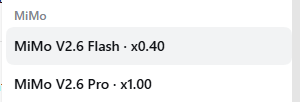
Bring the models included in the MiMo desktop App into DeepSeek Harness automatically, and use them from the DSH conversation window with zero configuration.
It runs on the quota you have already signed in for and already paid for inside the MiMo client — no separate API key to apply for, and no extra resident program to install.
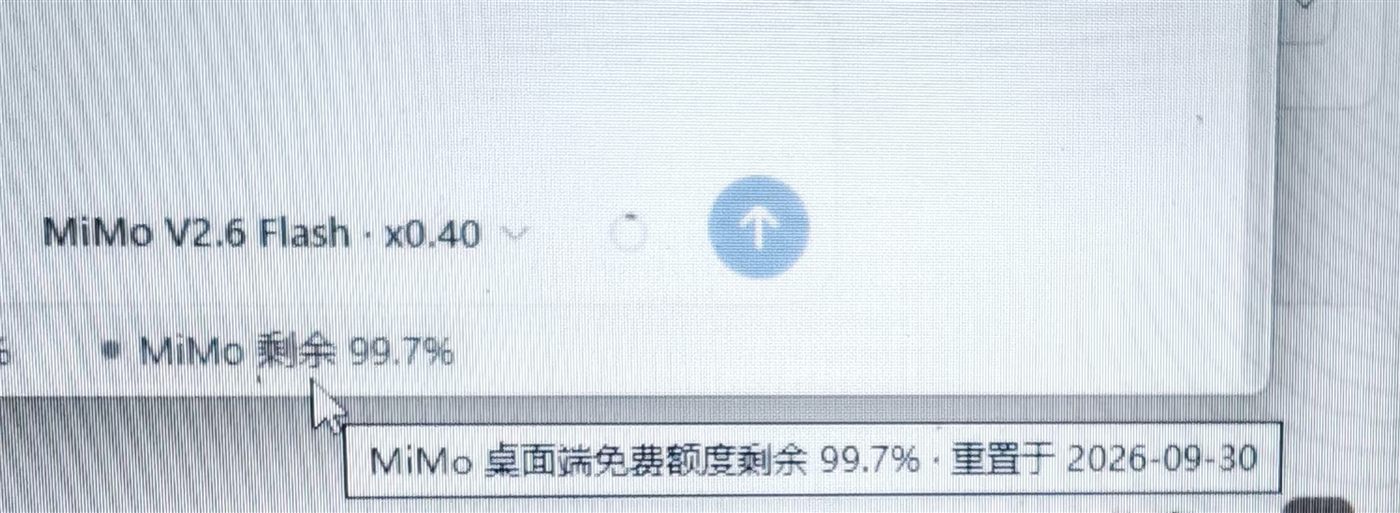
When a session is routed to MiMo, the remaining quota appears directly under the composer. Switch to another model and it is gone.
Hover for the reset date.
Why this exists
MiMo's client quota can normally only be spent from inside the client. To use it from DSH there are usually just two routes:
| Route | What it costs you |
|---|---|
| Apply for a platform API key | That is platform billing, a separate account from the client quota — you pay twice |
| Use a third-party reverse proxy | You install an extra resident program, plus an autostart entry |
This plugin is a third route: it reuses the credentials the client has already signed in with, and brings that client quota into DSH. No key to apply for, no extra program, no autostart entry.
Highlights
- Zero configuration — with the client already signed in there is nothing to do; the models simply appear.
- Uses your client quota — the same quota you have inside the MiMo client, not platform billing.
- No resident process — starts no proxy, injects no process, writes no autostart entry. Close DSH and nothing is left behind.
- Remaining quota in place — while the session is routed to MiMo, the remaining quota and reset date show under the composer; with any other model the readout does not appear at all.
- Works without the client — the plugin can also sign in on its own.
- Follows your account — switching accounts or signing out in the client is picked up automatically.
- Image input — paste images when the model supports them.
- Visible reasoning — chain-of-thought streams as thinking events. There is no reasoning-level picker, and that is deliberate (see below).
Install
dsh plugin --profile desktop add dsh-mimo-connect
dsh --profile desktop
Replace desktop with whichever profile you use (web / desktop / dsh-tui).
Then pick a model from the MiMo group in the model selector.
Where credentials come from
The plugin resolves a credential in this order, and stops at the first hit:
| Order | Source | Notes |
|---|---|---|
| 1 | $DSH_HOME/.mimo-connect-auth.json |
saved by the plugin's own sign-in |
| 2 | the MiMo desktop app's cookie DB | read-only, nothing on disk is modified |
| 3 | neither | tells you to run the login command |
The desktop cookie database lives at:
%APPDATA%\Xiaomi MiMo\Partitions\xiaomi-account\Network\Cookies
It is a standard Chromium SQLite cookie store. The plugin copies it to a
temporary file and queries that, so it never contends with the running desktop
app for the lock. MiMo stores its cookie values in plaintext (value is
populated, encrypted_value is empty), so no DPAPI unwrapping is required.
CLI
dsh plugin --profile desktop exec dsh-mimo-connect status    # sign-in state
dsh plugin --profile desktop exec dsh-mimo-connect verify     # one real completion
dsh plugin --profile desktop exec dsh-mimo-connect doctor     # local diagnostics
dsh plugin --profile desktop exec dsh-mimo-connect login      # sign in without the desktop app
dsh plugin --profile desktop exec dsh-mimo-connect logout     # delete the plugin's own credential
About login
Xiaomi's passport endpoint rejects every callback URL a third-party
integration can offer (it answers Callback连接不合法), and passToken is
HttpOnly, so page JavaScript cannot read it either. A one-click OAuth-style
login is therefore not available.
login prints a step-by-step guide instead: open the sign-in page, copy three
values from the browser devtools (Application → Cookies), paste them back. The
plugin verifies the credential actually works before saving it.
If you already run the MiMo desktop app, you do not need login — its
sign-in is reused as-is.
How it works
credential (passToken / cUserId / userId)
   ↓  STS exchange (3 redirects)
serviceToken
   ↓  sent as a Cookie header
mimo-server-cn.xiaomimimo.com/api/route/chat/completions
The real endpoint speaks the OpenAI chat-completions protocol, so there is no
protocol translation layer. model.headers injects the cookie into the
request pi-ai builds, which also removes the need for a local shim.
The attachment service
The plugin wires the host's attachments service into the adapter. This is not
optional: dsh-llm-pi-ai throws UNSUPPORTED_CONTENT the moment a message
contains an image block and no attachment service is available.
It also wires resolveImageAccess (mapped to the host's fs service), so the
image handle the model receives carries the normalized copy's read-only path.
When fs is unavailable the handle simply omits that path instead of failing the
turn.
Regression coverage: tests/image-guard.mjs.
One detail that matters
The gateway validates identity per domain: sending .xiaomi.com and
.account.xiaomi.com cookies in the same header makes it revoke the session
(EXPIRED) and bounce the request to the login page. The plugin therefore uses
a domain-scoped cookie jar, and emits each cookie name only once (taking the
value from the most specific matching domain). Guarded by tests/cookie-jar.mjs
and tests/session.mjs.
Remaining quota
While the session is routed to MiMo, a quota readout appears at the right of the stats row under the composer:
● MiMo 剩余 99.8%
Hovering shows the reset date (e.g. 重置于 2026-09-30). The indicator dot turns
to a warning colour below 20% and to an alert colour below 5%.
It only appears while the session is routed to MiMo. With DeepSeek or any other model the readout is absent entirely and issues no quota request — the figure belongs to the session that is spending the allowance, not to unrelated conversations.
The data comes from the client's own usage endpoint:
GET mimo-server-cn.xiaomimimo.com/api/user/usage
→ {"code":0,"data":{"percent":99.8,"resetDate":"2026-09-30","resetAt":1790782334}}
percent is the remaining share, not the used share. The read is read-only
and consumes nothing; a successful reading is cached for 60 seconds and a failure
is backed off for 15. Every failure path simply shows nothing — it can never
affect inference.
The node half registers an /api/mimo.quota route (behind the same browser
session fence as every other /api route) and the browser half mounts a
component on the conversation.composer.dock slot to read it. On a host with no
browser connection (the CLI, for instance) the route is not registered and the
provider works as usual.
Configuration
| Option | Default | Description |
|---|---|---|
cookieDb |
empty | explicit path to the desktop cookie database |
pollSeconds |
30 |
how often to re-check the credential; 0 disables polling |
The MIMO_COOKIE_DB environment variable overrides the cookie database path.
Models
| ID | Display name | Multiplier |
|---|---|---|
mimo-v2.6-flash |
MiMo V2.6 Flash | x0.40 |
mimo-v2.6-pro |
MiMo V2.6 Pro | x1.00 |
The multiplier is the credit coefficient the desktop app displays. It is informational only and does not affect requests.
The gateway exposes no model-listing endpoint (/api/route/models and
friends all return 404), so this list is a built-in snapshot taken from the
desktop app's model-catalog.json TEXT entries.
No reasoning-level picker
The model picker will not offer Off / Minimal / Low / Medium / High. That is intentional.
These models do produce chain-of-thought (returned as reasoning_content,
surfaced as thinking stream events), but the gateway ignores every control
that was measured:
| Parameter | Reasoning tokens |
|---|---|
| default | 176 / 211 |
thinking: { type: 'disabled' } |
179 |
thinking: { enabled: false } |
237 |
reasoning_effort: 'none' |
181 |
reasoning_effort: 'low' |
205 |
enable_thinking: false |
210 |
None had any effect. Offering a picker that silently does nothing is worse than offering none.
On response speed
Measurements show the latency comes from the upstream gateway, not the plugin:
| Stage | Time |
|---|---|
| session cache hit | 0 ms |
| cookie header construction | < 0.01 ms |
| DNS | 9–28 ms |
| network round trip (no inference) | 37–169 ms |
| one full completion | 1–19 s (highly variable) |
The same one-word prompt was measured anywhere between 1 s and 19 s. A bare
fetch bypassing the plugin entirely produces the same distribution, so the
plugin adds no measurable overhead.
Because the gateway ignores reasoning controls, there is currently no plugin-side way to speed this up.
Known limitations
- Relies on non-public endpoints. The plugin uses the desktop app's own endpoints and credentials, not an official Xiaomi API; upstream changes may require follow-up work.
- Response speed depends on upstream. Latency varies widely and is outside the plugin's control.
- The quota readout uses the same non-public endpoints. If
/api/user/usagechanges or disappears, the readout silently stops appearing; model calls are unaffected. - Credential lifetime.
passTokenwas measured at 30 days; after that you must sign in again (desktop app orlogin). serviceTokenneeds short-term renewal. Handled within the session, with one retry on a 401.- Quota is controlled by Xiaomi. The plugin only forwards requests; it does not change limits, throttling, or account permissions.
Development
npm run build                 # produce the browser half, lib/client.js
node tests/run.mjs            # every suite
node tests/run.mjs client     # browser half only
node tests/run.mjs layout     # layout parity only
node tests/run.mjs cookie     # suites matching "cookie"
Suites that need a real credential skip themselves when none is present. A few suites make real network calls when a credential is available.
The rendering and layout suites need a few test-only dependencies:
npm i --no-save js-yaml@^4 react@18.3.1 react-dom@18.3.1 jsdom
They are not part of the published artifact — in the DSH page the browser half takes React from the shell's platform module table.
tools/ holds local deployment helpers that reference a machine-specific DSH
profile; they are not part of the published test suite. npm run sync builds
first and then syncs the plugin into the desktop profile.
The browser half
The client bundle is hand-written in the __ModuleLoader__.load(...) shape with
no bundler involved: src/client.js already has the artifact's form, and
tools/build-client.mjs adds a source map before writing lib/client.js. The
host discovers it through the dsh.client declaration in package.json and
serves the file named by exports["./client"] verbatim under /plugins.
Restart DSH after changing client code: the bundle is snapshotted at process
start and patchReload will not re-read it.
Why the quota readout keeps up with the host's layout
The two built-in stats pills are children of one flex container,
[data-composer-stats], laid out by that container's own display:flex; gap:12px — no absolute positioning and no hand-computed offsets.
This plugin cannot become a child of that container: when the host registers
conversation.composer.dock it declares no children, so the slot registry has
no sub-slot to contribute to. The component therefore uses createPortal to send
its pill into [data-composer-stats], making it a real child of the same
container and leaving layout entirely to the host's own rules. The plugin
declares only the pill's own geometry.
tests/layout-parity.mjs extracts the host's CSS verbatim from the
dsh-client-ui-chat artifacts and compares computed styles with both pills in
one container, covering changed font size, missing variables, a narrow container,
and a dark theme. It skips entirely (exit code 0) when no DSH install is found;
DSH_APP_ROOT overrides the location.
The stats row mounts and unmounts with session state, and the host may replace it
outright, so after the first discovery the component watches for replacement with
a MutationObserver.
Disclaimer
- This project is for personal study and research only. It drives only your own MiMo account, on your own machine. Do not use it commercially or beyond reasonable personal use.
- You are responsible for complying with Xiaomi's terms of service. Any consequence of using this project (including but not limited to account restrictions, cleared quota, or service interruption) is yours to bear.
- This project is not affiliated with, or endorsed by, Xiaomi, Xiaomi MiMo, or DeepSeek. Names are used only to describe compatibility; trademarks remain with their respective owners.
Credits
- dsh-workbuddy-connect
(MIT) — reference for plugin layout, provider registration, and
PiAiAdapterassembly.
License
Comments
Comments live in GitHub Discussions. Sign in with GitHub to post or react.