
Install
Inside DeepSeek Harness, with dsh-market
dsh plugin --profile web add dshmarket
Or from the command line
dsh plugin --profile web add github:ai-yukin/dsh-0-tools
Installing runs third-party code with your own permissions — it can read your files, use your credentials and reach the network. Review the source first, and pin a commit (github:owner/repo#sha) when you can.
README
What is dsh-0-tools
dsh-0-tools is designed for users with zero programming experience who are using DeepSeek Harness (hereinafter referred to as DSH) for the first time. It features "Zero Barrier, Zero Cost, Zero Loss of Control, Zero Confusion", aiming to help beginners get a better user experience.
Main Features
- [Zero Barrier] One-click installation of DSH and this tool, with automatic desktop shortcut creation;
- [Zero Cost] One-click access to multiple permanently free large models accessible in China (Zhipu AI / SiliconFlow / iFlytek Spark / OpenRouter / ...), with automatic health monitoring and intelligent timeout prompts after configuration;
- [Zero Loss of Control] If you choose to call the DeepSeek official model API, the DSH interface will display real-time reminders of whether it's peak hours (full price) or off-peak hours (half price);
- [Zero Confusion] The beginner help center aggregates DSH official documentation and community-selected resources for quick onboarding.
Current Version & Compatibility
- Current version: v1.8.6
- Compatible DSH version: ≥
0.1.7(verified with0.1.7-rc.2) - System Requirements: One-click installation scripts support Windows 10 / Windows 11 (
install.bat) and macOS / Linux (install.sh); the plugin core code itself is cross-platform. Users who have manually installed DSH can install the plugin manually viadsh plugin --profile web add /path/to/dsh-0-tools.
Free Model List
dsh-0-tools currently integrates 4 permanently free large models. We recommend configuring all of them — when one model is busy or reporting errors, you'll have more faster and more stable free models to choose from, achieving "the more models, the more switching options":
| Model | Provider | Features |
|---|---|---|
| GLM-4.7-Flash + GLM-4V-Flash | Zhipu AI | Text + image understanding, permanently free |
| Qwen3-8B (15+ models under 9B) | SiliconFlow | Permanently free, direct access in China, 128K context, supports tool calling |
| Spark Lite | iFlytek Spark | Permanently free, strong Chinese understanding |
| OpenRouter Free Pool | OpenRouter | Automatically routes dozens of free models, automatically bypasses when one is delisted |
Each model provides a dedicated illustrated tutorial page. Click "Guide Tutorial" in "① Zero Cost · Free Model Manager Center" to view step-by-step registration instructions.
Installation & Usage (Illustrated Steps)
Step 1: Run the One-Click Installation Script
- Windows users: Double-click to run
install.bat - macOS / Linux users: Run
chmod +x install.sh && ./install.shin the terminal
Windows Version (install.bat)
- If DSH is already installed on your computer: the script will automatically detect and skip the installation, directly completing the installation of this tool;
- If DSH is not installed yet: the script will automatically scan the runtime environment, fill in missing dependencies, and then automatically install DSH;
- After successful installation, the script will automatically create a "DeepSeek Harness" shortcut on your desktop.
Tip:
install.batis a plain text script. You can right-click → "Open with → Notepad" to view all content before running (content is transparent and auditable). Scripts downloaded from the internet don't have digital signatures, and Windows may pop up a SmartScreen prompt ("Windows protected your PC"). Click "More info → Run anyway" — this is Windows' unified prompt for unsigned scripts, not a virus warning.
Step 2: Open the DSH Interface
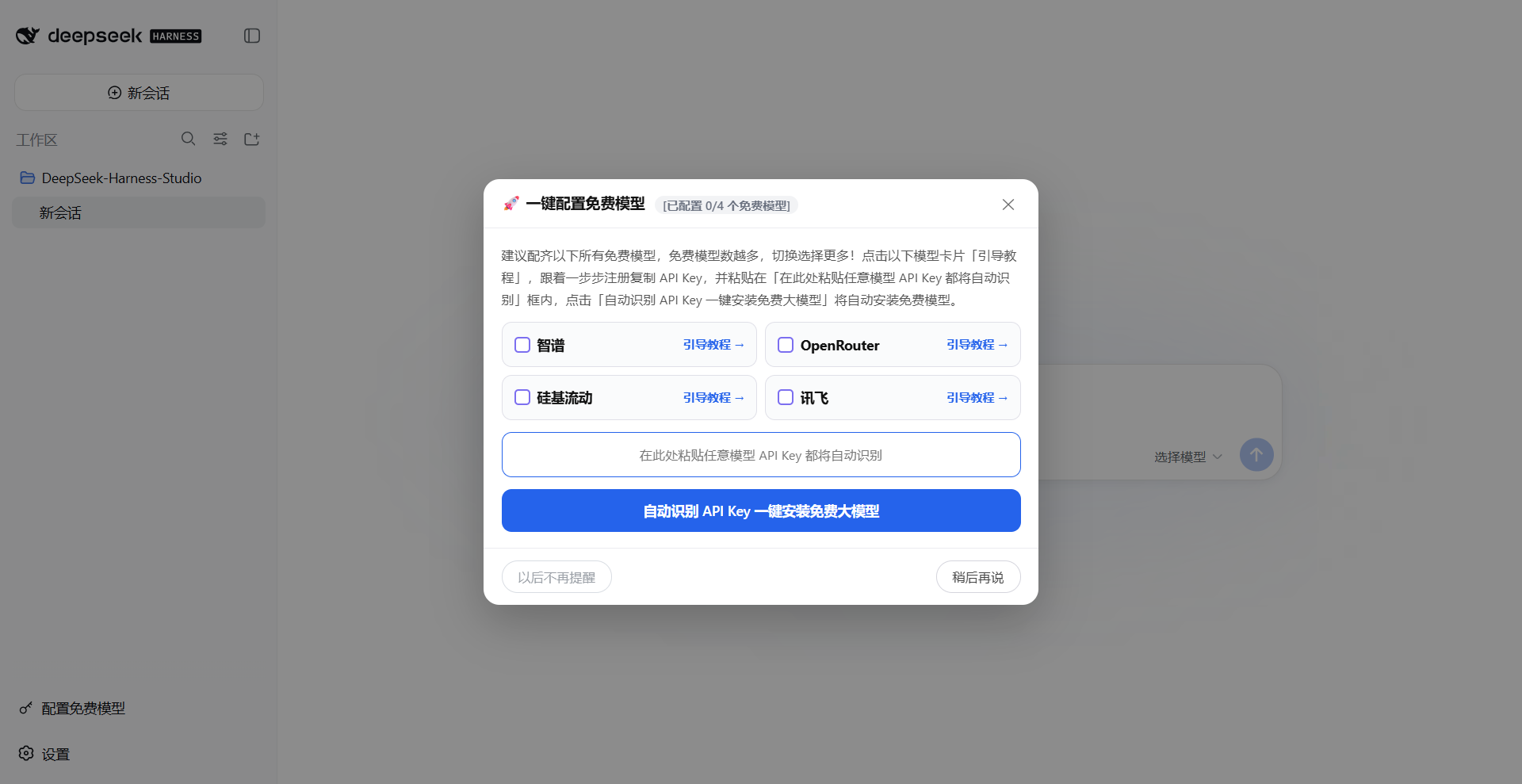
Double-click the "DeepSeek Harness" shortcut on your desktop, and the browser will automatically open the DSH web interface. When you haven't configured any free models yet, a popup will automatically guide you through configuration; you can also click the "Configure Free Model" button in the bottom-left corner of the DSH interface to enter the same configuration interface.
Step 3: Get and Install API Key
We recommend configuring all the following free models — the more free models, the more switching options! Click the "Guide Tutorial" button on each model card below, follow the steps to register and copy the API Key (for iFlytek, you need to copy both APIKey and APISecret, concatenated with an English colon), and paste it into the "Paste any model API Key here for automatic recognition" box, then click "Auto-recognize API Key and install free model with one click" to automatically install the free model.
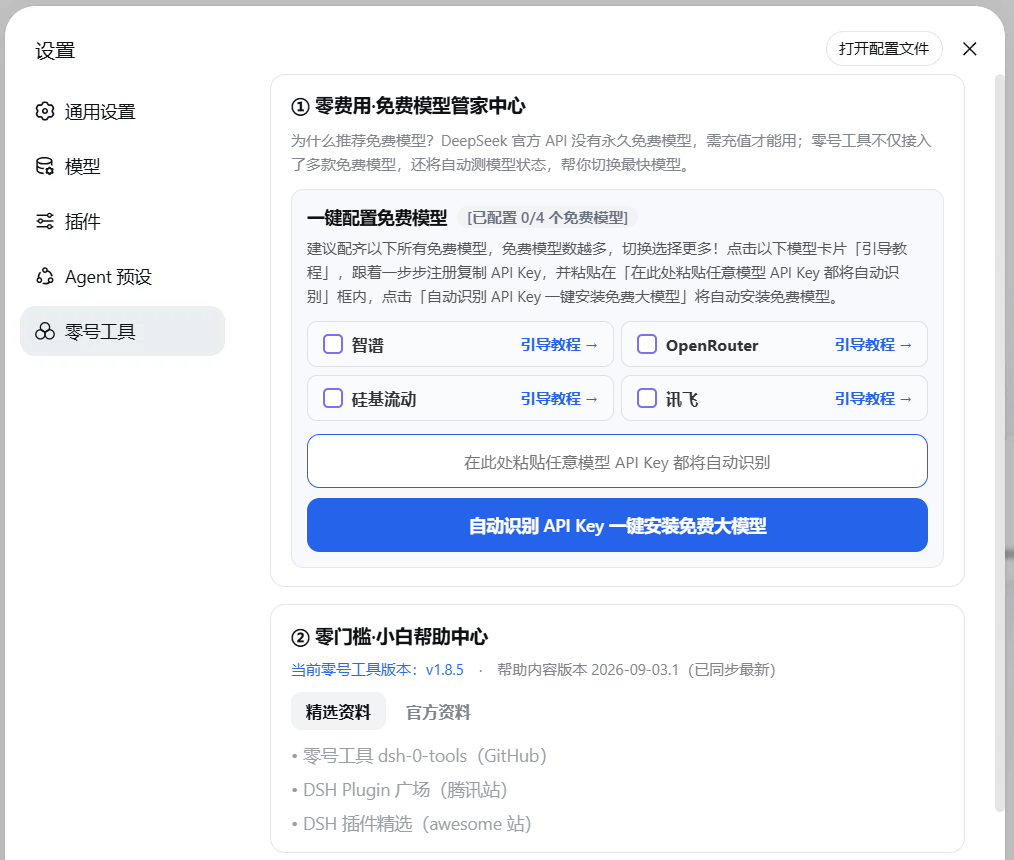
Configured models will show a ✅ mark and provide "One-click uninstall model" (with secondary confirmation); unconfigured models show "Guide Tutorial →" link.
Step 4: Intelligent Health Monitoring + Timeout Prompts, Zero Cost More Transparent
After configuring 2 or more free models, dsh-0-tools' "Free Model Manager Center" will automatically start health monitoring:
- Automatic health monitoring: Every 60 seconds in the background, sends a minimal
max_tokens=1request to all configured free models for health checks, records the last 5 response times and averages them; - Timeout prompt: When the current model times out, the bottom of the sidebar displays "Zhipu🔴Timeout, recommend switching to iFlytek" (automatically finds the fastest available model), helping users stay informed about model health;
- Status prompt: The bottom of the sidebar displays the current model status in real-time (Zhipu🟢Normal / Zhipu🟡Slow / Zhipu🔴Timeout, recommend switching to XX). The status bar is for display only and cannot be clicked;
- Status criteria: <8 seconds = Normal (🟢), 8-15 seconds = Slow (🟡), >15 seconds or timeout = Timeout (🔴).

Step 5: Using Paid DeepSeek Models
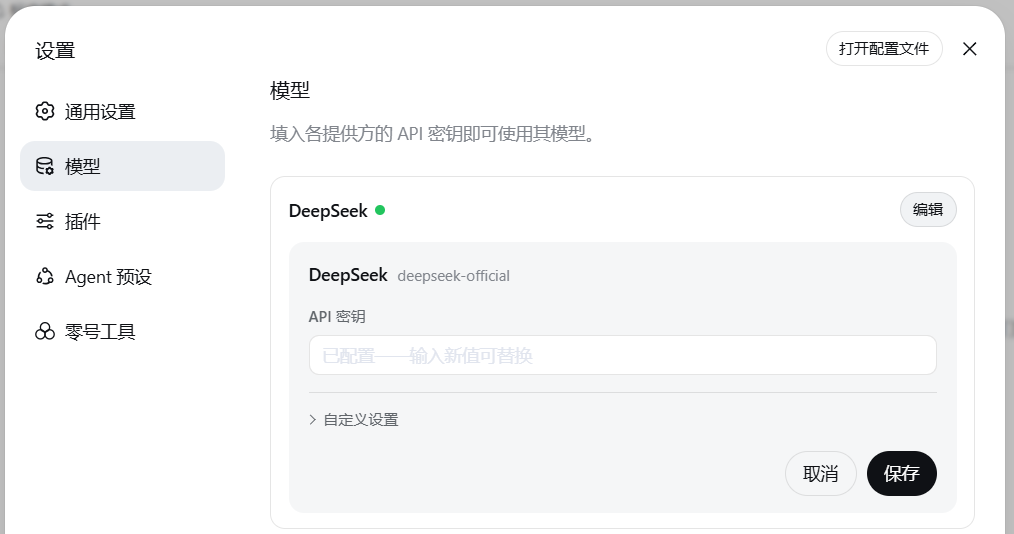
If you decide to use paid services and have already applied for and purchased a DeepSeek model API, you can click "Settings" in the bottom-left corner of the DSH interface, find "Models", click "Edit" next to DeepSeek, and enter your DeepSeek model API key.
Step 6: DeepSeek Billing Reminder
When you switch to and select a DeepSeek official model in the DSH interface, the bottom-left corner of the interface will display a real-time billing reminder. Based on the peak/off-peak hours of DeepSeek official API calls, it will prompt "Current peak hours, API at full price" or "Current off-peak hours, API at half price", providing you with "Zero Loss of Control" cost protection.

DeepSeek official billing rules (effective from 2026-08-23): Weekends (Saturday/Sunday) are uniformly off-peak pricing all day, no longer distinguishing peak/valley; only weekdays (Monday-Friday) implement peak/valley tiered billing — peak hours (9:00-12:00, 14:00-18:00) at full price, remaining off-peak hours at half price.
China Mirror Download Address
This repository provides a Gitee mirror for users in mainland China, now available:
- GitHub main repository:
https://github.com/ai-yukin/dsh-0-tools - Gitee mirror:
https://gitee.com/ai-yukin/dsh-0-tools
Notes:
- This repository uses GitHub as the main source repository, with Gitee as the domestic mirror. Automatic sync has been configured (Gitee repository "Management" → "Repository Sync Management" enables GitHub sync), keeping content consistent with the main repository;
- Domestic users are recommended to download from Gitee for more stable access speed;
- If you need to report issues or suggestions, please submit them in the Issues of the GitHub main repository.
Compatibility
This plugin has been developed and verified against the following DSH versions:
| DSH Version | Status |
|---|---|
0.1.7-rc.2 |
Verified and adapted (page loading / pricing bar / model selector / settings tab / official configuration channel / web authentication) |
0.1.1-rc.2 |
Verified and adapted (page loading / pricing bar / model selector / settings tab / official configuration channel) |
Directory Structure
dsh-0-tools/
├── lib/
│   ├── index.js     # host side: local health monitoring proxy server (127.0.0.1:3095), bypasses browser CORS
│   └── client.js    # browser side: bottom-left toolbar + settings tab "dsh-0-tools" + read/write config via official /api
├── guide/           # v1.8.0 added: 4 dedicated illustrated tutorial pages for free models
│   ├── zai.html              # Zhipu AI tutorial
│   ├── openrouter-free.html  # OpenRouter tutorial
│   ├── siliconflow.html       # SiliconFlow tutorial
│   ├── xinghuo.html          # iFlytek Spark tutorial
│   └── images/               # tutorial screenshots
├── screenshots/     # README screenshots
├── cordis.patch.yml # web profile injection declaration
├── package.json
├── help.json        # help center online data source (hosted on GitHub Pages, supports remote hot-update model list)
├── install.bat      # Windows one-click install + start + verify
└── install.sh       # macOS / Linux one-click install + start + verify
Mechanism Explanation
- Configuration status determination: The browser side calls official
settings.describe+credentials.describeto determine whetherllm-pi-ai.providers.{provider}exists and whether its credentials are configured, as the authoritative source; polls every 5 seconds to refresh the interface. - One-click configuration: Sequentially writes credentials via official
credentials.set, writes provider configuration section viasettings.mutate, and switches the default model to the corresponding free model viasettings.updatewith merge semantics (merge semantics ensure user-set fields likereasoningEffortare not erased). - One-click uninstall: Clears the provider configuration section and corresponding credentials via official channels; only when the default model previously pointed to that provider, restores to the original default model recorded before configuration, otherwise keeps the user's current selection unchanged.
- API Key auto-recognition: Automatically identifies which model a Key belongs to based on prefix/format (
sk-or-v1-→ OpenRouter,sk-(non-sk-or-v1-) → SiliconFlow,APIKey:APISecretformat or 32-bit hex → iFlytek Spark, long string with dots → Zhipu AI), and automatically invokes the one-click configuration process after recognition. - Free Model Manager Center: Every 60 seconds in the background, sends
max_tokens=1minimal requests to all configured free models for health checks, records the last 5 response times and averages them; when the current model times out, intelligently prompts to recommend switching to the fastest available model; sidebar displays status in real-time (for display only, cannot be clicked). - Invalid residual cleanup: The configuration center detects whether there are residual delisted/invalid model providers locally (dynamically reads their
apiKeyEnv, no longer relying on local static lists), provides an "invalid residual" prompt in the interface and offers one-click cleanup, avoiding orphan configurations that cannot be deleted. - Settings tab: Injected via
settings.sectionslot (same mechanism as official plugins), id isdsh-0-tools, tab name is "dsh-0-tools". - Help Center: Fetches
https://ai-yukin.github.io/dsh-0-tools/help.json, passes through a unified filterfilterRemotePayloadfor field-by-field security checks (URL enforces https, text rejects control characters/newlines, model id and credential name use character whitelist) before entering the interface and configuration chain; falls back to built-in data on failure or non-compliance; both the configurable model list and delisted model list are driven by this remote data, allowing adding or delisting models without reinstalling the plugin. - Tutorial page hosting: Tutorial pages are uniformly hosted on GitHub Pages (
https://ai-yukin.github.io/dsh-0-tools/guide/). Domestic users can download the source code from the Gitee mirror repository and view tutorials locally.
Disclaimer
- This plugin is a third-party community plugin, not affiliated with DeepSeek, Zhipu AI, SiliconFlow, iFlytek, or OpenRouter in any way. Officials do not provide support for it.
- When using this plugin to access third-party model services, please comply with the corresponding platform's terms of service and fee policies on your own.
- Conversation content through free model channels may be retained by model vendors for training. Do not enter sensitive content such as business secrets or personal privacy through these channels.
- This project is open source under the MIT license, and users assume usage risks at their own discretion.
License
MIT © 2026 ai-yukin
Comments
Comments live in GitHub Discussions. Sign in with GitHub to post or react.