
Install
Inside DeepSeek Harness, with dsh-market
dsh plugin --profile web add dshmarket
Or from the command line
dsh plugin --profile web add @zhangfengshun/dsh-remote-ssh
Installing runs third-party code with your own permissions — it can read your files, use your credentials and reach the network. Review the source first, and pin a commit (github:owner/repo#sha) when you can.
Screenshots
README
English | 中文
A DSH plugin like VSCode Remote-SSH: connect to remote HPC / servers via SSH, and directly operate remote files and terminals within DSH's built-in Files and Terminal sidebar tabs.
Contents: Features · Screenshots · Installation · Usage · Examples · Model Tools · Command Timeout & Recovery · Compatibility · Troubleshooting · How It Works · Caching & Consistency · License
Features
| Feature | Description |
|---|---|
| 🔌 SSH Connection | Key / password auth, ProxyJump bastion, one-click import from ~/.ssh/config |
| 📂 Remote Files | Built-in Files tab reads/writes remote files directly via SSH — no sync needed |
| 💻 Remote Terminal | Built-in Terminal tab auto-detects remote workspaces, opens an SSH interactive shell in the workspace's remote directory (like VSCode Remote-SSH) |
| 🌐 Remote Workspace | Select a remote directory to create a native workspace, one-click enter |
| 🤖 Model Tools | 13 remote_ssh_* tools, session-aware with auto-filled connection params; command-level timeout + remote_ssh_kill recovery |
🗂️ @ Completion |
In a remote-workspace session, @ completion lists remote files (git repos via git ls-files, measured 0.1s; bounded find otherwise; cached index + 900ms query budget so the caret never stalls) |
| ⚡ Faster Opens | Single-roundtrip merged reads + raw text fast path + result cache (LRU + 5s TTL): first open ≈1.31×, repeat opens within TTL 0 round-trips, expired revalidation ≈5× (measured on a real HPC); remote_ssh_exec connection reuse ≈15× |
Screenshots
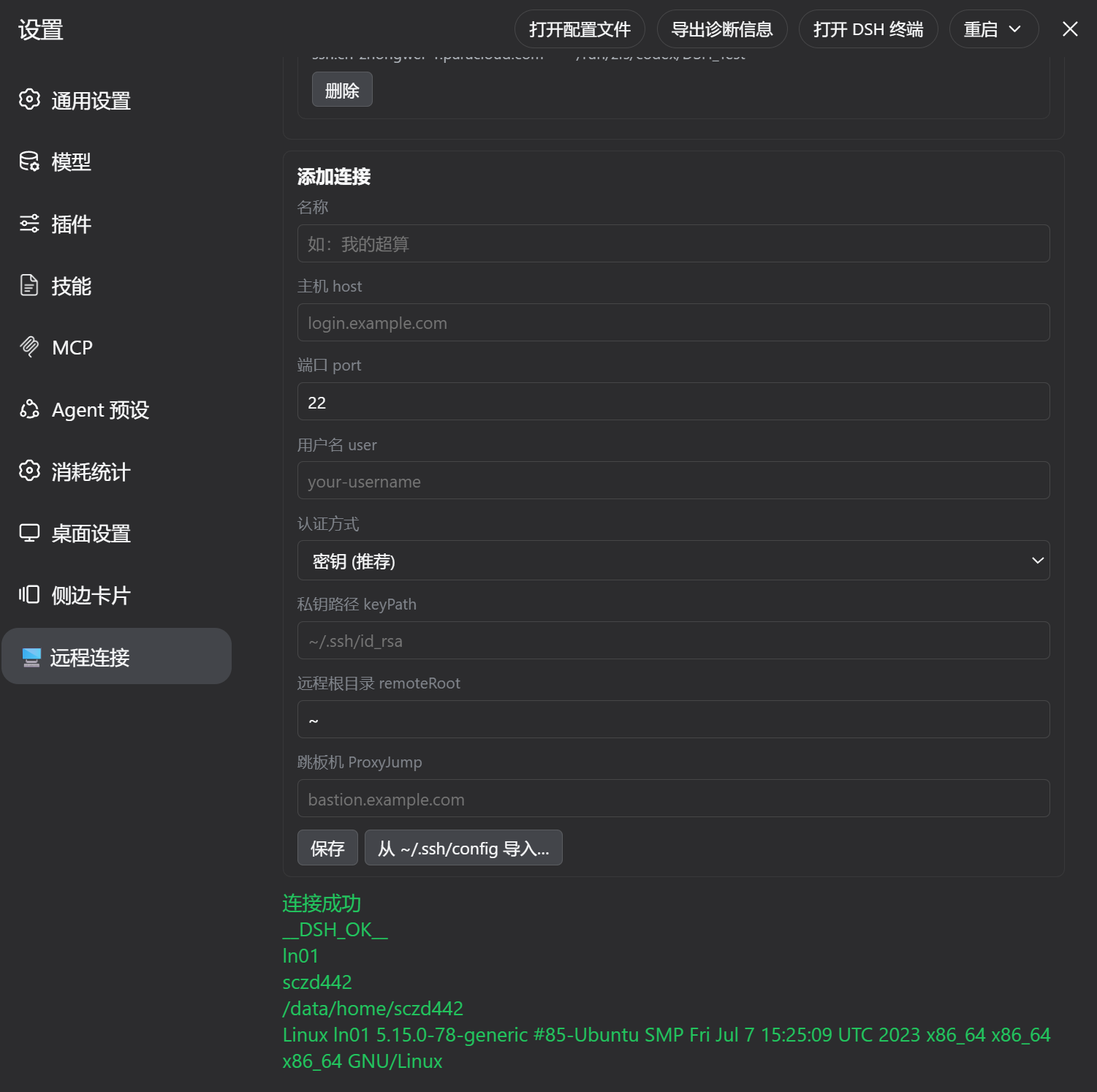
Settings → Remote SSH: connection profiles (key / password / ProxyJump bastion) · connection test · one-click import from ~/.ssh/config
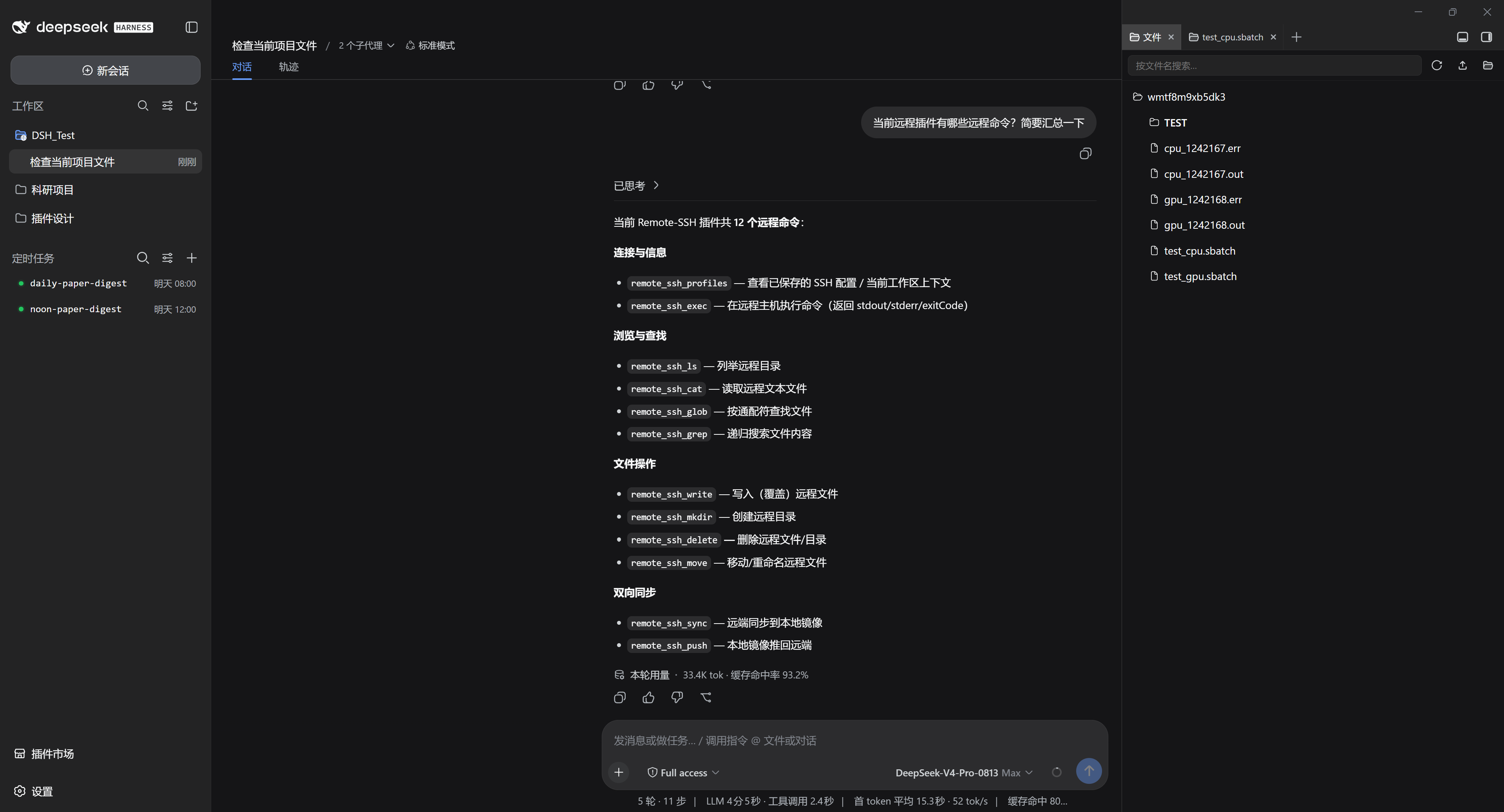
Built-in Files tab: browse the remote host directly (the right-hand tree IS the remote directory, edits save back to remote)
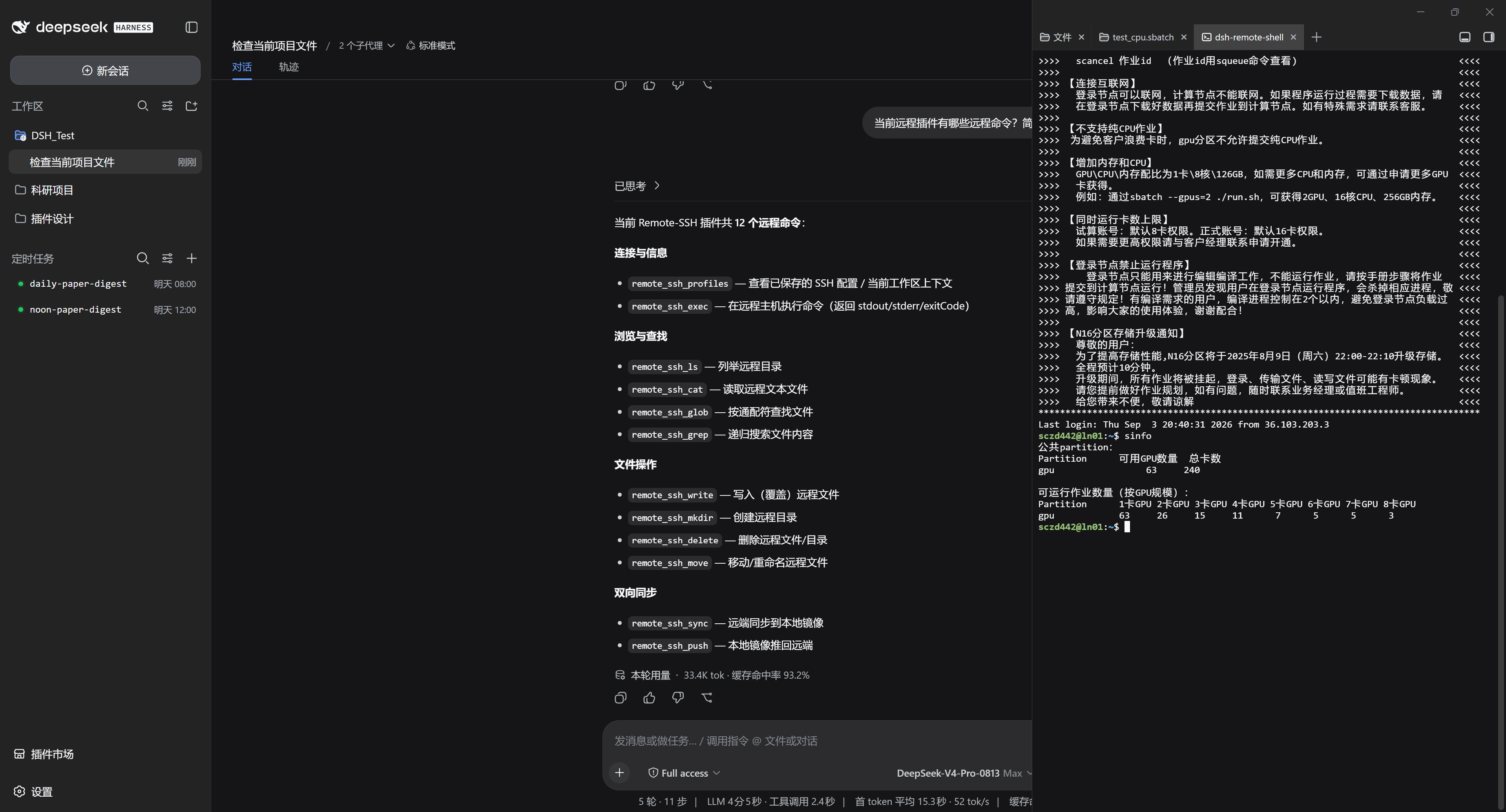
Built-in Terminal tab: auto-SSH to the HPC (SLURM environment shown); the left panel shows the model calling remote_ssh_* tools without connection params
Installation
Prerequisites
| Item | Requirement |
|---|---|
| DSH | ≥ 0.1.5-rc.1, 0.2.0-rc.1 included (the current official line; on the 0.1.2 stable line, use the v0.18.1-era plugin release). The declared peer range names every verified line explicitly, so the new harness compatibility gate (see Installation) does not block it |
| dsh-better-sidebar | ≥ 0.15 (this plugin uses its /sidebar/api/ file API plus 0.24's open.external "open with" endpoint; adapted since 2.4.18). This plugin can be installed on its own: since 2.4.18 a missing better-sidebar no longer stalls web boot (see below), but the remote file tree/editor tab is unavailable without it |
| Local SSH client | Windows: built-in OpenSSH (%SystemRoot%\System32\OpenSSH\ssh.exe); Linux/macOS: openssh-client |
| Remote host | Any standard sshd (HPC / server / bastion) |
One command (no token, API key or extra configuration needed):
dsh plugin --profile <name> add @zhangfengshun/dsh-remote-ssh@2.4.18
Restart DSH after installation. @zhangfengshun/dsh-remote-ssh must come after dsh-better-sidebar in the bundles list.
Installing this plugin without
dsh-better-sidebar(or if that bundle fails to load)? Since 2.4.18 it starts cleanly: the client half declares only core services (slots/locale) as hard dependencies and reaches better-sidebar through a child-fiber soft inject — the remote file editor tab registers when it is present and is silently skipped when it is not. What still works: the settings "Remote connections" section (connections + remote workspaces), the model tools (remote_ssh_*), remote terminal integration and@remote file completion. What does not: the Files tab's remote read/write and the editor tab — that/sidebar/api/fs.*channel belongs to better-sidebar (the built-in sidebar uses its own/api/*, which this plugin does not take over). Older releases stayed pending forever in that setup, so the frontend reportedweb boot: 1 entry did not activate/pending (waiting for service: betterSidebar)(issue #18). The host also logspatch: entry "better-sidebar" not foundwhen that bundle is absent —dsh-app-bootwarns unconditionally about missing patch targets, which is expected and harmless.
On DSH 0.2.0-rc.1+, does the install get refused or the plugin stay invisible? The new harness judges compatibility from the DSH peer version ranges a plugin declares: if the range does not cover the running version, installation/activation is rejected (
Plugin … is incompatible with dsh <version>) and the plugin manager offers a per-version "accept the risk" exemption instead. Since 2.4.16 this plugin lists every verified line explicitly (^0.1.0-rc.6 || ^0.1.5-rc.1 || ^0.1.7-rc.2 || ^0.2.0-rc.1), so no exemption is needed. If you are on an older plugin version, upgrade rather than clicking "accept the risk". (The check is strict semver: a prerelease runtime is only covered by a range that names that line explicitly — which is why lines like0.1.5-rc.1are listed one by one.)
Uninstall:
dsh plugin --profile <name> remove @zhangfengshun/dsh-remote-ssh
⚠️ dsh-better-sidebar compatibility (measured 2026-09):
0.18.1 / 0.19.0 / 0.19.1cannot load their host half on DSH Desktop v2.0.9 (DSH 0.1.5-rc.1) — they value-importSessionLogOffset, which the desktop module surface exposes only as a type — so the sidebar Files tab falls back to "Nothing here can view this kind of content yet." Use 0.18.0 or a build carrying the fix; this plugin supports both contracts (4 endpoints on 0.18, 6 includingfs.rename/fs.removeon 0.19).
Usage
Three steps
- Settings → Remote SSH → Add a connection (host / port / user / key) → Click "Test Connection"; an existing
~/.ssh/configcan be imported in one click - Add Workspace → Choose "Select Remote Directory…" → Pick a connection → Browse and select a remote directory (it becomes a native DSH workspace); if the directory does not exist yet, click "📁 New folder" to create it in place (both the local and remote tabs) — the picker then enters it automatically
- Inside that workspace session: the built-in Files tab shows remote files (edits save straight back to remote), and the Terminal tab auto-SSHes into the workspace's remote directory (key auth only)
Just ask the model (connection params are auto-filled inside a remote-workspace session):
What's inside /home/user/project? Then fix line 20 of train.py
Run squeue -u $USER and summarise the queue as a table
Grep every ERROR line from the *.log files in this directory
Examples
1 · Run a remote command (remote_ssh_exec, 120s timeout by default):
{
  "command": "sinfo -h -o '%P %a %D %t %N' | head -20",
  "timeoutMs": 30000
}
Returns { ok, exitCode, stdout, stderr, error, truncated, isTimeout } — e.g.
{ "ok": true, "exitCode": 0, "stdout": "cpu* up 12 idle 8 ...\n", "stderr": "", "error": "", "truncated": false, "isTimeout": false }
2 · Read / write files (no sync needed):
{ "path": "~/project/config.yaml", "content": "lr: 0.001\nepochs: 50\n" }
{ "path": "~/project/train.py" }
remote_ssh_cat transfers base64 (binary-safe); remote_ssh_write is atomic (temp file + rename).
3 · Long jobs and hung-command recovery:
{ "command": "cd ~/project && bash run_train.sh", "timeoutMs": 0 }
{ "all": true }
timeoutMs: 0 disables the timeout for that call; DSH_REMOTE_SSH_CMD_TIMEOUT_MS=600000 changes the global default. Timed-out pooled sessions are discarded and rebuilt, and remote_ssh_kill is the manual hatch.
4 · Tool calls inside a remote workspace (profileId omitted, relative paths resolve against the remote root):
{ "path": "configs/exp1.yaml" }
5 · Import connections from ~/.ssh/config: Settings → Remote SSH → "Import SSH config" → tick hosts → host / user / port / keyPath / ProxyJump are filled in.
6 · Mirror sync and push-back (review offline, then upload in one shot):
{ "workspaceId": "w_xxx" }
{ "workspaceId": "w_xxx" }
remote_ssh_sync pulls the remote tree into the local mirror; remote_ssh_push sends mirror changes back (tar over ssh, batched).
Model Tools
| Tool | Purpose |
|---|---|
remote_ssh_profiles |
List saved connections + current session's remote workspace context |
remote_ssh_exec |
Execute remote command (default 120s command timeout; timeoutMs to relax/disable) |
remote_ssh_kill |
Force-close pooled SSH sessions (recovery for hung commands) |
remote_ssh_ls |
List remote directory |
remote_ssh_cat |
Read remote file |
remote_ssh_write |
Write remote file |
remote_ssh_grep |
Search remote file contents |
remote_ssh_glob |
Find remote files by glob |
remote_ssh_mkdir |
Create remote directory |
remote_ssh_delete |
Delete remote file/directory |
remote_ssh_move |
Move/rename |
remote_ssh_sync |
Sync remote to local mirror |
remote_ssh_push |
Push local mirror back to remote |
In a remote-workspace session, profileId and other connection params can be omitted. All file/command tools run over the persistent SSH session pool + result cache; remote_ssh_exec measures ≈15× faster per command.
@ File Reference Completion
In a remote-workspace session, typing @ offers remote candidates (matching the Files tab tree) instead of the local mirror directory:
- Index source: git repos use
git ls-files --cached --others --exclude-standard(respects.gitignore, includes untracked files; measured 0.117s / 137 entries on a real HPC), non-git directories fall back to a boundedfind(maxdepth 5+ pruning, measured 1.57s / 3121 entries); - Exclusion happens remotely, before truncation (fixed in 2.4.8):
git ls-files --cached --othersoutput is not globally sorted (untracked files come first in readdir order), so anode_modules/tree can fill the first 20,000 lines and exhaust the quota — the excluded directories are therefore filtered by a remotegrep -vEbeforehead(same source of truth as the-prunelist), with the client-side filter kept as a second line of defence; hitting the index cap now logs a warning that files may be missing; - Query semantics mirror the official provider:
@and@src/list a remote directory;@readruns the fuzzy index (exact name > prefix > name substring > path substring > subsequence, directories +25); - The caret never stalls: the index is cached per workspace for 60s (invalidated after writes/commands) and a single completion waits at most 900ms — on timeout the stale index answers and the rebuild continues in the background; connection failures fall back to local behaviour;
- Local workspaces are untouched: non-remote sessions delegate straight to the host implementation.
Command Timeout & Recovery
All SSH commands default to a 120-second timeout (issue #5): a hung remote command (network stall, stuck remote process, cat waiting on stdin) can no longer occupy the session forever and block every later command.
- Automatic recovery on timeout: the pooled session is discarded and rebuilt automatically, so subsequent commands keep working; one-shot connections terminate the SSH process;
- Explicit budgets:
remote_ssh_execacceptstimeoutMs(milliseconds) per call,0disables the timeout (long builds/training); theDSH_REMOTE_SSH_CMD_TIMEOUT_MSenvironment variable overrides the global default; - Manual hatch:
remote_ssh_kill(orall: true) force-closes one or all pooled sessions at any time; - Timed-out commands are never auto-retried (retrying a hung command just hangs again) — the model decides whether to kill the session or retry differently.
Compatibility
Measured matrix (2026-09-12, all verified on real machines):
| Component | Version | Status |
|---|---|---|
| DSH | 0.1.5-rc.1 (DSH Desktop v2.0.9) | ✅ host services / settings / tools / slots / upload & download interception all compatible |
| DSH | 0.2.0-rc.1 (DeepSeek Harness desktop nightly, 2026-09-28) | ✅ adapted and verified on a real runtime since 2.4.16: the peer range names that line explicitly (otherwise the harness refuses to install/activate the plugin); the new settings API and the legacy-data migration keep working (a fresh profile restores every connection and workspace on its first boot); the terminal patch still lands on terminal-controller. The client inject list drops dsh-client-runtime, which the runtime no longer ships; 2.4.17 fixes the invisible workspace globe badge on a light theme (its colour now follows the icon's computed colour) |
| DSH | 0.1.7-rc.2 (DSH Desktop v2.0.15) | ✅ since 2.4.15: the new settings API (configure/describe/update, data stored in this plugin's entry Config with .volatile() fields) plus a one-time migration of the retired settings.yaml (connection/workspace ids and mirrorPaths preserved — nothing to rebuild); the sidebar terminal is now owned by the host's native terminal-controller, and the bundle patch covers it as well as better-sidebar |
| DSH | 0.1.5-rc.1 / 0.1.0-rc.6 lines | ✅ host services / settings / tools / slots / upload & download interception all compatible (still covered by the peer range) |
| DSH | 0.1.2-rc.1 stable line | ✅ (the 2.3.x-era baseline) |
| dsh-better-sidebar | 0.15.0 – 0.18.0 | ✅ fs.tree/fs.read/fs.write + fs.search (the { matches: cwd-relative '/'-separated paths, truncated } contract, since 2.4.11; returning only entries used to crash the whole Files tab on search) |
| dsh-better-sidebar | 0.19.x | ⚠️ this plugin already supports the 6-endpoint contract (incl. fs.rename/fs.remove); 0.19.0/0.19.1 themselves cannot load their host half on DSH Desktop until upstream fixes it (see the warning under Installation) |
| dsh-better-sidebar | not installed / failed to load | ✅ boots normally since 2.4.18 (no more web boot block, see Installation): the settings "Remote connections" section, model tools, remote terminal and @ completion keep working; ⚠️ the Files tab's remote read/write and the editor tab are unavailable (/sidebar/api/fs.* belongs to better-sidebar; the built-in sidebar uses its own /api/*). The host logs a patch: entry "better-sidebar" not found warning, which is expected |
| Remote sshd | standard OpenSSH (Linux / HPC / Windows) | ✅ key auth; password auth needs sshpass on the host (POSIX) |
The plugin never patches DSH sources or injects into the profile dependency tree — everything mounts through the official cordis.patch.yml + profile mechanism.
Troubleshooting
| Symptom | Cause and fix |
|---|---|
"Test Connection" reports Permission denied (publickey) |
① key has a passphrase: the plugin runs in batch mode (BatchMode=yes) and cannot prompt — load it with ssh-add first, or strip the passphrase; ② on a Windows host where the user is in Administrators, the public key must go to C:\ProgramData\ssh\administrators_authorized_keys; ③ the username spelling (user / .\user / user@domain) must match a manual connection |
Key auth fails after launching dsh web from git-bash |
Fixed in 2.3.9: on Windows the ssh binary is pinned to the system OpenSSH absolute path (previously Git's MSYS2 ssh was picked up) |
| Sidebar Files tab says "Nothing here can view this kind of content yet." | dsh-better-sidebar host half failed to load: 0.18.1 / 0.19.0 / 0.19.1 hit the SessionLogOffset runtime import on DSH Desktop — downgrade to 0.18.0 or use a fixed build (upstream PR #641) |
The frontend shows Failed to load plugins / web boot: 1 entry did not activate / @zhangfengshun/dsh-remote-ssh: pending (waiting for service: betterSidebar), and Desktop offers plugin recovery |
Known issue up to 2.4.17 (issue #18): the client half declared better-sidebar's service as a hard dependency, so without that bundle the entry stayed pending forever (a cordis fiber does not activate while any injected key is missing). Upgrade to 2.4.18, or install dsh-better-sidebar (matching your harness line) and restart |
| Built-in Terminal tab cannot connect | The terminal is an ssh -tt interactive channel and supports key auth only; password-auth profiles fall back to a local shell and now print a one-line notice (so a local shell is not mistaken for a remote one) — use the Files tab and the model tools for password auth |
Terminal opens in the remote $HOME instead of the workspace directory |
Fixed in 2.4.5 (the wrapper cds into the workspace remotePath, falling back to $HOME when it no longer exists); if it still starts in $HOME, make sure 2.4.5 is installed and DSH restarted |
Files tab tree root shows the mirror directory id (e.g. wmirror3) |
Fixed in 2.4.6: the root row now shows the remote directory name (e.g. my-project) with the full remote path on hover; that label never passes through the fs.* routes, so the client renders the replacement |
@ completion only finds the few files in the mirror |
Fixed in 2.4.7: in a remote-workspace session @ now lists remote files (60s index cache + 900ms query budget); if only mirror files show up, make sure 2.4.7 is installed and DSH restarted |
In a large repo @ cannot find real files (e.g. root AGENTS.md, src/**) |
Fixed in 2.4.8: exclusion used to run after truncation, so a node_modules/ tree could exhaust the index quota; exclusion now happens remotely (grep/-prune) before truncation, and hitting the cap logs a warning |
| The remote directory you want does not exist yet and "Add Workspace" cannot create it | Fixed in 2.4.9: the directory picker has a "📁 New folder" button (both tabs) — type a name to create it in place and enter it automatically |
| Accessing from the LAN / another device makes every file capability return 403 | Fixed in 2.4.10: the trust fence now reads the host's ctx.webRuntime.trustedHosts (same source as the /api gateway). Add the address to the DSH trust list — start with --trusted-host <host[:port]>, or access through your paired remote-access setup; with nothing configured the behaviour is unchanged (loopback only) |
The Files tab's "search by file name" crashes with Cannot read properties of undefined (reading 'length') |
Fixed in 2.4.11: the fs.search interception returned only entries, while better-sidebar's client contract is { matches, truncated }; it now provides matches (cwd-relative, /-separated, matching upstream's own implementation) and keeps entries |
| "Search by file name" spins forever in a remote workspace (large trees) | Fixed in 2.4.11: shallow-first (-maxdepth 3, measured 0.68s cold / 0.11s warm) returning as soon as anything matches (the deeper pass becomes a background cache warm-up and only runs synchronously when the shallow pass finds nothing), noise directories pruned before traversal, the short-circuit-blocking sort removed, and a remote wall-clock budget that returns the partial results collected so far and flags them as incomplete. Measured on an 大型项目 workspace: 5 minutes with zero output before → 43 matches in 0.96s now |
In a remote session @filename shows no candidates, while a bare @ works |
Fixed in 2.4.11: fuzzy queries rely on the index, and the index preferred git ls-files --cached --others (--others must walk the whole working tree and never finishes on huge projects → empty index). It now degrades in three budgeted steps (full git 6s → index-only git 3s → bounded find maxdepth 3 + 5s) and falls back to a bounded find (measured 0.65s) whenever the index is not ready yet, so candidates are never empty |
Install fails with minimumReleaseAge or "No matching version" right after a release |
npm supply-chain freshness policy — retry after 1–5 minutes |
| On another computer the remote workspace folder icon has no globe badge that this machine shows | That badge is a client-side DOM decoration (the shell's workspace rows only expose a fixed folder primitive — there is no per-workspace icon API), so it needs: the client half to be loaded → the host to return remote workspaces → the row text/attributes to match the workspace title → the shell DOM to be unchanged → the badge colour to be visible in that theme. Since 2.4.17 the colour is taken from the folder icon's own computed colour (visible in light and dark themes; it used to be a hard-coded white that was invisible on a light theme), matching normalises whitespace and also accepts title/aria-label, and a self-check was added. Diagnose by running window.__dshRemoteSshGlobeStats(true) in the devtools console: undefined means the client half did not load (upgrade the plugin and hard-refresh the page); remoteWorkspaces: 0 means the host returned no workspaces (check plugin/harness compatibility); remoteWorkspaces > 0 with globesInDom: 0 means the title or DOM did not match (compare titleSamples with what the sidebar actually shows) |
remote_ssh_push / remote_ssh_sync report returned invalid output even though the push succeeded |
Fixed in 2.4.13: their shared output schema marked error as required while the success path returned an undeclared remotePath/mirrorPath, so only success failed (failures validated fine). The schema now declares both path fields, error is optional, the success paths carry error: "", and every output schema in the file treats error as optional |
| A command hangs forever | The 120s timeout discards the pooled session automatically; use timeoutMs: 0 for long jobs and remote_ssh_kill at any time |
| Large files are truncated | 4MB per read, ≈6.29MB on the pooled download path (larger files fall back to a one-shot connection); use remote_ssh_exec with head/tail to page through |
How It Works
The plugin registers 6 exact routes (/sidebar/api/fs.tree, fs.read, fs.write, fs.search, plus fs.rename and fs.remove added by better-sidebar 0.19) that intercept better-sidebar's prefix route. When the session cwd contains .remote-ssh.json, requests go through SSH; otherwise local fs. The client sees local mirror paths — the Host transparently translates them to remote paths.
The model-side file tools (the agent's write/edit) use the in-process ctx.fs (the host base bundle mounts the local fs-sandbox), never an HTTP route — so up to 2.4.13 they only landed in the local mirror, leaving users unable to find the file on the remote machine without a manual remote_ssh_push. Since 2.4.14 the plugin wraps ctx.fs's writeText/editText: the original write runs unchanged (mirror content, sandbox fence and write-intent semantics intact), and on success the same content is pushed to that one remote file (not a whole-mirror tar, which could overwrite unrelated remote files), creating the remote parent directory first. A failed push only logs a warning — the local write already succeeded, so the bridge never turns a write into a failure; if the service cannot be wrapped, the old behaviour returns with a log line.
Remote reads use a single-roundtrip merged read: one pooled command returns the size/mtime frame plus the file content (text extensions prefer raw transfer with byte-length + U+FFFD validation and automatic base64 fallback — results are byte-identical), combined with host-side result caching and change invalidation (see below).
A shell wrapper (~/.dsh/remote-ssh/dsh-remote-shell[.cmd]) detects the workspace's .remote-ssh.json and auto-launches ssh -tt, making the built-in Terminal tab transparently connect to remote.
Caching & Consistency
Remote reads and directory listings are cached host-side (read LRU 32 + listing LRU 64 entries, TTL 5s; entries >1MiB are not cached, total budget 32MB so large files never weigh down the host): re-opening or switching back to a tab within the TTL costs 0 network round-trips; after expiry a lightweight mtime+size revalidation runs first, and unchanged files are served without re-transfer. Writes, deletes, moves, mkdir, uploads, push (syncUp), successful remote exec and mutating git subcommands automatically invalidate the affected cache entries, with a per-profile cache epoch guarding same-second same-size writes and path-space mismatches.
Known limitations:
- Files changed from the integrated terminal (
ssh -tt) or by other remote processes rely on TTL + revalidation and may be stale for up to 5 seconds; - The agent's
readstill reads the local mirror: since 2.4.14write/editare mirrored to the remote, but if someone else changes the file remotely the agent reads the older mirror copy (runremote_ssh_syncto refresh the mirror); - The pooled
/sidebar/filedownload path has an effective limit of ≈6.29MB; larger files automatically fall back to a one-shot connection download (succeeds, with one extra reconnect); - Binary content masquerading with a text extension costs one extra base64 fallback round-trip (results are still correct).
❤️ Happy Qixi
This project is a Qixi Festival gift for zhangyi.
May it connect us as closely as it connects to distant supercomputers. Happy Qixi ❤️
—— August 18, 2026
Changelog
Version history and per-release details live in CHANGELOG.md (latest: 2.4.3 better-sidebar 0.19 endpoints, 2.4.2 settings icon flash, 2.4.0 command-level timeout + remote_ssh_kill).
License
If this plugin helps you, a ⭐ star on GitHub or a favourite on DSH Market helps more people who work on remote supercomputers find it.
Comments
Comments live in GitHub Discussions. Sign in with GitHub to post or react.