
Install
Inside DeepSeek Harness, with dsh-market
dsh plugin --profile web add dshmarket
Or from the command line
dsh plugin --profile web add dsh-workbuddy-xdpool
Installing runs third-party code with your own permissions — it can read your files, use your credentials and reach the network. Review the source first, and pin a commit (github:owner/repo#sha) when you can.
Screenshots
README
English | 中文
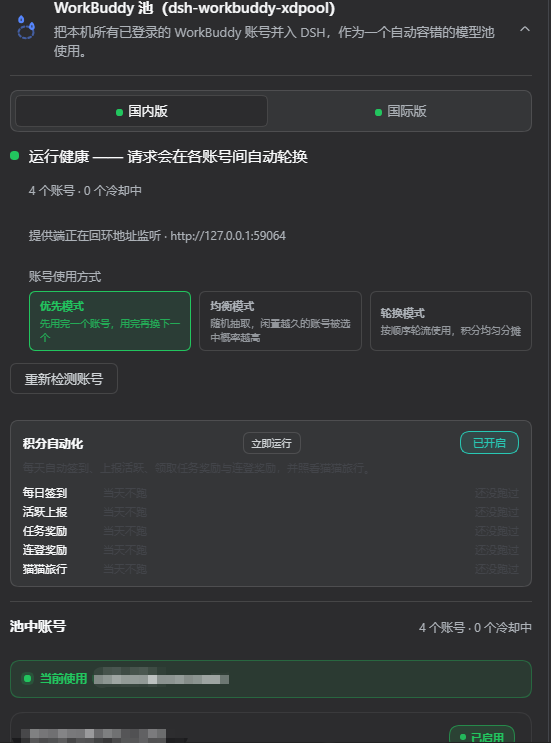
Every account you've signed into the WorkBuddy desktop app, merged into one DSH model pool. However many accounts you've used, that's how many the pool holds — no forms, no manual import.
An account gets rate-limited or runs out of credits? The request just moves to the next one that works. You keep asking; it keeps handling the rest.
It also throws in a full points-automation suite: check-ins, task rewards, streak redemption, the buddy trip — all the chores you'd otherwise click through every day, done in the background.
How this differs from the single-account connectors: plugins like
dsh-workbuddy-connecthandle one account at a time. XD Pool treats multiple accounts as the normal case — it doesn't pick favourites or ask you to import anything. Every sign-in snapshot on this machine goes into one shared pool, exposed as a singleworkbuddy-xdpoolprovider group, with automatic failover inside.
Screenshots
The plugin card (Settings → Plugins → DSH WorkBuddy XD Pool)
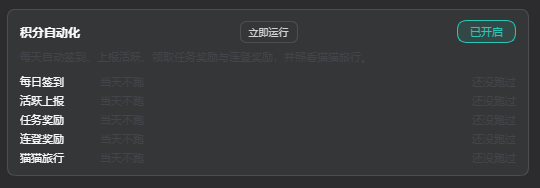
The points-automation panel
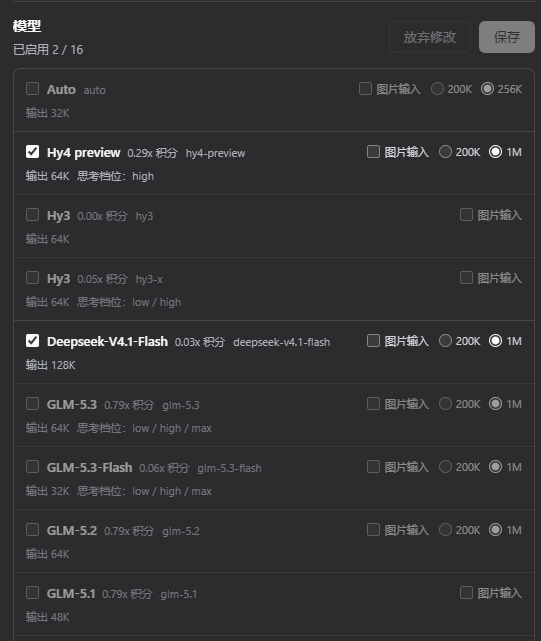
Model picker (CN and global as two separate groups)
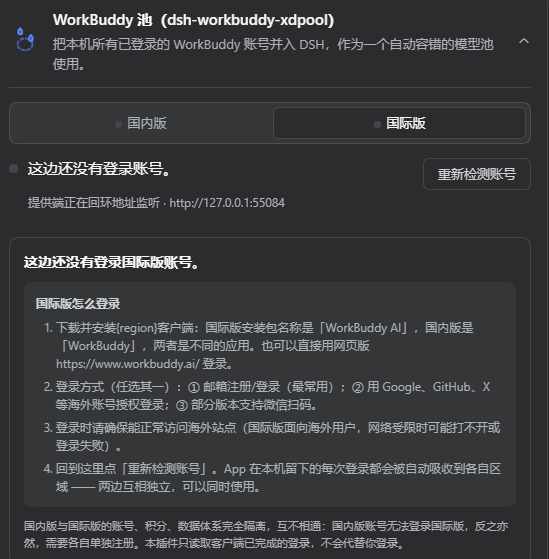
CN / global dual provider (separate accounts, credits and models, usable at the same time)
Features
1. The multi-account pool
Zero config: install it, turn it on, done. Every account signed into the WorkBuddy desktop app is discovered and pooled automatically — nothing to enter by hand.
Automatic failover: the pool tracks each account's rate-limit state. Hit a 429 and that account cools down while later requests land on the next healthy one; it rejoins automatically once the cooldown ends. Requests only wait when every account is cooling.
Pool health at a glance: the card shows how many accounts there are, how many are cooling, which one is next, plus each account's token expiry and cooldown countdown.
Live credit balances: per-account credit packages (
package · remaining / total) with a large total, refreshed from upstream as it changes.An annotated model catalog: pool models with their credit multiplier (e.g.
GLM-5.2 · x0.79), free / limited-free / night-discount tags, image-input support and context window — all tracking upstream live.CN / global auto-detection: the upstream origin is picked per account from its login domain — a global sign-in (
workbuddy.ai) goes towww.workbuddy.ai, CN (the default) tocopilot.tencent.com. Both kinds can live in the same pool.Manual controls when you want them: re-detect accounts, clear all cooldowns, and daily check-in — on the card and in the CLI.
2. Points automation
One switch on the card, and the plugin works through your growth-centre routine for you. On by default, and you can hit "Run now" to force a pass whenever you like.
Five jobs:
| Job | Default time | What it does |
|---|---|---|
| Daily check-in | 09:00 | Collect today's check-in reward |
| Activity report | 10:00 | Report activity so the growth centre counts the day |
| Task rewards | 11:00 | Enrol in open tasks and collect every reward that's ready |
| Streak bonus | 12:00 | Redeem streak tiers and spend the lottery draws |
| Buddy trip | 09:00 · 21:00 | Send the cat out, collect it when it's back |
The task-rewards pass covers 13 board tasks, including the ones that read as "somebody has to sit at the desktop and click these menus":
Browse inspiration · Use 5 templates · Try a hot skill · Apply the "Peacekeeper Elite" theme · Read the library · Summon 5 experts · Summon 3 expert teams · Try the Tencent Lighthouse expert · Open any assistant app · Enter the QQ teacher assistant · Create a design canvas · Create a scheduled task · Chat with the cat
Measured across four accounts, one pass collected 3300 credits and 135 energy.
The card tells you what a pass actually collected — it lists the task names rather than reporting a bare count. The streak countdown is spelled out too ("7d in 4d"), so a locked tier doesn't look like a failure.
"Earned today" breaks the day down by source — task rewards, check-in, streak, buddy trip — and resets at midnight.
Credit floor per account: set a minimum balance and an account below it stops being given work, so you can keep some credits in reserve.
The global region doesn't show this panel — that gateway has no growth system at all.
Install
Prerequisite: the WorkBuddy desktop app installed and signed in (the plugin reuses the sign-in state it stores locally). Multi-account = sign in and out a few times in the desktop app; each sign-in is absorbed into the pool. Built against DSH Desktop host 0.1.2.
Compatible with the
0.1.1-rc.2/0.1.2host line: the settings section installs viasettings.installSection(0.1.2-rc.1+) or the earlier free-function form, whichever the host supports.
Option A — install from npm (recommended)
# if dsh is not on PATH, use node ~/.dsh/profiles/node_modules/@deepseek-ai/dsh/lib/bin.js instead
dsh plugin --profile desktop add dsh-workbuddy-xdpool
npm is the fast path: the only dependency pulled in is the plugin itself (roughly 1 package, a few seconds). Installing from the GitHub source drags in the dev dependencies (bundler, test runner, hundreds of packages) and is much slower.
Option B — install from the GitHub source
dsh plugin --profile desktop add github:XDTrees/dsh-workbuddy-xdpool
Option C — register the bundle by hand
# 1) install the package (npm or GitHub)
dsh plugin --profile desktop add dsh-workbuddy-xdpool

# 2) register the bundle: edit ~/.dsh/profiles/desktop/package.json and append
#    "dsh-workbuddy-xdpool" to the end of the "dsh" → "profile" → "bundles" array

# 3) restart DSH Desktop
Building locally (developers)
pnpm install
pnpm build              # produces lib/index.js + lib/index.d.ts + lib/bin.js + lib/client.js
pnpm test               # 138 tests
pnpm typecheck          # host side
pnpm typecheck:client   # client side
The build output is committed (
lib/is not gitignored), so a GitHub install needs no install-time script and never trips pnpm's "build scripts were blocked" prompt. After changingsrc/, re-runpnpm buildand commitlib/too — otherwise users get the old build.
Note:
pnpm installwants pnpm 11 (npx pnpm@11), and may need--config.confirmModulesPurge=false --config.minimumReleaseAge=0— pnpm 11's defaultminimumReleaseAgesupply-chain policy blocks just-published rc packages.
Once installed: a WorkBuddy XD Pool group appears in the model picker, and Settings → Plugins → DSH WorkBuddy XD Pool shows pool health, each account's token / credits / check-in / cooldown state, the "Detect accounts again" and "Clear all cooldowns" buttons, and a check-in button per account.
It also works under the Web / TUI profiles (--profile web / --profile dsh-tui).
CLI
All commands run through dsh plugin --profile desktop exec dsh-workbuddy-xdpool <subcommand>:
dsh plugin --profile desktop exec dsh-workbuddy-xdpool status    # pool accounts/cooldown + shim state (--credits, --json, --rates)
dsh plugin --profile desktop exec dsh-workbuddy-xdpool accounts  # discovered accounts (--json)
dsh plugin --profile desktop exec dsh-workbuddy-xdpool doctor    # diagnose discovery/cooldown/upstream
dsh plugin --profile desktop exec dsh-workbuddy-xdpool reset     # clear all 429 cooldowns now
dsh plugin --profile desktop exec dsh-workbuddy-xdpool checkin   # today's check-in state per account (--json)
dsh plugin --profile desktop exec dsh-workbuddy-xdpool checkin all
                                                                 # collect every account's daily reward (or pass one label)
dsh plugin --profile desktop exec dsh-workbuddy-xdpool login     # guide to adding another desktop account
How accounts get into the pool
Auto-discovery. Every sign-in on the WorkBuddy desktop app leaves a token-bearing snapshot; XD Pool scans them and absorbs each into the pool. So multi-account = sign in / switch accounts in the desktop app, then hit "Detect accounts again" or restart DSH.
To snapshot an extra login explicitly (e.g. to pin one account for verification):
dsh plugin --profile desktop exec dsh-workbuddy-xdpool import myKey
dsh plugin --profile desktop exec dsh-workbuddy-xdpool accounts
dsh plugin --profile desktop exec dsh-workbuddy-xdpool remove myKey
Snapshots are stored under ~/.dsh/.workbuddy-xdpool/ named by the MD5-8 prefix of their key (so keys with Chinese, /, or spaces are safe). Long-lived use relies on refresh-token auto-renewal; if it lapses, re-sign-in on the desktop and import <key> --force.
Configuration
Effective config is read from the plugin settings section (settings.workbuddy-xdpool), editable on the Models settings page and applied live:
| Field | Description | Default |
|---|---|---|
authFile |
Override the WorkBuddy desktop auth-file path (equiv. to WORKBUDDY_AUTH_FILE) |
auto-probed |
cooldownMs |
Per-account 429 cooldown in milliseconds | 60000 |
Or set it directly in ~/.dsh/settings.yaml:
workbuddy-xdpool:
  cooldownMs: 120000
Architecture
- Host side (
src/, inside the DSH main process)index.ts— registers theworkbuddy-xdpoolprovider, theworkbuddy-xdpoolsettings section, the same-origin routes (status / re-scan / clear cooldowns / check-in / automation run / credit reserve), plus account discovery and catalog seeding.accounts.ts—WorkBuddyAccountPool: reads the desktop auth snapshots, 429 cooldowns, rotation and token refresh; account disabling and credit reserves live here too.scheduler.ts— the points-automation scheduler: runs five jobs on local time points (check-in / report / tasks / streak / travel), persists the daily earnings ledger, and backs the card's "Run now" button with the same code path.task-events.ts— builds the 13 task event chains. Each chain is plain data plus the fingerprint channel it must go out on (desktop or web); the tasks that need a REAL conversation (skill, experts) open one here to get the server-side id.catalog.ts/upstream.ts— the upstream client: model catalog (with per-model multipliers and free / image tags), credits, check-in, and every automation endpoint, switching CN/global by credential domain.web-status.ts/status-paths.ts— the same-origin status document and routes the card reads. Mutations are gated on POST + loopback origin + an explicitaccountId.bin.ts— the CLI above.
- Client (
src/client/, the browser card loaded viadsh.client) The collapsible shell reuses the host'sdsm-plugin-card*style language (--dsw-alias-*theme tokens); content classes are namespaceddsm-workbuddy-xdpool-*, and copy lives under thesettings.workbuddy-xdpoolnamespace. - Build
tsdownproduceslib/index.js(host entry) +lib/index.d.ts(types) +lib/bin.js(CLI) +lib/client.js(CJS browser bundle wrapped inwindow.__ModuleLoader__.load). All four are committed, so an install needs no build-time script.
Known limitations
Only accounts on THIS machine's desktop app: the pool cannot — and will not — sign you in or scan a QR code (tokens are minted by the WorkBuddy desktop app's own Tencent SSO and bound to the device). Adding an account = signing in on the desktop app; XD Pool absorbs it.
A few automation tasks are deliberately not implemented
Expert_Philanthropy(charity expert): requires a real donation; there is no way around it.black_cat(night owl): only scores between 23:00 and 08:00, and pays no credits — all-nighters for nothing.Model_chat_GLM5.2(chat with a specific model) andwb_wechat_oa_subscribe_task(follow the official account): the path is mapped out, deferred to the next release.
Expert_team_use_3occasionally sticks at 2/3: on one account, after two expert teams had been used that day, the third would not register (using a different, unused team didn't help either). Suspected per-account daily quota that resets the next day, unconfirmed. Fresh accounts are unaffected (measured 0/3 → 3/3).Depends on WorkBuddy's client APIs (not an official public API), so a WorkBuddy update may require a matching plugin update. If an account's refresh token lapses, sign in again on the desktop.
If your Windows and Linux usernames differ and the Windows environment variable doesn't reach WSL, point
WORKBUDDY_AUTH_FILE(orauthFile) at the real location.
Disclaimer
- This project is for personal study and research only. It drives only your own WorkBuddy accounts from your own machine — do not use it commercially or beyond reasonable personal use.
- You are responsible for complying with WorkBuddy's terms of service. Any consequences of using this project (including but not limited to account restrictions, cleared balances, or service interruption) are yours to bear.
- The authors accept no liability for any direct or indirect loss arising from the use or misuse of this project.
- This project is not affiliated with, authorised by, or endorsed by Tencent, WorkBuddy, or DeepSeek. Product names appear only to describe compatibility; trademarks belong to their respective owners.
Acknowledgments
This project draws on the following public projects and keeps their copyright notices as their licences require. What was taken is design approach and established findings; the code is an independent implementation. The modules that lean on a specific source say so in their file headers:
- corrinehu/dsh-workbuddy-connect (MIT) — the primary reference for settings-section registration (
settings.installSection) and the DSH plugin structure, the client card loading mechanism, and desktop credential refresh plus loopback-shim hardening. This project follows its "host mounts the card via installSection" path. - dingminhua/dsh-connect-workbuddy (MIT, Copyright (c) 2026 LaoDing) — the reference implementation for the
dsm-plugin-card*card style language and--dsw-alias-*theme tokens; daily check-in (/v2/billing/meter/checkin-activity-statusand/v2/billing/meter/daily-checkin), the credit-package aggregation rules (monthly vs one-off packs), and picking the upstream origin per credentialdomainall follow interface shapes that project verified. - Sliverkiss/workbuddy2api (MIT) — the reference for the WorkBuddy upstream protocol (
copilot.tencent.comwire behaviour) and the credits APIs; points automation (growth-centre check-in, activity report, streak redemption, the buddy-trip state machine, the 13 task event chains, and the expert summon chains) was ported wholesale from that project's Go reverse-engineering, including the scoring criteria and measured conclusions behind every event chain.
All copyright in the above belongs to their respective authors. This project uses a reference-the-approach, implement-independently method and does not copy any reference project's source wholesale. If anything is mis-attributed or missing, please open an issue.
License
Comments
Comments live in GitHub Discussions. Sign in with GitHub to post or react.