
Install
Inside DeepSeek Harness, with dsh-market
dsh plugin --profile web add dshmarket
Or from the command line
dsh plugin --profile web add dsh-codex-subscription
Installing runs third-party code with your own permissions — it can read your files, use your credentials and reach the network. Review the source first, and pin a commit (github:owner/repo#sha) when you can.
Screenshots
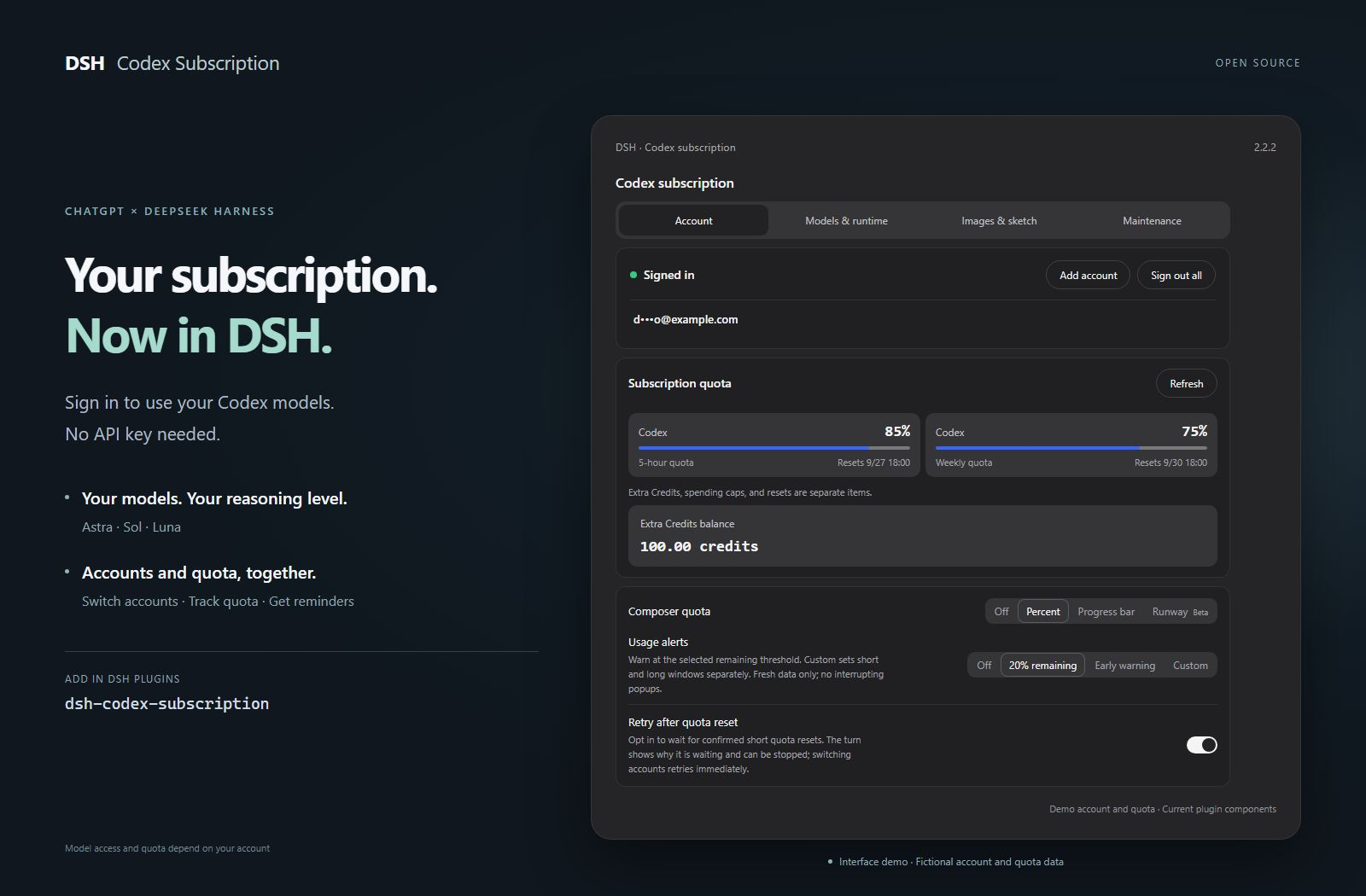
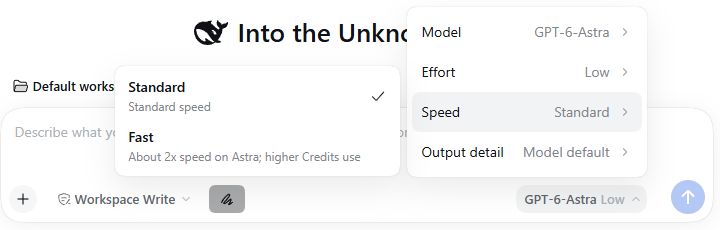
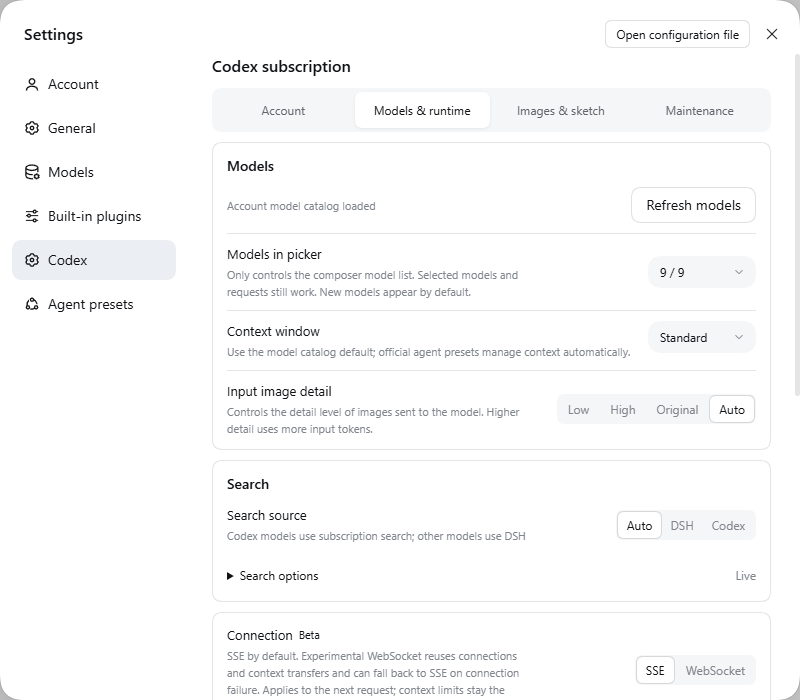
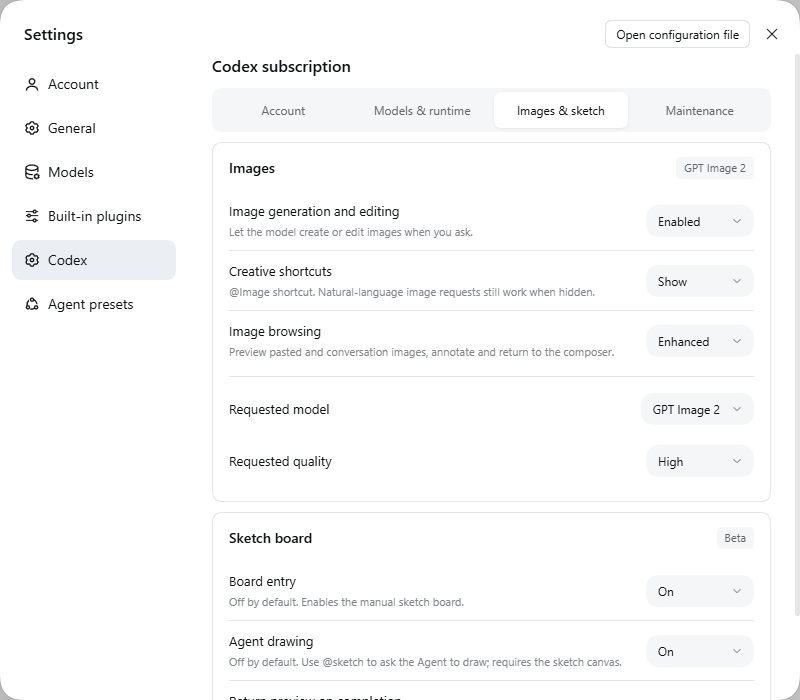

README
DSH Codex Subscription
简体中文 · English
Use your ChatGPT / Codex subscription directly in DeepSeek Harness
No OpenAI API key or Codex CLI. Models, search, quota, and image generation stay inside DSH.

Features · Install · Daily use · Examples · User guide · Update and uninstall
Feature overview
Subscription access, model controls, quota management, and image creation in one DSH workflow. Each capability is listed below; model access and quota depend on your account.
Models and search
| Feature | What you can do | Availability / setup |
|---|---|---|
| Subscription sign-in | Sign in to ChatGPT and use Codex subscription models without an API key | Normal chat needs no Codex CLI |
| Model catalog sync | Read available models and reasoning levels from your account, with manual refresh; models marked for retirement show their retirement date next to the model name, without automatically switching your selection | New models appear when your account offers them; the account catalog is the only source, so signed out or when it cannot be read no models are shown and no bundled list stands in |
| Model list | Show or hide individual models in the composer picker under Models & runtime | Display only; selected models and requests still work |
| Default model | Choose the model a new conversation opens with under Models & runtime → Models | Writes the DSH default model setting, the same one a model switch inside a chat writes; unset it to follow the DSH default |
| Reasoning levels | Choose supported reasoning effort in the composer | Levels vary by model |
| Speed tiers | Switch supported models between Standard and Fast; Ultrafast (Beta) too when the account catalog offers it, with a lightning indicator | Standard by default; Fast and Ultrafast increase usage, and Ultrafast is Pro 500 only today |
| Response verbosity | Request short, medium, or detailed responses | Follows the model default unless changed |
| Input image detail | Choose Low, High, Original, or Auto detail for images sent to the chat model | Affects input tokens; Auto by default |
| Subscription web search | Use Codex search or choose DSH search | Auto, DSH, and Codex routing options |
| Search scope | Choose live / cached search, disable search, or restrict domains | Configure under Models & runtime |
| Stream inactivity timeout | Set how long a request can receive no streamed data before it is aborted | 10 minutes by default; not an overall response deadline |
| Context budget | Use standard, extended, or custom budgets per model | Limited by the model catalog |
| GPT-Reserve | Select the reserve model when your account offers it | Experimental; no promise of a separate reserve quota |
Accounts and quota
| Feature | What you can do | Availability / setup |
|---|---|---|
| Multiple accounts | Add, switch, remove, or sign out of all accounts | Settings → Account |
| Quota details | View short / weekly windows, reset times, and separate quota groups | Only backend-provided windows and groups are shown |
| Credits and reset cards | View extra Credits, spending caps, and available reset cards | Shown when returned for your account |
| Composer quota | See remaining quota as a percentage or progress bar while chatting | Off by default; choose your display mode |
| Runway estimate | Estimate remaining time from recent usage | Beta; optional estimate, not a guarantee |
| Quota alerts | Use fixed, early, or custom short / long-window thresholds | 20% remaining by default; can be disabled |
| Redeem reset cards | Use an available reset card after confirmation | Confirmation and waiting safeguards; server decides the result |
| Retry after reset | Wait for a confirmed short-window reset before continuing | Off by default; waiting can be stopped |
Images and sketching
| Feature | What you can do | Availability / setup |
|---|---|---|
| Image generation | Generate through your subscription and adjust available request model / quality options | Beta; on by default, can be disabled |
| Reference image editing | Continue refining an image with references | Beta; on by default, can be disabled |
| Image viewing and download | Zoom, pan, fit to window, and download verified originals | Built-in viewer; older images may only have previews |
| Region-based editing | Mark regions, add notes, and continue editing with location references | Fills the composer for you to review and send |
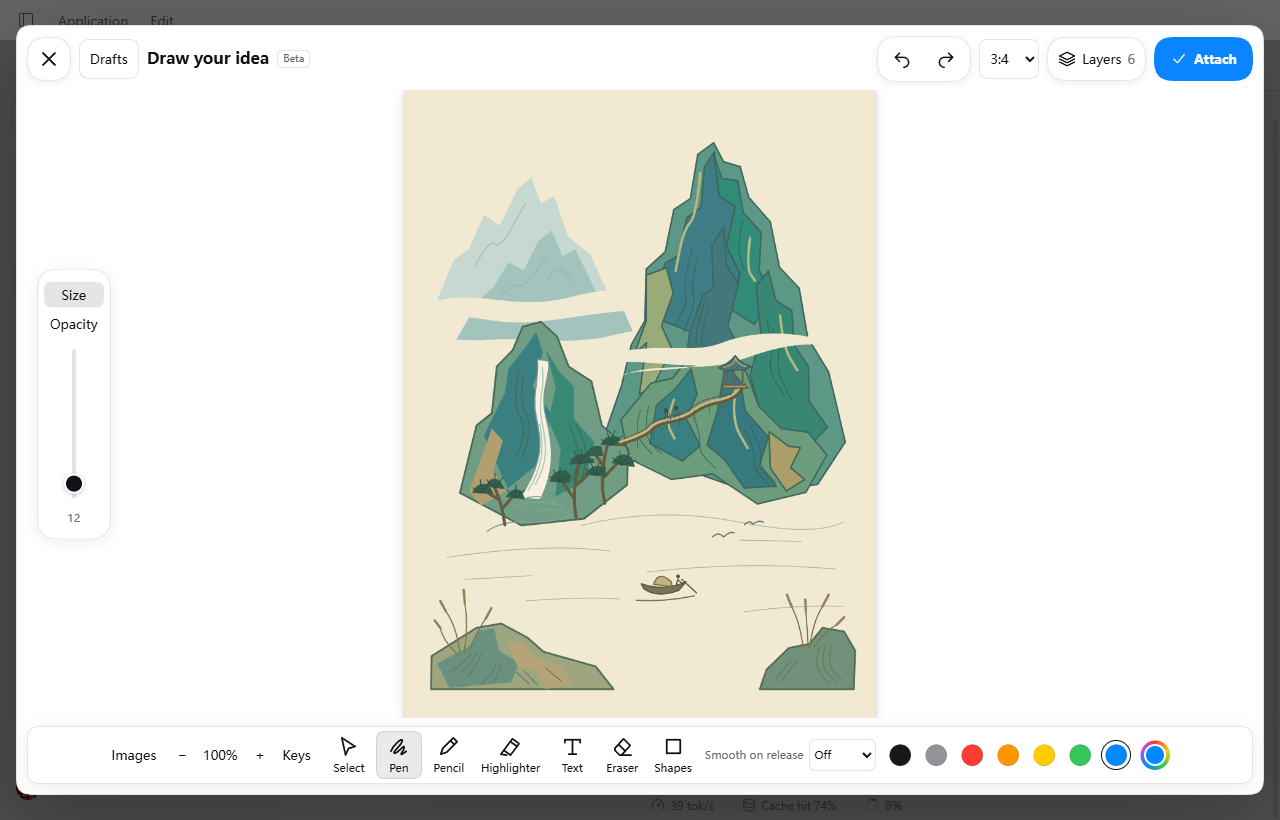
| Manual canvas | Choose an aspect ratio and draw with pen, pencil, marker, and erasers | Beta; canvas off by default |
| Shapes and text | Draw lines, arrows, shapes, native curves, and editable text / objects | Available in the sketch canvas |
| Layers and image import | Work in layers and bring images into the canvas | Images are managed as layers |
| Smoothing and navigation | Smooth complete strokes after release; pan, zoom, undo, and redo | Shortcuts can be customized or disabled |
| Multiple drafts | Save and reopen up to 20 local drafts | Stored in the current browser |
| Import and export | Export PNG, layered PSD, or native drafts that preserve editable strokes | PSD import supports a limited set of ordinary pixel layers |
| Agent drawing | Ask the agent to draw with @sketch, follow progress, and stop it; the agent can draw whole stages in SVG, imported as editable native strokes |
Beta; off by default, requires the canvas |
| Result preview for the model | Return a canvas image after drawing for subsequent review | Beta; off by default, adds image input usage |
Advanced capabilities and maintenance
| Feature | What you can do | Availability / setup |
|---|---|---|
| Codex independent subtasks | Reuse subscription sign-in and workspace permissions; select allowed models and reasoning levels | Beta; DSH by default, Codex requires the optional component and model-selection setup |
| Subtask component management | Install, disable, or uninstall the official Codex subtask component from settings | Managed by supported DSH hosts; no extra login |
| Cloud context compaction | Continue long conversations using Codex compaction while retaining DSH history and native compaction | Beta / experimental; off by default, enabled requests use SSE |
| WebSocket transport | Experimentally reuse connections and context transfers, with SSE fallback on connection failure | Beta / experimental; SSE by default, no speed guarantee |
| Support diagnostics | Inspect prerequisites and recent operation results, and copy a short report (about 1 KB; the full one can be copied separately) without credentials or conversation text | Settings → Maintenance; unverified does not mean broken |
| Forecast cache cleanup | Inspect and clear local quota forecast history | Keeps sign-in, drafts, originals, and shared dependencies |
Usage details, limitations, and optional components →
Prepare DSH
Verified against DSH 0.2.0-rc.2 (next channel) and 0.1.7-rc.2 (latest channel), with earlier accepted versions still supported.
This plugin supports the latest DeepSeek Harness release recorded in its package metadata and requires a ChatGPT account that currently has Codex access.
- Recommended: the official desktop app. DeepSeek now ships a DeepSeek Harness desktop app (macOS on Apple Silicon and 64-bit Windows; preview, open source). It needs no Node.js setup: install it, then add this plugin from the Plugins page as described below. The desktop app, the web app and the CLI share one DSH plugin system; this plugin's end-to-end acceptance is mainly run on the web app, so please open an issue if the desktop app misbehaves.
- Need Linux, or prefer a community portable build? Use DSH-Portable, a community portable desktop distribution for Windows, macOS, and Linux.
- Prefer the official route? Follow the DeepSeek Harness run guide.
Install
Install from the Plugins page (recommended)
Open Plugins → Add plugin in DSH.
Paste this package name, with its version, into the Package name or address field:
dsh-codex-subscription@2.5.1Click Install and wait for completion. Follow the page instructions; save your work before restarting if requested.
Open Settings → Codex, sign in to ChatGPT, then select a Codex model in your conversation.
Why the version is included: DSH's plugin page only installs versions that are at least 24 hours old, so the bare package name can install an older release during the first day after a new one, and that older release may not support your DSH. With the version you get exactly this release; a day after release the bare dsh-codex-subscription also resolves to the latest stable release. Other version numbers are on the releases page.
dsh plugin --profile web add dsh-codex-subscription
Follow the restart instructions, then sign in under Settings → Codex. Both the Plugins page and the terminal use DSH's installation management.
After signing in and selecting a Codex model in Web, install the same plugin in the Headless profile:
dsh plugin --profile headless add dsh-codex-subscription
dsh --profile headless "Reply with only the word: ok"
Inside the plugin
Everyday controls, right in the composer
Choose a model, adjust reasoning, switch speed tiers, and check remaining quota without opening settings for every request.
Accounts and preferences, in one place
Open Settings → Codex to manage accounts and quota. Enable other features as your tasks need them.
| Settings tab | What it controls |
|---|---|
| Account | Sign-in, account switching, reset times, quota display and alerts |
| Models & runtime | Subscription search, context budget, connections and subtasks |
| Images & sketch | Separate switches for image generation, the canvas, and agent drawing |
| Maintenance | Support diagnostics and local quota forecast cache |
Model-aware context follows your account's model directory; refreshing preserves your unsaved draft. Quota groups use backend-provided values, including separate buckets such as Spark.
Subscription failures remain visible: no silent fallback to another paid route.
Read the complete user guide →
From sketch to image
Image generation, editing, and the sketch canvas are Beta. The canvas and agent drawing are off by default; enable them under Images & sketch when needed.
Sketch → Attach to the composer → Describe the result → Generate.
Draw by hand with the canvas button, or ask the agent with @sketch and your drawing request.
GPT-6.1-Sol · Xhigh on the official desktop app 0.2.0-rc.2: one @sketch message produced 6 layers and 229 editable native strokes, then called GPT Image 2 (quality: high) once with the sketch as the only reference. About 13 minutes end to end.
The prompt (sent in Chinese): draw "Lighthouse and Homecoming" on a 4:3 canvas — a red-and-white lighthouse on a rocky cape casting a fan of light, an orange-sailed fishing boat heading home with a V-shaped wake, a half-risen sun, three cloud bands, three gulls and surf around the rocks, in six named layers; then turn the sketch into a warm watercolor travel poster with no text, keeping the composition.
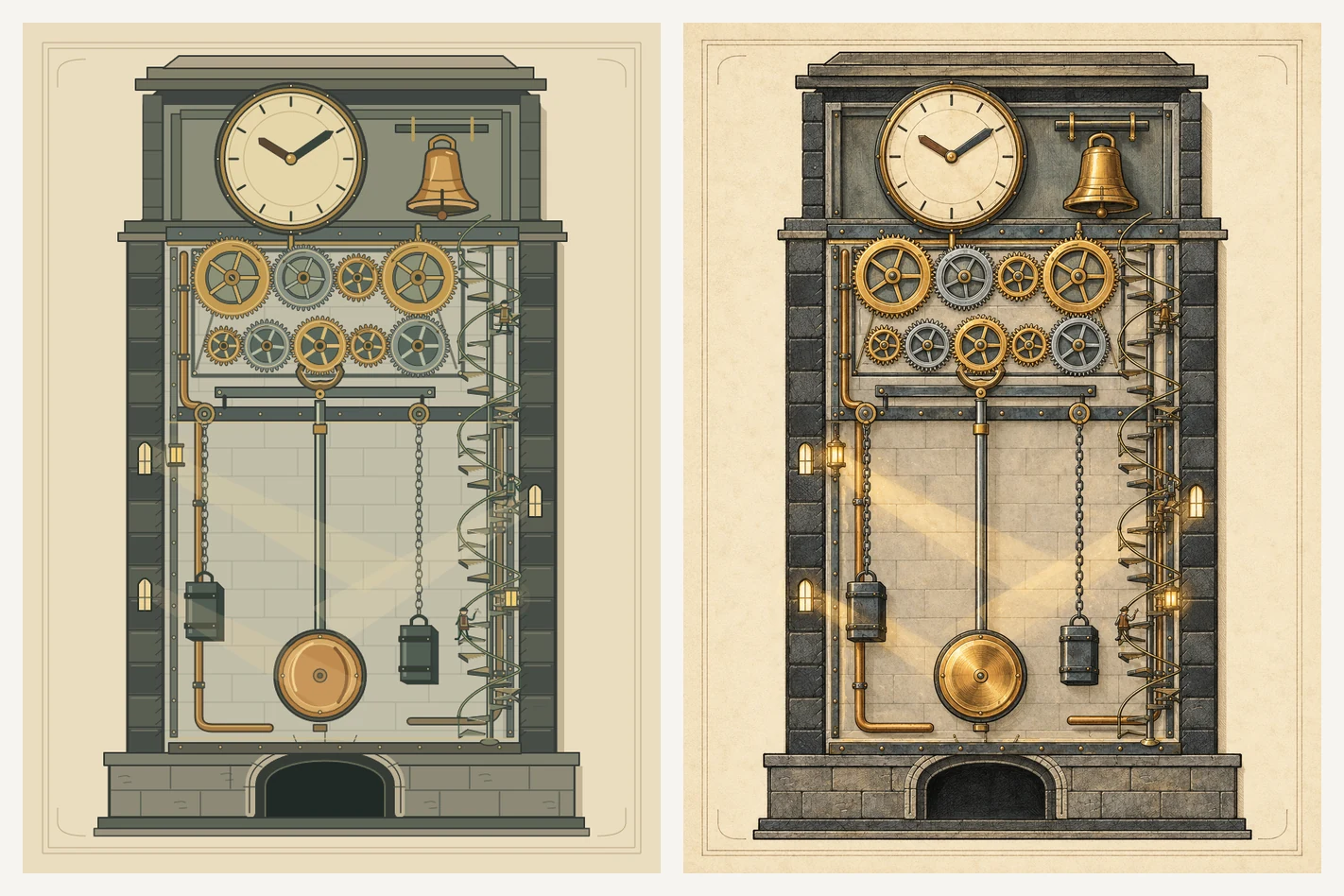
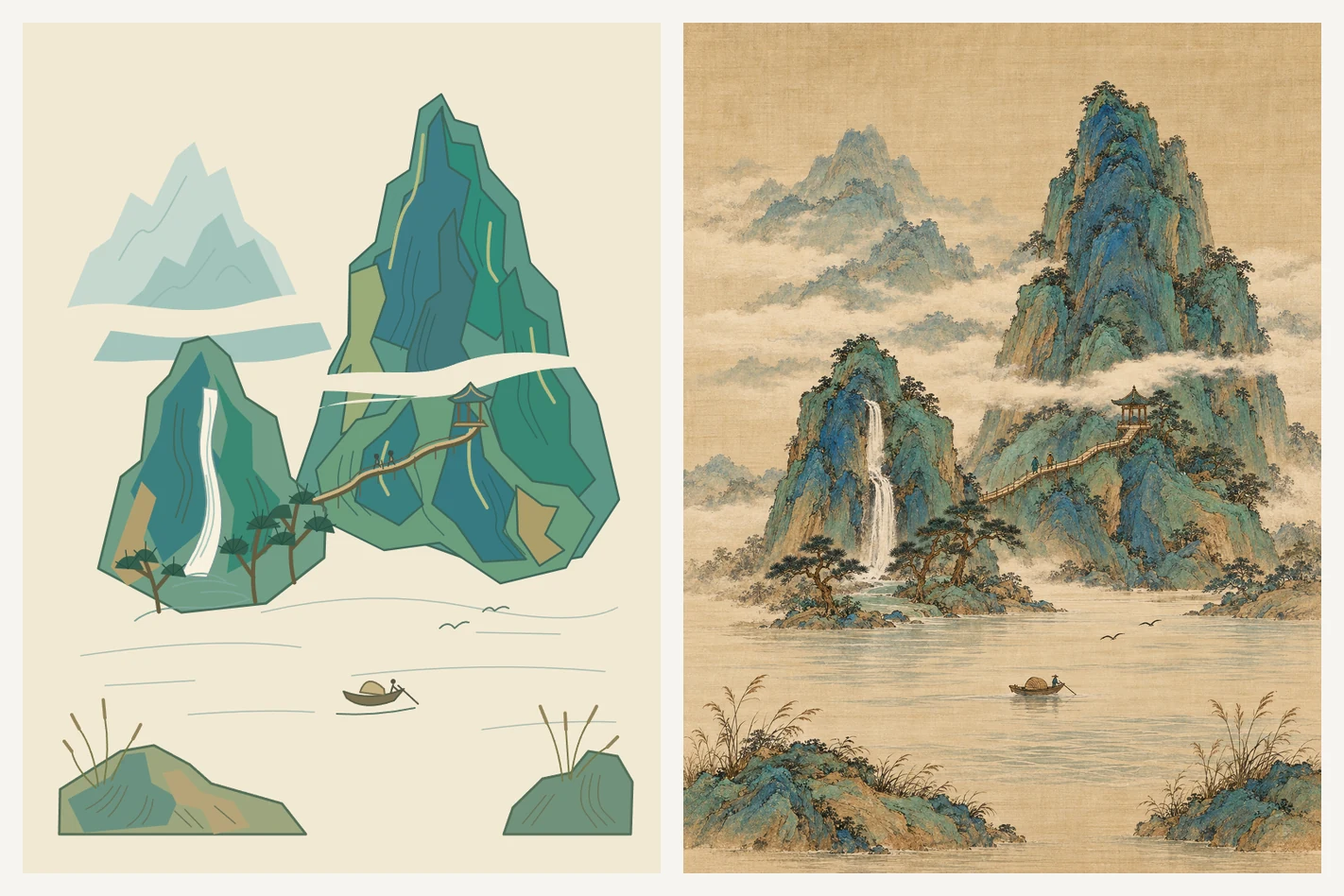
The first two subjects were chosen to expose quality differences: a mechanical cutaway tests structure and detail (meshing gears, pendulum, chains, tiny figures on a staircase), and a Song-dynasty blue-green landscape tests composition and taste (the "three distances", empty space, texture strokes and mineral color). The same prompt went to GPT-6.1-Sol · Xhigh and GPT-6-Astra · Low, one run each, on the official desktop app, with GPT Image 2 (quality: high).
Clock Tower Cutaway
Sol first computed tooth counts (48, 38, 27, 46, 36, 24, 34, 30, 22) and pitch circles for the nine gears with a script, then placed them in mesh; drawing took about an hour. Its first image request failed; it asked, was allowed one retry, and succeeded. Astra Low finished sketch and image in about 5 minutes, with a simpler structure and gears that are not individually calibrated.
A Thousand Green Peaks
Sol Xhigh took about 28 minutes and Astra Low about 5. Both kept the main peak, waterfall, plank path and river in place; Sol's receding ranges and mist bands are more complete.
"DeepSeek-chan" · copy a reference image (draw only, no image generation)
Here the reference image is attached to the message and the model copies it on the canvas, which tests proportions, gradient long hair, lace trim, hand lettering and small motifs. The reference is a community sticker of the DeepSeek mascot girl. Each cell is one run on the official desktop app with no image generation; the native-stroke runs had "return preview when finished" enabled, and the SVG runs added one sentence to the same prompt asking for the svg command on every layer.
The SVG runs have finer hair highlights, lace trim and lettering, and Sol was almost 9 minutes faster with SVG than stroke by stroke; Astra spent about 3 extra minutes on SVG for clearly richer detail. Neither model got the face shape right (too long and flat) or the small whale motif on the apron, though Sol's whale looks more like a whale.
The same challenge again, with the model checking itself against the reference
Same prompt and the same way of attaching the image as above; the plugin just gives the model two more things. It can use reference to put the image attached in the chat onto the board as a hidden picture layer, and while previewing it can turn on compare (the drawing and the reference blended 50/50, so position errors show up as ghosting) and grid (a labelled line every 100 pixels). Same Astra Medium on the official desktop app, one run, no image generation: 20 min 57 s, 7 drawing layers and 686 native strokes. The model also generated hair strands and lace with scripts, and checked against the overlay several times while drawing, fixing lettering and lace overlaps.
The face shape, hair flow, lace, hand and speech-bubble lettering are all closer to the reference than the two Astra runs above, at about twice the time of the SVG run. This is a single run; other prompts and references may behave differently.
Settings shown directly as cropped screenshots from the actual DSH interface.
Layers, native curves, brushes, undo/redo, and shortcuts are supported. Save multiple drafts, export PNG or layered PSD, and annotate generated images before continuing an edit.
Image editing, draft storage, and PSD limitations →
Optional capabilities
Normal subscription chat needs no Codex CLI. For Codex independent subtasks, use Install component under Models & runtime; disabling and uninstalling are available in the same place. Other experimental options remain opt-in.
Optional components, storage cleanup, and the full user guide →
Update and uninstall
Find this plugin on the DSH Plugins page and use its update or uninstall action. Follow any restart instructions. Uninstalling this plugin does not remove other plugins.
dsh plugin --profile web update dsh-codex-subscription
Run only when you want to uninstall:
dsh plugin --profile web remove dsh-codex-subscription
Troubleshooting
DSH 0.2.0-rc.2 did not exist when any release before 2.2.10 was published, and a published package's compatibility declaration cannot be changed. Install 2.2.10 or later (a bare package name can resolve to an older release during the first 24 hours, so enter dsh-codex-subscription@2.2.10) from the Plugins page, or run dsh plugin --profile web update dsh-codex-subscription, then restart DSH.
Use Plugins → Add plugin in DSH and paste the package name. No terminal setup is needed.
Install from the DSH you actually use. For terminal installation, run commands in the intended DSH environment and check its profile. Do not delete profiles or change your system PATH to force an install.
Generate Support diagnostics under Settings → Codex → Maintenance, paste it into the bug report form, and include the steps that caused the problem.
Diagnostics exclude credentials, account identifiers, raw responses, and full logs. Never attach sign-in URLs, authorization codes, or browser callback addresses.
Current icon
The current plugin icon and its appearance in DSH’s Installed list.
Captured in DSH 0.1.7-alpha.2.
Positioning and boundaries
- ChatGPT / Codex subscription only, done in depth: quota and forecasting, images and sketches, subtasks, diagnostics. Other subscriptions such as Claude or Grok are out of scope.
- Fail explicitly: requests never silently fall back to another paid route, and quota windows the account does not return are never invented.
- Tracks official DSH releases: every release is accepted end to end (install, start, remove, reinstall) against official DSH channels such as latest and next; verified versions are recorded in the compatibility notes.
- Models, quota and features depend on what your account actually returns; the ChatGPT backend and DSH can change independently.
Scope and support
The ChatGPT Codex backend and DSH can change independently. This community project is not affiliated with or endorsed by DeepSeek or OpenAI.
Use the bug report form for project feedback. Use the feature request form for focused product suggestions. Focused fixes and compatibility improvements are welcome; see CONTRIBUTING.md. For DSH plugin discussion, visit DeepSeek Harness Discussions. Read SECURITY.md before reporting sensitive issues.
If this project is useful, the Star button helps more DSH users find it.
Comments
Comments live in GitHub Discussions. Sign in with GitHub to post or react.