
Install
Inside DeepSeek Harness, with dsh-market
dsh plugin --profile web add dshmarket
Or from the command line
dsh plugin --profile web add dsh-model-capability
Installing runs third-party code with your own permissions — it can read your files, use your credentials and reach the network. Review the source first, and pin a commit (github:owner/repo#sha) when you can.
Screenshots
README
🎛️ dsh-model-capability
Choose a model's supported input modalities directly in DeepSeek Harness.
简体中文 · English

Features
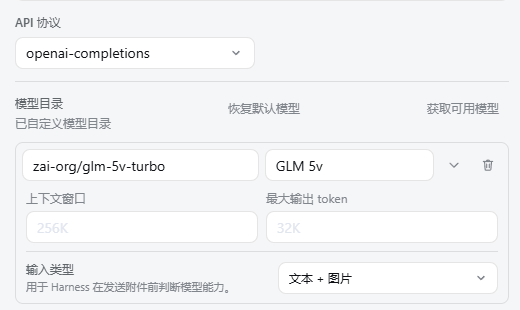
- Adds an Input modalities selector to native Harness model rows.
- Supports provider defaults, text, image, and text-plus-image declarations.
- Writes the standard model
inputfield used by Harness attachment checks. - Extends
settings.models.model.fieldswithout taking over validation or persistence. - Follows Harness light/dark theme tokens and English/Chinese locale state.
- Uses the standard DSH bundle and Web client discovery contracts without Tauri APIs.
Example
The model editor below explicitly declares Text + image input, allowing Harness to treat image attachments as supported model input:
Modality mapping
| Selection | Stored model value |
|---|---|
| Inherit provider default | input omitted |
| Text | ["text"] |
| Text + image | ["text", "image"] |
| Image | ["image"] |
Install
dsh plugin --profile web add dsh-model-capability
dsh --profile web --dump-config
dsh --profile web
Remove the plugin:
dsh plugin --profile web remove dsh-model-capability
Development
pnpm install
pnpm run build
pnpm test
npm pack --dry-run
The current release targets DeepSeek Harness 0.1.0-rc.5, its standard Web client discovery path, and the settings.models.model.fields extension slot.
Marketplace
The ready-to-copy catalog entry, pull-request checklist, and screenshot naming convention are documented in MARKETPLACE.md. Recommended screenshots show the input-modality field and its expanded option list; the marketplace entry references GitHub-hosted image URLs.
Security
The plugin updates only the current model row's input field through Harness's public settings slot. See SECURITY.md for supported versions, issue scope, and private-reporting guidance.
License
Comments
Comments live in GitHub Discussions. Sign in with GitHub to post or react.