
Install
Inside DeepSeek Harness, with dsh-market
dsh plugin --profile web add dshmarket
Or from the command line
dsh plugin --profile web add dsh-zotero
Installing runs third-party code with your own permissions — it can read your files, use your credentials and reach the network. Review the source first, and pin a commit (github:owner/repo#sha) when you can.
Screenshots
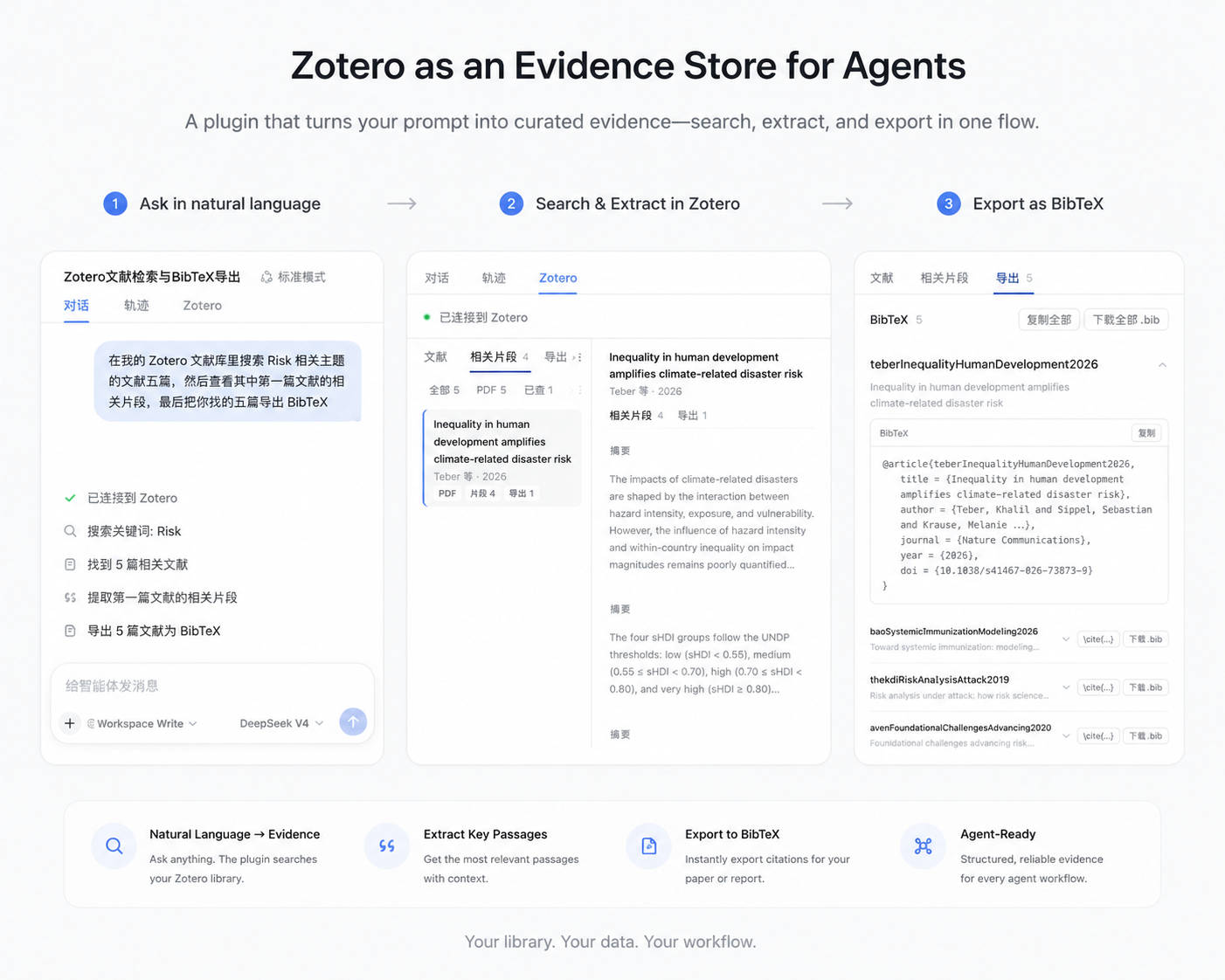
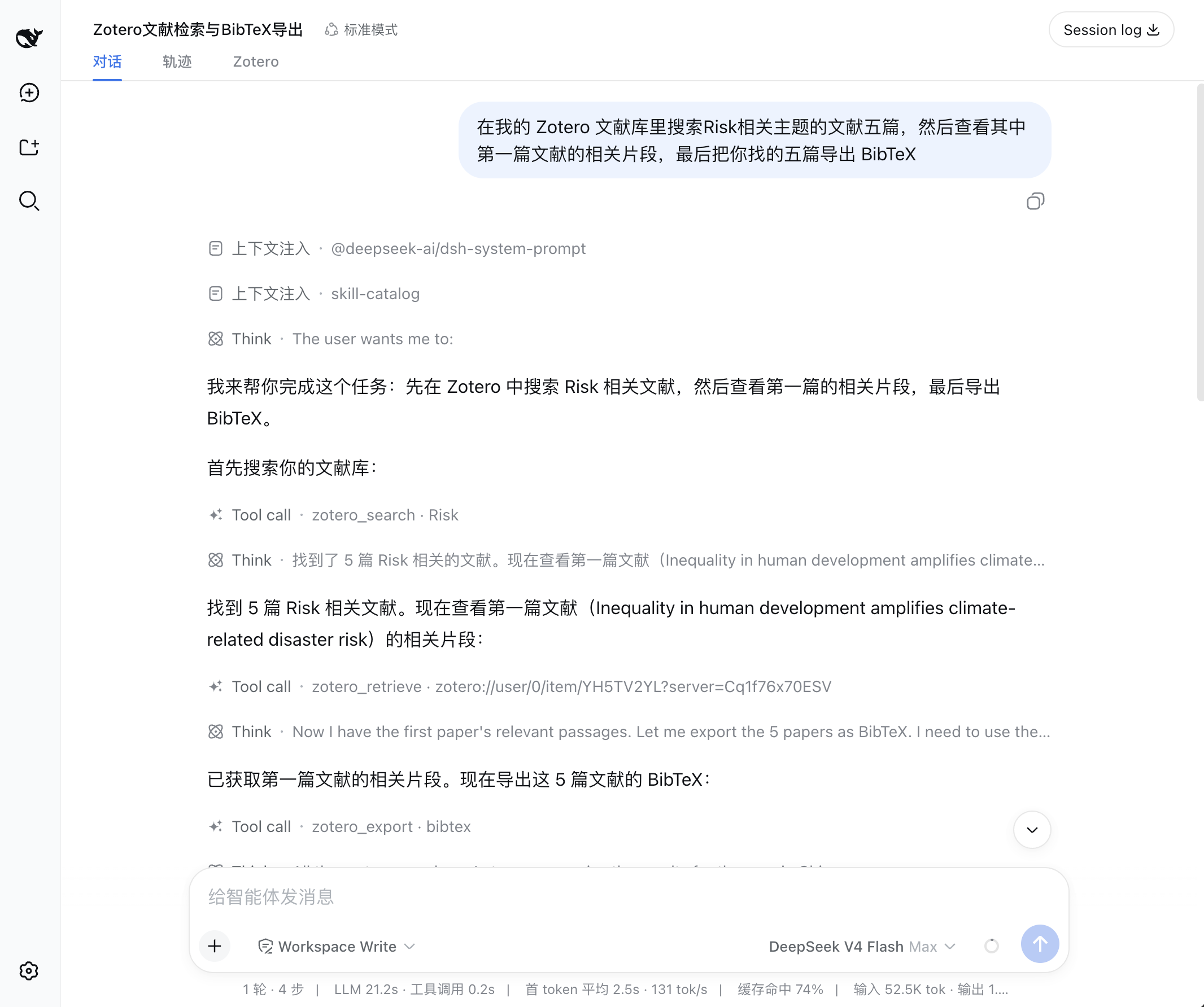
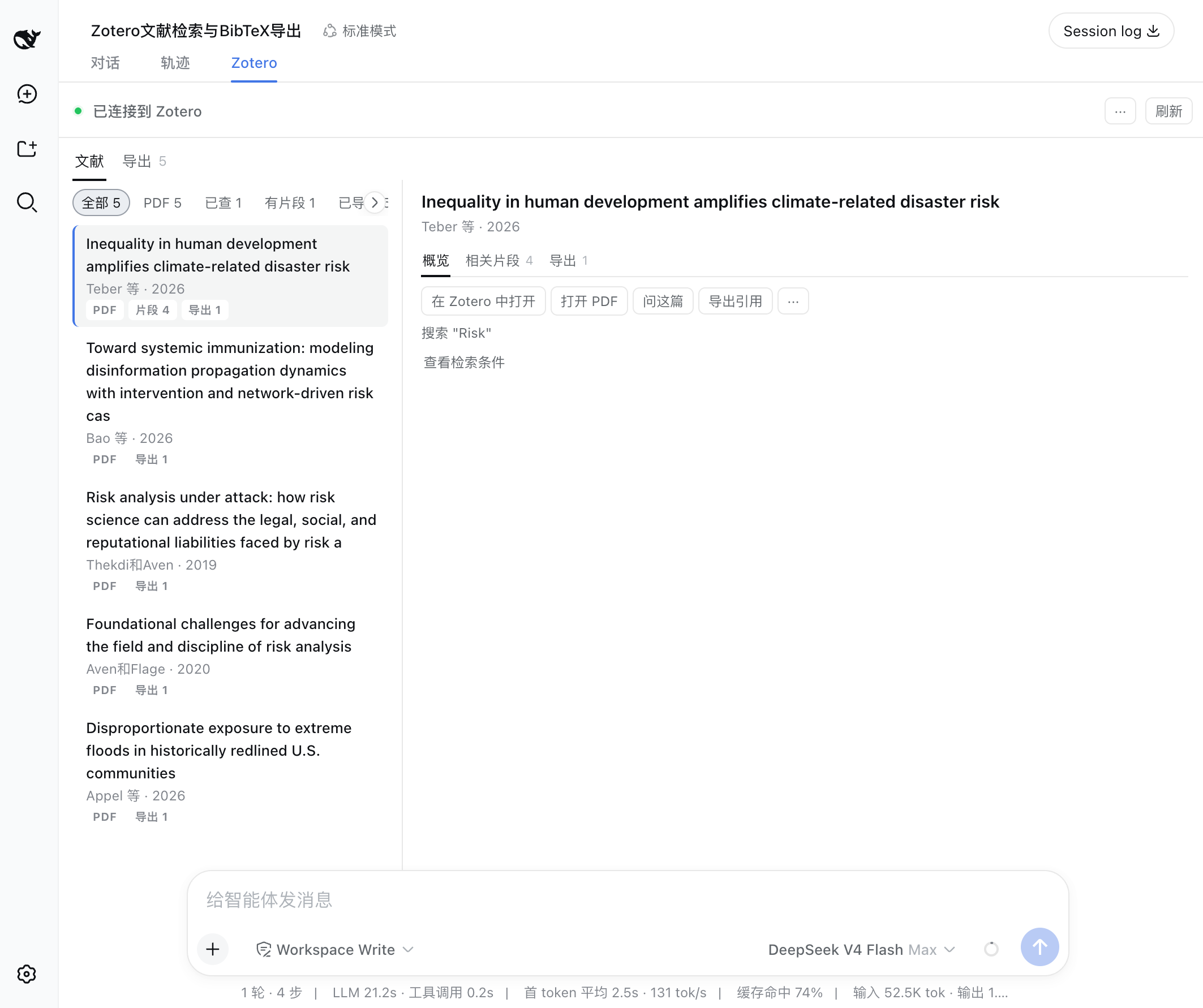

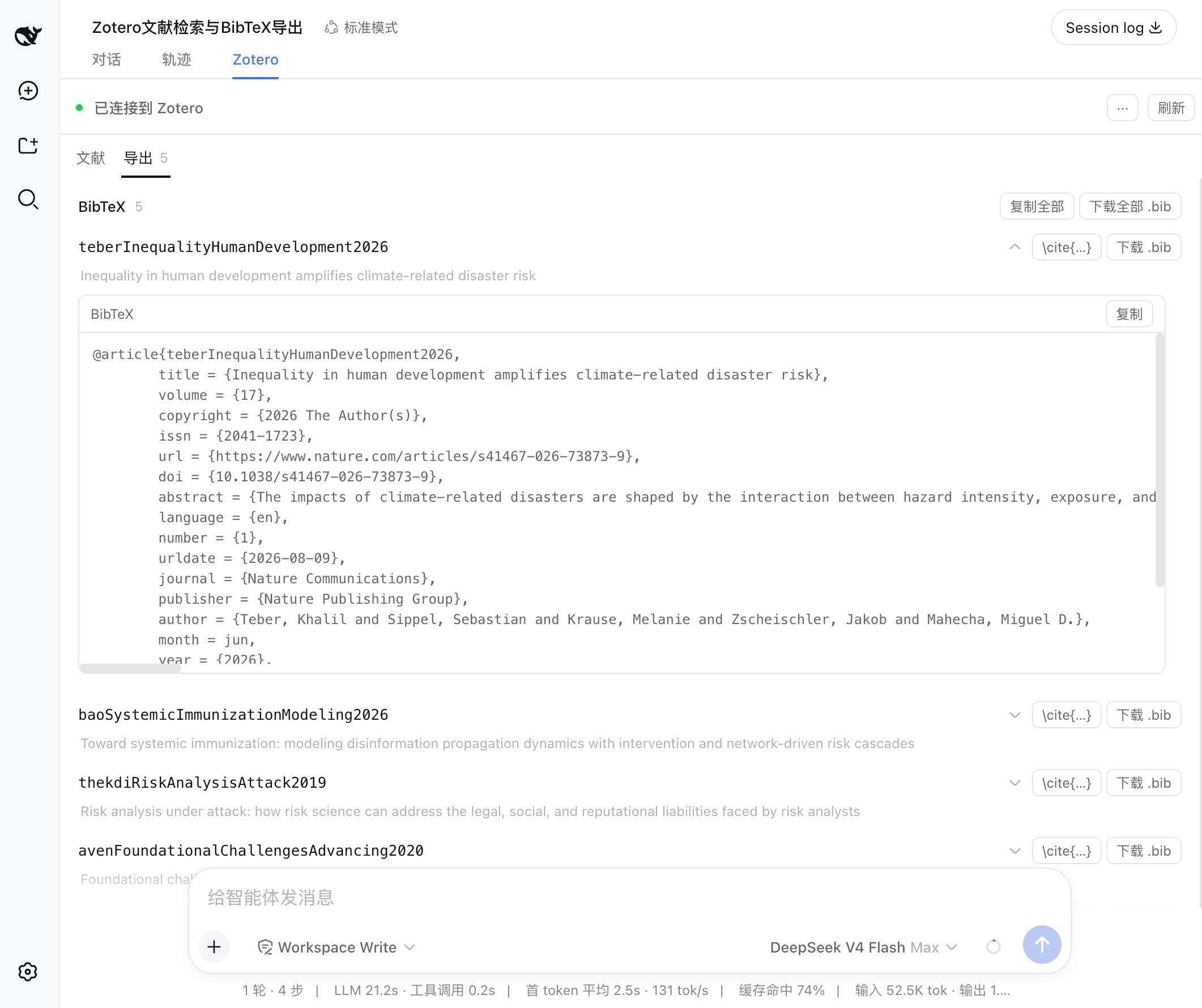
README
dsh-zotero
dsh-zotero is a Zotero plugin designed for agent research workflows. Agents can search your library directly, read metadata and notes, extract relevant evidence passages, locate source PDFs, and generate citations and bibliographies.
Install
From npm (recommended):
dsh plugin --profile <name> add dsh-zotero
From GitHub prebuilt branch:
dsh plugin --profile <name> add github:Vncntvx/dsh-zotero#release
Installing from main branch: Installing directly from
github:Vncntvx/dsh-zotero(defaultmainsource branch) executes build scripts locally. Because pnpm blocks dependency builds by default, you must configureallowBuildsinpnpm-workspace.yaml. Use the#releasebranch for zero-configuration prebuilt installation.
From a local tarball:
cd dsh-zotero && npm pack
dsh plugin --profile <name> add ./dsh-zotero-*.tgz
After installation, start a new session to use Zotero tools.
The plugin provides a configuration page under Settings → Zotero, supporting adjustments for API address, concurrency limits, full-text retrieval, and other parameters. Changes take effect on save. See Configuration Reference.
Tools
| Tool | Purpose |
|---|---|
zotero_search |
Search by title, author, year, or full-text index across library, collection, saved-search, and publication scopes |
zotero_browse |
Discover library structure: libraries, collection tree, saved searches, tag facets, item types and fields |
zotero_get |
Read structured metadata for a single item, optionally including notes, annotations, and attachments |
zotero_children |
Explore an item's child-object graph: direct notes, attachments, and PDF annotations |
zotero_retrieve |
Extract query-ranked evidence passages using BM25, supporting multi-attachment retrieval |
zotero_changes |
Track incremental changes and deletions based on local transaction versions |
zotero_attachment |
Resolve an item or attachment ref to a verified local file path or URL |
zotero_export |
Generate formatted citations, bibliographies, and BibTeX, BibLaTeX, RIS, or CSL JSON exports |
Prerequisites
- Zotero ≥ 7 desktop (reads require Zotero ≥ 7; writes require Zotero 10). Enable local API: Settings → Advanced → Allow other applications on this computer to communicate with Zotero.
- Node.js ≥ 22.19 or ≥ 24
- Host dsh ≥ 0.2.0-rc.2
- Local API at
http://127.0.0.1:23119/api; reads require no authentication, while writes use a locally issued write key
Usage Example
The agent calls tools during the conversation as needed, using outputs as context for subsequent steps:
User: Find papers about Risk
Agent → zotero_search(query: "Risk", itemTypes: ["journalArticle"])
       5 matches; user picks the first 3

User: What does the first one's abstract say?
Agent → zotero_get(ref: "zotero://user/0/item/ABCD1234")
       Returns full abstract

User: Find the methodology discussion in this paper
Agent → zotero_retrieve(ref: "zotero://user/0/item/ABCD1234", query: "methodology",
                        sources: ["fulltext", "note"])
       Returns relevant passages with page labels and source tags

User: Export all three as BibTeX
Agent → zotero_export(refs: ["zotero://user/0/item/ABCD1234",
                             "zotero://user/0/item/EFGH5678",
                             "zotero://user/0/item/IJKL9012"], format: "bibtex")
       Generates BibTeX entries; copy or download directly in the UI
More examples in Features.
Limitations
- Read-only by default: 8 write tools (create note, add/remove item tags and collections, create/correct items and collections, delete a collection and library-wide tags) are available only when
writeEnabledis turned on. Every write passes session approval and the plan review card first, plus Zotero’s local authorization dialog on the first write. - Keyword-based retrieval: Passage search uses BM25 term frequency matching. Full-text search relies on Zotero's local index; unindexed PDFs will not return text passages.
- Attachment handling:
zotero_attachmentverifies and returns local attachment paths. Reading PDF contents depends on host environment capabilities. - Export format: Export tools return plain text (such as BibTeX, RIS, or CSL JSON), which can be copied or downloaded directly from the panel.
Permissions
- Network: HTTP requests are restricted to the local
http://127.0.0.1:23119/apiloopback address. The plugin follows no redirects and makes no outbound network connections. - Filesystem and processes: Read-only access to local attachment paths (verified via async
stat). The plugin executes no shell commands, loads no native binary modules, and spawns no background daemons. - Persistence: Configuration is stored in
$DSH_HOME/settings.yaml. If "Always Allow" is selected during write authorization, the issued key is stored in the host credentials store. - Lifecycle: Configuration changes take effect immediately on save. Installing or removing the plugin requires restarting the host application.
Documentation
| Document | Covers |
|---|---|
| Getting Started | Installation, prerequisites, and connection verification |
| Features | Sources panel, chat integration, evidence extraction, and export workflow |
| Tool Reference | Parameters, return values, and error codes for all 16 tools (8 read + 8 write) |
| Configuration Reference | 36 configuration fields, default values, and hot-reload behavior |
| Architecture | Data flow, layer responsibilities, and design boundaries |
| Development Guide | Build, test, local development, and release workflow |
| Scenarios | Real-conversation acceptance cases and everyday usage prompts |
| Troubleshooting | Common issues, diagnostic steps, and fixes |
License
Comments
Comments live in GitHub Discussions. Sign in with GitHub to post or react.