
Install
Inside DeepSeek Harness, with dsh-market
dsh plugin --profile web add dshmarket
Or from the command line
dsh plugin --profile web add dsh-plugin-appshot
Installing runs third-party code with your own permissions — it can read your files, use your credentials and reach the network. Review the source first, and pin a commit (github:owner/repo#sha) when you can.
README
A macOS / Windows global-hotkey "one-shot screenshot of the current window" that drops the image into the DeepSeek Harness (DSH) composer as context — hand your current working window to the agent with zero friction.
Project site (GitHub Pages): https://appshot.twoodbyte.top/
English · 中文 · Changelog · 更新日志
Install
In the DeepSeek Harness 0.1.7 desktop preview:
- Open Plugins → Add plugin
- Enter
dsh-plugin-appshot - Install, then restart
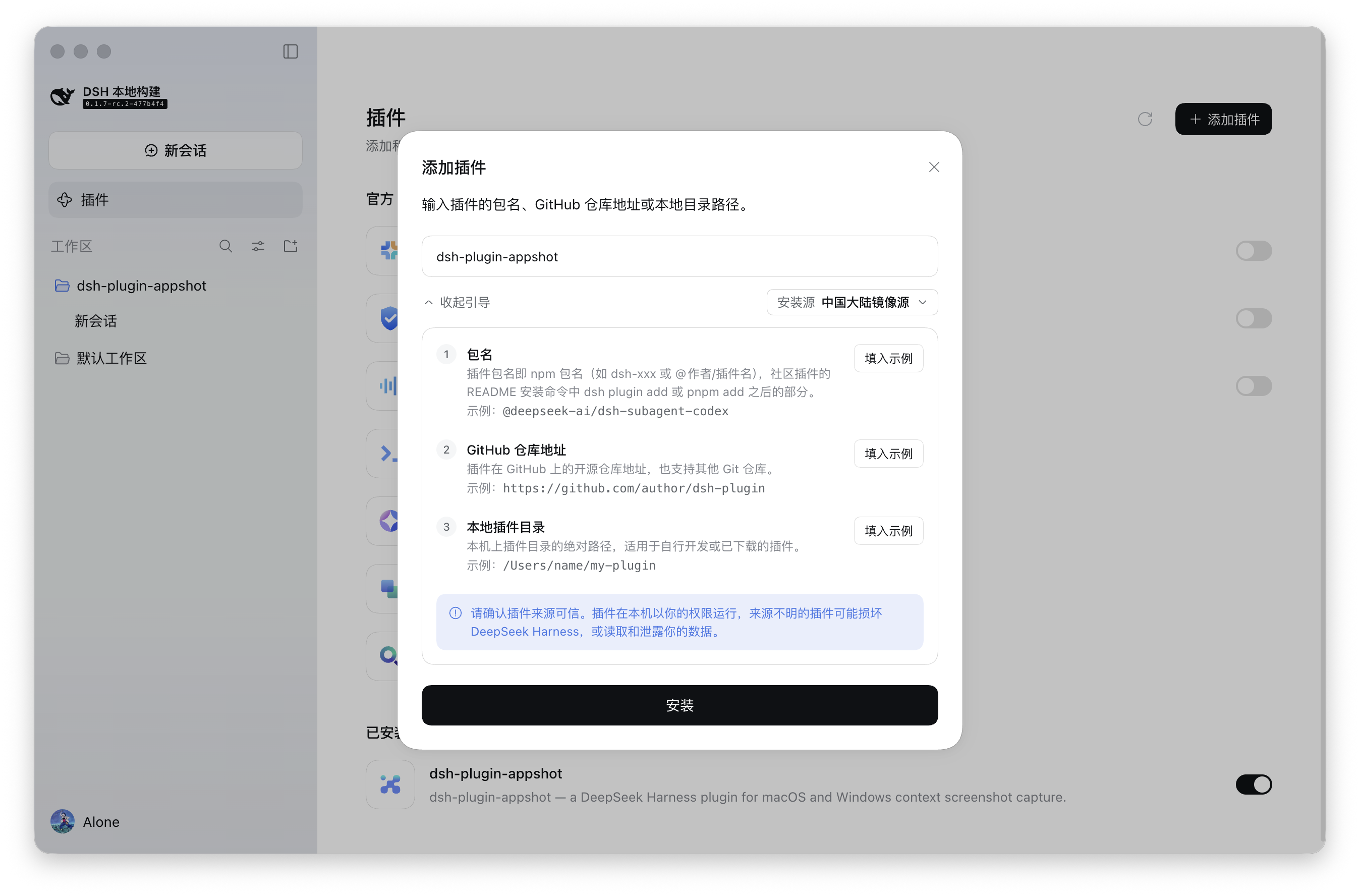
The npm package is prebuilt — no local compilation. You are ready when the log shows plugin applied successfully and native agent ready. On first capture, macOS asks for Screen Recording and Accessibility (see Permissions); Windows needs no extra grants.
Command line: dsh plugin add dsh-plugin-appshot
Installing from source (developers/contributors): run
pnpm install && pnpm build && pnpm build:nativeinside the plugin directory, then rundsh plugin --profile <name> add ./dsh-plugin-appshotfrom its parent directory (dsh plugin addresolves relative paths against the invoking directory).
What it is
A DSH take on "Codex Appshots": brings global-shortcut context capture to DeepSeek Harness.
Typical scenario: whenever you run into an issue or question in any app or window — whether inspecting a design, browsing docs, debugging code in your IDE, or troubleshooting terminal output — simply press Left ⌘ + Right ⌘. The screenshot of your current window is instantly transferred to the DSH client and attached to the composer draft; just type your question to ask the agent directly, eliminating the friction of manual capturing, app switching, and pasting.
It captures the "current window", not the "whole screen" — matching Codex's own Appshots wording ("An appshot captures the frontmost window only."):
| ✅ Captures | ❌ Does not capture |
|---|---|
| The one frontmost window at the moment you trigger (Chrome / VS Code / Finder / Terminal…) | The whole screen, desktop wallpaper, menu bar/Dock, other windows, background apps |
Press Left ⌘ + Right ⌘ → capture frontmost window → image lands in composer → describe and Send
Currently supports macOS 14+ (Apple Silicon / arm64) (Left ⌘ + Right ⌘ by default, remappable in settings) and Windows 10 19041+ (x64) (double Ctrl by default, remappable in the settings panel).
Usage
In any app (Chrome, VS Code, Finder / Notepad, Terminal…), press the global hotkey — Left ⌘ + Right ⌘ together on macOS, Left Ctrl + Right Ctrl together on Windows (remappable in the settings panel) — you capture exactly the one window in front of you, not the whole screen.
What happens next differs per platform:
- macOS: after the screenshot lands on disk, the DSH window is activated and focused (capture-then-activate — DSH can never appear in its own screenshot; if DSH is already focused, screenshot is automatically ignored; window activation applies to the DSH desktop app only — under
dsh webthe image still lands in the composer, just without the window activation). - Windows: DSH is never activated — the screenshot silently lands in the current session's input box without interrupting your work; success is signaled by a shutter sound and a fly-in animation (both disableable), and failures surface in a no-focus-stealing lightweight toast.
- macOS: after the screenshot lands on disk, the DSH window is activated and focused (capture-then-activate — DSH can never appear in its own screenshot; if DSH is already focused, screenshot is automatically ignored; window activation applies to the DSH desktop app only — under
| Before trigger (frontmost app window; screenshots show macOS) | After trigger (captured & mounted into Composer) |
|---|---|
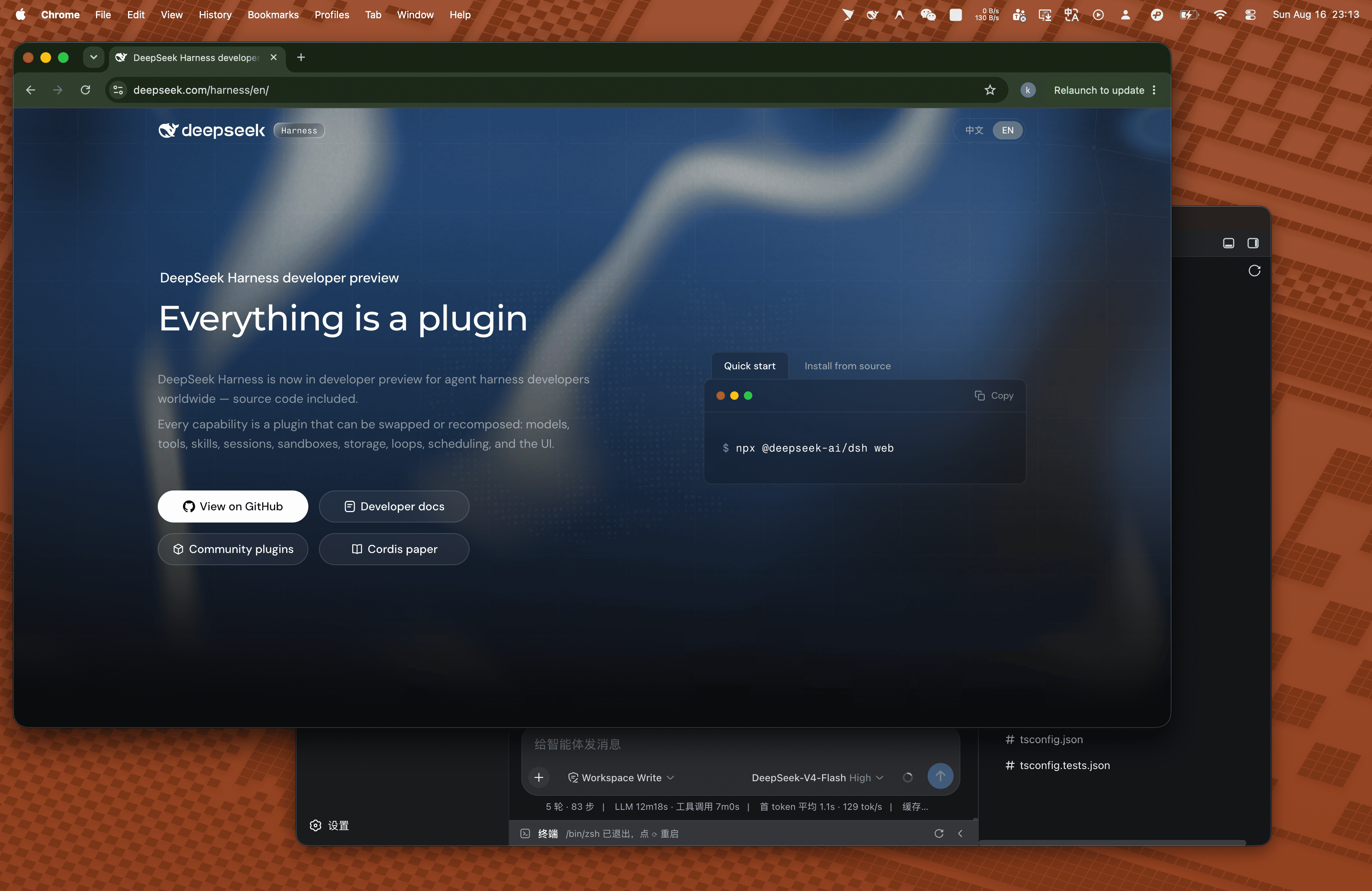 |
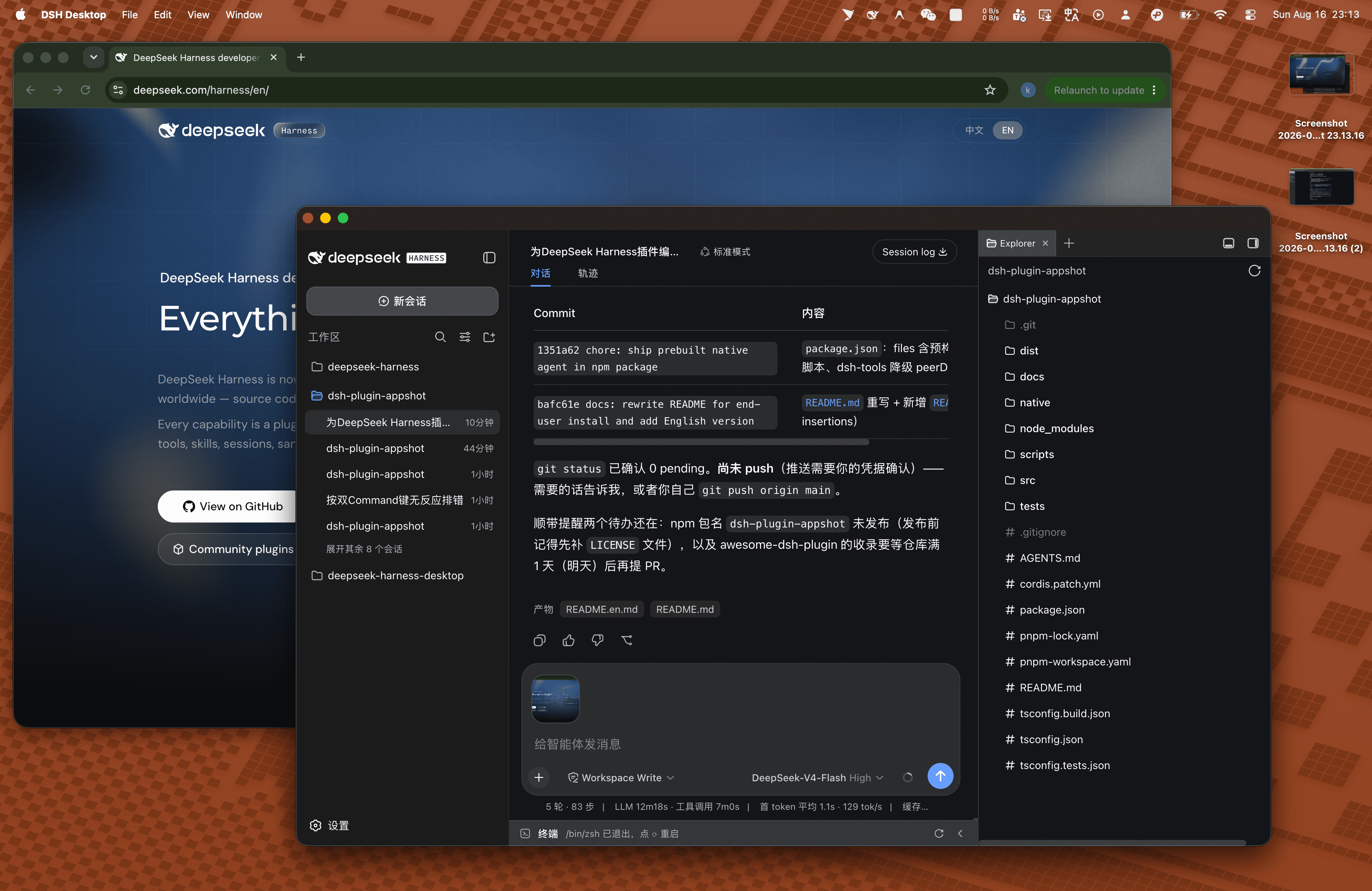 |
- The screenshot is attached to the current session's composer draft (click to inspect in full view, or trigger again to append more).
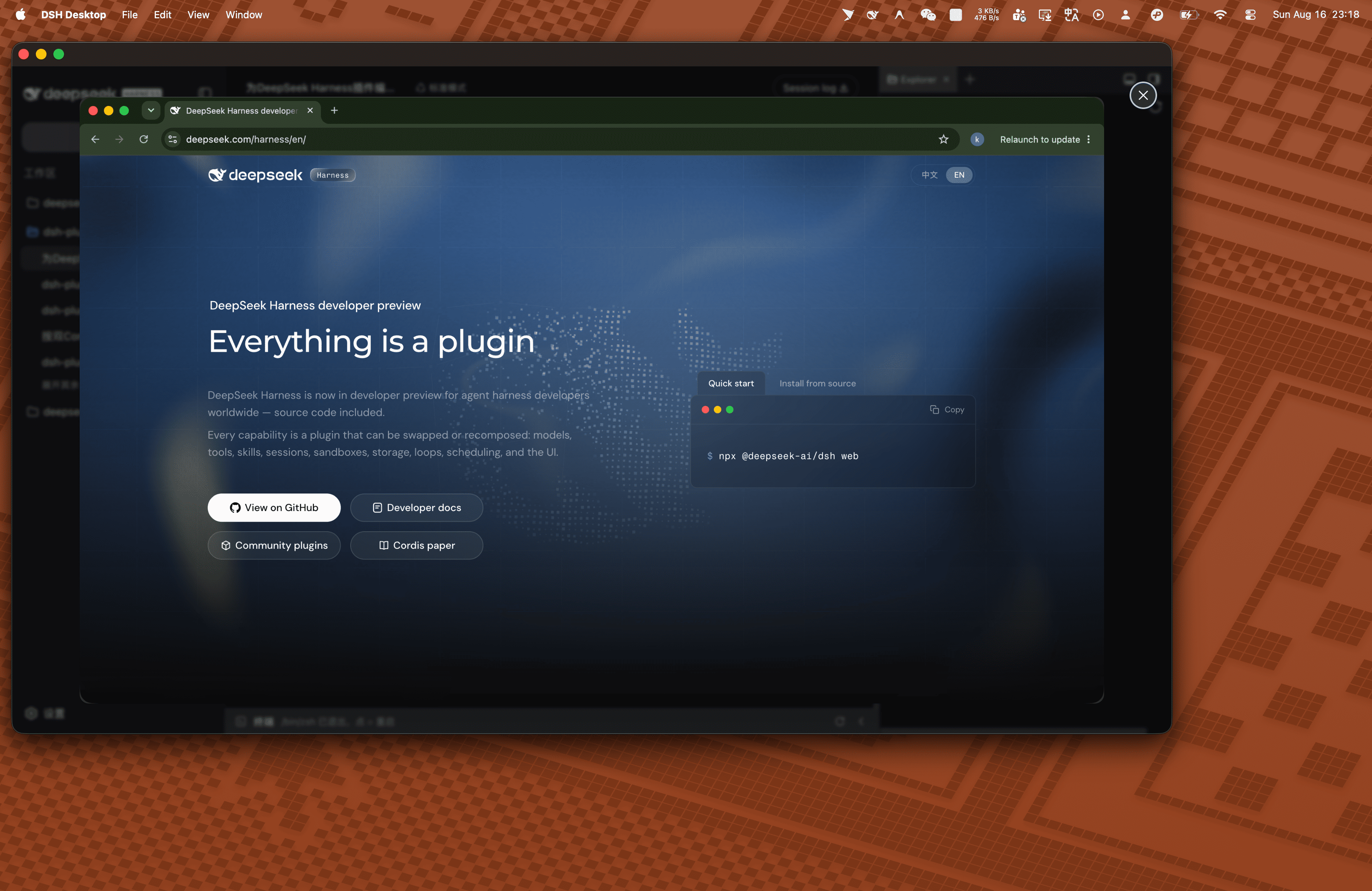
- Type a description (e.g. "analyze this error on screen") and hit Send — the screenshot is submitted together with your text.
The screenshot enters the composer rather than firing the agent directly — you stay in control: add context, append more shots, or remove attachments you don't need.
Features
Shared across platforms
- Precise single-window capture: only the one window you're looking at — never the whole screen, other windows, or the desktop.
- Composer draft mounting: screenshots land in the current session's input draft automatically and are sent with your message; trigger repeatedly to append more.
- No leftovers: staging temp files are cleaned in every success/failure branch under a single-owner contract; orphans from crashed runs are swept on plugin startup.
macOS
- Global Dual-Command hotkey: Left ⌘ + Right ⌘ state machine (the same trigger Codex Appshots uses), with debounce/cooldown; responds even while DSH is in the background or minimized; remappable in settings (e.g. double-tap ⌘).
- ScreenCaptureKit single-window capture: transparent layers, shadows and tooltips filtered out, Retina resolution preserved; on multi-display setups only the target window's screen is captured.
- Capture-then-activate (no self-capture): the DSH window is activated and brought to front only after the screenshot has been taken and written to disk — no race condition that could "screenshot DSH itself"; if DSH itself is focused, capture is cleanly ignored.
- SSE push mounting: the host persists the screenshot via
saveImageas a DSH Attachment, pushes it over a self-hosted SSE channel, and the client module mounts it into the active session and focuses the input. - Permission feedback: missing Screen Recording / Accessibility permissions trigger the system authorization prompt, plus a system notification (
UNUserNotificationCenter) with the failure reason.
Windows
- Double-Ctrl hotkey (remappable): Left + Right Ctrl by default; switch to other Ctrl/Alt/Shift combinations in the DSH settings panel, persisted across restarts.
- Topmost-window-on-cursor's-monitor targeting: captures the topmost window on the monitor under the cursor; explicitly refuses (with a toast) when the frontmost window is DSH itself, the desktop, the taskbar, or an invisible/spanning window — no accidental captures.
- Bring-to-front + fallback two-stage capture: a visible-content backup is taken first, then re-captured after a regular bring-to-front; if activation fails, the backup is used so "what you saw is what you get".
- Silent delivery (inverse anti-self-capture design): DSH is never activated or focused; the screenshot travels through an in-memory Node pending buffer and a directed HTTP long poll to the locked client, mounts into the composer, and reports back a
MOUNTEDconfirmation. - Non-intrusive feedback: shutter sound, border flash and thumbnail fly-in animation (each disableable); all failure hints are no-activate toasts that never steal focus.
How it works
Three components, one-way data flow:
┌──────────────────────────┐     NDJSON IPC (stdio)     ┌───────────────────────────┐
│  macOS Native Agent       │ ────────────────────────▶  │  Node / Cordis host plugin │
│  (Appshot Agent.app)      │    type: "appshot"         │  (src/)                    │
│  · Dual-Command FSM       │                            │  · fs.readFile bytes        │
│  · Frontmost-window pick  │                            │  · attachments.saveImage    │
│  · ScreenCaptureKit shot  │                            │  · ownership transfer+unlink│
│  · activate DSH after     │                            │  · webServer SSE broadcast  │
└──────────────────────────┘                            └─────────────┬─────────────┘
                                                                      │ SSE (appshot/ready)
                                                                      ▼
┌──────────────────────────┐
│  DSH Client module (Renderer) │
│  · resolve active sessionId   │
│  · mount ImageAttachmentRef   │
│  · focus composer input       │
└──────────────────────────┘
Key design points:
- No-self-capture hard constraint: no module may activate/show/focus the DSH window before the screenshot is on disk; window activation is a native capability (
NSRunningApplication), not a DSH API. - Deterministic ownership transfer (Single Owner): the staging file belongs to the plugin until
saveImagesucceeds; ownership then moves to the DSH AttachmentStore and the pluginunlinks immediately; failure paths clean up infinally; orphan files are garbage-collected on startup.
Permissions
On first trigger, macOS prompts for authorization:
| Permission | Purpose |
|---|---|
| Screen Recording | ScreenCaptureKit captures the frontmost window |
| Accessibility | Global hotkey state machine + window activation/bring-to-front |
If you deny, the capture is aborted with a system notification; re-grant in System Settings → Privacy & Security and retry.
Limitations
- Supports macOS 14+ (Apple Silicon / arm64) and Windows 10 19041+ (x64) (self-contained single-file agent — no .NET runtime install needed); WebUI is not supported (a browser sandbox can't access global hotkeys or cross-app activation).
- Window activation applies to the DSH desktop app (macOS) only; under
dsh webscreenshots still land in the composer, but the window is not activated/brought to front; Windows follows the anti-self-capture design and never activates DSH — screenshots silently land in the composer input. - No region selection, full-screen capture, image annotation, OCR, or screenshot history (all on the roadmap).
- Hotkeys: Left ⌘ + Right ⌘ (Dual Command) by default on macOS; double-Ctrl by default on Windows, remappable in DSH Settings → Screenshot Capture, which also toggles the shutter sound and capture animation (settings persist across restarts).
Development
src/                 Host plugin (Cordis apply(ctx) entry + windows/macos delivery + client modules)
native/macos/        Swift Native Agent (ScreenCaptureKit + double-Command state machine)
native/windows/      C# Native Agent (Win32 low-level keyboard hook + two-stage GDI capture)
docs/                requirements / technical (per-platform) / tasks / api-grounded-review
tests/               Phase contract tests (node --test)
Common commands:
pnpm build                  # esbuild bundle host plugin + client module → dist/
pnpm typecheck              # tsc --noEmit
pnpm test                   # contract tests (DSH_DISABLE_AGENT_SPAWN=1 to avoid spawning the real agent)
pnpm build:native           # build Appshot Agent.app (macOS)
pnpm build:native:windows   # dotnet publish self-contained single-file exe → native/windows/bin/win-x64/ (Windows)
pnpm test:native            # Windows native unit tests (dotnet test)

# Native diagnostics (inside native/macos)
swift build && .build/debug/appshot-macos --list-windows          # list capturable windows
.build/debug/appshot-macos --cli-capture --output /tmp/test.png    # frontmost-window capture PoC
Dependency notes: @deepseek-ai/cordis (^4.0.1) and @deepseek-ai/dsh-tools (exact 0.1.0-rc.6; npm latest is a stale 0.0.1-rc.1 — don't npm i over it) are devDependencies used for types only during development; the package metadata deliberately declares no peerDependencies — on Windows, pnpm creates relative symlinks for peer dependencies, which fails with EPERM for regular users (without Developer Mode). The code uses import type only; ctx is injected by the host at runtime, so the plugin has zero runtime dependencies.
Publishing (technical-windows.md §7.4): a tag triggers the two-runner GitHub Actions workflow — macOS builds Appshot Agent.app, Windows builds appshot-win-x64.exe; the assemble job restores both artifacts and runs npm publish (prepack is platform-aware: it builds the native agent for the current platform, and in CI it enforces a both-artifacts gate that blocks the release if either is missing). A local pnpm pack yields a single-platform package and is not a release source.
License
This project is licensed under the MIT License.
Comments
Comments live in GitHub Discussions. Sign in with GitHub to post or react.