
Install
Inside DeepSeek Harness, with dsh-market
dsh plugin --profile web add dshmarket
Or from the command line
dsh plugin --profile web add dsh-ops
Installing runs third-party code with your own permissions — it can read your files, use your credentials and reach the network. Review the source first, and pin a commit (github:owner/repo#sha) when you can.
README
dsh-ops
A plugin dedicated to improving the token efficiency of DSH plugins, boosting AI performance, reducing token consumption, and cutting total task time. It removes the token, time, and model-attention waste caused by DSH repeatedly hitting PowerShell errors on Windows, and will keep being updated.
Main features of this plugin:
- A set of more advanced always-on tools written in Rust. Compared with the built-ins, these tools use fewer input and output tokens, run faster, cover more ground, and impose less mental load on the AI; they also carry brief hash checks, line/position info, and similar messages to reduce token overhead.
- Planned on the roadmap: everyday tools such as DOC/PDF operations, web search, and crawl4ai-style HTML-to-Markdown tools, added through progressive disclosure so the AI avoids writing one-off code or scripts to reach its goal. The current release does not ship them yet.
- Provides an option to disable the built-in tools, to maximize savings on the AI's mental load and the fixed system prompt.
- On Windows it additionally provides the
ops_bashtool — the AI is far more fluent with bash than with pwsh. You can use the independent bash 5.3.15 bundled with ops, or point theops_bashtool at Git Bash.
Plugin traits:
- Low intrusion and high compatibility: it does not change runtime logic, inject into the system prompt or modify system variables — it only adds new, easy-to-use high-level tools, so it stays compatible with almost any plugin.
[!NOTE] A rigorous benchmark and a concrete test plan for token savings and performance gains will ship in the next version, covering most common scenarios. The 97% token reduction reported for the previous version only describes the "single, complex task delivered from a complete, explicit and specific prompt" scenario — with short prompts the model's search for a conclusion is too random to control the variables.
tips: "ops" here is short for the broad sense of operations (running operations), indicating that this plugin sits in the base-tool position between DSH and system/code/file operations. This is not an operations (ops/SRE) plugin.
Install, update and uninstall
Official plugin marketplace
In the target DSH application's plugin marketplace, enter the npm package name dsh-ops, choose a custom registry and enter https://mirrors.huaweicloud.com/repository/npm/, install, then enable it. Installing through npmmirror is currently not recommended — it has bugs.
Of course, if you are sure you can reach the official npm registry, pick the official registry; if you are not sure, follow the steps above.
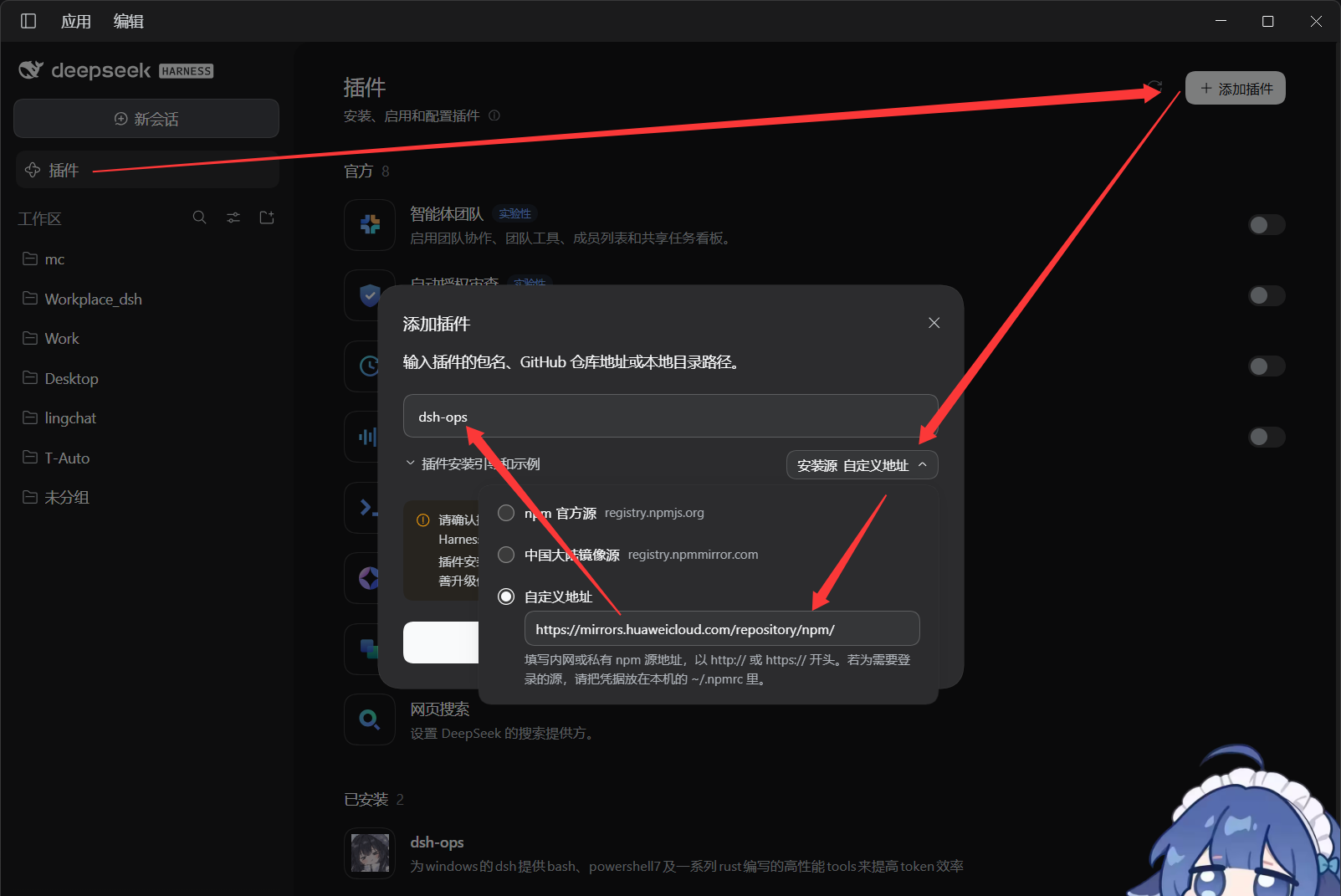
One-command npm installation
Installation
npx --yes dsh-ops@latest install --profile desktop
npx --yes dsh-ops@latest install --profile web
npx --yes dsh-ops@latest install --profile tui
An explicit target profile is required. tui maps to the dsh-TUI product's dsh-tui profile, not the old tui directory. Initialize the target application first. This entry point delegates installation to the official DSH CLI rather than implementing a separate profile lock and rollback logic.
Desktop must use the CLI bundled with the desktop application; the default auto-detected path is %LOCALAPPDATA%\Programs\DeepSeek Harness\resources\runtime\cli\bin\dsh.cmd. For another installation location, add --dsh-cli "<installation>\resources\runtime\cli\bin\dsh.cmd". Web/TUI require an available DSH CLI, which can also be specified explicitly.
You can also use the official commands directly:
dsh plugin --profile web add dsh-ops
dsh plugin --profile dsh-tui add dsh-ops
"<desktop installation>\resources\runtime\cli\bin\dsh.cmd" plugin --profile desktop add dsh-ops
A regular DSH CLI cannot manage the reserved desktop profile; do not confuse it with the desktop app's own entry point.
Update
Re-run the same npx --yes dsh-ops@latest install --profile ..., or use the official CLI add dsh-ops@latest. Reload when the app asks; restart the app when replacing code that is already loaded.
Uninstall and status
npx --yes dsh-ops@latest status --profile desktop
npx --yes dsh-ops@latest uninstall --profile desktop
Replace desktop with web or tui as needed. You can also uninstall from the marketplace, or run the official dsh plugin --profile ... remove dsh-ops. Binaries are managed as part of the profile's plugin dependencies; uninstalling removes the dependency reference without deleting the system shell, copies in other profiles, or the package manager's shared cache.
Old files explicitly provisioned by earlier versions under <DSH_HOME>/dsh-ops/ (provisioned shells, and the FastCtx runtime earlier versions could provision) need separate cleanup: npx --yes dsh-ops@latest uninstall --yes. The ~/.fastctx/ state left by the removed background component is not deleted by default; add --purge-fastctx when needed.
The former dsh-ops/background component (FastCtx background jobs) has been removed. A profile that still has its row keeps loading: the row publishes nothing and logs one warning, and can be deleted.
Optional read-only OPS sidebar
Enable the dsh-ops/tui row in dsh-TUI and restart to add the OPS sidebar without stealing focus or executing tools. Without tuiPanels, only that optional row stays pending. See Sidebar guide. While focused, use f to filter, n/p for local pages and a to acknowledge all-session alerts; only bounded retained metadata is browsed, never fetched result pages.
Documentation
- Usage · Troubleshooting · Component reference · Configuration reference
- Native PTC · Manual validation
- Contributing · Roadmap · Changelog · Provenance
License
Plugin source is distributed under MIT AND Apache-2.0: everything outside licenses/fastctx/ is MIT; FastCtx is Apache-2.0. See NOTICE, licenses/fastctx/LICENSE-APACHE, and licenses/fastctx/NOTICE.
The separate Windows payload packages are distributed under their upstream components' licenses: Git for Windows includes GPL and other licensed components, and PowerShell includes MIT and third-party components. Their original licenses, notices, and provenance records are kept with the payloads; the plugin's MIT license does not replace those. See PROVENANCE.md.
Acknowledgements
The Rust tools are based on yc-duan's Codex plugin FastCtx and use its source code. Vendor marking and deletion-only distribution changes were recorded in vendor/fastctx/FORK.md and vendor/fastctx/UPSTREAM.md, which remain in the repository history and in earlier published versions; the vendored source itself was removed with the background component. The FastCtx notice that must be reproduced follows:
This product includes FastCtx (https://github.com/yc-duan/fastctx), Copyright (c) 2026 yc-duan, used under the Apache License 2.0.
FastCtx is redistributed and/or modified here by the maintainer of this distribution. Any such change is that maintainer's own work and their sole responsibility. It is not endorsed by, not supported by, and not attributable to the author of FastCtx, who accepts no liability of any kind arising from this distribution or from anything built on top of it.
Maintainers
In no particular order
Contributors
Star trend
Comments
Comments live in GitHub Discussions. Sign in with GitHub to post or react.