
Install
Inside DeepSeek Harness, with dsh-market
dsh plugin --profile web add dshmarket
Or from the command line
dsh plugin --profile web add dsh-notice-center
Installing runs third-party code with your own permissions — it can read your files, use your credentials and reach the network. Review the source first, and pin a commit (github:owner/repo#sha) when you can.
Screenshots
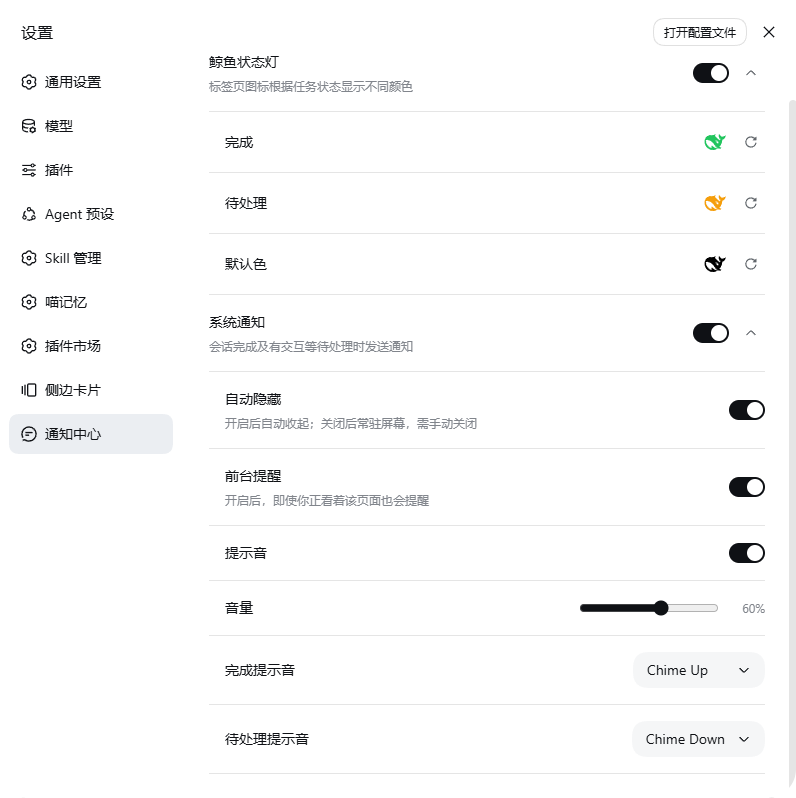
README
中文 | English

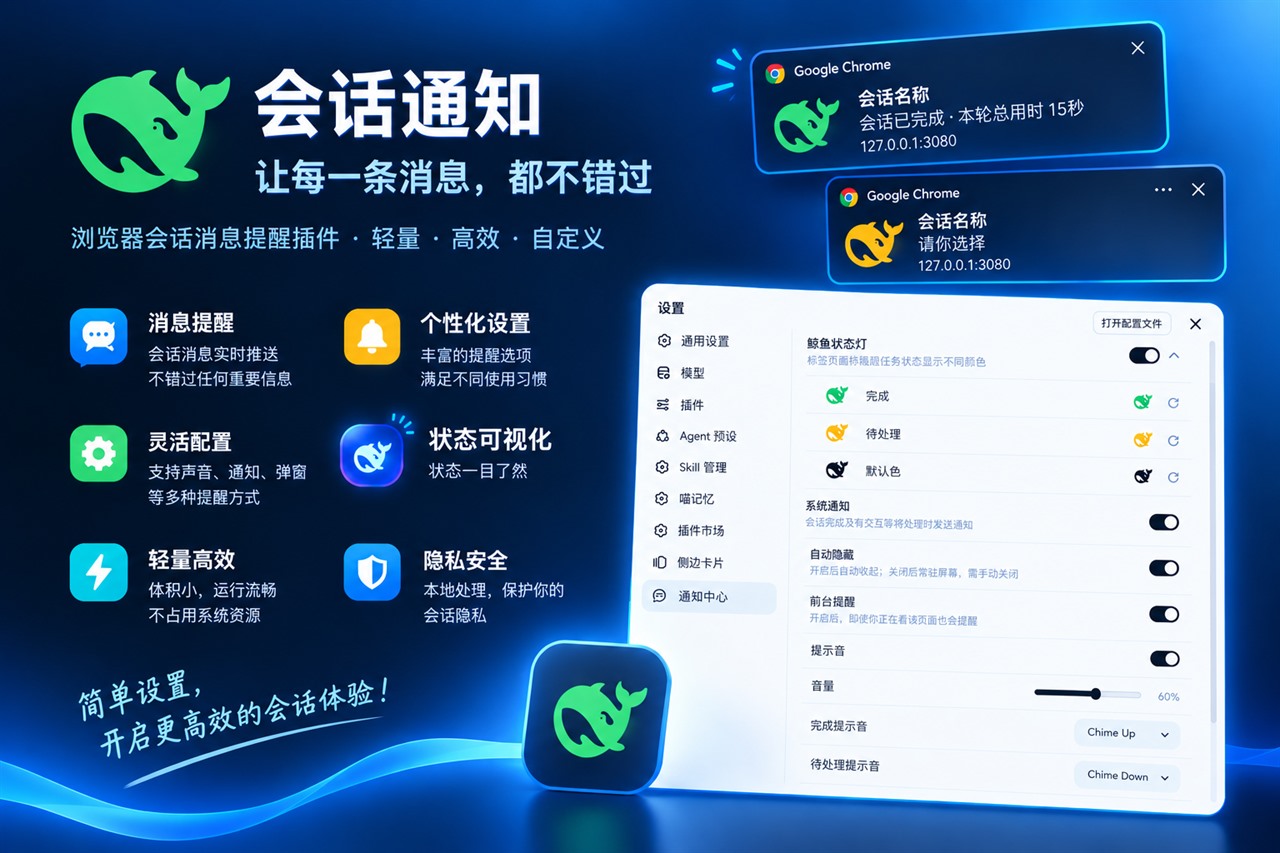
In one line: a notification center for DeepSeek Harness — it turns the tab's whale icon into a status light and gets your attention while you are looking elsewhere.
| Package | dsh-notice-center |
| Plugin instance id | notice-center |
| Settings namespace | notice-center |
| Install shapes | npm package / GitHub repo / tarball / local link — all four supported |
Contents
Usage
- Why you need it
- Features
- Installation
- Getting started in three steps
- Settings reference
- Troubleshooting
- Known limitations
Development
- Architecture
- Project layout
- Life of a notification
- Local development
- Tests
- Releasing
- Changelog
- Design constraints
Why you need it
Inside Harness, the two signals that matter — "a session finished" and "something is waiting for your decision" — only show up on the sidebar dots and inside the session itself. The moment you switch to another tab or another app, they are invisible.
Long tasks make this worse: you go do something else, come back, and the session finished ages ago — or an approval request has been sitting there for ten minutes.
This plugin moves both signals somewhere you will actually see them:
| While you are away from the DSH page | What you get |
|---|---|
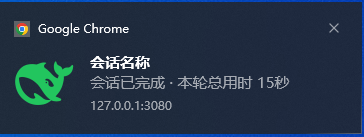
| A session finished | The tab whale turns green, plus a system notification (with the turn duration when it is a single notification) |
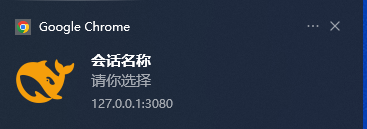
| Something needs you | The tab whale turns amber, plus a system notification (saying whether it is an approval / question / plan review) |
Features
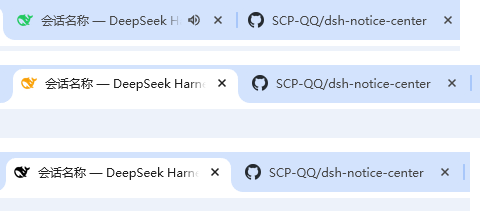
1. Whale status light
Three colours are encoded directly into the tab icon, driven by the same official signal as the sidebar dots, so they can never drift apart:
| Whale colour | Meaning | When it clears |
|---|---|---|
| Green | A session finished while you were not watching it | Clears once you open that session; back to default once you have opened them all |
| Amber | A session awaits you: question / approval / plan review | Clears once handled |
| Black | All clear (the stock icon) | Default state |
- Only main sessions count; subagents do not affect it
- When both apply, amber wins — a pending interaction is the primary status, so a session stuck waiting on you is never masked by another session that just finished
- All three colours are configurable (including the default colour: leave it unset to keep the stock icon)
2. System notifications
Two events raise a notification, and by default only while you are not looking:
| Event | Trigger | What the notification says |
|---|---|---|
| Finished | A session completes | Title = session name; body = Session finished, with the turn duration appended when it is a single notification (e.g. Session finished · turn took 3s) |
| Pending | A new pending interaction appears | Title = session name; body = the interaction type: Approval needed · <tool> / Choose an option (Choose options for multi-select, Type an answer when there are no options, N questions for a batch) / Plan review; unknown types fall back to Something awaits you |
| Finished (green) | Pending (amber) |
|---|---|
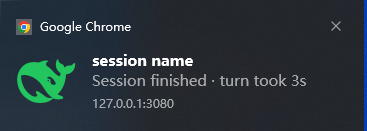 |
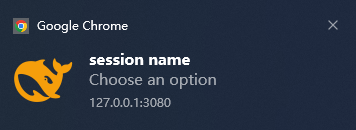 |
Notifications are raised by the browser (Chrome here), so the card shows the browser and the site
127.0.0.1:3080— that is expected. The screenshots show the English UI; notification copy is localised at runtime.
Other behaviour:
- Click a notification = focus the window and open that session
- Only while you are not looking — "foreground" means the tab is visible and the window has focus. Switching tabs, minimising, or having another app on top all notify. To also notify while you are looking (you are parked in a session but away from the screen, e.g. on your phone), turn on Notify in the foreground
- Aggregation: events within 300ms are merged into one notification, with
+Nappended to the title - Optional persistence: turn off Auto hide and the notification stays on screen until you dismiss it
- The notification icon follows your configured status-light colours
3. Sounds
Finished and pending each have their own dropdown, 47 entries in total: 2 built-in synthesised chimes plus 45 mp3s taken from opencode's bundled sound library.
| Pack | Entries |
|---|---|
| Built-in (synthesised) | Chime Up (finished default, rising two-tone), Chime Down (pending default, falling two-tone) |
| Alert | Alert 01–10 |
| Bip-bop | Bip-bop 01–10 |
| Staplebops | Staplebops 01–07 |
| Nope | Nope 01–12 |
| Yup | Yup 01–06 |
- Hover to preview: hovering a dropdown entry plays it (120ms debounce, so sweeping the list does not turn into noise)
- Preview after adjusting volume: releasing the volume slider plays the finished chime at the new volume
- With sound on, the system notification sound is muted and the plugin sound is used instead
- Audio is served by the host half at
/notice-center-sounds/<id>.mp3; if that route is unavailable it falls back to the built-in chime, never to silence - No migration needed: existing configs keep using
Chime Up/Chime Down
Installation
Requirements
- Official DeepSeek Harness:
1.4.0requires0.1.7-rc.2+;1.3.xsupports0.1.2-rc.1+- The range is declared in
engines.dshand the@deepseek-ai/dsh-*peers, guarded bytest/compat-range.smoke.mjs. The two lines split by host version: the Market never offers 1.4.0 to an older host, and the DSH core refuses to load it — older hosts simply stay on1.3.xwith no update prompt. - The version gate only compares version strings and cannot detect a removed API (0.1.7 dropped
settings.registerwhile the old declaration still passed), so never treat it as a compatibility guarantee on its own.
- The range is declared in
- System notifications need a secure context —
http://127.0.0.1:3080orlocalhostworks; over a LAN IP the browser's Notification API is unavailable (a browser restriction, not a plugin issue)
Option 1: from npm (recommended)
dsh plugin --profile web add dsh-notice-center
Package page: https://www.npmjs.com/package/dsh-notice-center (latest is stable; prereleases go to the next tag — install with dsh-notice-center@next)
Option 2: straight from GitHub
dsh plugin --profile web add github:SCP-QQ/dsh-notice-center
# or over SSH (when a proxy interferes with HTTPS on your machine)
dsh plugin --profile web add git+ssh://git@github.com:SCP-QQ/dsh-notice-center.git
Option 3: from a tarball (offline / internal distribution)
npm pack                                        # produces dsh-notice-center-<version>.tgz
dsh plugin --profile web add ./dsh-notice-center-<version>.tgz
Option 4: local link (while editing the code)
In the profile's package.json: add "dsh-notice-center": "link:<project dir>" to dependencies and "dsh-notice-center" to dsh.profile.bundles, then run pnpm install inside the profile directory.
All four options require a Harness restart to take effect. Installing from npm / GitHub needs no extra
@deepseek-ai/*packages from the profile — the host half's only runtime dependency is@deepseek-ai/schemastery(available on npm).
Uninstall
dsh plugin --profile web remove dsh-notice-center
Remove the dependency and the dsh.profile.bundles entry, then restart — nothing is left behind.
Getting started in three steps
Open the settings page — Settings → Notification center (a sidebar entry)
Grant system notifications — the master switch is on by default: after the page loads, your first click or key press makes the plugin ask the browser for notification permission once (browsers refuse requests without a user gesture, so the page cannot pop it on its own — it borrows your first interaction). Choose Allow and you also get a "Notifications enabled" confirmation. Frequency rules:
- at most once per page load (clicking more in the same session never re-prompts);
- choose Allow or Block → never asked again (the permission is settled);
- merely closing the prompt with × / Esc (neither choice) → not a decision, so the next page load asks again until you decide;
- to stop it entirely: turn the System notifications switch off, or choose Block.
Later, use the status chip right below the switch (the short state is always visible; hover it or focus it with the keyboard for the full explanation):
State Chip What to do Not granted (you dismissed the prompt) "Not granted - Grant", clickable Click it and the browser asks again Blocked warning icon + "Blocked" Browsers do not ask twice (and a page may not open site settings): hover for the recovery path — click the icon at the left of the address bar → Notifications → Allow, or open chrome://settings/content/notificationsUnsupported one small line Usually a secure context problem (see Install → Requirements): use http://127.0.0.1:3080Granted hidden (the row stays clean) — The switch itself always works (you can turn notifications off even while unauthorised — and turning it off stops the automatic request); change the permission in site settings and the chip follows immediately.
Tune as you like — expand the two groups: change colours, pick sounds, set volume, toggle Notify in the foreground / Auto hide
After that, whenever you switch away or minimise, a finished session or a pending interaction notifies you — and clicking the notification jumps straight back to that session.
Settings reference
| Group | Setting | Key | Default | Notes |
|---|---|---|---|---|
| Whale status light | Master switch | colorsEnabled |
on | When off, the stock icon is kept |
| Finished | green |
#22C55E |
Finished status-light colour (official sidebar colour) | |
| Pending | amber |
#F59E0B |
Pending status-light colour (official sidebar colour) | |
| Default colour | black |
unset | Unset = keep the stock /favicon.svg |
|
| System notifications | Master switch | notifyEnabled |
on | On by default; the first interaction asks for browser permission, and a status chip appears below the switch while it is missing |
| Auto hide | notifyAutoHide |
on | Off = the notification stays until you dismiss it | |
| Notify in the foreground | notifyForeground |
off | On = also notify while you are looking at the page | |
| Sound | notifySound |
on | When on, the system sound is muted and the plugin sound plays | |
| Volume | notifyVolume |
0.6 |
0–1 | |
| Finished sound | notifyDoneSound |
builtin-up |
one of 47 | |
| Pending sound | notifyPendingSound |
builtin-down |
one of 47 |
Settings are persisted by Harness' settings service into the notice-center: section of <DSH_HOME>/settings.yaml.
The settings page also shows a one-line footer at the very top with the plugin name and version (e.g. "Notification center v1.3.0") — clicking it opens the repository in a new tab.
Troubleshooting
| Symptom | Cause and fix |
|---|---|
| No "Notification center" entry in Settings | The plugin did not load. Make sure you restarted Harness after installing, then look for settings namespace "notice-center" registered in the Harness console |
| A switch does nothing / a new setting has no effect | After changing the host half (lib/index.mjs) you must restart Harness — settings writes go through the host schema |
| A permission prompt popped up on my very first click after installing | The master switch is on by default, so the plugin borrows your first interaction (click / key press) to ask once — browsers refuse permission requests without a user gesture. Choose Block if you do not want it, and use the status chip in the settings later |
| No notifications at all | Three conditions are required: ① the master switch is on; ② browser permission is Allow; ③ the page is not in the foreground when the event fires (use Notify in the foreground to relax this) |
| No notifications over a LAN IP | Non-secure context: the browser disables the Notification API, so system notifications are entirely unavailable (unrelated to Notify in the foreground). Use 127.0.0.1 / localhost; over a LAN only the tab status light works |
| Nothing after closing the tab | Known limitation, see below |
| The green light disappears after a refresh | Expected. That state is the official signal's in-memory state and is lost on refresh |
| The notification flashes by too fast | Turn Auto hide off and it stays until dismissed |
| No sound | Check in order: sound switch, volume not 0, whether the sound route is available (it falls back to the built-in chime, so it should never be fully silent) |
| Notifications swallowed by the OS | Windows Focus Assist / Do Not Disturb intercepts them; the plugin cannot detect it |
Known limitations
- No notifications once the browser tab is closed — Web Push needs a server plus HTTPS, which is not realistic for a local plugin
- The Notification API is unavailable in a non-secure context (LAN IP)
- The green state is lost on refresh — it lives in memory only, which is the behaviour of the official signal itself
- System-level Do Not Disturb swallows notifications (Windows Focus Assist etc.); the plugin cannot detect it
- The auto-hide duration is not configurable — the Web Notification spec has no duration parameter; the desktop decides (roughly 5–20 seconds)
- The notification card cannot be styled — the card is rendered by the browser with no CSS or theming hook; only title, body and icon are yours
Development
Everything below is for maintainers: architecture, local development, tests and releasing. If you only want to use the plugin, you can stop here.
Architecture
The plugin has two halves running in different processes, exchanging configuration through Harness' settings service:
| Part | File | Runs in | Responsibility |
|---|---|---|---|
| Host half | lib/index.mjs |
Harness main process (Node) | ① Declare the Config schema (settings form, write validation and the legacy settings.yaml import all derive from it); ② serve /notice-center-sounds/<id>.mp3 |
| Browser half | lib/client.cjs |
Browser (plugin bundle) | favicon state machine + notification state machine + sound library + settings page |
| Bundle patch | cordis.patch.yml |
Loader layer | Insert one row id: notice-center into the plugin tree (that id IS the settings namespace) |
The host half's two optional channels:
ctx.inject(["settings"], …)— declares "this plugin ships its own page":settings.configure({ auto: false }, ctx.fiber). The owner must be the plugin's own fiber (describe()looks the policy up byentry.fiber, and theinjectchild is a different fiber)ctx.inject(["webServer"], …)— mounts the sound route. When the service is absent the route is not mounted and the browser half falls back to the built-in chime
The settings contract (since 0.1.7 — the easiest thing to break silently here):
- The form is derived from the plugin's own Config: dsh-settings'
describe()reads the entry fiber'sruntime.Config, and the entry id is the namespace — the plugin no longer registers a namespace (the oldsettings.register(ns, schema)was removed in 0.1.7). - Every field must be
.volatile():volatileForm()only projects fields under the nearest volatile ancestor, so one unmarked field disappears from the settings page entirely (test/host-half.smoke.mjsasserts this field by field)..volatile()requires schemastery ≥ 3.18.4. - Existing users need no manual migration: at startup dsh-settings reads
<DSH_HOME>/settings.yaml, writes each section into the entry carrying the same id, then renames the file tosettings.yaml.imported. Our section name equals the entry id (notice-center).
Why the host half does not import @deepseek-ai/dsh-settings: it keeps the host half's only runtime dependency at @deepseek-ai/schemastery — and because profiles default to autoInstallPeers: false, resolving any @deepseek-ai peer would actually fail on a version mismatch and break loading. This is what makes a clean registry install possible.
Where the browser half gets its data (all official client services; the plugin holds no state of its own):
| Service | Provided by | Used for |
|---|---|---|
configForms |
@deepseek-ai/dsh-client-ui-settings |
configForms.get(entryId) reads and writes settings (the old settingsScope was removed in 0.1.7); the snapshot carries status / writable |
sessions |
@deepseek-ai/dsh-api-session-controller/client |
Session list snapshot: origin / running / displayTitle |
uiSession |
@deepseek-ai/dsh-client-ui-session |
sessionStatus: Map<sessionId, { running, pendingInteraction, completionUnread }> — 0.1.7 removed both the row fields completed / pendingInteraction and the pendingInteractions store; the official workspace session rows use the same mapping (completed ≡ completionUnread) |
The sound route is deliberately narrow: only ^[a-z0-9-]+\.mp3$ filenames are served (no path traversal), and because the audio is a package constant it is cached immutable.
Project layout
package.json                    package metadata (scripts: test / test:host / test:client)
cordis.patch.yml                bundle patch layer (insert id: notice-center)
lib/index.mjs                   host half: settings schema + sound static route
lib/client.cjs                  browser half: favicon machine + notification machine + sound library + settings page
assets/audio/*.mp3              45 opencode sounds (MIT; see assets/audio/README.md)
docs/images/                    README screenshots, banners and the social-preview card
test/host-half.smoke.mjs        host-half smoke test (164 lines)
test/client-half.smoke.mjs      browser-half smoke test: state machine + real settings-page render (687 lines)
.github/workflows/test.yml      CI: runs pnpm test on push / PR
.github/workflows/publish.yml   release: tag-triggered, OIDC, no token
Life of a notification
sessions.list changes
   └─ sync()
        ├─ trackEdges()        running true->false edge (compensation when the current session finishes)
        ├─ detectTransitions() official completed false->true; new sessions in pendingInteractions
        │     └─ queueNotification(kind, sessionId, label, typeLabel)
        │          ├─ master switch off            -> dropped
        │          ├─ this same completion already queued -> dropped (no double-send)
        │          └─ enqueued + 300ms aggregation window
        └─ targetOf() -> favicon becomes green / amber / default

300ms later, flushNotifications()
   ├─ permission not granted                     -> dropped
   ├─ page in foreground and foreground notify off -> dropped
   ├─ group by kind -> one Notification per group (title = session name, body = event type)
   └─ play the selected sound
Notifications deliberately carry no tag: the same session reuses the same tag across runs, and Windows/Chrome treats the later one as an update to an existing notification — it replaces silently and never raises a banner again.
Local development
pnpm install          # the only runtime dependency is @deepseek-ai/schemastery
npm test              # host-half + browser-half smoke tests
The restart rule has two halves — this is the easiest thing to trip over:
| What you changed | Restart Harness? | Why |
|---|---|---|
lib/client.cjs (browser half) |
No — a page refresh is cleanest | Client HMR stat-polls the bundle and tells the browser to reload that plugin |
lib/index.mjs (host half) |
Yes, mandatory | Host-half hot reload relies on cordis-plugin-hmr (needs the loader to run with --expose-internals), which does not work in practice. Schema changes (adding/removing settings) also need a restart — otherwise the settings page write fails validation, which looks like "the switch does nothing" |
| First install, any rename | Yes, mandatory | The plugin tree and bundle list changed |
Debugging: browser-half errors land in the DevTools console; a successful host-half registration logs dsh-notice-center: settings namespace "notice-center" registered to the Harness console.
Tests
npm test            # both (this is what CI runs)
npm run test:host   # host half only
npm run test:client # browser half only
Both smoke tests are zero-dependency, pure Node — no browser needed:
- Host half (164 lines): actually executes
apply(), asserts only the expected services are injected, checks schema defaults and validation, exercises the sound route (serves an mp3 / 404 for unknown / rejects path traversal / all 45 packaged files present) and verifies that an existingsettings.yamlpasses the schema with every field preserved verbatim - Browser half (687 lines): stubs
window.__ModuleLoader__/document/Notification, evaluates the bundle and takes its factory, assemblesapply()with a fakectx, then drives state transitions and asserts theNotificationconstructor arguments. The settings page is really rendered against a recording stub (React element tree), asserting switch order, that each control writes only its own field, collapse behaviour, the footer, and more
Invariants pinned by the tests — do not break these:
PLUGIN_VERSION/PLUGIN_NAME/PLUGIN_REPOinlib/client.cjsmust matchpackage.json- The
SOUND_PACKSlibrary must map one-to-one onto the files inassets/audio/; adding a sound means updating it in two places:lib/client.cjsandtest/client-half.smoke.mjs - The
zhandendictionaries must have identical key sets
Releasing
Releasing is driven by a tag-triggered publish.yml — ordinary commits and pushes never publish:
| Intent | Command | Result |
|---|---|---|
| Commit only (feature not validated yet) | git commit + git push |
Only test.yml runs; npm sees nothing |
| Prerelease (for testers) | set version to 1.3.0-rc.1 → commit → git tag v1.3.0-rc.1 && git push origin v1.3.0-rc.1 |
Published to the next tag; latest untouched |
| Stable release | set version to 1.3.0 → commit → git tag v1.3.0 && git push origin v1.3.0 |
Published to latest, with provenance attached |
| Validate the pipeline only | Actions → publish → Run workflow | Installs, tests and runs npm pack --dry-run — publishes nothing |
The workflow has three gates; failing any one blocks the release:
- The tag must match the
package.jsonversion - The tagged commit must already be on
main - Tests must pass
The publish step is also idempotent: if that version already exists on the registry it is skipped, so re-tagging or re-running never fails the build.
Before tagging, add this release to CHANGELOG.md (user-visible changes plus compatibility notes) — it is the source of the release notes shown on the npm page and the GitHub Release.
One-time setup: npm Trusted Publishing (OIDC)
Publishing needs no npm token at all (so there is nothing to expire or leak). Open the package page → Publishing Access → Trusted publishers → Add a trusted publisher → choose GitHub Actions:
https://www.npmjs.com/package/dsh-notice-center/access
| Field | Value |
|---|---|
| Organization or user | SCP-QQ |
| Repository | dsh-notice-center |
| Workflow filename | publish.yml (filename only, no path; renaming the file requires updating this or publishing returns 403) |
| Environment name | npm (must match the workflow's environment:) |
| Allowed actions → Allow npm publish | ✅ required |
⚠️ That checkbox is new npm behaviour: a trusted publisher may only
npm stage publishby default, so without Allow npm publish the workflow'snpm publishis rejected. If you would rather have "staged only, human approves in the browser", leave it unchecked and change the last step tonpm stage publish.
- With OIDC, npm attaches provenance automatically (no
--provenanceflag); the package page shows the attestation - To require a manual approval after pushing a tag: repository Settings → Environments →
npm→ add Required reviewers (optional) - Publishing from your own machine is still possible with a granular token: put
//registry.npmjs.org/:_authToken=<token>in an.npmrcat the project root. That file is already in.gitignore— never commit it
Design constraints
Read these before changing code — each one came from a real bug:
- No
tagon notifications — the same tag is treated as an update and silently replaces (see "Life of a notification") - "Foreground" is
tab visible && window focused— usingvisibilityStatealone misreads "browser buried behind another app" as "the user is looking", which is exactly when a notification matters most - Amber beats green — matching the official
sessionStatuses; a pending interaction is the primary status - The turn duration comes from observing the
runningedge — a session already running when the page loads has no known start, so no duration is shown (never guessed) - The host half keeps zero
@deepseek-airuntime dependencies — onlyschemastery, otherwise a registry install breaks on peer resolution - The sound route only allows
^[a-z0-9-]+\.mp3$— the filename goes straight into a path join, so it must be whitelisted
Feedback and contributing
- Issues and ideas: https://github.com/SCP-QQ/dsh-notice-center/issues
- Run
npm testbefore proposing a change; settings-related changes should update the assertions intest/*.smoke.mjs - Sound assets come from anomalyco/opencode (MIT) — keep
assets/audio/README.mdin sync when replacing or removing them
License
MIT — see LICENSE for the full text.
The 45 sound files in assets/audio/*.mp3 come from anomalyco/opencode (packages/ui/src/assets/audio/), released upstream under MIT; the same licence and attribution are kept here. If upstream changes its terms, replace or remove this directory.
Comments
Comments live in GitHub Discussions. Sign in with GitHub to post or react.