
Install
Inside DeepSeek Harness, with dsh-market
dsh plugin --profile web add dshmarket
Or from the command line
dsh plugin --profile web add dsh-loupe
Installing runs third-party code with your own permissions — it can read your files, use your credentials and reach the network. Review the source first, and pin a commit (github:owner/repo#sha) when you can.
Screenshots
README
dsh-loupe
Lightweight DSH word/sentence explainer
简体中文 | English
Select a word or a sentence in a DSH conversation and the floating window explains it. Fast, light, no extra session pollution.
For heavy follow-up questions that need long context, use my other plugin dsh-tree-viewto ask along a tree of branches.
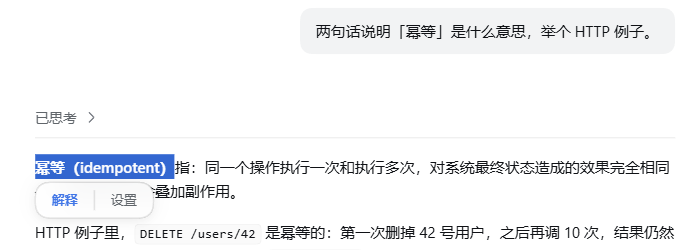
Select a word and the panel appears:
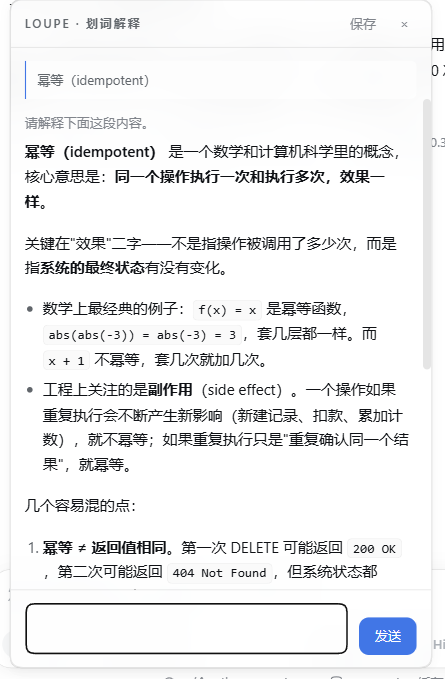
Click "Explain" and the floating window starts asking right away:
Features
| 🖱️ Select and it pops | Select any text in a message body and two entries, "Explain / Settings", appear below the selection. |
| 🪟 Answers in a window | Not a sidebar. Single instance, multi-turn follow-ups, streaming markdown, draggable, position remembered. |
| 🔌 No session created | One model request only: no session log, no tool registration, the left-hand list never gets dirty. |
| 📚 Brings its own context | Uses the plugin's own context.md instead of dragging in the agent's full context — faster and cheaper. |
| 🔁 Accumulates on its own | After each explanation it keeps "what was selected → what came out", so the same word sharpens with use. |
| 🗂️ Everything archived | Every exchange goes into history, searchable by keyword and paged; click one and it is restored into the window for more questions. |
| 📌 Pinnable as a session | An explanation worth keeping: pick a target workspace, save it, and it becomes a real session in the left-hand list, auto-named "Selection · ". |
| 🌐 Bilingual UI | Interface and prompt in Chinese or English; auto uses the host's language preference (locale.preference), falling back to the browser language, and can be pinned. |
| 🧠 Collapsible reasoning | The model's own reasoning is folded away by default; expand it when you want it, and it survives a restore from history. |
| 🌗 Follows the theme | Light/dark and skin follow the host; when the host ships no design tokens it falls back to the OS preference. |
| 🔑 Zero config | Borrows the host's llm service; there is no API key to fill in. |
| 🫧 Glass look | Translucent + background blur, switchable off in Settings. |
Plugin traits
Fast. By the time you click "Explain" it is already asking — the window submits on open, so there is no second send to press. The reasoning level defaults to off, and three measured runs gave a first token at 503ms / 544ms / 634ms, with a full answer in 1.7–2.5 seconds. It also does not drag the agent's full context in: it sends only the sentence you selected plus a small notebook, and the notebook sits at a fixed spot in the prompt so it still hits the host's prompt cache.
Precise. Three things go to the model: the text you selected, the message it sits in (only that one by default), and context.md (capped at 2200 characters). None of the main conversation's hundreds of thousands of tokens come along, so nothing unrelated can pull the explanation off course. context.md is where a glossary and your own usage preferences go; auto-accumulation also writes "what was selected → what came out" back into it, so the second time you ask about a word it fits your context better than the first.
Light. The host half imports only node:fs / node:os / node:path / node:crypto — zero third-party dependencies; the UI half is a hand-written module-loader module with no build output to keep in sync. It creates no session, writes no session log and registers no tool — running it leaves two files behind: context.md and history.jsonl.
One job only. It does not chat, summarise or edit code; it explains the selected passage. One exchange, read it, close it — when you really want a long discussion, click "Save" and hand it back to the main conversation.
Install
Local checkout (recommended)
git clone https://github.com/Rice00/dsh-loupe.git
dsh plugin --profile <profile> add link:/abs/path/to/dsh-loupe
The patch inserts one row (loupe) into the profile. Then restart that profile — host plugin modules are cached in-process, so a running harness will not read the new row. UI-only changes just need a browser refresh.
link: is a live link, so a source edit takes effect immediately; the cost is that the folder must not move once installed. Use file: to copy the files along instead, and then every change needs a reinstall.
From npm or GitHub
dsh plugin --profile <profile> add dsh-loupe                    # npm
dsh plugin --profile <profile> add github:Rice00/dsh-loupe      # GitHub
Let an AI assistant do it
Please install the DSH plugin dsh-loupe:

1) Into the web profile, from any of three sources:
     from npm:
       dsh plugin --profile web add dsh-loupe
     from GitHub:
       dsh plugin --profile web add github:Rice00/dsh-loupe
     or from a local checkout (put the absolute path of this folder here):
       dsh plugin --profile web add link:<absolute path>
2) Restart that profile — host plugin modules are cached in-process, so the new row is only read at startup.
   (UI-only changes just need a browser refresh.)
3) Verify: open any conversation and select a sentence in the message body.
   "Explain / Settings" should appear below the selection; clicking "Explain" should open the
   floating window and stream an answer, with a stats line at the bottom
   (N chars · first token …ms · total …ms).
4) If it does not work, open the fourth tab of the Settings page, "Diagnostics": it lists the
   host llm service, model resolution, context.md writability, drag-event counters and the
   workspace probe result, one per line.
FAQ
Will it pollute my main conversation? No. One model request only: no session, no session log, no tool registration.
Do I need an API key?
No. It goes through the host's existing llm service and follows agent-default-model by default.
How is it different from a side conversation? A side conversation forks the entire history of the main conversation, hundreds of thousands of tokens; this plugin takes only the sentence you selected and a small notebook.
Why is the reasoning level off by default?
Explaining one passage does not need high reasoning. On the same question the first token took 544ms at off and 2806ms at low. If the answer feels shallow, raise it to low in Settings.
If I close the window, is the content still there?
Yes. It is all in history.jsonl, and clicking an entry under Settings → "History" restores it so you can keep asking.
The window will not drag? The "Diagnostics" tab in Settings carries drag-event counters — drag once and see whether the numbers move, and you know whether the events reach the host half.
The glass look does nothing?
It needs browser support for color-mix. Without it the window falls back to a solid background and everything else keeps working.
Can I switch the interface to English?
Yes — pick en under "Language" in Settings and the interface and the prompt switch immediately. auto uses the host's language preference, falling back to the browser language (the host page's lang attribute is a static template value). The theme needs no switch: it follows the host.
Settings
Change these in the Settings page, under "Params"; the next explanation picks them up.
| Setting | Default | Notes |
|---|---|---|
| Reasoning level | off |
off / low / high / max. Explaining one passage does not need high reasoning. |
| Neighbouring messages | 0 |
0 / 1 / 2 / 4. How many messages before and after the selection go into the prompt. 0 = only the message the selection sits in. |
| Glass look | on |
on / off. Translucent + background blur; off is a solid background, which drags more smoothly. |
| Auto-accumulation | on |
on / off. Keeps each conclusion in context.md. |
| Context cap | 2200 |
800 / 2200 / 4000 / 8000 characters. How much of context.md gets injected. |
| Language | auto |
auto / zh / en. auto uses the host's language preference (locale.preference), falling back to the browser language (the host page's lang attribute is a static template value and is never used). Only the interface and the prompt are translated. |
Data and routes
Data lands in ~/.dsh/loupe/ (it follows DSH_HOME when that is set):
context.md     plugin context (the hand-written part + the tagged auto-accumulated block)
history.jsonl  every exchange (append-only, never rewritten; above 8MB only the tail is read)
Routes provided by the host half:
GET  /plugins/dsh-loupe/probe     diagnostics: host capabilities / model resolution / context writability / drag events / workspace probe
POST /plugins/dsh-loupe/explain   the explain call (SSE: meta / thinking / reasoning / first / delta / done / error)
GET  /plugins/dsh-loupe/history   history (newest first; ?limit= &offset= &q= for search and paging)
GET  /plugins/dsh-loupe/context   read the context
POST /plugins/dsh-loupe/context   write the context (64 KB cap)
POST /plugins/dsh-loupe/pin       save into a real session (fallback when the client session service is unavailable)
Code layout:
lib/index.js       host half — routes / prompt assembly / stream parsing / disk writes (imports Node built-ins only)
lib/client.js      UI half — selection / bubble / window / four tabs (hand-written module, no build step)
cordis.patch.yml   the patch
docs/              implementation and fix records, including a post-mortem of the "save" path
The host half does not hot-reload (editing lib/index.js needs a profile restart); the UI half just needs a refresh.
Uninstall
dsh plugin --profile <profile> remove dsh-loupe
~/.dsh/loupe/ is not removed with it. Delete that folder by hand if you want it gone for good.
Roadmap
- Selection bubble (explain / settings)
- Floating window: multi-turn follow-ups, streaming markdown, draggable, position memory
- Independent channel: no session, no session log
- Context of its own + auto-accumulation
- History archive and one-click restore
- Save into a real session (workspace of your choice)
- Glass look toggle
- Auto-naming the saved session
- History search and paging
- Collapsible reasoning
- Published to npm
- English README
Contributing
Issues and pull requests are welcome.
License
MIT License © dsh-loupe contributors
Comments
Comments live in GitHub Discussions. Sign in with GitHub to post or react.