
Install
Inside DeepSeek Harness, with dsh-market
dsh plugin --profile web add dshmarket
Or from the command line
dsh plugin --profile web add @daweifu/capability-menu
Installing runs third-party code with your own permissions — it can read your files, use your credentials and reach the network. Review the source first, and pin a commit (github:owner/repo#sha) when you can.
Screenshots
README
Table of Contents
Capability Overview
- Builds a unified capability catalog (
ctx.capability) for DeepSeek Harness tools (including MCP and built-in tools) and skills. - Provides three policy tiers — Resident / On-demand / Disabled — to manage capability exposure and invocation.
- Supplies on-demand capabilities only when needed, reducing the tool definitions sent with each request and saving tokens and context.
Capability Model
Capability is the umbrella concept introduced by this plugin: a Tool and a Skill are different kinds of capability.
| kind | provides to the agent | action | notes |
|---|---|---|---|
tool |
executes an action (an MCP tool or a harness-native built-in tool) | execute |
indexed by ctx.tools |
skill |
the method / flow / knowledge for a class of tasks | load |
indexed by ctx.skills |
The model gets two meta tools:
| tool | role | corresponding entry |
|---|---|---|
meta_search |
search Tool / Skill candidates; list summaries help choose one, while detail returns its full description and the tool schema or Skill usage guidance | @daweifu/capability-menu/search |
meta_invoke |
unified execution surface: really executes Tools (full ctx.tools pipeline) + loads Skills |
@daweifu/capability-menu/invoke |
Capability Management
| Task | How to do it |
|---|---|
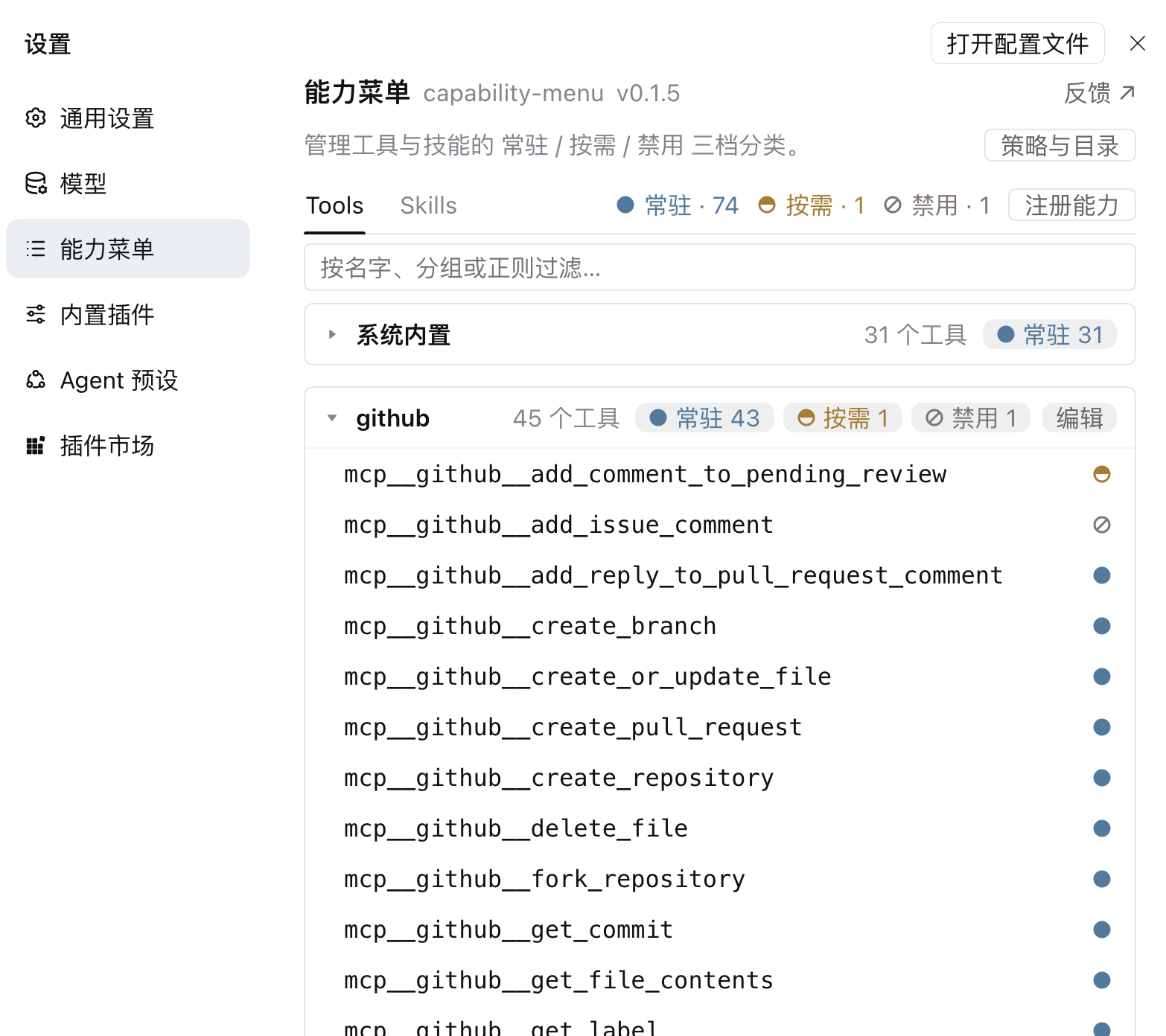
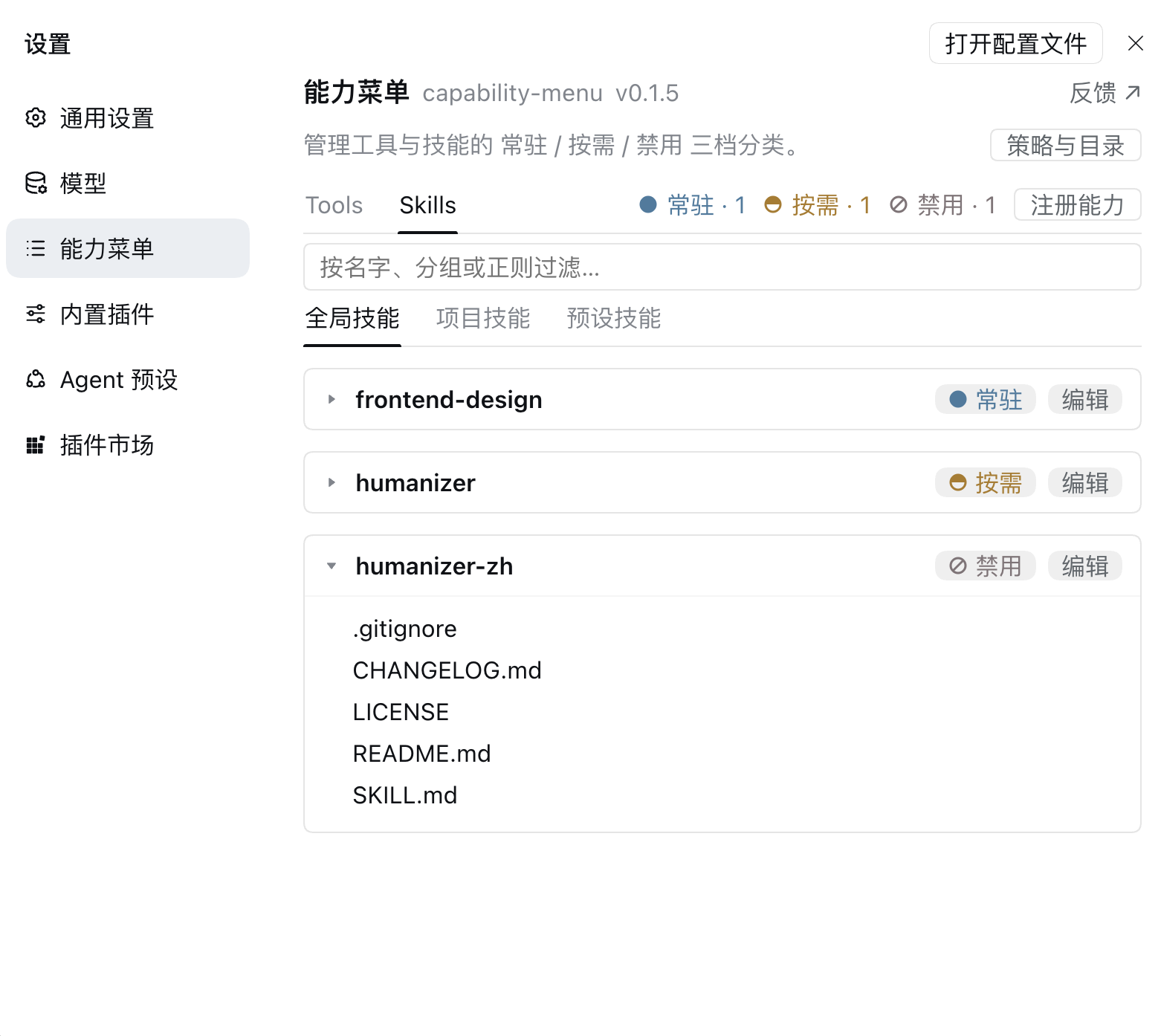
| Change a tier | Click the dot beside a capability. Click a tier count at the top to change the whole group. |
| Find a capability | Use the filter below the tabs to search by name or group. Regex is supported and matching is case-insensitive. |
| View details | Click a Tool to see its definition. Click a Skill to expand its files and preview them; content is rendered as Markdown. |
| Register a capability | Click Register capability in the top right to add an MCP server or Skill directory; Skills accept local paths or public GitHub URLs. |
| Edit or remove | Click Edit on a server group in Tools or a Skill row in Skills. |
| View policies and catalog | Click Policy & catalog on the right side of the page header. |
Registering an MCP server writes its patch configuration; a missing file or parent directory is created automatically. MCP credentials such as request headers are stored in the config; keep it secure. Skill registration creates a link or imports a directory into the selected skill root.
GitHub Skill imports accept a default-branch root URL (the root must contain SKILL.md), a specific branch root https://github.com/{owner}/{repo}/tree/{branch}, or a Skill subdirectory https://github.com/{owner}/{repo}/tree/{branch}/{skill-directory}. Local paths are also supported. Only public repositories are supported; Git must be installed on the machine running dsh. The plugin validates SKILL.md and copies only the selected directory.
Installation and Uninstallation
Prerequisites: Node.js and the dsh CLI. Compatible with DeepSeek Harness 0.1.5-rc.2 and 0.2.0-rc.1 (dsh plugin forwards to pnpm internally, so pnpm needs no separate install).
Install from npm (recommended)
A single package ships both the server-side plugin and the front-end Capability Management page; after installation it appears as its own section in Settings:
# install
dsh plugin --profile web add @daweifu/capability-menu

# upgrade to the version tagged latest on npm (name the version to avoid keeping the installed one)
dsh plugin --profile web add "@daweifu/capability-menu@$(npm view @daweifu/capability-menu dist-tags.latest)"

# To install a prerelease tag such as next, use that tag instead:
# dsh plugin --profile web add "@daweifu/capability-menu@$(npm view @daweifu/capability-menu dist-tags.next)"
The upgrade command installs the version pointed to by npm's latest tag; use the matching tag or an explicit version for prereleases.
Install from source
git clone https://github.com/PKUfudawei/dsh-capability-menu.git
cd dsh-capability-menu
pnpm install                   # the prepare script builds lib/ (server) and lib/client.js (front-end)

dsh plugin --profile web add ./dsh-capability-menu
Verify the install
cd "${DSH_HOME:-$HOME/.dsh}/profiles/web" && pnpm list @daweifu/capability-menu && dsh --profile web --dump-config | grep -m1 '== @daweifu/capability-menu'
Uninstall
dsh plugin --profile web remove @daweifu/capability-menu
Exposure Policy
All capabilities (Tool and Skill) fall into three tiers by their exposure level (what the model sees in the context) and their execution mode:
Tools and Skills three-tier exposure and execution
| tier | capability | what the model sees | how to find it | how to use it |
|---|---|---|---|---|
| Resident | tool | Tool definition is included with every request | No search needed | Call directly; it goes through the full ctx.tools pipeline |
| skill | Name and summary appear in <available_skills> |
No search needed | The skill tool loads the content when needed |
|
| On-demand | tool | Tool definition is not included with requests | Search candidates with meta_search or search the capability catalog YAML (catalogFile) |
Call with meta_invoke, or fetch details and parameters by exact id before calling directly |
| skill | Not shown in <available_skills> |
Search with meta_search or search the capability catalog YAML (catalogFile) |
Load SKILL.md with meta_invoke |
|
| Disabled | tool | Tool definition is not included with requests | Hidden from search results and the capability catalog | Calls are rejected |
| skill | Not shown in <available_skills> |
Hidden from search results and the capability catalog | Loads are rejected |
Scope & reserved tools:
- Tiers apply to MCP and harness-native built-in tools; built-ins use the reserved
built-ingroup. Do not name an MCP serverbuilt-in.meta_searchandmeta_invokeare always Resident and cannot be disabled.run_codeis reserved for Code Mode; it is excluded from the catalog and menu and needs no tier rule.- Keep high-frequency core tools Resident: On-demand built-ins require
meta_search→meta_invoketo use.
Configuration
Rules live under config in this plugin's capability-menu-policy entry:
- The default file is
~/.dsh/cordis.patch.yml; when$DSH_HOMEis set, the file is$DSH_HOME/cordis.patch.yml. - Edit the YAML directly or use Capability Management. UI clicks update memory immediately and write back about 1.5 seconds after input stops, batching writes to avoid repeated hot reloads and catalog rebuilds.
- A profile can override the rules in its own
cordis.patch.yml, targeting the entry ID. In examples,- insert:,id, andnameare Cordis patch structure, not policy fields.
config:
  tools:
    resident: # Resident
      - execute_cmd
      - get_session_context
      - search_kb
      - 'mcp__gongfeng__*'    # wildcard: everything under this server is resident
    on-demand: # On-demand
      - 'mcp__*'              # wildcard fallback
      - 'server:km:*'         # bulk on-demand by server prefix
    disabled: # Disabled
      - 'mcp__secret__*'      # disabled outranks everything, even resident
  skills:
    resident: # Resident
      - debugging
      - coding
    on-demand: # On-demand
      - legacy_skill          # explicit on-demand (unlisted skills default to resident)
    disabled: # Disabled
      - forbidden_skill
  metaTools:
    - meta_search             # always resident; cannot be disabled
    - meta_invoke
All configuration options
| Option | Entry | Default | Description |
|---|---|---|---|
tools / skills / metaTools |
capability-menu-policy |
see above | Tier rules; UI changes are written back to this entry's config after the debounce |
catalogFile |
capability-menu-registry |
~/.dsh/capability-catalog.yaml |
Materialized on-demand catalog path; empty disables it |
refreshDebounceMs |
capability-menu-registry |
200 |
Debounce window (ms) for change-event rebuilds; 0 disables debouncing |
patchFile |
capability-menu-policy |
~/.dsh/cordis.patch.yml ($DSH_HOME wins) |
Patch file that MCP server registration writes to |
skillsDir |
capability-menu-policy |
~/.dsh/skills |
Skill root used by skill directory registration |
persistDebounceMs |
capability-menu-policy |
1500 |
Debounce window (ms) before a clicked tier change is written back to the patch file |
These settings belong to their respective plugin entries and usually live in the same cordis.patch.yml; they do not require separate config files. catalogFile is the generated catalog for model-side search, while skillsDir is a directory for Skills.
Rule priority (evaluated in order: Disabled always wins; between Resident and On-demand, exact rules beat wildcards):
| priority | rule | example | effect |
|---|---|---|---|
| 1 | disabled exact |
disabled: [forbidden_skill] |
hardest deny, overrides everything |
| 2 | disabled wildcard |
disabled: ['mcp__secret__*'] |
block a whole group |
| 3 | resident exact |
resident: [bash] |
keep one capability resident |
| 4 | on-demand exact |
on-demand: [legacy_skill] |
one capability on-demand (what a Capability Management click writes) |
| 5 | resident wildcard |
resident: ['mcp__gongfeng__*'] |
keep a whole group resident |
| 6 | on-demand wildcard |
on-demand: ['mcp__*'] |
bulk on-demand fallback |
| default | no rule matched | — | resident |
If a higher-priority rule overrides a selected tier, the UI reports that the classification did not apply.
On-demand capability catalog (catalogFile)
The plugin writes On-demand Tools and Skills to the YAML file specified by catalogFile so the model can search them. The default is ~/.dsh/capability-catalog.yaml; set it to an empty string to disable the catalog. The catalog is updated when Tools, Skills, or tiers change. When there are no On-demand capabilities, the model receives no catalog hint.
A Skill must be registered in ctx.skills to appear in the catalog. The model can search it with grep / read or call meta_search, then use the capability with meta_invoke. Each entry has an id and kind; a Skill's id is its name.
# ~/.dsh/capability-catalog.yaml (auto-generated; contains only On-demand
# capabilities — Resident ones are already resident and Disabled ones must not
# be discoverable, so neither is written. Lists are emitted as `-` block
# sequences, one item per line.)
capabilities:
  - id: mcp__km__search
    kind: tool
    name: mcp__km__search
    description: Search the knowledge base
    server: km
  - id: legacy_skill
    kind: skill
    name: legacy_skill
    description: A low-frequency skill for working on legacy code
    whenToUse: Use when working on legacy projects
If the model-side bash / read sandbox cannot access the default directory, set catalogFile to a path it can reach. Multiple DSH instances share the default file; use a different path for each instance when they need separate catalogs.
License
This project is licensed under the Apache License 2.0.
Comments
Comments live in GitHub Discussions. Sign in with GitHub to post or react.