
Install
Inside DeepSeek Harness, with dsh-market
dsh plugin --profile web add dshmarket
Or from the command line
dsh plugin --profile web add @noob-stupid/dsh-plugin-console
Installing runs third-party code with your own permissions — it can read your files, use your credentials and reach the network. Review the source first, and pin a commit (github:owner/repo#sha) when you can.
Screenshots
README
Web & Desktop — both supported.
English: README.md | 中文: README.zh.md
DSH Plugin Gating Hub (dsh-plugin-gating-hub)
Renamed from dsh-plugin-hub — old URLs redirect.
Framework upgrade safety & plugin version gating for DeepSeek Harness (DSH): one-click framework upgrade with auto-rollback on failure → one-click rollback to the previous version after an upgrade → plugins the new framework cannot load are auto-disabled → the plugin upgrade gate refuses a version the host can't take. A built-in multi-source plugin market & index (500+ plugins / 300+ skills, zero GitHub API calls) rides on top as the discovery layer — and every source is swappable: install source (incl. a private intranet registry), search source (URL template + headers), index source (self-hosted intranet index), Git source (incl. a local
file://bare repo), so plugins can be installed on an intranet-only or fully offline machine.
Why DSH Plugin Gating Hub
- 🛡️ Framework upgrade safety, end-to-end — one-click upgrade: config backup + full-tree checkpoint (rollback point) → online install (service stays up, page never disconnects) → version verification → auto-restart. A failed install auto-rolls the whole tree back, version check catches fake success, 15-min hard timeout + stall detection — the framework is never left broken. → details
- ↩️ One-click rollback to the previous version — after an upgrade the framework card keeps a 「roll back to previous」 button: stop service → restore full tree → relaunch → health check, state visible throughout.
- 🚫 Incompatible plugins auto-disabled — the adapt gate force-disables plugins the new
framework cannot load (enable locked; the server rejects
/togglewith 409 — unbypassable); 「Check update → Update & adapt」auto-verifies and unlocks them. - 🔒 Plugin upgrade gating — a version/declaration gate (
dsh.engines.framework/engines.dsh+@deepseek-ai/*ranges, built-in zero-dependency semver engine) decides whether a plugin version may run on this host, so an upgrade can't silently take plugins out. - 🧩 Built-in discovery layer — multi-source plugin market (GitHub / Gitee / custom sources)
plus the static index of
dsh-pluginrepos (500+ by stars) and a Skills tab (up to 300); browse, search, one-click install, zero GitHub API calls (served via CDN). Every source is swappable — private intranet npm registry, custom search source (URL template + headers), self-hosted index source, Git source (incl. localfile://bare repo) — so an intranet-only / offline machine can still browse and install. - 🤖 AI Empower — give the console a package name or GitHub repo, the local AI reads its docs and drafts a safe, confirmable deployment plan (install / config / start / health-check); server components get an automatic control card. → details
Install
# npm release (recommended: prebuilt, no git / build authorization needed)
dsh plugin --profile web add @noob-stupid/dsh-plugin-console

# or install from GitHub source (needs git; allowBuilds authorization on first add)
dsh plugin --profile web add github:Noob-stupid/dsh-plugin-gating-hub
Then restart the dsh service → refresh the page → Settings → Plugins → Plugin Console.
Option 2: deploy script (fallback when network is restricted)
Windows (PowerShell):
git clone https://github.com/Noob-stupid/dsh-plugin-gating-hub "$env:TEMP\dsh-plugin-console" 2>$null; & "$env:TEMP\dsh-plugin-console\deploy.ps1"
Linux / macOS:
git clone https://github.com/Noob-stupid/dsh-plugin-gating-hub /tmp/dsh-plugin-console 2>/dev/null; bash /tmp/dsh-plugin-console/deploy.sh
The script copies the plugin into $DSH_HOME/profiles/<profile>/node_modules/ and
idempotently appends an enable entry to cordis.patch.yml. Afterwards:
- Restart the dsh service (host code changes need a process restart; CLI restarts the process, the desktop client exits and reopens);
- Refresh the page → Settings → Plugins → Plugin Console.
Option 3: hand it to an AI in one sentence
Install the DSH plugin hub (dsh-plugin-hub): run
dsh plugin --profile web add @noob-stupid/dsh-plugin-console(npm release); if there is no dsh CLI, clone https://github.com/Noob-stupid/dsh-plugin-gating-hub to~/.dsh/profiles/web/node_modules/and register it incordis.patch.yml(id: plugin-console, name: @noob-stupid/dsh-plugin-console). Restart dsh web afterwards.
Requires: DSH ≥ 0.1.0-rc.6 (web profile, with dsh-client-modules / dsh-host-plugin-inventory).
Highlights
| Benefit | Detail | |
|---|---|---|
| 🤖 | **AI Empower ** | Give the console a package name or GitHub repo — the local AI reads docs, drafts a deployment plan (install / write config / start service / health check) and executes it safely after your confirmation; server-type components get an automatic control card |
| 🛡️ | **Framework upgrade safety & adapt gate ** | Force-disables plugins incompatible with the new framework (enable locked; 「Check update → Update & adapt」auto-verifies and unlocks); full-tree checkpoint before upgrade, automatic rollback on relaunch failure, one-click rollback to the previous version |
| 🏠 | **Family-bundle cards & safety ** | Same-root subpath exports group into one family card (collapse/expand, batch check-update, one-click unlock-adapted, known-check preview); never-crash safety (pre-enable import probe + patch auto-heal + exports fallback); adapt-gate source-scan hard criterion & migrate detection; deleting a bundle sub-row disables only that row |
| 🚀 | Server component cards | Left-side floating card auto-aligned to the main panel: start / stop / status / open Web UI buttons, multi-server dropdown, collapsible |
| 🧩 | Plugin & skill hub | Auto-collected index of dsh-plugin topic repos (500+ by stars) plus a Skills tab (agent-skills ∪ claude-skills ∪ dsh-skill, up to 300) — browse, search, one-click install, no GitHub API calls |
| 🤖 | Auto-collection CI | GitHub Actions reruns build-index every 6 hours (manual trigger available); authors just add the dsh-plugin / agent-skills / claude-skills / dsh-skill topic — no application needed |
| ⚡ | Instant, rate-limit-free | The index is served as a static marketplace/index.json via jsDelivr CDN (10-min host cache); terminal users make zero GitHub API calls |
| 🔄 | Version detection & one-click update | Semver-based; installed entries match npm dist-tags.latest / beta; subpackage mismatch warnings prevent mixed-version breakage |
| 🔀 | Multi-source | GitHub / Gitee (direct-repo mode) / custom search sources (URL template + header auth + private http); ⊞ merges GitHub + all custom sources in parallel |
| 🔒 | Safe by default | Loopback-only routes; AI fallback behind an explicit cost-consent modal; infrastructure rows are toggle-protected |
- Highlights
- AI 赋能与服务器组件控制
- One-click install
- Usage
- Features
- How it works
- Compatibility
- Project layout
- HTTP endpoints
- 安全
- Known limitations
- Help & Ecosystem
- Contributing
- Changelog
- License
Usage
- Restart DSH → open the Web GUI → Settings → Plugins → Plugin Console.
- Installed list: toggle plugins on/off (HMR applies within ~1s), search by name/id, expand details (version, repository, README summary).
- 市场: empty query on the GitHub source opens the static index (instant);
type a query to search live. Switch sources via the login pill (GitHub / Gitee / custom);
⊞merges all sources;★filters todsh plugin add-installable packages. - Skills tab: switch 插件/技能 next to the search box to browse and install skills
(cloned into
~/.dsh/skills/<name>/). - Install: click 添加到本地 → the chain runs in the background (safe to leave the page); 「检测更新」/「更新 → vX」 appear automatically for installed entries.
Screenshots · 界面一览
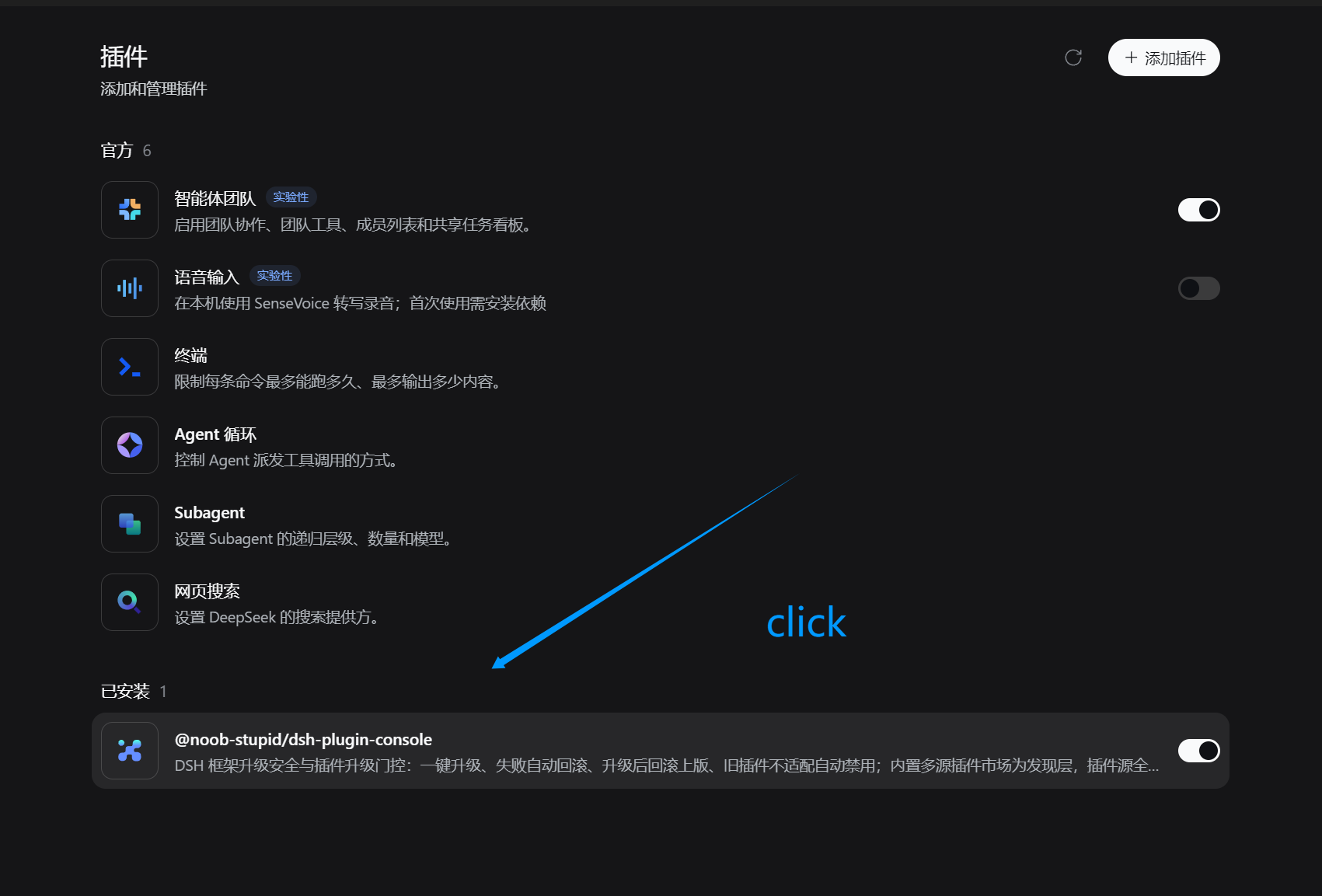
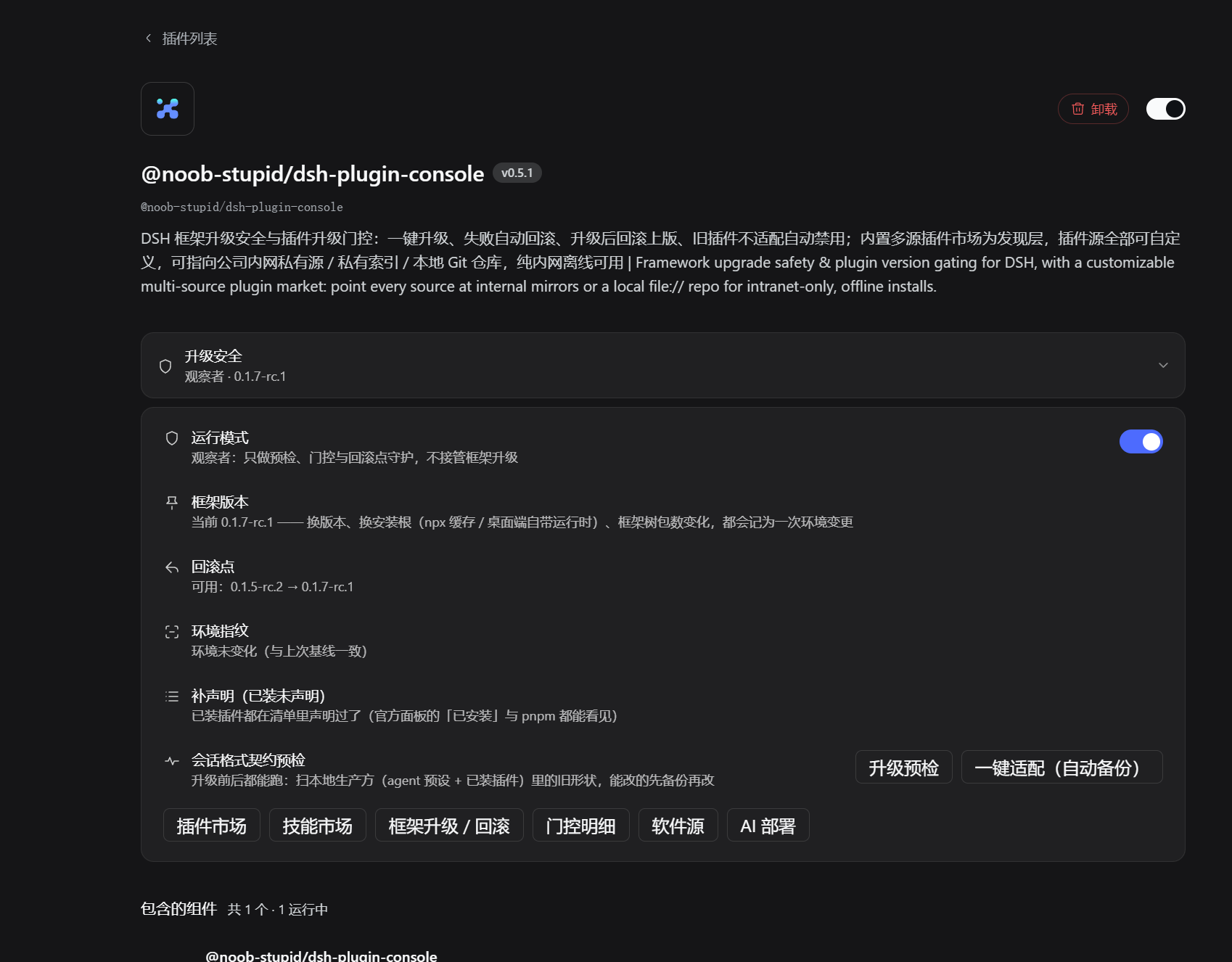
入口挂在官方插件管理页自己的插槽(
plugins.bundle.config,key = 包名):装完之后它出现在 「设置 → 插件 → 已安装」里我们这一条下面,用的是官方容器与官方风格 —— 不是 DOM 注入,官方更新也不怕。
1 · 已安装列表里的入口(官方页,点开我们这条即见)
2 · 「升级安全」面板(就地展开:运行模式 / 框架版本 / 回滚点 / 环境指纹 / 补声明 / 契约预检 / 各功能入口)
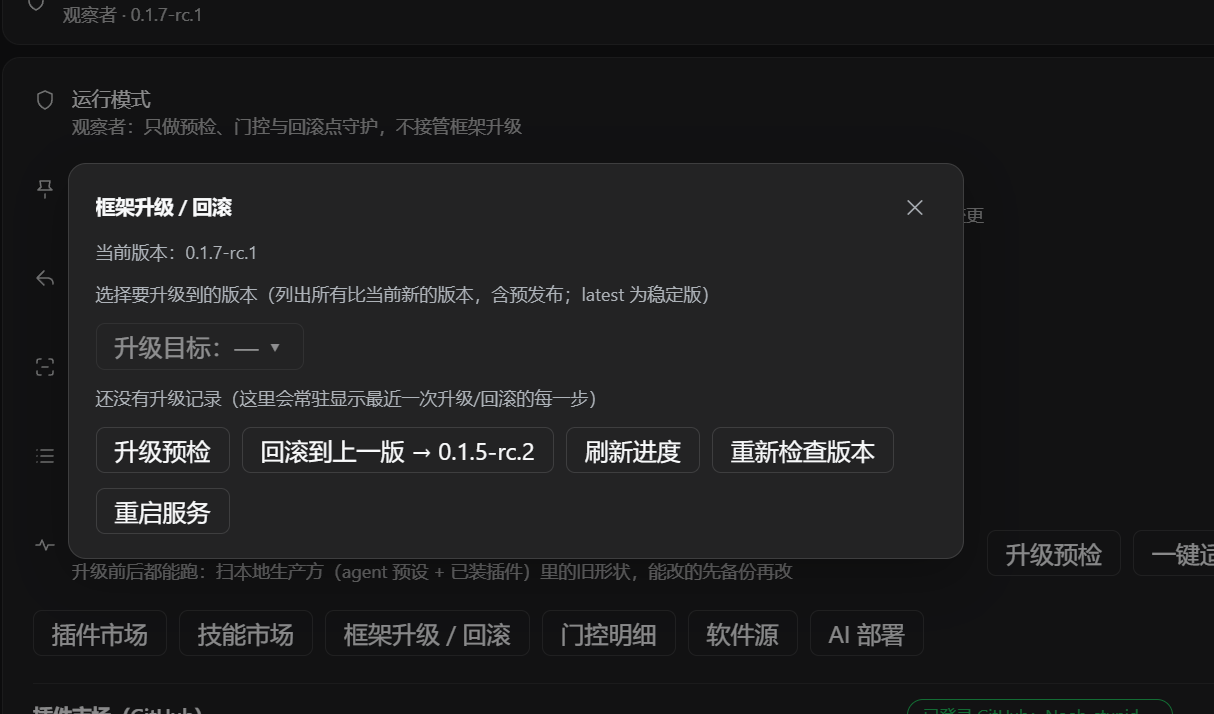
3 · 框架升级 / 回滚(可选目标版本、常驻的升级进度、一键回滚上一版)
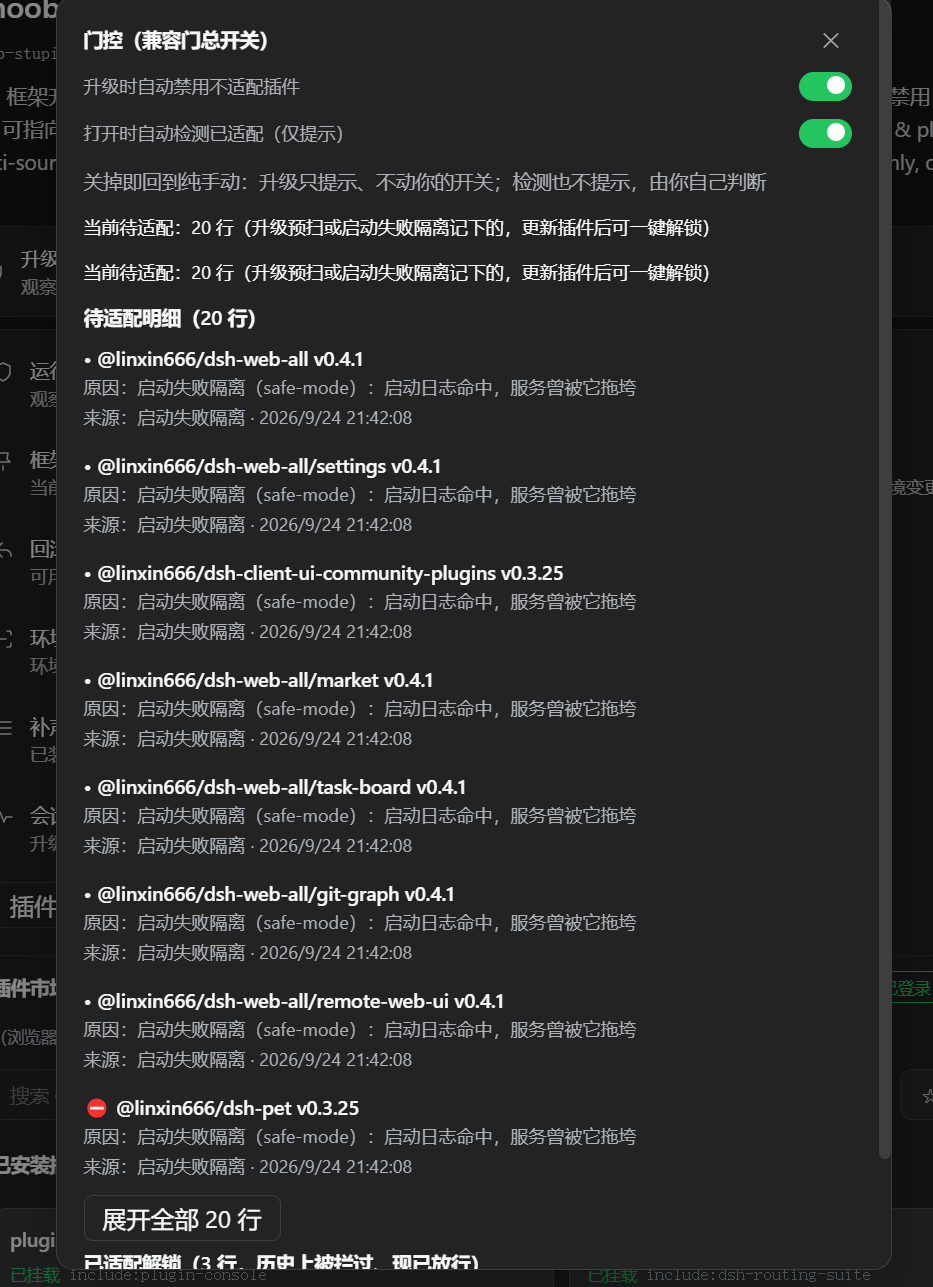
4 · 门控明细(谁被隔离、为什么:升级预扫 or 启动失败隔离,附来源与时间)
Features
Installed plugins (one-click toggle + details)
- Shows only third-party plugins by default (extra/non-bundled), tagged "Third-party" with a delete entry; click "All" to see the full list (1.5s flash feedback);
- Lists every plugin entry (name, load state, enabled state); search by name/id;
- Disable = append
- id: X+disabled: trueto the user patch layer, effective via HMR; - Enable = remove that entry; bundle-layer rows disabled by default are overridden with
disabled: false; - Tags "Patch-disabled / Patch-forced" distinguish user patch state;
- Infrastructure protection: host transport/hmr/storage/settings chain plugins (70+ rows) are marked "Protected" and cannot be toggled — disabling them would break HMR;
- Details panel: version, repository/homepage links and a README summary for each plugin;
- Version check: 检测更新 reads npm
dist-tags.latest(curl channel, works even when node networking is blocked) and warns about subpackages that need syncing (depsOutdated).
Framework one-click upgrade (deepseek-harness card)
- The deepseek-harness card shows 「框架升级 → vX」 when a newer framework version is
available (stable
latestpreferred;nextchannel whenlatestequals the installed version); clicking runs the full flow: backup config + framework snapshot (rollback point) → online install (service stays up, page never disconnects) → version verification → auto-restart to apply; - Real-time progress: a
DSH-Upgradeconsole window pops up showing live pnpm download progress; the in-panel progress card shows the waiting time; - Upgrade protection: failed installs auto-rollback (robocopy, backup verified before upgrade), version check catches fake success, 15-min hard timeout, stall detection (no debug-log updates → auto switch registry), global trap fallback, and 15-min stale-state cleanup — the framework is never left broken;
- pnpm channel: npm-cli.js freezes at startup in the schtasks task environment (0-byte
debug log, no network requests ever sent); upgrades use
corepack pnpm(starts in ~0.4s, installed rc.8 in 11.5s) against the npmmirror (China) registry, withdangerouslyAllowAllBuildsso native modules (node-pty/koffi) compile; - Runtime bin resolution: under the pnpm layout
@deepseek-ai/dshis a Junction — the relaunch step resolvesbin.jsat runtime (follows the Junction to the current version) instead of using a path baked in at script-generation time; - Card dismiss semantics: terminal states (done/failed) are permanently dismissed on ✕ (persisted); in-progress dismissal is session-only and the card returns after a refresh.
Marketplace (multi-source)
- Source switcher: click the login pill to switch between GitHub / Gitee / custom sources (persisted); title, loading text, placeholder and note all follow the source;
- GitHub: default query
dsh-plugin, browser-direct with server fallback; - Gitee: official search API is retired, so it uses direct-repo mode — enter
owner/repo(Chinese paths and full URLs supported) to find and install a repository; - Custom sources: add in Source Manager (URL template with
{q}/{page}placeholders), optional header auth (e.g.Authorization: Bearer ...), and local/private http URLs; - Multi-source summary: the
⊞toggle searches GitHub + all custom sources in parallel, merging results with source labels; - ★ official filter: shows only packages installable via
dsh plugin add— root packages with adsh.bundlemanifest (official) or aggregate repos whose subpackage carriesdsh.bundle(subpackage-installable); markers are enriched by the server (curl dual-channel) with a client-side fallback; - Type badges: 官方 / 聚合 / 技能 (repo contains SKILL.md) recognized automatically.
Network environment notes (why a multi-source setup can look "all dead")
- Accelerators/proxies that rewrite hosts kill the direct sources: tools like Steam++ often point
github.comat127.0.0.1, so the GitHub direct source,raw.githubusercontent.comandapi.github.comall become unreachable — the plugin is not broken. The console now reports this honestly as "local proxy / certificate interception (…) — an accelerator or proxy was detected, turn it off and retry" instead of a vague "network unreachable".- Free mirrors are unreliable for the git protocol on large packs, while archive/raw are usually fast: measured on the same ghproxy.net host, archive (plain HTTP) ran at 4 MB/s while the git protocol moved 0 B/s. Since this version the git channel has a stall criterion (switch source after 20 s below 1 B/s) plus its own budget, and falls back to the archive channel (download the tarball, extract, create the repo — equivalent to a clone) when all git sources fail. No manual source switching needed.
- To reorder transports, use Source Manager: git sources, archive sources and index sources all support primary→backup plus self-hosted mirrors (internal Gitea/GitLab, local
file://bare repos).
Download-install channels and dependency forms
Which channel gets used depends on what the package actually is — not on a setting:
| Channel | Target | When it is used | Written in the manifest as | Needs plugin-src |
|---|---|---|---|---|
| ① pnpm (registry) | npm registry | if the package is on the registry, this is the main channel | <name>: <version> |
no |
| ② curl tarball (registry) | npm registry tarball | races in parallel with ① (takes over when pnpm is blocked/stuck) | same as above | no |
| ③ GitHub Release asset | prebuilt tgz of an upstream release | when both registry sources 404 | link:<absolute path> |
yes |
| ④ git clone | repository source | no npm package / no release asset | link:… |
yes |
| ⑤ archive (tar.gz) | codeload / mirrors | when the git protocol cannot move any bytes | link:… |
yes |
In one sentence: has an npm package → ①/②, write a version, keep the lock clean; no npm package →
fall back to ③/④/⑤, materialize into ~/.dsh/plugin-src/<pkg> and write link:.
Environment reminder: an accelerator/proxy that rewrites hosts makes the direct sources unreachable (see above), and free mirrors are unreliable for the git protocol on large packs while archive/raw are usually much faster — the console already switches by itself.
Static index market (plugin & skill tabs)
Hybrid architecture: browsing uses the static index (instant, zero GitHub API calls), searching uses live channels (GitHub search API / multi-source parallel) — they complement each other: a brand-new repo can be found by live search even before it enters the index.
- Empty query on the GitHub source shows the static index (
marketplace/index.json, jsDelivr CDN + 10-min host cache): 500+ plugins by stars, instant, zero GitHub API calls; - 插件 / 技能 tabs next to the search box: the skills tab lists auto-collected
agent-skills∪claude-skills∪dsh-skillrepos (up to 300); - Auto version check: installed entries in the market are checked against npm
dist-tags.latestin the background — cards turn into 「更新 → vX」 buttons; - Skill install: skill entries install by git-clone into
~/.dsh/skills/<name>/(frontmatternamewins over repo name; SKILL.md found at repo root or first-level subdirectory). Installed skills show a grey 「已装」 badge.
Source Manager
The floating "Sources" button (right of the title row, semi-transparent) opens the manager:
- Install sources (registry): add / inline edit / set primary / restore defaults; private and intranet addresses supported; deletion is protected (install-critical);
- Search sources: built-in GitHub, Gitee + custom search sources (add/remove,
🔒shows header count); - Gitee login (optional): direct mode needs no login; login only raises rate limits — create a third-party app (gitee.com → Data management → Third-party apps, scopes user_info, projects), fill client_id / client_secret, save, then authorize.
Run mode (managed / observer)
The mode decides who leads framework upgrades — nothing else:
- Observer (default): the console only preflights, gates, and guards the rollback point. It does not take over upgrades.
- Managed: framework upgrade and rollback are owned by this console. It switches to managed automatically when you upgrade through this console, and records the reason.
Boot-failure quarantine is not affected by the mode. When the service cannot start, the console locates the culprit from the boot log and disables it (broken presets are renamed to .broken-*; with no clear culprit it falls back to safe mode so the service can start). A console that cannot boot cannot gate anything — so this rescue path always runs.
Framework compatibility
Measured on isolated instances (fresh DSH_HOME, real HTTP probes) — supported: framework ≥ 0.1.5-rc.2, no workarounds needed.
| 0.1.7-rc.2 (current) | 0.1.5-rc.2 / 0.1.2-rc.1 | |
|---|---|---|
Official plugins page (@deepseek-ai/dsh-client-ui-plugin-manager) |
present | not shipped by the framework at all |
| The official-style Upgrade safety entry | shown (hosted in that page's own plugins.bundle.config slot) |
not shown — there is no page to host it |
Classic Plugins tab (settings.plugins.tab) |
shown | shown |
| Server-side features (upgrade / rollback / gating / marketplace) | all available | all available (every route answered 200 in the matrix) |
| Errors | none | none (the slot registration degrades silently) |
So on an older framework the plugin is the old UI with the full feature set — the new entry simply has nowhere to live. It never white-screens and never throws.
Verification matrix, raw logs and the one framework-side caveat (0.1.2-rc.1 ships patchReload: "live" for a web tree without the HMR service → boot exits 1 after ~10s; unrelated to this plugin) are recorded in .testdir/fw-old-matrix/report.md.
Documentation
- AI Empower 与服务器组件控制
- Framework upgrade safety & plugin adapt gate
- 契约规则库 Upgrade contract rules — 框架每次变更会打断什么、怎么发现、怎么修(数据在
lib/contracts/rules.json,欢迎 PR 补充:每个事故都应该变成一条规则) - How it works · Compatibility · Project layout
- HTTP endpoints · Local AI fallback & consent
- Framework patch (cordis.patch.yml) · Security & disclaimer
Known limitations
- Host code changes require a service restart (the panel's restart button is watchdog-safe); client changes just need a page refresh;
- Live GitHub search depends on GitHub reachability (browser-direct + server fallback; during network-blackout windows retry later);
- Version detection works for npm-published packages; skill-type repos have no version concept;
- The static index is capped (500 plugins / 300 skills per build); authors bump their star count or wait for the 6h CI cycle to enter the index;
- Skills are discovered by
dsh-skill-filesystem— if the current profile does not enable that plugin, installed skills stay dormant until it is enabled and DSH restarted.
##帮助
- Panel missing: restart dsh → refresh → Settings → Plugins → Plugin Console.
- Toggle does nothing: infrastructure rows are "Protected" (by design); normal toggles take effect via HMR within 1-3s.
- Compatibility warning: a breaking upstream release arrived; see Compatibility.
- Search empty/fails: GitHub uses browser-direct (falls back to the server channel);
Gitee is direct-repo mode (enter
owner/repo); check custom-source URL/headers; retry during network blackout windows. - ★ filter empty: ★ shows only
dsh plugin add-installable packages (official + subpackage-bundle aggregates); markers are backfilled in 1-3s — no false "none" report. - Install fails: confirm the repo has package.json and the package is published; npm failures fall back to git install; switch the primary source if npmmirror is unstable.
- Skill not found by DSH: enable
@deepseek-ai/dsh-skill-filesystemin the profile (cordis.yml) and restart; skills live in~/.dsh/skills/<name>/.
Ecosystem & discoverability
- Listed on awesome-dsh-plugin (the community main list) and DSH Directory;
- This hub's own auto-collection index (500+ plugins / 300 skills, refreshed by CI every 6h) includes any repo tagged
dsh-plugin/agent-skills/claude-skills/dsh-skill— tag your repo and it appears in the market automatically, no application needed; - If you build DSH plugins, this panel is your distribution channel: one-click install for every user of the hub.
Support
If this panel saves you time or makes DSH more fun to use:
- ⭐ Star this repo — it directly helps more DSH users find it;
- Share it with DSH users or in DSH communities;
- Submit your own plugin (tag it
dsh-plugin) to grow the ecosystem; - Found a bug or want a feature? Open an issue.
Contributing
Contributions of all kinds are welcome — issues, PRs, docs, translations.
- Guidelines: CONTRIBUTING.md
- Code of Conduct: CODE_OF_CONDUCT.md
- Security policy: SECURITY.md (report vulnerabilities privately)
- Issue templates: bug reports & feature requests via the new issue page
Changelog
See CHANGELOG.md.
License
MIT
Preview (experimental · not for production)
The layered-refactor preview lives in its own repository: Noob-stupid/dsh-plugin-hub-refactor
- What it is: the monolithic
lib/index.js(8547 lines) split into layers —lib/index.js141 lines +lib/server/**38 modules; feature-equivalent to0.3.57, maintainability only; - Verified: 19 test suites green · 8 architecture-guard assertions · route inventory identical (
status+ response fields) against the stable build; - Not yet exercised: real framework upgrade / rollback, restart guardian, component start/stop, real AI run, Gitee OAuth (~10–25% long-tail risk, subjective);
- For everyday use stick to the latest npm release of
@noob-stupid/dsh-plugin-console(npm view @noob-stupid/dsh-plugin-console version), ormainof this repo.
Comments
Comments live in GitHub Discussions. Sign in with GitHub to post or react.