
Install
Inside DeepSeek Harness, with dsh-market
dsh plugin --profile web add dshmarket
Or from the command line
dsh plugin --profile web add github:Meredith2328/dsh-sticky-note
Installing runs third-party code with your own permissions — it can read your files, use your credentials and reach the network. Review the source first, and pin a commit (github:owner/repo#sha) when you can.
README
This plugin publishes its README in Chinese only.
左下角便签:随手记点子 / 感想 / TODO,实时保存到归档目录,清单 + 悬浮归档。
适配 DSH
0.2.0-rc.2:用户配置改用插件自己的Config(volatile 字段写回 profile patch),设置卡片继续挂在插件管理器的详情页。
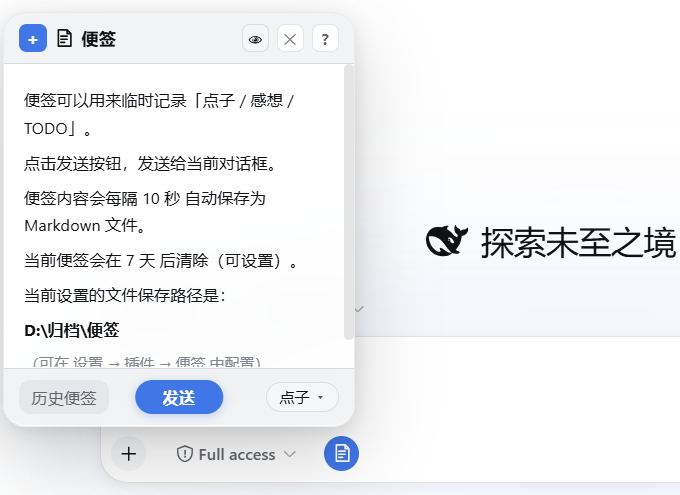
✨ 功能
- 📝 随手记:编辑框工具栏上的便签按钮,点击弹出便签面板
- 📍 可选固定:从标题栏操作中固定后吸附到屏幕边缘,外部点击不再关闭;固定状态与位置会被记住
- 🔁 可选续写:可在插件设置中选择重新打开时继续当前草稿;默认关闭,保持原有行为
- 🔎 整体缩放:标题栏操作提供
− / 倍率 / +,支持Cmd/Ctrl + + / - / 0,倍率会被记住 - 💾 自动保存:按设定间隔(10 秒 / 1 分钟 / 5 分钟)自动落盘,
Ctrl+S立即保存 - 🏷️ 三分类:点子 / 感想 / TODO,快捷键
Ctrl+Shift+1/2/3切换 - 📤 一键发送:便签内容直接发给当前对话(或追加到输入框)
- 📋 历史便签:分组清单 + 展开收起,双击查看、单击预备发送,归档分组可一键恢复
- ✏️ 可编辑:历史便签可二次编辑保存;外部编辑器改动后查看视图自动刷新
- 📌 选择保留:标记保留的便签不会被自动清除(针形图标)
- 🧹 自动清除:按最后修改时间计龄,超期未保留的先移入「已清除」回收站(保留 30 天),Host 定时触发
- 🖥️ Markdown:编辑 ↔ 实时预览(
Ctrl+Shift+V),支持表格 / 任务列表 / 删除线 / 图片 - 🌓 深色模式:全部配色跟随 DSW 主题变量,深浅自动切换
- ⌨️ 快捷键:
Esc层层退出、Tab/Shift+Tab缩进、Ctrl+Shift+X删除线、Ctrl+Shift+T任务项、Ctrl+T表格骨架等 - ⚙️ 可配置:存储路径、保存间隔、清除周期、默认类别、发送方式、是否继续当前草稿
📦 安装
dsh plugin --profile web add github:Meredith2328/dsh-sticky-note
或本地目录:
dsh plugin --profile web add file:/path/to/dsh-sticky-note
安装后重启 DSH(Web 或 Desktop)。
请不要使用裸包名
dsh plugin ... add dsh-sticky-note;npm 上的同名包不是本项目。
版本对应关系:
- 便签 v0.6.0 → DSH
0.2.0-rc.2 - 便签 v0.5.0 → DSH
0.1.6-alpha.2 - 便签 v0.2.3 → DSH
0.1.0-rc.7~0.1.1-rc.2
v0.6.0 的适配集中在配置的存取接缝上。@deepseek-ai/dsh-settings 不再提供 ctx.settings.register(namespace, schema):插件改成导出自己的 Config,把用户可改的字段标成 .volatile(),Loader 解析后作为 apply(ctx, config) 的第二参数下发,字段是带 .get() 的引用,设置表单与 profile patch 都按这份 schema 走;写回改用 ctx.settings.update(条目 id, patch),并通过 ctx.settings.configure({ auto: false }, ctx.fiber) 说明设置页由插件自己的卡片渲染。同时 connection.rpc.handle 只收 (channel, handler),旧的 { authority: 'loopback' } 选项已经不存在;settings.plugin.item 插槽在 0.2.0 里没有声明,旧的兜底注册一并删除。读不到 settings 服务时(例如测试直连 handler)仍旧退回 ~/.dsh/sticky-note-config.json。
🗂️ 存储结构
<root>/
├── 点子/    ← 以时间戳命名的 .md 文件
├── 感想/
├── TODO/
├── 归档/    ← 归档的便签(前缀类别名,可一键恢复)
└── 已清除/  ← 自动清除的回收站(保留 30 天)
默认根路径 ~/.dsh/sticky-notes(DSH_HOME 下),可在设置页修改。
🤝 贡献
外部贡献采用先 Issue、后 PR 的流程。请先阅读 CONTRIBUTING.md;未经确认的 PR 暂不进入人工代码审查。
📄 License
MIT
Comments
Comments live in GitHub Discussions. Sign in with GitHub to post or react.