
Install
Inside DeepSeek Harness, with dsh-market
dsh plugin --profile web add dshmarket
Or from the command line
dsh plugin --profile web add dsh-answer-highlighter
Installing runs third-party code with your own permissions — it can read your files, use your credentials and reach the network. Review the source first, and pin a commit (github:owner/repo#sha) when you can.
Screenshots
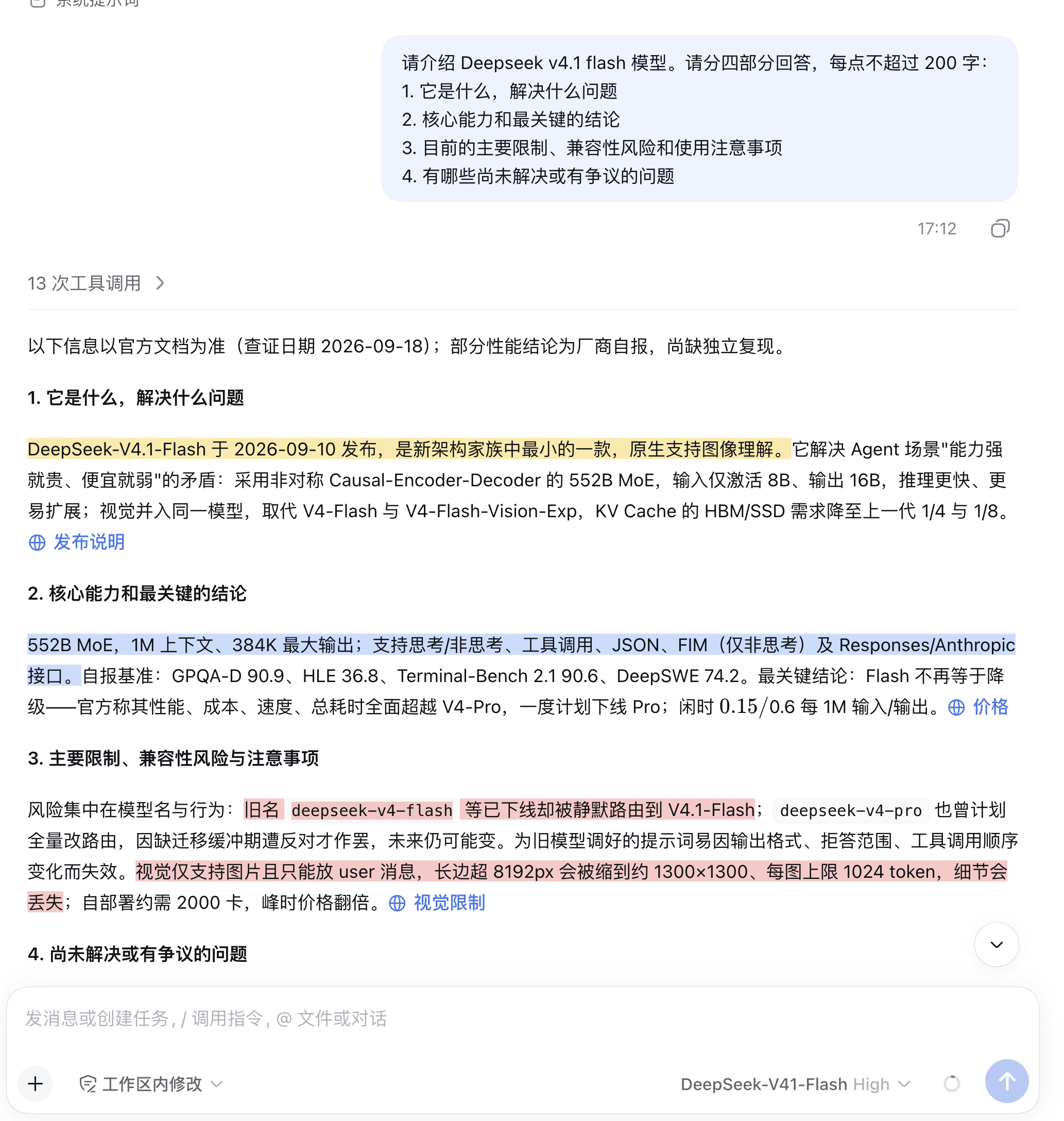
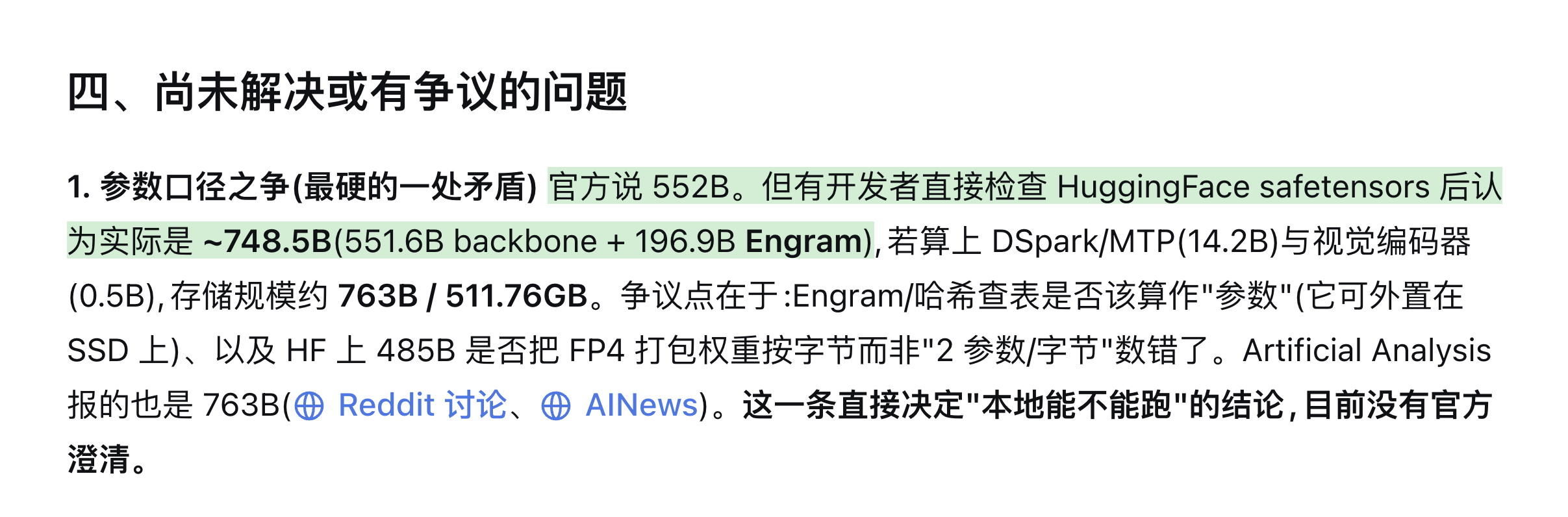
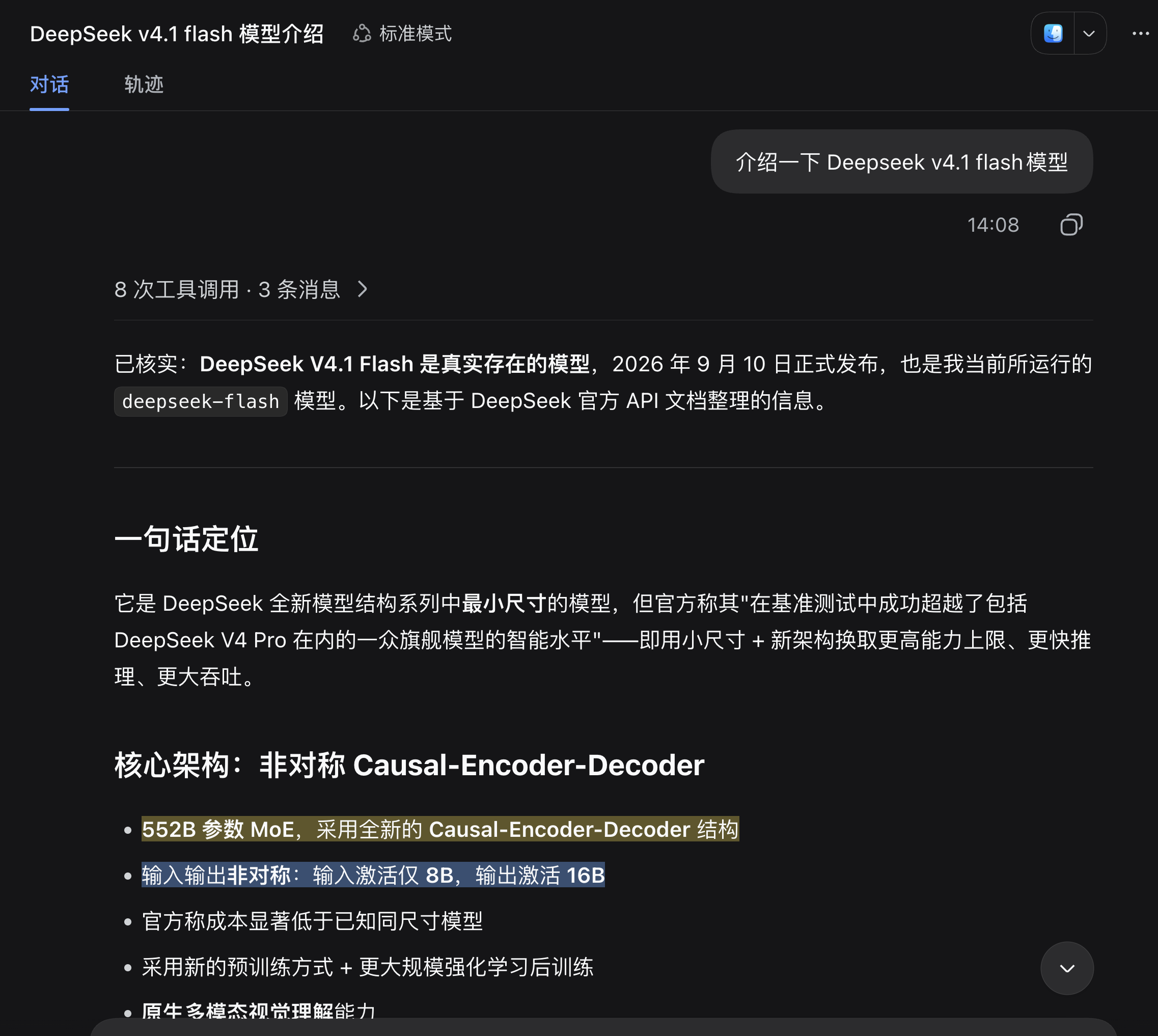
README
Automatic key-point, definition, warning, and question highlighting for AI answers in DSH Web. The main answer keeps streaming as usual; annotations are generated after the answer completes and rendered in place.
1. What Problem It Solves
Highlights answers like PDF annotations. In long AI responses, important information is often buried in sentences rather than headings. This plugin makes those sentences easy to scan.
After an answer completes, the plugin makes one additional model call to identify notable passages. It uses deepseek-official/deepseek-flash by default. This call only produces annotations; it does not affect the main answer or rewrite the original session log.
2. Features
- Generates annotations after an answer completes
- Four semantic highlight types, described below
- Automatic light and dark theme support
- Restores highlights after page refresh
- Local JSONL storage
- Does not rewrite the original answer or session log
| Type | Color | Use |
|---|---|---|
key-point |
Bright yellow | Conclusions, core facts, and the most important information |
definition |
Blue | Concept explanations, terminology, and boundary conditions |
warning |
Bright red | Risks, limitations, deprecations, and counterintuitive caveats |
question |
Green | Open questions, unresolved points, and user decisions |
Colors above describe the light theme. Dark theme automatically adjusts brightness and opacity for readability.
3. Requirements
- DSH Web
- Node.js 20 or later
- A browser supporting the CSS Custom Highlight API
- A configured and available DeepSeek model route
4. Installation
Run this in the plugin directory:
npm install
npm run build:client
Install it into the DSH web profile:
dsh plugin --profile web add github:Matcha-Eason/dsh-answer-highlighter
5. Quick Start
- Start DSH Web.
- Start a new conversation.
- Wait for the main answer to complete.
- Highlights usually appear after another 3–8 seconds.
6. Default Model
The plugin uses deepseek-official/deepseek-flash to generate annotations. This is a separate auxiliary model call and consumes additional tokens. To use another model, override provider and model in the plugin configuration. To follow the main answer model, configure both fields with the same route.
7. How It Works
Main answer completes
  ↓
Read user question and answer text
  ↓
Call deepseek-flash to generate annotations
  ↓
Validate quotes and write local JSONL
  ↓
Browser polls the annotation API
  ↓
Locate text in the DOM and render highlights
The main answer and annotation pipelines are separate. Annotation failures do not affect the main answer.
8. Data and Privacy
Annotations are stored at:
$DSH_HOME/plugin-data/dsh-answer-highlighter/annotations
Set DSH_ANSWER_HIGHLIGHT_DATA to use another directory. Each session gets one JSONL file, with one line per assistant message. Empty annotation results are also recorded to avoid repeated model calls.
9. Browser Support
The browser must support the CSS Custom Highlight API. Supported browsers show the four-color highlights; unsupported browsers keep the page unchanged. Safari is currently unsupported.
10. FAQ
Why are there no highlights?
- Old sessions are not backfilled
- The answer may not be complete yet
- The browser does not support the CSS Custom Highlight API
- The returned quote cannot be uniquely located in the DOM
- The annotation call failed or timed out
Does it consume extra tokens?
Yes. After each answer completes, the plugin makes one separate call to deepseek-flash.
Are old sessions backfilled?
No. Only assistant messages that complete after the plugin is running are annotated.
11. Uninstall
dsh plugin --profile web remove dsh-answer-highlighter
To remove local data completely, delete the default storage directory.
12. License
MIT
Comments
Comments live in GitHub Discussions. Sign in with GitHub to post or react.