
Install
Inside DeepSeek Harness, with dsh-market
dsh plugin --profile web add dshmarket
Or from the command line
dsh plugin --profile web add dsh-themes
Installing runs third-party code with your own permissions — it can read your files, use your credentials and reach the network. Review the source first, and pin a commit (github:owner/repo#sha) when you can.
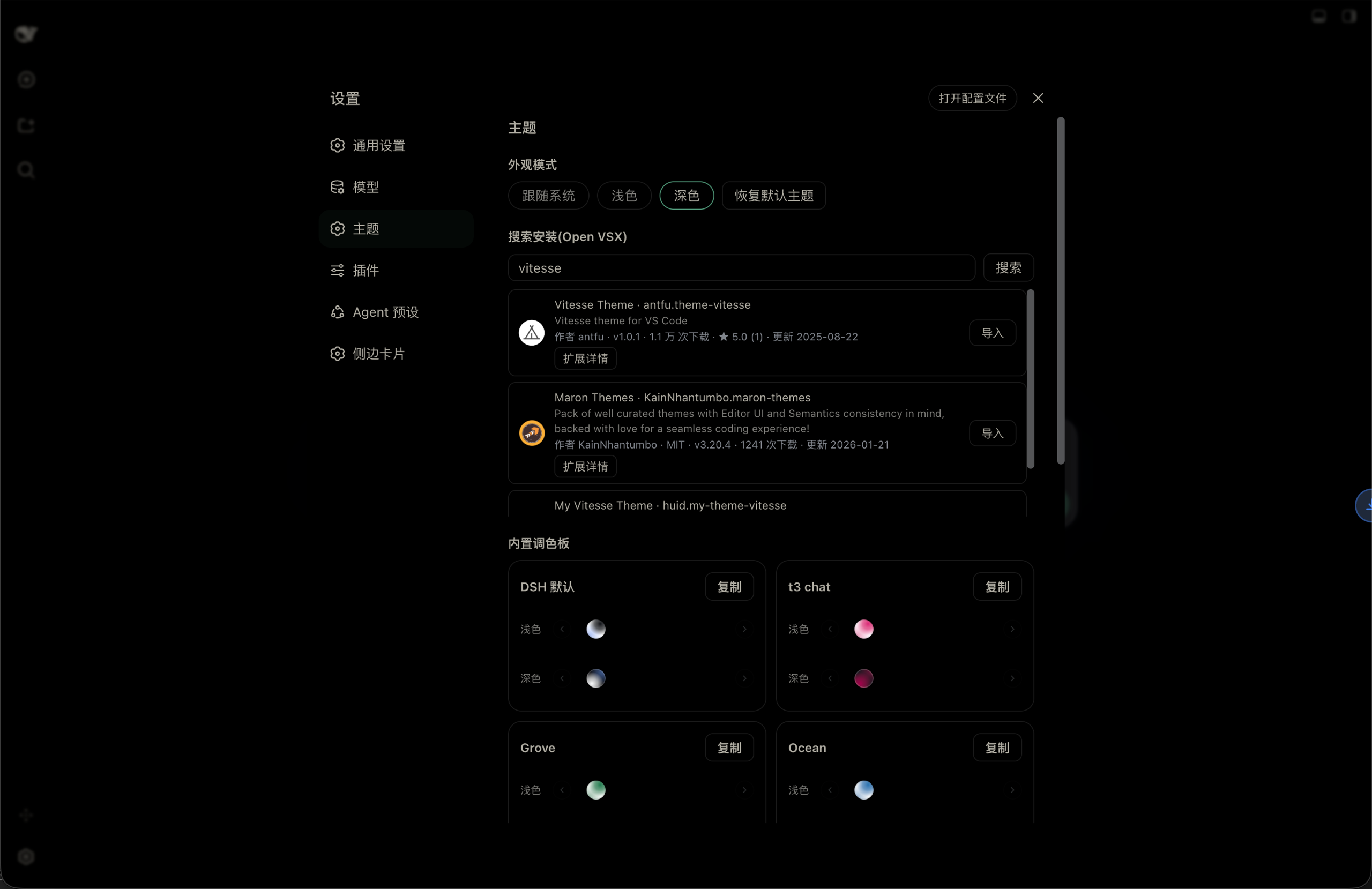
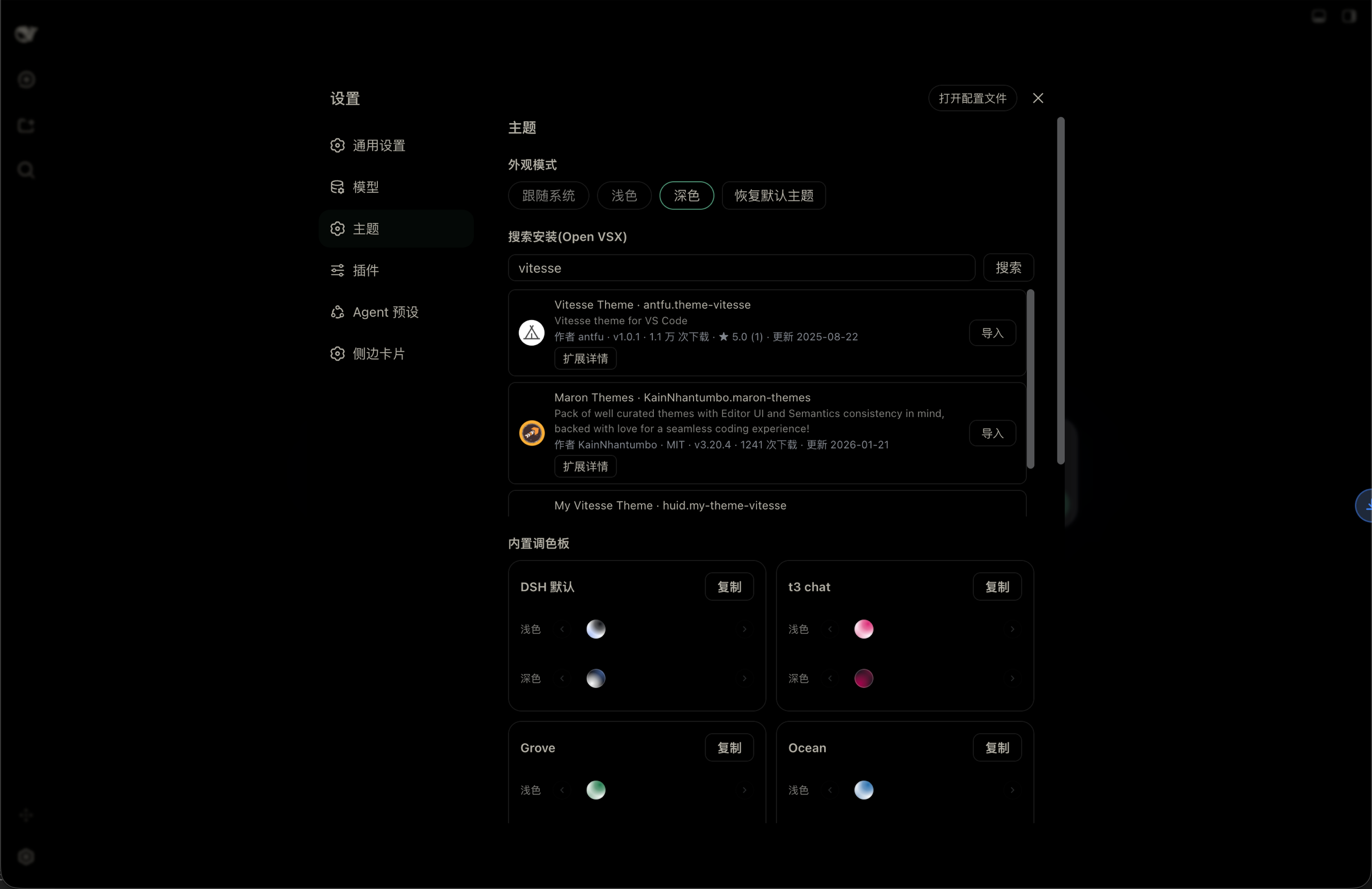
Screenshots
README
dsh-themes
English | 中文
A look & theme plugin for DSH (DeepSeek Harness): built-in palettes, light / dark / follow-system appearance modes, Open VSX search & install, VS Code theme import, persisted theme library.
The theme engine (semantic role mapping, dual-seed generation, contrast solving, OKLCH perceptual import mapping) is architecturally inspired by t3code.
Compatibility
- Requires DSH
>=0.1.5-rc.1 <0.2.0(declared throughpeerDependencies, which DSH's plugin compatibility gate evaluates) - Verified on 0.1.7-rc.2 (current latest) and on 0.1.5-rc.2
- The Host half no longer uses
connection.rpc.handle; it registers the exact Fetch route/api/dsh-themesthroughconnection.fetch.register, so DSH's own/apiprefix route forwards it with the trusted-host fence and browser-session authentication attached — no consumer-sidewebServerinjection required. Since 0.1.7,connection.rpc.handleattaches the route to Connection's own fiber (owner.effect(() => owner.webServer.register(…))), so a consumer call throwscannot get property "webServer" without inject - Therefore the old
inject: [webRuntime, webServer]addition on theconnectionrow in a profile'scordis.patch.ymlis no longer needed and can be removed since 0.1.9
0.2.0: import fixes & speedups
This release fixes "importing Tokyo Night reports contributes no color themes". The cause was not the extension — it was this plugin's parser:
- VS Code themes are JSONC. All three theme files in
enkia.tokyo-nightcontain//comments (a whole block of commented-out keys from line 87), while the old host used strictJSON.parse— all three failed, the host returned an empty theme list, and the UI wrongly reported "contributes no color themes". Everything now goes throughjsonc-parser, the same approach t3code takes (parse(text, errors, { allowTrailingComma: true })): comments, trailing commas and a BOM all parse, consistently across the local-scan, URL, paste and VSIX paths. - The light variant was classified dark. Tokyo Night Light's theme file says
"type": "dark"(an upstream typo); only the extension manifest'suiTheme: "vs"is right. Following t3code, the manifestuiThemenow overrides the file'stype, so the light variant finally lands in the light slot. - Faster imports:
- On-demand unzip — the bulk of a VSIX is readme / changelog / icons /
.itermcolors, while theme files are always.json.fflate'sfilternow inflates only JSON instead of everything. - Compact payloads — only the 44 workbench color keys the palette mapper actually reads are kept;
tokenColors/semanticTokenColorsare dropped. Measured on Tokyo Night's three themes: 117,679 → 4,412 bytes (-96.25%) of RPC payload. (Basis of comparison: the summed minifiedJSON.stringifyof the three theme files — i.e. what a client would receive without compaction.) - One batched detail call — author/license enrichment after a search went from N RPCs to a single
open-vsx-details. - Search cache + short timeout — the same query hits an in-memory 60 s cache; a slow Open VSX fails after 10 s instead of leaving the UI waiting for 90 s.
- On-demand unzip — the bulk of a VSIX is readme / changelog / icons /
- Toasts instead of inline text — success/failure now uses DSH's native
Toast(the@deepseek-ai/dsh-client-ui-primitivesseed-word module): top-center, slide-in/fade-out built in,z-index: 1100above every panel. No longer rendered at the bottom of the settings page, where nobody could see it. - Animated search — 350 ms input debounce, Enter searches immediately (IME composition aware), an
inline spinner in the field, a loading state in the results area, and rows that fade in, all honoring
prefers-reduced-motion. - Regression tests —
node scripts/e2e-import.mjsdrives the whole pipeline against the real Tokyo Night VSIX (52 assertions, including the cold-cache download path that was once missed);node scripts/check-vs-keys.mjskeeps the color whitelist covering every key the mapper reads.
Features
- Theme card model: each theme has light/dark variant slots aggregating all variants of that side; imported extensions become one theme card
- Default theme fallback: the DSH native appearance is itself a selectable theme; deleting the in-use imported theme or clicking "Restore default theme" falls back to it
- Variant selector: blended color-ball list (like t3code's ThemePreviewCircle); selected ball enlarges in a fixed slot, overflow arrows navigate, active variants show a selection outline
- Appearance modes: system / light / dark; light and dark sides can belong to different themes independently
- Color editor (second-level page): rename, light/dark tabs, grouped token color pickers + hex inputs with instant effect, and "Reset edits"
- Open VSX search & install: one-request search (60 s TTL cache, 10 s timeout) with icon/author/license/rating, description inline on cards and details batched into one call; debounced input, inline spinner and fade-in results; one-click import downloads, unzips on demand, parses (JSONC +
includemerge) and aggregates, with a versioned cache for instant repeats - VS Code import: local extension scan, URL fetch, paste JSON — all four paths accept JSONC (comments / trailing commas / BOM); the manifest
uiThemeoverrides a file'stypeso light variants are no longer misclassified; OKLCH-aware engine derives surfaces, workbench-specified values are contrast-gated - Toast feedback: success / failure reports use DSH's native
Toast(top-center, animated, above every panel) instead of inline text at the bottom of the page - Full token coverage: all 95 color tokens of the DSH design platform (surface layers bg-layer-1
3 / overlays / masks, label layers primarycaption, interactive feedback, buttons, Markdown, status extras, scrollbars, toast/tooltip, sidebar & menu specifics) follow the theme; the "Edit" editor groups them semantically - Settings nav icon: the "Themes" entry in the settings panel gets a palette icon from the reicon icon set (https://github.com/dqev/reicon)
- Bilingual UI: settings copy follows the DSH language preference (Settings → General → Language), switching live; persisted theme-library data stays language-neutral and is localized at render time
- Persistence: theme library saved to
~/.dsh/dsh-themes.jsonand restored on restart - Cross-platform (Windows / macOS / Linux): networking and local files run entirely inside the host process (global
fetch+ node builtins +fflatein-memory unzip) — no dependence on shell commands like curl/mkdir/unzip, so it works under Windows (pwsh) too
Development
Source is modular TypeScript bundled by VitePlus (vp) into DSH plugin function bodies (see the pack block in vite.config.ts).
pnpm install             # deps (vite-plus is declared as a devDependency — no global vp needed)
pnpm build               # vp pack → dist/client/index.cjs & dist/host/index.cjs
pnpm verify              # ★ full gate = build + check + test (what CI and releases run)

pnpm check               # source-level: color-whitelist coverage + locale dictionary parity (no build)
pnpm test                # artifact-level: bundle shape + real-VSIX end-to-end (build first)

bash scripts/install.sh              # one-click: build → assemble npm package → install into a DSH profile
bash scripts/install.sh --pack-only  # build & pack only, no install (used by CI releases)
DSH_PLUGIN_PROFILE=desktop bash scripts/install.sh   # install into another profile (default: web)
scripts/install.shprefers./node_modules/.bin/vp(CI has no globalvp) and reads the version frompackage.json, so there is no second version to keep in sync. Note:vp's native addon fails to load under some Electron-bundled node builds with a code-signature Team ID mismatch — use your system / nvm node locally (e.g.PATH=$HOME/.nvm/versions/node/vXX/bin:$PATH vp pack).viteis an alias:package.jsondeclares"vite": "npm:@voidzero-dev/vite-plus-core@<same version as vite-plus>". vite-plus 0.3+ validates that alias (otherwise it fails withExpected @voidzero-dev/vite-plus-core@x, but found vite@y), so bumpingvite-plusrequires bumping the alias to the same version — then runpnpm verify. Currently:vite-plus1.0.0-rc.0 (bundling vite 8.3.x), Node^22.19.0 || ^24.11.0 || >=26.0.0.
Structure
shared/            # Used by both halves (bundled into each artifact)
  jsonc.ts         #   tolerant JSONC parsing (jsonc-parser + trailing commas + BOM)
  vs-colors.ts     #   VS Code color-key whitelist + compact payload (the only theme shape sent to the client)
client/src/        # Browser half (settings UI, palette engine)
  color-utils.ts   #   RGB/HSL/WCAG contrast, dual-seed palettes
  oklch.ts         #   OKLCH perceptual engine (import derivation)
  chat.ts          #   t3 chat palette (colors taken from t3.chat as-is)
  vs-import.ts     #   VS Code theme parsing & mapping
  toast.ts         #   notice queue built on DSH's native Toast
  palette.ts       #   token list, default appearance, built-in themes
  styles.ts        #   settings page styles (incl. search/loading animations)
  index.ts         #   entry: state / override layer / settings page / editor / registration
host/src/          # Node half (RPC)
  util.ts          #   cross-platform network/file helpers (configurable timeout & retries)
  index.ts         #   entry: scan / read / search / detail / install / persist
scripts/
  install.sh       #   one-click build + assemble npm package + install
  e2e-import.mjs   #   end-to-end import regression (real Tokyo Night VSIX)
  check-vs-keys.mjs#   color-whitelist coverage guard
Releasing (automatic npm publish)
One command: bump → commit → tag → push; CI then gates, publishes to npm and writes a Release with a generated changelog.
pnpm release # bumpp (antfu): pick a version → update package.json → commit → tag vX.Y.Z → push
A pushed tag makes .github/workflows/release.yml run:
| Step | What it does |
|---|---|
Tag vs package.json version |
Fails fast when they disagree (no "tagged v0.3.0, published 0.2.0") |
pnpm verify |
The full gate (build + source checks + artifact checks + real-VSIX end-to-end) |
Assemble + npm publish |
Signed with --provenance; idempotent — skips if that version is already on npm, so re-runs never fail on a version conflict |
changelogithub |
Creates the GitHub Release with a changelog grouped from conventional commits / PRs, and attaches the .tgz |
dsh plugin add <the .tgz URL from the Release> then installs exactly that version.
You can still Draft a new release manually (the workflow also listens for release: published),
or re-run it via workflow_dispatch with a tag.
Authentication is a one-time setup (either works; the workflow supports both):
- A. npm Trusted Publishing (OIDC — recommended, no secret at all): on npmjs.com → package
dsh-themes→ Settings → Trusted Publisher → GitHub Actions, withMangMax/dsh-themes/release.ymland an empty Environment. Provenance is then signed automatically. - B.
NPM_TOKEN: add a repo secret namedNPM_TOKEN(Settings → Secrets and variables → Actions) whose value is a Granular Access Token (Read and write, with Bypass 2FA enabled). When present it takes precedence.
A prerelease (version containing -, or a Release marked prerelease) is published under npm's
next dist-tag so it never replaces latest.
Install
Via npm registry (after publish):
dsh plugin --profile web add dsh-themes
Local one-click build (for development iteration):
bash scripts/install.sh
Either way, restart dsh web, then use it under Settings → Themes.
Usage
- Appearance modes: system / light / dark; unspecified sides fall back to the DSH default theme
- Independent light/dark owners: clicking a variant only sets that side's theme without switching the appearance mode; light and dark can come from different themes; clicking a card name assigns the theme to both sides
- Color editor: click "Edit" on a theme card — rename, light/dark tabs, grouped token color pickers + hex inputs (instant), and reset
- Copy for built-in themes: built-in themes cannot be edited directly; use "Copy" to create a custom copy first
- VS Code import: scan local extensions (
~/.vscode/extensions,~/.vscode-insiders/extensions,~/.cursor/extensions), fetch from URL, or paste JSON; imported themes can be renamed/deleted - Open VSX search: search, read inline descriptions and links, one-click import (cached)
Uninstall
dsh plugin --profile web remove dsh-themes
Or remove the dependency from the profile and restart dsh web. On removal the palette override layer is disposed automatically and the appearance returns to default.
Comments
Comments live in GitHub Discussions. Sign in with GitHub to post or react.