
Install
Inside DeepSeek Harness, with dsh-market
dsh plugin --profile web add dshmarket
Or from the command line
dsh plugin --profile web add dsh-pianist
Installing runs third-party code with your own permissions — it can read your files, use your credentials and reach the network. Review the source first, and pin a commit (github:owner/repo#sha) when you can.
README
dsh-pianist brings a piano-playing Agent to the DeepSeek Harness (dsh) Web UI: tired of coding? Ask the AI to play a tune and relax. How well it plays is entirely up to the model. A toy — and also an exam.
Project home page: https://laplace-bit.github.io/dsh-pianist/
The result
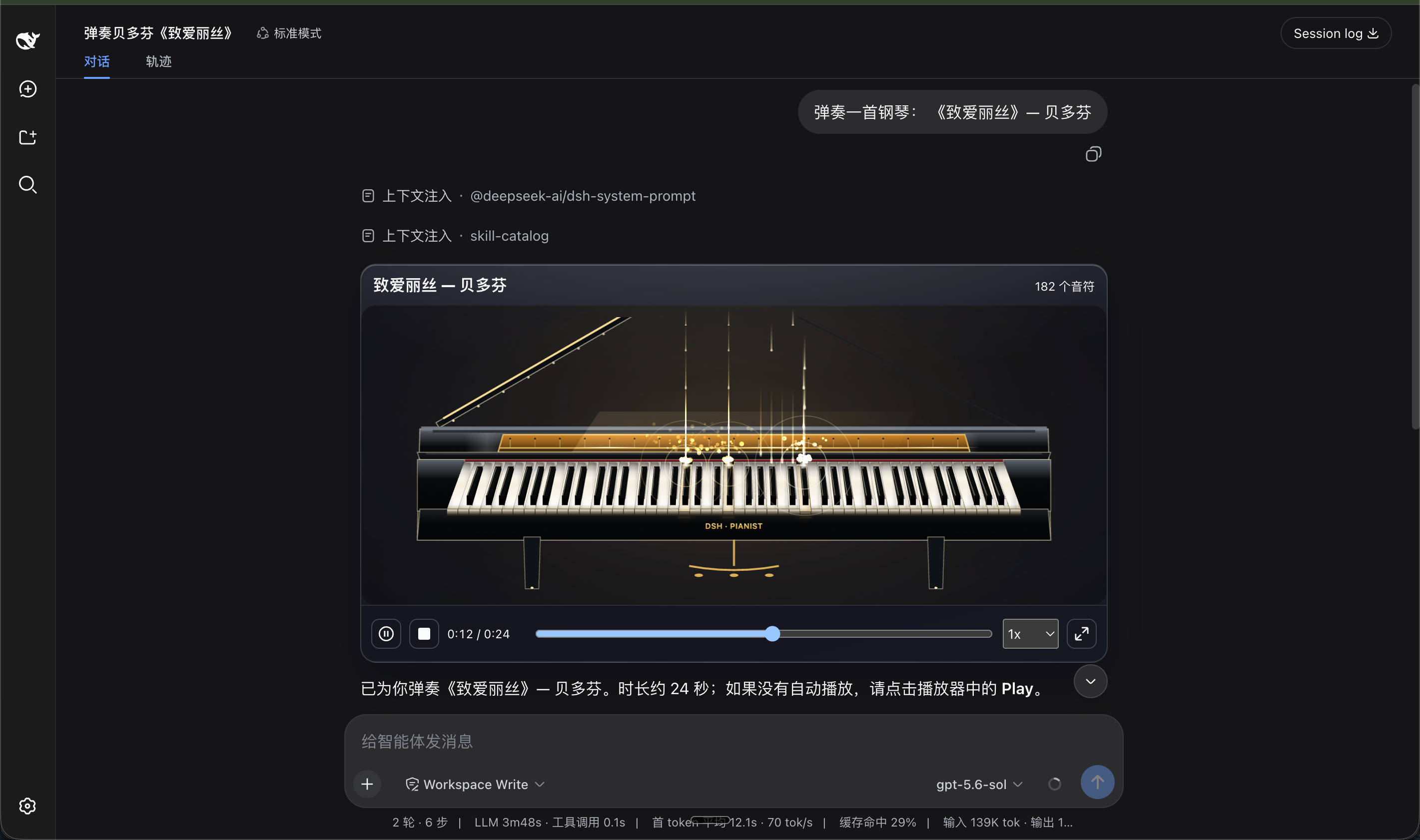
Click the cover above to watch the showreel (docs/showreel.mp4), or visit the online demo, pick a piece, and hear it rendered in real time.
What it sounds like
- The timbre comes from real recorded samples of Salamander Grand Piano V3 — six velocity layers, key release, string resonance, pedal action — not synth "beeps".
- Two swappable skins: Obsidian & Gold (a black glossy grand with warm gold trim; keys flash gold on impact) and Sakura Pearl (a pearl-white body with rose-gold details under a sakura-tinted skylight).
- A full-screen immersive stage with waterfall notes, rippling reflections, shooting stars and mist that rise and fall with the performance.
- All 88 keys are playable: mouse glissando, computer keyboard, arrow-key note selection — play it yourself if you like.
- Underneath it all is a deterministic timeline. Pause, scrub, replay — the same score plays back identically every time. That is what makes it an exam paper: whether the model can really play becomes obvious the moment it tries.
Installation
In the DeepSeek Harness source repository:
pnpm dsh plugin --profile web add dsh-pianist
If dsh is already on your PATH:
dsh plugin --profile web add dsh-pianist
The npm package ships prebuilt artifacts — usable right after install.
Then start the UI:
pnpm dsh web
To uninstall: pnpm dsh plugin --profile web remove dsh-pianist.
Kernel Compatibility
| DSH kernel | This plugin |
|---|---|
| 0.1.0-rc.5 - 0.1.0-rc.7 | ✅ all versions |
| 0.1.1-rc.2 | ✅ all versions |
| 0.1.2-alpha.1 - 0.1.2-alpha.3 | ✅ 0.1.0 (build with the 2026-09-01 compat fix); earlier releases fail to load on 0.1.2 |
- ✅ = compatible.
0.1.2-alpha.3is the current host kernel and has been verified live (built-artifact import + test suites); the remaining kernels are covered by the dual-kernel-compatible design (one build, one API surface). - Kernel 0.1.2 removed the
settingsNamespace()runtime helper (on ≤ 0.1.1 it was a validating identity function; 0.1.2 keeps only the same-named type). This plugin does not statically import that symbol any more — it inlines its namespace constant locally and asserts it as theSettingsNamespacetype, which works on both old and new kernels. - The current build no longer statically imports
settingsNamespace(); earlier releases only work on kernels ≤ 0.1.1 — rebuild or update to a build that contains the fix. - Never statically import runtime symbols from
@deepseek-ai/*packages. The host CLI starts vianode --import tsx/esm, and tsx applies the hosttsconfigpathsmapping, so a bare@deepseek-ai/*import from an external plugin may be redirected into the host's own sources — any host-side rename or removal then explodes at boot as a module instantiation error. Type-only imports (import type) are unaffected.
Usage
Once installed, just request a song in natural language; the Agent hands the full score to the piano:
Play the first eight bars of Ode to Joy, both hands, with sustain pedal.
A C-major scale at 100 BPM, slowed down a little.
Improvise something light and cheerful to help me unwind.
The browser may require one manual click on the play button before sound comes out — that is the browser's autoplay policy, not a bug.
The Settings → Plugins → Pianist card lets you adjust at any time:
- Enable/disable the plugin and switch skins (Obsidian & Gold / Sakura Pearl);
- Immersive stage or chat-card form; it returns to the card automatically when a piece ends;
- Quality (low/medium/high), volume, waterfall notes, pedal and particle-effect toggles.
Changes apply as soon as you save.
License
Plugin code is MIT. The bundled piano recordings come from Salamander Grand Piano V3 (CC BY 3.0); see THIRD_PARTY_NOTICES.md for attribution.
A standalone web page can import the package via npm and register the Web Component:
import { registerDshPianoView } from 'dsh-pianist/demo';
registerDshPianoView();
// <dsh-piano-view> exposes public APIs such as setScore / setPianistSettings /
// play / pause / seek / setRate / requestImmersive.
The settings card is registered under Settings → Plugins via settings.plugin.item. For a local preview landing page, see docs/index.html: pnpm run build && pnpm dlx serve ..
Comments
Comments live in GitHub Discussions. Sign in with GitHub to post or react.