
Install
Inside DeepSeek Harness, with dsh-market
dsh plugin --profile web add dshmarket
Or from the command line
dsh plugin --profile web add "https://github.com/KarlOfLaw/dsh-side-chat/releases/latest/download/dsh-side-chat-1.1.2.tgz"
Installing runs third-party code with your own permissions — it can read your files, use your credentials and reach the network. Review the source first, and pin a commit (github:owner/repo#sha) when you can.
README
[!NOTE] A side chat is not a floating overlay or a hand-built imitation of the DSH chat UI. It is a real DSH Session that reuses the native conversation components and reads bounded parent context only when needed.
Start Here
- Just use it: download
release/dsh-side-chat-1.1.2.tgzand install it with the command below. - Develop it: clone the repository, run
npm test, and let the same command build the plugin and run the regression suite. - What it solves: open a native DSH session that can ask questions, use tools, and work in the project without leaving the main conversation.
- The key boundary: the main session and side chat share a workspace but keep independent transcripts; the side chat does not automatically copy the full parent conversation.
Interface Preview
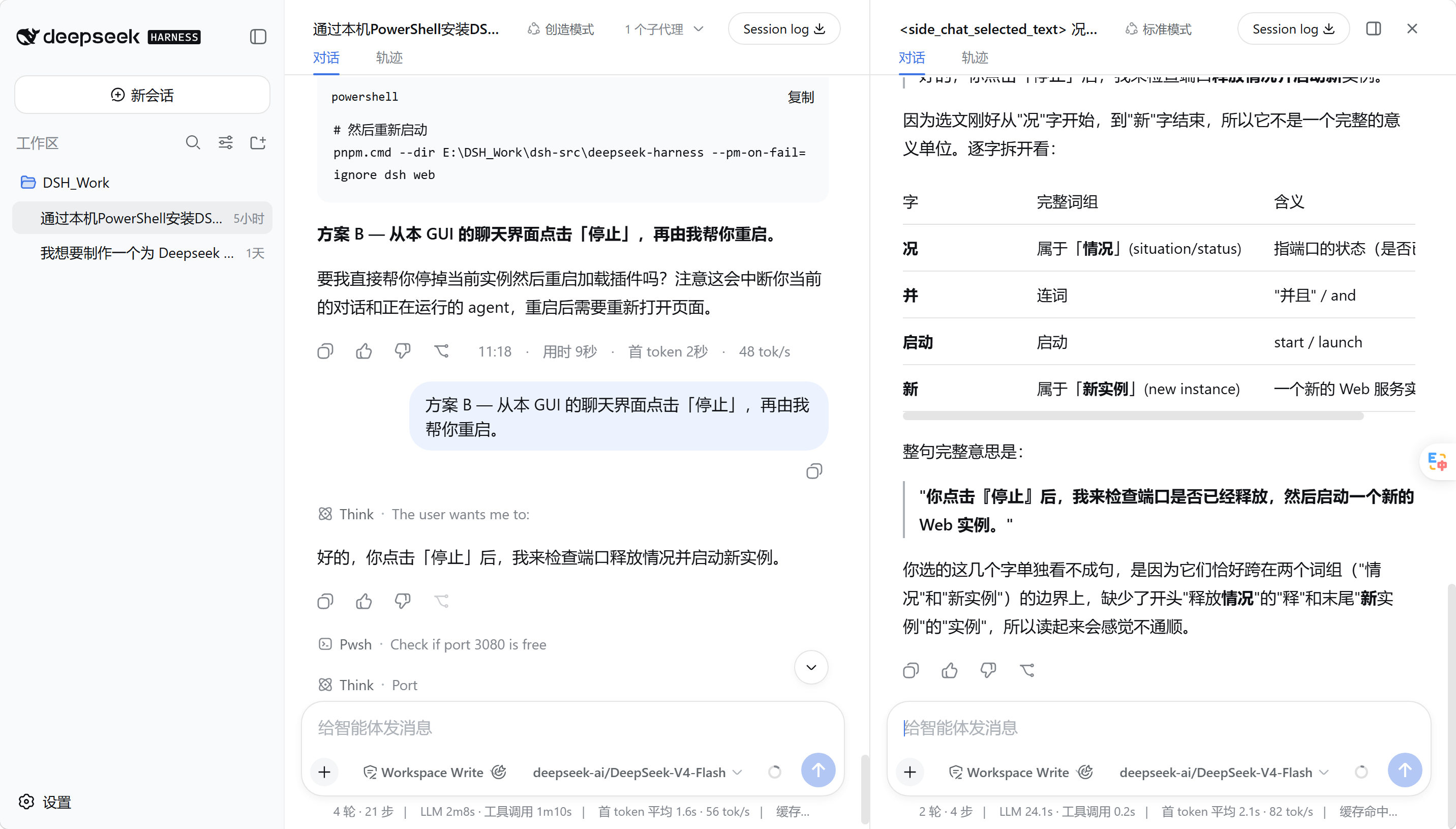
The main conversation and side chat use the same native DSH interface. The divider is resizable, both composers stay aligned, and side sessions do not appear in the workspace session list.
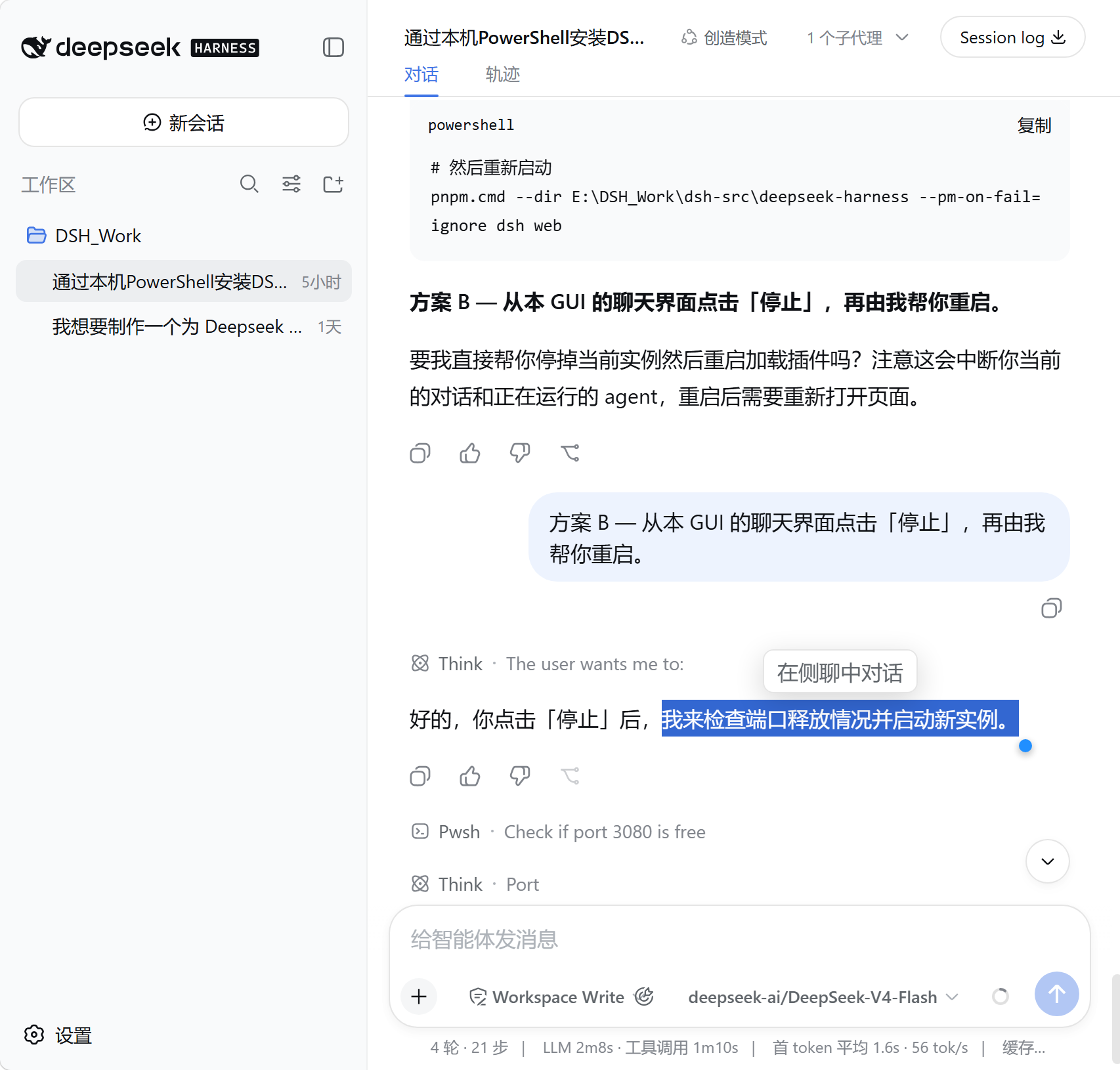
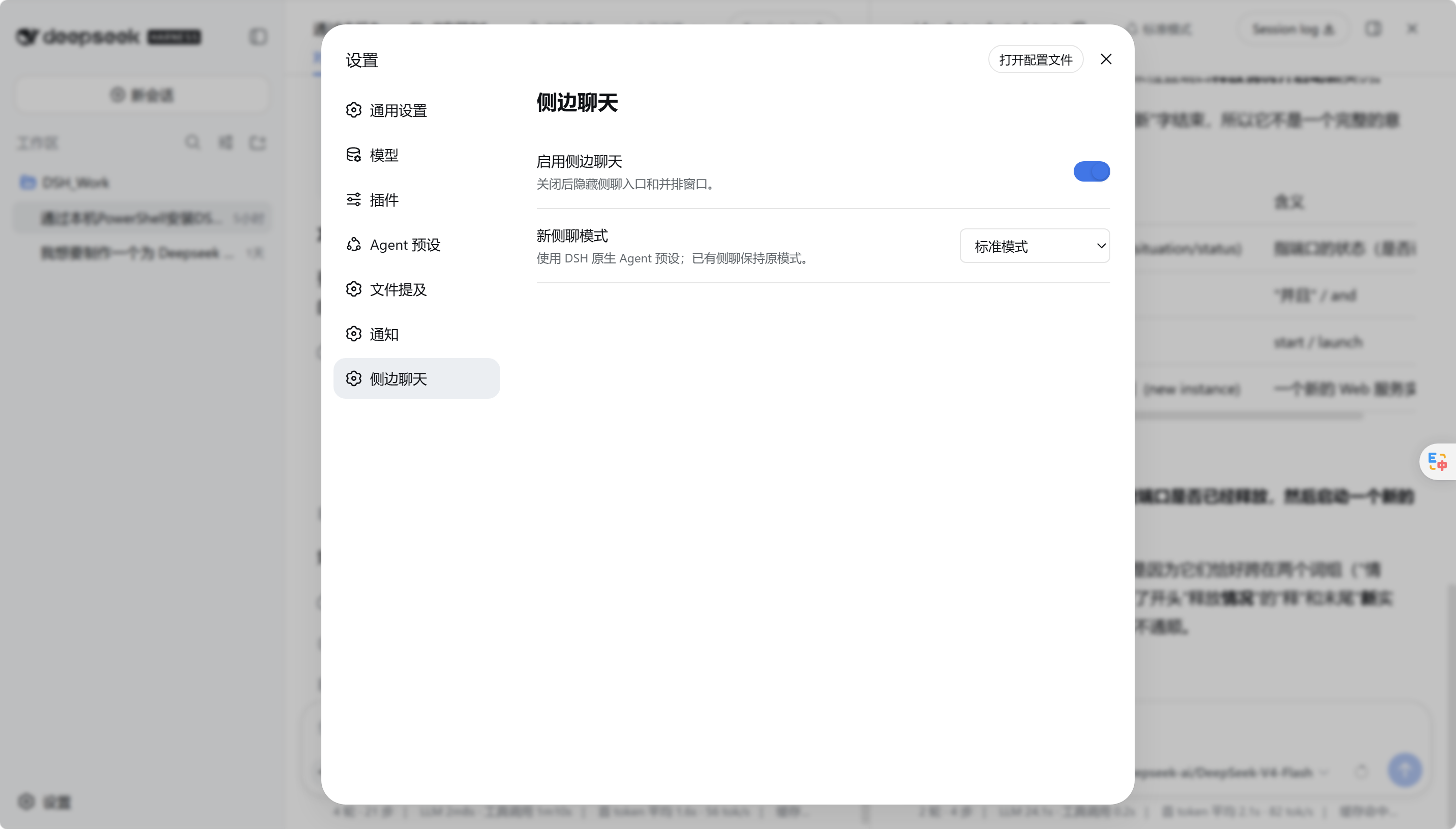
| Ask about selected text | Native settings page |
|---|---|
 |
 |
Quick Start
Install the prebuilt package
Requirements: Node.js 22 or later and a DeepSeek Harness installation that can load Web plugins.
Download the prebuilt package from GitHub Releases, or use the copy in the repository's release/ directory. Installation does not need to run the build again:
# After downloading from GitHub Releases:
dsh plugin --profile web add .\dsh-side-chat-1.1.2.tgz

# Or use the in-repo copy:
dsh plugin --profile web add .\release\dsh-side-chat-1.1.2.tgz
Start DSH from the project that you want the Agent to work in:
cd D:\path\to\your-project
dsh web --port 3080
Open the URL printed by DSH. The plugin loads automatically in the Web client.
Build from source
git clone https://github.com/KarlOfLaw/dsh-side-chat.git
cd dsh-side-chat
npm test

$DshSource = "D:\path\to\deepseek-harness"
$PluginSource = (Get-Location).Path
pnpm --dir $DshSource dsh plugin --profile web add $PluginSource
pnpm --dir $DshSource dsh web
For an existing installation:
npm test
pnpm --dir $DshSource dsh plugin --profile web update dsh-side-chat
npm test builds the dynamic output and formal local package, then runs the core, host integration, client contract, and smoke tests.
Local linked development
When the plugin is registered from its source directory, DSH loads dist/formal-host.mjs and dist/formal-client.cjs rather than reading src/ directly. After changing source, run npm test (or npm run build) again and restart dsh web; otherwise the browser may still be running the previous build.
Usage
- Open a main session and click the message-bubble-plus icon in the header.
- The side chat immediately shows its complete native header and composer. The hide and close controls are already in the native header before the first message is sent.
- Use it like a normal DSH conversation: select a model, send messages, attach files, use tools, and handle approvals.
- Drag the divider to adjust the pane ratio. Focus it and use the arrow keys for fine adjustment; hold
Shiftfor larger steps. - Select text in a main message and click "Ask in side chat" to place it in the side composer as a removable quote chip.
- Use the panel icon in the side header to hide the pane. The message-bubble icon in the main header restores the same side chat.
- Click the close icon and choose either "Retain conversation" or "Delete and close."
Useful details
- Each main session keeps its own side-chat state; switching main sessions does not reuse another session's active side chat.
- "Retain conversation" releases the active Agent but keeps the session on disk. Opening the same mode later restores the most recently retained side chat.
- "Delete and close" can delete only sessions created by this plugin and requires a storage backend that supports safe per-session deletion. Otherwise, the plugin reports the limitation and keeps the session.
- When Settings, the plugin market, or another native DSH modal is open, the divider yields pointer interaction and cannot cover or intercept that modal.
- The Side Chat settings page can enable or disable the plugin and choose the native Agent mode used by new side chats.
Sessions and Data
The first open creates a real DSH Session with parentSession and archives it immediately, keeping it out of the workspace session list. If a side chat was retained, the next open in the same mode resumes the most recent retained session instead of starting empty.
The plugin does not copy the parent transcript into the side chat. Selected text is added only as a native composer reference. When more background is actually needed, side_chat_context can retrieve a bounded, relevant, chronologically ordered set of parent-session events.
The main session and side chat share the same workspace. File edits, commands, approvals, and other tool side effects from the side chat are real. Hiding, retaining, or closing the pane does not undo them.
Core Capabilities
| Capability | Implementation |
|---|---|
| Real independent session | Creates or resumes a Session with parentSession through DSH agents.create/resume, without occupying subagent routing. |
| Complete native UI | Both panes render the complete ConversationRoot; messages, tools, approvals, attachments, composer, model, and access controls remain native DSH features. |
| Complete before first send | Even an empty side chat shows the native header, composer, and hide/close controls; the same native UI remains after sending. |
| On-demand parent context | The plugin does not copy the parent transcript. side_chat_context retrieves bounded, relevant parent excerpts only when needed. |
| True side-by-side layout | Adds only a minimal split shell. The divider supports dragging and keyboard adjustment, with the side pane constrained to 25%-70%. |
| No sidebar pollution | New side sessions are archived immediately and stay out of the workspace session list. |
| Ask about a selection | Selecting text in a main message reveals an "Ask in side chat" action and places the quote in a removable native composer chip. |
| Hide, restore, or delete | Hiding only collapses the pane; retained chats can be restored, and closing can safely delete the child session. |
| Native modes and models | New chats default to Standard mode, with PTC, Minimal, and Creation modes available. The native model selector remains available. |
Current Limitations and Compatibility
- The current selection entry is primarily designed for mouse selection; mobile long-press selection and a touch action bar are not specially optimized yet.
- A single selected-text reference is limited to 8,000 characters; longer selections are truncated.
- Complete rendering for an arbitrary Session currently depends on DSH's
SessionProviderBindingContext seam. If upstream removes that seam, the plugin fails explicitly instead of falling back to a custom chat renderer. - Safe permanent deletion requires JSONL session storage and deletion support from the formal local plugin package. Unsupported configurations keep the data and return an explicit error.
- On-demand parent context is intentionally bounded and may not contain every historical detail from the main conversation.
Architecture Boundary
The host adds only the lifecycle and context capabilities required by side chat:
Main Session
  `-- archived side Session (parentSession=Main Session)
      |-- native DSH Agent / preset / tools / approvals
      |-- independent transcript, shared workspace
      `-- side_chat_context -> bounded, on-demand parent context
The client keeps the registered DSH conversation component and places it inside two session bindings. The plugin does not implement its own message renderer or composer. The minimal split shell handles only layout, resizing, and lifecycle entry points; it does not take over DSH messages, input, models, attachments, tools, or approvals.
Development and Project Layout
src/core.mjs          Pure functions: side IDs, context filtering, retained child selection
src/host.template.js  Child lifecycle, context tool, retain/delete behavior
src/client.js         Native ConversationRoot bindings and the minimal split shell
dev/                  Isolated DSH profile, local build, and acceptance seed
tests/                Core, integration, client contract, and smoke tests
release/              Prebuilt packages for direct installation
The repository intentionally contains both the unbuilt source and prebuilt plugin packages: readers can study and build the implementation, while users can install the .tgz directly.
Upgrade or Remove
Replace the package under release/, update the plugin, and restart DSH Web:
dsh plugin --profile web update dsh-side-chat
Remove the plugin with:
dsh plugin --profile web remove dsh-side-chat
License
MIT. The referenced DeepSeek Harness checkout is also MIT licensed.