
Install
Inside DeepSeek Harness, with dsh-market
dsh plugin --profile web add dshmarket
Or from the command line
dsh plugin --profile web add dsh-better-workspace
Installing runs third-party code with your own permissions — it can read your files, use your credentials and reach the network. Review the source first, and pin a commit (github:owner/repo#sha) when you can.
Screenshots
README
简体中文 | English
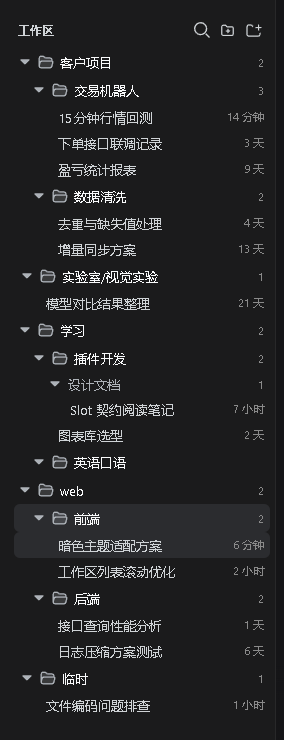
A two-layer folder system for the DeepSeek Harness (DSH) sidebar workspace list — a disk layer nests workspaces by their directory paths (the official workspace-tree semantics: a workspace inside another workspace's directory nests under it), and a name layer eats every
/in workspace titles (web/frontendandweb/backendunder one virtualwebfolder). The two layers combine orthogonally.
disk layer (paths, automatic)         name layer (titles, virtual)
~/projects/                           web/
|- web/        <- workspace (dir)     |- frontend  <- workspace "web/frontend"
|  `- api/     <- nested workspace    `- backend   <- workspace "web/backend"
`- docs/       <- sibling workspace
Features & preview
Add workspace: the official directory flow
"Add workspace" runs the official DSH picking flow (since v0.12.0): a loopback-only webserver bind with a display session opens the host's native OS chooser; an all-interfaces/LAN bind, an SSH launch, or a headless host switches to the official in-app directory browser (Miller columns, root-anchored breadcrumbs, editable path, inline new-folder row, hidden-file toggle) — the exact scenario this plugin's hand-rolled browser polished until the official one landed. Picking a directory creates the workspace and starts a new session in it, exactly like the shipped browser; the conversation empty-state picker drives that same official flow from this plugin's tree popover (v0.22.0).
Grouping happens by naming, not by a popup: rename the workspace after creation (every / in the title is a group) or drag it onto a folder row.
Groups: a projection of names
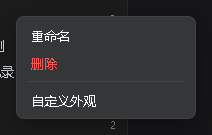
Name groups derive from the / segments of workspace titles — there is no second source of truth to keep in sync. Right-click a folder row to rename the group (rewrites the title prefix of every member); the tree re-flows instantly. The root level holds workspaces without a /.
Sessions follow the same rule
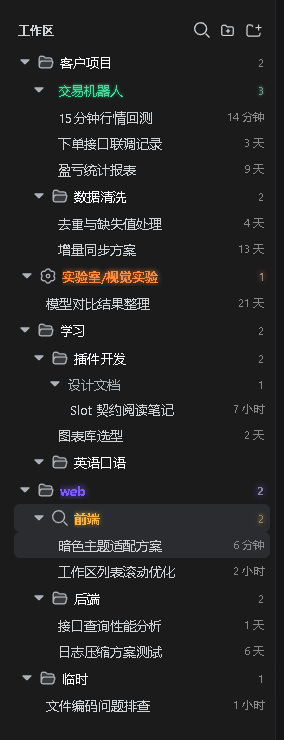
Session titles nest on / too (e.g. test1/plugin maintenance). Session groups render in a secondary color without a folder icon, so they are clearly distinct from workspace folders; a session group can be renamed as a whole (rewrites member titles).
No title regression after a restart: the cold list right after a DSH restart only carries titles for sessions that hit the persisted projection cache — fork-born and never-checkpointed sessions temporarily fall back to the workspace basename, even though the real title still lives in the session log. This plugin remembers each session's last real wire title in the browser (a debounced local cache: real changes coalesce into one write) and renders from memory during that window, so / grouping keeps working; the moment a session opens, the official data takes over and self-heals.
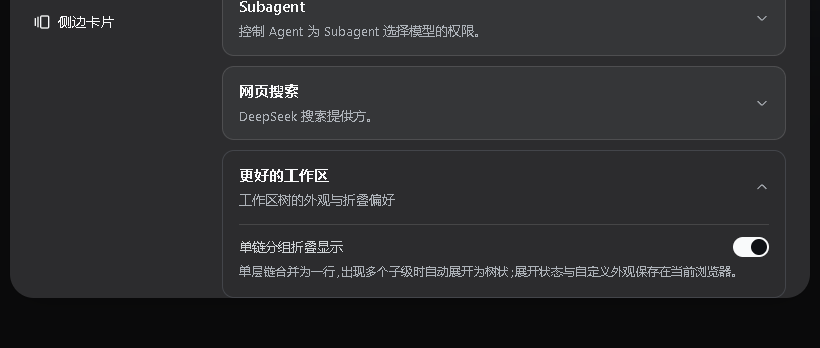
Manual cross-device sync (web ↔ desktop app): appearance, the default appearance, and toggles live in each device's own browser by default. The settings card adds a "Cross-device sync" section — "Pull from desktop app" on the web / "Pull from web" in the desktop app, with an overwrite-this-device or merge-both-sides mode (the union keeps each side's unique entries); the other surface's data travels through the host settings store (~/.dsh/settings.yaml, shared by both surfaces). A "Send this device's data" button next to it covers history created before this version — push once, and afterwards every edit is written to the host automatically for the other surface to pull. Expansion state stays per-device.
More highlights
- Folder-style collapse: clicking a workspace row collapses/expands all of its sessions (the row keeps a session counter when collapsed); session groups collapse too; search force-expands everything.
- Native drag restored: drag a workspace row above/below another to reorder (writes back the host registry order) or onto a folder row to move it into that group (rewrites the title prefix); drag session rows to reorder inside their group, onto a row of ANOTHER group to move into that group (onto a root-level row to leave the group), onto a session-group row to move into it, or onto their OWN workspace row / anywhere outside a group (empty space included) to leave it — the workspace row highlights and the tree shows a faint dashed hint while such a drag is in flight; a grouped session row also offers "Move out of group" in its context menu. Display order = host manual order, drag results are visible immediately. The disk layer is a filesystem fact and never changes through dragging: a cross-level drop only re-groups the name prefix (the workspace lands at the end of its own disk level), same-level drops take the anchor order. While dragging a workspace, merged single-chain rows (e.g. work/A) temporarily re-expand into folder rows — every level of the path becomes a drop target, and chains merge back when the drag ends.
- Native capabilities kept: open/rename/fork/archive sessions, per-workspace new-session (the + button always expands the workspace first so the new session is immediately visible), current-session highlight, official status dots (blue running ring / amber pending / green done), status breathing lights (dots hidden by collapse bubble outward: workspace/folder rows breathe on their icon in the status color — amber pending / green done, custom-glow labels breathe along; running breathes blue only on the session row itself and never relays; off-able in settings), active-schedule badge (alarm clock icon for sessions with active Schedule records; since v0.23.0 it renders the occupant of the shipped
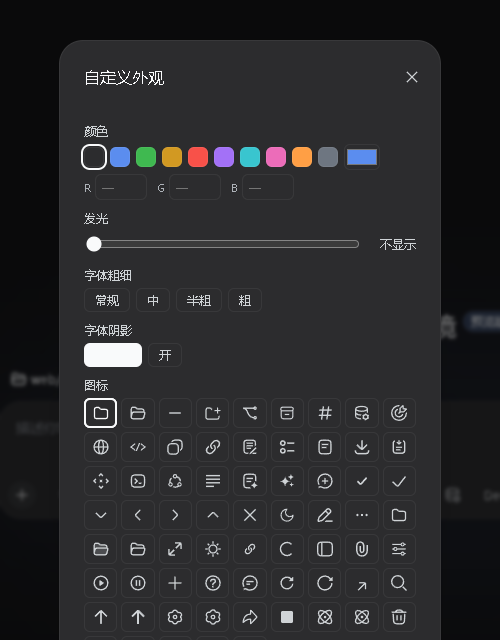
sidebar.session.row.leadingseat, so it is the same mark the official row would show), ungrouped-session fallback, UI copy in 21 languages following the DSH language preference (Simplified and Traditional Chinese included). - Auto color + icon for new items (v0.25.0, off by default): one switch in the plugin settings card. Turn it on and every newly created session gets a built-in color while every new workspace additionally gets an icon — for anyone who would rather not style rows one by one. Colors come from 13 fixed slots, each shipping two colors — a darker one for the light theme, a lighter one for the dark theme — drawn with a shuffle bag plus a recent-draw window: nothing repeats inside a cycle, a refill never starts with the last three colors, and items added in a row look clearly different. The readability claim is real: every entry keeps contrast ≥ 4.5 on its own theme's background, i.e. WCAG normal-text AA (computed by script and asserted per color in the test suite, measured against conservative surfaces: a hovered row darker than pure white in the light theme, the brightest surface in the dark theme). A row stores the slot id (
auto:3), not a hex, so switching between light and dark repaints it with the matching sibling color — nothing to reconfigure and no mismatch. Only items created after you turn it on are touched: rows you styled by hand (stored as hex) are never overwritten, turning it off does not undo assignments, and an item is never randomized twice. Icons come from the existing icon candidate set, filtered by what the host actually exports — and workspaces only: the session row's cell belongs to the official status dot and schedule mark, so it has no icon slot. - Official semantics and shortcuts wired up (v0.23.0, aligned with dsh 0.1.7-rc.2): ① the archived filter is the shipped three-way pick (Hide archived / All conversations (show archived) / Archived only); under "Archived only" a workspace without archived sessions disappears entirely, and an empty list offers "No archived sessions yet" + View other sessions as the way back. ② The shipped shortcuts ⌥⌘K search / ⌥⌘O add workspace / ⌥⌘N new session (⌘K / ⌘O / ⌘N on desktop) really work in this plugin's own sidebar — the search key opens and focuses this sidebar's filter field, the add key runs the very same official directory flow (native chooser on a native host, the in-app pointer on a browse host), and the buttons show the host's current keybindings. ③ A first-use workspace reads as the localized "Default workspace" instead of the on-disk directory name.
- Slash-bearing titles never nest from URLs: when a host-generated session title lands containing
/(e.g. echoing a pasted URL), it is auto-wrapped in“”and shown verbatim — only for sessions created after this launch, and only once the name stays stable for ~20s (letting the native AI naming land first); pre-existing sessions and your manually named/groupings are never touched. Quotes (manual ones too) never split on/, and a lone quote is just an ordinary character; unquoted URL tails still fall back flat. - The New Session workspace picker IS the sidebar tree (v0.22.0): the empty-state "Workspace" chip used to open the shipped one-level list of flat titles (no disk nesting at all). This plugin shadows that seat (lowest priority renders) and draws the same tree the sidebar draws — disk nesting, the tri-state "/" name layer, chain compression — all from the one view store, so changing a view option on the sidebar moves this popover immediately. The current workspace carries a check, folder rows fold (picker-local, fully expanded by default), and the pinned "Add workspace" action still renders the shipped directory-picking occupant (native chooser / official in-app browser) instead of a copy.
Install
dsh plugin --profile web add dsh-better-workspace
Plain JavaScript, zero build, zero npm dependencies (dsh client baseline modules only). Restart DSH after installing.
How it works
The sidebar browsing region is the public sidebar.workspaces slot; this plugin registers the same slot with a lower priority and replaces the shipped browser with the tree. All data flows through the slot’s standard snapshot hooks and injected host actions — no private APIs.
The add flow is entirely official: this plugin's sidebar.workspaces registration declares the directory-flow child hole and consumes it through renderSlot (the same children pattern the official WorkspaceBrowser uses); the official composed occupant (native chooser / in-app browser) owns the whole picking interaction. This plugin, as the owner, just creates the workspace and starts a session after the pick. The mechanism works on dsh 0.1.2+ hosts — either upgrade order converges.
View state (folder collapse, session expansion), custom styling and plugin settings persist browser-side via the dsh client store (dsh.betterWorkspace.view.v1).
Relationship to dsh-better-sidebar
Same dsh-better-* family, zero overlap: dsh-better-sidebar is the VSCode-like panel on the right; this plugin only takes over the left workspace list. They can be installed together.
Version compatibility
- dsh 0.1.6-alpha.1: both the primitives icon set and the browser injection face changed; this plugin adapts automatically since 0.10.2. The icon grid only lists glyphs this host actually exports (the retired
IconSendOutline16resolves to the equivalentIconSendOutline14, so a previously saved choice never turns into an empty icon slot), and session drag-to-reorder falls back to a browser-local order when the host no longer injectsinsertSessionBefore— no feature is lost. Either upgrade order (plugin first or dsh first) converges. - dsh 0.1.6-alpha.2: the settings pages were reworked — since 0.12.0 this plugin registers its settings card on both seats (the pre-alpha.2 Settings → Plugins card and the alpha.2+ Plugins panel's bundle page, keyed by package name); the tree gains the disk-nesting layer (official workspace-tree semantics) and add-workspace rides the official directory flow (native chooser / official in-app browser).
- Across surfaces: web and desktop share one set of client assets; appearance / switches sync manually through the settings card, while collapse state and the local session order stay per-browser by design.
Limitations / roadmap
- Dragging a session across workspaces is still refused (a session belongs to its workspace); inside one workspace the group now follows the drop (v0.18.0: another group's row rewrites the prefix, the workspace row takes it out of every group, and the context menu offers "Move out of group").
- Search is local title filtering (both layers flattened, per-workspace matching); host content search (
session.search) is planned. - The flat view is not taken over; the hierarchical tree is the view.
Develop
npm test        # smoke: manifest consistency / baseline require whitelist / dictionary alignment / syntax
npm pack        # tarball for local install verification
License
Comments
Comments live in GitHub Discussions. Sign in with GitHub to post or react.