
Install
Inside DeepSeek Harness, with dsh-market
dsh plugin --profile web add dshmarket
Or from the command line
dsh plugin --profile web add dsh-deckseek
Installing runs third-party code with your own permissions — it can read your files, use your credentials and reach the network. Review the source first, and pin a commit (github:owner/repo#sha) when you can.
README
🙏 Thanks to the original repository aa2246740/dsh-better-display (MIT) and its authors and contributors.
dsh-deckseek is a fork of aa2246740/dsh-better-display, independently maintained by JNNarrator as a DeepSeek Harness display & interaction enhancement plugin (MIT).
It adds an independent DeckSeek reading tab to DSH: the execution record folds away, the final answer stays in full, and three reading skins are available. It changes presentation and interaction views only — the native Chat / Trajectory tabs, composer, model selector, tools, and approvals all stay exactly as they are.
Screenshots
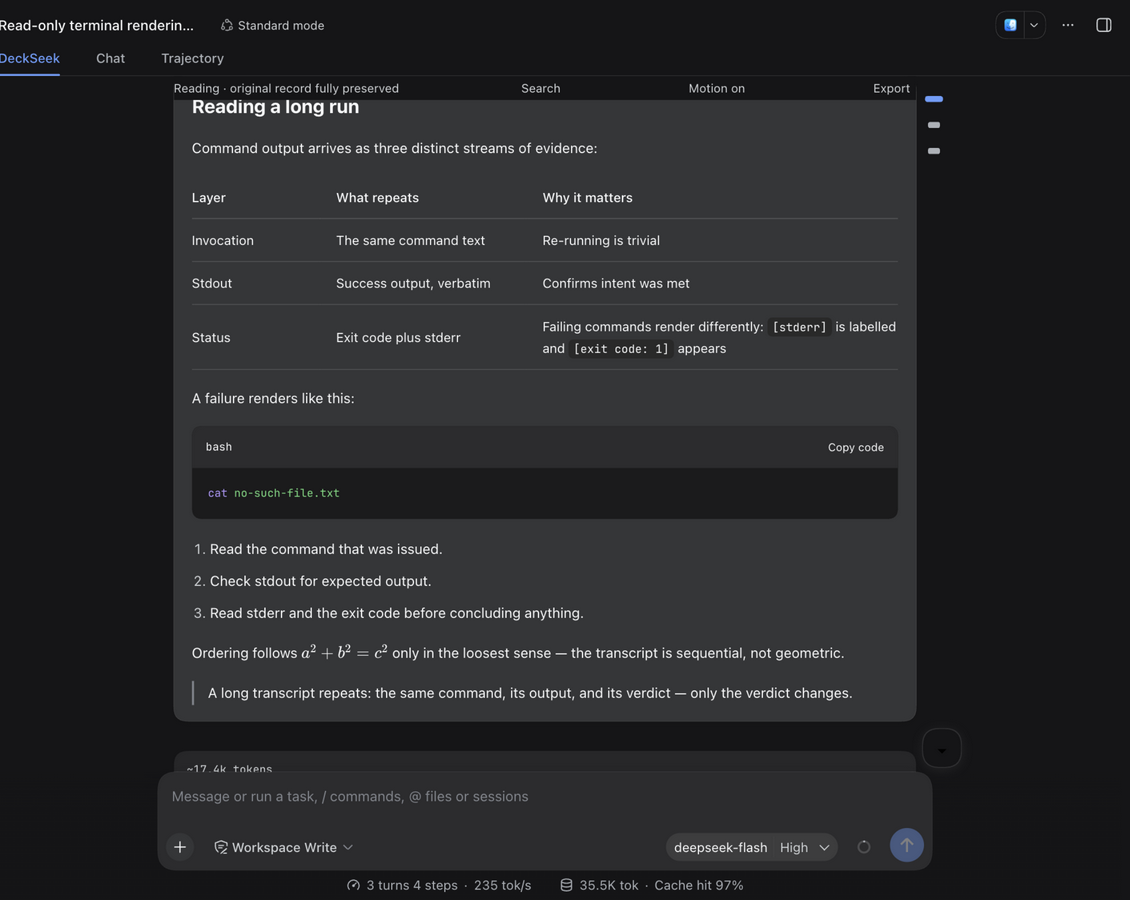
The DeckSeek reading view (Soft skin): the execution record folds away and the final answer renders in full — headings, tables, code, formulas and quotes in one column; the toolbar stays pinned at the top (readout plus search / motion / export); the message rail hugs the right edge; spacing above the task bar and composer stays compact — no hollow gaps under long task lists.
The Terminal skin (the default): box-character corners on the window, a workspace title bar above, and a standing status line below (RUN / WAIT / IDLE plus 12 turns · last turn 34 steps and ^K commands / ? help); the body opens a turn with a > prompt, keeps one glyph vocabulary (⏺ ⎿ ✻) and spins a braille glyph while work is in flight. Three skins (Terminal rows / Soft cards / Paper typographic flow) share one DOM and change only structure, density and type; colours always come from host theme tokens, so light and dark adapt on their own.
| Message navigation rail | In-view search |
|---|---|
 |
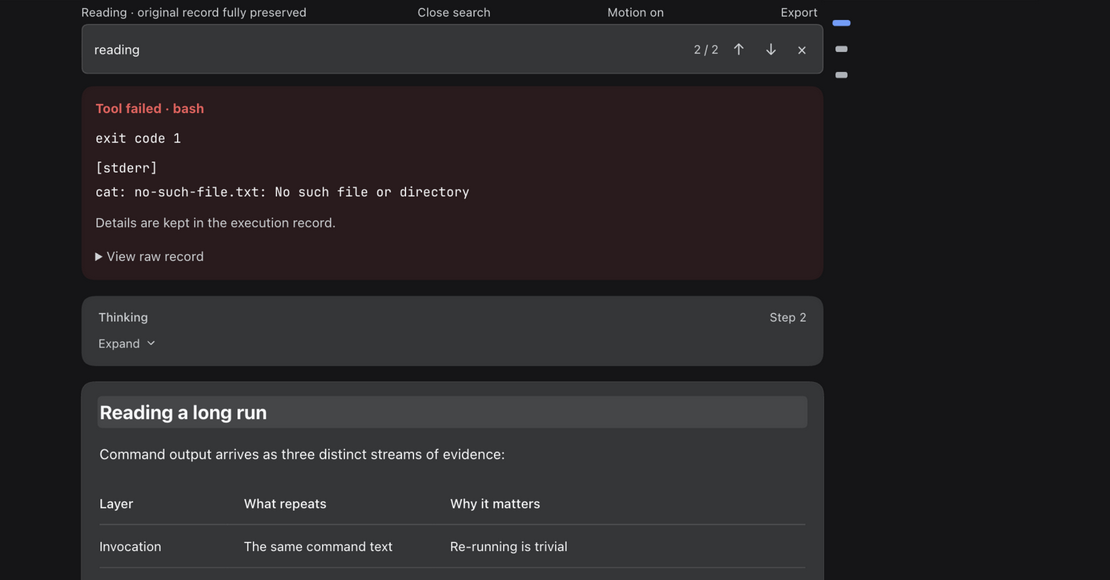 |
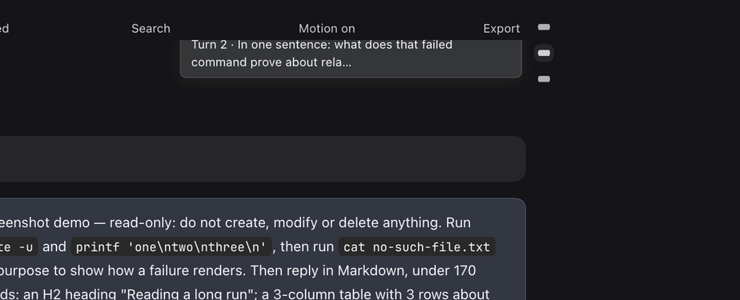
| Hovering a mark shows a "Turn N · title" info bubble; clicking scrolls the message into view with a landing flash | Live match counts with previous / next navigation; hits scroll precisely into view with a flash |
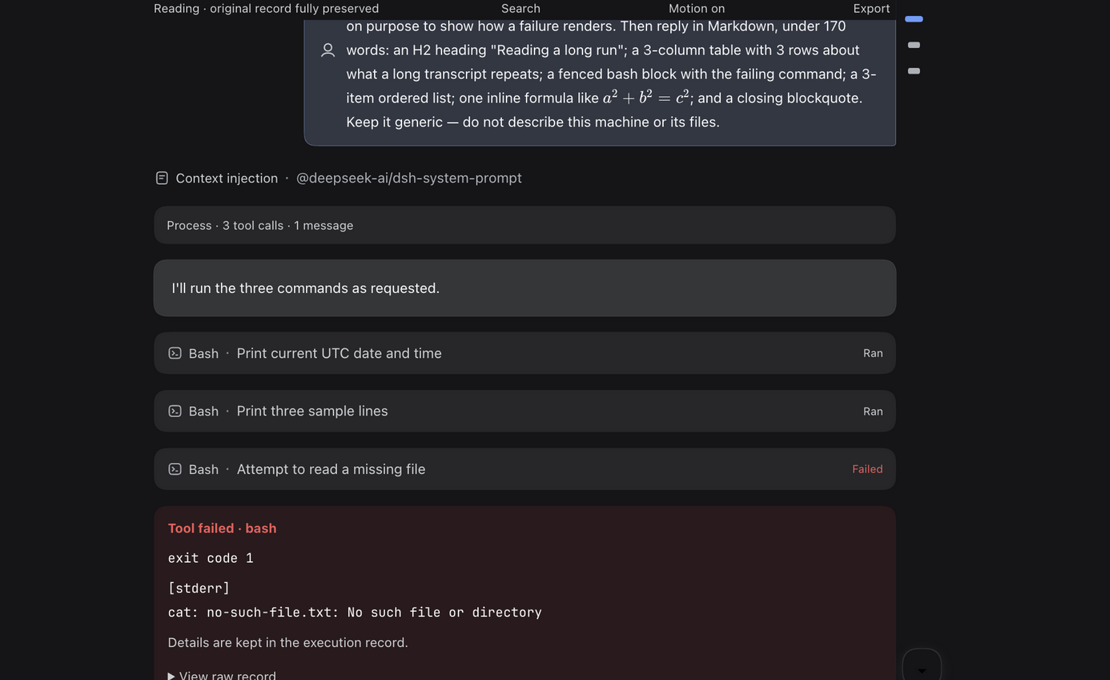
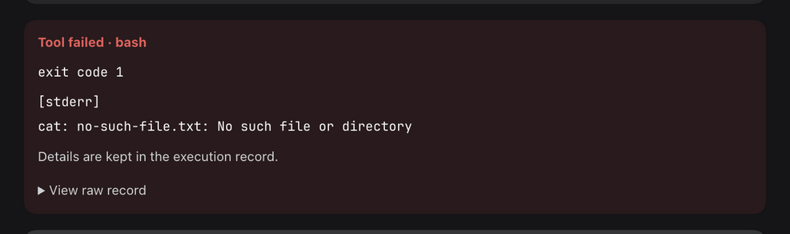
| Execution process & tool rows | Unified failure cards |
 |
 |
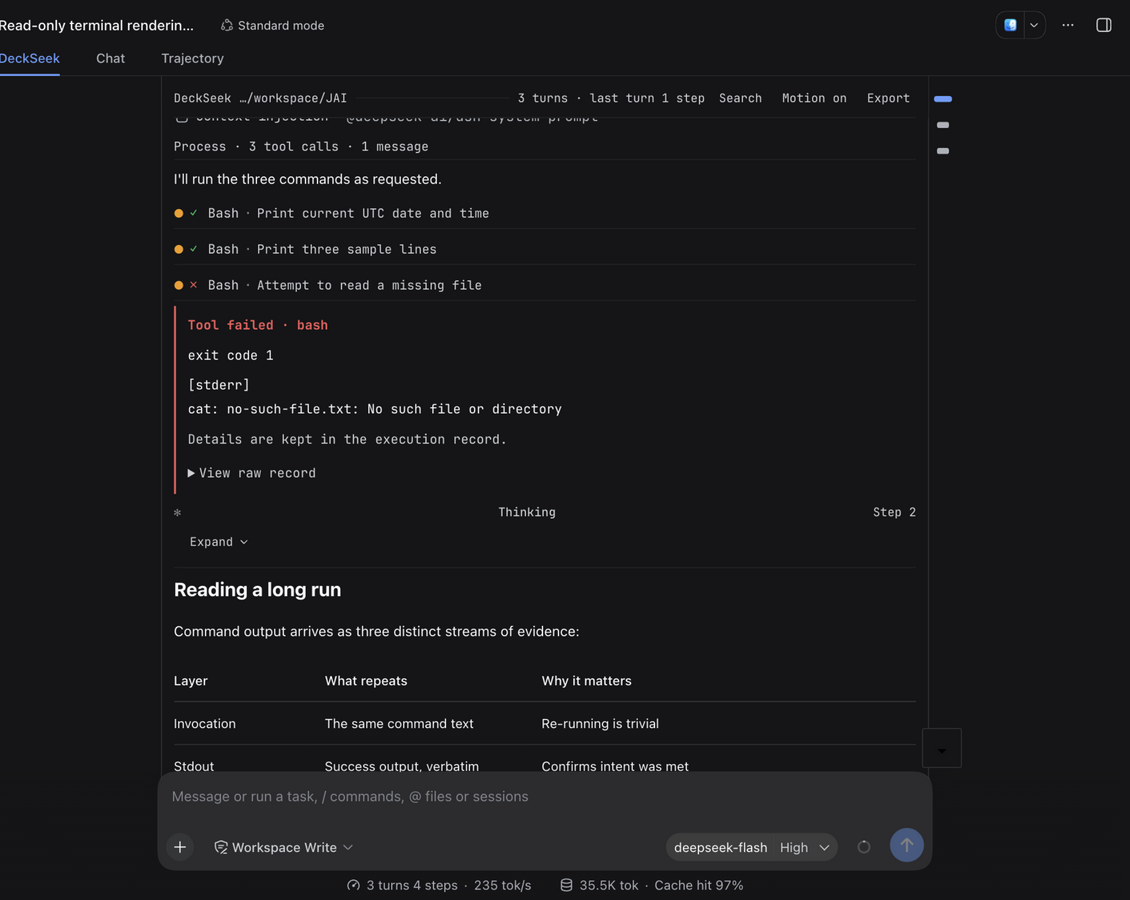
A folded turn states what it hides (3 tool calls · 1 failed), and expanding it labels each row by family (Ran / Failed…); thinking cards expand |
Failure reason, exit code and stderr summary, plus an expandable raw record |
Three reading skins
Switch from the dedicated DeckSeek page in DSH settings, or press Ctrl/Cmd+K anywhere in the reading view; it takes effect immediately. Terminal is the default.
| Skin | Direction | Good for |
|---|---|---|
| Terminal (default) | Rows: monospace, a box-character window, a status line, and ANSI role colour plus tool-category colour as the only colour | TUI and Claude Code sensibilities; watching work happen |
| Soft | Cards: the answer card uses the host's own elevation (0.5px hairline stroke + soft glow), and the user card derives an identity colour from the brand accent | Everyday reading; clear separation between turns |
| Paper | Typographic flow: no containers at all, only a heading hierarchy and article-scale prose rhythm; colour is reserved for failures | Long-form reading, export and print |
Skins express structure, density, type, and radii only; every colour comes from a host theme token, so dark and light themes adapt automatically and the plugin ships no palette of its own. Switching skins does not change the component tree — one DOM, a different stylesheet; see docs/design/reading-skins.md.
The terminal skin adds box-character corners, an optional screen texture (scanlines / vignette / glow, three levels, off by default), a status line (RUN / WAIT / IDLE, the turn readout, and two panel keys), a Ctrl/Cmd+K command palette and a ? shortcut sheet, j k g G / navigation keys, a workspace title bar, a ▌ caret on the streaming answer, a braille spinner with a per-turn verb and a right-aligned clock in the status line, tool-category colour on the ⏺ marker, a right-aligned number column, a count of what a folded turn hides (39 tool calls · 4 files · 2 failed), a hanging hairline on the closing readout line, a full-width band for the user turn, and a braille dot-matrix mark on the idle screen. The reasoning behind each, with measured parameters, is in terminal-skin-v3.md, terminal-skin-v4.md and terminal-skin-v5.md.
Features
Reading view
- Live native steps, thinking, and progress during execution; the process folds away on successful completion, leaving the final answer and interactive cards.
- Every known record kind (system prompts, turn processes, turn stats, …) is adapted; unknown kinds fall back to a copyable raw-record card — DSH is not stable yet, so the fallback stays.
- Failed tools / commands render as unified error cards: reason, exit code, and an expandable raw record.
- Long reasoning folds into a fading two-line card that follows along; expanding pauses the follow, which can be resumed.
- Lossless fidelity: native Markdown, syntax highlighting, math, tables, images, and tool facts render exactly.
Navigation & search
- Message navigation rail: a minimal right-edge rail of tiny pill marks — one per message you sent, editor-minimap style. It takes no layout space and the reading column stays truly centered; the mark at your reading position widens and highlights, hovering shows a "Turn N · title" info bubble, and clicking scrolls that message into view with a landing flash. Marks compress to fit when turns pile up, so every mark stays visible (hidden on narrow widths).
- Turn keyboard navigation:
Alt+↑/Alt+↓jump between your messages using the same positioning logic as the rail. - In-view search: covers your questions and the model's answers; live match counts, previous / next navigation, precise scrolling to each hit with a flash; every match block is tinted, character-level hits are painted through the CSS Custom Highlight API, and the current hit is inverted for emphasis.
- Reading position memory: reopening a session returns to where you stopped, with a brief notice; "Back to latest" jumps to the end at any time.
Export & copy
- Session export: one click in the reading toolbar downloads the session as Markdown (your questions plus the model's answers in display order, process folded), with a timestamped filename.
- One-click copy on code blocks; hovering a table in an answer reveals "Copy as CSV" (RFC 4180, quotes and newlines handled).
Interaction & state
- Status and follow: the reasoning card follows the latest line and rests at the bottom when it ends; while thinking it shows a localized "thinking… {time}" label, and tools show per-family states; scrolling away from the bottom floats a centred "↓ Back to latest" pill with an unread count above the composer; sending or steering a message returns the view to the bottom.
- Width follows the pane: the reading column fills the conversation pane it is given (a 1100px ceiling exists only for readability) instead of inheriting the native chat column, which is sized for bubbles beside a composer.
- Motion can be turned off: the toolbar toggle or the system's
prefers-reduced-motionstops every animation from one place. - Bilingual UI: every reading-view string follows the DSH app language (Chinese / English) with no restart.
- Adaptive theme and type size: dark / light syncs live with no flash; type follows browser zoom and the host's content font-size setting (skin line heights, leading slots, and block gaps follow it too).
Compatibility
- Generative MCP Apps (SEP-1865): an
mcp-appcode block in a reply mounts as a live interactive card inside asandbox="allow-scripts allow-forms"iframe, talking over JSON-RPCpostMessage(ui/initialize,ui/resize,ui/submit, …), with the card height adapting between 60 and 2400px. - 306 unit and component tests: covering message projection, the Markdown pipeline, SEP-1865 parsing, adaptive height budgeting, two-line streaming follow and its latency budget, and the search / unread-count / reading-measure / copy / skin-part / caret-hook / stylesheet-contract interactions (colours come from host tokens only, every token reference resolves, every drawn glyph is one cell wide) under happy-dom.
Keyboard shortcuts
| Key | Action |
|---|---|
Alt+↑ / Alt+↓ |
Jump between your messages (inactive while typing in a field) |
Cmd/Ctrl+F |
Open / close in-view search |
Enter / Shift+Enter |
In search: next / previous match |
Esc |
Close search |
← → Home End |
Switch tabs inside a tool card |
Installation
There are two release channels and they are not in sync: npm currently carries 0.6.0, while newer versions ship as GitHub Release tarballs (this repository is at 0.11.0).
0.11.0 and later require DSH ≥ 0.1.7-rc.1: the peer range narrows to
>=0.1.7-rc.1 <0.2.0-0, so 0.1.3 is no longer supported — installing on an older host fails the peer check and needsdsh plugin allow-version. Upgrading to 0.11.0 also carries one breaking change: the settings namespace moves fromdeckseektodsh-deckseek, so an existingdeckseek.skinis no longer read (the skin silently falls back to the default soft card); rename the key to keep your choice. See the CHANGELOG.
# From npm (0.6.0)
dsh plugin --profile web add dsh-deckseek

# Or install the newest release from its tarball
dsh plugin --profile web add ./dsh-deckseek-0.11.0.tgz
--profile takes web, desktop, or headless depending on the host you run. Restart the host after installing.
Listed in:
- awesome-dsh-plugin (PR #4528, merged)
- awesome-deepseek-harness-plugins (deepseek1024.com, PR #367, merged; once the npm package is published the marketplace detects it and upgrades to one-click install)
Development
npm test                                  # 297 tests (node --test + happy-dom)
npx tsc -p tsconfig.json --noEmit         # type check
DSHX_HARNESS=<DSH checkout> npm run build # build lib/ (client + host halves)
If the build fails with
Set DSHX_HARNESS to the checkout used for this build.orDSHX externalClientBundle adapter is missing, the devkit (tools/dshx) is not in the checkoutDSHX_HARNESSpoints at — pass both:DSHX_DEVKIT=<checkout that has tools/dshx> DSHX_HARNESS=<target checkout> npm run build.
- Dependencies come from a DSH checkout, not npm: link development dependencies to a built Harness checkout with
node scripts/link-harness-dependencies.mjs <DSH checkout>; do not runpnpm install/pnpm addin this directory. package-lock.jsonis a best-effort artifact under--legacy-peer-depssemantics: the published@deepseek-ai/dsh-client-ui-settingsdeclares a^0.0.1-rc.1peer on@deepseek-ai/dsh-client-ui-primitives, which cannot intersect this plugin's 0.1.x range, so strict resolution always ends in ERESOLVE.- Do not run
npm cihere — it cannot reproduce a working dependency tree. - When verifying a new build locally: with a profile pointing at a tarball through
file:, re-runningdsh plugin --profile web installafter rebuilding that tarball does not update it (it reportsAlready up to date). Remove<profile>/node_modules/dsh-deckseek, rundsh plugin --profile web install --force, then comparelib/client.jsbyte for byte.
Other
- Features and usage are also documented by the original repository: aa2246740/dsh-better-display
- Third-party notices: THIRD_PARTY_NOTICES.md · Changelog: CHANGELOG.md · Design contract: DESIGN.md · Design docs: docs/design/
v0.11.0 · An unofficial DSH display & interaction enhancement plugin. It only changes presentation and interaction views — never the Agent's core execution, SDK, or model credentials.
Comments
Comments live in GitHub Discussions. Sign in with GitHub to post or react.