
Install
Inside DeepSeek Harness, with dsh-market
dsh plugin --profile web add dshmarket
Or from the command line
dsh plugin --profile web add github:IamNewHands/dsh-approval-gate
Installing runs third-party code with your own permissions — it can read your files, use your credentials and reach the network. Review the source first, and pin a commit (github:owner/repo#sha) when you can.
README
简体中文 | English
dsh-approval-gate
Auto-approval gate for DeepSeek Harness — minimal human intervention: safe operations auto-approve, risky ones go to a human (fail-safe).
A deterministic hard-deny layer and a Flash model pre-judge every sandbox escalation: credential exfiltration and destruction aimed at system paths are rejected outright, routine operations auto-approve, hard-risk operations (deletion / credentials / remote / system / bulk) always require human confirmation; learned rules only ever cover operations you confirmed, with an in-app human review UI.
Origin: this project is a fork of moon09300731/dsh-approval-gate, with several defects fixed and multi-machine rule sharing added. The original author's copyright and the MIT license are in LICENSE. This repository (IamNewHands/dsh-approval-gate) is the maintained version.
Upstream attribution: the deterministic hard-deny layer, the classifier-input redaction, the structured JSON verdict protocol, the judge-failure fallback, and the dynamic system-prompt guidance were ported from NanmiCoder/dsh-auto-mode (MIT License), adapted here to this plugin's confirmation-based learning pipeline. Credit for those five capabilities belongs to that project.
✨ Features
- 🚦 Deterministic hard-deny layer (evaluated before keywords): credential exfiltration and destruction targeting a filesystem root, an OS/credential-critical path, a Windows device namespace or a reserved device name are rejected outright with no dialog so the agent replans;
DSH_HOMEpaths and the user home root escalate to a human instead, preserving manual approval. Ordinary workspace operations are unaffected - ⚡ Flash risk pre-judgment: every sandbox escalation is judged by a Flash model, which must return a strict JSON verdict
{decision, reason, category}withdecision∈allow/ask/denyandcategory∈deletion/credential/remote/system/bulk/neutral; recoverable operations auto-approve - 🔒 Classifier-input redaction: private key blocks, cloud/GitHub/Slack tokens,
Bearerheaders andkey=valuesecrets become[redacted-secret]; text is truncated to 1000 characters; arguments are sanitized by field name (secret-named fields →[redacted-secret-field], bulk-content fields →[redacted-<key>:<length>-chars]). Secrets never leave the machine - ♻️ Judge-failure fallback (absorbed; semantics corrected in v0.8.0): an unavailable judge prompts a human on the first failure — a broken judge does not mean your operation is harmful. The real failure reason (timeout / upstream error / empty answer) is written to the audit log and the approval record, and approving the operation seeds a fingerprint-scoped allow rule so the same target never reaches the judge again.
judgeFailureLimit(default 1; set >1 for the old "silently reject first" rhythm) - 🔗 Judge model candidate chain (v0.8.0): configured judge → session default model → built-in fallback, so one flaky channel (502 / timeout) no longer means the judge is entirely unavailable
- 🧮 Learning outranks the judge (v0.8.2): a
neutraloperation whose confirmation count already metriskyThresholdauto-approves on the completed confirmations when the judge is unavailable, instead of prompting a human again because the judge is flaky. Hard denies / hard facts / dangerous keywords / the allowlist still run before the judge, and hard categories still require a human every time - 🧾 Escalation prompts always name the command and target (v0.8.3): every escalation explanation carries both a "command" and a "target path" line, writing
host未提供when the host supplied neither;danger-full-accessadds "does not restrict paths — this grant covers the whole machine" so it is not misread as a scoped grant. When the strictcallIdmatch misses, the command is backfilled from the newest same-name call and labelled as such (display only — it never feeds hard denies, rules or snapshots) - 🩺 Session-event access fixed at the root (v0.8.4): the plugin always read
session.events, but DSH'sSessionexposes onlysnapshotEvents()/ownEvents()— so structured arguments, the deterministic hard-deny layer, and the judge's user-authorization source were all dead. It now readssnapshotEvents() → ownEvents() → events. Behaviour change: calls writing intoC:\Windows\...,~/.sshand other protected locations are hard-rejected with no dialog, and the dangerous-keyword layer can see the real command, so keyword hits escalate to a human more often - 🧹 No phantom command line (v0.8.5): only command-flavoured tools (
pwsh,bash,terminal-bash, …) print a command line;write/editshow just the target path, so a file approval never carries a meaningless命令:host未提供 - 📊 Approval explanations become a field table (v0.9.0): each approval record renders five fields — operation type / target path / blast radius / command / model note. The operation type is decided at command level (
Remove-Item/rm/format/git reset --hard→ deletion,git … push/gh release/npm publish/scp→ push/publish,write→ create/write,edit→ modify), the blast radius states the consequence of the sandbox mode (whole machine / workspace / read-only), and values are colour-coded: deletion red, create green, modify blue, push amber. The host card's plain text is now one field per line (操作:… / 路径:… / 影响:… / 命令:… / 原因:…) instead of a prose paragraph, and the notice strip shows a one-line summary. Events carry a newfactsfield (older events get them derived by the events API from what was recorded, with nothing written back); events withoutfactsstill render from text - 🔢 The "审批" tab shows a count (v0.9.0): the tab reads
审批 (12)— the number of records the view actually lists for this session (pending approvals live only in the notice strip and are excluded) — so you can tell at a glance whether anything new arrived without opening the tab - 🧭 Dynamic system-prompt guidance: while the
auto-approvepreset is active, an<auto_approve_policy>block is injected into the session's dynamic runtime context, telling the agent that routine workspace work runs directly, that deletion is the highest-risk routine operation and its authority must never be generalized to a variable/glob/parent/sibling/second target, that a reversible move or backup is preferred, and that hard-denied calls are rejected without a dialog so it should replan rather than resubmit - 🛡️ Hard risks are always human: deletion, credentials, remote/production, system paths, and bulk irreversible operations go directly to human — no counting, no learning, and no reconsideration. This is a symmetric safety gate: whether the judge answers
allowordeny, a hard category goes to a human (fixed in v0.7.0 — thedenybranch used to silently reject first, making the configured hard categories inert) - 🎯 Confirmation-based learning: after N human confirmations of the same operation, the N+1th occurrence auto-approves; persisted rules carry an operation fingerprint, so only operations you confirmed are auto-approved
- 🧠 Semantic similarity verification: operations with different wording but the same intent are judged by Flash against your confirmed samples — no keyword dependency
- 📄 File diff & revert (v0.5.0+): click a file in an approval record to view a unified diff — changed lines with ±5 context lines, multiple changes grouped into hunks separated by gray "N unmodified lines" bars, green additions / red deletions / gray context, dual line numbers; one-click Revert sends a command for the AI to restore the file from snapshot
- 🗂️ Session-scoped snapshots (v0.5.0+): snapshots belong to the event's session; the approval view shows only the current session's snapshot stats; clearing supports "this session only" vs "clear all" to avoid wiping other sessions' unviewed diffs
- 🔧 Hot-reloadable config:
allowlist.jsonedits take effect immediately, no restart - 🈶 Chinese approval explanations (v0.8.1): approval cards and the approval view explain themselves in Chinese. When the justification is English or carries the host prefix
escalate sandbox to …, the plugin builds the explanation from real facts — target sandbox mode, the real command, the real target paths — and states the consequence (writable scope, reversibility, whether anything outside the workspace is touched). Commands and paths are kept verbatim and the model's original text is appended as a note. A newzhfield carries the Chinese text on each event whilejustificationkeeps the original for audit - ✅ Human review UI: a green notice appears above the composer on auto-approval; the "Approval" view (right of Trajectory) shows the current session's full auto-approval timeline
- 🔔 Rejection notices persist (v0.7.0+): notices for silent and manual rejections no longer vanish after a few seconds — they stay above the composer (with "View approval log" / "Re-approve" actions) until you switch to the "Approval" tab. The read position is persisted locally, so a reload neither loses pending rejections nor re-nags about ones already seen. A reconsidered rejection is released, so it neither counts as pending nor re-surfaces as a red notice (v0.7.1)
- ↩️ Reconsider a rejection (v0.7.0+): a silent rejection in the approval log can be re-approved in one click — writing an auto-approve rule carrying the operation fingerprint and delivering a retry instruction so the AI re-runs it. Fences: the deterministic hard-deny tier and hard-risk categories are not reconsiderable (offering a button there would be a false promise)
📸 Interface Overview
① Approval View
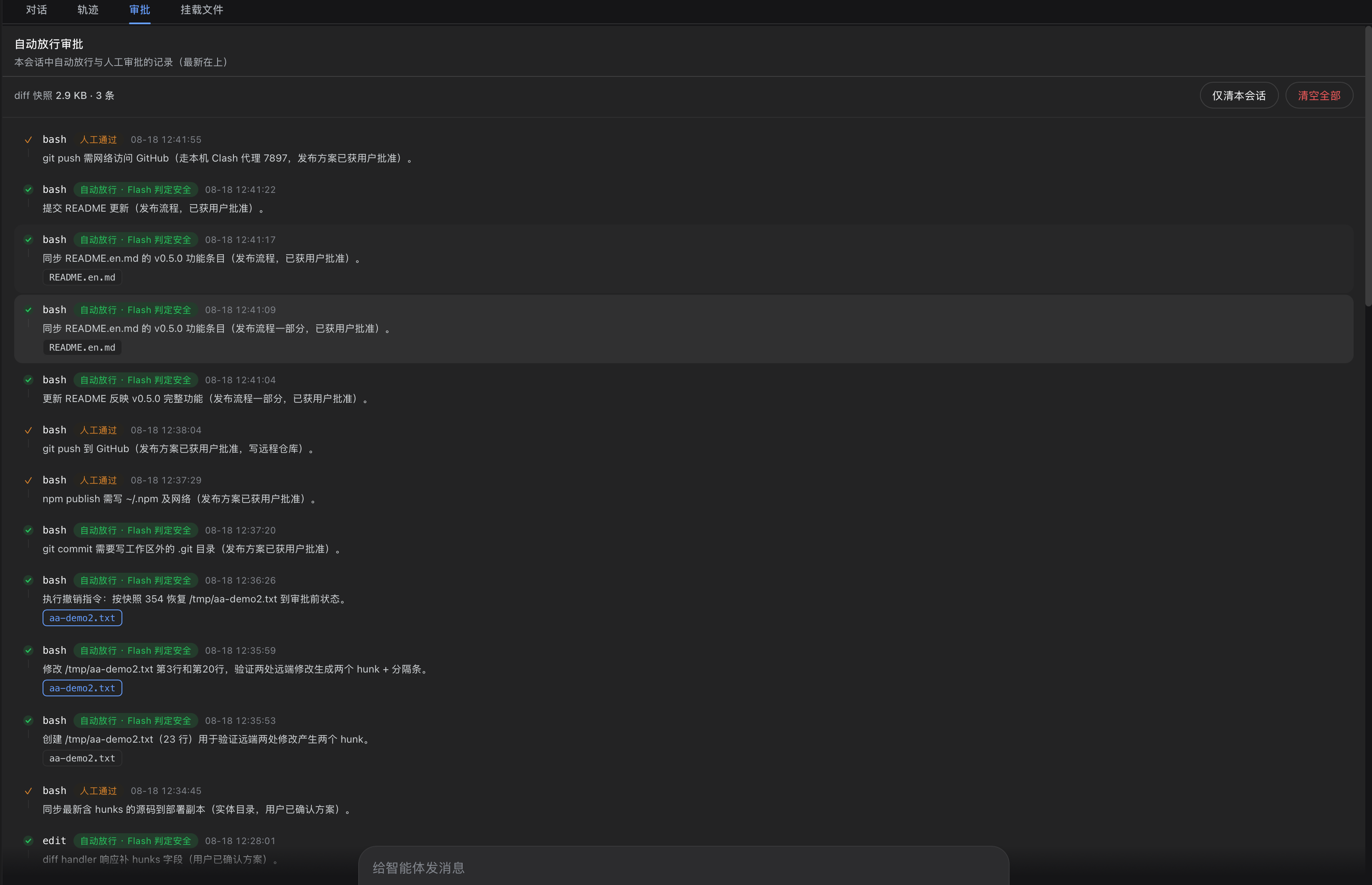
The "Approval" tab (right of Trace) lists the current session's auto-allowed and manually-approved actions in reverse-chronological order: each record shows the tool (bash / edit), a verdict tag ("Auto-allowed · Flash safe", "Approved" etc.), timestamp and description. The top bar shows this session's diff snapshot usage (2.9 KB · 3 items) with two cleanup options: "This session only" (removes only the current session's snapshots, never touching other sessions' unviewed diffs) and "Clear all" (double-confirmed, clears every session).
Silently rejected records (red "Rejected outright") carry an extra "Re-approve" button: pressing it writes an auto-approve rule carrying the operation fingerprint and delivers a retry instruction so the AI re-runs the operation. A pending N badge next to the title shows how many rejections are still unreconsidered. Once reconsidered, the record flips to "Reconsideration approved · … (was rejected outright)" in the done colour and drops out of the pending count. The deterministic hard-deny tier (credential exfiltration / system-path destruction) and hard-risk categories (deletion / credential / remote / system / bulk) do not show the button — no allowlist rule can override the former, and the latter must be confirmed by a human every time, so offering a button would be a false promise.
② File Diff
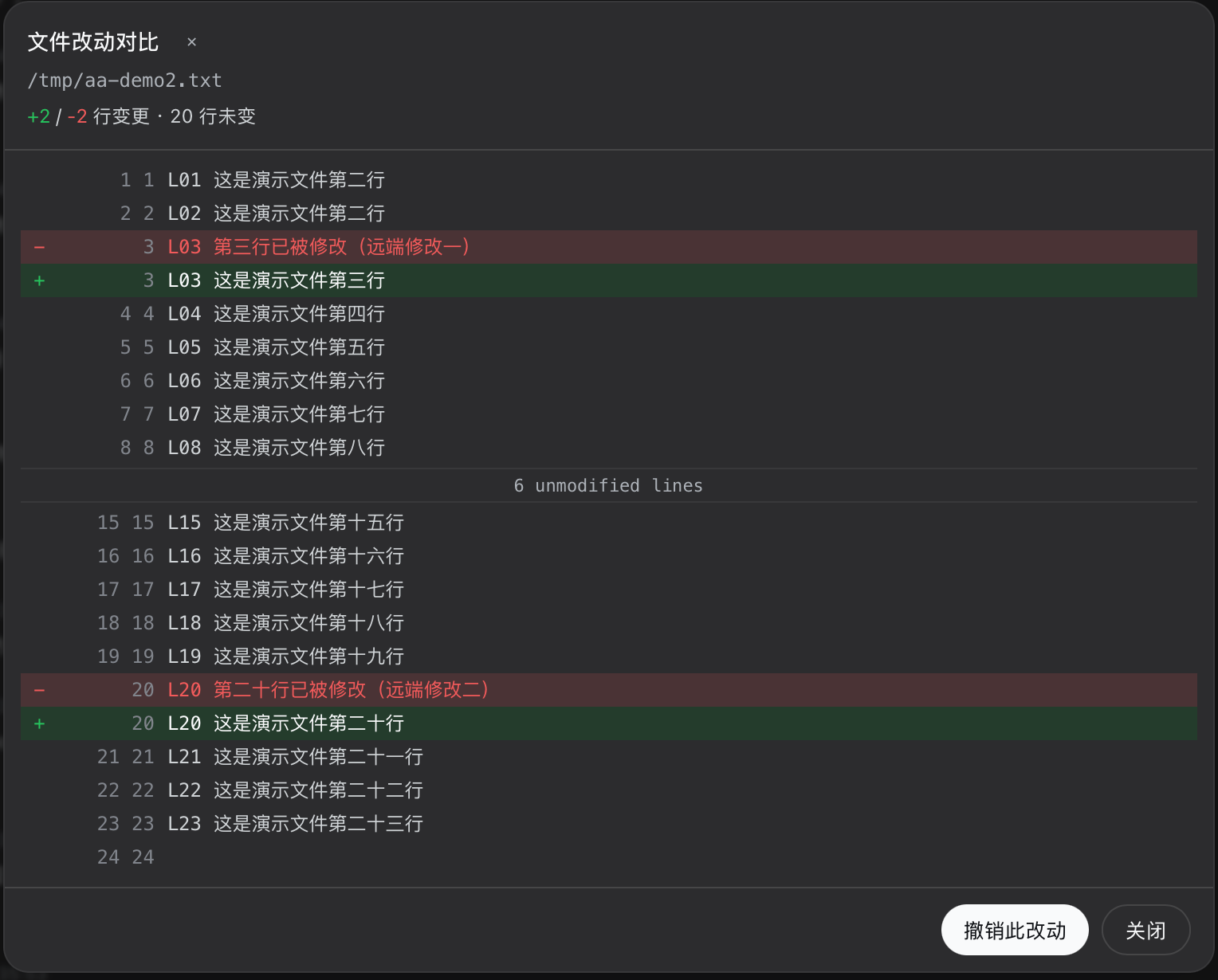
Click a file in an approval record to open the diff dialog: a unified diff with green additions (+), red deletions (-) and gray context lines; dual old/new line numbers on the left; multiple changes grouped into hunks with gray "6 unmodified lines" separators folding unchanged regions. The header shows +2 / -2 changed · 20 unchanged. The Revert button at the bottom sends an undo command to the conversation so the AI restores the file from the pre-approval snapshot.
③ Settings · Auto-approval
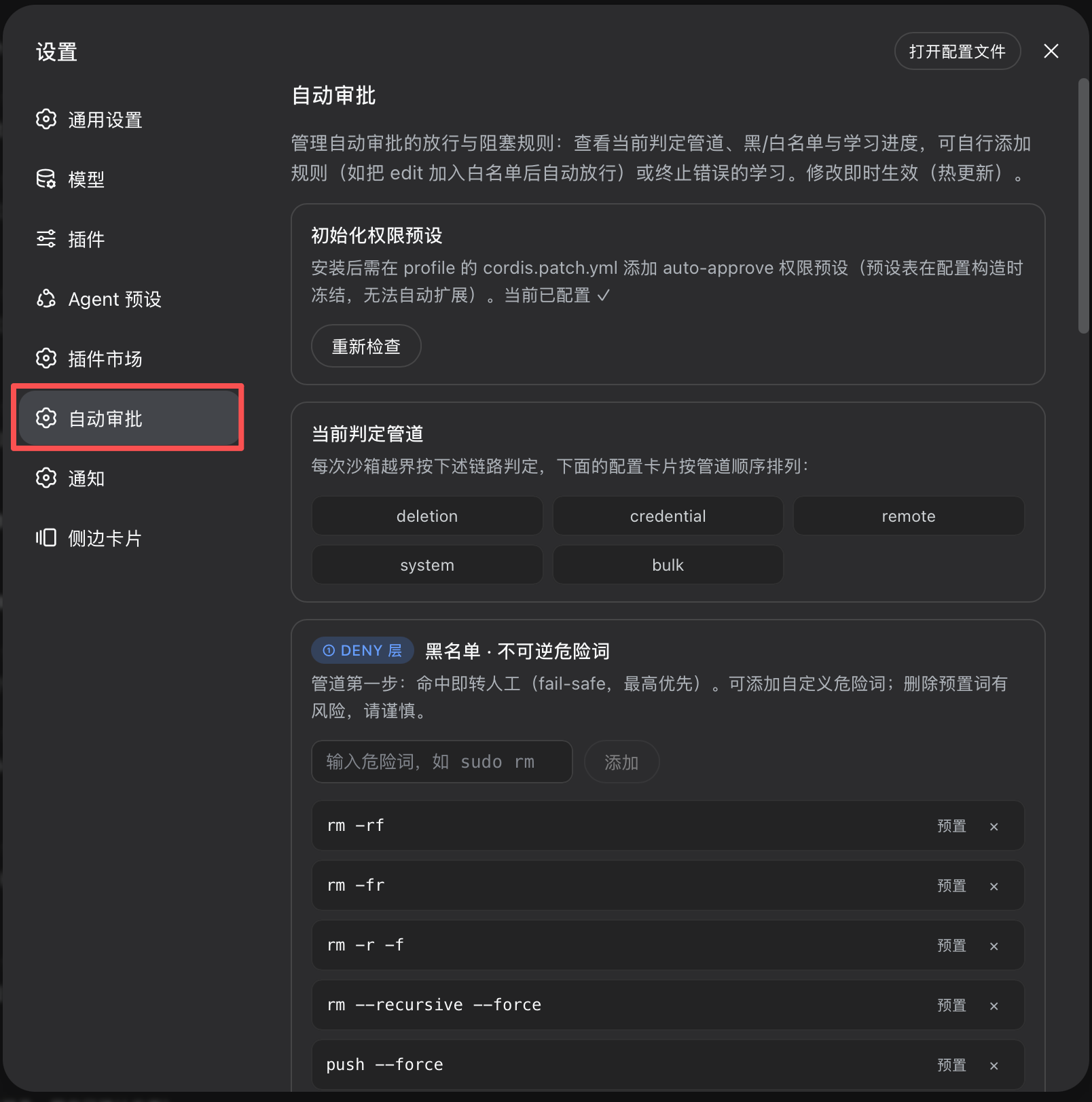
The "Auto-approval" section in Settings provides full configuration: preset initialization (one-click write of the auto-approve preset into cordis.patch.yml), pipeline overview, deny-keyword blacklist (built-in entries + custom add), and hot-reload notes (changes take effect immediately, no restart).
The judgment pipeline runs in this order:
hard-deny (credential / system-path) → hard-fact human escalation → dangerous keywords
→ allowlist → deny-rules → structured JSON judge (hard categories → human, ahead of allow / deny;
neutral → confirmation-based learning; failure limit) → verdict learning
🚀 Quick Start
dsh plugin --profile web add "github:IamNewHands/dsh-approval-gate#main"
The
dsh-approval-gatepackage on npm is upstream 0.5.0 and lacks this repository's fixes — do not install it by package name.
- Add the permission preset: append the
auto-approvepreset to~/.dsh/profiles/web/cordis.patch.yml(see guide) - Restart
dsh web - Select the preset: choose "Auto Approval (Flash)" in the session's permission dropdown
📖 Docs
📄 License
MIT
Comments
Comments live in GitHub Discussions. Sign in with GitHub to post or react.