
Install
Inside DeepSeek Harness, with dsh-market
dsh plugin --profile web add dshmarket
Or from the command line
dsh plugin --profile web add github:Han-1413141/dsh-ui-hub
Installing runs third-party code with your own permissions — it can read your files, use your credentials and reach the network. Review the source first, and pin a commit (github:owner/repo#sha) when you can.
Screenshots
README
 English | 中文
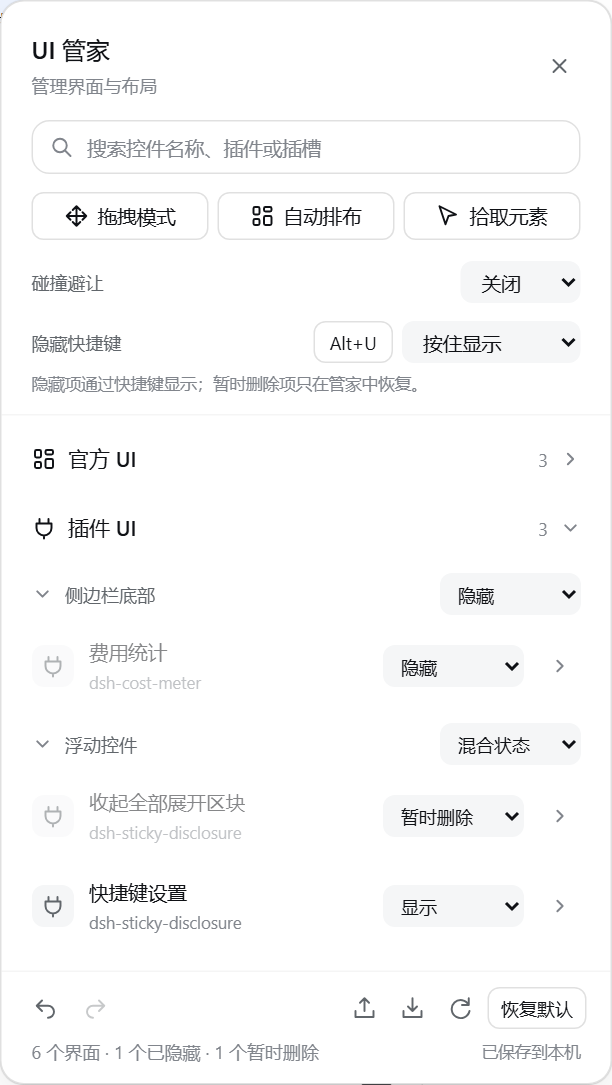
UI Hub for DSH Desktop and Web discovers controls in UI slots and marked floating widgets. Search for a control, show or hide it, adjust its position, arrange floating widgets, and export your layout for later restoration.
| Light | Dark |
|---|---|
|
|
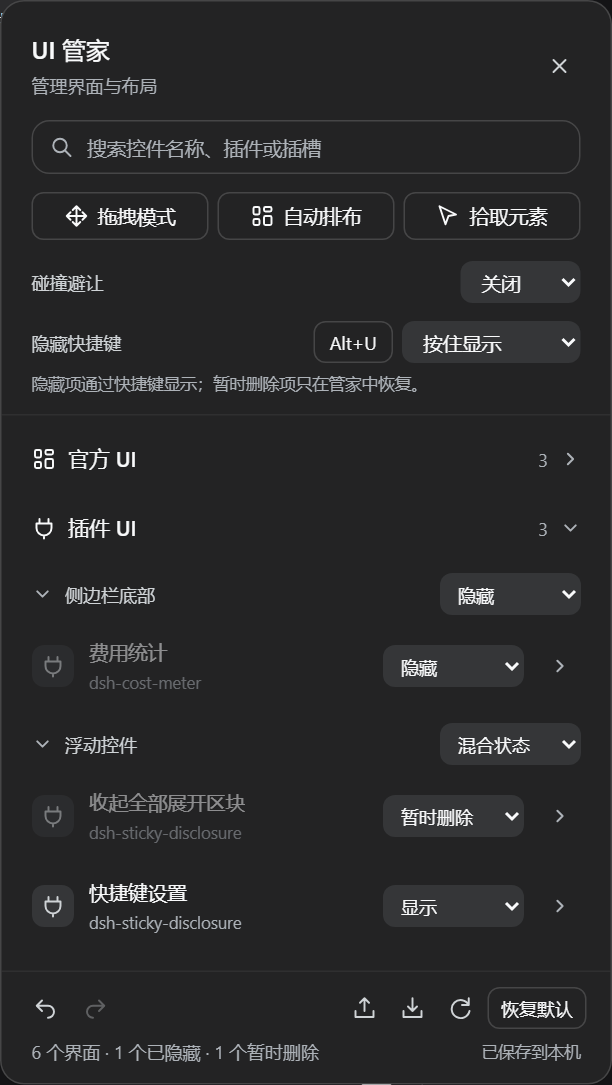
Actual plugin rendering with the official DSH 0.2.0-rc.2 theme and local fixture controls.
Interface and layout improvements
- Uses DSH surfaces, typography, corner radii and compact controls. Search comes first; drag, arrange and pick stay together, with backup and recovery actions in the footer.
- Settings follow identified controls and child actions across insertion, reorder and remount. Existing layouts migrate automatically.
- Undo and redo retain the last 30 changes in the current page. Group visibility changes and resetting the layout can each be undone in one step.
- Search keeps focus, details work on the first expansion, and group menus show mixed visibility.
- A visible status reports failed local saves; export remains available. Floating candidates are indexed incrementally and discovery is reused while dragging.
Shown, hidden and temporarily removed controls
Each control, inner element and group has a visibility menu:
| State | Behavior |
|---|---|
| Shown | Display normally; unaffected by the reveal shortcut |
| Hidden | Absent until revealed with the shortcut |
| Removed | Always absent, including while the shortcut is active. Select Shown to restore it without losing its position or size |
The default is hold Alt+U (⌥U on macOS) to show, release to hide. Click the key button beside Reveal shortcut to record another key or combination. Select Press to toggle to alternate visibility with each press. Esc cancels recording. The panel shortcut, Ctrl+Shift+U / ⌘⇧U, remains reserved.
The shortcut is inactive in text inputs, editable areas, select controls and during IME composition. Releasing a required key or leaving the window ends a hold. Holding to preview does not automatically move overlapping widgets. Temporary reveal state is never saved: reloading, importing a layout or re-enabling the plugin hides those controls again.
Removed controls retain their configuration and the underlying plugin remains installed. A removed parent also keeps its children absent. Existing on: false settings migrate to Removed; explicitly choose Hidden for shortcut-controlled items. Visibility and shortcut settings support undo/redo and layout export/import.
Restore defaults
Click the labeled Reset defaults button at the bottom right of the panel to reset UI Hub:
- Restore normal visibility for roots and inner elements; clear hidden/removed states, positioning, sizes, locks and custom names.
- Restore the
Alt+Uhold-to-show shortcut and Smart collision avoidance. - Restore the launcher/panel positions and collapsed categories/groups, clear search, and exit drag/pick modes.
Defaults are saved immediately and survive reload. One click on Undo restores the previous settings, including group preferences; redo is also supported. To reset only one control and its children, expand its details and select Reset item.
Find controls and back up layouts
- Search by control name, plugin or slot. Matches expand automatically; clearing the search restores the saved collapse state.
- Export layout saves a JSON file. Import layout restores visibility, positions, sizes and group state. Invalid files leave the current layout intact.
- Transfer this local file between Web and Desktop when controls have matching identities and structure.
- Idle counters no longer rewrite the DOM continuously; re-enabling the plugin resumes normal updates.
✨ Features
| Feature | Description |
|---|---|
| 🔍 Full discovery | Enumerates every UI inside the platform's [data-slot] anchors plus floating widgets outside slots (dsh-sticky-disclosure pills, dsh-mingli-chart views, ...); unknown widgets can be captured with Pick element |
| 🗂️ Official vs plugin | The panel is split into Official UI and Plugin UI categories |
| 📁 Collapsible groups | Two-level collapse (category → slot group), all collapsed by default so only category/group names + counts show; expand step by step, state is remembered |
| 🎚️ Per-widget control | Choose Shown, Hidden or Removed for each UI root and its inner buttons / icons / charts / fields independently |
| 📐 Three position modes | Default (restore), Nudge (translate without leaving the layout), Float (fixed positioning with exact x/y) |
| 🖱️ Direct drag mode | Enable Drag mode and drag any UI directly to move it (slot-mounted UIs use nudge and keep their layout; loose widgets float) or drag its bottom-right grip to resize; Esc exits |
| 🛡️ Collision avoidance | Off (report only) / Smart (clear overlaps) / Strict (any overlap); locked items stay put and push others away |
| ✨ One-click arrange | Packs every floating UI into right-aligned vertical columns anchored to the conversation scrollport |
| 💾 Persistent | Toggles, positions, sizes, and collapse state live in localStorage and are restored across refreshes |
| 🧹 Non-invasive & reversible | No plugin code is modified; only additive data-uihub-* attributes plus the hub's own !important stylesheet. Disposal removes every trace |
Why
DSH is a plugin ecosystem and every plugin adds a bit of chrome: header buttons, composer badges, sidebar cards, bottom-right pills, floating charts. Plugins do not know each other's geometry, so overlap is the default. UI Hub keeps one roster and one floor plan for all of them:
- Discover every UI and group it by slot;
- Toggle, move, and lock each item;
- Separate floating widgets that overlap;
- Arrange scattered widgets into one aligned column in a click.
📸 UI gallery
Full captioned walkthrough: docs/GALLERY.md.
Usage
- On Desktop, choose Enable now after installing, or reopen the app if installed from the terminal. On Web, restart
dsh web. A UI Hub button appears in the top-right corner (hotkeyCtrl+Shift+U, macOS⌘⇧U); click it to open the panel. - The panel opens with the two collapsed categories Official UI / Plugin UI (all collapsed by default). Click a category to reveal its slot groups, then click a group to list its UIs.
- Each row: choose Shown, Hidden or Removed on the right; the chevron opens position and inner-element settings.
- Detail pane:
- Position mode: default / nudge / float;
- X/Y in float mode, DX/DY in nudge mode;
- Drag to move: a grab handle appears at the widget corner;
- Lock: collision avoidance never moves this item;
- Inner elements: toggle buttons, icons, charts, and fields separately.
- Actions and footer tools:
- Drag mode: drag any UI directly to move it, drag its corner grip to resize, Esc to exit;
- Auto arrange: packs all float-mode UIs into right-aligned columns;
- Pick element: click any element on the page (even unmarked ones) to manage it;
- Reset defaults: the labeled footer button restores visibility, layout, shortcuts, collision settings and group preferences in one undoable action.
API
window.dshUiHub.undo()                 // undo one layout edit; returns boolean
window.dshUiHub.redo()                 // redo one layout edit; returns boolean
window.dshUiHub.exportLayout()         // export a portable layout object
window.dshUiHub.importLayout(data)      // restore an object or JSON string; returns boolean
window.dshUiHub.items()                 // [{ key, label, visibility, revealed, on, mode, x, y, children: [...] }]
window.dshUiHub.setConfig(key, { visibility: "hidden" })  // reveal with the shortcut
window.dshUiHub.setConfig(key, { visibility: "removed" }) // absent regardless of shortcut
window.dshUiHub.setConfig(key, { visibility: "shown" })   // restore without losing layout
window.dshUiHub.setRevealShortcut({ code: "KeyU", alt: true, ctrl: false, meta: false, shift: false, mode: "hold" }) // hold | toggle
window.dshUiHub.getRevealShortcut()                     // copy of shortcut settings
window.dshUiHub.setConfig(key, { mode: "float", x: 300, y: 200 })
window.dshUiHub.setConfig(key, { sw: 360, sh: 240 })     // set size
window.dshUiHub.setConfig("child:...", { visibility: "hidden" }) // same three states for children
window.dshUiHub.setConfig(key, { on: false })            // legacy API: equivalent to removed
window.dshUiHub.arrange()               // one-click auto arrange
window.dshUiHub.collisionMode("strict") // off | smart | strict
window.dshUiHub.dragMode(true)          // enable/disable direct drag mode
window.dshUiHub.open() / close()
window.dshUiHub.reset()                // complete reset, immediate save; undo() restores it
Behavior notes
- Control identity: explicit markers, IDs, known plugin classes and accessible names map to persistent keys. Existing
slot:…@Nkeys are retained; their numbers are assigned identifiers rather than current DOM indices. Child actions use the same association. - No style fights: positions are enforced through
data-uihub-float+ CSS variables +!importantrules, so other plugins' inlineleft/topwrites cannot override them. Removing the attribute restores the plugin's own styles. - Dispose restores everything: all
data-uihub-*attributes, CSS variables, stylesheet, and hub chrome are removed. - Direct drag: drag mode intercepts pointers only while enabled. Dragging a slot-mounted UI uses nudge (it stays inside the layout, so anchored popups follow it), while loose floating widgets move with float coordinates; the bottom-right grip resizes (float: resizes the floating box; default/nudge: pins an in-place size override). Ending a drag never re-fires the button's click; a plain click still reaches the plugin normally. Reset item restores the original; Esc exits.
- Floated popup follower: when an explicitly floated UI opens a popup that still appears at the original spot, the hub shifts it with the independent CSS
translateproperty (only popups anchored at the original spot; centered full-page dialogs are untouched). - Locked items win: arrange and avoidance skip locked items and route others around them.
- Panel and handles use z-index 80/86: above plugin floats, below app dialogs (100+).
Install
Desktop (DSH 0.2.0-rc.2): open Plugins → Add plugin in the sidebar, paste the following source, install it, then choose Enable now. Follow DSH's restart prompt if shown.
github:Han-1413141/dsh-ui-hub
Desktop includes Node and pnpm. For terminal installation, first install the bundled command through Manage dsh command in the application menu. Open Desktop once to initialize its profile, fully quit it, and run:
dsh plugin --profile desktop add github:Han-1413141/dsh-ui-hub
Then reopen Desktop. Web uses a separate profile:
dsh plugin --profile web add github:Han-1413141/dsh-ui-hub
dsh web
The standalone CLI follows DSH's Node requirement: ^22.19.0 || >=24.0.0 for the version checked here. Desktop's bundled command needs no separate Node or pnpm installation.
PowerShell installer (automatically selects desktop for the bundled command, otherwise web):
irm https://raw.githubusercontent.com/Han-1413141/dsh-ui-hub/main/install.ps1 | iex
To select a profile explicitly, download install.ps1 and run ./install.ps1 -Profile desktop or -Profile web. Without Git, use https://github.com/Han-1413141/dsh-ui-hub/archive/refs/heads/main.tar.gz as the source.
# Replace desktop with web for a Web installation.
dsh plugin --profile desktop update dsh-ui-hub
dsh plugin --profile desktop remove dsh-ui-hub
Layout/shortcut preferences belong to the browser origin: Desktop and Web keep separate preferences. Compatibility details and verification limits are in COMPATIBILITY.md.
Tests
python -X utf8 test/verify.py
python -X utf8 test/verify_layout.py   # identity, undo and persistence regressions
python -X utf8 test/verify_visibility.py # visibility states and keyboard lifecycle
python -X utf8 test/verify_reset.py    # complete reset, history and persistence
python -X utf8 test/verify_compat.py   # Playwright chromium over test/mock.html
Covers discovery, official/plugin classification, default-collapsed categories with stepwise expansion, root/child toggles, float positioning, arrange alignment, strict collision avoidance, panel, hotkey, pick mode, direct drag move + drag resize, persistence across reload, and teardown.
Known limitations
Float coordinate system: float mode uses
position:fixed. If a UI's ancestor carries a CSStransform, fixed positions resolve against that ancestor; use Nudge for such items.Platform DOM changes: discovery relies on the public
[data-slot]anchors and plugindata-*markers. If the platform renames them, items reappear under new keys (old configs stay local).Indistinguishable controls: identical unmarked elements still use occurrence order. Plugin authors can provide a unique
data-uihub-idon roots or child actions. Completely changed markers or names may create a new identity.No forced reflow inside slots: default/nudge modes respect the original slot layout; for a full-page rearrangement, switch items to Float and use Auto arrange.
Picked elements retain only their current-page DOM identity and need to be picked again after reload. Slot controls and marked plugin widgets can restore automatically.
Comments
Comments live in GitHub Discussions. Sign in with GitHub to post or react.