
Install
Inside DeepSeek Harness, with dsh-market
dsh plugin --profile web add dshmarket
Or from the command line
dsh plugin --profile web add github:H1Kariiiiiii/dsh-desktop-launcher2
Installing runs third-party code with your own permissions — it can read your files, use your credentials and reach the network. Review the source first, and pin a commit (github:owner/repo#sha) when you can.
README
Desktop launcher + one-click shutdown plugin for DeepSeek Harness: create a desktop icon from the Web settings page (double-click to start
dsh web), with a WPF-style startup popup; plus a floating power button at the bottom-right that exits dsh gracefully after confirmation.
中文 · English
⚡ Install (copy this single line)
dsh plugin --profile web add github:H1Kariiiiiii/dsh-desktop-launcher2
That's all: dsh pulls the source from GitHub, installs it, and auto-adds it to your profile's bundles layer — no manual file edits. Then restart with
dsh web.
(If dsh isn't installed yet: npm i -g @deepseek-ai/dsh. If the github: form fails on your pnpm version, use dsh plugin --profile web add git+https://github.com/H1Kariiiiiii/dsh-desktop-launcher2.git.)
Features
Desktop icon (core)
- A "Create desktop icon" button on the settings page creates
DeepSeek-Harness.lnkon your Desktop (Windows). - Double-click behavior:
- Probes
http://127.0.0.1:3080for a running dsh instance. - If not running, shows a DeepSeek-Harness-styled startup popup (dark rounded WPF card + spinner + status text) while starting
dsh webin the background. - Polls for up to 60 seconds, then opens the browser once ready.
- Probes
- Icon/scripts live in
~/.dsh/desktop-launcher/(launcher2.ps1+.lnk+ icon assets).
One-click shutdown
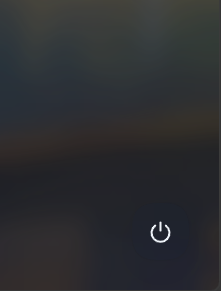
- A floating power button at the bottom-right of the page (circular icon).
- Click → confirmation dialog (configurable to exit directly without confirm).
- On confirm →
POST /api/dsh-desktop-launcher2/shutdown→ctx.appExitgraceful exit (plugin tree is disposed first; falls back toprocess.exit(0)ifappExitis absent). - The browser receives the acknowledgement before the process goes away, avoiding a dead-server error page.
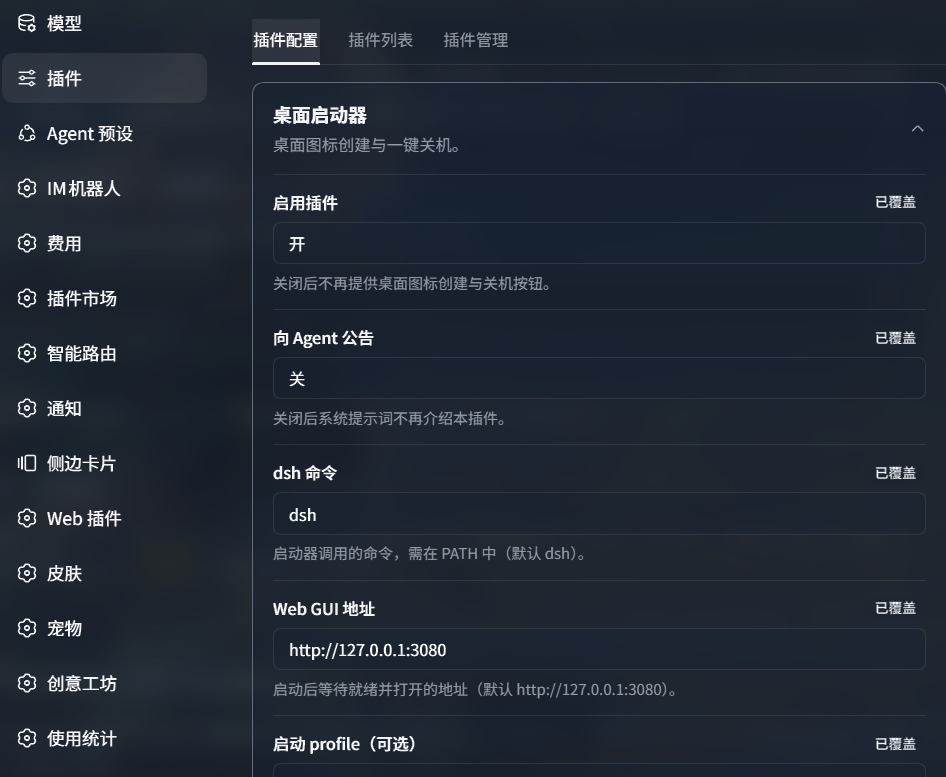
Configuration (Settings → Plugins → Plugin configuration → Desktop launcher)
| Field | Default | Description |
|---|---|---|
| Enable plugin | true |
When off, desktop icon creation and the shutdown button stop. |
| Announce to agent | false |
When off, the system prompt no longer introduces this plugin. |
| dsh command | dsh |
Command the launcher calls; must be on PATH. |
| Web GUI URL | http://127.0.0.1:3080 |
Address the launcher waits for and opens. |
| Startup profile (optional) | empty | Leave blank to start dsh web without a --profile argument. |
| Icon file (optional) | empty | .ico/.png path for the desktop icon; blank uses the bundled dsh icon. |
| Confirm before exit | true |
When off, the power button exits immediately without a confirm dialog. |
Config is written to the desktop-launcher section of ~/.dsh/settings.yaml (shared with the official settings panel, persists after restart).
Screenshots
Settings card (Settings → Plugins → Plugin configuration → Desktop launcher)
Floating shutdown button at the bottom-right
Installation
Requires dsh (
dsh webmust start).dsh plugin adddetects the package declaresdsh.bundleand auto-adds it to the profile's bundles layer — no manual file editing; just restartdsh webafter install.
Recommended: install from GitHub
# Install
dsh plugin --profile web add github:H1Kariiiiiii/dsh-desktop-launcher2

# Restart
dsh web
Pure JS package (no build step), works directly from GitHub. If the
github:form fails on your pnpm version, usegit+https://github.com/H1Kariiiiiii/dsh-desktop-launcher2.git.
Development / internal: install from local source
# Clone or unzip the repo anywhere, then install with an absolute file: path
dsh plugin --profile web add "file:C:/path/dsh-desktop-launcher2"

# Restart
dsh web
Note for local
file:dependencies: pnpm copies the package (not a link) across drives, so after editing source, re-rundsh plugin --profile web add "file:C:/path/dsh-desktop-launcher2"(or deletenode_modules/dsh-desktop-launcher2thenpnpm install) to sync.
Verify after install
# 1) Confirm the plugin is in the composed layer (should see the dsh-desktop-launcher2 section)
dsh --profile web --dump-config | Select-String "dsh-desktop-launcher2"

# 2) Start dsh web, open Settings → Plugins → Plugin configuration → Desktop launcher:
#    - Click "Create desktop icon" → a DeepSeek-Harness.lnk appears on the Desktop
#    - A ⏻ floating shutdown button should appear at the bottom-right
Uninstall
dsh plugin --profile web remove dsh-desktop-launcher2
# Then restart dsh web; the desktop shortcut and ~/.dsh/desktop-launcher/ scripts can be deleted manually
Compatibility
Tested against rc.1 at runtime:
| Layer | Status |
|---|---|
Host routes (ctx.webServer.register, exact) |
✅ Stable (core API) |
Settings registration (installSection / register dual path) |
✅ Feature-detected, degrades when absent |
ctx.appExit |
✅ Optional read, process.exit fallback |
ctx.systemPrompt |
✅ Optional read, only used when announcement is on |
Client bundle protocol (window.__ModuleLoader__.load lazy CJS) |
⚠️ Private protocol, may change with dsh versions |
Client slot (settings.plugin.item, keyed) |
⚠️ Contract details (key must equal settings namespace) may change |
Desktop shortcut (launcher2.ps1) |
✅ Standalone PowerShell, independent of plugin liveness |
Degradation guarantee: even if the client UI breaks entirely, launcher2.ps1 still starts dsh web on its own (it only calls the dsh command).
Verified on: host dsh 0.1.2-rc.1, Node v24.19.0, Windows PowerShell 5.1+.
FAQ
Q: Saving settings errors with settings namespace "desktop-launcher" is not registered?
A: The settings service may not have been ready when the plugin applied; the route layer lazy-registers before writing (detects and registers before POST). If it still appears, restart dsh (host registration requires a restart).
Q: The plugin configuration card doesn't show up?
A: Confirm both: ① host registration succeeded (desktop-launcher: exists in ~/.dsh/settings.yaml); ② the card key equals the namespace (this plugin registers as desktop-launcher). Refresh the page after both; host code changes require a restart.
Q: Opening the desktop icon shows 401 (authentication required)? A: This is rc.1's browser auth (per-process random token). The launcher script lets dsh open the token-carrying browser itself; if dsh is already running and the browser lost its cookie, restart dsh so it re-opens the authenticated URL.
Q: Source changes don't apply after restart?
A: file: deps are copied (not linked) across drives; re-run add or delete the node_modules copy and reinstall (see "Development / internal" above).
Background
@linxin666/dsh-desktop-launcheris a standalone npm package (repo zhu1090093659/dsh-web), latest 0.3.13 (2026-09-03), still maintained.- The aggregate
@linxin666/dsh-web-allbundled it as a dependency from 0.3.3 → 0.3.13; it was removed from the aggregate dependencies starting 0.3.14 (0.3.14/0.3.15/0.3.16 have nodesktop-launcherindependenciesorexports). - This project is ported from the 0.2.8 source (leftover in local
.pnpm_patches; that version's@deepseek-ai/dsh-client-runtimedependency does not exist in rc.1). Note: the original package 0.3.9+ switched todsh-client-store/dsh-client-ui-rendereretc. to support alpha.2+; 0.3.13 requiresdsh >= 0.1.2-alpha.4and could theoretically be installed. This project chose to re-implement standalone rather than depend on the original package. - Repo code: plain ESM JavaScript (no TS/JSX; client bundle uses the
window.__ModuleLoader__.loadlazy-CJS factory), adapted for DeepSeek Harness 0.1.2-rc.1 (Windows).
Structure
dsh-desktop-launcher2/
├── lib/
│   ├── index.js        # host entry: routes, settings registration, announcement
│   ├── client.js       # client bundle: settings card + floating shutdown button
│   └── host/state.js   # launcher script generation (PowerShell / POSIX)
├── assets/             # dsh.ico / dsh.png (bundled icons) + screenshots/
├── cordis.patch.yml    # bundle patch layer
├── package.json        # plugin manifest (file: loading)
└── LICENSE             # Apache-2.0
Credits
- Functionality and UI ported from
@linxin666/dsh-desktop-launcher@0.2.8(Apache-2.0) in the zhu1090093659/dsh-web-ui repository. The launcher popup, shortcut installer, and floating shutdown button designs come from that package, rewritten as plain ESM JavaScript against thedsh 0.1.2-rc.1API. - Icon assets (
dsh.ico/dsh.png) are from the original package.
License
Apache-2.0 (same as the original; code includes ported parts with original copyright notices retained).
Comments
Comments live in GitHub Discussions. Sign in with GitHub to post or react.