
Install
Inside DeepSeek Harness, with dsh-market
dsh plugin --profile web add dshmarket
Or from the command line
dsh plugin --profile web add dsh-prompt
Installing runs third-party code with your own permissions — it can read your files, use your credentials and reach the network. Review the source first, and pin a commit (github:owner/repo#sha) when you can.
Screenshots

README
中文 · English
Stop copy-pasting — one click, template in chat.
24 deep templates, /prompt and smart suggestions as backup.
Works out of the box, fully customizable.
Your ⭐ means the world to me.
Install INSTALL
Requires DSH (DeepSeek Harness). You give the orders, AI does the work. dsh-prompt turns favorite prompts into clickable templates.
# 1. Install the DSH CLI (skip if present)
npm install -g @deepseek-ai/dsh

# 2. Install dsh-prompt — --profile is REQUIRED: install into the profile
#    behind the DSH entry you actually use (wrong profile = silent no-op)
dsh plugin --profile web add dsh-prompt       # self-hosted web service (dsh web)
#     or
dsh plugin --profile desktop add dsh-prompt   # DSH Desktop app
# Pin a version for stability (current 0.2.0):
dsh plugin --profile web add dsh-prompt@0.2.0 --registry https://registry.npmjs.org
Restart the matching entry once. Desktop: fully quit and reopen. Web: restart and refresh. Zero config: install and go, remove and it's gone.
👇 A new button left of the input box means success.

Advanced: no global install, stale updates, let AI do it
Examples use the web profile — DSH Desktop users, replace every --profile web with --profile desktop.
# Without a global install
npx --yes @deepseek-ai/dsh plugin --profile web add dsh-prompt

# When an update is silently skipped, pin the official registry
dsh plugin --profile web add dsh-prompt@latest --registry https://registry.npmjs.org
Paste this to your AI and let it confirm the profile, check the environment and install as needed:
Please install the DeepSeek Harness plugin dsh-prompt. Read the repo README first: https://github.com/FeatherHunter/dsh-prompt
First confirm which profile my DSH entry uses (DSH Desktop app → desktop; self-hosted web service → web) and install into the right one;
then check the environment and install as needed (skip what's present), and report back briefly.
Upgrade · uninstall (desktop users: swap --profile web for --profile desktop):
dsh plugin --profile web update dsh-prompt   # upgrade
dsh plugin --profile web remove dsh-prompt   # uninstall
Supported DSH versions SUPPORTED DSH
Developed and verified against DSH CLI 0.2.0-rc.2 and DSH Desktop 2.0.9.
Lower DSH versions are not verified — they install fine, but running correctly is not guaranteed; issues are welcome.
The block below is the single version declaration, and it must match dsh.engines.dsh in package.json character for character (npm run test:issue-42 compares the two, so editing one and forgetting the other turns red). It is documentation only: installation never blocks on a version.
dsh.engines.dsh = >=0.2.0-rc.2
dsh.cli = 0.2.0-rc.2
dsh.desktop = 2.0.9
Way 1 · Prompt button PROMPT BUTTON
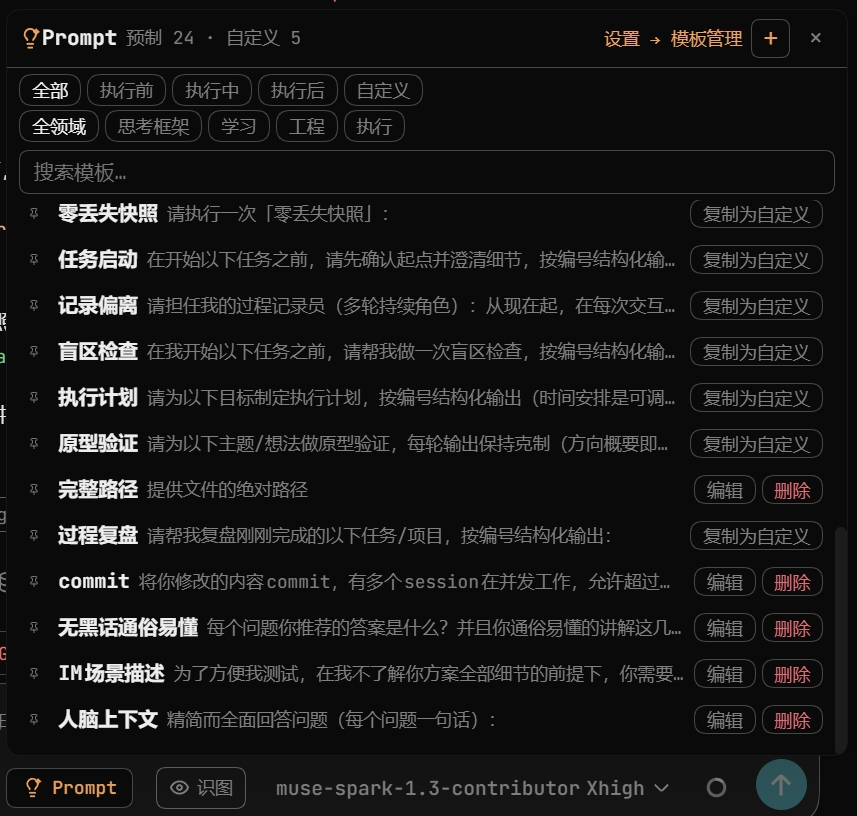
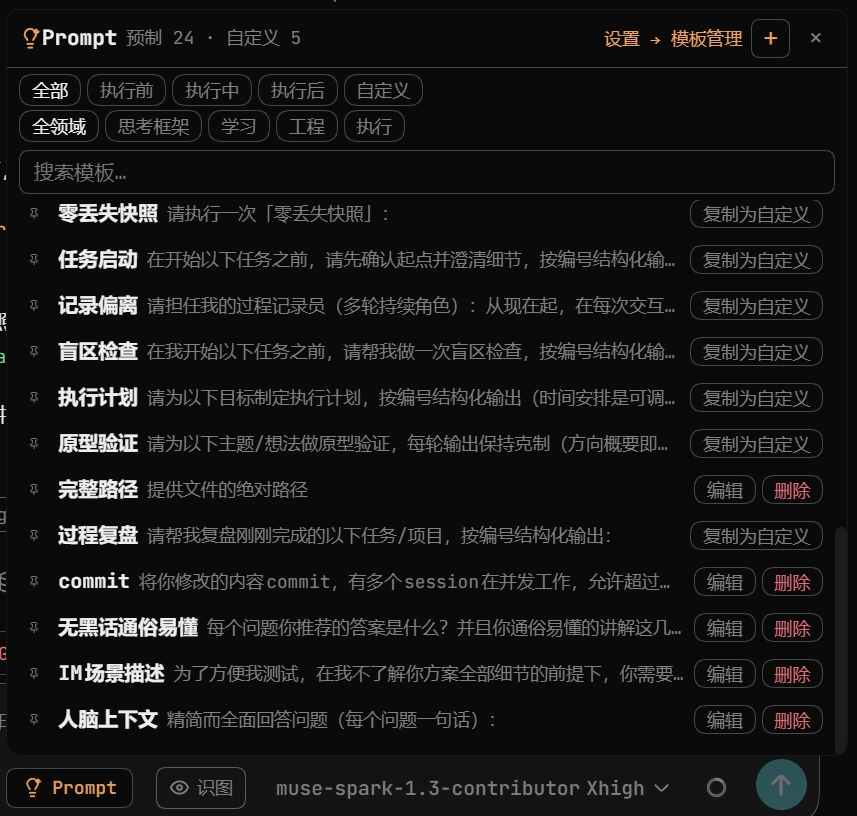
Hover the ⚡Prompt button and the panel opens (click works too). Phase tabs + domain filter + search — click a row, body lands in the box. Most-used sinks to the bottom, closest to the button.
👇 The panel looks like this.
Way 2 · /prompt trigger TRIGGER
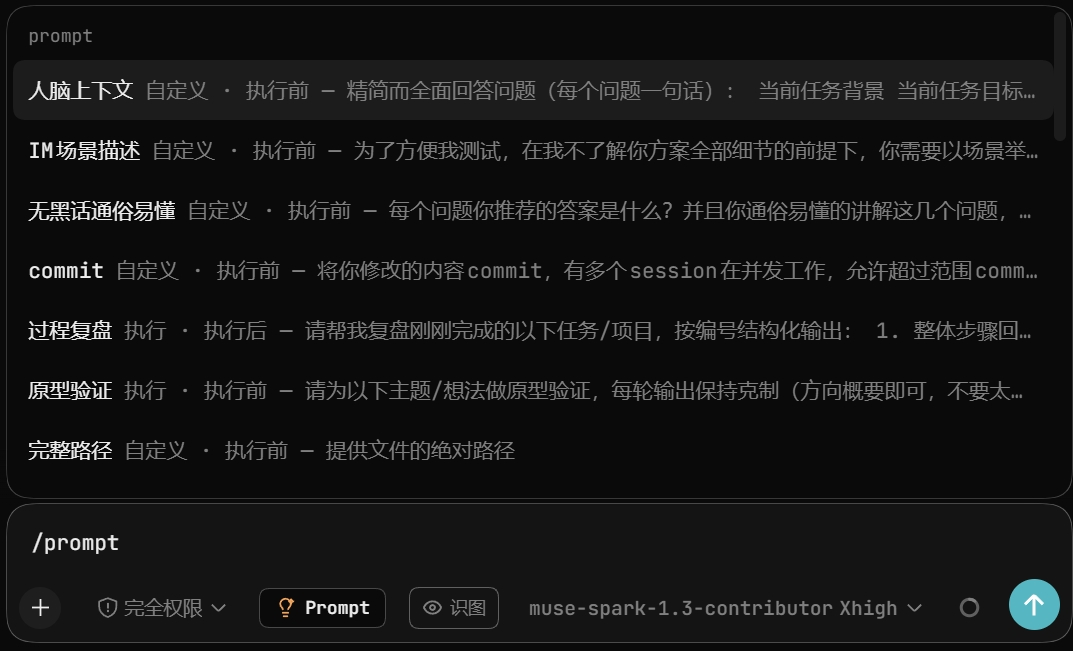
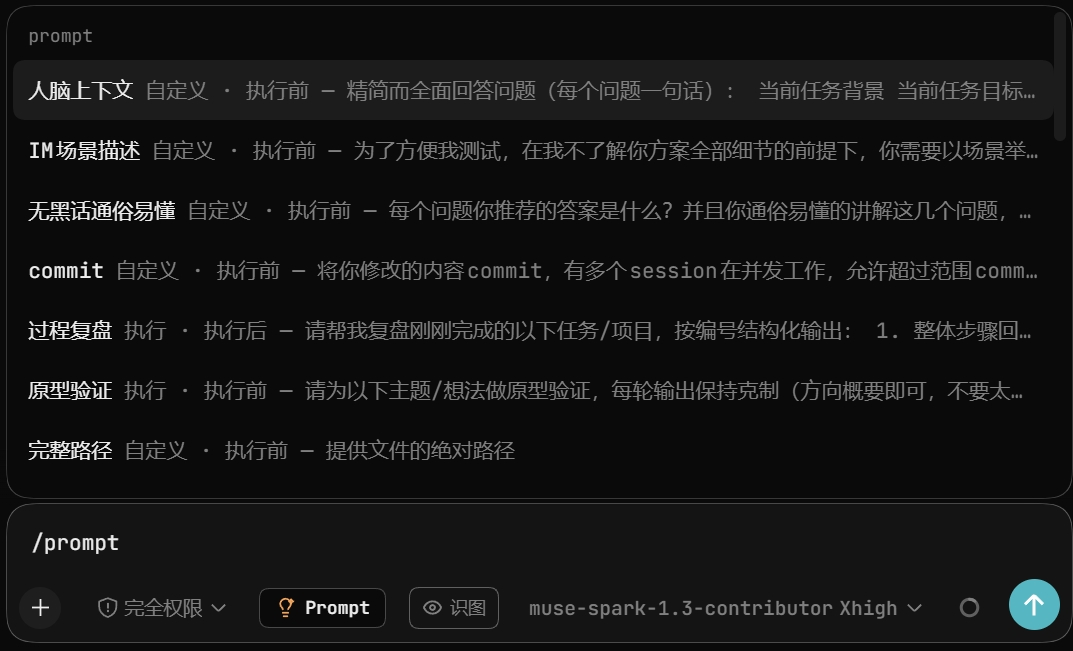
For keyboard people: type /prompt, candidates filter live.
Each row: "name + tags·phase — first 42 characters".
Half a name works too: /prompt retro.
(Screenshots are Chinese in v1; layout is identical.)
👇 Type half, candidates narrow down.
Way 3 · Smart suggestion card SMART CARD
No need to hunt templates — describe your task, cards pop up on hits. On by default, one toggle to silence; local word table only, no network.
Gallery TEMPLATES
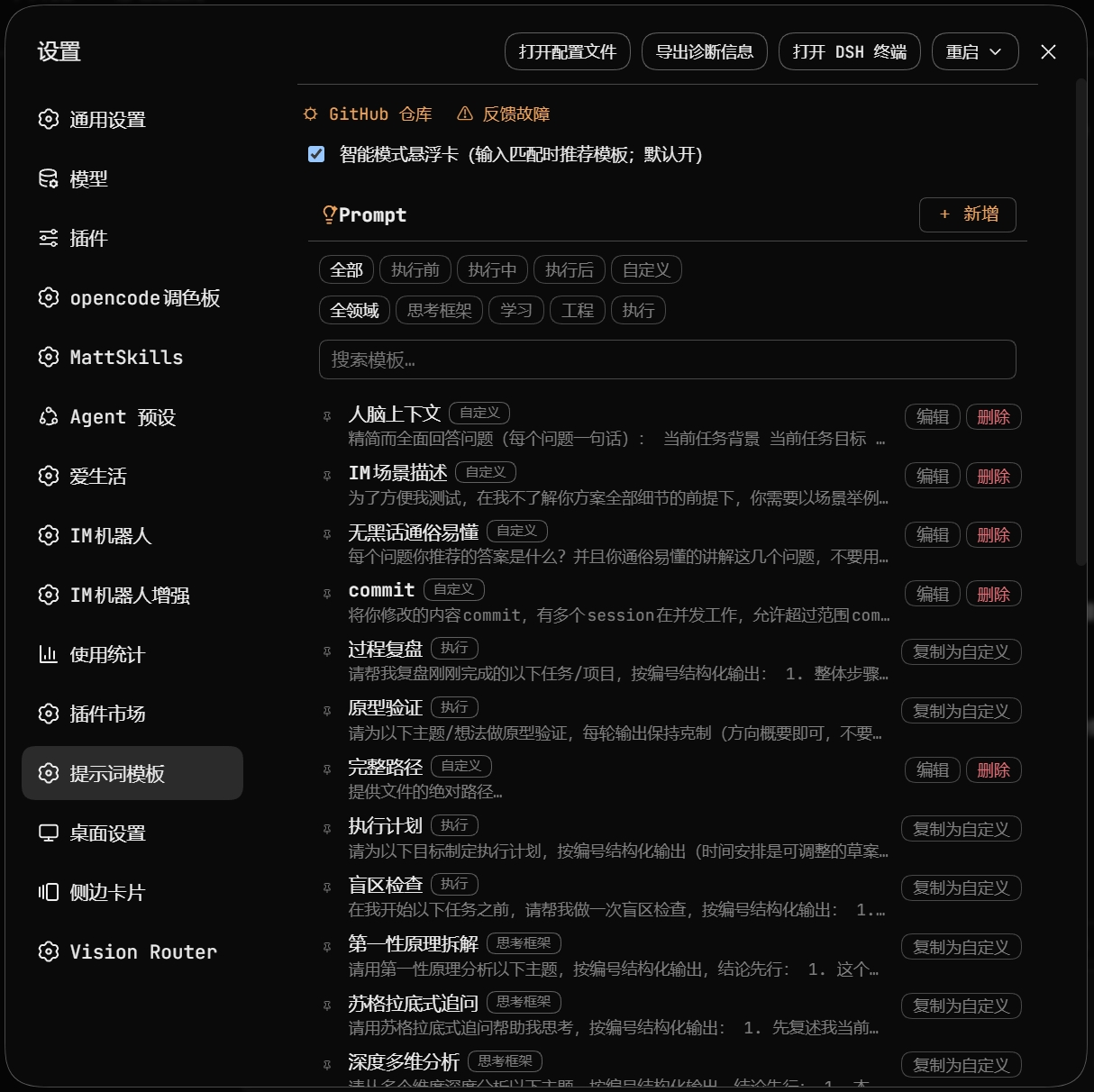
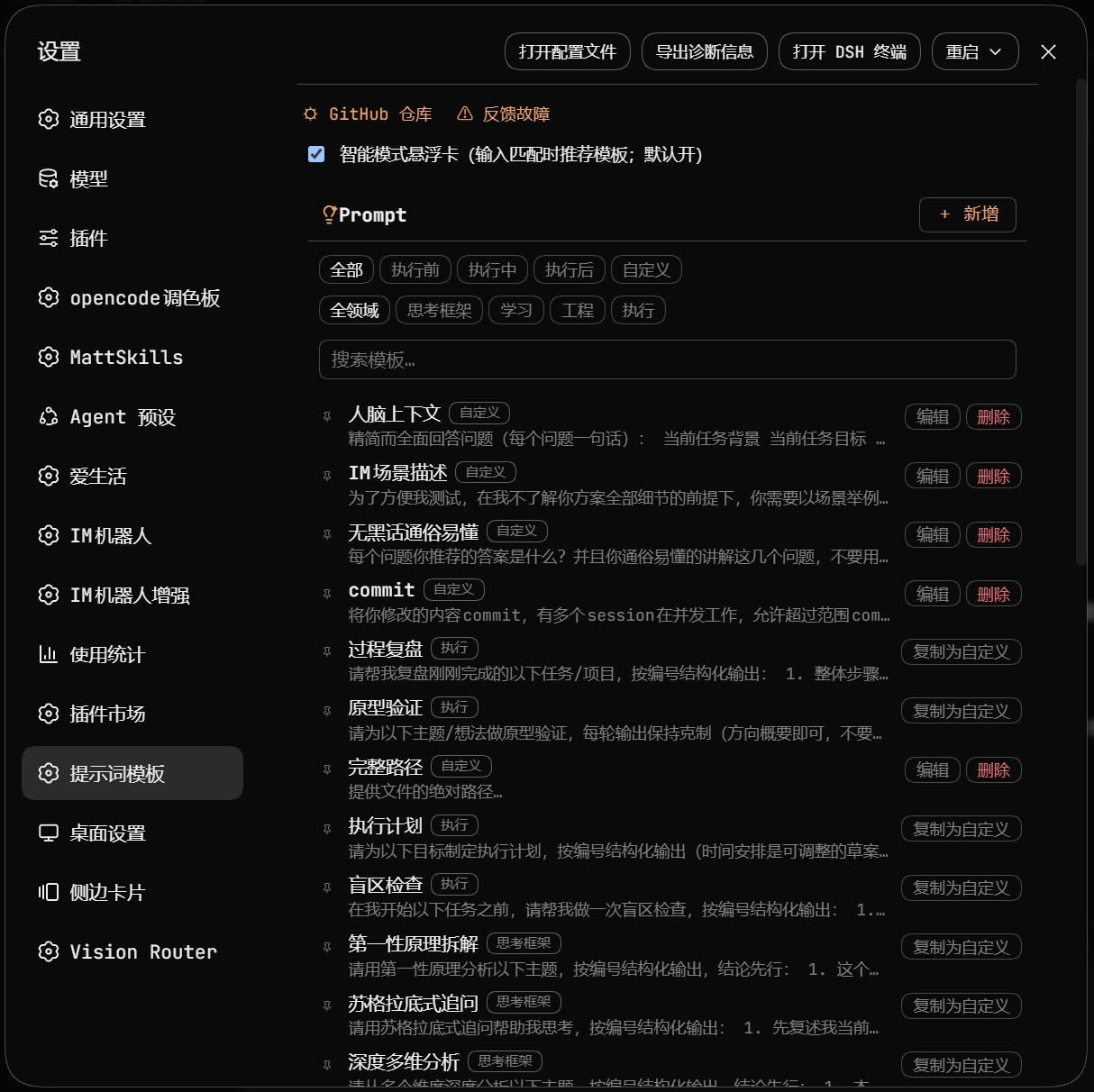
24 built-ins across four domains and three phases. Read-only: unbreakable. Clone to custom to tweak.
👇 All 24 on one settings page.
Customize & manage CUSTOM
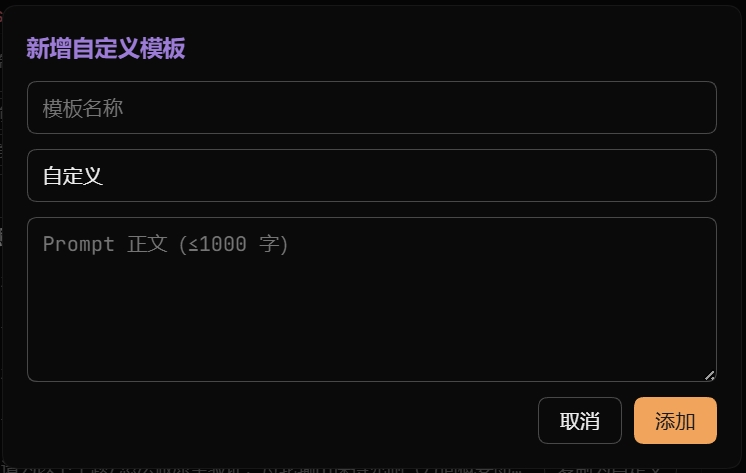
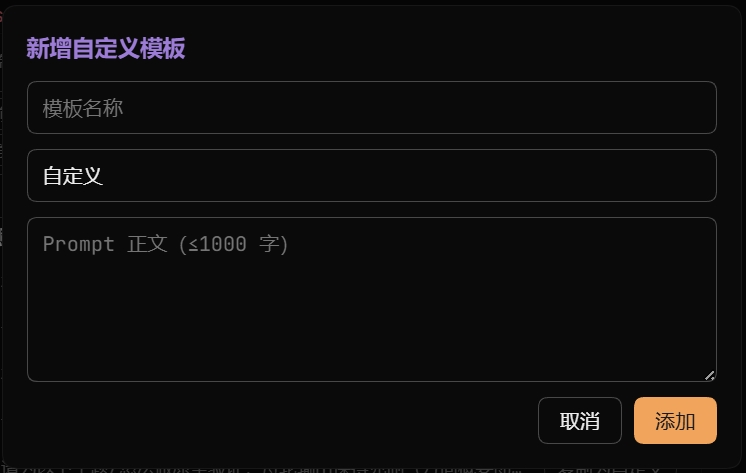
Save your wording as templates: one click, title + body, done. Pin up to 5, delete with one confirm. Separate storage — upgrades never eat yours.
👇 The new-template dialog.
Privacy PRIVACY
Templates and counts stay local. Zero network reports. Removing the plugin removes the data.
Local diagnostic log (off by default, written to your own machine only)
When you are troubleshooting, the plugin can write a structured log to <DSH home>/logs/dsh-prompt/YYYY-MM-DD.log (on Windows: C:\Users\<you>\.dsh\logs\dsh-prompt\). The switch lives in Settings → Plugins → Prompt Templates and is off by default: with it off only errors and warnings are recorded; turning it on adds info and debug. The host is authoritative, so refreshing the page does not change the value.
- Template names and prompt bodies are never recorded. A line carries the event name, its level, counts, booleans, durations and short irreversible hashes only; a template is identified by an 8-character hash. The field whitelist lives in
event-list.dsh-prompt.json, and both the client and the host drop anything outside it before it can reach the file. - Nothing is ever reported automatically. Logs stay on your disk; they leave the plugin only when you click "导出日志" (downloads a file) or "复制正文" (copies to the clipboard).
- No automatic cleanup: one file per day, no rotation, no deletion. The "清空日志" button deletes every log file (two-step confirmation).
- A failing log pipeline never breaks the plugin: an unwritable directory degrades to the system temp directory, and a second failure stops writing entirely with a single warning on stderr.
FAQ FAQ
Still the old version after updating?
Install once from the official registry (desktop users: swap --profile web for --profile desktop):
dsh plugin --profile web add dsh-prompt@latest --registry https://registry.npmjs.org
Then restart your entry. Desktop: fully quit and reopen. Web: restart and hard-refresh (Ctrl+F5).
No Prompt button after install?
Check the plugin went into your entry's profile (wrong profile = silent no-op).
Desktop app → --profile desktop; web service → --profile web.
Then restart that entry once.
Where are custom templates stored? Uploaded anywhere?
Local browser storage, never uploaded. Switching browsers or wiping data loses them — back up favorites.
More from the author MORE
If you like this one, these may help too:
dsh-opencode-palette — 34 classic opencode themes for DSH, one click to reskin
dsh-plugin-ui-debug — closed-loop UI debugging for DSH plugins with a real headless Chrome
dsh-mattpocock-skills-deck — 25 engineering skill packs, callable right from the panel
dsh-chinese-skill-patch — use Chinese skill names in DSH directly, no English renames
Questions, ideas? Open an ISSUE — usage chat, template ideas, requests and bugs all welcome
A personal project, not affiliated with DeepSeek Harness. MIT © FeatherHunter
Thanks THANKS
Thanks to everyone who starred and filed issues — you make this toolbox better, bit by bit.
dsh-prompt is still waiting for its first external contributor. File an issue, a PR, or share your templates — your name lands here. Ping me if you already did.
Comments
Comments live in GitHub Discussions. Sign in with GitHub to post or react.