
Install
Inside DeepSeek Harness, with dsh-market
dsh plugin --profile web add dshmarket
Or from the command line
dsh plugin --profile web add dsh-netassist
Installing runs third-party code with your own permissions — it can read your files, use your credentials and reach the network. Review the source first, and pin a commit (github:owner/repo#sha) when you can.
Screenshots
README
dsh-netassist
Part of the dsh-toolkit family: dsh-mcp-bridge · dsh-win-toolkit · dsh-netassist · dsh-driftwatch
Network & proxy assistant for DeepSeek Harness (dsh).
Born from real-world China-network pain: GitHub flaky, proxies everywhere, hosts conflicts, TUN vs system proxy confusion. This plugin gives your agent one-shot answers to "is GitHub reachable?", "what proxy is my system using?", "is my proxy port alive?", plus a full diagnosis chain — all read-only, all injection-safe.
中文文档见 README.zh.md。
Platform
Windows. Proxy detection reads the Windows registry and the checks shell out to
powershell.exe. On other platforms the tools start but their checks cannot run, and they say
so (spawn powershell.exe ENOENT) instead of reporting a clean result.
Timing
Every check spawns a powershell.exe, and a cold one costs roughly 20 seconds to start. So on
a freshly booted Windows machine:
- the individual tools answer within about half a minute
net_doctorcan exceed a minute, because it runs four checks in parallel plus a port probe
Most MCP clients default to a 60-second request timeout, so net_doctor may time out on a cold
machine even though it is working. If that happens, call the individual checks (net_github_status,
net_proxy_status, net_hosts_check) instead, or raise your client's request timeout. Once
PowerShell has been used a few times the cost drops sharply.
Tools
| Tool | What it answers |
|---|---|
net_github_status |
Is GitHub reachable right now? (DNS + TCP 443) |
net_proxy_status |
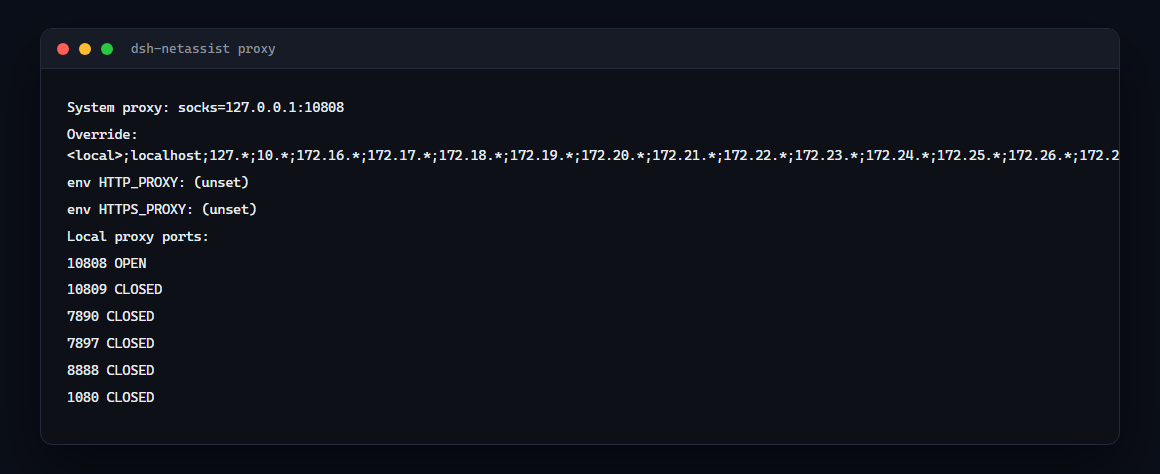
System proxy config: registry ProxyEnable/ProxyServer/ProxyOverride + proxy env vars |
net_proxy_probe |
Which common local proxy ports are alive? (default 10808/10809/7890/7897/8888/1080) |
net_diag |
Full chain for any host: DNS → TCP → HTTPS status code |
net_hosts_check |
GitHub entries pinned in the hosts file (proxy conflict scan) |
Install
dsh plugin --profile web add dsh-netassist
dsh web   # restart
Then ask your agent:
- "check if github.com is reachable" →
net_github_status - "what proxy is my system using?" →
net_proxy_status - "is my proxy running?" →
net_proxy_probe - "why can't I reach api.example.com:8443?" →
net_diaghost=api.example.com port=8443 - "any github entries in my hosts?" →
net_hosts_check
How it works
Every tool runs a short read-only PowerShell snippet through powershell.exe -NoProfile -NonInteractive. All user input crosses the script boundary as Base64 — injection-proof by construction. No writes, no admin rights, no dependencies.
- Config:
psTimeoutMs(default 25000) — per-call PowerShell timeout, settable in your profile'scordis.patch.ymlunder thenetassistentry. - Windows-only: tools fail loudly on non-Windows platforms.
Real-world example (this machine)
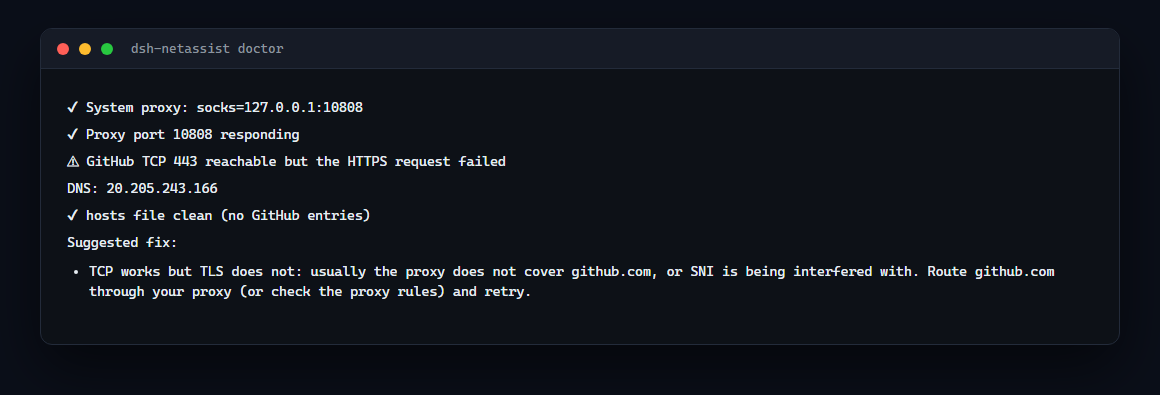
net_github_status → DNS: 20.205.243.166, TCP 443: OPEN
net_proxy_status  → ProxyEnable: 1, ProxyServer: 127.0.0.1:10808
net_proxy_probe   → 10808 OPEN, 10809/7890/7897/8888/1080 CLOSED
net_hosts_check   → no github entries in hosts (clean)
Troubleshooting
- "PowerShell failed": usually execution-policy or anti-virus interference. The plugin uses
-NoProfile -NonInteractive; checkGet-ExecutionPolicy— it does not require RemoteSigned. - Port probes use a 5s connect timeout each, so a full probe takes ~5-10s worst case.
Links
- npm: https://www.npmjs.com/package/dsh-netassist
- GitHub: https://github.com/Edge-Echo/dsh-netassist
- License: MIT
Comments
Comments live in GitHub Discussions. Sign in with GitHub to post or react.